

This guide collects 320 .NET interview questions with answers, from the basics every junior developer should know to the runtime internals and architecture topics asked in senior and lead interviews. Every answer is written to be said out loud in an interview: a clear explanation first, then an example in C#, then the follow-ups interviewers usually ask.
How the questions are organized
Questions are numbered in order of difficulty, so you can work from the top or jump straight to your level.
Beginner — questions 1–110 (110)
Experienced — questions 111–220 (110)
Expert — questions 221–320 (100)
Topics covered
Performance and memory (59 questions) — start with What is the CLR?
ASP.NET Core (56 questions) — start with What is ASP.NET Core?
Async and concurrency (43 questions) — start with What is the Base Class Library (BCL)?
Architecture and design (39 questions) — start with What is a record in C#?
Entity Framework Core (38 questions) — start with What is the difference between LINQ query syntax and method syntax?
Security (30 questions) — start with What is the CLR?
Testing (15 questions) — start with What does the dotnet CLI do?
Deployment and containers (14 questions) — start with What is an assembly in .NET?
Dependency injection (12 questions) — start with What is a primary constructor in C# 12?
LINQ (7 questions) — start with What is the Base Class Library (BCL)?
Real-time and gRPC (4 questions) — start with What is SignalR?
How to use this guide
Answer each question aloud before reading the answer, then compare.
Run the code examples in a scratch project — interviewers often ask you to change them.
Follow the related-question links at the end of each answer to cover a topic end to end.
For senior roles, prepare a real example from your own work for every architecture and performance question.
Go deeper on the blog
01What is .NET?
Beginner.NET is a free, open-source, cross-platform developer platform created by Microsoft for building applications across web, desktop, mobile, cloud, and IoT environments. It provides developers with a runtime environment, a comprehensive standard library, and language options like C#, F#, and Visual Basic to write modern applications that run on Windows, Linux, and macOS.
How it works
.NET operates on a managed execution model powered by the Common Language Runtime (CLR). When you write C# code, the compiler translates it into an intermediate language called Common Intermediate Language (CIL). When your application runs, the CLR's Just-In-Time (JIT) compiler converts CIL into native machine code specific to the operating system. This abstraction layer provides several benefits: automatic memory management through garbage collection, platform independence, and security features built into the runtime.
.NET includes the Base Class Library (BCL), a massive collection of pre-built types and APIs for common tasks like file I/O, networking, collections, and data processing. Modern .NET (versions 5+) is unified and cross-platform by default, making it easy to share code between a web server running on Linux and a desktop application on Windows. The SDK provides command-line tools, NuGet package management, and integration with Visual Studio for a complete development experience.
Example
csharpusing System; class Program { static void Main() { string message = "Hello, .NET!"; int version = 8; Console.WriteLine($"{message} Running on .NET {version}"); Console.WriteLine($"Timestamp: {DateTime.UtcNow:O}"); } }This simple console application demonstrates .NET fundamentals: it uses C# language features (string interpolation), the BCL (Console and DateTime), and outputs a message with the current timestamp—all managed by the runtime.
Key points to mention
- Free and open-source: .NET is licensed under MIT and actively developed on GitHub, with contributions from Microsoft and the community.
- Cross-platform: Write once and run on Windows, Linux, and macOS without recompilation.
- Managed runtime: The CLR handles memory management, type safety, and security automatically.
- Unified platform: Use the same .NET runtime for web (ASP.NET Core), desktop (WinForms, WPF), mobile (MAUI), and cloud applications.
- Strong ecosystem: Access to NuGet packages, extensive documentation, and a large developer community.
Common follow-up questions
- What is the difference between .NET Framework and modern .NET?
- How does garbage collection work in .NET?
- What is ASP.NET Core and how does it relate to .NET?
Related interview questions
.NETCsharp02What is the difference between .NET Framework, .NET Core and modern .NET?
BeginnerDirect Answer: .NET Framework is the original Windows-only runtime released in 2002. .NET Core, launched in 2016, was Microsoft's cross-platform rewrite. Starting with .NET 5 (2020), they unified into one platform simply called ".NET" with annual releases, LTS support every two years, and full cross-platform support for Windows, Linux, and macOS.
How it works
.NET Framework was tightly integrated with Windows and relied on the Windows Runtime environment. This made it powerful for Windows desktop and server applications but impossible to run on other operating systems.
Microsoft recognized the industry shift toward cloud, containerization, and cross-platform development. In 2016, they created .NET Core as a ground-up rewrite: open-source, modular, and designed to run on any OS. For several years, both platforms coexisted—enterprises stayed on Framework for legacy systems while new projects chose Core for flexibility.
By 2020, .NET Core had matured enough to become the single, unified ".NET" platform. .NET Framework is now in maintenance mode (no new features, security updates only). Modern .NET emphasizes fast iteration with yearly releases, LTS versions every two years for production stability, and a lean, composable toolchain.
Today, all new .NET development uses modern .NET (currently .NET 8 or 9), which includes ASP.NET Core, Entity Framework Core, and a rich ecosystem of NuGet packages.
Example
csharp// Modern .NET (8+) – works on Windows, Linux, macOS using System; var message = "Hello from .NET 8!"; Console.WriteLine(message); Console.WriteLine($"OS: {System.Runtime.InteropServices.RuntimeInformation.OSDescription}"); Console.WriteLine($"Runtime: {System.Runtime.InteropServices.RuntimeInformation.FrameworkDescription}");This code runs identically on any platform—try it on Windows PowerShell, a Linux terminal, or macOS. .NET Framework code would only work on Windows; .NET Core 3.1 would work cross-platform but with older APIs.
Key points to mention
- .NET Framework (2002–present): Windows-only, in maintenance mode, used for legacy enterprise systems.
- .NET Core (2016–2019): The experimental, open-source cross-platform foundation that proved the concept.
- Modern .NET (5+): Unified platform with yearly releases, LTS versions, cloud-native tooling, and full OS support.
- Migration path: Framework → Core → modern .NET; most new production code targets .NET 8 LTS or .NET 9 STS.
- .NET Framework will receive security patches indefinitely but no new features; modern .NET is the strategic investment.
Comparison table
Aspect .NET Framework .NET Core (3.1) Modern .NET (5+) OS Support Windows only Windows, Linux, macOS Windows, Linux, macOS Release Model Infrequent major versions Annual releases Annual releases + LTS every 2 years Open Source Partial Full (GitHub) Full (GitHub) Status Maintenance mode End of life (Jan 2022) Active development Cloud Ready Legacy approach Modern containers Cloud-native, optimized Performance Good for Windows Fast startup Industry-leading speed 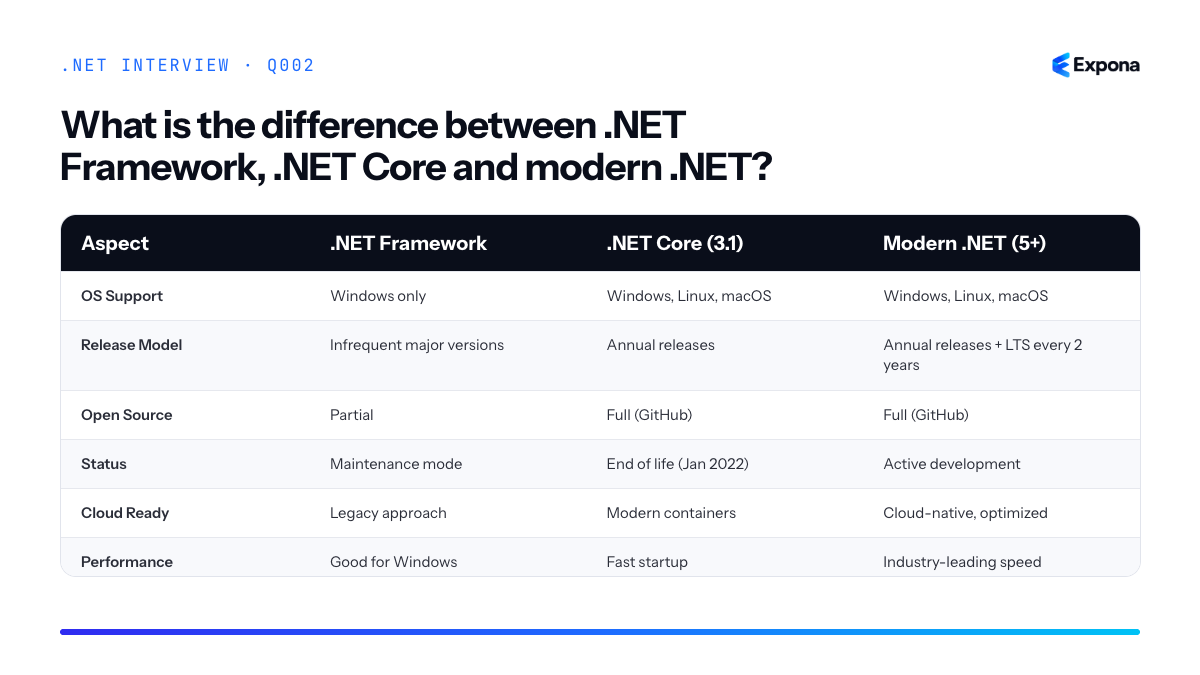
Common follow-up questions
- "Should we migrate our .NET Framework app?" – Yes, if it's actively used. Modern .NET offers better performance, security, and cloud support. Plan for refactoring, especially UI code (Windows Forms works, but WPF requires careful porting).
- "What's the difference between .NET 8 and .NET 9?" – .NET 8 is LTS (supported until Nov 2026); .NET 9 is STS (18 months). Pick LTS for production stability, STS if you want cutting-edge features.
- "Can .NET Framework and modern .NET coexist?" – Yes, on the same machine. They're separate runtimes. Legacy services can stay on Framework while new microservices run on modern .NET.
Related interview questions
Further reading
.NETCsharp03What is the CLR?
BeginnerThe Common Language Runtime (CLR) is the virtual machine that executes all .NET code. It provides essential services like Just-In-Time (JIT) compilation, automatic memory management through garbage collection, type safety, exception handling, and security—all abstracted away from the developer. Without the CLR, you would need to manage these concerns manually, similar to writing in C++.
How it works
When you write C# code and compile it, the compiler doesn't produce machine code directly. Instead, it produces Intermediate Language (IL) bytecode that's platform-agnostic. This IL is stored in assemblies (.dll or .exe files) along with metadata describing types, methods, and dependencies.
When your .NET application runs, the CLR takes over. It reads the IL from your assembly and uses the JIT compiler to translate it into native machine code specific to the processor architecture you're running on. This happens on-demand: the first time a method is called, it's compiled; subsequent calls use the cached compiled version.
The CLR also manages memory through the garbage collector, which automatically tracks object references and frees memory that's no longer in use. It enforces type safety at runtime, ensuring you can't cast an object to an incompatible type without validation. It provides a unified exception handling model and a security framework that controls what code can do, such as file access or network operations.
The CLR operates on a managed memory model where objects live on the heap and primitives or references live on the stack. This abstraction lets developers write code without worrying about memory corruption, pointer arithmetic, or manual cleanup—major sources of bugs in unmanaged languages.
Example
csharpclass Program { static void Main() { var person = new Person { Name = "Alice", Age = 30 }; Console.WriteLine($"{person.Name} is {person.Age}"); // CLR automatically manages memory; no delete needed } } class Person { public string Name { get; set; } public int Age { get; set; } }When this code runs, the CLR JIT-compiles the Main method, allocates the Person object on the heap, and automatically frees its memory when it's no longer referenced—all without explicit code.
Key points to mention
- The CLR is a virtual machine that sits between your code and the operating system, providing platform independence.
- It performs JIT compilation: converting IL to native machine code at runtime, enabling optimizations based on actual usage patterns.
- Automatic garbage collection eliminates manual memory management and prevents memory leaks (though IDisposable is still used for unmanaged resources).
- Type safety and exception handling are enforced by the CLR, catching errors at runtime rather than causing undefined behavior.
- The CLR enables the "write once, run anywhere" philosophy: your IL works across Windows, Linux, and macOS with the appropriate .NET runtime installed.
Common follow-up questions
- What's the difference between the CLR and the .NET Framework? The CLR is the runtime engine; .NET Framework is a larger ecosystem including the CLR, class libraries, and tools.
- Does .NET Core have a CLR? Yes. .NET Core (now just ".NET" in versions 5+) includes its own CLR optimized for cross-platform performance and cloud scenarios.
- How does the CLR handle different processor architectures? The JIT compiler generates native code specific to the current processor at runtime, so the same IL works on ARM, x86, and x64 without recompilation.
Related interview questions
- What is IL (Intermediate Language)?
- What is the difference between stack and heap memory?
- What is IDisposable?
Further reading
.NETCsharpPerformanceSecurity04What is IL (Intermediate Language)?
BeginnerIL (Intermediate Language), also called MSIL or CIL, is a platform-agnostic instruction set that C# code compiles into. It sits between human-readable C# and machine code, allowing .NET programs to run across different operating systems and architectures. At runtime, the JIT compiler translates IL into native machine code specific to the current platform.
How it works
When you compile a C# project, the C# compiler doesn't produce native machine code directly. Instead, it produces IL instructions that are stored inside .NET assemblies (DLL or EXE files). These IL instructions are human-readable yet hardware-independent, similar to bytecode in Java.
During runtime, the CLR's Just-In-Time (JIT) compiler reads the IL and converts it on-demand into native machine code that the CPU can execute. This happens method-by-method: the first time a method is called, its IL is compiled to native code and cached. Subsequent calls use the cached native code, avoiding recompilation.
This two-stage compilation model gives .NET several advantages. First, it enables platform independence—the same IL assembly runs on Windows, Linux, and macOS because each platform has its own JIT compiler. Second, it allows for runtime optimizations—the JIT can apply optimizations based on actual runtime behavior and CPU architecture. Third, it enables security and verification—IL can be inspected and validated before execution.
Example
csharppublic class Calculator { public int Add(int a, int b) { return a + b; } } var calc = new Calculator(); int result = calc.Add(5, 3);When you compile this C#, the
Addmethod is converted to IL instructions (such asldarg.0,ldarg.1,add,ret). When the program runs and callsAdd(5, 3), the JIT compiler translates those IL instructions into native x86 or ARM machine code that executes on your specific CPU.Key points to mention
- Platform independence: IL is the same across Windows, Linux, and macOS; only the JIT compiler is platform-specific.
- JIT compilation: IL is compiled to native code at runtime by the CLR, not ahead of time (though Native AOT and ReadyToRun are alternatives).
- Verifiable and secure: IL can be inspected for type safety and security violations before execution.
- Stored in assemblies: IL lives in DLL and EXE files alongside metadata about types, methods, and resources.
- Performance trade-off: JIT compilation adds startup latency but allows runtime optimizations that can exceed pre-compiled code performance.
Common follow-up questions
- What is the CLR (Common Language Runtime)?
- Can I see the IL that my C# code compiles to?
- How does IL differ from native code compilation in C++?
Related interview questions
.NETCsharpPerformance05What is JIT compilation?
BeginnerJIT (Just-In-Time) compilation is the process where the .NET runtime converts Intermediate Language (IL) code into native machine code at runtime, just before a method is executed for the first time. This allows .NET to be both platform-independent (IL runs anywhere) and performance-optimized (native code is fast). Modern .NET uses tiered compilation, which starts with quick compilation and later recompiles frequently-used methods with aggressive optimizations.
How it works
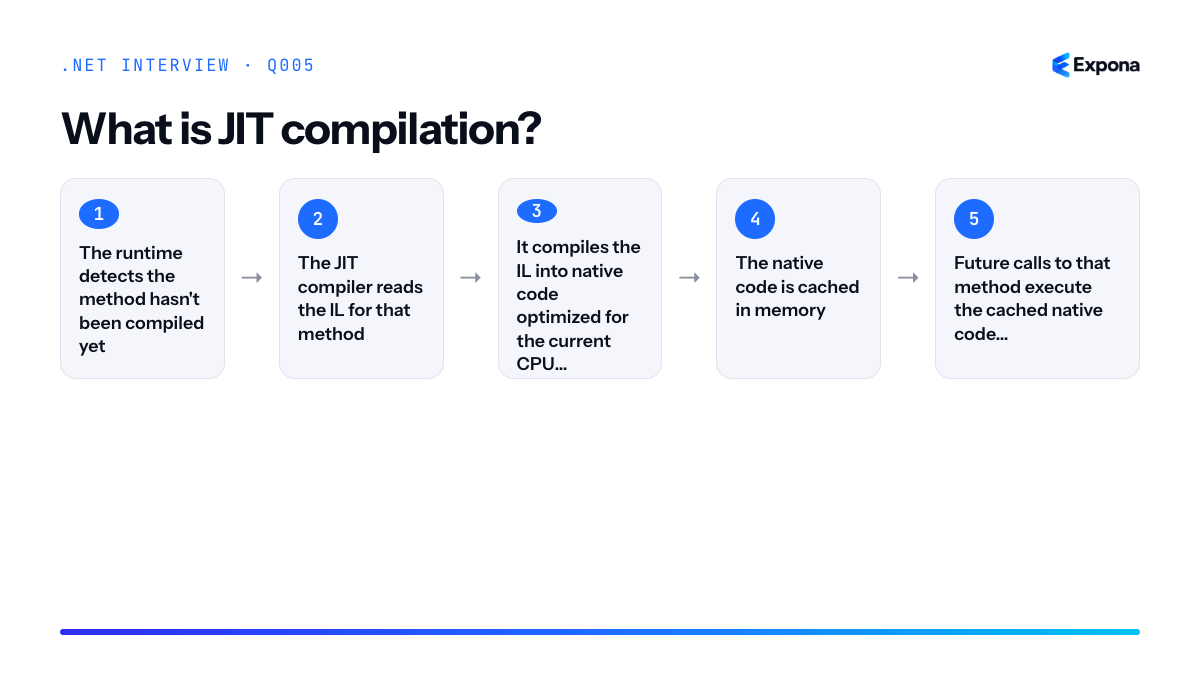
When you write C# and compile it, the compiler produces IL (Intermediate Language), not native machine code. This IL is stored in your assembly. When your program runs and calls a method for the first time, the JIT compiler kicks in:
- The runtime detects the method hasn't been compiled yet.
- The JIT compiler reads the IL for that method.
- It compiles the IL into native code optimized for the current CPU architecture.
- The native code is cached in memory.
- Future calls to that method execute the cached native code directly—no recompilation.
In modern .NET, tiered compilation makes this even smarter. Tier 0 (quick JIT) compiles with minimal optimization to get the method running fast. If the method is called frequently, Tier 1 (optimizing JIT) recompiles it with full optimizations like inlining and loop unrolling. This balance means your app starts quickly but still gets peak performance for hot code paths.
Example
csharppublic class Program { public static void Main() { // First call: JIT compiles Calculate to native code int result1 = Calculate(5); Console.WriteLine($"Result: {result1}"); // Subsequent calls: use cached native code int result2 = Calculate(10); Console.WriteLine($"Result: {result2}"); } public static int Calculate(int x) { // On first invocation, IL here is converted to native machine code return x * x + x; } }The first call to
Calculate(5)triggers JIT compilation; the runtime converts its IL to native code. The second call toCalculate(10)reuses that already-compiled native code without recompilation.Key points to mention
- Startup delay: JIT compilation adds a small delay the first time each method runs (warm-up time), but this is typically negligible for modern applications.
- Platform independence: Because compilation happens at runtime, the same IL works on Windows, Linux, and macOS—the JIT produces platform-specific native code automatically.
- Optimization opportunities: The JIT can optimize based on actual runtime data—it knows which CPU you're on, actual data types flowing through methods, and call patterns, enabling smarter optimizations than static ahead-of-time compilers.
- Tiered compilation: .NET 5+ defaults to tiered compilation, balancing startup speed (Tier 0) with peak performance (Tier 1) automatically.
- Caching: Compiled native code is cached in memory for the lifetime of the process; it's never re-JIT'd unless explicitly requested by the runtime.
Common follow-up questions
- Can we pre-compile IL to native code? Yes—ReadyToRun (R2R) and NativeAOT allow ahead-of-time compilation to eliminate JIT overhead and improve startup time.
- What's the performance difference between Tier 0 and Tier 1? Tier 0 compiles very quickly (sometimes in microseconds) but produces less-optimized code. Tier 1 takes longer to compile but produces code that can be 10–30% faster for compute-intensive workloads.
- How does JIT affect cold startup? In cold applications, you pay JIT cost for every method called during startup. For typical web services, this is under 100ms; for CLI tools, it can be noticeable. This is why NativeAOT is gaining adoption for trimmed, fast-startup scenarios.
Related interview questions
Further reading
.NETCsharpPerformance06What is an assembly in .NET?
BeginnerAn assembly is the compiled unit of deployment in .NET, typically a
.dll(dynamic link library) or.exe(executable) file. It contains Intermediate Language (IL) code, metadata describing all types and members, and a manifest that specifies the assembly's version, name, and dependencies on other assemblies.How it works
When you compile a C# project, the compiler translates your source code into IL—a platform-independent intermediate representation. This IL, along with rich metadata about classes, methods, properties, and other type information, is packaged into an assembly file.
The assembly also includes a manifest—a metadata table that describes the assembly itself: its identity (name, version, culture), the types it exports, and which other assemblies it depends on. When the .NET runtime loads an assembly, it reads the manifest to understand what's inside and how to resolve dependencies.
Assemblies are the unit of versioning, security, and deployment. You can share assemblies across applications, place them in the Global Assembly Cache (in .NET Framework), or bundle them with your application. Each assembly is independently versionable, so you can update one assembly without recompiling the entire application.
The runtime uses a process called Just-In-Time (JIT) compilation to convert IL code to native machine code when the assembly executes. This allows the same IL assembly to run on different platforms (Windows, Linux, macOS) as long as the appropriate .NET runtime is installed.
Example
csharp// MathLibrary.csproj – a class library assembly <Project Sdk="Microsoft.NET.Sdk"> <PropertyGroup> <TargetFramework>net8.0</TargetFramework> <AssemblyName>MathLibrary</AssemblyName> <Version>1.0.0</Version> </PropertyGroup> </Project> // MathLibrary.cs – code in the assembly namespace MathLibrary { public class Calculator { public int Add(int a, int b) => a + b; } } // Program.cs – consumer project using MathLibrary; var calc = new Calculator(); Console.WriteLine(calc.Add(5, 3)); // 8When you build
MathLibrary, the compiler producesMathLibrary.dll—the assembly. The manifest inside records that it's version 1.0.0, contains theCalculatortype, and depends onSystem.Runtime. YourProgram.csproject references this assembly; at runtime, the .NET loader reads the manifest and executes the IL code.Key points to mention
- Assemblies are files (
.dllor.exe) containing IL code and metadata; they're the output of compilation. - The manifest is metadata inside the assembly that describes the assembly's identity, exported types, and dependencies—it's how the runtime resolves what to load.
- Assemblies are independently versioned and deployed; a single project can reference assemblies of different versions.
- IL is platform-independent; the JIT compiler converts it to native code at runtime, enabling cross-platform execution.
- The Base Class Library (BCL) itself is distributed as a set of assemblies that the runtime loads automatically.
Common follow-up questions
- What is the difference between a private assembly and a shared assembly?
- What is the Global Assembly Cache (GAC), and why is it rarely used in modern .NET?
- How does the runtime resolve assembly dependencies, and what is assembly binding?
Related interview questions
.NETCsharpDevOps- Assemblies are files (
07What is the Base Class Library (BCL)?
BeginnerThe Base Class Library (BCL) is the standard library that ships with .NET, providing fundamental types and functionality for building applications. It includes namespaces like System, System.Collections, System.IO, System.Net, and System.Text, among hundreds of others. Every .NET application relies on the BCL to perform core operations such as file I/O, string manipulation, threading, networking, and data structures.
How it works
The BCL is a collection of managed assemblies (compiled code) that are part of the .NET runtime distribution. When you install .NET, the BCL assemblies are installed alongside it, making them immediately available to any application you build. You access BCL functionality by referencing namespaces in your code—for example,
using System;orusing System.Collections.Generic;—and then calling the types and methods defined in those namespaces.The BCL is organized hierarchically by namespace, grouping related functionality together. For instance,
System.IOcontains file and directory operations,System.Nethandles networking,System.Collections.Genericprovides type-safe collections, andSystem.Text.Jsonhandles JSON serialization. These namespaces wrap the underlying operating system capabilities and provide a consistent, object-oriented interface that works across Windows, Linux, and macOS.The BCL also includes modern features like LINQ, which allows you to query collections with a SQL-like syntax, and System.Text.Json for parsing and generating JSON without external dependencies. The BCL is continuously updated with each .NET release, adding new types, methods, and performance improvements while maintaining backward compatibility.
Example
csharpusing System; using System.Collections.Generic; using System.IO; using System.Linq; using System.Text.Json; // BCL example: Collections, LINQ, File I/O, JSON var numbers = new List<int> { 1, 2, 3, 4, 5 }; var evenNumbers = numbers.Where(n => n % 2 == 0).ToList(); Console.WriteLine($"Even numbers: {string.Join(", ", evenNumbers)}"); // File I/O from System.IO var path = Path.Combine(Environment.GetFolderPath(Environment.SpecialFolder.Desktop), "data.json"); File.WriteAllText(path, JsonSerializer.Serialize(evenNumbers)); // Read it back var readContent = File.ReadAllText(path); var parsed = JsonSerializer.Deserialize<List<int>>(readContent); Console.WriteLine($"Parsed from file: {string.Join(", ", parsed ?? [])}");This example demonstrates BCL usage: creating a typed collection, using
LINQ.Where()to filter, writing to a file withSystem.IO.File, serializing to JSON withSystem.Text.Json, and reading it back—all from the BCL with no external packages.Key points to mention
- The BCL is built-in and free; no installation or NuGet packages required for basic functionality.
- It provides cross-platform abstractions, so code written for Windows works on Linux and macOS without changes.
- Common namespaces include System (core types), System.Collections.Generic (dictionaries, lists), System.IO (files), System.Linq (querying), System.Net (networking), and System.Text.Json (serialization).
- The BCL is always available in every .NET project; you only need to add
usingstatements to access it. - It is designed for performance and is heavily optimized; many operations delegate to the runtime or operating system.
Common follow-up questions
- How does the BCL differ from NuGet packages? The BCL is built-in and maintained by Microsoft; NuGet packages are third-party libraries you install separately to extend functionality.
- What happens if I use BCL types in .NET Framework vs. .NET 8+? Some newer BCL types (like JsonSerializer) are only available in newer .NET versions; you must target the appropriate framework or use compatibility packages.
- Can I override or extend BCL classes? Yes, many BCL classes are designed to be inherited (e.g., collections, exceptions); sealed classes cannot be extended intentionally.
Related interview questions
Further reading
.NETCsharpasynclinq08What is the .NET SDK vs the .NET runtime?
BeginnerThe .NET SDK (Software Development Kit) contains everything you need to develop and build .NET applications, including compilers, the dotnet CLI, and project templates. The .NET runtime is a minimal package that contains only what is necessary to execute already-compiled .NET applications. Think of it this way: developers install the SDK, but end users only need the runtime.
How it works
When you develop a .NET application, you use the SDK, which includes the C# compiler, the dotnet command-line tool, NuGet package manager, and pre-built project templates. The SDK is a superset that enables you to write code, compile it into Intermediate Language (IL), and create assemblies.
Once your application is compiled and ready for deployment, end users do not need the compiler or development tools. They only need the .NET runtime, which provides the Just-In-Time (JIT) compiler to convert IL to machine code at runtime, the garbage collector, the type system, and the base class library necessary to execute your application.
For deployment scenarios, you have flexibility: you can deploy your app to machines with the runtime installed, or you can create self-contained deployments where the runtime is bundled with your application. When containerizing an ASP.NET Core app, you often use a lightweight runtime image as the base rather than the full SDK.
Example
csharp// Program.cs - requires SDK to compile using System; class Program { static void Main() { Console.WriteLine("Hello from .NET!"); Console.WriteLine($"Runtime: {System.Runtime.InteropServices.RuntimeInformation.FrameworkDescription}"); } }To build this, you run
dotnet build(SDK required). To run it, you executedotnet runor./bin/Release/net8.0/Program.exe(runtime required). End users only need the runtime to execute the compiled DLL.Key points to mention
- SDK is for development: Includes compiler, CLI tools, debugger, templates, and everything needed to create applications.
- Runtime is for execution: Minimal footprint with JIT compiler, garbage collector, and runtime libraries to execute compiled code.
- Size difference: The SDK is significantly larger (500+ MB) compared to the runtime (50-150 MB), which matters for production deployments.
- Separate downloads: Both are available separately from microsoft.com; you choose based on your use case (development vs. deployment).
- Version alignment: Applications compiled with SDK version X.Y should run on runtime version X.Y or newer (generally backward compatible within a major version).
Common follow-up questions
- Can you run a .NET application without installing the SDK? Yes, if the runtime is installed or the application is self-contained with the runtime bundled.
- What is the difference between SDK versions and runtime versions? The SDK is used at compile time; the runtime version is what your deployed application targets and what end-user machines need.
- Should production servers have the SDK installed? Generally no—install only the runtime to reduce surface area and system complexity. The SDK is for development machines.
Related interview questions
.NETCsharp09What does the dotnet CLI do?
BeginnerThe dotnet CLI (Command Line Interface) is a cross-platform tool that allows developers to create, build, run, test, and publish .NET applications directly from the command line. It's the foundation for modern .NET development, eliminating the need to rely solely on Visual Studio and enabling automation in CI/CD pipelines.
How it works
The dotnet CLI is installed as part of the .NET SDK and provides a unified command structure for managing your entire project lifecycle. When you run a command like
dotnet build, the CLI parses your project file (typically a .csproj), restores NuGet dependencies, compiles your code, and produces output artifacts. Each command follows a predictable pattern:dotnet [command] [arguments] [options].The CLI works with project files to understand your application's structure, dependencies, and configuration. It supports multiple project types—console applications, class libraries, ASP.NET Core web applications, and more. The CLI also integrates with the NuGet package manager, allowing you to add, update, and remove dependencies seamlessly.
One of the most powerful aspects is its cross-platform nature. The same commands work identically on Windows, macOS, and Linux, making it ideal for DevOps teams and developers working in mixed environments. The CLI also powers many higher-level tools, including Visual Studio and Visual Studio Code, which use it behind the scenes.
Example
csharp// Program.cs - Simple console application Console.WriteLine("Hello from dotnet CLI!"); var greeting = GetGreeting("World"); Console.WriteLine(greeting); static string GetGreeting(string name) => $"Welcome, {name}!";To execute this, you'd use
dotnet runin the terminal, which restores dependencies, compiles the code, and executes the program without manually creating build artifacts.Key points to mention
- Core commands:
dotnet new(creates projects),dotnet build(compiles),dotnet run(executes),dotnet test(runs unit tests),dotnet publish(creates deployment packages) - Dependency management: Use
dotnet add packageanddotnet remove packageto manage NuGet packages without editing .csproj files manually - Project agnostic: Works with any .NET project type—console apps, libraries, web applications, and more—using the same fundamental commands
- CI/CD integration: Perfect for automation scripts and continuous integration pipelines since it's scriptable and cross-platform
- Restore and clean:
dotnet restoredownloads dependencies, whiledotnet cleanremoves build artifacts
Common follow-up questions
- What's the difference between
dotnet buildanddotnet publish? (Build compiles for development; publish prepares for deployment) - How do you run integration tests for ASP.NET Core using the CLI?
- What does
dotnet restoredo, and when is it necessary?
Related interview questions
- What is xUnit?
- How do you write integration tests for ASP.NET Core?
- How do you test code that depends on time?
Further reading
.NETCsharpTestingDevOps- Core commands:
10What is NuGet?
BeginnerNuGet is the package manager for .NET that enables developers to discover, download, and manage reusable libraries and dependencies in their projects. Packages are defined in your project file and automatically restored from nuget.org (the public feed) or private feeds during the build process, making dependency management centralized and version-controlled.
How it works
NuGet operates as a centralized repository system. When you add a package reference to your .csproj file, NuGet resolves that package and all its transitive dependencies from configured feeds. During build time, NuGet restores these packages to a local cache (typically in
~/.nuget/packages) and makes the assemblies available to your project.You interact with NuGet through multiple interfaces: the dotnet CLI (e.g.,
dotnet add package), Visual Studio's Package Manager UI, the Package Manager Console, or by directly editing your project file. Thepackages.lock.jsonfile (when enabled) ensures deterministic restores by locking exact versions across team members.Private NuGet feeds allow organizations to host internal packages securely, enabling code sharing across teams while maintaining intellectual property protection. Authentication can be configured per feed, supporting various credential types.
Example
csharp// After installing NuGet package "Newtonsoft.Json" via: // dotnet add package Newtonsoft.Json using Newtonsoft.Json; var jsonString = "{\"name\": \"Alice\", \"age\": 30}"; var person = JsonConvert.DeserializeObject<dynamic>(jsonString); Console.WriteLine($"{person.name} is {person.age} years old"); // Output: Alice is 30 years oldThis code uses the popular Newtonsoft.Json NuGet package to deserialize JSON without writing custom parsing logic—demonstrating how NuGet packages provide reusable functionality.
Key points to mention
- Central repository: nuget.org hosts millions of open-source packages; organizations can also host private feeds
- Declarative dependency management: Package references in the .csproj file make dependencies explicit and version-controlled
- Transitive dependency resolution: NuGet automatically downloads dependencies of your dependencies, resolving version conflicts
- Version control: Lock files ensure reproducible builds and consistent versions across development teams
- Package metadata: Each package includes version information, license, dependencies, and documentation for informed selection
Common follow-up questions
- How do you handle version conflicts when two packages require different versions of the same dependency?
- What's the difference between a NuGet package and a local project reference?
- How do you create and publish your own NuGet package?
Related interview questions
.NETCsharp11What is a .csproj file?
BeginnerA .csproj file is the MSBuild project file for C# projects. It is an XML configuration file that defines how your project should be built, including the target framework, dependencies, output type, and build settings. Modern .NET projects use the compact SDK-style format rather than the verbose .NET Framework format.
How it works
When you build a C# project, MSBuild reads the .csproj file to understand what to compile, which NuGet packages to restore, what the target framework is, and which compilation options to apply. The file is XML-based and contains property groups, item groups, and targets that instruct MSBuild how to orchestrate the build process.
The SDK-style format (introduced with .NET Core) automatically includes sensible defaults and globs common file patterns like
*.csfiles in the project directory. This means you rarely need to explicitly list every source file. The file can also reference property files, define custom build steps, and configure package metadata for NuGet publishing.The .csproj file works hand-in-hand with the .sln (solution) file when managing multiple projects. The solution file references one or more .csproj files, enabling you to build and manage them as a cohesive unit.
Example
csharp<Project Sdk="Microsoft.NET.Sdk"> <PropertyGroup> <TargetFramework>net8.0</TargetFramework> <OutputType>Exe</OutputType> <LangVersion>latest</LangVersion> <Nullable>enable</Nullable> </PropertyGroup> <ItemGroup> <PackageReference Include="Newtonsoft.Json" Version="13.0.3" /> </ItemGroup> </Project>This minimal .csproj declares a console application targeting .NET 8.0 with nullable reference types enabled and a dependency on Newtonsoft.Json; MSBuild automatically discovers all .cs files in the directory and compiles them.
Key points to mention
- PropertyGroup: Contains metadata like
TargetFramework,OutputType(Exe, Library), and compiler settings such asNullableandLangVersion. - ItemGroup: Lists package references (NuGet dependencies), project references, and other files to include in the build.
- SDK-style format: The modern, concise format used by .NET 5+; older .NET Framework projects used verbose formats that explicitly listed every file.
- Automatic file discovery: SDK projects automatically include all .cs files in the directory tree without explicit declarations.
- TargetFramework: Specifies which .NET runtime your project targets (e.g., net8.0, net48, net6.0-windows).
Common follow-up questions
- What is the difference between a .csproj file and a .sln file? A .csproj file defines a single project; a .sln file is a container that references multiple .csproj files to organize them into a solution.
- How do you add a NuGet package to a .csproj file? You can either use
dotnet add packagefrom the CLI, or manually add a<PackageReference>entry to the<ItemGroup>section and restore withdotnet restore. - What is the .csproj.user file? It is a local, machine-specific file that stores user preferences (like debug settings or breakpoints) and is typically not checked into source control.
Related interview questions
.NETCsharp- PropertyGroup: Contains metadata like
12What is the difference between a value type and a reference type?
BeginnerValue types hold their data directly in memory and are copied entirely when assigned to another variable, meaning each copy is independent. Reference types store only a reference (pointer) to an object on the managed heap, so multiple variables can point to the same object. This fundamental distinction affects memory allocation, performance, and how changes to data are observed across your application.
How it works
When you declare a value type variable like
intorstruct, the runtime allocates memory on the stack to store the actual value. When you assign a value type to another variable, the entire data is copied, creating two independent copies. Changes to one copy do not affect the other.Reference types like
class,string, and arrays work differently. The variable doesn't hold the actual data; it holds a reference (memory address) to an object stored on the managed heap. When you assign a reference type to another variable, you're copying the reference, not the object itself. Both variables now point to the same object in memory. Any modification through either variable affects the shared object.The garbage collector automatically manages heap memory for reference types, cleaning up objects that no longer have any references. Value types on the stack are automatically freed when they go out of scope, making them more efficient for small, short-lived data.
Example
csharp// Value type example int a = 5; int b = a; b = 10; Console.WriteLine($"a: {a}, b: {b}"); // Output: a: 5, b: 10 // Reference type example var list1 = new List<int> { 1, 2, 3 }; var list2 = list1; list2.Add(4); Console.WriteLine($"list1.Count: {list1.Count}"); // Output: list1.Count: 4 // Struct (value type) example struct Point { public int X, Y; } var p1 = new Point { X = 1, Y = 2 }; var p2 = p1; p2.X = 10; Console.WriteLine($"p1.X: {p1.X}, p2.X: {p2.X}"); // Output: p1.X: 1, p2.X: 10In the value type example, changing
bdoesn't affectabecause they're independent copies. In the reference type example,list1andlist2reference the same list, so adding tolist2is visible throughlist1. The struct example demonstrates that structs are value types, so copying creates independent instances.Key points to mention
- Memory location: Value types live on the stack; reference types live on the managed heap.
- Copying behavior: Value types are deep-copied on assignment; reference types share the same object.
- Common value types: Primitives (
int,double,bool),struct, andenum. - Common reference types:
class,string, arrays, delegates, and interfaces. - Performance implications: Value types are generally faster for small data due to stack allocation; large value types can harm performance if copied frequently.
Common follow-up questions
- What is the difference between class and struct in C#?
- What are nullable value types?
- Why should you avoid large structs, and when should you prefer a class over a struct?
Related interview questions
- What is the difference between class and struct in C#?
- What is the difference between record class and record struct?
- What are nullable value types?
Further reading
.NETCsharp13What is the difference between stack and heap memory?
BeginnerThe stack stores method frames and local value types (like integers and structs) and is automatically cleaned up when methods return, while the heap stores reference types (objects, strings, arrays) and is managed by the garbage collector. Stack allocation is faster but limited in size, while heap allocation is flexible but requires garbage collection overhead.
How it works
Memory in .NET is divided into two main regions: the stack and the heap. When a method is called, a new frame is created on the stack containing space for all local variables and method parameters. Value types (like
int,bool,struct) are stored directly in this stack frame. When the method returns, the entire frame is popped off the stack, and all local variables are immediately destroyed—no garbage collection needed.The heap, by contrast, is a large pool of memory where reference types live. When you use the
newkeyword to create an object, the object is allocated on the heap, and a reference (pointer) to that object is returned. This reference is typically stored on the stack (if it's a local variable) or in another object on the heap (if it's a field). Because objects can outlive the method that created them and can be referenced from multiple places, the heap cannot be cleaned up as simply as the stack. Instead, the garbage collector periodically scans the heap, identifies objects that are no longer referenced, and reclaims their memory.Stack memory is also more efficient—allocation and deallocation are O(1) operations that just move a pointer. Heap allocation and garbage collection introduce overhead. However, the stack is limited in size (typically a few megabytes per thread), while the heap can grow much larger.
Example
csharppublic class Program { public static void Main() { int age = 25; // Stack: value type stored directly string name = "Alice"; // Stack: reference to string object // Heap: "Alice" string object stored here Person person = new Person(); // Stack: reference to Person object // Heap: Person object stored here person.Name = "Bob"; } } public class Person { public string Name { get; set; } // Field reference stored in Person object on heap }In this example,
age(anint) is stored directly on the stack, whilenameandpersonare stack references pointing to objects on the heap. WhenMainreturns, the stack frame is destroyed, references are lost, and the heap objects become candidates for garbage collection.Key points to mention
- Stack is automatic and deterministic—memory is freed instantly when a method returns; predictable performance with no GC pauses.
- Heap requires garbage collection—the CLR must identify unreachable objects and reclaim memory, which can cause temporary pauses.
- Value types live on the stack (when local), while reference types live on the heap—understanding this distinction is crucial for value types vs. reference types.
- Stack is thread-local; each thread gets its own stack, preventing race conditions for local variables.
- Stack size is limited, making it unsuitable for large data structures; this is why collections are reference types stored on the heap.
Common follow-up questions
- Why are structs sometimes stored on the stack but can also end up on the heap?
- Can I force memory to be freed immediately instead of waiting for garbage collection?
- How do I know if my code is causing excessive garbage collection?
Related interview questions
- What is garbage collection?
- What is the difference between a value type and a reference type?
- What is the CLR?
Further reading
.NETCsharpPerformance14What is boxing and unboxing?
BeginnerBoxing is the process of wrapping a value type (like
int,struct) in anobjectreference on the heap. Unboxing is extracting that value type back out. Both operations carry performance costs—heap allocation for boxing, and validation plus copying for unboxing—so modern C# encourages generics and value types to avoid them in performance-critical code paths.How it works
When you assign a value type to an
objectvariable or pass it to a method expectingobject, the runtime allocates memory on the heap, copies the value there, and gives you a reference to that heap object. This is boxing. The original value type remains on the stack; the boxed copy lives on the heap until garbage collected.Unboxing reverses this: you extract the value back from the heap object and copy it onto the stack (or into a local variable). The runtime validates that the boxed type matches the target type—unboxing an
intbox into alongvariable throws anInvalidCastException.Because value types are stored on the stack (fast, automatic cleanup) but reference types live on the heap (requiring GC), boxing trades performance for the convenience of treating all values uniformly through the object interface. This was especially common in pre-generic .NET; today, generics like
List<T>eliminate most boxing scenarios.Example
csharp// Boxing and unboxing example int number = 42; // Boxing: value type → object reference object boxed = number; // Allocates heap memory, copies value // Unboxing: object reference → value type int unboxed = (int)boxed; // Validates type, copies from heap Console.WriteLine(unboxed); // 42 // Common mistake: implicit boxing in collections ArrayList list = new ArrayList(); list.Add(100); // Boxing occurs here int value = (int)list[0]; // Unboxing occurs here // Modern approach: use generics to avoid boxing List<int> genericList = new List<int>(); genericList.Add(100); // No boxing int value2 = genericList[0]; // No unboxingThe first section demonstrates explicit boxing (assigning
inttoobject) and explicit unboxing (casting back). The second half shows how old non-generic collections forced boxing on every value; generics eliminate this by storing actualintinstances.Key points to mention
- Performance cost: Boxing allocates heap memory and copies the value; unboxing validates type and copies back. Both are expensive in tight loops.
- Generics eliminate boxing:
List<int>stores integers directly without boxing, unlike the old non-genericArrayList. - Type safety on unbox: Unboxing validates that the boxed type matches exactly—you cannot unbox an
intbox aslongwithout a cast that may fail. - Reference equality after boxing: Each boxing creates a new heap object, so two boxed copies of the same value are different objects:
object a = 5; object b = 5; a == bisfalse. - Nullable value types: Boxing a nullable value type like
int?boxes the underlying value if it has one, ornullif it doesn't.
Common follow-up questions
- Why does boxing happen implicitly in some cases? When you pass a value type to a method expecting
objector an interface the value type implements, the runtime automatically boxes it for you. - How do structs avoid boxing? Record structs and regular structs are value types, so using generics with them avoids boxing entirely compared to reference type wrappers.
- Can you unbox to a different type? No—unboxing requires an exact type match or an exception is thrown. You must unbox to the original type or use
Convertclass methods instead.
Related interview questions
- What are IValueTaskSource and pooled ValueTasks?
- What is the difference between record class and record struct?
- What is high-performance logging with LoggerMessage?
Further reading
.NETCsharpPerformance15What is the difference between class and struct in C#?
BeginnerClasses are reference types that live on the heap and support inheritance, making them ideal for complex objects. Structs are value types that live on the stack and are copied on assignment, making them best for small, immutable data structures like coordinates or currency values.
How it works
The fundamental difference lies in how classes and structs are stored and passed in memory. Value types like structs store their data directly on the stack, while reference types like classes store a reference on the stack that points to data on the heap. When you assign a struct to another variable or pass it as a parameter, the entire value is copied. When you assign a class, only the reference is copied—both variables point to the same object.
Classes support inheritance, allowing you to create hierarchies and use polymorphism. Structs do not support inheritance (except from interfaces) and cannot be abstract. Classes can have null values; structs have default values for each field. Classes require explicit initialization; structs are automatically initialized with default values.
Performance and memory characteristics differ significantly. Structs are allocated on the stack, making them faster to create and destroy, but copying large structs repeatedly can be expensive. Classes have heap allocation overhead but avoid copying when passed around. For small, simple data, structs are often more efficient; for complex, frequently-used objects, classes are typically better.
Example
csharp// Struct: value type, best for small immutable data public struct Point { public int X { get; set; } public int Y { get; set; } public Point(int x, int y) => (X, Y) = (x, y); } // Class: reference type, supports inheritance public class Person { public string Name { get; set; } public int Age { get; set; } public Person(string name, int age) => (Name, Age) = (name, age); } // Usage demonstrating value vs reference behavior var point1 = new Point(10, 20); var point2 = point1; point2.X = 30; Console.WriteLine(point1.X); // Output: 10 (struct was copied) var person1 = new Person("Alice", 30); var person2 = person1; person2.Name = "Bob"; Console.WriteLine(person1.Name); // Output: Bob (both reference same object)This example shows how modifying a copied struct leaves the original unchanged, while modifying through a class reference affects the original because both variables point to the same object.
Key points to mention
- Memory allocation: Structs are stack-allocated (faster creation/destruction), classes are heap-allocated (more memory overhead but better for complex objects)
- Value vs reference semantics: Structs are copied on assignment; classes pass references, so modifications affect the original
- Inheritance: Classes support inheritance and polymorphism; structs only implement interfaces
- Nullability: Class variables can be null; struct variables have default values and cannot be null (without nullable reference types)
- Use cases: Use structs for small, immutable data (Point, Size, Color); use classes for complex, mutable objects with shared state (Person, Customer, Service)
Common follow-up questions
- When would you choose a struct over a class, and when would you choose a class?
- What is a record, and how does it differ from a class or struct? (See record class vs record struct)
- What happens when you box a struct, and why is it important to know?
Related interview questions
- What is the difference between a value type and a reference type?
- What is the difference between record class and record struct?
- What is the difference between an abstract class and an interface?
Further reading
.NETCsharp16What is a record in C#?
BeginnerA record is a C# type that provides value-based equality, automatic ToString generation, and non-destructive mutation through the
withkeyword. Introduced in C# 9, records are reference types (or value types if declared asrecord struct) designed primarily for immutable data transfer objects, events, and domain objects where structural equality matters more than reference equality.How it works
Records automatically generate several members for you:
- Value-based equality: Two records are equal if all their properties have the same values, not because they reference the same object in memory. The compiler generates
Equals,GetHashCode, and equality operators. - ToString override: Records automatically generate a readable ToString that displays the type name and all properties, making debugging easier.
- Copy-with-mutation: The
withexpression creates a shallow copy of a record with specified properties changed. This is non-destructive—the original record remains unchanged. - Positional parameters: Records support positional syntax in declarations, creating properties and a primary constructor automatically.
Records are immutable by convention, though not enforced by the compiler unless you explicitly use
init-only properties. This makes them safe for multi-threaded scenarios and reliable as dictionary keys.Example
csharp// Positional record—generates properties, constructor, and equality members public record Person(string Name, int Age); // Usage var person1 = new Person("Alice", 30); var person2 = new Person("Alice", 30); // Value-based equality Console.WriteLine(person1 == person2); // true // Automatic ToString Console.WriteLine(person1); // Person { Name = Alice, Age = 30 } // Non-destructive mutation with 'with' var person3 = person1 with { Age = 31 }; Console.WriteLine(person3); // Person { Name = Alice, Age = 31 } Console.WriteLine(person1.Age); // 30 (original unchanged)This example demonstrates how a record makes data-carrying types concise: a single line replaces dozens of lines of boilerplate code for equality and ToString, and the
withexpression elegantly handles immutable updates.Key points to mention
- Records are reference types by default—they inherit from
object, notstruct. Userecord structfor value semantics. - Equality is based on property values, not reference identity, making records suitable as dictionary keys and safe for comparison.
- Records are immutable by design convention—use
init-only properties to enforce compile-time immutability and prevent accidental mutation. - Perfect for DTOs, events, and command/query objects where you need lightweight, immutable data containers without ceremony.
- The
withkeyword provides non-destructive mutation, enabling functional-style programming patterns in C#.
Common follow-up questions
- What is the difference between
record classandrecord struct? - How does record equality differ from class equality, and why should I use
init-only properties? - Can records inherit from other records or classes? (Yes—records can inherit from other records; inheritance chains work, but be cautious with equality semantics.)
Related interview questions
- What is the difference between record class and record struct?
- What is the difference between a value type and a reference type?
- What is the difference between class and struct in C#?
Further reading
.NETCsharpArchitecture- Value-based equality: Two records are equal if all their properties have the same values, not because they reference the same object in memory. The compiler generates
17What is the difference between record class and record struct?
BeginnerA record class is a reference type stored on the heap with value-based equality, while a record struct is a value type stored on the stack with the same conveniences. Both provide positional deconstruction, immutability support, and compiler-generated equality, but they differ in memory allocation and performance characteristics. The choice depends on whether you need reference semantics (class) or value semantics (struct).
How it works
Records were introduced in C# 9 to simplify immutable data types. Both record class and record struct automatically generate constructors, equality methods (
Equals,GetHashCode,==,!=), and aToStringmethod based on the declared properties.A record class is a reference type that inherits from
System.Object. Two instances are equal if their property values are equal, even if they occupy different memory locations. It supports inheritance and polymorphism.A record struct is a value type that lives on the stack (unless boxed). Two instances are equal based on value comparison. Record structs are useful for small, immutable data structures where avoiding heap allocation improves performance. Unlike regular structs, record structs support the
withkeyword for non-destructive mutation and cleaner copying.Example
csharp// Record class (reference type) public record Person(string Name, int Age); // Record struct (value type) public record struct Point(double X, double Y); var person1 = new Person("Alice", 30); var person2 = new Person("Alice", 30); Console.WriteLine(person1 == person2); // True (value equality) var point1 = new Point(1.0, 2.0); var point2 = new Point(1.0, 2.0); Console.WriteLine(point1 == point2); // True (value equality) // Both support 'with' for creating modified copies var person3 = person1 with { Age = 31 }; var point3 = point1 with { X = 2.0 };This demonstrates that both record class and record struct support value-based equality and the convenient
withkeyword for immutable updates, regardless of their storage location.Key points to mention
- Memory allocation: Record classes allocate on the heap (reference type); record structs allocate on the stack (value type), making structs faster for small data but requiring care with boxing.
- Equality semantics: Both use structural (value-based) equality by default, not reference equality like mutable classes.
- Immutability: Both support init-only properties and the
withkeyword for clean, immutable patterns. - Inheritance: Record classes support inheritance; record structs do not (structs cannot inherit from other structs in C#).
- Performance: Record structs avoid heap allocations and garbage collection pressure, making them ideal for high-frequency data structures like coordinates or measurements.
Common follow-up questions
- Can a record struct be mutable? Yes, record structs can have settable properties, but this goes against the intent; records are designed for immutability. Mutable value types can cause subtle bugs.
- Should I always use record struct instead of record class for performance? No—record structs have trade-offs. Stack allocation is faster, but copying a struct (parameter passing, return values) copies all data. For large types or when you need reference semantics, use record class.
- How does a record struct differ from a regular struct? Record structs automatically generate equality methods and the
withkeyword support; regular structs require manual implementation or inherit broken default equality fromValueType.
Related interview questions
- What is the difference between a value type and a reference type?
- What is the difference between class and struct in C#?
- What is a record in C#?
Further reading
.NETCsharpPerformance18What are the access modifiers in C#?
BeginnerC# has six access modifiers—public, private, protected, internal, protected internal, and private protected—that control the visibility and accessibility of classes, methods, properties, and fields. They define which code can access a member, from anywhere in your application down to only within the declaring class or assembly. The best practice is to use the most restrictive modifier that still allows your code to function correctly.
How it works
Access modifiers restrict visibility by defining scope boundaries. Public members are accessible from anywhere, making them part of your public API. Private members (the default for class members) are accessible only within the declaring class, hiding implementation details. Protected members are accessible within the class and any derived classes, useful for inheritance hierarchies. Internal members are accessible anywhere within the same assembly, allowing internal collaboration without exposing to external consumers. Protected internal (union) allows access within the same assembly or from derived classes in other assemblies. Private protected (intersection) is the most restrictive combination, allowing access only within the same class or derived classes in the same assembly.
The key principle is encapsulation: expose only what clients need, and hide everything else. This protects your implementation from unintended misuse and makes refactoring safer.
Example
csharppublic class BankAccount { private decimal _balance; // Only accessible within this class protected string AccountNumber { get; set; } // Accessible in derived classes public decimal GetBalance() // Part of the public API { return _balance; } internal void LogTransaction(string details) // Used within the assembly { Console.WriteLine($"Transaction: {details}"); } private void ValidatePin(string pin) // Hidden implementation detail { // Validation logic } protected internal decimal ApplyInterest(decimal rate) { return _balance *= (1 + rate); // Accessible across assemblies or in derived classes } private protected void ResetInternalState() // Only in this class or derived classes in same assembly { _balance = 0; } }This example demonstrates how different modifiers create layers of visibility: private hides the balance and validation, protected and internal control inheritance and assembly access, and public defines the safe interface for external code.
Key points to mention
- The default access modifier for class members is private; for top-level types it is internal—always be explicit to avoid surprises.
- Use public sparingly for your public API; prefer private or protected for internal implementation details to reduce coupling.
- Protected is for inheritance scenarios; use it when derived classes need to override or access behavior, such as in template method patterns.
- Internal is ideal for multi-project solutions where you want code sharing within your own assemblies but not external consumers.
- Protected internal and private protected are advanced modifiers; use them when you need precise control over inheritance and assembly boundaries.
- Access modifiers apply to classes, structs, interfaces, methods, properties, and fields, and even nested types.
Common follow-up questions
- What is the default access modifier in C#? — For class members, it is private; for top-level types (classes, interfaces, structs), it is internal.
- Why should I avoid making everything public? — Public members become part of your contract, making them hard to change later. Private members are implementation details you can refactor freely without breaking clients.
- When would I use protected internal vs. private protected? — Use protected internal (union) when derived classes or assembly-internal code need access; use private protected (intersection) only when both conditions must be true—rarely needed in practice.
Related interview questions
Further reading
.NETCsharpSecurity19What is the difference between const and readonly?
Beginnerconst is a compile-time constant whose value is baked directly into every place it's referenced, while readonly is a field that can only be assigned once—either at declaration or in the constructor—and its value is determined at runtime. Use
constfor true constants that never change across versions; usereadonlyfor values that should be immutable but may vary per instance or need runtime initialization.How it works
When you declare a
constfield, the C# compiler replaces every reference to that constant with its literal value during compilation. This means the value is "baked in" to the calling assembly. If you later change the constant value and recompile only the library—but not the calling code—callers will still see the old value until they recompile.readonlyfields, by contrast, are resolved at runtime. The field can be assigned a value during initialization (at declaration) or inside any constructor, but nowhere else. Once assigned, it cannot be modified. Because the value is looked up at runtime rather than baked in, changing areadonlyfield's value and recompiling will immediately affect all callers without them needing to recompile.constis implicitlystaticand must be assigned a compile-time constant expression (a literal or another constant).readonlycan be instance-level or static, and can be assigned the result of a method call or any expression that runs at initialization time.Example
csharppublic class Configuration { // Compile-time constant: value is baked into calling code public const int MaxRetries = 3; // Runtime constant: value is resolved when accessed public readonly string AppVersion; public readonly DateTime StartupTime; public Configuration(string version) { AppVersion = version; // Can only assign once StartupTime = DateTime.UtcNow; // Runtime value } } // Usage var config = new Configuration("1.0.0"); Console.WriteLine(Configuration.MaxRetries); // 3 (compiled into IL) Console.WriteLine(config.AppVersion); // "1.0.0" (runtime lookup) Console.WriteLine(config.StartupTime); // Current UTC timeThe
MaxRetriesconstant is compiled into the calling code's IL, whileAppVersionandStartupTimeare set once during construction and cannot change afterward.Key points to mention
constis implicitlystatic, so there is only one value shared across all instances;readonlycan be instance-level or static.constmust be assigned a compile-time constant expression;readonlycan be assigned at runtime (in a constructor or initializer).- Changing a
constvalue requires recompiling all dependent code; changingreadonlyonly requires recompiling the assembly that defines it. constapplies only to primitives and strings;readonlycan hold any type, including reference types (though the reference itself becomes immutable, not the object it points to).readonlyis the safer default for most scenarios because it provides versioning safety and allows runtime flexibility.
Common follow-up questions
- Can you make a
readonlyreference type truly immutable? The field reference is immutable, but the object it points to can still be modified. To prevent that, use an immutable collection or readonly struct. - What happens if a library changes a
constvalue? Callers see the old value until they recompile, which can cause version mismatch bugs. This is whyreadonlyis preferred for public constants. - Can you use
readonlywith properties? Yes, modern C# allowsreadonlyproperties andinitaccessors for similar immutability semantics.
Related interview questions
Further reading
.NETCsharp20What is a static class?
BeginnerA static class is a sealed class that cannot be instantiated and contains only static members (methods, properties, and fields). It serves as a container for utility functions and extension methods, and is loaded into memory only once by the CLR when first accessed.
How it works
When you declare a class as
static, the compiler enforces several rules: no instance can be created (the constructor is private by default), all members must be static, and the class is implicitly sealed and abstract. This means you cannot inherit from a static class. Static classes are ideal for grouping related functionality that doesn't require object state—think of them as organized collections of utility functions.The CLR loads a static class the first time any of its members are accessed, initializing static fields and running the static constructor if one exists. All subsequent calls to static members reference the same data in memory, making static classes efficient for shared utilities.
Static classes are commonly used in the .NET Framework itself—examples include
Math,String,File, andConsole. They're also the natural home for extension methods, which must be declared in static classes in C#.Example
csharppublic static class StringHelper { public static bool IsValidEmail(string email) { return email != null && email.Contains("@"); } public static string Reverse(string input) { return new string(input.Reverse().ToArray()); } } // Usage class Program { static void Main() { string email = "user@example.com"; if (StringHelper.IsValidEmail(email)) { Console.WriteLine("Valid email"); } string reversed = StringHelper.Reverse("Hello"); Console.WriteLine(reversed); // "olleH" } }This example shows a static utility class that provides string validation and manipulation methods. All members are accessed directly on the class name without creating an instance.
Key points to mention
- No instantiation: You cannot use
newto create an instance; the compiler will throw an error. - All members must be static: Instance members, instance constructors (other than the private static constructor), and instance fields are not allowed.
- Sealed and abstract: A static class cannot be inherited from, making it impossible to extend its behavior through inheritance.
- Memory efficiency: Static members are loaded once and shared across the entire application lifetime, reducing memory overhead compared to creating multiple instances.
- Thread-safe initialization: The CLR guarantees that static constructors run only once and are thread-safe, making static classes reliable for singleton-like patterns.
Common follow-up questions
- How do static classes differ from the Singleton pattern? (Static classes are simpler and thread-safe by default, while Singleton requires manual implementation and instantiation.)
- Can you use a static class as a base class? (No, static classes are implicitly sealed.)
- What is the difference between a static class and a regular class with all static members? (A static class is explicitly sealed by the compiler and cannot be instantiated, while a regular class with static members can still be instantiated, though it would be wasteful.)
Related interview questions
- What is an extension method?
- What is the difference between an abstract class and an interface?
- What are generic constraints?
Further reading
.NETCsharp- No instantiation: You cannot use
21What is a constructor?
BeginnerA constructor is a special method that runs automatically when you create an instance of a class or struct, allowing you to initialize the object's state. C# supports several constructor types: parameterless (default), parameterized, static, and primary constructors, each serving different initialization needs.
How it works
When you use the
newkeyword to instantiate a class or struct, the runtime automatically invokes the constructor before the object is returned to you. Constructors have the same name as the class and no return type (not evenvoid). They initialize fields, properties, and perform any setup logic the object needs to function correctly.Constructors are useful for enforcing invariants—ensuring that an object never exists in an invalid state. For example, you might require certain fields to be set or validated before the object is ready to use. If you don't define a constructor, C# provides a default parameterless constructor, but defining your own gives you control over initialization.
You can have multiple constructors with different parameters (constructor overloading). Constructors can also call other constructors using the
this()keyword, allowing you to reuse initialization logic and reduce code duplication.Example
csharppublic class Person { public string Name { get; set; } public int Age { get; set; } // Parameterless constructor public Person() { Name = "Unknown"; Age = 0; } // Parameterized constructor public Person(string name, int age) { Name = name; Age = age; } // Constructor calling another constructor public Person(string name) : this(name, 0) { } // Static constructor (runs once for the class) static Person() { Console.WriteLine("Person class initialized"); } } // Usage Person p1 = new Person(); // Uses parameterless constructor Person p2 = new Person("Alice", 30); // Uses parameterized constructor Person p3 = new Person("Bob"); // Calls parameterized with default ageThis example demonstrates a class with multiple constructors: a default one, a parameterized one, one that chains to another constructor, and a static constructor that initializes class-level data.
Key points to mention
- Constructors must have the same name as the class and no return type
- You can overload constructors with different parameter lists
- Use
this()to call another constructor in the same class (constructor chaining) - Static constructors run once before any instance is created and cannot have parameters
- Classes and structs both support constructors, though structs have special rules for parameterless constructors
Common follow-up questions
- What is the difference between a constructor and a finalizer/destructor?
- Can a constructor be private, and if so, why would you do that?
- What happens if you don't define a constructor?
Related interview questions
- What is a primary constructor in C# 12?
- What is the difference between class and struct in C#?
- What is an interface?
Further reading
.NETCsharp22What is a primary constructor in C# 12?
BeginnerA primary constructor is a C# 12 feature that allows you to declare constructor parameters directly in the class declaration. These parameters are automatically available as fields throughout the entire class, eliminating the need for manual field declarations and assignments. This reduces boilerplate code, particularly for dependency injection scenarios.
How it works
In C# 12, you can append parameter declarations directly to the class name using parentheses, similar to how method signatures work. The parameters become implicitly captured and accessible throughout the class scope without requiring explicit backing fields or properties. The compiler generates the constructor logic automatically.
When you declare a primary constructor parameter, it has class scope and can be used in field initializers, property initializers, and all instance methods. The parameters are read-only by default, ensuring immutability and thread safety. If you need custom constructor logic beyond parameter capture, you can still define an explicit constructor body using a colon syntax.
Primary constructors work seamlessly with inheritance, record types, and both reference and value types. They integrate naturally with nullable reference types and property initialization patterns, making them ideal for dependency injection, data carrier classes, and services that depend on external components.
Example
csharp// Without primary constructor (traditional approach) public class OrderService { private readonly IOrderRepository _repository; private readonly ILogger<OrderService> _logger; public OrderService(IOrderRepository repository, ILogger<OrderService> logger) { _repository = repository; _logger = logger; } public async Task<Order?> GetOrderAsync(int id) { _logger.LogInformation("Fetching order {OrderId}", id); return await _repository.GetByIdAsync(id); } } // With primary constructor (C# 12) public class OrderService(IOrderRepository repository, ILogger<OrderService> logger) { public async Task<Order?> GetOrderAsync(int id) { logger.LogInformation("Fetching order {OrderId}", id); return await _repository.GetByIdAsync(id); } }In the primary constructor version, the
repositoryandloggerparameters are automatically available throughout the class without declaring backing fields or assignment statements.Key points to mention
- Reduced boilerplate: Primary constructors eliminate repetitive field declarations and assignments, making code more concise, especially for dependency injection scenarios.
- Class-scoped parameters: Parameters are implicitly available throughout the entire class, including in property initializers, field initializers, and all methods.
- Read-only by default: Primary constructor parameters are read-only, promoting immutability and thread safety without additional effort.
- Inheritance support: Derived classes must explicitly call the base class primary constructor, maintaining clear dependency flow in inheritance hierarchies.
- Optional explicit constructor body: You can still add custom constructor logic using explicit constructor syntax if needed beyond parameter capture.
Common follow-up questions
- Can primary constructors have default values? Yes, you can use default parameter values in primary constructors just like regular method parameters, but this pattern is less common since most frameworks expect all dependencies to be explicitly provided.
- How do primary constructors interact with inheritance? Derived classes must explicitly invoke the base class primary constructor using the base() syntax; parameters are not inherited automatically.
- Are primary constructor parameters the same as properties? No; they are implicitly captured as class-scoped variables. If you need public access, you must explicitly declare properties in addition to the primary constructor.
Related interview questions
Further reading
.NETCsharpSecuritydependency-injection23What are properties in C#?
BeginnerProperties are members of a class that expose controlled access to data through getter and setter accessors. They provide a clean, object-oriented way to read and write values while maintaining encapsulation. Auto-properties simplify syntax by automatically generating backing fields, and the
initaccessor allows values to be set only during object initialization, supporting immutability patterns.How it works
Properties bridge the gap between fields and methods. When you access a property, you're actually calling methods (get and set accessors) behind the scenes, but the syntax looks like direct field access. This allows you to add validation, logging, or other logic without changing the public interface.
A property has two main accessors:
getreturns a value andsetassigns a value. You can control access levels independently—for example, a public getter with a private setter. Auto-properties (introduced in C# 3.0) automatically create a hidden backing field, eliminating boilerplate code. Theinitaccessor (C# 9.0+) restricts assignment to the initialization phase, enabling immutable object patterns. Properties are part of encapsulation, a core principle of object-oriented design.Example
csharppublic class Person { // Auto-property with private setter public string Name { get; private set; } // Full property with validation private int _age; public int Age { get { return _age; } set { _age = value >= 0 ? value : throw new ArgumentException("Age cannot be negative"); } } // Init-only property (immutable after construction) public string Email { get; init; } public Person(string name, string email) { Name = name; Email = email; } } // Usage var person = new Person("Alice", "alice@example.com") { Email = "newemail@example.com" }; // person.Email = "another@example.com"; // Error: init-only property cannot be set person.Age = 25; // Valid // person.Age = -5; // Error: throws ArgumentExceptionThis example demonstrates three property patterns: an auto-property with a private setter for controlled initialization, a full property with validation logic in the setter, and an init-only property for immutable data after construction.
Key points to mention
- Properties provide encapsulation by allowing you to control read/write access and add logic without exposing internal implementation details.
- Auto-properties simplify syntax when no special logic is needed; the compiler generates a private backing field automatically.
getandsetcan have different access levels (e.g.,public get,private set) to enforce controlled mutation.- The
initaccessor (C# 9+) enables immutability by allowing assignment only during object initialization, supporting modern patterns like immutable records. - Properties are different from fields; properties are computed/controlled access points, while fields are raw data storage.
Common follow-up questions
- When would you use a property versus a field? Always prefer properties for public members because they provide encapsulation and allow future validation without breaking the API.
- Can a property be abstract or virtual? Yes, properties can be declared as
abstractorvirtualin base classes to force or allow derived classes to override their behavior. - What is the performance difference between properties and fields? Modern .NET compilers optimize auto-properties to near-field performance; any difference is negligible in real applications.
Related interview questions
- What is the difference between a field and a property?
- What is encapsulation?
- What is the difference between a value type and a reference type?
Further reading
.NETCsharp24What is the difference between a field and a property?
BeginnerA field is a raw data member that directly stores a value, while a property is a wrapper around field access that provides controlled get and set accessors. Properties allow you to add logic, validation, and change implementation without breaking your public API, making them the preferred choice for class members in modern C#.
How it works
A field is simply a variable declared directly in a class or struct. It holds data and nothing more. When you access a field, you are directly reading from or writing to that memory location.
A property is a member that wraps field access through accessor methods called
getandset. Thegetaccessor runs when you read the property; thesetaccessor runs when you assign a value. This indirection allows you to:- Add validation logic before accepting a new value
- Perform side effects (logging, notifying observers, updating related fields)
- Compute a value on-the-fly without storing it
- Change the internal implementation without changing the public interface
- Implement data binding in UI frameworks
Because properties feel syntactically like fields (you use dot notation to access them), they provide a clean abstraction while maintaining encapsulation—a core object-oriented principle.
Example
csharppublic class User { // Raw field – direct access, no control private int _age; // Property wrapping the field with validation public int Age { get { return _age; } set { if (value < 0 || value > 150) throw new ArgumentException("Age must be between 0 and 150"); _age = value; } } // Auto-property – no explicit backing field needed public string Name { get; set; } // Computed property – no backing field, returns a calculated value public bool IsAdult => Age >= 18; } // Usage var user = new User { Name = "Alice" }; user.Age = 25; // Validation runs Console.WriteLine(user.IsAdult); // True – computed on accessThis example demonstrates that properties provide a single, consistent interface for accessing data while hiding validation and computation logic from the caller.
Key points to mention
- Encapsulation: Properties enforce the principle that internal state should be protected and accessed only through controlled interfaces
- API stability: You can change a field to a property without recompiling consuming code, but changing a property's name or removing it is a breaking change
- Flexibility: A property can be read-only (
getonly), write-only (setonly), or use different access levels for each accessor (e.g.,public get; private set;) - Auto-properties: C# 3.0+ introduced auto-properties like
public string Name { get; set; }, which eliminate boilerplate while still providing property benefits - Best practice: Expose public data members as properties, not fields—fields are typically private and often back a public property
Common follow-up questions
- What is an auto-property, and when would you use one?
- How do access modifiers apply to properties?
- Can you have a read-only property, and how would you implement it?
Related interview questions
.NETCsharp25What is method overloading?
BeginnerMethod overloading is a feature that allows you to define multiple methods with the same name but different parameter lists (signatures). The compiler determines which method to call at compile time based on the arguments you pass. This is a form of compile-time (static) polymorphism.
How it works
When you overload a method, you create several versions of it that differ by their parameters. The differences can be:
- Number of parameters:
Calculate(int a)vs.Calculate(int a, int b) - Type of parameters:
Display(string text)vs.Display(int number) - Order of parameters:
Combine(string first, int second)vs.Combine(int first, string second)
The return type alone cannot be used to differentiate overloaded methods—the compiler wouldn't know which version to call when it sees only the method name. At compile time, the C# compiler analyzes the argument types and counts to select the most specific matching method. If no exact match exists, it attempts implicit conversions to find a suitable candidate.
Example
csharppublic class Calculator { // Overload 1: Two integers public int Add(int a, int b) { return a + b; } // Overload 2: Three integers public int Add(int a, int b, int c) { return a + b + c; } // Overload 3: Two doubles public double Add(double a, double b) { return a + b; } // Overload 4: Parameter array (variable length) public int Add(params int[] numbers) { return numbers.Sum(); } } // Usage var calc = new Calculator(); Console.WriteLine(calc.Add(5, 10)); // Calls Overload 1 → 15 Console.WriteLine(calc.Add(5, 10, 15)); // Calls Overload 2 → 30 Console.WriteLine(calc.Add(5.5, 10.5)); // Calls Overload 3 → 16.0 Console.WriteLine(calc.Add(1, 2, 3, 4, 5)); // Calls Overload 4 → 15The compiler selects the correct
Addmethod based on the argument types and count, making the API more intuitive and readable.Key points to mention
- Overloading is resolved at compile time, not runtime—this differs from method overriding, which uses runtime polymorphism.
- The method signature (name + parameters) must be unique; return type alone does not create a valid overload.
- Overloading improves code readability and maintainability by using a single, intuitive method name for related operations.
- Use optional parameters and default values carefully alongside overloading to avoid redundant method definitions.
- Overloading works with constructors, operators, and regular methods.
Common follow-up questions
- What's the difference between overloading and overriding? — Overloading creates multiple methods with the same name but different signatures (compile-time); overriding replaces a base class method in a derived class (runtime polymorphism).
- Can you overload a method based only on return type? — No, the compiler cannot determine which overload to call when it sees only the method name and arguments, making return-type-only differences invalid.
- How does the compiler choose the best overload match? — The compiler performs overload resolution by finding the most specific match: exact type match first, then implicit conversions, then
paramsarrays as a last resort.
Related interview questions
- What is the difference between LINQ query syntax and method syntax?
- What is JIT compilation?
- What is an extension method?
Further reading
.NETCsharp- Number of parameters:
26What is method overriding?
BeginnerMethod overriding is a mechanism that allows a derived class to provide a different implementation of a method that already exists in its base class. The derived class uses the
overridekeyword to replace avirtualorabstractbase method, enabling runtime polymorphism where the correct method is called based on the actual object type, not the reference type.How it works
When you declare a method as
virtualin a base class, you're signaling that derived classes are permitted to override it with their own implementation. The derived class then uses theoverridekeyword to replace that method. At runtime, when you call the method through a base class reference pointing to a derived class object, .NET uses dynamic dispatch to invoke the overridden method in the derived class, not the base class version.This is different from method overloading, which creates multiple methods with the same name but different signatures in the same class. Overriding specifically replaces an inherited method with a new implementation.
For virtual, abstract, and override, the relationship is clear:
virtualprovides a default implementation that can be overridden,abstractrequires derived classes to provide an implementation, andoverrideis how you provide that implementation in the derived class.Example
csharppublic class Animal { public virtual void MakeSound() { Console.WriteLine("Some generic sound"); } } public class Dog : Animal { public override void MakeSound() { Console.WriteLine("Woof!"); } } public class Cat : Animal { public override void MakeSound() { Console.WriteLine("Meow!"); } } // Usage Animal myPet = new Dog(); myPet.MakeSound(); // Output: Woof! myPet = new Cat(); myPet.MakeSound(); // Output: Meow!This example demonstrates polymorphism in action: the same method call produces different results depending on the actual object type, not the reference type.
Key points to mention
- The base method must be marked
virtualorabstractto be overridable; you cannot override a non-virtual method. - The overridden method must have the same signature (name, parameters, and return type) as the base method.
- Overriding enables runtime polymorphism through late binding—the correct method is resolved at runtime based on the actual object type.
- You can use the
sealedkeyword to prevent further overriding in derived classes, or mark a method assealed overrideto block overriding in subclasses while still overriding the base method. - The
basekeyword allows you to call the base class implementation from within the overridden method if needed.
Common follow-up questions
- What is the difference between overriding and overloading?
- Can you override a static method? (Answer: No, static methods are resolved by reference type, not runtime type.)
- What happens if you forget the
virtualkeyword in the base class? (Answer: The method cannot be overridden; it will be hidden if you use a similar method name in the derived class.)
Related interview questions
Further reading
.NETCsharp- The base method must be marked
27What is the difference between virtual, abstract and override?
BeginnerVirtual allows derived classes to optionally override a method while providing a default implementation in the base class. Abstract requires derived classes to implement a method—there is no default implementation. Override is the keyword used in derived classes to replace a virtual or abstract method with a new implementation.
How it works
Virtual methods enable polymorphic behavior with a safety net. When you mark a method as
virtual, you're saying "derived classes may override this, but they don't have to." The base class provides working code, so if a derived class doesn't override it, the base implementation runs. This is useful when you have sensible default behavior that some subclasses might customize.Abstract methods are the opposite. They define a contract that every derived class must fulfill. An abstract method has no body—it's purely a signature. The derived class is forced to provide an implementation using the
overridekeyword. Abstract methods must live inside an abstract class, and you cannot instantiate an abstract class directly.Override is the mechanism that fulfills the contract. When a derived class implements a virtual or abstract method, it uses the
overridekeyword to signal that it's intentionally replacing the base class behavior. Withoutoverride, you're just creating a new method that hides the base method—which is usually a mistake.Example
csharpabstract class Animal { // Virtual: optional to override, has default behavior public virtual void MakeSound() { Console.WriteLine("Some generic animal sound"); } // Abstract: must override, no implementation public abstract void Move(); } class Dog : Animal { // Override virtual method public override void MakeSound() { Console.WriteLine("Woof!"); } // Must override abstract method public override void Move() { Console.WriteLine("Dog runs on four legs"); } } class Bird : Animal { // Don't override MakeSound—uses base implementation implicitly // But could override if needed // Must override abstract Move public override void Move() { Console.WriteLine("Bird flies with wings"); } } // Usage Animal myDog = new Dog(); myDog.MakeSound(); // Output: Woof! myDog.Move(); // Output: Dog runs on four legs Animal myBird = new Bird(); myBird.MakeSound(); // Output: Some generic animal sound myBird.Move(); // Output: Bird flies with wingsThis example demonstrates that
Dogoverrides both methods, whileBirdonly overridesMoveand inherits the defaultMakeSound—showing the difference between mandatory (abstract) and optional (virtual) overrides.Key points to mention
- Virtual = optional override: Provides default behavior; derived classes can customize but don't have to.
- Abstract = mandatory override: No implementation provided; every derived class must implement it.
- Override keyword = fulfillment: Used in derived classes to replace base behavior and avoid the accidental method hiding that occurs without it.
- Abstract classes only: Abstract methods can only exist inside abstract classes; you cannot instantiate abstract classes directly.
- Polymorphism enabler: Both virtual and abstract enable runtime polymorphism—the correct override is called based on the actual object type, not the reference type. See method overriding for more details.
Common follow-up questions
- Can you use override without virtual or abstract? No—you can only override a virtual or abstract member. If you define a new method with the same signature without
override, you're hiding (shadowing) the base method, which is usually unintended. - What's the difference between abstract classes and interfaces? See abstract class vs. interface. In short: abstract classes can have state and constructors; interfaces define contracts only.
- Can an abstract class have non-abstract methods? Yes—abstract classes can mix abstract methods (that must be overridden) with virtual or concrete methods (that provide default behavior).
Related interview questions
.NETCsharp28What is an interface?
BeginnerAn interface defines a contract that specifies which members (methods, properties, events, and indexers) a type must implement. Classes and structs can implement one or more interfaces, allowing you to define a blueprint for behavior without providing implementation details. Interfaces enable loose coupling, polymorphism, and make code more testable and maintainable.
How it works
An interface is declared using the
interfacekeyword and contains only member signatures—no implementation. When a class or struct implements an interface, it must provide concrete implementations for all members defined by that interface. This creates a contract: "if you claim to implement this interface, you must provide these capabilities."Interfaces support multiple inheritance—a single type can implement multiple interfaces simultaneously. This is one of the key differences from abstract classes, which allow only single inheritance. Interfaces promote loose coupling because code can depend on an interface rather than a concrete implementation, making it easier to swap implementations and write unit tests with mock objects.
Starting with C# 8.0, interfaces can include default implementations for methods, allowing you to add new members to an interface without breaking existing implementations. However, the core purpose remains defining a contract.
Example
csharp// Define an interface contract public interface IPaymentProcessor { decimal ProcessPayment(decimal amount); string GetStatus(); } // Implement the interface in a class public class CreditCardProcessor : IPaymentProcessor { public decimal ProcessPayment(decimal amount) { Console.WriteLine($"Processing credit card payment: ${amount}"); return amount; } public string GetStatus() { return "Credit card ready"; } } // Another implementation of the same interface public class PayPalProcessor : IPaymentProcessor { public decimal ProcessPayment(decimal amount) { Console.WriteLine($"Processing PayPal payment: ${amount}"); return amount * 0.99m; // 1% fee } public string GetStatus() { return "PayPal connected"; } } // Use any implementation through the interface class Program { static void Main() { IPaymentProcessor processor = new CreditCardProcessor(); processor.ProcessPayment(100); processor = new PayPalProcessor(); processor.ProcessPayment(100); } }This example demonstrates how two different classes implement the same
IPaymentProcessorinterface, providing their own versions of payment processing. Code using the interface doesn't need to know which implementation it's working with—it only depends on the contract.Key points to mention
- Contract definition: Interfaces define what members must exist, not how they work.
- Multiple implementation: A class can implement multiple interfaces, unlike abstract classes which support only single inheritance.
- Loose coupling: Code depending on interfaces rather than concrete classes is more flexible, testable, and maintainable.
- Polymorphism: Different implementations can be used interchangeably wherever the interface type is expected.
- Default implementations (C# 8+): Interfaces can now include method bodies, though this is optional and less common.
Common follow-up questions
- What is the difference between an interface and an abstract class?
- Can a struct implement an interface?
- What's the purpose of using interfaces in dependency injection?
Related interview questions
.NETCsharpTesting29What is the difference between an abstract class and an interface?
BeginnerAbstract classes define a base template for derived classes with shared state and logic, allowing only single inheritance. Interfaces define contracts that classes must implement and support multiple inheritance, making them ideal for defining capabilities without enforcing implementation details. In modern C#, the distinction has blurred somewhat with default interface methods, but the intent remains: abstract classes represent "is-a" relationships, while interfaces represent "can-do" capabilities.
How it works
An abstract class serves as a blueprint for a family of related classes. It can contain abstract methods (which must be overridden), concrete methods (with implementations), fields, constructors, and access modifiers like protected or private. When a class inherits from an abstract class, it commits to implementing all abstract members and gains access to shared logic and state. However, C# allows a class to inherit from only one abstract class.
An interface, by contrast, is a contract that specifies what methods and properties a class must provide, but not necessarily how. Interfaces cannot hold state (no instance fields) and traditionally contained only method signatures. Since C# 8.0, interfaces can include default implementations and static members, giving them more flexibility. Critically, a class can implement multiple interfaces, allowing it to adopt many different contracts simultaneously.
Use abstract classes when you have a clear hierarchy with shared code, constructor logic, or state management. Use interfaces when you want to define a capability that unrelated classes should provide, or when you need multiple inheritance of contract.
Example
csharp// Abstract class: represents a family of animals with shared behavior public abstract class Animal { protected string Name { get; set; } // State protected Animal(string name) { Name = name; // Constructor logic } // Abstract method: derived classes must implement public abstract void Speak(); // Concrete method: shared logic public void Sleep() { Console.WriteLine($"{Name} is sleeping."); } } // Interface: represents the capability to fly public interface IFlyable { void Fly(); void Land(); } // Concrete class: inherits from one abstract class, implements multiple interfaces public class Bird : Animal, IFlyable { public Bird(string name) : base(name) { } public override void Speak() { Console.WriteLine($"{Name} chirps."); } public void Fly() { Console.WriteLine($"{Name} is flying."); } public void Land() { Console.WriteLine($"{Name} lands."); } } // Usage var bird = new Bird("Sparrow"); bird.Speak(); // Output: Sparrow chirps. bird.Sleep(); // Output: Sparrow is sleeping. bird.Fly(); // Output: Sparrow is flying.This example shows that
Birdinherits fromAnimal(gaining state and shared logic) and implementsIFlyable(satisfying a capability contract). It can do this because C# supports multiple interface implementation but single class inheritance.Key points to mention
- Inheritance model: Abstract classes support single inheritance; interfaces support multiple implementation.
- State management: Abstract classes can hold instance fields and maintain state; interfaces cannot hold instance state (though they can have constants and, since C# 8, static fields).
- Constructors: Abstract classes can have constructors to initialize state; interfaces cannot.
- Access modifiers: Abstract class members can be private, protected, internal, or public; interface members are implicitly public (with private implementation in C# 8+).
- Purpose: Abstract classes model "is-a" hierarchies with shared behavior; interfaces define "can-do" capabilities independent of hierarchy.
Common follow-up questions
- Can an interface have constructors? (No, but a class implementing an interface can.)
- Can an abstract class implement an interface? (Yes, and often does to define default behavior for that interface.)
- What is the difference between a virtual method in a base class and a method in an interface? (Virtual methods provide optional overrides with a default implementation; interface methods enforce a contract, though C# 8+ defaults blur this distinction.)
Related interview questions
- What is the difference between class and struct in C#?
- What is an interface?
- What is the difference between AddTransient services that hold state and stateless services?
Further reading
.NETCsharp30What are the four pillars of OOP?
BeginnerThe four pillars of Object-Oriented Programming are encapsulation, abstraction, inheritance, and polymorphism. These foundational concepts enable developers to write maintainable, scalable, and reusable code by organizing data and behavior into logical, self-contained units. Together, they form the backbone of how we design and structure applications in languages like C#.
How it works
Encapsulation bundles data (fields) and methods together into a class, hiding internal implementation details behind access modifiers (private, protected, public). This protects the object's state from unintended external modification and allows controlled access through properties or methods.
Abstraction exposes only the essential features of an object while concealing complex implementation details. It allows you to interact with objects at a high level without needing to understand how they work internally. Abstract classes and interfaces are key tools for achieving abstraction.
Inheritance enables a class (derived class) to inherit properties and methods from another class (base class), promoting code reuse and establishing hierarchical relationships. A child class can extend or override parent behavior, reducing duplication and improving maintainability.
Polymorphism allows objects of different types to be treated through a common interface or base class. This enables flexible, extensible code where the specific implementation is determined at runtime based on the actual object type, supporting both method overriding and method overloading.
Example
csharp// Encapsulation: private fields, public property // Abstraction: abstract base class hides implementation details public abstract class Animal { private string _name; public string Name { get => _name; set => _name = value; } // Abstraction: abstract method defines contract public abstract void MakeSound(); } // Inheritance: Dog inherits from Animal public class Dog : Animal { // Polymorphism: override abstract method public override void MakeSound() { Console.WriteLine($"{Name} barks!"); } } public class Cat : Animal { public override void MakeSound() { Console.WriteLine($"{Name} meows!"); } } // Usage Animal dog = new Dog { Name = "Buddy" }; Animal cat = new Cat { Name = "Whiskers" }; dog.MakeSound(); // Output: Buddy barks! cat.MakeSound(); // Output: Whiskers meows!This example demonstrates all four pillars: encapsulation via the private
_namefield and publicNameproperty, abstraction through theAnimalabstract class, inheritance withDogandCatextendingAnimal, and polymorphism by callingMakeSound()on different animal types through the commonAnimalinterface.Key points to mention
- Encapsulation protects object integrity by controlling access to internal state, reducing bugs and unintended side effects.
- Abstraction simplifies code by hiding complexity, making systems easier to understand and maintain.
- Inheritance promotes the DRY (Don't Repeat Yourself) principle, allowing shared functionality to be defined once in a base class.
- Polymorphism enables flexible, loosely-coupled designs where new types can be added without changing existing code that uses the base interface.
- These pillars work together: encapsulation and abstraction reduce complexity, inheritance enables code reuse, and polymorphism creates extensibility.
Common follow-up questions
- What is the difference between method overloading and method overriding? (Both are forms of polymorphism; overloading occurs at compile-time, overriding at runtime.)
- How do abstract classes differ from interfaces in achieving abstraction? (See this related question for a detailed comparison.)
- Can you explain the SOLID principles in relation to OOP pillars? (SOLID builds on these pillars to create even more maintainable designs.)
Related interview questions
- What is polymorphism?
- What is encapsulation?
- What is the difference between an abstract class and an interface?
Further reading
.NETCsharp31What is encapsulation?
BeginnerEncapsulation is the practice of bundling data (fields) and behavior (methods) together while hiding internal implementation details behind a public interface. It protects an object's state from unauthorized or invalid changes by controlling access through properties and methods, making code more maintainable and reducing unintended side effects.
How it works
Encapsulation operates on the principle of information hiding. You declare fields as private so external code cannot directly access or modify them. Instead, you expose controlled access through public properties, methods, or events. This creates a boundary between the internal state of an object and the outside world.
The key benefit is protecting invariants—the rules that must always be true for your object to work correctly. For example, a bank account balance should never be negative. By hiding the balance field and only allowing withdrawals through a validated method, you guarantee this invariant is maintained. If the balance were public, any code could set it to an invalid value.
Encapsulation also makes code easier to refactor. If the internal implementation changes—say you switch from storing a single balance to storing transactions and computing balance on-demand—external code doesn't break because it only depends on the public interface, not the private details.
Example
csharppublic class BankAccount { private decimal _balance; public string AccountHolder { get; } public decimal Balance { get => _balance; private set => _balance = value; } public BankAccount(string accountHolder, decimal initialBalance) { AccountHolder = accountHolder; Balance = initialBalance; } public void Deposit(decimal amount) { if (amount <= 0) throw new ArgumentException("Deposit must be positive"); Balance += amount; } public bool Withdraw(decimal amount) { if (amount <= 0 || amount > Balance) return false; Balance -= amount; return true; } }The
_balancefield is private and can only change through validatedDepositandWithdrawmethods, ensuring the balance never becomes invalid. TheBalanceproperty has a private setter so external code cannot bypass these rules.Key points to mention
- Encapsulation is one of the four pillars of OOP, alongside inheritance, polymorphism, and abstraction.
- Use access modifiers (
private,public,protected) to control visibility and enforce boundaries. - Properties with getters and setters provide a cleaner syntax than traditional getter/setter methods while still allowing validation logic.
- Encapsulation protects object invariants and reduces coupling between classes, making code more maintainable and testable.
- It enables you to change internal implementation without affecting code that depends on the public interface.
Common follow-up questions
- Why use properties instead of just public fields?
- How does encapsulation relate to enforcing aggregate invariants in domain-driven design?
- What is the difference between encapsulation and abstraction?
Related interview questions
Further reading
.NETCsharpSecurity32What is polymorphism?
BeginnerPolymorphism is the ability of objects to take on multiple forms and allows you to write code that can work with objects of different types through a common base type or interface. At runtime, the actual object's type determines which method implementation is executed, enabling flexible and extensible code design.
How it works
Polymorphism operates through the principle that a variable of a base class or interface type can reference objects of derived classes. When you call a method on that variable, the CLR (Common Language Runtime) uses late binding to determine which implementation to execute based on the actual runtime type of the object, not the variable's declared type.
There are two main forms of polymorphism in C#:
- Compile-time (Static) Polymorphism: Method overloading, where multiple methods share the same name but have different parameters. The compiler resolves which method to call based on the arguments provided.
- Runtime (Dynamic) Polymorphism: Method overriding, where a derived class provides a different implementation of a base class method marked as
virtual. The runtime determines which implementation to execute.
Polymorphism works hand-in-hand with method overriding to create extensible and maintainable code that adheres to the Open/Closed Principle—open for extension through inheritance, closed for modification.
Example
csharpusing System; abstract class Animal { public virtual void Speak() { Console.WriteLine("Animal makes a sound"); } } class Dog : Animal { public override void Speak() { Console.WriteLine("Dog barks: Woof!"); } } class Cat : Animal { public override void Speak() { Console.WriteLine("Cat meows: Meow!"); } } class Program { static void Main() { Animal dog = new Dog(); Animal cat = new Cat(); dog.Speak(); // Outputs: Dog barks: Woof! cat.Speak(); // Outputs: Cat meows: Meow! // Process any animal ProcessAnimal(dog); ProcessAnimal(cat); } static void ProcessAnimal(Animal animal) { animal.Speak(); // Correct method called based on actual type } }This example shows runtime polymorphism: variables of type
AnimalholdDogandCatobjects, and callingSpeak()executes the correct overridden method for each actual type.Key points to mention
- Polymorphism requires a base class or interface; derived classes override or implement methods to provide specific behavior.
- The actual runtime type of the object determines which method implementation executes, not the variable's declared type.
- Polymorphism reduces code duplication and makes code more flexible—you can add new types without changing existing code that uses the base type.
- Use
virtualkeyword in the base class andoverridein derived classes to enable runtime polymorphism. - Interfaces are a powerful way to achieve polymorphism without inheritance; multiple types can implement the same interface differently.
Common follow-up questions
- What's the difference between
virtualandabstractmethods? (Abstract forces implementation in derived classes; virtual provides a default that can be overridden.) - How does polymorphism relate to the four pillars of OOP? (It's one of the core pillars; the others are encapsulation, inheritance, and abstraction.)
- Can you use polymorphism with interfaces? (Yes, interfaces are even more flexible than base classes for achieving polymorphic behavior.)
Related interview questions
Further reading
.NETCsharp33What is the sealed keyword?
BeginnerThe sealed keyword prevents a class from being inherited or a method from being overridden further. It explicitly communicates that a type is not designed for extension and can unlock small JIT compilation optimizations by allowing devirtualization.
How it works
When you mark a class as
sealed, the compiler prevents any derived class from inheriting it. When you mark a method (or property) assealed, you prevent further overrides in subclasses—though the method must already be markedvirtualoroverrideto seal it.The sealed keyword serves two purposes. First, it clarifies design intent: the author is saying "this class is complete and not meant to be extended." This makes code easier to reason about and safer to refactor. Second, it enables the JIT compiler to devirtualize method calls and apply inlining more aggressively, since there's no possibility of a derived implementation being called at runtime.
Most .NET framework classes are sealed by default (like
string,int,DateTime) for both safety and performance reasons. You should consider sealing your own classes unless you explicitly design them for inheritance.Example
csharp// Sealed class—cannot be inherited public sealed class PaymentProcessor { public virtual void Process(decimal amount) { } } // This will not compile // public class CreditCardProcessor : PaymentProcessor { } // Error! // Sealed method—prevents further override in subclasses public class DataService { public virtual void Fetch() { } } public class CachedDataService : DataService { public sealed override void Fetch() { // This is the final implementation; no subclass can override it } } // This will not compile // public class LoggedCachedDataService : CachedDataService // { // public override void Fetch() { } // Error! // }The first class prevents any inheritance; the sealed method in the subclass prevents further overrides down the chain, while still allowing the class itself to be inherited.
Key points to mention
sealed classprevents inheritance entirely;sealed overrideprevents further overrides of a specific method in derived types.- Sealing enables JIT optimizations by removing the possibility of polymorphic dispatch, allowing devirtualization and inlining.
- Most built-in .NET types (String, DateTime, Int32) are sealed to protect their invariants and improve performance.
- Seal by default unless you explicitly design a class for inheritance; this follows the principle of "make it hard to misuse."
- Sealed does not affect static members, constructors, or internal implementation—only inheritance and override relationships.
Common follow-up questions
- Why would you seal a method but not the class? — To allow subclasses to exist and override some members, but lock down a specific method that has no safe alternative implementation path.
- Does sealing improve performance in all cases? — Not dramatically in everyday code, but it removes a source of virtual dispatch overhead and signals to the JIT that devirtualization is safe, which matters in hot paths.
- Can you seal a static member or constructor? — No, static members and constructors are not virtual by nature, so sealing does not apply to them.
Related interview questions
Further reading
.NETCsharpPerformanceArchitecture34What is a namespace?
BeginnerA namespace is a container that organizes types (classes, interfaces, structs, enums, delegates) and prevents naming conflicts by creating a logical hierarchy. In C#, namespaces allow you to group related code and avoid collisions when multiple developers or libraries define types with the same name. Modern C# (7.10+) supports file-scoped namespaces, which eliminate excessive indentation.
How it works
Namespaces create a fully qualified name for each type by prefixing it with the namespace path. For example, a class
Userin the namespaceCompany.Servicesis fully qualified asCompany.Services.User. Two different namespaces can both contain aUserclass without conflict because they are distinguishable by their full names.You access types in a namespace either by using their fully qualified name or by importing the namespace with a
usingdirective at the top of your file. Namespaces can be nested, creating a hierarchical organization that mirrors your project structure. The .NET Framework itself uses deep namespace hierarchies—for example,System.Collections.GenericorMicrosoft.AspNetCore.Mvc—to organize its vast library of types.File-scoped namespaces, introduced in C# 11, simplify syntax by allowing you to declare a single namespace for an entire file with
namespace MyNamespace;instead of wrapping all code in braces. This reduces indentation and improves readability, especially for single-namespace files.Example
csharp// File-scoped namespace (C# 11+) namespace Company.Services; public class UserService { public void CreateUser(string name) { Console.WriteLine($"Creating user: {name}"); } } // Another file namespace Company.Data; public class UserRepository { public void SaveUser(string name) { Console.WriteLine($"Saving user: {name}"); } } // Usage in main program using Company.Services; using Company.Data; var service = new UserService(); var repo = new UserRepository(); service.CreateUser("Alice"); repo.SaveUser("Alice");This example demonstrates two separate namespaces (
Company.ServicesandCompany.Data) each containing different types, and howusingdirectives make them accessible without fully qualified names.Key points to mention
- Namespaces prevent naming collisions—multiple libraries can define a
Loggerclass as long as they are in different namespaces. - The fully qualified name includes the complete namespace path;
usingdirectives allow you to omit the prefix for brevity. - Namespaces are hierarchical and typically mirror your project folder structure for maintainability (e.g.,
MyApp.Features.Auth.Services). - File-scoped namespaces (C# 11+) use
namespace X;syntax and apply to the entire file, reducing nesting and indentation. - Namespaces are purely a logical organization tool; they do not affect runtime performance or memory usage.
Common follow-up questions
- What is the difference between a namespace and a class? A namespace is a logical grouping container; a class is a type that can be instantiated and contains members.
- How do global using directives work? They allow you to import a namespace once in a central file so it is available to all files in your project.
- Can namespaces span multiple files? Yes; you can declare the same namespace in several files, and all types from those files are considered part of that namespace.
Related interview questions
Further reading
.NETCsharpArchitecturedependency-injection- Namespaces prevent naming collisions—multiple libraries can define a
35What are global using directives?
BeginnerGlobal using directives are a C# 10+ feature that imports a namespace for your entire project, eliminating the need to repeat
usingstatements in every file. In SDK-style projects (the modern standard), implicit usings automatically add common namespaces likeSystem,System.Linq, andSystem.Collections.Genericwithout you writing anything at all.How it works
When you declare a global using directive with the
globalkeyword, the compiler makes that namespace available throughout your entire project. You typically place these in a dedicated file (often calledGlobalUsings.csorUsings.cs) rather than scattering them across multiple files.Implicit usings go a step further. When you create a new SDK-style project (which uses a modern .csproj file), the project is configured with
<ImplicitUsings>enable</ImplicitUsings>. This automatically adds a set of common namespaces based on your project type. For example, a console application automatically includesSystem,System.IO,System.Threading, and others—you don't have to write them. You can see exactly which namespaces are implicitly included by examining the generated*.GlobalUsings.g.csfile in yourobjfolder.This feature reduces boilerplate and makes code cleaner, especially in larger projects where the same namespaces appear in every file.
Example
csharp// GlobalUsings.cs global using System; global using System.Collections.Generic; global using System.Linq; global using MyProject.Models; global using MyProject.Services; // Program.cs (no using statements needed!) var items = new List<string> { "apple", "banana", "cherry" }; var filtered = items.Where(x => x.Length > 5).ToList(); Console.WriteLine($"Found {filtered.Count} items");The
GlobalUsings.csfile declares all namespaces once for the entire project, soProgram.cscan useList<T>,LINQmethods, and custom project namespaces without anyusingstatements.Key points to mention
- C# 10+ feature: Global usings are only available in .NET 6+ projects; they don't work in older Framework projects.
- Implicit usings are default: New SDK-style projects have implicit usings enabled by default, so you automatically get
System,System.Linq, and other common namespaces without writing anything. - Centralized management: Putting all global usings in one file makes it easy to see and manage project-wide dependencies.
- Can be disabled: If you prefer explicit control, you can set
<ImplicitUsings>disable</ImplicitUsings>in your.csproj. - Scope is project-wide: Global usings apply only to the project they're declared in; they don't leak to other projects that reference it.
Common follow-up questions
- Can I disable implicit usings? Yes—add
<ImplicitUsings>disable</ImplicitUsings>to your.csprojif you want full control over every namespace. - How do I see what namespaces are implicitly included? Build your project and look at
obj/Debug/net8.0/ProjectName.GlobalUsings.g.cs(the exact path depends on your target framework). - Are global usings the same as
using static? No—global usingimports a namespace, whileusing staticimports static members from a specific type.
Related interview questions
Further reading
.NETCsharp36What is the difference between == and Equals?
BeginnerThe core difference is that == is an operator that compares references by default for reference types, while Equals() is a virtual method that can be overridden to implement custom equality logic. For value types, == and Equals() both compare values, but strings and records override both operators to compare by value despite being reference types.
How it works
==is an operator defined on specific types. For most reference types like classes, it performs reference equality by default—checking if both variables point to the same object in memory. However, the behavior of==can be overloaded, and many built-in types do override it. For example,stringoverloads==to compare the actual text content rather than object references.Equals()is a virtual method inherited fromSystem.Object. By default, it performs reference equality for classes and value equality for structs. Unlike==,Equals()can always be overridden in derived classes to implement custom comparison logic. This makes it more flexible for defining what "equality" means in your domain.Strings override both
==andEquals()to compare content. Records, introduced in C# 9, automatically override both to provide value-based equality by comparing their properties rather than their references.Example
csharp// Reference type (class) class Person { public string Name { get; set; } public override bool Equals(object obj) { return obj is Person p && p.Name == Name; } public override int GetHashCode() => Name.GetHashCode(); } // Test var person1 = new Person { Name = "Alice" }; var person2 = new Person { Name = "Alice" }; var person3 = person1; // Different references, same content Console.WriteLine(person1 == person2); // False (different objects) Console.WriteLine(person1.Equals(person2)); // True (overridden for value equality) // Same reference Console.WriteLine(person1 == person3); // True (same object) Console.WriteLine(person1.Equals(person3)); // True // String comparison (overloaded == and Equals) var str1 = new string(new[] { 'A', 'B' }); var str2 = new string(new[] { 'A', 'B' }); Console.WriteLine(str1 == str2); // True (content comparison) Console.WriteLine(str1.Equals(str2)); // TrueThis example shows how
==defaults to reference equality for custom classes, whileEquals()can be overridden to compare by value. Strings behave differently due to their overloaded operators.Key points to mention
==is an operator that can be overloaded; by default it compares references for classes and values for structs.Equals()is a virtual method fromobjectthat can always be overridden to define custom equality regardless of type.- Strings and records override both
==andEquals()to provide value-based comparison. - If you override
Equals(), you should also overrideGetHashCode()and consider overloading==for consistency. Equals()is safer for polymorphic comparisons because it's virtual and cannot cause unexpected behavior through operator overloading.
Common follow-up questions
- Why should you override
GetHashCode()when you overrideEquals()? - What's the difference between
Equals()andReferenceEquals()? - How do classes and structs differ in their default equality behavior?
Related interview questions
- What is the difference between a value type and a reference type?
- What is the difference between class and struct in C#?
- What is a record in C#?
Further reading
.NETCsharp37Why are strings immutable in .NET?
BeginnerStrings in .NET are immutable because once created, their value cannot be changed. Every operation that appears to modify a string actually creates a new string object. This design choice provides significant benefits including thread safety, performance optimization through interning, and safe usage as dictionary keys without worrying about value changes.
How it works
When you declare a string in .NET, it's stored in memory with a fixed character sequence. The
System.Stringclass is sealed and its internal character array cannot be modified after creation. This is enforced at the CLR level—there are no public methods that allow you to change a string's content in place.When you perform operations like concatenation, substring extraction, or case conversion, the CLR creates an entirely new string object with the result and returns a reference to it. The original string remains unchanged in memory. This immutability guarantee means multiple references can safely point to the same string without fear that one caller might change it for another.
The .NET runtime also implements string interning—a optimization where identical string literals and many string values are stored only once in the intern pool. Since strings cannot change, the runtime can confidently reuse the same memory location for multiple references, reducing memory pressure and improving performance.
Example
csharpstring original = "Hello"; string modified = original.ToUpper(); Console.WriteLine(original); // Output: Hello (unchanged) Console.WriteLine(modified); // Output: HELLO (new string) // Each operation creates a new string string s1 = "dotnet"; string s2 = s1 + " rocks"; string s3 = s1 + " rocks"; Console.WriteLine(ReferenceEquals(s2, s3)); // Output: True (interned) Console.WriteLine(ReferenceEquals(s1, s2)); // Output: False (different strings)This demonstrates that
ToUpper()returns a new string while the original remains "Hello", and identical strings may share the same memory through interning.Key points to mention
- Thread safety—multiple threads can safely access the same string reference without synchronization because no thread can modify it.
- Dictionary key safety—strings can be reliably used as dictionary keys since their hash code won't change unexpectedly during the key's lifetime.
- Performance cost—frequent string modifications through concatenation create many intermediate objects; use StringBuilder for heavy concatenation to avoid this overhead.
- Memory efficiency—string interning means duplicate strings share memory, reducing overall allocation.
- Predictable behavior—immutability eliminates entire classes of bugs where unexpected string mutations cause hard-to-trace issues.
Common follow-up questions
- What is the difference between
stringandStringBuilder, and when should each be used? - How does string interning work, and can you control it programmatically?
- If strings are immutable, why can string interpolation appear to modify a string?
Related interview questions
- When should you use StringBuilder?
- How do you run tasks in parallel safely?
- What is string interpolation?
Further reading
.NETCsharpasync38When should you use StringBuilder?
BeginnerUse StringBuilder when concatenating strings in loops or combining many string pieces. Since strings are immutable in .NET, each concatenation creates a new string object. StringBuilder buffers changes in memory and builds the final string once, dramatically reducing memory allocations and improving performance.
How it works
Strings in .NET are immutable, meaning once created, they cannot be changed. When you use the
+operator or string concatenation, the runtime creates a brand new string object containing the combined result. This is inefficient when done repeatedly because each operation allocates memory, copies data, and discards the old string.StringBuilder, part of the
System.Textnamespace, maintains an internal character buffer that can grow dynamically. Instead of creating new objects with each addition, StringBuilder appends content to this mutable buffer. Only when you callToString()does it create the final immutable string. This approach minimizes allocations and garbage collection pressure, resulting in significant performance gains for operations involving many concatenations.Example
csharp// Bad: Creates 100 string objects string result = ""; for (int i = 0; i < 100; i++) { result += "Item " + i + ", "; } // Good: Uses StringBuilder efficiently var sb = new StringBuilder(); for (int i = 0; i < 100; i++) { sb.Append("Item ").Append(i).Append(", "); } string result = sb.ToString();The StringBuilder version performs the same loop but creates only one final string object, while the concatenation version creates approximately 100 intermediate strings that must be garbage collected.
Key points to mention
- StringBuilder is most beneficial in loops where you perform many concatenations; for simple one-time operations, the performance difference is negligible.
- StringBuilder maintains a resizable internal buffer (capacity) that grows as needed; you can optimize by setting initial capacity if you know the approximate final length.
- StringBuilder provides
Append(),Insert(),Remove(), andReplace()methods for flexible string manipulation before converting to a final string. - Modern string interpolation with
$""syntax is optimized by the compiler and can be nearly as efficient as StringBuilder in many cases, but StringBuilder is still preferred for complex loops. - StringBuilder is not thread-safe; use
lockstatements or other synchronization if accessed from multiple threads.
Common follow-up questions
- When should I set StringBuilder's capacity? If you know the approximate final string length beforehand, set capacity in the constructor to avoid internal buffer resizing:
new StringBuilder(1000). - Is StringBuilder necessary with string interpolation? String interpolation is compiler-optimized and adequate for most scenarios, but StringBuilder remains superior for dynamic loops where the number of concatenations is unknown or large.
- What's the performance difference? With 1000+ concatenations, StringBuilder can be orders of magnitude faster; with small operations (2-3 concatenations), the difference is imperceptible.
Related interview questions
- Why are strings immutable in .NET?
- What is the Base Class Library (BCL)?
- What is string interpolation?
Further reading
.NETCsharp39What is string interpolation?
BeginnerString interpolation is a C# feature that lets you embed expressions directly inside string literals using the
$prefix and curly braces{}. For example,$"Hello {name}"produces a cleaner, more readable alternative to older string concatenation or formatting methods. The compiler optimizes interpolated strings at compile time, making them both performant and expressive.How it works
When you prefix a string with the
$symbol, the C# compiler treats the string as a template. Any expression inside curly braces{}is evaluated at runtime and its result is inserted into the string. Behind the scenes, the compiler generates efficient code—often callingstring.Format()or using interpolated string handlers in modern .NET versions for optimal performance.You can embed simple variables, object properties, method calls, arithmetic expressions, and even complex logic inside the braces. The compiler also supports format specifiers (like
{price:C2}for currency) and alignment (like{name,10}for padding). String interpolation respects string immutability in .NET—each interpolated string creates a new string object.Example
csharpstring name = "Alice"; int age = 30; decimal salary = 75000m; DateTime startDate = new DateTime(2023, 1, 15); // Basic interpolation string greeting = $"Hello, {name}!"; Console.WriteLine(greeting); // Output: Hello, Alice! // Multiple expressions and format specifiers string profile = $"{name} is {age} years old and earns {salary:C2} annually."; Console.WriteLine(profile); // Output: Alice is 30 years old and earns $75,000.00 annually. // Expressions inside braces string summary = $"In {DateTime.Now.Year}, {name} will be {age + 1}."; Console.WriteLine(summary); // Output: In 2024, Alice will be 31. // Alignment and padding string aligned = $"|{name,15}| {age,3}|"; Console.WriteLine(aligned); // Output: | Alice| 30|This example demonstrates basic interpolation, format specifiers like
:C2for currency, embedded expressions likeage + 1, and alignment padding with,10syntax.Key points to mention
- Readability: Interpolation is far more readable than string concatenation (
+) orstring.Format(), reducing cognitive load and errors. - Compiler optimization: Modern .NET uses interpolated string handlers to avoid allocating intermediate objects, improving performance compared to older formatting methods.
- Format specifiers: You can use format specifiers like
{price:F2},{date:yyyy-MM-dd}, or{value:P}for precise formatting without additional method calls. - Expression support: Any valid C# expression can go inside braces—method calls, ternary operators, LINQ queries, and arithmetic all work seamlessly.
- Null-coalescing and null-conditional: You can combine interpolation with null operators like
{user?.Name ?? "Guest"}for safe, concise null handling.
Common follow-up questions
- How does string interpolation compare to
string.Format()orStringBuilder? String interpolation is more readable and compile-time optimized; use StringBuilder when building strings in loops to avoid excessive allocations. - Can you use interpolation in older .NET versions? String interpolation was introduced in C# 6.0 (.NET Framework 4.6 and .NET Core). Earlier versions require
string.Format()or concatenation. - What happens if you use
$@together? The$@prefix combines interpolation ($) with verbatim strings (@, which ignore escape sequences), allowing multi-line interpolated strings with literal backslashes and newlines.
Related interview questions
Further reading
.NETCsharp- Readability: Interpolation is far more readable than string concatenation (
40What are nullable value types?
BeginnerNullable value types allow value types like
int,bool, andDateTimeto hold anullvalue in addition to their normal range of values. The syntaxint?is shorthand forNullable<int>, and you can check whether a value is present using theHasValueproperty or use the null-coalescing operator??to provide a default whennullis encountered.How it works
By default, value types cannot be
null—they always contain a value. For example, anintdefaults to0, and abooldefaults tofalse. However, in many real-world scenarios, you need to represent the absence of a value (not just a default). This is where nullable value types come in.When you declare a variable as
int?, you're actually creating an instance of the generic structNullable<T>. This struct wraps the value type and adds a boolean flag that indicates whether a value is present. Internally,Nullable<int>contains two fields: abool HasValueproperty and aint Valueproperty.You interact with nullable value types in three main ways: checking
HasValuebefore accessingValue, using the null-coalescing operator??to supply a default, or relying on implicit unwrapping when you're confident a value exists. Boxing a nullable value type with anullvalue results in a null reference; boxing a nullable value type with a value results in a boxed version of the underlying value (not theNullable<T>wrapper).Example
csharpint? age = null; string? name = null; DateTime? birthDate = new DateTime(1990, 5, 15); // Checking HasValue if (age.HasValue) { Console.WriteLine($"Age: {age.Value}"); } else { Console.WriteLine("Age is unknown"); } // Using null-coalescing operator int displayAge = age ?? 0; Console.WriteLine($"Display age: {displayAge}"); // Using GetValueOrDefault int safeAge = age.GetValueOrDefault(18); Console.WriteLine($"Safe age: {safeAge}"); // Direct comparison with null if (birthDate != null) { Console.WriteLine($"Birth date: {birthDate}"); }This example demonstrates declaring nullable value types, checking for null with
HasValue, providing defaults with??, and usingGetValueOrDefault()to safely extract values.Key points to mention
int?is syntactic sugar forNullable<T>, a generic struct that wraps a value type and a boolean flag.- Always check
HasValueor use the??operator before assuming a nullable value type contains a value; accessingValuewhenHasValueisfalsethrows anInvalidOperationException. - Nullable value types are still value types—they live on the stack (when local variables) and are passed by value, unlike nullable reference types.
- You can use
GetValueOrDefault()to safely extract a value with a fallback, or use pattern matching in C# 7+ withif (age is int ageValue). - Boxing a nullable value type with
nullproduces a null reference; boxing a nullable value type with a value produces a boxed instance of the underlying type.
Common follow-up questions
- What is the difference between
int?andintin terms of memory or performance? — A nullableintrequires 5 bytes (4 bytes for the int plus 1 byte for the boolean flag), versus 4 bytes for a regularint. The performance cost is minimal but noticeable in performance-critical scenarios or large collections. - Can I use nullable value types with
nullin LINQ or database queries? — Yes, nullable value types are essential for ORM frameworks like Entity Framework; they allow you to model optional columns in databases where a value may genuinely be missing. - How do nullable value types differ from
nullreference types? — Nullable value types are opt-in per variable and use theNullable<T>wrapper, while nullable reference types (C# 8+) are a static analysis feature that helps prevent null reference exceptions on reference types.
Related interview questions
- What is the difference between a value type and a reference type?
- What are nullable reference types?
- What is the difference between stack and heap memory?
Further reading
.NETCsharp41What are nullable reference types?
BeginnerNullable reference types (NRTs) are a C# feature that enables the compiler to track and warn about potential null reference exceptions before runtime. By enabling this feature, you can annotate reference types with
?to indicate they may be null, while unmarked references are treated as non-nullable and should never be null. This shifts null-safety checking from runtime to compile-time.How it works
Nullable reference types were introduced in C# 8.0 as an optional feature and became enabled by default in .NET 6+. When enabled (via the
<nullable>enable</nullable>project setting or#nullable enabledirective), the compiler performs static analysis to detect when you might dereference a null reference.The system works as follows: a variable declared as
string nameis considered non-nullable, meaning the compiler expects it to never be null and will warn if you assign null to it or pass it where a non-nullable string is expected. In contrast,string? optionalNameis nullable, signaling that the variable may contain null, and the compiler requires you to null-check before dereferencing it.This is purely a compile-time safety mechanism. At runtime, the
?annotation has no effect—it does not prevent null from being assigned. Rather, it communicates intent to the compiler and serves as documentation for other developers. The compiler uses flow analysis to understand when a nullable variable has been checked and is safe to use.Example
csharp#nullable enable public class UserService { public void ProcessUser(string? email) { // Compiler warning: Cannot convert null literal to non-nullable string type // string name = email; // ❌ Error // Compiler accepts this after null-check if (email != null) { string name = email; // ✓ Safe Console.WriteLine(name.Length); } // Without null-check, compiler warns // Console.WriteLine(email.Length); // ⚠️ Warning: possible null reference } public string GetUserEmail(User? user) { // Requires null-check before accessing property return user?.Email ?? "unknown@example.com"; } } public class User { public required string Id { get; init; } // Non-nullable, must be provided public string? Email { get; set; } // Nullable, may be null }This example shows how the compiler warns when assigning a nullable reference to a non-nullable variable without a null-check, and how the null-conditional operator
?.safely handles potential null values.Key points to mention
- Compile-time feature: NRTs are a static analysis tool; they do not affect runtime behavior or IL code generation.
- Opt-in (historically): While enabled by default in newer templates, projects can enable or disable NRTs per file or project-wide via the
<nullable>project setting. - Flow-sensitive: The compiler tracks whether a nullable variable has been null-checked within a code path, allowing you to use it safely after the check without additional casts.
- Works with nullable value types: NRTs apply similar logic to reference types that nullable value types provide for structs.
- Helps prevent NullReferenceException: By catching potential null dereferences at compile-time, NRTs reduce a common class of runtime errors.
Common follow-up questions
- Can you disable nullable reference types in a .NET 6+ project, and why might you want to?
- How do nullable reference types interact with inheritance and interface implementation?
- What is the difference between the null-coalescing operator
??and the null-conditional operator?.when working with NRTs?
Related interview questions
- What is the difference between a value type and a reference type?
- What are nullable value types?
- What is the difference between class and struct in C#?
Further reading
.NETCsharp42What do the ?. and ?? operators do?
BeginnerThe
?.operator (null-conditional operator) safely accesses members on an object only when that object is not null, returning null if the object is null. The??operator (null-coalescing operator) returns a fallback value when the left operand is null, and??=(null-coalescing assignment) assigns a value only when the variable is currently null. Together, these operators provide a concise, readable way to handle null scenarios without explicit null checks.How it works
The
?.operator allows you to chain member access (properties, methods, indexers) without throwing aNullReferenceException. If the object is null, the entire expression short-circuits and returns null. This is especially useful when working with nested objects or method chains where any level might be null.The
??operator evaluates the right operand only if the left operand is null. This is called null coalescing and provides a clean syntax for supplying default values. It works with both reference and nullable value types.The
??=operator (introduced in C# 8.0) combines assignment with null coalescing. It assigns the right-hand value to the left-hand variable only if that variable is currently null, useful for lazy initialization patterns.Example
csharppublic class User { public string? Name { get; set; } public Address? Address { get; set; } } public class Address { public string? City { get; set; } } // Usage User? user = GetUser(); // might be null // ?. operator - safe navigation string? city = user?.Address?.City; // Returns null if user or Address is null // ?? operator - null coalescing string displayName = user?.Name ?? "Unknown"; // ??= operator - null coalescing assignment user ??= new User { Name = "Guest" }; // Assigns only if user is null // Combining them string message = user?.Address?.City ?? "No city available"; Console.WriteLine(message); // Prints city name or "No city available"This example demonstrates all three operators: safely accessing nested properties with
?., providing fallback values with??, and conditionally assigning with??=.Key points to mention
- The
?.operator returns null if the object is null; otherwise, it proceeds with the member access. It preventsNullReferenceExceptionfrom being thrown. - The
??operator is right-associative, soa ?? b ?? cevaluates asa ?? (b ?? c), allowing easy chaining of fallback values. - The
??=operator only assigns if the left side is null, making it perfect for lazy initialization and default value setup patterns. - These operators work with nullable reference types (available with the nullable reference types feature in C# 8.0+), improving code safety by distinguishing between nullable and non-nullable references at compile time.
- You can combine
?.with indexers and methods:list?[0]orperson?.GetName()are both valid.
Common follow-up questions
- What is the difference between
??and the ternary operator? (The ternary operator requires an explicit condition, while??specifically checks for null.) - Can you use
?.with methods that have side effects? (Yes, but be cautious—the method only executes if the object is not null.) - What does
user?.Method()?. Propertydo? (It callsMethod()on user if user is not null, then accessesPropertyonly if the returned object is not null.)
Related interview questions
Further reading
.NETCsharp- The
43What is an enum?
BeginnerAn enum (enumeration) is a named set of integral constants that allows you to define a group of related constant values with meaningful names. Instead of using magic numbers or strings throughout your code, enums provide type safety, readability, and maintainability. They are value types (structs) that inherit from
System.Enumand are compiled into integer values at runtime.How it works
When you declare an enum, you define a new type with a fixed set of named constants. Each constant has an underlying integral value—by default, an
intstarting at 0 and incrementing. The compiler treats each enum member as a constant and enforces that only valid enum values can be used in code.Enums provide several benefits: they replace magic numbers with self-documenting names, enable compile-time validation (you can't accidentally pass an invalid status), and work seamlessly with switch statements. For combinable values (like permissions or flags), the
[Flags]attribute lets you combine multiple enum values using bitwise operations, treating each member as a power of two.Under the hood, enums are just syntactic sugar over integers. When you reference an enum member, the compiler substitutes its underlying integer value. This makes enums both type-safe at compile time and efficient at runtime.
Example
csharp// Simple enum for order status public enum OrderStatus { Pending = 0, Processing = 1, Shipped = 2, Delivered = 3, Cancelled = 4 } // Flags enum for file permissions [Flags] public enum FilePermissions { None = 0, Read = 1, Write = 2, Execute = 4, Delete = 8 } class Program { static void Main() { // Simple enum usage OrderStatus status = OrderStatus.Processing; Console.WriteLine($"Order status: {status}"); // Output: Order status: Processing // Switch with enum if (status == OrderStatus.Processing) Console.WriteLine("Your order is being processed."); // Flags enum usage FilePermissions perms = FilePermissions.Read | FilePermissions.Write; Console.WriteLine($"Has read: {perms.HasFlag(FilePermissions.Read)}"); // Output: True Console.WriteLine($"Has execute: {perms.HasFlag(FilePermissions.Execute)}"); // Output: False } }This example shows a simple enum for order statuses and a
[Flags]enum for file permissions that can be combined using bitwise OR and checked withHasFlag().Key points to mention
- Enums are value types derived from
System.Enumwith an underlying integral type (default isint); you can also usebyte,short,long, etc. - They provide type safety—the compiler prevents invalid values and makes code self-documenting compared to magic numbers or strings.
- Use
[Flags]attribute for enums representing combinable bit flags; each value should be a power of two (1, 2, 4, 8, etc.). - Enums work efficiently in switch statements and can be converted to/from their underlying integer values with casting or
Enum.Parse(). - Unlike
constfields, enum members are implicitly static and cannot be changed after compilation.
Common follow-up questions
- Can you change an enum's underlying type, and why would you?
- What is the difference between a simple enum and a
[Flags]enum? - How do you parse a string into an enum value, and how do you convert an enum to a string?
Related interview questions
.NETCsharp- Enums are value types derived from
44What are generics?
BeginnerGenerics are a language feature that allows you to write type-safe, reusable code by using type parameters (placeholders) instead of specific types. A generic class or method works with any data type while maintaining compile-time type checking and avoiding the need for casting or boxing and unboxing.
How it works
Generics use angle brackets with a type parameter (usually
T, but can be any name) to define a placeholder for a concrete type. When you create an instance or call a method, you specify what type should replace that parameter. The compiler generates type-specific code at compile time, so you get both flexibility and safety.Instead of writing separate classes for
ListOfInts,ListOfStrings, andListOfObjects, you write one genericList<T>. The runtime and compiler handle the rest. This eliminates:- Casting: No need to cast retrieved items back to their original type.
- Boxing overhead: Value types don't get boxed when stored in generic containers.
- Type errors: The compiler catches type mismatches at build time, not runtime.
You can constrain generics too. For example,
<T where T : IComparable>ensuresTimplementsIComparable, so you can safely call comparison methods.Example
csharp// Generic class that works with any type public class Container<T> { private T _value; public void Set(T value) => _value = value; public T Get() => _value; } // Generic method public static void PrintArray<T>(T[] items) { foreach (var item in items) Console.WriteLine(item); } // Usage var intContainer = new Container<int>(); intContainer.Set(42); Console.WriteLine(intContainer.Get()); // Output: 42 var stringContainer = new Container<string>(); stringContainer.Set("Hello"); Console.WriteLine(stringContainer.Get()); // Output: Hello PrintArray(new[] { 1, 2, 3 }); PrintArray(new[] { "a", "b", "c" });The
Container<T>class works with any type—integers, strings, objects—without casting. When you createContainer<int>, the compiler generates type-safe code just for integers.Key points to mention
- Generics provide type safety at compile time, catching errors early rather than at runtime.
- They eliminate casting—you retrieve items in their original type without
asor(Type). - They improve performance by avoiding boxing of value types; an
intin aList<int>stays on the stack or inline in memory. - Generics work with constraints (e.g.,
<T where T : class>,<T where T : struct>,<T where T : IComparable>) to restrict what types can be used. List<T>,Dictionary<TKey, TValue>, andIEnumerable<T>are built-in generic types you use constantly in .NET.
Common follow-up questions
- What is the difference between generics and
object? — Usingobjectrequires casting every time you retrieve a value and causes boxing for value types, losing type safety and performance. Generics avoid both. - Can you have multiple type parameters? — Yes:
Dictionary<TKey, TValue>orTuple<T1, T2, T3>use multiple parameters separated by commas. - What is covariance and contravariance? — Advanced topic:
out T(covariance) allowsIEnumerable<Derived>to be used whereIEnumerable<Base>is expected;in T(contravariance) does the opposite.
Related interview questions
- What is boxing and unboxing?
- What is ReadyToRun?
- What is the difference between record class and record struct?
Further reading
.NETCsharp45What are generic constraints?
BeginnerGeneric constraints are restrictions placed on type parameters in generic classes, methods, or interfaces that specify what types are allowed to be substituted. They enable you to write type-safe generic code by ensuring that only types meeting certain criteria can be used, allowing the compiler to verify that specific operations or member accesses are valid. Common constraints include
where T : class,where T : struct,where T : new(), andwhere T : SomeInterface.How it works
Without constraints, a generic type parameter
Tis treated as the most basic type possible—essentiallyobject. This means you can only call methods that exist onobject(likeToString(),GetHashCode(), etc.). Constraints tell the compiler and developers what assumptions can be safely made aboutT.When you apply a constraint using the
wherekeyword, the compiler enforces it at compile time. If someone tries to use a type that doesn't satisfy the constraint, they'll get a compilation error rather than a runtime failure. This allows you to call methods specific to the constrained type without casting or reflection.Multiple constraints can be combined. For example,
where T : class, IComparable, new()meansTmust be a reference type that implementsIComparableand has a parameterless constructor. There are also base type constraints (likewhere T : Animal) and unmanaged constraints for low-level programming.Example
csharp// Generic repository with constraints public class Repository<T> where T : class, new() { private List<T> _items = new(); public void Add(T item) { if (item != null) _items.Add(item); } public T CreateNew() { return new T(); // Valid because of new() constraint } } public class User { public string Name { get; set; } } // Usage var userRepo = new Repository<User>(); var newUser = userRepo.CreateNew(); // Works fine // var stringRepo = new Repository<string>(); // Compiler error: string doesn't satisfy constraints (can't instantiate with new())This example demonstrates a repository pattern where
Tmust be a reference type with a parameterless constructor, allowing us to safely callnew T()and work with objects predictably.Key points to mention
- Compile-time safety: Constraint violations are caught at compilation, not at runtime, preventing type-related errors before deployment.
- Reference vs. value types: The
classconstraint restricts to reference types, whilestructrestricts to value types, giving you control over object allocation and behavior. - Interface and base type constraints: You can require that
Timplements a specific interface (e.g.,where T : IComparable) or derives from a base class, enabling you to call interface or base class methods confidently. - Constructor constraint:
new()ensuresThas a parameterless constructor, allowing the generic code to instantiate new instances. - Multiple constraints: Constraints are combined with commas and follow a specific order: base type/class/struct first, then interfaces, then
new()last.
Common follow-up questions
- Can you have multiple constraints on a single type parameter? Yes, you can combine them (e.g.,
where T : class, IDisposable, new()), but the order matters and there are limitations—for example, you cannot have bothclassandstructconstraints together. - What is the difference between
where T : classandwhere T : struct?classrestricts to reference types, whilestructrestricts to value types, affecting memory allocation and null-ability. - Can you use constraints with multiple type parameters? Yes, each type parameter can have its own set of constraints; for example,
public class Pair<T, U> where T : class where U : structapplies different constraints to different parameters.
Related interview questions
.NETCsharp46What is the difference between an array and a List<T>?
BeginnerArrays have a fixed size determined at creation and are slightly faster due to direct memory allocation, while
List<T>is a dynamic collection that grows automatically as you add elements.List<T>provides convenient methods likeAdd,Remove, andInsert, whereas arrays require manual index management. For most modern C# applications,List<T>is the preferred choice because its dynamic nature and rich API outweigh the minor performance difference.How it works
An array is a contiguous block of memory with a predetermined length. Once created, its size cannot change—if you need more space, you must create a new array and copy all elements over manually. This fixed nature makes array access extremely fast because the runtime can calculate the memory address of any element in constant time.
List<T>is a generic wrapper around an internal array. When you create aList<T>, it allocates an internal array with initial capacity (typically 4 elements). As you add items beyond this capacity,List<T>automatically creates a larger internal array (usually doubling the capacity) and copies elements to it. This dynamic resizing incurs a small overhead, but it happens infrequently enough that most operations remain very efficient.Both arrays and
List<T>maintain elements in memory sequentially, providing fast index-based access. The key difference lies in flexibility: arrays demand that you know the exact size upfront, whileList<T>adapts to your needs.Example
csharp// Array: fixed size int[] numbers = new int[5]; // Must specify size upfront numbers[0] = 10; numbers[1] = 20; // numbers[5] = 30; // IndexOutOfRangeException! // List: dynamic size List numbersList = new(); // No size needed numbersList.Add(10); numbersList.Add(20); numbersList.Add(30); // Grows automatically numbersList.Insert(1, 15); // Easy to insert at specific position numbersList.Remove(20); // Easy to remove by value Console.WriteLine($"Array length: {numbers.Length}"); // 5 Console.WriteLine($"List count: {numbersList.Count}"); // 4This example shows that arrays require you to specify length upfront and crash if you exceed bounds, while
List<T>grows seamlessly and provides convenient methods for common operations.Key points to mention
- Fixed vs. Dynamic: Arrays have immutable length;
List<T>grows and shrinks automatically. - Performance: Arrays are marginally faster for pure access patterns;
List<T>adds minimal overhead through internal resizing, which is amortized across many operations. - API:
List<T>offers rich methods (Add,Remove,Insert,Contains,ForEach) that require manual loops with arrays. - Memory efficiency: Arrays use only as much memory as needed;
List<T>may allocate more internal capacity than current item count to reduce resizing frequency. - Use cases: Use arrays when size is truly fixed (e.g., a deck of 52 cards); use
List<T>for collections of unknown or variable size.
Common follow-up questions
- "What happens internally when a List exceeds its capacity?" The list doubles its internal array capacity, allocates a new array, copies all elements, and discards the old array. This is an O(n) operation, but it happens rarely enough that the amortized cost per
Addis still O(1). - "When would you use an array instead of List<T>?" Use arrays for fixed-size collections, performance-critical code paths where the small overhead matters, interop scenarios, or when working with legacy code. Modern C# favors
List<T>orIEnumerable<T>for flexibility. - "How does List<T> compare to other collections like Dictionary or HashSet?"
List<T>maintains insertion order and allows duplicates with fast index access;Dictionary<K, V>uses key-value pairs;HashSet<T>removes duplicates and offers fast lookups. Choose based on your access patterns.
Related interview questions
.NETCsharp- Fixed vs. Dynamic: Arrays have immutable length;
47What is a Dictionary<TKey,TValue>?
BeginnerA Dictionary<TKey, TValue> is a generic, hash-based collection that stores key-value pairs and provides O(1) average-time lookups by key. It is part of the
System.Collections.Genericnamespace and is the most commonly used collection for fast data retrieval when you need to associate unique keys with values. Unlike HashSet<T>, which stores only keys, a Dictionary stores both a key and its corresponding value.How it works
A Dictionary uses a hash table internally. When you add a key-value pair, the key is passed through a hash function to compute a hash code, which determines where in an internal array the pair is stored. This hash-based approach enables constant-time (O(1)) average lookup, insertion, and deletion.
The dictionary maintains an array of "buckets." If two different keys hash to the same bucket (a hash collision), the dictionary uses chaining or linear probing to store both entries. Modern implementations typically use chaining with linked lists or similar techniques.
Keys must be unique; attempting to add a duplicate key will throw an
ArgumentException. Values, however, can be duplicated. The dictionary is mutable—you can add, remove, or update entries after creation. For thread-safe scenarios, consider usingConcurrentDictionary<TKey, TValue>fromSystem.Collections.Concurrent.Example
csharpvar users = new Dictionary<int, string> { { 1, "Alice" }, { 2, "Bob" }, { 3, "Charlie" } }; // Lookup by key (may throw KeyNotFoundException) string name = users[1]; // "Alice" // Safe lookup using TryGetValue if (users.TryGetValue(2, out string? value)) { Console.WriteLine($"Found: {value}"); } // Add or update users[4] = "Diana"; users[1] = "Alicia"; // Updates existing key // Iterate over key-value pairs foreach (var kvp in users) { Console.WriteLine($"{kvp.Key}: {kvp.Value}"); } // Remove users.Remove(2);This example creates a dictionary mapping user IDs to names, demonstrates safe lookups with
TryGetValue, shows updates, iteration, and removal.Key points to mention
- O(1) average lookup: Fast key-based retrieval makes dictionaries ideal for caches, lookups, and associations.
- Use TryGetValue to avoid exceptions: Indexer access (
dict[key]) throwsKeyNotFoundExceptionif the key is missing;TryGetValue(key, out var value)is safer. - Keys must be unique and override GetHashCode/Equals: Keys must implement meaningful
GetHashCode()andEquals()for correct behavior with custom types. - Mutable and not thread-safe: Modifying a dictionary while iterating throws
InvalidOperationException; useConcurrentDictionary<TKey, TValue>for multi-threaded scenarios.
Common follow-up questions
- What is the difference between Dictionary and Hashtable? Hashtable is a non-generic, legacy collection that requires boxing/unboxing. Dictionary is generic, type-safe, and faster.
- How do hash collisions affect performance? Excessive collisions degrade average lookup time. A good hash function minimizes collisions; the dictionary automatically resizes when load factor exceeds a threshold.
- Can I use a custom class as a key? Yes, but it must override
GetHashCode()andEquals()correctly. Immutable types are safer for keys to prevent hash code changes after insertion.
Related interview questions
.NETCsharp48What is the difference between IEnumerable and IList?
BeginnerIEnumerable<T> is a contract for forward-only iteration through a collection, while IList<T> extends that capability with random access via indexing, a Count property, and the ability to add, remove, or modify elements. In other words, every IList<T> is an IEnumerable<T>, but not every IEnumerable<T> is an IList<T>.
How it works
IEnumerable<T> defines a single method:
GetEnumerator(), which returns an IEnumerator<T>. This enumerator lets you move forward through items one at a time usingMoveNext()andCurrent. You cannot go backward, jump to a specific position, or modify the collection during iteration (in most cases). This minimal interface is lightweight and can represent virtually any data source: arrays, lists, database queries, files, or even infinite streams.IList<T>, on the other hand, inherits from IEnumerable<T>> and ICollection<T>, adding:
this[int index]— get or set an element by positionint IndexOf(T item)— find an element's positionvoid Insert(int index, T item)— insert at a specific positionvoid RemoveAt(int index)— remove by positionCountproperty — know how many elements exist
The trade-off is clear: IEnumerable<T> is simpler and more flexible (it can wrap lazy-evaluated streams), while IList<T> is more powerful but requires the underlying collection to support random access and modification.
Example
csharp// IEnumerable - iteration only IEnumerable<int> numbers = GetNumbers(); foreach (var n in numbers) { Console.WriteLine(n); // Works } // var first = numbers[0]; // ❌ Compile error: no indexer // numbers.Add(5); // ❌ Compile error: no Add method // IList - full control IList<int> list = new List<int> { 1, 2, 3 }; Console.WriteLine(list[0]); // ✅ 1 - direct access list.Add(4); // ✅ Now { 1, 2, 3, 4 } list.RemoveAt(1); // ✅ Now { 1, 3, 4 } foreach (var n in list) // ✅ IList is also IEnumerable { Console.WriteLine(n); } IEnumerable<int> GetNumbers() => Enumerable.Range(1, 3); // Deferred executionThis example shows that IList gives you indexing and modification, while IEnumerable only lets you iterate; IList is always usable where IEnumerable is expected.
Key points to mention
- IEnumerable<T> is the base contract; IList<T> inherits from it and adds indexing and modification capabilities.
- Use IEnumerable<T> when you only need to read and iterate; it's cheaper and works with LINQ queries, lazy sequences, and streams.
- Use IList<T> when you need random access, counting, inserting, or removing elements; concrete types like List<T> and array implementations support it.
- IEnumerable<T> does not guarantee the collection is re-enumerable; some sources (like query results) may be consumed once.
- Methods accepting IEnumerable<T> are more flexible and reusable; methods accepting IList<T> are more specialized but more powerful.
Common follow-up questions
- What about ICollection<T>? — It sits between them, adding Count, Add, Remove, and Contains, but no indexing. IList inherits from both ICollection and IEnumerable.
- Can I use LINQ on both? — Yes, both work with LINQ because LINQ extension methods target IEnumerable<T>. However,
.ToList()materializes the sequence into an IList<T>. - What about HashSet<T>? — It implements IEnumerable<T> and ICollection<T>, but not IList<T> (no indexing, no guaranteed order).
Related interview questions
.NETCsharplinq49What is a HashSet<T>?
BeginnerA HashSet<T> is an unordered collection of unique elements that uses a hash table for fast lookups and insertions. It enforces uniqueness automatically and provides O(1) average-case performance for Contains, Add, and Remove operations, making it ideal for deduplication and membership testing.
How it works
HashSet<T> uses a hash table data structure internally. When you add an item, it computes a hash code for that item and stores it in a bucket based on that hash. When you check if an item exists (Contains), it computes the same hash code and checks that bucket—without scanning the entire collection. This gives you constant-time lookups.
The key characteristic is uniqueness. If you try to add a duplicate item, the Add method returns false and the item is not added again. Equality is determined by the item's GetHashCode() and Equals() methods. Two objects are considered the same if they have the same hash code and return true from Equals().
Unlike Dictionary<TKey,TValue>, a HashSet has no key-value pairs—it just stores values. It's also unordered, so you cannot rely on iteration order.
Example
csharp// Deduplication and membership testing HashSet<int> uniqueNumbers = new HashSet<int> { 1, 2, 3, 4, 5 }; // Fast Contains check if (uniqueNumbers.Contains(3)) { Console.WriteLine("3 is in the set"); } // Add only adds if not present uniqueNumbers.Add(3); // Returns false, not added uniqueNumbers.Add(6); // Returns true, added // Remove uniqueNumbers.Remove(5); // Set operations HashSet<int> other = new HashSet<int> { 3, 6, 7 }; uniqueNumbers.IntersectWith(other); // Keep only common elements Console.WriteLine(string.Join(", ", uniqueNumbers)); // Output: 3, 6This example demonstrates adding unique numbers, checking membership in constant time, and performing set operations like intersection—all operations that would be inefficient with a List.
Key points to mention
- HashSet enforces uniqueness; duplicate adds are silently ignored (Add returns false)
- Provides O(1) average-case performance for Add, Remove, and Contains—much faster than List for membership tests
- Unordered collection; iteration order is not guaranteed and may change as the set is modified
- Supports efficient set operations: Union, Intersect, Except, SymmetricExcept, IsSubsetOf, IsSupersetOf
- Items must implement GetHashCode() and Equals() correctly for proper behavior; custom types should override both methods
Common follow-up questions
- How does HashSet handle hash collisions? — Multiple items with the same hash code are stored in the same bucket using a linked list or chain; Equals() is used to find the exact item within the bucket.
- What's the difference between HashSet and List for checking if an item exists? — HashSet.Contains() is O(1) average; List.Contains() is O(n) because it must scan every element. For large collections and frequent lookups, HashSet is far superior.
- When should I use HashSet versus Dictionary? — Use HashSet when you only need to store and check for unique values; use Dictionary when you need to store key-value pairs and look up values by key.
Related interview questions
Further reading
.NETCsharpTesting50What is LINQ?
BeginnerLINQ (Language Integrated Query) is a .NET feature that provides a unified, strongly-typed syntax for querying data from any source—collections, databases, XML, or web services. It introduces standard query operators like Where, Select, GroupBy, and OrderBy directly into the C# language, eliminating the need to learn different query syntaxes for different data sources.
How it works
LINQ bridges the gap between the imperative world of C# and the declarative world of data queries. When you write a LINQ query, the compiler translates it into method calls on objects that implement specific interfaces like
IEnumerableorIQueryable.For in-memory collections, LINQ to Objects works directly with
IEnumerable<T>. For databases, LINQ providers (such as Entity Framework Core) translate your query into SQL before executing it on the server. The key benefit is that you write the same query syntax regardless of the underlying data source—the provider handles the translation.LINQ supports two syntaxes: query syntax (resembling SQL) and method syntax (using lambda expressions and extension methods). Both are equally powerful; the choice depends on readability and preference. You can also learn more about deferred execution in LINQ, which means queries often don't execute until you enumerate the results.
Example
csharpvar employees = new List<Employee> { new(1, "Alice", 75000), new(2, "Bob", 65000), new(3, "Charlie", 85000) }; // Query syntax var highEarners = from emp in employees where emp.Salary > 70000 orderby emp.Name select emp.Name; // Method syntax (equivalent) var highEarnersMethod = employees .Where(e => e.Salary > 70000) .OrderBy(e => e.Name) .Select(e => e.Name); foreach (var name in highEarners) Console.WriteLine(name); // Output: Alice, Charlie record Employee(int Id, string Name, decimal Salary);This example demonstrates querying an in-memory list to find employees earning more than £70,000, ordered by name, returning only their names.
Key points to mention
- Language integration: LINQ is built into C# syntax, not a separate library, making queries feel natural and IntelliSense-friendly.
- Provider-based: Different LINQ providers handle different data sources—LINQ to Objects, LINQ to SQL, Entity Framework (Entity Framework Core), LINQ to XML—using the same query syntax.
- Strongly typed: Queries are checked at compile time, catching errors early and enabling refactoring with confidence.
- Composable: You can chain multiple operators together, building complex queries incrementally.
- Query and method syntax are interchangeable: Choose whichever reads better for your use case.
Common follow-up questions
- What is the difference between
IEnumerableandIQueryablein LINQ? - How does LINQ to SQL differ from LINQ to Objects?
- What are deferred execution and eager execution in LINQ, and when would you use
ToList()orToArray()?
Related interview questions
- What is the Base Class Library (BCL)?
- What is the difference between LINQ query syntax and method syntax?
- What is deferred execution in LINQ?
Further reading
.NETCsharplinq51What is the difference between LINQ query syntax and method syntax?
BeginnerLINQ query syntax and method syntax are two different ways to write the same LINQ queries. Query syntax resembles SQL with keywords like
from,where, andselect, while method syntax chains extension methods likeWhere(),Select(), andOrderBy(). Both compile to identical IL code—the compiler translates query syntax into method calls behind the scenes.How it works
Query syntax is a declarative language integrated into C# that mimics SQL. It uses contextual keywords and reads naturally from left to right, making complex queries more readable. The compiler parses this syntax and converts it into method calls at compile time.
Method syntax (also called fluent syntax) chains extension methods directly on collections. Each method returns an
IEnumerableorIQueryable, allowing you to chain operations. This approach is more functional and gives you access to every overload of each method.Both syntaxes ultimately generate the same delegates and lambda expressions. The choice between them is largely about readability and personal preference. Method syntax offers more flexibility because you can use any extension method available, while query syntax is limited to keywords the compiler recognizes. Many developers mix both approaches in the same codebase—using query syntax for simple filters and method syntax for complex operations.
Example
csharpvar employees = new List<Employee> { new Employee { Id = 1, Name = "Alice", Department = "IT", Salary = 75000 }, new Employee { Id = 2, Name = "Bob", Department = "HR", Salary = 55000 }, new Employee { Id = 3, Name = "Charlie", Department = "IT", Salary = 85000 } }; // Query syntax var queryResult = from emp in employees where emp.Department == "IT" orderby emp.Salary descending select new { emp.Name, emp.Salary }; // Method syntax (identical result) var methodResult = employees .Where(emp => emp.Department == "IT") .OrderByDescending(emp => emp.Salary) .Select(emp => new { emp.Name, emp.Salary }); foreach (var item in queryResult) { Console.WriteLine($"{item.Name}: ${item.Salary}"); }Both approaches filter IT employees, sort by salary in descending order, and project only the name and salary—they compile to identical executable code.
Key points to mention
- Query syntax and method syntax produce the same compiled IL code; the difference is purely syntactic.
- Query syntax reads more like SQL and is often preferred for complex filtering and joins; method syntax provides more control and flexibility.
- LINQ deferred execution applies to both syntaxes—the query doesn't run until enumerated.
- Method syntax allows access to all overloads and gives you granular control; query syntax is limited to recognized keywords.
- Most real-world codebases mix both styles depending on what makes the code more readable in context.
Common follow-up questions
- Can you mix query and method syntax in one LINQ statement? Yes—you can start with query syntax and chain method calls, or vice versa. The compiler will handle the mix seamlessly.
- Which syntax performs better? Both compile to identical code, so there is no performance difference. The choice is purely about readability and maintainability.
- When should I use one over the other? Use query syntax for readable, multi-step filtering and joins; use method syntax for complex transformations, grouping, or when you need specific method overloads.
Related interview questions
Further reading
.NETCsharpefcorelinq52What is deferred execution in LINQ?
BeginnerDeferred execution in LINQ means that query execution is delayed until the results are actually enumerated or materialized. When you write a LINQ query, it builds an expression tree but does not run immediately. The query executes only when you call a materializing method like
ToList(),Count(),ForEach(), or iterate through results with aforeachloop.How it works
When you construct a LINQ query using LINQ methods or query syntax, you are building an
IEnumerable<T>orIQueryable<T>object that represents the query logic. This is not yet executed. The query is held as a set of instructions, waiting to be evaluated. Execution occurs only when something consumes the enumerable—typically aforeachloop, a materializing method, or an aggregate operation. This design allows LINQ to be lazy and efficient, enabling features like filtering at the source and combining multiple operations before running. It also means the same query can produce different results if enumerated at different times, since the underlying data may have changed.Example
csharpvar numbers = new List<int> { 1, 2, 3, 4, 5 }; // This query does NOT execute yet—it's deferred var evenNumbers = numbers.Where(n => n % 2 == 0); Console.WriteLine("Query defined, not executed"); // Execution happens here when we enumerate foreach (var num in evenNumbers) { Console.WriteLine(num); // Output: 2, 4 } // Executing again produces results again var count = evenNumbers.Count(); // Query runs a second time Console.WriteLine($"Count: {count}"); // Output: Count: 2 // Materializing to a list—query runs a third time var list = evenNumbers.ToList(); // Execution happens hereThe query is defined but not executed on the third line; it runs each time we enumerate or materialize it, showing that deferred execution allows multiple evaluations of the same query expression.
Key points to mention
- Lazy evaluation: LINQ queries are lazy and execute only when consumed, reducing memory usage and improving performance.
- Materializing methods:
ToList(),ToArray(),Count(),First(), andForEach()force immediate execution. - Multiple executions: Enumerating the same query multiple times can run the query repeatedly, potentially with different results if the data changes.
- Side effects and debugging: Deferred execution can be surprising when debugging; a breakpoint in a
Whereclause may not be hit if the query is never enumerated. - Query compilation: Compiled queries in EF Core and PLINQ provide ways to optimize or eagerly execute queries when needed.
Common follow-up questions
- What is the difference between deferred and immediate execution? Deferred execution delays query evaluation until enumeration; immediate execution runs the query right away. Methods like
ToList()make execution immediate. - Why might enumerating the same LINQ query multiple times be a problem? If the query runs against a changeable data source each time, results may differ. Also, repeated enumerations waste resources; it's often better to materialize once with
ToList(). - How does deferred execution affect performance in Entity Framework? It allows EF to combine filters and projections into a single database query, improving efficiency, but can also lead to unexpected N+1 queries if not managed carefully.
Related interview questions
- What are compiled queries in EF Core?
- What is LINQ?
- What is the difference between LINQ query syntax and method syntax?
Further reading
.NETCsharplinq53What is the difference between First and FirstOrDefault?
BeginnerFirst throws an
InvalidOperationExceptionif the sequence is empty or no element matches the condition, while FirstOrDefault returns the default value (typicallynullfor reference types or the zero value for value types) when the sequence is empty or no match is found. ChooseFirstwhen you expect a result and want to fail fast on missing data; chooseFirstOrDefaultwhen an empty result is a valid outcome.How it works
Both
FirstandFirstOrDefaultare LINQ methods that retrieve a single element from a sequence. They differ fundamentally in error handling:First() immediately throws an exception if:
- The sequence is empty
- No element satisfies an optional predicate
This design enforces fail-fast semantics—if you call
First, you're asserting that a matching element must exist. If it doesn't, an exception bubbles up immediately, alerting you to an unexpected state.FirstOrDefault() handles absence gracefully by returning:
nullfor reference types- The default value (0, false,
default) for value types - A custom default value if provided as an overload parameter
This design is useful when missing data is anticipated or acceptable. You then check the returned value before proceeding, allowing your code to continue execution.
The distinction also relates to nullable value types, since
FirstOrDefaulton a non-nullable value type returns its zero value, which may be ambiguous—you cannot distinguish between "no element found" and "an element with the zero value exists."Example
csharpvar numbers = new List<int> { 10, 20, 30 }; // First - throws if no match try { var result = numbers.First(n => n > 50); Console.WriteLine(result); } catch (InvalidOperationException ex) { Console.WriteLine($"Exception: {ex.Message}"); // Output: Exception: Sequence contains no matching element } // FirstOrDefault - returns default value var resultOrDefault = numbers.FirstOrDefault(n => n > 50); Console.WriteLine(resultOrDefault); // Output: 0 // FirstOrDefault with custom default var custom = numbers.FirstOrDefault(n => n > 50, -1); Console.WriteLine(custom); // Output: -1 // With reference types - returns null var words = new List<string> { "apple", "banana" }; var found = words.FirstOrDefault(w => w.StartsWith("z")); Console.WriteLine(found ?? "Not found"); // Output: Not foundThe code demonstrates that
Firstthrows when no element matches, whileFirstOrDefaultsafely returns a default value—zero for integers, null for strings—allowing continued execution.Key points to mention
Firstis safer when you expect data to exist; an exception signals a genuine problem early.FirstOrDefaultis safer when absence is valid; it lets you handle the null or zero value explicitly.- With value types,
FirstOrDefaultreturning 0 orfalsedoes not tell you whether no element was found or if an element with that zero value exists—consider using nullable types or checking the count first. - Both methods accept an optional predicate for filtering:
First(x => x.Property == value)orFirstOrDefault(x => x.Property == value). - Overloads of
FirstOrDefaultallow specifying a custom default value to return instead of the implicit zero value.
Common follow-up questions
- How does
FirstOrDefaultbehave with nullable value types? — If you useList<int?>,FirstOrDefaultreturnsnullby default, making it clearer that no element was found versus finding an actual zero or null value. - What is the difference between
Firstand Single? —Firstreturns the first matching element;Singlethrows if there is more than one match or if the sequence is empty, guaranteeing exactly one result. - When should I use
FirstversusFirstOrDefaultin production code? — UseFirstfor required data; useFirstOrDefaultfor optional data, then validate the result before using it.
Related interview questions
- What is the difference between Single and First?
- What is the difference between == and Equals?
- What are nullable value types?
Further reading
.NETCsharp54What is the difference between Single and First?
BeginnerSingle expects exactly one element in a sequence and throws an exception if there are zero or multiple matches, while First simply returns the first element it encounters and ignores any others. Use Single when you need to guarantee uniqueness; use First when you only care about the first match.
How it works
LINQ provides these two methods for extracting elements, but they have fundamentally different expectations and behaviors:
Single() validates that the sequence contains exactly one element matching the predicate (or exactly one element total if no predicate is provided). If the sequence is empty, it throws
InvalidOperationException. If the sequence contains more than one matching element, it also throwsInvalidOperationException. This makes Single ideal for scenarios where you expect and enforce a one-to-one relationship.First() returns the first element in a sequence that matches the predicate (or the first element overall if no predicate is provided). If the sequence is empty, it throws
InvalidOperationException. However, First does not care if there are additional matching elements—it stops after finding the first one and returns immediately.The key distinction is intent: Single asserts a constraint, while First simply retrieves. This difference affects performance, safety, and how you should use each method depending on your data expectations.
Example
csharpvar users = new List<User> { new User { Id = 1, Email = "alice@example.com" }, new User { Id = 2, Email = "bob@example.com" }, new User { Id = 3, Email = "charlie@example.com" } }; // Using First - returns the first user, ignores others var firstUser = users.First(); Console.WriteLine(firstUser.Email); // Output: alice@example.com // Using First with predicate - returns first user with Id > 1 var firstMatching = users.First(u => u.Id > 1); Console.WriteLine(firstMatching.Email); // Output: bob@example.com // Using Single - expects exactly one match try { var singleUser = users.Single(u => u.Id == 2); Console.WriteLine(singleUser.Email); // Output: bob@example.com } catch (InvalidOperationException ex) { Console.WriteLine("Error: " + ex.Message); } // This will throw because multiple users have Id > 1 try { var singleMatching = users.Single(u => u.Id > 1); } catch (InvalidOperationException ex) { Console.WriteLine("Error: Sequence contains more than one element"); // This executes }In this example, First returns the first matching user regardless of how many others exist, while Single validates that exactly one match exists and throws an exception if that constraint is violated.
Key points to mention
- Exception handling: Both throw
InvalidOperationExceptionon empty sequences, but Single also throws if multiple matches exist. - Performance: First is generally faster because it stops after finding one element, while Single must scan the entire sequence to verify uniqueness.
- Use cases: Use Single when enforcing business rules (e.g., "get the admin user" where only one should exist); use First when simply retrieving the earliest match.
- Alternatives: Consider FirstOrDefault and SingleOrDefault to avoid exceptions on empty sequences.
- Predicate behavior: Both methods accept optional predicates to filter before matching; the filtering logic is identical, only the validation differs.
Common follow-up questions
- What is the difference between FirstOrDefault and SingleOrDefault?
- When would you choose Single over First in a real application?
- What performance impact does Single have compared to First on large datasets?
Related interview questions
.NETCsharp- Exception handling: Both throw
55What is a lambda expression?
BeginnerA lambda expression is an inline, anonymous function that uses the
=>operator to define a concise syntax for creating delegates or expression trees. Lambdas are fundamental to modern C# and are extensively used with LINQ, event handlers, and asynchronous operations.How it works
A lambda expression is essentially a shorthand way to write an anonymous method without the verbose
delegatekeyword. The syntax is:(parameters) => expression or statement body.When you write a lambda, the compiler infers the parameter types and return type based on context. The lambda is converted into either a
Func<T, TResult>,Action<T>, or an expression tree depending on how it's used.Lambdas enable functional programming patterns in C#. They capture variables from their enclosing scope (closure), allowing the function to access and modify outer state. When a lambda captures variables, the compiler creates a hidden class to store those values, which is important to understand for memory management.
The expression form (single line, no braces) returns a value implicitly. The statement form (with braces) can contain multiple statements and requires an explicit
returnkeyword if needed.Example
csharp// Simple lambda with LINQ var numbers = new[] { 1, 2, 3, 4, 5 }; var squared = numbers.Where(x => x > 2).Select(x => x * x); // Lambda with multiple parameters Func<int, int, int> add = (a, b) => a + b; var result = add(5, 3); // Returns 8 // Lambda with statement body Func<int, string> getGrade = score => { if (score >= 90) return "A"; if (score >= 80) return "B"; return "C"; }; // Lambda capturing outer variable int multiplier = 10; Func<int, int> multiplyBy = x => x * multiplier; Console.WriteLine(multiplyBy(5)); // Outputs 50This code demonstrates simple filtering and transformation with lambdas, multi-parameter lambdas assigned to delegates, statement-body lambdas with complex logic, and variable capturing from the outer scope.
Key points to mention
- Lambdas are anonymous functions that provide concise syntax compared to named methods or anonymous delegates
- They are primarily used with LINQ (Where, Select, GroupBy, etc.) and make data queries more readable
- Lambdas capture variables from their enclosing scope, creating closures that can lead to unexpected behavior if you're not careful with mutable captured state
- The compiler infers parameter and return types automatically, but you can specify them explicitly if needed
- Lambdas can be converted to expression trees, which allows LINQ providers to analyze and execute them as database queries (LINQ to SQL, Entity Framework)
Common follow-up questions
- What is the difference between
Func<T, TResult>andAction<T>? (Func returns a value; Action returns void) - How do captured variables in lambdas relate to memory leaks in managed code?
- What is the difference between lambda expressions and expression trees, and when would you use each?
Related interview questions
.NETCsharpArchitecturelinq56What is a delegate?
BeginnerA delegate is a type-safe reference type that defines the signature of a method. It allows you to pass methods as parameters to other methods, store them in variables, and invoke them later. Delegates form the foundation of the event system in .NET and enable callback patterns, functional programming styles, and decoupling of components.
How it works
A delegate acts as a contract that specifies the return type and parameters a method must have. When you declare a delegate, you're creating a new type that can hold a reference to any method matching that signature. This is similar to a function pointer in C++, but type-safe.
At runtime, when you assign a method to a delegate variable, you're creating a delegate instance that wraps that method. You can then invoke the delegate as if you were calling the method directly. Multiple methods can be combined into a single delegate using the
+=operator, creating a multicast delegate that invokes all registered methods in sequence.Delegates enable several important patterns: callbacks (passing a method to be called later), event handling (notifying subscribers of state changes), and functional composition (chaining operations). The .NET Framework provides built-in generic delegates like
ActionandFuncthat cover most common scenarios, reducing the need to declare custom delegate types.Example
csharp// Define a delegate type public delegate void NotificationDelegate(string message); // Method matching the delegate signature public static void SendEmail(string message) => Console.WriteLine($"Email: {message}"); public static void SendSms(string message) => Console.WriteLine($"SMS: {message}"); // Usage NotificationDelegate notify = SendEmail; notify("Hello!"); // Output: Email: Hello! // Add another method (multicast) notify += SendSms; notify("Alert"); // Invokes both SendEmail and SendSms // Modern approach using Action (no need to declare delegate type) Action<string> modernNotify = SendEmail; modernNotify("Modern way");This example shows a custom delegate type, assigning a method to it, invoking it, and combining multiple methods. The modern approach uses the built-in
Action<T>generic delegate, which is cleaner and more commonly used today.Key points to mention
- Type-safety: The compiler ensures only methods with matching signatures can be assigned to a delegate
- Multicast capability: Multiple methods can be combined using
+=and-=, creating chains of invocations - Foundation for events: Events in .NET are built on delegates; an event is essentially a delegate with restricted access (can only be invoked from the declaring class)
- Generic alternatives:
Action<T>(no return value) andFunc<T, TResult>(returns a value) cover most use cases and are preferred over custom delegate declarations - Enables functional programming: Delegates allow passing behavior as data, supporting lambda expressions and LINQ operations
Common follow-up questions
- What is the difference between a delegate and an event? (Events restrict who can invoke the delegate)
- How do lambda expressions relate to delegates? (Lambdas are anonymous functions commonly assigned to delegates)
- What is the difference between
ActionandFunc? (Actionperforms an operation with no return value;Funcreturns a result)
Related interview questions
.NETCsharpArchitecture57What are Func, Action and Predicate?
BeginnerFunc, Action, and Predicate are built-in generic delegate types in .NET that simplify working with methods as first-class objects. Action represents a method that returns void, Func represents a method that returns a value, and Predicate represents a method that returns a boolean. They eliminate the need to declare custom delegate types for common scenarios.
How it works
Delegates are type-safe function pointers that allow you to pass methods around as parameters or store them as variables. Before generics, you'd define a custom delegate type for each method signature. The framework team recognized three patterns were so common they built them in as generic delegates.
Action<T> represents a method that takes parameters of type T and returns nothing (void). It has 16 overloads: Action (no parameters), Action<T>, Action<T1, T2>, and so on up to 16 parameters.
Func<T, TResult> represents a method that takes parameters and returns a value of type TResult. The last type parameter is always the return type. Like Action, it supports overloads from zero to 16 input parameters.
Predicate<T> is a specialized version of Func that takes a single parameter and returns bool. It's commonly used for filtering and searching operations. Under the hood, Predicate<T> is equivalent to Func<T, bool>, but its name makes the intent clearer.
All three are reference types stored on the heap, allowing them to be passed between methods and stored in collections.
Example
csharp// Action: takes parameters, returns void Action<string> greet = name => Console.WriteLine($"Hello, {name}!"); greet("Alice"); // Output: Hello, Alice! // Func: takes parameters, returns a value Func<int, int, int> add = (a, b) => a + b; int result = add(5, 3); // result = 8 // Predicate: takes one parameter, returns bool Predicate<int> isEven = x => x % 2 == 0; bool check = isEven(4); // check = true // Practical usage with LINQ List<int> numbers = [1, 2, 3, 4, 5]; var evenNumbers = numbers.Where(x => x % 2 == 0).ToList(); // [2, 4] var squared = numbers.Select(x => x * x).ToList(); // [1, 4, 9, 16, 25]This example shows how Action executes an operation with side effects, Func transforms input into output, and Predicate filters collections based on a condition.
Key points to mention
- Action returns void, Func returns a value, Predicate<T> returns bool—choose based on what your method needs to do
- They support lambda expressions and method groups, making code more concise than declaring custom delegates
- Predicate<T> is semantically equivalent to Func<T, bool> but signals intent when used for filtering or validation
- All three integrate seamlessly with LINQ methods like Where, Select, Find, and ForEach
- Type parameters are generic, so they work with any type—primitives, classes, structs, or custom types
Common follow-up questions
- What's the difference between Predicate<T> and Func<T, bool>? When would you use one over the other?
- Can you pass an async method as an Action or Func? What happens?
- How do delegates relate to the delegate keyword versus lambda expressions?
Related interview questions
- What is the difference between a value type and a reference type?
- What is the difference between stack and heap memory?
- What is the difference between class and struct in C#?
Further reading
.NETCsharp58What is an event in C#?
BeginnerAn event in C# is a wrapper around a delegate that allows a class to notify subscribers when something happens. It enforces encapsulation by restricting external code to only subscribe (
+=) or unsubscribe (-=), preventing them from reassigning or invoking the delegate directly. Events are a core pattern for implementing the observer design pattern and enabling loose coupling between components.How it works
An event is built on top of delegates. A delegate defines the signature (parameters and return type) that event handlers must match. When you declare an event, you specify a delegate type, and only the class that owns the event can invoke it. External subscribers can only attach their handlers (methods) to the event using the
+=operator or detach them using the-=operator.This differs from exposing a delegate directly. If you expose a public delegate field, external code could reassign it entirely (wiping out all subscribers) or invoke it from outside. Events prevent both of these problems by making the delegate accessible only within the class, while providing controlled subscription and unsubscription access to the outside world.
Events follow a publish-subscribe pattern: the publisher (the class that owns the event) raises the event when a condition occurs, and all subscribers receive notification by having their handler methods called automatically.
Example
csharppublic delegate void OrderEventHandler(string message); public class OrderProcessor { // Event declaration public event OrderEventHandler OrderPlaced; public event OrderEventHandler OrderShipped; public void PlaceOrder(string orderId) { Console.WriteLine($"Processing order: {orderId}"); // Raise the event (only possible within this class) OnOrderPlaced($"Order {orderId} has been placed"); } public void ShipOrder(string orderId) { Console.WriteLine($"Shipping order: {orderId}"); OnOrderShipped($"Order {orderId} has been shipped"); } // Protected method to raise the event protected virtual void OnOrderPlaced(string message) { OrderPlaced?.Invoke(message); } protected virtual void OnOrderShipped(string message) { OrderShipped?.Invoke(message); } } // Usage var processor = new OrderProcessor(); // Subscribe to events processor.OrderPlaced += (message) => Console.WriteLine($"[Notification] {message}"); processor.OrderPlaced += (message) => Console.WriteLine($"[Email] Sending email: {message}"); processor.OrderShipped += (message) => Console.WriteLine($"[SMS] Sending SMS: {message}"); processor.PlaceOrder("ORD-123"); processor.ShipOrder("ORD-123"); // This would cause a compile error: // processor.OrderPlaced = null; // Cannot reassign // processor.OrderPlaced.Invoke("test"); // Cannot invoke from outsideThis example demonstrates a publisher (OrderProcessor) raising events when orders are placed or shipped, and multiple subscribers receiving notifications through their subscribed handlers.
Key points to mention
- Built on delegates: Events use a delegate type to define the signature that handlers must match.
- Encapsulation: Only the class owning the event can raise it; external code can only subscribe and unsubscribe.
- Loose coupling: Publishers don't need to know the details of subscribers, promoting maintainability and extensibility.
- Thread safety: Modern C# uses the null-conditional operator (
?.Invoke()) to safely invoke events even if no subscribers exist. - Event naming convention: Event names typically describe what happened (past tense), like
OrderPlacedorButtonClicked, and handlers follow the patternOn[EventName].
Common follow-up questions
- What is the difference between an event and a delegate? (Events prevent external reassignment; delegates don't.)
- How do you unsubscribe from an event, and why is it important? (Use
-=to unsubscribe and prevent memory leaks from dangling event handlers.) - What is the
EventHandlerandEventHandler<T>pattern? (Standard delegate types used for events in the .NET framework, with specific signatures.)
Related interview questions
Further reading
.NETCsharpArchitecture59What is an extension method?
BeginnerAn extension method allows you to add new methods to existing types without modifying their source code or creating a derived class. It is a static method defined in a static class with the
thiskeyword on its first parameter, which specifies the type being extended.How it works
Extension methods provide a way to extend functionality of sealed types, built-in types, and third-party classes that you cannot modify directly. When you define an extension method, the compiler translates the call into a static method invocation. For example, when you call
myString.IsNullOrEmpty(), the compiler converts it toStringExtensions.IsNullOrEmpty(myString). This syntactic sugar makes the code more readable and intuitive, as if the method belonged to the original type.The
thiskeyword in the first parameter is crucial—it tells the compiler which type this method extends. The remaining parameters are regular method parameters that can be passed when calling the extension method. Extension methods must be defined in a static class and must themselves be static.Extension methods are discovered through the namespace in which they are defined. If you want to use an extension method, you must either have it in the same namespace or explicitly import the namespace with a
usingstatement. This prevents accidental pollution of the global method space.Example
csharpusing System; // Extension method defined in a static class public static class StringExtensions { public static bool IsValidEmail(this string value) { return value.Contains("@") && value.Contains("."); } public static string Reverse(this string value) { char[] charArray = value.ToCharArray(); Array.Reverse(charArray); return new string(charArray); } } class Program { static void Main() { string email = "user@example.com"; // Calling extension methods as if they belong to string if (email.IsValidEmail()) Console.WriteLine("Valid email"); Console.WriteLine(email.Reverse()); // Output: moc.elpmaxe@resu } }This example defines two extension methods for the
stringtype: one to validate email format and one to reverse a string. The methods can be called directly on any string variable, making the code more fluent and readable.Key points to mention
- Extension methods must be declared in a static class and must be static themselves
- The first parameter uses the
thiskeyword to specify which type is being extended - They work on any type: built-in types, sealed classes, third-party libraries, and your own classes
- Extension methods are resolved at compile time, not runtime, so they do not affect performance
- They are commonly used in LINQ, where methods like
Where(),Select(), andGroupBy()are extensions onIEnumerable<T>
Common follow-up questions
- Can you use extension methods with interfaces or only classes? (Yes, both—you extend the interface type itself)
- What happens if an extension method has the same name as an instance method on the type? (Instance methods take precedence; the extension is ignored)
- Can extension methods access private members of the class they extend? (No, they have the same access restrictions as any external code)
Related interview questions
- What is a static class?
- What is JIT compilation?
- What is the difference between stack and heap memory?
Further reading
.NETCsharp60What is exception handling in C#?
BeginnerException handling in C# is a mechanism to gracefully manage runtime errors using try-catch-finally blocks. It allows you to detect errors (exceptions), handle them appropriately, and ensure cleanup code runs regardless of success or failure. Proper exception handling prevents application crashes and enables recovery strategies.
How it works
When an error occurs in a try block, the runtime creates an exception object and looks for a matching catch block. If found, the catch block executes; if not, the exception propagates up the call stack. The finally block (if present) always executes, whether an exception occurred or not, making it ideal for resource cleanup.
C# uses a hierarchical exception model where all exceptions inherit from
System.Exception. You should catch specific exceptions (likeFileNotFoundExceptionorArgumentNullException) before general ones (likeException). This specificity allows targeted recovery—for example, retrying a failed network request differently than handling invalid input.Modern C# offers the using statement and using declaration for automatic resource disposal, which work alongside exception handling to ensure that resources like file streams or database connections are released even when exceptions occur. The difference between Results.Problem and throwing exceptions relates to how APIs signal errors: exceptions are for exceptional, unrecoverable conditions, while Result patterns are often preferred in modern API design.
Example
csharppublic class FileProcessor { public string ReadConfigFile(string path) { try { using var reader = new StreamReader(path); return reader.ReadToEnd(); } catch (FileNotFoundException ex) { Console.WriteLine($"Config file not found: {ex.Message}"); return string.Empty; } catch (UnauthorizedAccessException ex) { Console.WriteLine($"Access denied: {ex.Message}"); return string.Empty; } catch (Exception ex) { Console.WriteLine($"Unexpected error: {ex.Message}"); throw; } finally { Console.WriteLine("File read attempt completed."); } } } // Usage var processor = new FileProcessor(); string config = processor.ReadConfigFile("appsettings.json");This example demonstrates catching specific exceptions first (file not found, access denied), then a general catch-all that rethrows to propagate unexpected errors. The finally block logs completion, and the using declaration automatically disposes the StreamReader.
Key points to mention
- Catch specific exceptions first—let unexpected exceptions bubble up rather than silently swallowing them with a bare
catch (Exception). - Finally always runs—use it (or using statements) for guaranteed cleanup of resources, connections, or file handles.
- Exceptions are for exceptional cases—don't use them for normal control flow; they're expensive and indicate something went wrong.
- Exception details matter—include the message, stack trace, and inner exception when logging or rethrowing so debugging is easier.
- Consider using Result patterns in modern APIs instead of throwing exceptions for expected error conditions, improving clarity and testability.
Common follow-up questions
- What's the difference between throw and throw ex?
- When should I use finally vs. using statements?
- How do you implement global exception handling?
Related interview questions
- How do you implement global exception handling?
- What is the difference between Results.Problem and throwing exceptions?
- What is the CLR?
Further reading
.NETCsharp- Catch specific exceptions first—let unexpected exceptions bubble up rather than silently swallowing them with a bare
61What is the difference between throw and throw ex?
Beginnerthrow; rethrows the current exception while preserving its original stack trace, making debugging easier. throw ex; rethrows the exception but resets the stack trace to the point where throw ex; is called, losing information about where the error originally occurred. Always use throw; without arguments when rethrowing exceptions in a catch block.
How it works
When an exception is thrown in .NET, the runtime captures a stack trace showing the exact sequence of method calls that led to the error. This stack trace is invaluable for debugging because it shows the complete call chain from where the exception originated to where it was caught.
When you use throw; (bare throw statement) inside a catch block, the CLR rethrows the same exception object with its original stack trace intact. The stack trace still points to the original location where the exception was first thrown, preserving the complete debugging information.
When you use throw ex; (where ex is the caught exception variable), you are explicitly throwing the exception object again, but this creates a new throw point. The runtime updates the stack trace to start from this new throw statement, effectively erasing information about all the intermediate calls between the original throw and the catch block. This makes it significantly harder to trace back to the root cause of the problem.
Modern versions of .NET and Visual Studio partially mitigate this issue by preserving an "inner" exception reference, but using throw ex; still loses critical stack trace information that was present in the original exception.
Example
csharppublic class StackTraceExample { public static void Main() { try { MethodA(); } catch (Exception ex) { Console.WriteLine("Stack trace:"); Console.WriteLine(ex.StackTrace); } } public static void MethodA() => MethodB(); public static void MethodB() => MethodC(); public static void MethodC() { try { throw new InvalidOperationException("Original error"); } catch (Exception ex) { // GOOD: Preserves original stack trace throw; // BAD: Resets stack trace (uncomment to see difference) // throw ex; } } }When using throw;, the stack trace shows MethodA → MethodB → MethodC. With throw ex;, the stack trace only shows the catch block in MethodC, hiding the earlier methods in the call chain.
Key points to mention
- Use throw; (bare throw) to preserve the original stack trace when rethrowing in a catch block
- throw ex; resets the stack trace, making it harder to debug and understand the root cause
- The stack trace is critical diagnostic information that shows the complete call sequence leading to an exception
- Only throw a new exception explicitly if you're transforming the error or wrapping it in a custom custom exception
- Most exception handling best practices recommend avoiding unnecessary rethrows altogether
Common follow-up questions
- When should you create a new exception instead of rethrowing?
- What is the difference between using throw; versus wrapping an exception in InnerException?
- How does ExceptionDispatchInfo help preserve stack traces in async code?
Related interview questions
.NETCsharp62What is a custom exception?
BeginnerA custom exception is a class that inherits from the
Exceptionclass (or a more specific exception type) and represents a domain-specific error condition in your application. Unlike built-in exceptions likeArgumentNullExceptionorInvalidOperationException, custom exceptions allow you to throw and catch application-specific scenarios—such asOrderNotFoundExceptionorInsufficientInventoryException—making error handling more precise and your code's intent clearer.How it works
When you create a custom exception, you define a new class that inherits from
Exceptionor another exception type. This allows you to encapsulate domain logic and error details relevant to your business context. Custom exceptions are typically thrown when a specific business rule is violated or an expected operation fails in a way that your application needs to handle differently.The benefit is semantic clarity: instead of throwing a generic
InvalidOperationExceptionwhen an order cannot be found, you throwOrderNotFoundException, signaling to callers exactly what went wrong. Calling code can then catch that specific exception and respond appropriately—perhaps logging, returning a 404 response, or retrying with different parameters.Custom exceptions follow the same exception handling mechanisms as built-in exceptions: they propagate up the call stack until caught by a try-catch block or handled by a global error handler. They can include additional properties to provide context—like an order ID, the requested quantity, or a custom error code—helping downstream handlers make informed decisions.
Example
csharp// Define a custom exception public class OrderNotFoundException : Exception { public int OrderId { get; } public OrderNotFoundException(int orderId) : base($"Order with ID {orderId} was not found.") { OrderId = orderId; } public OrderNotFoundException(int orderId, Exception innerException) : base($"Order with ID {orderId} was not found.", innerException) { OrderId = orderId; } } // Usage public class OrderService { public Order GetOrder(int orderId) { var order = _database.FindOrder(orderId); if (order == null) throw new OrderNotFoundException(orderId); return order; } } // Calling code catches the specific exception try { var order = orderService.GetOrder(999); } catch (OrderNotFoundException ex) { Console.WriteLine($"Could not retrieve order {ex.OrderId}"); }This example defines
OrderNotFoundExceptionwith a custom property (OrderId) and multiple constructors to support inner exceptions, making it easy for calling code to handle missing orders specifically and access context about what failed.Key points to mention
- Inherit from Exception or a specific base: Always derive from
Exceptionor a more targeted base class likeInvalidOperationException; follow .NET naming conventions by ending with "Exception". - Provide constructors for flexibility: Include constructors that accept a message, an inner exception, or both, allowing callers to wrap or pass through root causes.
- Include contextual properties: Add public properties (like
OrderId) that give callers specific details about what failed, reducing the need to parse error messages. - Use for domain-specific errors: Reserve custom exceptions for business logic failures and expected edge cases, not for control flow or catching programming mistakes.
- Keep them lightweight: Custom exceptions should not contain heavy business logic; they are signals, not solutions.
Common follow-up questions
- Should I always create a custom exception, or use built-in ones? Use built-in exceptions for framework-level errors (
ArgumentNullException,InvalidOperationException). Create custom exceptions only when you need specific, domain-aware handling that callers will benefit from catching distinctly. - Can I add static methods or factory patterns to custom exceptions? Yes, though it is uncommon. You might create a static factory to standardize logging or wrap multiple error scenarios, but keep this minimal; exceptions should primarily be data carriers for error context.
- How do custom exceptions interact with middleware or global error handlers? Middleware and error-handling filters can catch custom exceptions and translate them into appropriate HTTP responses—for example, converting
OrderNotFoundExceptionto a 404 status code.
Related interview questions
.NETCsharp- Inherit from Exception or a specific base: Always derive from
63What is the using statement?
BeginnerThe using statement is a C# language construct that ensures the Dispose() method is called on IDisposable objects when execution leaves the using block, even if an exception occurs. This guarantees proper cleanup of unmanaged resources like file handles, database connections, and network streams without requiring explicit try-finally blocks. The modern
using vardeclaration form (C# 8+) automatically disposes the object at the end of its scope.How it works
When you declare a variable with
using, the compiler generates code that wraps your block in an implicit try-finally statement. After the using block exits—whether normally, via return, or due to an exception—the finally block calls Dispose() on the resource.There are two forms of the using statement:
- Traditional using statement:
using (Type variable = new Type()) { }— disposes when the block ends - Using declaration (C# 8+):
using Type variable = new Type();— disposes at the end of the enclosing scope (method, class, etc.)
The compiler essentially transforms
using (var resource = GetResource()) { /* code */ }into:csharpvar resource = GetResource(); try { /* code */ } finally { resource?.Dispose(); }This pattern is critical because many .NET types manage unmanaged resources—file handles, database connections, streams—that won't be cleaned up by the garbage collector alone. Without proper disposal, you can leak resources, exhaust connection pools, or leave files locked.
Example
csharp// Traditional using statement using (var file = new StreamWriter("output.txt")) { file.WriteLine("Hello, World!"); } // Dispose() called automatically here // Modern using declaration (C# 8+) using var connection = new SqlConnection("Server=localhost"); connection.Open(); // ... use connection // Dispose() called at end of method scope // Multiple resources using var reader = new StreamReader("input.txt"); using var writer = new StreamWriter("output.txt"); { string line = reader.ReadLine(); if (line != null) writer.WriteLine(line); } // Both disposed automaticallyIn this example, the
StreamWriterandStreamReaderobjects are automatically disposed when their using scopes end, ensuring file handles are released even if an exception occurs during file operations.Key points to mention
- The using statement requires the object to implement IDisposable interface; it calls Dispose() automatically
- Exception safety is built-in: Dispose() is called even if an unhandled exception occurs within the block
- Using declarations (C# 8+) dispose at the end of scope rather than at the end of a block, making the code cleaner and less nested
- Multiple using declarations can be chained to manage several resources in order (disposed in reverse declaration order)
- You can use
resource?.Dispose()syntax to safely dispose nullable resources
Common follow-up questions
- What happens if Dispose() throws an exception? The exception propagates; if you need to dispose multiple resources safely despite exceptions, use nested using statements or consider a finally block
- What's the difference between using statement and try-finally? Both call Dispose() in finally, but using is syntactic sugar that's cleaner and less error-prone
- Do I need using for every IDisposable object? Yes, or you risk resource leaks; most .NET framework classes that manage resources implement IDisposable and should be wrapped in using
Related interview questions
.NETCsharpasync- Traditional using statement:
64What is IDisposable?
BeginnerIDisposable is a .NET interface that defines a Dispose() method for deterministically releasing unmanaged resources like file handles, database connections, and network sockets. Instead of waiting for the garbage collector to run, you explicitly call Dispose() to free these resources immediately, preventing resource leaks and improving application performance.
How it works
The
IDisposableinterface contains a single method:void Dispose(). When a class implements this interface, it promises to clean up unmanaged resources when Dispose() is called. Unmanaged resources are anything not managed by the CLR—think file handles from the operating system, database connection sockets, or memory allocated via P/Invoke.The garbage collector doesn't know about these resources and won't clean them up automatically. Without Dispose(), a file might stay locked, a database connection might remain open, or system memory might leak until the application terminates. By implementing IDisposable, your class provides a way for consumers to explicitly free these resources when done.
The pattern is often combined with the
usingstatement (or declaration in C# 8+), which automatically calls Dispose() when the variable goes out of scope, even if an exception occurs.Example
csharppublic class FileProcessor : IDisposable { private FileStream? _fileStream; public void OpenFile(string path) { _fileStream = new FileStream(path, FileMode.Open); } public void Dispose() { _fileStream?.Dispose(); GC.SuppressFinalize(this); } } // Usage using (var processor = new FileProcessor()) { processor.OpenFile("data.txt"); // File is open here } // Dispose() is called automatically hereThis example shows a class managing a FileStream (an unmanaged resource). The
usingstatement automatically calls Dispose() when the block exits, closing the file handle immediately.Key points to mention
- Unmanaged resources only: Use IDisposable for OS handles, file streams, database connections, and P/Invoke memory—not for regular managed objects.
- Deterministic cleanup: Dispose() lets you control exactly when resources are freed, rather than waiting for garbage collection.
- Using statement integration: The
usingkeyword automatically calls Dispose(), making the pattern safe even if exceptions occur. - Best practice is the full pattern: The standard full Dispose pattern includes a finalizer and separate protected Dispose(bool) method for inheritance safety.
- IAsyncDisposable: For async cleanup operations, IAsyncDisposable provides DisposeAsync() instead.
Common follow-up questions
- Why not just use a finalizer? Finalizers run unpredictably after garbage collection; Dispose() runs immediately when called.
- What's the difference between Close() and Dispose()? Some classes (like FileStream) have both, but Dispose() is the standard interface and should always be preferred.
- Do I need to implement both Dispose() and a finalizer? Only if your class holds unmanaged resources directly; if it only holds IDisposable objects, you don't need a finalizer.
Related interview questions
.NETCsharpPerformance65What is garbage collection?
BeginnerGarbage collection (GC) is the automatic memory management process that frees heap memory occupied by objects that the application no longer needs. The .NET runtime tracks object references and periodically reclaims memory from objects that are unreachable, eliminating the need for manual memory deallocation like in C++. This prevents memory leaks and makes .NET development safer and more productive.
How it works
The garbage collector operates by marking objects as reachable or unreachable. It starts with root references (local variables, static fields, CPU registers) and traverses the object graph to identify all objects still in use. Any object not found in this traversal is considered unreachable and its memory can be reclaimed.
.NET uses a generational garbage collection strategy to optimize performance. Objects are organized into three generations (0, 1, and 2). Generation 0 contains newly created objects and is collected frequently—most short-lived objects die here and are cleaned up cheaply. Generation 1 is an intermediate stage for objects that survived one collection. Generation 2 holds long-lived objects collected less frequently. This strategy works because most objects are short-lived; by focusing collection effort on Generation 0, the GC minimizes pause times.
The garbage collector also compacts the heap after collection, moving surviving objects together in memory to reduce fragmentation and improve cache locality. This process is deterministic in the sense that you can't predict exactly when a collection occurs, but you can request one explicitly if needed (though rarely recommended).
Example
csharppublic class MemoryExample { public static void Main() { // Create objects var person1 = new Person { Name = "Alice" }; var person2 = new Person { Name = "Bob" }; // person1 goes out of scope and becomes unreachable person1 = null; // At some point, GC runs and reclaims memory for the original person1 object // person2 remains reachable and its memory is not freed Console.WriteLine(person2.Name); // Output: Bob } } public class Person { public string Name { get; set; } }In this example, when
person1is set to null, the original Person object it referenced becomes unreachable. The garbage collector will eventually collect that object's memory, while the object referenced byperson2remains safe because it's still reachable.Key points to mention
- Automatic memory management: Developers don't manually free memory; the runtime handles it transparently.
- Generational strategy: Objects are divided into generations so young, short-lived objects are collected more frequently than old, long-lived ones.
- Heap compaction: After collecting dead objects, the GC moves surviving objects together, reducing fragmentation and improving performance.
- Heap allocation only: GC only manages heap memory; stack memory (value types) is freed when they go out of scope.
- Non-deterministic timing: You cannot predict when GC runs, though you can request it with
GC.Collect()(rarely recommended in production).
Common follow-up questions
- What causes memory leaks in managed code if garbage collection is automatic?
- How does the garbage collector handle objects with destructors or
IDisposable? - Can you force garbage collection, and when would you do it?
Related interview questions
.NETCsharpPerformance66What are GC generations?
BeginnerGC generations are a memory management optimization in .NET where objects are categorized into three age groups—Generation 0, 1, and 2—based on how long they've survived garbage collection cycles. The garbage collector prioritizes collecting younger generations more frequently because most objects are short-lived, making the system more efficient than collecting all memory every time.
How it works
When the .NET garbage collector (GC) runs, it doesn't treat all objects equally. Instead, it uses a generational hypothesis: most objects die young, and those that survive collection are likely to live longer.
Generation 0 is where all new objects are allocated. When memory pressure triggers a collection, Gen 0 is collected frequently and aggressively. Objects that survive a Gen 0 collection are promoted to Generation 1.
Generation 1 acts as a buffer zone. It contains objects that survived at least one collection. Gen 1 is collected less frequently than Gen 0, and when it is collected, both Gen 0 and Gen 1 are examined. Objects surviving a Gen 1 collection move to Generation 2.
Generation 2 holds long-lived objects—those that have survived multiple collections. Gen 2 is collected infrequently, typically only when memory is critically needed. A full garbage collection examines all three generations.
This tiered approach means the GC spends most time on the youngest generation where most garbage is found, rather than repeatedly scanning long-lived objects that rarely need collection.
Example
csharpusing System; class Program { static void Main() { // These objects start in Gen 0 var temp1 = new byte[1000]; var temp2 = new byte[1000]; Console.WriteLine($"Before GC - Gen 0 objects: {GC.GetTotalMemory(false)}"); // Force a Gen 0 collection GC.Collect(0, GCCollectionMode.Optimized); // temp1 and temp2 are unreachable, so they're collected // Objects that survive move to Gen 1 Console.WriteLine($"After Gen 0 collection: {GC.GetTotalMemory(false)}"); // Create a long-lived object var longLived = new byte[10000]; // Multiple collections eventually promote longLived to Gen 2 for (int i = 0; i < 3; i++) { GC.Collect(i); } Console.WriteLine($"longLived is now in Gen {GC.GetGeneration(longLived)}"); } }This code demonstrates object promotion: newly created objects start in Gen 0, and
GC.GetGeneration()shows which generation an object currently occupies after successive collections.Key points to mention
- Three-tier structure: Gen 0 (new), Gen 1 (intermediate), Gen 2 (old) optimize collection frequency based on object lifespan.
- The generational hypothesis: Most objects die young, so collecting Gen 0 frequently captures most garbage with minimal overhead.
- Promotion on survival: Objects that survive a collection are promoted to the next generation, reducing re-scanning of long-lived objects.
- Full collections are expensive: Gen 2 collections pause the application longer because they examine all objects, making them rare by design.
- Predictable performance: The generational model provides more predictable pause times compared to collecting the entire heap at once.
Common follow-up questions
- What triggers garbage collection? (See how does the .NET garbage collector decide when to run?)
- Can you manually control which generation gets collected?
- What is garbage collection and why do we need it?
Related interview questions
- What is garbage collection?
- What causes memory leaks in managed code?
- How does the .NET garbage collector decide when to run?
Further reading
.NETCsharpPerformance67What is async and await?
Beginnerasync and await are keywords that enable asynchronous programming in C#. The
asynckeyword marks a method as asynchronous, allowing it to use theawaitkeyword. Theawaitkeyword pauses execution of the method, frees the thread to handle other work, and resumes when the awaited task completes, keeping applications responsive and scalable without blocking threads.How it works
When you mark a method with
async, the compiler transforms it into a state machine that can pause and resume. Inside an async method,awaitdoes three things:- Checks if the awaited task is already complete. If yes, execution continues synchronously.
- If not complete, the method returns a
Taskto the caller and the thread is freed to process other requests. - When the awaited operation finishes, a continuation is scheduled to resume the method from where it paused.
This is fundamentally different from blocking. Traditional synchronous code holds a thread hostage while waiting for I/O (network, disk, database). Async/await releases the thread, allowing the thread pool to serve other requests. This multiplies throughput without creating new threads.
The return type of an async method should be
Task,Task<T>, or (in rare cases)void. Always preferTaskorTask<T>overasync voidbecauseasync voidmethods cannot be awaited and exceptions thrown in them crash the application domain.Example
csharppublic async Task<string> FetchUserNameAsync(int userId) { // Await frees the thread while the HTTP request is in flight var response = await httpClient.GetAsync($"https://api.example.com/users/{userId}"); response.EnsureSuccessStatusCode(); var content = await response.Content.ReadAsStringAsync(); return content; } // Calling code var userName = await FetchUserNameAsync(42); Console.WriteLine(userName);This method makes an HTTP request without blocking the thread. While waiting for the server response, the thread handles other requests. Once the response arrives, the method resumes, reads the content, and returns it.
Key points to mention
asyncis a compile-time marker; it doesn't create threads. It enables use ofawaitand transforms the method into a state machine.awaitonly works inside anasyncmethod. It pauses execution and frees the thread, enabling better resource utilization.- Always use
TaskorTask<T>as return types, neverasync void(except for event handlers), because exceptions inasync voidcannot be caught. - Async doesn't make code faster; it makes applications more scalable by reducing thread starvation in high-concurrency scenarios.
- Understand the difference between Task.Run and async/await—
Task.Runcreates a new thread, whileawaitreleases the current one.
Common follow-up questions
- Why should I avoid
async void? (Because exceptions thrown inasync voidmethods cannot be caught by the caller and will crash the application.) - What happens if I don't await an async method? (The method returns a
Taskthat is never observed, potentially causing unhandled exceptions and unpredictable behavior.) - How does async/await compile under the hood? (The compiler generates a state machine that manages pause/resume logic and continuations.)
Related interview questions
- What is the difference between Task.Run and async/await?
- How does async/await compile under the hood?
- What is the danger of sync over async?
Further reading
.NETCsharpasync68What is a Task?
BeginnerA Task is a .NET abstraction that represents an asynchronous operation that may or may not return a value. The
Taskclass (representing no return value) andTask<T>generic class (representing a return value of type T) are fundamental to C# async/await programming. Tasks can be awaited, combined, cancelled, and monitored for completion.How it works
A Task is a promise that work will be completed at some point in the future. When you call an async method, it returns a Task immediately without blocking the calling thread. The actual execution may happen on a thread pool thread, or it may be scheduled to run later. The Task itself acts as a handle to that ongoing work, allowing you to:
- Await it — pause execution until the Task completes using the
awaitkeyword - Check its status — inspect whether it's running, completed, faulted, or cancelled via properties like
IsCompleted,IsFaulted, andIsCanceled - Get a result — with
Task<T>, retrieve the value via theResultproperty (blocking if necessary) or await and extract it - Combine multiple Tasks — use
Task.WhenAll()orTask.WhenAny()to coordinate multiple asynchronous operations - Cancel it — request cancellation through a
CancellationToken
Under the hood, Tasks are built on top of the thread pool and compiler-generated state machines created by the async/await pattern. When you await a Task, the method pauses, and the runtime schedules a continuation to resume when the Task completes.
Example
csharp// Returning Task with no value async Task FetchDataAsync() { await Task.Delay(1000); Console.WriteLine("Data fetched"); } // Returning Task<T> with a value async Task<int> GetCountAsync() { await Task.Delay(500); return 42; } // Usage async Task Main() { // Await a Task with no return value await FetchDataAsync(); // Await a Task<T> and capture the result int count = await GetCountAsync(); Console.WriteLine($"Count: {count}"); // Combine multiple tasks var task1 = FetchDataAsync(); var task2 = GetCountAsync(); await Task.WhenAll(task1, task2); }This example shows how
FetchDataAsync()returns a non-generic Task, whileGetCountAsync()returnsTask<int>; both can be awaited, andTask.WhenAll()waits for both to complete.Key points to mention
- Task represents future work — it doesn't necessarily run on a different thread; it's a scheduling and coordination mechanism
- Async methods should return Task or Task<T>, not
void(see why you should avoid async void) - Tasks are allocated on the heap and are reference types
- Use
awaitto unwrap a Task rather than blocking with.Resultor.Wait(), which can cause deadlocks - Tasks support cancellation through
CancellationTokenand exception handling via try/catch around await statements
Common follow-up questions
- What's the difference between Task and Thread? — Tasks are higher-level abstractions managed by the thread pool, while threads are lower-level OS constructs. Many Tasks can run on a single thread through cooperative multitasking.
- When should you use Task.Run()? — Use
Task.Run()to offload CPU-bound work to a thread pool thread, not for I/O-bound operations which already return Tasks. - Can I await a Task multiple times? — Yes, a completed Task can be awaited multiple times and will return the same result each time.
Related interview questions
.NETCsharpasync- Await it — pause execution until the Task completes using the
69Why should you avoid async void?
BeginnerAvoid async void methods because they cannot be awaited, making it impossible to know when they complete, and any unhandled exceptions will crash your entire application. Async void should only be used for event handlers; everywhere else, return
TaskorTask<T>to ensure proper exception handling and composability.How it works
When you declare a method as
async void, the compiler generates a state machine that doesn't return anything to the caller. Unlikeasync Task, which returns aTaskobject that represents the asynchronous operation,async voidreturns control immediately and the caller has no handle on the ongoing work.This creates two critical problems. First, the caller cannot await the method or know when it finishes executing. If calling code needs to wait for completion or coordinate multiple operations, it's impossible. Second, any exception thrown inside an
async voidmethod is raised on the synchronization context that invoked it. If there's no handler, the exception propagates to the top level and crashes the entire process—often with a cryptic "An unhandled exception of type 'System.Exception' occurred in YourApp.exe" message.Async Task, by contrast, captures exceptions into the returnedTaskobject. The caller can await it and handle exceptions with try-catch, or let them propagate as faulted tasks. This gives you control and predictability.Example
csharp// ❌ BAD: async void – cannot await, exceptions crash the app public async void ProcessDataBad() { await Task.Delay(1000); throw new InvalidOperationException("Something went wrong!"); } // ✅ GOOD: async Task – can await and handle exceptions public async Task ProcessDataGood() { await Task.Delay(1000); throw new InvalidOperationException("Something went wrong!"); } // Usage public async void OnButtonClick() { // ❌ No way to await or catch exceptions ProcessDataBad(); // ✅ Can await and handle errors try { await ProcessDataGood(); } catch (InvalidOperationException ex) { Console.WriteLine($"Caught: {ex.Message}"); } }The bad example throws an unhandled exception that crashes the application; the good example lets you catch and handle it gracefully in calling code.
Key points to mention
- No awaiting: Callers cannot await
async voidmethods, breaking the async chain and making it impossible to coordinate work. - Uncontrolled exceptions: Exceptions in
async voidbypass Task exception handling and can crash the process. - Event handlers are the exception: The only acceptable use of
async voidis for event handlers (like button clicks) where the caller expects no return value. - Always return Task or Task<T>: Make async methods returnable so callers can await them, compose them with other operations, and handle errors.
- Difficult to test: Unit tests cannot easily verify completion or await async void methods, making them hard to test reliably.
Common follow-up questions
- "When is async void acceptable?" – Only for event handlers (button clicks, form loaded, etc.) where the runtime expects no return value and fire-and-forget semantics are appropriate.
- "What about using Task.Run with async void?" – Still avoid it; Task.Run should pair with async Task, not async void.
- "How do I make an event handler properly async?" – Use
async Taskand handle any exceptions inside the handler or attach handlers to the returned task.
Related interview questions
- What is a Task?
- What is the difference between Task.Run and async/await?
- What is ValueTask and when should you use it?
Further reading
.NETCsharpasync- No awaiting: Callers cannot await
70What is the difference between Task.Run and async/await?
BeginnerTask.Run explicitly queues a delegate to run on a thread pool thread, typically for CPU-bound work that needs a dedicated thread. async/await is a language feature for writing asynchronous code that returns control to the caller without blocking a thread, ideal for I/O-bound operations. The key difference: Task.Run uses a thread; async/await frees a thread while waiting.
How it works
Task.Run immediately schedules work on the ThreadPool and returns a Task representing that scheduled work. This is useful when you have synchronous CPU-intensive logic (like heavy calculations) that you want to offload from the current thread so it doesn't block the UI or request handler. The thread remains active for the duration of the operation.
async/await is syntactic sugar over state machines that allows you to write asynchronous code that looks synchronous. When an async method hits an await point (like a network call or database query), it returns control immediately without consuming a thread. The continuation resumes when the I/O operation completes. This is much more efficient for I/O-bound work because you don't need a thread waiting idle for a network response—potentially thousands of concurrent I/O operations can be pending with just a handful of threads in the pool.
In summary: use Task.Run to parallelize CPU work; use async/await to avoid blocking threads during I/O waits.
Example
csharp// Task.Run – CPU-bound work public static async Task DoCpuWork() { // Offload expensive calculation to thread pool int result = await Task.Run(() => { int sum = 0; for (int i = 0; i < 1_000_000_000; i++) sum += i; return sum; }); Console.WriteLine($"Result: {result}"); } // async/await – I/O-bound work (no Task.Run needed) public static async Task FetchDataAsync() { using var client = new HttpClient(); // This awaits without consuming a thread while waiting string response = await client.GetStringAsync("https://api.example.com/data"); Console.WriteLine($"Data: {response}"); } // Usage await DoCpuWork(); await FetchDataAsync();In the first method, Task.Run explicitly pushes the CPU-intensive loop onto a thread pool thread so it doesn't block the caller. In the second method, GetStringAsync already returns a Task and is designed to not consume a thread while waiting for the HTTP response—no Task.Run is needed or beneficial.
Key points to mention
- Task.Run is for CPU-bound work; async/await is for I/O-bound work. Mixing them (e.g., Task.Run around I/O) wastes threads.
- async/await preserves the thread pool thread for other work; Task.Run dedicates a thread to your operation, then returns it to the pool when done.
- Overusing Task.Run on I/O operations can cause thread pool starvation and deadlocks if you block on async code.
- async/await requires the underlying operation to be truly asynchronous (return a Task); wrapping synchronous code in Task.Run is the workaround.
- Task.Run introduces scheduling overhead; use it only when you genuinely need parallel execution, not for every async call.
Common follow-up questions
- When should I use Task.Run in an ASP.NET Core handler? — Rarely. If you have a short CPU burst, just do it synchronously on the request thread. For long operations, offload to a background service. Task.Run on a web server often indicates poor architecture.
- Is it ever correct to do Task.Run around an async method? — Only to change the SynchronizationContext (rare). Generally, no—you're wasting the benefit of async by consuming an extra thread.
- Can I use Task.Run inside an async method for true parallelism? — Yes, if you have independent CPU-bound tasks and want to run them in parallel, e.g.,
await Task.WhenAll(Task.Run(...), Task.Run(...)).
Related interview questions
- What is async and await?
- What is the danger of sync over async?
- What is the difference between Task.WhenAll and Parallel.ForEach?
Further reading
.NETCsharpasync71What is ASP.NET Core?
BeginnerASP.NET Core is a free, open-source, cross-platform framework for building web applications and APIs on the modern .NET runtime. It replaces the older ASP.NET Framework and is designed to be fast, lightweight, modular, and cloud-native. ASP.NET Core includes built-in features like dependency injection, middleware pipeline, configuration management, and logging, making it ideal for contemporary web development.
How it works
ASP.NET Core runs on top of the .NET runtime and uses a request-response model. When a client makes an HTTP request, it is received by Kestrel, the built-in web server, and passed through a pipeline of middleware components. Each middleware can process the request, modify it, and pass it to the next middleware, or short-circuit and return a response. This pipeline eventually reaches your application logic—controllers, handlers, or endpoints—which generates a response that flows back through the middleware stack to the client.
ASP.NET Core is fundamentally modular. You start with a minimal base and add only the features you need via NuGet packages. The framework automatically handles HTTP protocol details, routing, model binding, validation, and serialization. The built-in dependency injection container makes it easy to manage dependencies and promote testability. Configuration can come from multiple sources (JSON files, environment variables, command-line arguments) and is automatically injected where needed.
Example
csharpvar builder = WebApplication.CreateBuilder(args); // Add services builder.Services.AddScoped<IGreetingService, GreetingService>(); var app = builder.Build(); // Middleware pipeline app.UseRouting(); app.MapGet("/hello/{name}", (string name, IGreetingService service) => { var message = service.Greet(name); return Results.Ok(new { message }); }); app.Run(); // Simple service interface IGreetingService { string Greet(string name); } class GreetingService : IGreetingService { public string Greet(string name) => $"Hello, {name}!"; }This minimal ASP.NET Core application registers a service in the dependency injection container, sets up a middleware pipeline, defines a GET endpoint that receives a name parameter and injects the greeting service, and returns a JSON response.
Key points to mention
- Cross-platform: Runs on Windows, Linux, and macOS, unlike the older .NET Framework.
- Modular and lightweight: Start with minimal features and add only what you need; no bloat.
- High performance: Consistently ranks at the top in TechEmpower benchmarks due to efficient async/await patterns and minimal allocations.
- Built-in dependency injection: No need for external containers; DI is first-class.
- Cloud-native: Designed for containerization (Docker), microservices, and cloud platforms like Azure.
Common follow-up questions
- What is the difference between
app.Use()andapp.Run()in middleware? - How does the ASP.NET Core dependency injection container work, and what are the lifetime scopes (Transient, Scoped, Singleton)?
- What is the role of Program.cs and how does the startup process work in modern ASP.NET Core?
Related interview questions
- What is .NET?
- What is Kestrel?
- What is the difference between .NET Framework, .NET Core and modern .NET?
Further reading
.NETCsharpaspnetcore72What is Kestrel?
BeginnerKestrel is the cross-platform web server built into ASP.NET Core that handles HTTP and HTTPS traffic directly. It ships with every ASP.NET Core application and can run on Windows, Linux, and macOS. While it can serve traffic directly to clients, it's commonly deployed behind a reverse proxy like Nginx or IIS for production workloads.
How it works
Kestrel is a managed HTTP server written in C# that runs on top of the .NET runtime. When you create an ASP.NET Core application, Kestrel is the default hosting server. It listens on specified ports and processes incoming HTTP/HTTPS requests, passing them through the ASP.NET Core request pipeline (middleware) where your application logic handles them.
Unlike older IIS-based hosting, Kestrel doesn't require a separate server installation—it's part of your application runtime. This makes it extremely lightweight and portable. The server is optimized for performance and supports modern HTTP features including HTTP/1.1, HTTP/2, and HTTP/3.
In production, Kestrel is typically deployed behind a reverse proxy. The reverse proxy (Nginx, Apache, or IIS) receives external traffic on standard ports (80, 443), forwards it to Kestrel running on a private port, and handles concerns like SSL termination, load balancing, and compression. This separation provides security benefits and allows you to run multiple Kestrel instances behind a single proxy.
Example
csharpvar builder = WebApplication.CreateBuilder(args); // Configure Kestrel options builder.WebHost.ConfigureKestrel(serverOptions => { serverOptions.ListenLocalhost(5000); // HTTP on port 5000 serverOptions.ListenLocalhost(5001, listenOptions => { listenOptions.UseHttps(); // HTTPS on port 5001 }); serverOptions.Limits.MaxRequestLineSize = 16_384; serverOptions.Limits.MaxRequestHeadersTotalSize = 32_768; }); var app = builder.Build(); app.MapGet("/", () => "Hello from Kestrel!"); app.Run();This example configures Kestrel to listen on both HTTP (port 5000) and HTTPS (port 5001) with custom request size limits, demonstrating how to customize the server's behavior before the application starts.
Key points to mention
- Kestrel is built into ASP.NET Core and requires no external dependencies or separate server installation
- It supports multiple platforms (Windows, Linux, macOS) and modern HTTP protocols (HTTP/1.1, HTTP/2, HTTP/3)
- Configuration happens in code via
ConfigureKestrel()or through configuration files (appsettings.json) - In production, Kestrel typically runs behind a reverse proxy for security, SSL termination, and load balancing
- You can tune performance through options like
MaxRequestHeadersTotalSize,MaxConnections, and thread pool settings
Common follow-up questions
- Why would you use Kestrel behind a reverse proxy instead of directly? — Reverse proxies provide SSL termination, handle external traffic routing, protect Kestrel from direct attacks, and allow multiple application instances
- Can Kestrel handle production traffic directly? — Technically yes for smaller applications, but industry best practice is to use a reverse proxy for security and operational benefits (see how to tune Kestrel for production)
- How do you configure Kestrel for different environments? — Use environment-specific appsettings files (appsettings.Production.json) or conditional logic in ConfigureKestrel() based on IHostEnvironment
Related interview questions
Further reading
.NETCsharpaspnetcore73What is Program.cs in ASP.NET Core?
BeginnerProgram.cs is the entry point of an ASP.NET Core application where you configure the application's services, middleware pipeline, and endpoints. It replaces the traditional Startup.cs file and uses the WebApplication builder pattern to set up dependency injection, logging, authentication, and request handling in a modern, minimal hosting model.
How it works
Program.cs follows a structured flow that initializes your ASP.NET Core application:
1. Create the builder: The
WebApplication.CreateBuilder(args)method instantiates a WebApplicationBuilder that provides access to services, configuration, and logging infrastructure.2. Register services: You add services to the dependency injection container using
builder.Services.Add*()methods. This includes controllers, Entity Framework, authentication, CORS, and any custom services your application needs.3. Build the application: Calling
builder.Build()creates the WebApplication instance with all registered services. After this point, the service container is locked and you cannot add new services (though you can access them).4. Configure middleware: You use
app.Use*()andapp.Map*()methods to add middleware components that handle requests. The order matters—each middleware processes the request and passes control to the next in the pipeline. This is where you configure routing, authentication, HTTPS redirection, and exception handling.5. Map endpoints: You define API routes and controllers using
app.MapControllers(),app.MapGet(),app.MapPost(), and similar methods, which tell ASP.NET Core how to handle specific HTTP requests.6. Run the application:
app.Run()starts the Kestrel web server and begins listening for requests.Example
csharpvar builder = WebApplication.CreateBuilder(args); // Register services builder.Services.AddControllers(); builder.Services.AddScoped<IUserService, UserService>(); builder.Services.AddDbContext<AppDbContext>(); builder.Services.AddCors(options => { options.AddPolicy("AllowAll", policy => policy.AllowAnyOrigin().AllowAnyMethod().AllowAnyHeader()); }); var app = builder.Build(); // Configure middleware pipeline if (app.Environment.IsDevelopment()) { app.UseDeveloperExceptionPage(); } else { app.UseExceptionHandler("/Error"); } app.UseHttpsRedirection(); app.UseCors("AllowAll"); app.UseRouting(); app.UseAuthentication(); app.UseAuthorization(); // Map endpoints app.MapControllers(); app.MapGet("/health", () => Results.Ok("Healthy")); app.Run();This example demonstrates the complete lifecycle: creating a builder, adding services like a database context and CORS policy, configuring middleware in the correct order, mapping controllers and custom endpoints, and running the application.
Key points to mention
- Minimal hosting model: Modern ASP.NET Core (6.0+) uses Program.cs without a separate Startup class, reducing boilerplate and improving readability.
- Service registration order doesn't matter: Services can be registered in any order during the builder phase, but middleware order is critical—it determines how requests flow through your application.
- Top-level statements: Program.cs uses C# top-level statements, allowing code without a Main method or Program class wrapper.
- Environment-aware configuration: Use
app.Environment.IsDevelopment()and similar checks to conditionally register middleware and services based on your deployment environment. - Middleware pipeline immutability: Once you call
app.Run(), you cannot add more middleware—the pipeline is locked and execution begins.
Common follow-up questions
- What is the difference between services and middleware? (Services are dependencies injected into components; middleware handles requests in a pipeline.)
- Why does middleware order matter? (The request pipeline order determines which middleware processes requests first, affecting authentication, authorization, logging, and error handling behavior.)
- Can you add services after calling
builder.Build()? (No, the service container is locked; attempting to add services after building will throw an exception.)
Related interview questions
- What is the request pipeline order?
- How does the ASP.NET Core middleware pipeline work internally?
- How does routing match endpoints efficiently?
Further reading
.NETCsharpaspnetcore74What is middleware?
BeginnerMiddleware are software components in ASP.NET Core that form a request processing pipeline. Each middleware component can inspect or modify HTTP requests, execute logic, pass control to the next middleware, or short-circuit the pipeline and return a response directly.
How it works
Middleware operates in a chain-of-responsibility pattern. When an HTTP request arrives, it flows through each middleware component in the order they're registered in the pipeline. Each middleware can:
- Process the request — examine or modify the incoming HTTP request
- Call the next middleware — invoke the next component in the chain using
await next(context) - Short-circuit the pipeline — return a response without calling subsequent middleware
- Process the response — modify the response after the next middleware has executed
Think of middleware as a stack of interceptors. The request travels down through each layer, and the response travels back up. This creates an "onion" pattern where outer middleware can wrap inner middleware. Understanding how the ASP.NET Core middleware pipeline works internally helps clarify this layering.
Example
csharpvar builder = WebApplication.CreateBuilder(args); var app = builder.Build(); // Middleware 1: Logging app.Use(async (context, next) => { Console.WriteLine($"Request: {context.Request.Path}"); await next(context); Console.WriteLine($"Response: {context.Response.StatusCode}"); }); // Middleware 2: Authentication check app.Use(async (context, next) => { if (!context.Request.Headers.ContainsKey("Authorization")) { context.Response.StatusCode = 401; await context.Response.WriteAsync("Unauthorized"); return; // Short-circuit } await next(context); }); // Middleware 3: Handle requests app.MapGet("/", () => "Hello, World!"); app.Run();This example demonstrates three middleware: the first logs request and response, the second validates authentication (and short-circuits if missing), and the third handles the actual GET request. The
Usemethod is the standard way to add custom middleware.Key points to mention
- Middleware order matters — they execute in the order registered, and the request flows down while the response flows back up
- You can use
next()to pass control forward or omit it to terminate the pipeline - Common built-in middleware includes authentication, CORS, routing, and exception handling
- Middleware is perfect for cross-cutting concerns like logging, error handling, and security checks
- The
Run()method terminates the pipeline, whileUse()andMap()allow continuation — see the difference between Use, Run, and Map
Common follow-up questions
- What's the difference between middleware and filters?
- How do you create custom middleware as a class rather than inline?
- Can middleware access dependency-injected services?
Related interview questions
- How does the ASP.NET Core middleware pipeline work internally?
- What is the difference between Use, Run and Map in middleware?
- What is the request pipeline order?
Further reading
.NETCsharpaspnetcore75What is the request pipeline order?
BeginnerThe request pipeline is a chain of middleware components that process HTTP requests and responses in the order they are registered in Program.cs. Each middleware can inspect, modify, or short-circuit the request before passing it to the next middleware, and can also inspect or modify the response on the way back. The order matters critically—middleware registered first runs first for requests and last for responses.
How it works
ASP.NET Core uses a middleware pipeline architecture where each middleware component is a delegate that receives the next middleware in the chain. When a request arrives, it flows through each middleware in registration order. Each middleware can:
- Process the request before calling
next() - Pass control to the next middleware
- Short-circuit the pipeline and return early (preventing subsequent middleware from running)
- Process the response after the next middleware completes
Typical pipeline order follows a logical flow: exception handling comes first (to catch errors from all downstream middleware), then HTTPS redirection, static file serving, routing, CORS, authentication, authorization, and finally the endpoint handler. This ordering ensures security policies are checked before endpoints execute and that errors are caught at the application level.
Example
csharpvar builder = WebApplication.CreateBuilder(args); var app = builder.Build(); // Middleware order matters app.UseExceptionHandler("/error"); // 1. Exception handling app.UseHttpsRedirection(); // 2. HTTPS redirection app.UseStaticFiles(); // 3. Static files app.UseRouting(); // 4. Routing app.UseCors("AllowAll"); // 5. CORS app.UseAuthentication(); // 6. Authentication app.UseAuthorization(); // 7. Authorization app.MapGet("/public", () => "Public endpoint"); app.MapGet("/protected", () => "Protected endpoint") .RequireAuthorization(); app.Run();This pipeline ensures that static files are served without authentication, public endpoints are accessible, but protected endpoints require authorization—all because middleware runs in this exact order.
Key points to mention
- Order is critical: Middleware must be registered in the correct sequence. For example,
UseAuthentication()must come beforeUseAuthorization(), and both must come afterUseRouting(). - Request/response flow: For requests, middleware runs top-to-bottom; for responses, it unwinds bottom-to-top. A middleware can execute code before and after calling
next(). - Short-circuiting: Middleware like
UseStaticFiles()or early validation can short-circuit the pipeline, preventing later middleware from running. - Exception handling first:
UseExceptionHandler()should be registered early to catch errors from all downstream middleware. - UseRouting() requirement: Most middleware that needs route information must come after
UseRouting(), as that's when route matching occurs.
Common follow-up questions
- Why must
UseAuthentication()come beforeUseAuthorization()? — Because authorization requires knowing who the user is; authentication establishes identity first. - Can I create custom middleware and where should I place it in the pipeline? — Yes, custom middleware can be placed strategically; for example, logging middleware often goes early, while validation middleware might go after routing.
- What happens if I call
UseRouting()multiple times or forget it? — Routing matches endpoints efficiently only when explicitly called; forgetting it means routes won't be matched. Calling it multiple times is redundant and can cause issues.
Related interview questions
- How does routing match endpoints efficiently?
- How does JWT authentication work in ASP.NET Core?
- What is Program.cs in ASP.NET Core?
Further reading
.NETCsharpaspnetcoreSecurity- Process the request before calling
76What is dependency injection?
BeginnerDependency Injection (DI) is a design pattern where objects receive their dependencies from external sources rather than creating them internally. Instead of a class instantiating its own dependencies, those dependencies are provided—typically through a constructor, property, or method. ASP.NET Core has a built-in DI container that automatically resolves and injects registered services.
How it works
Dependency Injection inverts control over object creation and dependency management. Rather than a class being responsible for instantiating everything it needs, a central container manages object lifecycles and relationships.
When you register a service in the DI container, you tell it: "When someone asks for this interface, create or return that implementation." At runtime, when a class requests a dependency through its constructor, the container automatically provides it. This decouples classes from their concrete implementations, making code more testable, maintainable, and flexible.
ASP.NET Core's built-in DI container supports three service lifetimes: Transient (new instance every time), Scoped (one instance per HTTP request), and Singleton (one instance for the entire application). Understanding these lifetimes is crucial—for example, injecting a scoped service into a singleton can cause issues because the singleton will hold a stale reference.
Example
csharp// Without DI: class creates its own dependency public class OrderService { private readonly EmailSender _emailSender = new(); public void PlaceOrder(string item) => _emailSender.Send($"Order: {item}"); } // With DI: dependency is injected public interface IEmailSender { void Send(string message); } public class EmailSender : IEmailSender { public void Send(string message) => Console.WriteLine($"Sending: {message}"); } public class OrderService { private readonly IEmailSender _emailSender; public OrderService(IEmailSender emailSender) { _emailSender = emailSender; } public void PlaceOrder(string item) => _emailSender.Send($"Order: {item}"); } // In Program.cs (ASP.NET Core 8+) var builder = WebApplication.CreateBuilder(args); builder.Services.AddScoped(); builder.Services.AddScoped(); var app = builder.Build();The
OrderServiceno longer createsEmailSenderdirectly; instead, it receivesIEmailSenderthrough its constructor, making it easy to swap implementations for testing or different environments.Key points to mention
- Loose coupling: Classes depend on abstractions (interfaces) rather than concrete implementations, making code more flexible and testable.
- Service lifetimes matter: Transient, Scoped, and Singleton have different implications for performance and behavior.
- Constructor injection is standard: In .NET, dependencies are typically provided via constructor parameters, though property and method injection are also supported.
- ASP.NET Core has built-in support: You don't need a third-party container like Autofac for basic scenarios; the framework provides everything you need in
IServiceCollection. - Testability: DI makes unit testing simpler because you can inject mock implementations instead of real ones.
Common follow-up questions
- What are the three service lifetimes in ASP.NET Core, and when would you use each?
- What happens if you inject a scoped service into a singleton?
- How do you register and resolve services manually if you need more control over instantiation?
Related interview questions
- What is a primary constructor in C# 12?
- How do you size and limit memory for .NET in Kubernetes?
- What happens if you inject a scoped service into a singleton?
Further reading
.NETCsharpSecuritydependency-injection77What are the service lifetimes in ASP.NET Core?
BeginnerService lifetimes in ASP.NET Core define how long an instance of a service persists in memory and how it is reused. There are three lifetimes: Transient (new instance every time), Scoped (one instance per HTTP request), and Singleton (one instance for the entire application lifetime). Choosing the right lifetime is critical for performance, memory usage, and correctness in your application.
How it works
ASP.NET Core's dependency injection container manages service lifetimes automatically. When you register a service, you specify how it should be instantiated and cached.
Transient services create a fresh instance every time they are requested. This is useful for stateless services or when you need a clean slate each time. The downside is potential memory overhead and slower performance if many instances are created.
Scoped services create one instance per logical scope, typically one per HTTP request in web applications. Within a single request, the same instance is injected everywhere it is needed. This is ideal for request-specific data like database contexts—see How do you manage DbContext lifetime? for more details. When the request completes, the instance is disposed.
Singleton services create one instance when first requested and reuse it for the entire application lifetime. They are created lazily or at application startup, depending on configuration. Singletons are efficient for expensive-to-create, thread-safe services like caches or configuration objects. However, they must be thread-safe and stateless (or carefully managed) to avoid concurrency issues across requests.
Example
csharppublic interface ILogger { void Log(string message); } public class ConsoleLogger : ILogger { public void Log(string message) => Console.WriteLine(message); } public class Program { public static void Main(string[] args) { var builder = WebApplication.CreateBuilder(args); builder.Services.AddTransient<ILogger, ConsoleLogger>(); // New instance each time builder.Services.AddScoped<IUserService, UserService>(); // One per request builder.Services.AddSingleton<ICache, MemoryCache>(); // One for app lifetime var app = builder.Build(); app.MapGet("/", (ILogger logger) => { logger.Log("Request received"); return "OK"; }); app.Run(); } }This example registers three services with different lifetimes: a transient logger (creates a new instance per injection), a scoped user service (one per HTTP request), and a singleton cache (shared across all requests).
Key points to mention
- Transient: Always creates a new instance. Use for stateless services or when you need isolated state. Be aware of AddTransient services that hold state issues.
- Scoped: One instance per request. Ideal for DbContext and other request-scoped resources. Perfect for isolating data between concurrent requests.
- Singleton: One instance forever. Must be thread-safe. Best for immutable or thread-safe shared resources like caches, loggers, or configuration.
- Disposing: Scoped and Singleton services are disposed when their scope ends or the application shuts down. Transient instances may not be disposed by the container unless explicitly tracked.
- Memory and performance: Singletons are fastest but require careful design; Scoped offers a good balance; Transient is safest but slower and memory-hungry.
Common follow-up questions
- Can you inject a Singleton service into a Scoped or Transient service? Yes, but the reverse (injecting Scoped into Singleton) is dangerous and throws an error by design to prevent capturing request-specific state in long-lived services.
- What happens if I dispose a Singleton manually? It can cause issues for subsequent requests. Singletons should only be disposed once at application shutdown.
- How does DbContext lifetime relate to Scoped services? DbContext is registered as Scoped by default because each request should have its own database connection and object tracking context.
Related interview questions
- What is the difference between IOptions, IOptionsSnapshot and IOptionsMonitor?
- How do you manage DbContext lifetime?
- What is the difference between AddTransient services that hold state and stateless services?
Further reading
.NETCsharpaspnetcoredependency-injection78What is appsettings.json?
Beginnerappsettings.json is a configuration file in ASP.NET Core applications that stores application settings in JSON format, such as database connection strings, logging levels, and custom options. Environment-specific files like appsettings.Development.json and appsettings.Production.json override the base configuration based on the current environment, enabling different settings for development, testing, and production without code changes.
How it works
ASP.NET Core uses a configuration provider system that reads appsettings.json during application startup. The framework loads the base appsettings.json file first, then overlays environment-specific files on top of it. This layered approach means values in appsettings.Development.json will override matching keys from appsettings.json when running in development.
The configuration is injected into the dependency container and made available throughout your application via the
IConfigurationinterface. You can access settings directly by key, or bind entire sections to strongly-typed options classes using the Options pattern. This approach keeps sensitive data (like production connection strings) out of source control by using different files per environment or external secret management.The configuration system also supports multiple sources beyond JSON files, including environment variables, command-line arguments, and User Secrets for sensitive development data. These are layered in a defined configuration precedence order, allowing environment variables and secrets to override file-based settings.
Example
csharp// appsettings.json { "ConnectionStrings": { "DefaultConnection": "Server=localhost;Database=myapp;" }, "Logging": { "LogLevel": { "Default": "Information" } }, "AppSettings": { "ApiTimeout": 30, "MaxRetries": 3 } } // appsettings.Development.json (overrides for development) { "Logging": { "LogLevel": { "Default": "Debug" } } } // Program.cs - accessing configuration var builder = WebApplication.CreateBuilder(args); // Access via IConfiguration var connectionString = builder.Configuration.GetConnectionString("DefaultConnection"); // Or bind to a strongly-typed class var appSettings = new AppSettings(); builder.Configuration.GetSection("AppSettings").Bind(appSettings); builder.Services.Configure<AppSettings>( builder.Configuration.GetSection("AppSettings")); var app = builder.Build(); // Inject IConfiguration or IOptions<AppSettings> into controllers/services app.Run(); public class AppSettings { public int ApiTimeout { get; set; } public int MaxRetries { get; set; } }This example shows how appsettings.json stores configuration, how environment-specific files override values, and how to access settings via
IConfigurationor the Options pattern in your application.Key points to mention
- appsettings.json is the default configuration file; environment-specific files (Development, Production) overlay on top based on
ASPNETCORE_ENVIRONMENT - Use the Options pattern with
IOptions<T>to bind configuration sections to strongly-typed classes for better type safety and validation - Never commit sensitive data like production connection strings or API keys to appsettings.json; use User Secrets in development and environment variables or secret management services in production
- Configuration is read-only after application startup; changes to the file require an application restart
- The configuration system supports nested JSON objects and arrays, making it flexible for complex settings
Common follow-up questions
- How do you handle environment-specific configuration? — Use environment-specific appsettings files (appsettings.{Environment}.json) and set the
ASPNETCORE_ENVIRONMENTvariable via environment variables, launch settings, or Docker. The framework automatically merges these with the base file. - What's the difference between IConfiguration and IOptions? —
IConfigurationprovides direct access to raw configuration values and supports dynamic reloading;IOptions<T>binds configuration to strongly-typed classes, provides validation, and is recommended for the Options pattern. - How do you access nested configuration values? — Use colon-separated keys like
Configuration["ConnectionStrings:DefaultConnection"]or the Options pattern to bind entire sections to classes with matching property names.
Related interview questions
- How does configuration precedence work in ASP.NET Core?
- How do you store secrets safely in .NET apps?
- What are environments in ASP.NET Core?
Further reading
.NETCsharp- appsettings.json is the default configuration file; environment-specific files (Development, Production) overlay on top based on
79What are environments in ASP.NET Core?
BeginnerEnvironments in ASP.NET Core are a way to conditionally configure and run your application differently based on where it's deployed. The
ASPNETCORE_ENVIRONMENTvariable specifies which environment is active—typically Development, Staging, or Production—allowing you to load different configuration, logging levels, and middleware behavior for each.How it works
ASP.NET Core uses the
ASPNETCORE_ENVIRONMENTenvironment variable to determine the current runtime environment. When your application starts, the framework checks this variable and uses it to:- Load environment-specific configuration files (e.g.,
appsettings.Development.json,appsettings.Production.json) - Enable or disable middleware and features conditionally
- Apply environment-specific dependency injection registrations
- Control logging verbosity and output
- Manage which secrets or connection strings are used
The three standard environments are Development (local machine), Staging (pre-production testing), and Production (live). You can also define custom environments. The environment name is case-insensitive and accessible via
IHostEnvironment.EnvironmentNamethroughout your application.When you use appsettings.json, the configuration system automatically merges settings from environment-specific files, with later sources overriding earlier ones. This layering approach makes it easy to maintain environment-specific secrets and settings without duplicating common configuration.
Example
csharpvar builder = WebApplication.CreateBuilder(args); // Access the current environment var isDevelopment = builder.Environment.IsDevelopment(); var isProduction = builder.Environment.IsProduction(); // Configure services conditionally if (isDevelopment) { builder.Services.AddScoped<ILogger, ConsoleLogger>(); builder.Logging.SetMinimumLevel(LogLevel.Debug); } else { builder.Services.AddScoped<ILogger, FileLogger>(); builder.Logging.SetMinimumLevel(LogLevel.Warning); } // Load environment-specific settings var environment = builder.Configuration["Environment"]; Console.WriteLine($"Running in: {builder.Environment.EnvironmentName}"); var app = builder.Build(); // Use middleware conditionally if (app.Environment.IsDevelopment()) { app.UseDeveloperExceptionPage(); } else { app.UseExceptionHandler("/Error"); } app.Run();This code demonstrates how to conditionally register services and middleware based on the current environment, enabling verbose logging in Development but minimal logging in Production.
Key points to mention
- Set
ASPNETCORE_ENVIRONMENTvia system environment variables, launch settings (launchSettings.json), or deployment configuration - Environment-specific configuration files follow the naming pattern
appsettings.{Environment}.jsonand override baseappsettings.jsonsettings - Use
IHostEnvironmentto inject environment information into your services and middleware for runtime decisions - Helper methods like
IsDevelopment(),IsProduction(), andIsEnvironment("custom")make environment checks readable and safe - The default environment is Production if not explicitly set; always explicitly configure your target environment in deployment
Common follow-up questions
- How do you set the ASPNETCORE_ENVIRONMENT in different deployment scenarios (local, Docker, Azure)?
- What's the difference between configuration precedence and environment-specific overrides?
- How should you handle secrets in each environment, particularly Production? (See storing secrets safely in .NET apps)
Related interview questions
.NETCsharpaspnetcore- Load environment-specific configuration files (e.g.,
80What is the Options pattern?
BeginnerThe Options pattern is a configuration management approach in .NET that binds configuration sections from appsettings.json (or other sources) to strongly typed classes, which are then injected via dependency injection using IOptions<T>, IOptionsSnapshot<T>, or IOptionsMonitor<T>. This makes configuration type-safe, validated, and testable instead of relying on magic strings or dynamic dictionaries.
How it works
The Options pattern follows a simple three-step process:
1. Define a configuration class: Create a Plain Old CLR Object (POCO) that mirrors your configuration structure. Property names should match the JSON keys in appsettings.json.
2. Register in Dependency Injection: In Program.cs (or Startup.cs), bind the configuration section to your POCO class using
services.Configure<YourOptionsClass>(configuration.GetSection("SectionName")).3. Inject and use: Inject
IOptions<YourOptionsClass>into your services, accessing the configuration through theValueproperty.This approach provides immediate benefits: the compiler validates property names, you get IntelliSense support, and you can apply data annotations for validation. Unlike string-based configuration access, this catches typos at compile time or during startup validation.
Example
csharp// appsettings.json { "EmailService": { "SmtpServer": "smtp.gmail.com", "Port": 587, "SenderEmail": "noreply@example.com" } } // Configuration class public class EmailServiceOptions { public string SmtpServer { get; set; } public int Port { get; set; } public string SenderEmail { get; set; } } // Program.cs var builder = WebApplication.CreateBuilder(args); builder.Services.Configure<EmailServiceOptions>( builder.Configuration.GetSection("EmailService")); builder.Services.AddScoped<IEmailService, EmailService>(); var app = builder.Build(); // Using the options public class EmailService : IEmailService { private readonly EmailServiceOptions _options; public EmailService(IOptions<EmailServiceOptions> options) { _options = options.Value; } public async Task SendEmailAsync(string to, string subject, string body) { using var client = new SmtpClient(_options.SmtpServer, _options.Port); await client.SendMailAsync(_options.SenderEmail, to, subject, body); } }This example demonstrates binding the "EmailService" configuration section to
EmailServiceOptions, then injecting it intoEmailServicewhere it's used to configure an SMTP client.Key points to mention
- Three injection types:
IOptions<T>(singleton, immutable),IOptionsSnapshot<T>(scoped, reloads per request), andIOptionsMonitor<T>(singleton, reloads dynamically) serve different reload requirements. - Validation support: Add
DataAnnotationsattributes (like[Required],[Range]) to your options class for automatic validation; useValidateDataAnnotations()in Program.cs. - Type safety: Configuration is checked at compile time and startup, preventing runtime string-key errors common with
IConfiguration.GetValue("SomeKey"). - Testability: Mock
IOptions<T>easily in unit tests usingOptions.Create(new MyOptions { ... }). - Flexibility: Supports multiple configuration sources (JSON, environment variables, Azure Key Vault) through the standard
IConfigurationabstraction.
Common follow-up questions
- What's the difference between IOptions, IOptionsSnapshot, and IOptionsMonitor? IOptions is a singleton and never reloads; IOptionsSnapshot reloads per request scope and is useful for multi-tenant scenarios; IOptionsMonitor reloads dynamically and supports change callbacks.
- How do you validate options at startup? Use
.ValidateDataAnnotations(), implementIValidateOptions<T>, or call.Validate(options => !string.IsNullOrEmpty(options.SmtpServer))during configuration. - Can you use Options pattern with environment-specific settings? Yes—combine
appsettings.jsonwithappsettings.{Environment}.jsonor environment variables, and theIConfigurationlayer merges them automatically before binding to your options class.
Related interview questions
Further reading
.NETCsharpArchitecture- Three injection types:
81What is routing in ASP.NET Core?
BeginnerRouting in ASP.NET Core is the mechanism that maps incoming HTTP requests to the appropriate endpoint handler based on the request URL and HTTP method. It determines which controller action, Minimal API handler, or Razor Page processes each request. Routing uses template patterns like
/products/{id}to extract data from URLs and pass it to your application logic.How it works
When an HTTP request arrives, the routing system evaluates it against a collection of route patterns defined in your application. Each route template can include static segments (like
/api/products) and dynamic segments (like{id}) that capture values from the URL.ASP.NET Core supports three main routing approaches:
- Conventional Routing – Uses MapControllerRoute to define patterns that map to controller and action names
- Attribute Routing – Routes defined directly on controllers and actions using
[Route]attributes - Minimal APIs – Routes defined fluently in Program.cs using Map methods
The router matches the incoming request against each route in order until it finds a match. If a match is found, route values (like
id,controller,action) are extracted and made available to the endpoint handler. If no match is found, a 404 response is returned.Example
csharp// Program.cs - Minimal API routing example var builder = WebApplication.CreateBuilder(args); var app = builder.Build(); app.MapGet("/products", () => "Get all products"); app.MapGet("/products/{id}", (int id) => { return $"Get product with ID: {id}"; }); app.MapPost("/products", (CreateProductDto dto) => { return Results.Created($"/products/1", new { id = 1, name = dto.Name }); }); app.Run(); public record CreateProductDto(string Name);This example defines three routes: one to list all products, one to get a specific product by ID (with the ID extracted from the URL), and one to create a new product. The
{id}segment is automatically parsed as an integer and passed to the handler method.Key points to mention
- Route patterns are processed in order; the first match wins, so place more specific routes before general ones
- Route parameters can be constrained using route constraints like
{id:int}or{slug:regex(^[a-z]+$)}to ensure only matching requests reach the endpoint - Controllers use a combination of conventional and attribute routing to map URLs to action methods
- Minimal APIs provide a lightweight alternative for defining routes without controllers, ideal for APIs and microservices
- The router integrates with dependency injection to resolve handler parameters and inject services
Common follow-up questions
- What's the difference between conventional routing and attribute routing?
- How do route constraints work and when should you use them?
- Can you mix Minimal API routes with controller-based routes in the same application?
Related interview questions
- How does routing match endpoints efficiently?
- What is a controller?
- How do you organize a large Minimal API project?
Further reading
.NETCsharpaspnetcore82What is a controller?
BeginnerA controller is a class that handles HTTP requests and returns responses in an ASP.NET Core application. API controllers inherit from
ControllerBaseand use attributes like[HttpGet],[HttpPost], and[Route]to map incoming requests to specific action methods. Controllers are the core building block of the MVC pattern and serve as the entry point for processing client requests and returning data.How it works
When a client makes an HTTP request, the ASP.NET Core routing system matches the request URL and HTTP method to a controller action. The controller receives the request, processes business logic (often by calling services), and returns a response—typically JSON data wrapped in an
IActionResult. Controllers can accept parameters from the URL, query string, request body, or headers. The framework automatically deserializes request data and serializes response data using configured formatters (usually JSON).Controllers separate concerns by keeping HTTP handling logic distinct from business logic. A controller orchestrates the flow: it receives input, delegates work to services, and formats output. This makes code testable, maintainable, and follows the Single Responsibility Principle. For APIs,
ControllerBaseis preferred overControllerbecauseControllerincludes view-rendering features needed only for traditional MVC web applications.Example
csharp[ApiController] [Route("api/[controller]")] public class ProductsController : ControllerBase { private readonly IProductService _productService; public ProductsController(IProductService productService) { _productService = productService; } [HttpGet("{id}")] public async Task<ActionResult<ProductDto>> GetProduct(int id) { var product = await _productService.GetProductByIdAsync(id); if (product == null) return NotFound(); return Ok(product); } [HttpPost] public async Task<ActionResult<ProductDto>> CreateProduct(CreateProductDto dto) { var product = await _productService.CreateProductAsync(dto); return CreatedAtAction(nameof(GetProduct), new { id = product.Id }, product); } }This controller handles GET and POST requests for products;
GetProductretrieves a single product by ID, andCreateProductcreates a new product and returns a 201 Created response with the location of the new resource.Key points to mention
- Controllers inherit from
ControllerBasefor APIs (orControllerfor traditional MVC with views) - HTTP method attributes (
[HttpGet],[HttpPost], etc.) and[Route]map requests to actions - The
[ApiController]attribute enables automatic model validation and consistent error responses - Dependency injection is used to inject services into controller constructors, promoting testability
- Action methods return
IActionResultsubclasses likeOk(),NotFound(),BadRequest(), andCreatedAtAction()
Common follow-up questions
- What is the difference between
ControllerandControllerBase? (Controllerincludes view support for server-rendered pages) - What is routing in ASP.NET Core and how does it connect to controllers?
- How do you choose between Minimal APIs and controllers for large systems?
Related interview questions
- What is routing in ASP.NET Core?
- How do you choose between Minimal APIs and controllers for large systems?
- What is MVC in ASP.NET Core?
Further reading
.NETCsharpaspnetcore- Controllers inherit from
83What are Minimal APIs?
BeginnerMinimal APIs are a lightweight approach to building HTTP endpoints in ASP.NET Core that use lambda expressions and fluent method calls instead of controller classes. Introduced in .NET 6 and refined through .NET 8, they enable you to define routes, handlers, and middleware with minimal boilerplate code, making them ideal for microservices, REST APIs, and rapid prototyping.
How it works
Minimal APIs eliminate the traditional controller-based architecture by allowing you to map HTTP endpoints directly on the
WebApplicationobject using methods likeMapGet,MapPost,MapPut, andMapDelete. Each method accepts a route pattern and a handler function (typically a lambda). The handler receives dependencies through parameter injection, processes the request, and returns a response. ASP.NET Core automatically handles serialization, model validation, and dependency resolution, so you write less infrastructure code and focus on business logic.The model binding system works the same as controllers—route parameters, query strings, request bodies, and services are automatically injected into your handler parameters. You can also apply filters, middleware, and authorization declaratively using extension methods on the endpoint definition.
Example
csharpvar builder = WebApplication.CreateBuilder(args); builder.Services.AddScoped<IProductService, ProductService>(); var app = builder.Build(); app.MapGet("/products", async (IProductService service) => await service.GetAllAsync()) .WithName("GetProducts") .WithOpenApi(); app.MapGet("/products/{id}", async (int id, IProductService service) => await service.GetByIdAsync(id)) .WithName("GetProductById") .Produces<Product>(StatusCodes.Status200OK) .Produces(StatusCodes.Status404NotFound); app.MapPost("/products", async (CreateProductRequest request, IProductService service) => { var product = await service.CreateAsync(request); return Results.Created($"/products/{product.Id}", product); }) .WithName("CreateProduct") .Accepts<CreateProductRequest>("application/json") .RequireAuthorization(); app.Run();This example defines three endpoints: fetching all products, retrieving a single product by ID, and creating a new product with authorization. The service is injected automatically, and
Resultshelper methods provide strongly-typed responses.Key points to mention
- Low ceremony: No controller classes, attributes, or action methods—just route patterns and handlers, reducing scaffolding.
- Dependency injection: Services are injected directly into handler parameters, keeping code clean and testable.
- OpenAPI/Swagger: Built-in support for generating OpenAPI documentation via
WithOpenApi()without extra configuration. - Performance: Minimal APIs are fast because they skip the controller routing layer and use direct method invocation.
- Scalability trade-offs: Ideal for small to medium APIs; larger systems often benefit from controllers for organization and consistency.
Common follow-up questions
- How do you validate input in Minimal APIs? Use
Validate(), fluent validators, or data annotations on your request DTOs; ASP.NET Core validates before invoking the handler. - Can you group related endpoints? Yes, use
MapGroup()to create route groups and apply middleware or authorization to multiple endpoints at once. - How do you handle errors and exceptions? Use middleware, exception handlers, or return
Results.BadRequest(),Results.InternalServerError(), and other helper methods.
Related interview questions
- How do you choose between Minimal APIs and controllers for large systems?
- How do you protect APIs against CSRF?
- What is ASP.NET Core?
Further reading
.NETCsharpaspnetcore84What is model binding?
BeginnerModel binding is the automatic mechanism in ASP.NET Core that converts incoming request data (from route, query strings, headers, and body) into strongly-typed action method parameters. It eliminates the need to manually parse HTTP requests, making controller actions cleaner and more maintainable. The framework inspects the action method signature and populates those parameters from various data sources according to a configurable priority order.
How it works
When a request arrives at an action method, ASP.NET Core's model binding system follows a predictable sequence to locate and convert data:
- Inspection: The framework examines the action method's parameters and their names.
- Source Resolution: It searches for matching data in sources in this order: route values, query string, form data (body), headers, and cookies.
- Type Conversion: Once found, the data is converted to the parameter's declared type using type converters or custom binding logic.
- Validation: After binding, model validation attributes are applied to verify the data meets requirements.
You can control binding behavior using attributes like
[FromRoute],[FromQuery],[FromBody], and[FromHeader]to explicitly specify where data should come from, or use[BindNever]to exclude properties entirely.Example
csharppublic class Product { public int Id { get; set; } public string Name { get; set; } public decimal Price { get; set; } } [ApiController] [Route("api/[controller]")] public class ProductsController : ControllerBase { // GET /api/products/5?name=Widget [HttpGet("{id}")] public IActionResult GetProduct(int id, string name) { // id is bound from route, name from query string return Ok(new { id, name }); } // POST /api/products // Body: { "id": 1, "name": "Widget", "price": 29.99 } [HttpPost] public IActionResult CreateProduct([FromBody] Product product) { // Entire Product object is bound from JSON body return CreatedAtAction(nameof(GetProduct), new { id = product.Id }, product); } }In the first method,
idis automatically bound from the route segment andnamefrom the query string. In the second method, the entire JSON body is deserialized into aProductobject because of the[FromBody]attribute.Key points to mention
- Automatic and configurable: Model binding works automatically for primitive types and complex objects, but you can override behavior with binding attributes.
- Priority matters: Route parameters take precedence over query strings, which take precedence over form data—unless you explicitly specify a source.
- Works with complex types: Model binding can reconstruct nested objects and collections from flattened request data (e.g.,
Product.Supplier.Namefrom form fieldProduct.Supplier.Name). - Type safety: Invalid data types are caught during binding before your action executes, providing automatic client validation feedback.
- Integrates with validation: Model binding feeds directly into model validation annotations like
[Required]and[Range].
Common follow-up questions
- How do I bind a property from a custom source? Implement
IModelBinderorIModelBinderProviderto create custom binding logic for specific types. - What happens if binding fails? The parameter receives its default value (null for reference types, default for value types), and
ModelState.IsValidbecomes false, triggering validation errors. - Can I prevent certain properties from being bound? Yes, use the
[BindNever]attribute on properties you want excluded from automatic binding, which is important for security in MVC scenarios.
Related interview questions
.NETCsharpefcore85What is model validation?
BeginnerModel validation is the process of checking that data submitted to your application meets defined rules and constraints before processing. In .NET, you use data annotations (attributes like
[Required],[StringLength],[Range]) to declare validation rules on model properties, and the framework automatically enforces them during model binding. With the[ApiController]attribute, invalid models automatically return a 400 Bad Request response with validation error details.How it works
Model validation happens after model binding completes. The ASP.NET Core runtime examines all data annotations on your model properties and runs the corresponding validators. The
ModelState.IsValidproperty tells you whether all validations passed. When you mark a controller with[ApiController], the framework intercepts requests with invalid models and returns a structured 400 response automatically—you don't need to manually checkModelState.IsValidin most cases. You can also implementIValidatableObjectfor complex, multi-property validation logic that annotations alone cannot express.Example
csharpusing System.ComponentModel.DataAnnotations; public class CreateUserRequest { [Required] [StringLength(100, MinimumLength = 2)] public string Name { get; set; } [Required] [EmailAddress] public string Email { get; set; } [Range(18, 120)] public int Age { get; set; } [Phone] public string PhoneNumber { get; set; } } [ApiController] [Route("api/[controller]")] public class UsersController : ControllerBase { [HttpPost] public IActionResult CreateUser(CreateUserRequest request) { // ModelState is automatically valid here; invalid requests return 400 return Ok(new { message = "User created", user = request }); } }When a client sends a request with missing or invalid data (e.g., an empty Name or invalid Email format), ASP.NET Core automatically rejects it with a 400 response containing validation error details; the action method never executes.
Key points to mention
- Data annotations like
[Required],[StringLength],[EmailAddress],[Range], and[RegularExpression]provide declarative validation rules. - Validation occurs during model binding, before your action method runs.
- The
[ApiController]attribute enables automatic 400 responses for invalid models, eliminating boilerplate validation checks. IValidatableObjectallows you to implement custom validation logic that involves multiple properties or complex business rules.- Custom validation attributes let you create domain-specific validators (e.g.,
[ValidCreditCard]) that can be reused across models.
Common follow-up questions
- How do you implement custom validation? — Derive from
ValidationAttributeand overrideIsValid, or implementIValidatableObjecton your model for cross-property rules. - What's the difference between server-side and client-side validation? — Server-side validation (data annotations) is mandatory for security; client-side validation (HTML5 or JavaScript) improves user experience but can be bypassed.
- How do you access validation errors in your action method? — Without
[ApiController], checkModelState.IsValidand iterateModelState.Values; with[ApiController], the framework handles this for you and includes errors in the 400 response payload.
Related interview questions
Further reading
.NETCsharpaspnetcore- Data annotations like
86What are the common HTTP status codes for APIs?
BeginnerHTTP status codes are standardized three-digit numbers that indicate the outcome of an API request. The most common codes for APIs are 200 OK, 201 Created, 204 No Content, 400 Bad Request, 401 Unauthorized, 403 Forbidden, 404 Not Found, 409 Conflict, and 500 Internal Server Error. These codes help clients understand whether their request succeeded, and if not, what went wrong and how to handle the failure.
How it works
HTTP status codes are grouped into five categories based on their first digit. The 2xx range indicates success, 3xx indicates redirection, 4xx indicates client errors (the request was malformed or invalid), and 5xx indicates server errors (the server failed to process a valid request).
Success codes (2xx): 200 OK means the request succeeded and the server is returning data. 201 Created indicates a new resource was successfully created (typically used for POST requests). 204 No Content indicates success but there is no content to return (common for DELETE or update operations).
Client error codes (4xx): 400 Bad Request means the client sent malformed data or missing required fields. 401 Unauthorized means authentication is required or failed, often related to cookie and JWT authentication. 403 Forbidden means the authenticated user lacks permission to access the resource. 404 Not Found means the requested resource does not exist. 409 Conflict indicates a conflict, such as trying to create a resource that already exists.
Server error codes (5xx): 500 Internal Server Error is a catch-all for unexpected server failures. Other 5xx codes include 502 Bad Gateway and 503 Service Unavailable.
Example
csharp[ApiController] [Route("api/[controller]")] public class UsersController : ControllerBase { [HttpPost] public IActionResult CreateUser([FromBody] CreateUserDto dto) { if (dto == null || string.IsNullOrEmpty(dto.Name)) return BadRequest("Name is required"); // 400 if (UserExists(dto.Email)) return Conflict("Email already registered"); // 409 var user = new User { Name = dto.Name, Email = dto.Email }; _context.Users.Add(user); _context.SaveChanges(); return CreatedAtAction(nameof(GetUser), new { id = user.Id }, user); // 201 } [HttpGet("{id}")] public IActionResult GetUser(int id) { var user = _context.Users.Find(id); if (user == null) return NotFound(); // 404 return Ok(user); // 200 } [HttpDelete("{id}")] public IActionResult DeleteUser(int id) { var user = _context.Users.Find(id); if (user == null) return NotFound(); // 404 _context.Users.Remove(user); _context.SaveChanges(); return NoContent(); // 204 } }This example demonstrates a typical REST API controller that returns appropriate status codes for different scenarios: 201 when creating, 200 when retrieving, 204 when deleting, 400 for validation errors, 409 for conflicts, and 404 when resources don't exist.
Key points to mention
- Use correct status codes consistently—they communicate intent to API consumers and are often parsed by client libraries for retry logic.
- Always return 2xx for success and 4xx for client errors; avoid returning 200 with an error message in the response body.
- 401 and 403 are different: 401 means "you need to authenticate," while 403 means "you're authenticated but don't have permission."
- Include meaningful error details in the response body (e.g., validation messages for 400 errors) to help clients debug issues.
- Idempotent operations (GET, DELETE) should return 404 if the resource doesn't exist; POST may return 409 if the resource already exists depending on your API design.
Common follow-up questions
- What is the difference between 401 and 403? (401 = authentication failed, 403 = insufficient permissions)
- When should you use 204 No Content vs. 200 OK? (204 for operations where you don't need to return data, 200 when returning a body)
- How do you handle authorization errors in your API? (This ties into testing authorization rules in integration tests)
Related interview questions
.NETCsharpSecurity87What is IActionResult?
BeginnerIActionResult is an interface in ASP.NET Core that represents the result of a controller action. It allows actions to return different HTTP responses—such as
Ok,NotFound,BadRequest, orRedirect—without coupling the action to a specific response type.ActionResult<T>extends this pattern by combining a typed response body with standard HTTP status results.How it works
IActionResultis a contract that says "I know how to convert myself into an HTTP response." When an action method returns anIActionResult, the ASP.NET Core framework calls theExecuteAsync()method on that result object, which writes the appropriate HTTP status code, headers, and body to the response.Built-in implementations include
OkResult(200),BadRequestResult(400),NotFoundResult(404), andCreatedAtActionResult(201). You can also create custom results by implementing the interface yourself.ActionResult<T>is a helper that combines typed data with status results. It has an implicit conversion toIActionResult, so you can return either a typed object (which becomes a 200 Ok response) or anIActionResultfrom the same action. This gives you flexibility while maintaining type safety for the happy path.Example
csharpusing Microsoft.AspNetCore.Mvc; [ApiController] [Route("api/[controller]")] public class UsersController : ControllerBase { [HttpGet("{id}")] public ActionResult<UserDto> GetUser(int id) { if (id <= 0) return BadRequest("User ID must be greater than 0."); var user = new UserDto { Id = id, Name = "Alice" }; return Ok(user); } [HttpPost] public ActionResult<UserDto> CreateUser(CreateUserRequest request) { if (string.IsNullOrWhiteSpace(request.Name)) return BadRequest("Name is required."); var user = new UserDto { Id = 1, Name = request.Name }; return CreatedAtAction(nameof(GetUser), new { id = user.Id }, user); } } public class UserDto { public int Id { get; set; } public string Name { get; set; } } public class CreateUserRequest { public string Name { get; set; } }This example shows how
ActionResult<T>lets theGetUseraction return either aBadRequest(with explanation) or anOkresult with typed user data, and howCreateUsercan return aCreatedAtActionresult with a 201 status and location header.Key points to mention
IActionResultdecouples the action logic from HTTP response details; the framework handles serialization and status codes.ActionResult<T>provides type safety for the success case while still allowing you to return problem results (likeBadRequestorNotFound).- Helper methods like
Ok(),BadRequest(),NotFound(), andCreatedAtAction()are shortcuts that create the corresponding result objects. - You can return the typed object directly from an
ActionResult<T>method, and it is implicitly wrapped in anOkresponse. - For Minimal APIs, TypedResults provides similar functionality with better discoverability and OpenAPI support.
Common follow-up questions
- What's the difference between returning
IActionResultandActionResult<T>?IActionResultis the base interface with no type information;ActionResult<T>adds a typed body and makes it easier to document with Swagger/OpenAPI. - Can I create a custom result by implementing
IActionResult? Yes, you implementExecuteAsync(HttpContext)to write your custom logic directly to the response. - What happens if I just return an object without wrapping it in
Ok()? In controller actions, the framework may auto-wrap it as a 200 response, but explicitly usingOk()orActionResult<T>is clearer and more testable.
Related interview questions
.NETCsharp88What is REST?
BeginnerREST (Representational State Transfer) is an architectural style for building web APIs that uses standard HTTP methods, resources identified by URIs, and stateless communication. It leverages HTTP semantics—GET to retrieve, POST to create, PUT to replace, PATCH to update, and DELETE to remove—making APIs predictable, scalable, and easy to integrate with.
How it works
REST treats everything as a resource identified by a unique URI (e.g.,
/api/products/42). Clients interact with these resources by sending HTTP requests with appropriate verbs, and servers respond with representations of those resources (typically JSON) and status codes that describe the outcome.The core principles are:
- Client-Server Architecture: Separation of concerns between the client requesting data and the server managing it.
- Statelessness: Each request contains all information needed; the server doesn't store client context between requests.
- Standard HTTP Methods: Consistent use of GET (safe, idempotent), POST (creates), PUT (replaces), PATCH (partial update), and DELETE (removes).
- Resource-Oriented: URIs represent nouns (resources), not verbs (actions). For example, use
PUT /api/products/5instead ofGET /api/updateProduct?id=5. - Status Codes: Responses include meaningful HTTP status codes like 200 (OK), 201 (Created), 400 (Bad Request), 404 (Not Found), and 500 (Server Error) to communicate results clearly. See what are the common HTTP status codes for APIs for more detail.
Example
csharp// Simple REST API using minimal APIs in .NET 8 var builder = WebApplication.CreateBuilder(args); var app = builder.Build(); var products = new List<Product> { new(1, "Laptop", 999.99m), new(2, "Mouse", 29.99m) }; // GET - Retrieve all products app.MapGet("/api/products", () => Results.Ok(products)); // GET - Retrieve a single product app.MapGet("/api/products/{id}", (int id) => products.FirstOrDefault(p => p.Id == id) is Product p ? Results.Ok(p) : Results.NotFound()); // POST - Create a new product app.MapPost("/api/products", (Product newProduct) => { products.Add(newProduct); return Results.Created($"/api/products/{newProduct.Id}", newProduct); }); // PUT - Replace a product entirely app.MapPut("/api/products/{id}", (int id, Product updated) => { var product = products.FirstOrDefault(p => p.Id == id); if (product is null) return Results.NotFound(); product.Name = updated.Name; product.Price = updated.Price; return Results.Ok(product); }); // DELETE - Remove a product app.MapDelete("/api/products/{id}", (int id) => { var product = products.FirstOrDefault(p => p.Id == id); if (product is null) return Results.NotFound(); products.Remove(product); return Results.NoContent(); }); app.Run(); record Product(int Id, string Name, decimal Price);This example demonstrates all REST verbs: GET retrieves data, POST creates new products, PUT updates existing ones, and DELETE removes them—each returning appropriate status codes.
Key points to mention
- REST is not a protocol or standard; it's an architectural style that sits on top of HTTP.
- Statelessness is critical—each request must be independent; the server should not rely on session data from previous requests.
- Use nouns for URIs (e.g.,
/api/customers) and HTTP verbs for actions, not custom URL patterns like/api/getCustomer. - Always return meaningful status codes; a 200 OK with an error message in the body is misleading.
- REST APIs should be idempotent where appropriate—GET, PUT, and DELETE should produce the same result if called multiple times with identical data.
Common follow-up questions
- What makes an API truly "RESTful," and is every HTTP API considered REST?
- How does REST differ from other architectural styles like GraphQL or RPC?
- What best practices should you follow when designing a REST API in .NET?
Related interview questions
- What are the common HTTP status codes for APIs?
- How do you design a good REST API in .NET?
- What is HttpClient?
Further reading
.NETCsharpArchitecture89What is Swagger or OpenAPI?
BeginnerOpenAPI (formerly Swagger) is a standardized specification for describing REST APIs in a machine-readable format (JSON or YAML). Swagger UI is a tool that renders this specification as interactive documentation where developers can test endpoints directly in the browser. Clients, SDKs, and mock servers can be automatically generated from an OpenAPI document.
How it works
OpenAPI works by defining your entire API surface—endpoints, request/response schemas, authentication methods, and error codes—in a structured document. When you build an ASP.NET Core API, you can generate this document automatically using tools like Swashbuckle (which uses Swagger/OpenAPI under the hood).
The workflow is: (1) you write API controllers with XML comments or attributes, (2) Swashbuckle scans your code at startup and generates an OpenAPI JSON/YAML file, (3) Swagger UI consumes that file and renders an interactive interface, and (4) clients can call your endpoints through the UI or generate typed client code from the specification.
This approach ensures your documentation is always in sync with your actual code, eliminating the problem of outdated or manually-written API docs. It also enables contract-driven development where frontend teams can work from the OpenAPI spec even before backend implementation is complete.
Example
csharpusing Microsoft.AspNetCore.Mvc; namespace MyApi.Controllers; /// <summary> /// Manages product operations. /// </summary> [ApiController] [Route("api/[controller]")] public class ProductsController : ControllerBase { /// <summary> /// Retrieves a product by ID. /// </summary> /// <param name="id">The product ID.</param> /// <returns>The product details.</returns> /// <response code="200">Product found.</response> /// <response code="404">Product not found.</response> [HttpGet("{id}")] [ProduceResponseType(typeof(ProductDto), StatusCodes.Status200OK)] [ProduceResponseType(StatusCodes.Status404NotFound)] public ActionResult<ProductDto> GetProduct(int id) { var product = new ProductDto { Id = id, Name = "Widget", Price = 19.99m }; return Ok(product); } } public record ProductDto(int Id, string Name, decimal Price);This controller automatically generates OpenAPI documentation. Swashbuckle reads the XML comments and
ProduceResponseTypeattributes to describe what the endpoint does, what it accepts, and what responses it returns. Swagger UI then displays this as an interactive page where you can click "Try it out" to test the endpoint.Key points to mention
- Industry standard: OpenAPI is language-agnostic and widely adopted, making it easier for third parties to integrate with your API.
- Self-documenting code: Documentation stays current with your implementation because it's generated directly from your code, not maintained separately.
- Code generation: Clients, mock servers, and strongly-typed proxies can be generated from the OpenAPI spec, reducing manual coding.
- Swashbuckle in .NET: ASP.NET Core has built-in integration via Swashbuckle NuGet package; it requires minimal setup (one-line registration and middleware).
- Contract-first development: Teams can define the API contract in OpenAPI first, then implement backends and frontends in parallel.
Common follow-up questions
- How do you customize Swagger/OpenAPI documentation? Use XML comments,
[Summary],[Description]attributes, and Swashbuckle filters to control what's exposed and how it appears. - Can you version APIs with OpenAPI? Yes; you can define multiple OpenAPI documents (one per version) and register them separately in Swashbuckle, allowing clients to see documentation for different API versions.
- How does this relate to designing a good REST API? OpenAPI enforces clarity and consistency in API design; it encourages you to think through schemas, error responses, and endpoint behavior upfront.
Related interview questions
Further reading
.NETCsharpTesting90What is CORS?
BeginnerCORS (Cross-Origin Resource Sharing) is a browser security mechanism that allows web applications running on one origin (domain, protocol, or port) to make requests to APIs hosted on a different origin. By default, browsers block these cross-origin requests for security reasons, but CORS provides a standardized way to explicitly permit them by configuring allowed origins, HTTP methods, and headers on the server.
How it works
When a browser makes a cross-origin request, it first sends a preflight request (an OPTIONS request) to the server asking what origins, methods, and headers are allowed. The server responds with CORS headers indicating permissions. If the preflight passes, the browser allows the actual request (GET, POST, etc.) to proceed.
For simple requests (GET, HEAD, POST with standard headers), the browser may skip the preflight and send the actual request directly, then check the response headers to determine if the cross-origin access is allowed.
The key CORS response headers include:
Access-Control-Allow-Origin– specifies which origins can access the resourceAccess-Control-Allow-Methods– specifies allowed HTTP methods (GET, POST, PUT, DELETE, etc.)Access-Control-Allow-Headers– specifies which request headers are allowedAccess-Control-Allow-Credentials– indicates whether credentials (cookies, auth) can be included
Example
csharp// Program.cs (.NET 8+) var builder = WebApplication.CreateBuilder(args); // Define a CORS policy builder.Services.AddCors(options => { options.AddPolicy("AllowFrontend", policy => { policy.WithOrigins("https://example.com", "https://app.example.com") .AllowAnyMethod() .AllowAnyHeader() .AllowCredentials(); }); }); builder.Services.AddControllers(); var app = builder.Build(); // Apply the CORS policy globally app.UseCors("AllowFrontend"); app.MapControllers(); app.Run();This configuration allows requests from two specific origins, permits any HTTP method and header, and allows credentials to be sent with requests.
Key points to mention
- CORS is a browser-enforced security feature; it doesn't prevent server-to-server API calls or non-browser clients from accessing your API
- You can define multiple CORS policies and apply them selectively to different endpoints or controllers using the
[EnableCors]attribute, similar to how filters in ASP.NET Core work - In development, you can use
AllowAnyOrigin(), but in production you should explicitly whitelist trusted origins for security - Avoid setting
AllowAnyOrigin()withAllowCredentials()– this combination is rejected by browsers as a security violation - CORS must be configured before authentication middleware in the middleware pipeline to work correctly
Common follow-up questions
- What is the difference between a CORS preflight request and a simple request?
- How do you apply CORS to specific controllers or endpoints rather than globally?
- What security risks should you consider when configuring CORS?
Related interview questions
.NETCsharpaspnetcore91What is Entity Framework Core?
BeginnerEntity Framework Core (EF Core) is the official Object-Relational Mapping (ORM) framework for .NET. It enables developers to work with databases using .NET objects instead of raw SQL, automatically mapping C# classes to database tables and translating LINQ queries into SQL commands. EF Core handles database operations, change tracking, migrations, and relationships declaratively.
How it works
Entity Framework Core acts as an abstraction layer between your application and the database. You define C# classes (called entities) that represent your data model. EF Core maintains a DbContext, which represents your database session and coordinates all database operations.
When you query using LINQ, EF Core translates your C# expressions into SQL at runtime. For example, a LINQ
Where()clause becomes a SQLWHEREstatement. EF Core then executes the SQL against your database and materializes the results back into C# objects.Change tracking is a core feature: EF Core monitors which entities have been created, modified, or deleted during your DbContext's lifetime. When you call
SaveChanges(), it generates the appropriateINSERT,UPDATE, orDELETEstatements based on these changes.Migrations provide version control for your database schema. Instead of manually running SQL scripts, you define your model in code, and EF Core generates migration files that evolve your database schema over time.
Example
csharp// Define your entities public class Product { public int Id { get; set; } public string Name { get; set; } public decimal Price { get; set; } public int CategoryId { get; set; } public Category Category { get; set; } } public class Category { public int Id { get; set; } public string Name { get; set; } public List<Product> Products { get; set; } = new(); } // Define your DbContext public class AppDbContext : DbContext { public DbSet<Product> Products { get; set; } public DbSet<Category> Categories { get; set; } protected override void OnConfiguring(DbContextOptionsBuilder options) => options.UseSqlServer("Server=.;Database=Shop;Trusted_Connection=true;"); } // Usage using var context = new AppDbContext(); // Query with LINQ (translates to SQL) var expensiveProducts = context.Products .Where(p => p.Price > 100) .Include(p => p.Category) .ToList(); // Create and save var newProduct = new Product { Name = "Laptop", Price = 1500, CategoryId = 1 }; context.Products.Add(newProduct); context.SaveChanges(); // Generates INSERT statementThis example demonstrates querying products by price with their related category, then creating and persisting a new product—all using C# objects and LINQ instead of SQL.
Key points to mention
- LINQ to SQL translation: EF Core converts LINQ expressions into database-specific SQL queries at runtime.
- Change tracking: EF Core automatically detects and tracks modifications to entities, generating appropriate SQL statements on
SaveChanges(). - Relationships: Navigation properties define one-to-many, many-to-many, and one-to-one relationships declaratively in code.
- Migrations: Database schema evolution is managed through code-based migrations rather than manual SQL scripts.
- Database agnostic: EF Core supports multiple database providers (SQL Server, PostgreSQL, SQLite, MySQL) with minimal code changes.
Common follow-up questions
- What is the difference between eager loading, lazy loading, and explicit loading in EF Core?
- Why use projections with Select in EF Core?
- What is Dapper and when would you use it instead of EF Core?
Related interview questions
- Why use projections with Select in EF Core?
- What is Dapper and when would you use it?
- What is the difference between LINQ query syntax and method syntax?
Further reading
.NETCsharpefcore92What is a DbContext?
BeginnerDbContext is the core Entity Framework Core class that represents a session with the database. It provides an abstraction layer between your application and the database, exposing DbSet properties for each entity, tracking changes to objects in memory, and coordinating the saving of those changes back to the database through SaveChanges.
How it works
DbContext acts as a bridge between your domain objects and the database. When you create a DbContext instance, it opens a logical session that manages the lifecycle of your entities. The context maintains an internal change tracker that monitors every entity you load, create, modify, or delete. This is part of the Unit of Work pattern, where all changes are batched together and committed in a single transaction.
Each DbSet<T> property represents a collection of entities of type T in the database. When you query through a DbSet, the context tracks the returned entities. As you modify these objects, the context detects those changes through its change tracking mechanism. When you call SaveChanges(), the context generates appropriate SQL INSERT, UPDATE, or DELETE statements and executes them within a transaction, ensuring data consistency.
DbContext is typically configured with connection strings and model mappings in the OnConfiguring method or through dependency injection. Modern applications almost always use constructor-based dependency injection to register DbContext in the service container, making it easy to manage its lifetime and enable features like automatic connection pooling.
Example
csharppublic class ApplicationDbContext : DbContext { public ApplicationDbContext(DbContextOptions<ApplicationDbContext> options) : base(options) { } public DbSet<Product> Products { get; set; } public DbSet<Order> Orders { get; set; } protected override void OnModelCreating(ModelBuilder modelBuilder) { modelBuilder.Entity<Product>().HasKey(p => p.Id); modelBuilder.Entity<Order>().HasKey(o => o.Id); } } // Usage in a service public class ProductService { private readonly ApplicationDbContext _context; public ProductService(ApplicationDbContext context) { _context = context; } public async Task AddProductAsync(Product product) { _context.Products.Add(product); await _context.SaveChangesAsync(); } }This example shows a custom DbContext defining two entities, configured via dependency injection, and then used in a service to add and persist a new product to the database.
Key points to mention
- DbContext maintains a session and tracks all entity changes in memory until SaveChanges is called
- DbSet<T> properties expose queryable collections for LINQ operations against specific entity types
- The context must be disposed properly (typically handled automatically with dependency injection scopes) to release database connections
- DbContext is not thread-safe; use a new instance per request in web applications or employ synchronization for other scenarios
- OnModelCreating allows fluent configuration of entity mappings, relationships, and database constraints
Common follow-up questions
- How do I configure DbContext with a connection string in dependency injection?
- What is the difference between tracking and non-tracking queries?
- How does SaveChanges differ from SaveChangesAsync, and when should I use each?
Related interview questions
.NETCsharpefcore93What are EF Core migrations?
BeginnerEF Core migrations are a version control system for your database schema. They automatically track changes to your Entity Framework Core models and generate SQL scripts that transform your database from one schema state to another. Migrations let you evolve your database alongside your code without losing data.
How it works
When you modify a DbContext or entity class, EF Core doesn't automatically update the database. Instead, you use the migration system to capture those changes as discrete, reversible steps.
The workflow is straightforward: after changing your model, you run
dotnet ef migrations add MigrationNameto create a migration file. This file contains anUp()method (applies the change) and aDown()method (reverts it). EF Core analyzes the difference between your current model and the database schema snapshot, then generates the SQL. Finally, you rundotnet ef database updateto apply pending migrations to the database.Each migration is stored as a C# file in your Migrations folder alongside a snapshot file that tracks the complete schema state. This history forms an audit trail of all schema changes, making it easy to understand when and why changes occurred.
Example
csharp// Original model public class Product { public int Id { get; set; } public string Name { get; set; } } // After adding a property public class Product { public int Id { get; set; } public string Name { get; set; } public decimal Price { get; set; } // New property } // Terminal: dotnet ef migrations add AddPriceToProduct // This generates Up() with: migrationBuilder.AddColumn("Price", "Products", ...); // And Down() with: migrationBuilder.DropColumn("Price", "Products", ...); // Terminal: dotnet ef database update // Applies the migration to the databaseThis example shows how a single property addition translates into a generated migration file with both forward and rollback logic.
Key points to mention
- Idempotency: Migrations track which ones have been applied via the
__EFMigrationsHistorytable, preventing duplicate execution. - Snapshot files: EF Core maintains a model snapshot to compare against when generating new migrations, ensuring accuracy.
- Reversibility: The
Down()method lets you roll back a migration withdotnet ef database update <PreviousMigration>. - Data loss risk: Some operations (like dropping columns) are destructive; you should review generated migrations before applying them to production, especially for zero-downtime deployments.
- Customization: Generated migrations can be edited manually to include seed data or custom SQL logic.
Common follow-up questions
- How do you handle merge conflicts when multiple developers create migrations on different branches?
- Can you safely rename a column without losing data, and how does EF Core handle this?
- What's the difference between
Update-DatabaseandScript-Migration, and when would you use each?
Related interview questions
.NETCsharpefcore- Idempotency: Migrations track which ones have been applied via the
94What is the difference between Add and Update in EF Core?
BeginnerAdd marks an entity as new and schedules it for insertion into the database. Update marks an entity as modified and schedules all its properties for update in the database. The key difference is their intent: Add assumes the entity doesn't exist yet, while Update assumes it already exists and needs changes.
How it works
When you call
DbContext.Add(), Entity Framework Core assigns the entity anEntityStateofAdded. This state tells EF Core to generate an INSERT statement whenSaveChanges()is called. The entity is tracked by the context, and all property values are captured for the INSERT command.When you call
DbContext.Update(), EF Core assigns anEntityStateofModified. This tells EF Core to generate an UPDATE statement. Importantly, Update marks all properties as changed, regardless of whether you actually modified them. This means every column in the UPDATE statement will be SET, even if the value hasn't changed.The distinction matters because Add expects a new entity (often with a default or zero primary key), while Update expects an entity that already exists in the database and needs synchronization. If you call Update on an entity that doesn't exist, the UPDATE statement will execute but affect zero rows—no error occurs, but the intended change doesn't happen.
Example
csharpvar context = new BlogContext(); // Using Add - for new entities var newBlog = new Blog { Title = "My New Blog" }; context.Add(newBlog); await context.SaveChangesAsync(); // Generates: INSERT INTO Blogs (Title) VALUES ('My New Blog') // Using Update - for existing entities var existingBlog = new Blog { Id = 1, Title = "Updated Title" }; context.Update(existingBlog); await context.SaveChangesAsync(); // Generates: UPDATE Blogs SET Title = 'Updated Title' WHERE Id = 1This example shows Add creating a new blog record and Update modifying an existing one identified by its Id.
Aspect Add Update Entity State Added Modified SQL Generated INSERT UPDATE Property Tracking Only provided values included All properties marked as changed Use Case New entities not in database Existing entities requiring modification Primary Key Usually generated or default Must exist in database If Entity Doesn't Exist INSERT succeeds; new record created UPDATE executes but affects 0 rows 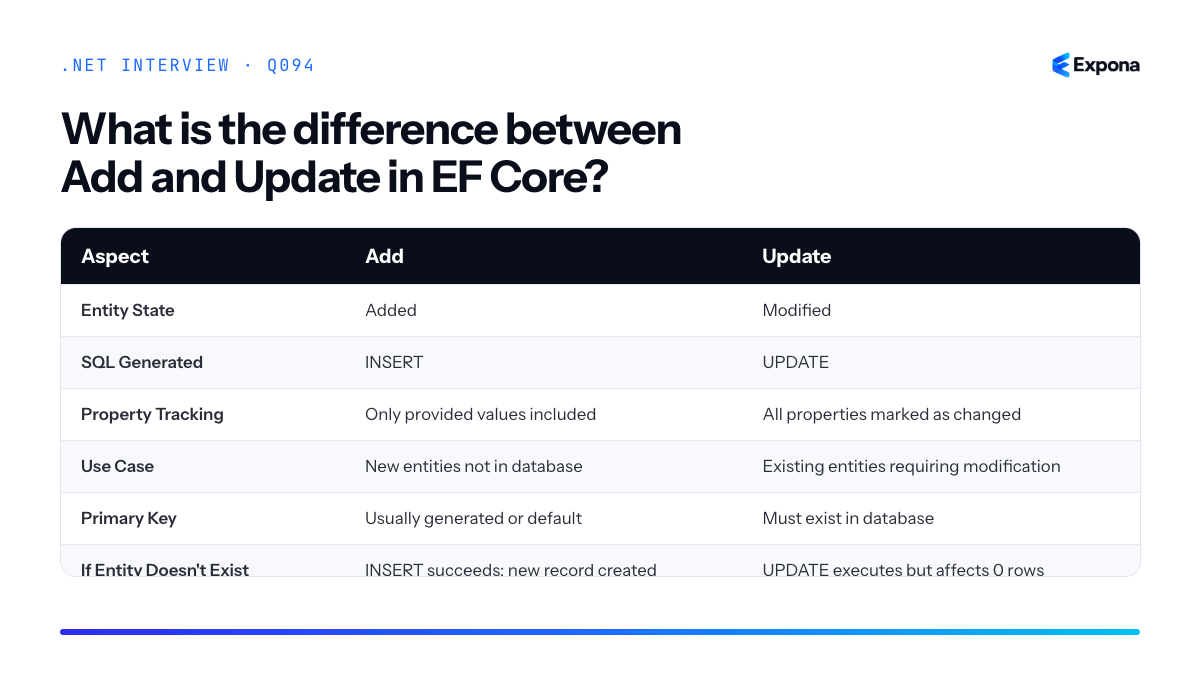
Key points to mention
- EntityState matters: Add uses
EntityState.Added, Update usesEntityState.Modified. You can checkentry.Stateto verify the current state. - All properties updated: Update marks all properties as changed, so UPDATE statements include every column. This differs from attaching an entity and modifying only specific properties.
- Tracking vs. detached entities: Both methods work on tracked or detached entities. Use Add for new detached entities and Update for existing detached entities that need full synchronization.
- Performance consideration: If you only need to update specific properties, consider using
DbContext.Attach()followed by property-level changes instead of Update for better performance. - Relationships: Add handles relationship setup for new entities; Update assumes relationships already exist in the database.
Common follow-up questions
- What's the difference between Update and Attach? How would you update only specific properties?
- What happens if you call Add on an entity with an existing primary key value?
- How does Update interact with EF Core migrations and schema changes?
Related interview questions
.NETCsharpefcore- EntityState matters: Add uses
95What is AsNoTracking?
BeginnerAsNoTracking is a LINQ method that tells Entity Framework Core to retrieve entities without attaching them to the change tracker. This makes queries faster and more memory-efficient for read-only scenarios where you don't plan to modify the returned data.
How it works
By default, when Entity Framework Core executes a query, it attaches the returned entities to its internal change tracker. The change tracker monitors these entities for modifications, allowing EF Core to detect and persist changes when you call
SaveChanges(). However, this monitoring consumes memory and CPU cycles.AsNoTrackingdisables this behavior for a specific query. The retrieved entities are materialized into objects but are never attached to the change tracker. This means:- EF Core doesn't allocate memory for change tracking snapshots
- The query executes faster because there's no tracking overhead
- You cannot modify and persist those entities using
SaveChanges() - Multiple calls to retrieve the same entity by ID will create separate instances (since there's no identity map)
This approach is ideal for read-only scenarios like displaying data in a UI, generating reports, or building search results where you have no intention of updating the database.
Example
csharp// WITH tracking (default behavior) var orders = _context.Orders .Where(o => o.CustomerId == 42) .ToList(); // Entities are tracked // WITHOUT tracking (read-only) var ordersReadOnly = _context.Orders .AsNoTracking() .Where(o => o.CustomerId == 42) .ToList(); // Entities are NOT tracked // Attempting to modify and save won't work ordersReadOnly.First().Amount = 999; _context.SaveChanges(); // Changes won't be persistedIn the first query, the
Orderentities are tracked and any modifications you make will be detected and saved. In the second query withAsNoTracking(), the entities are pure data objects with no connection to the change tracker, so modifications are ignored.Key points to mention
AsNoTrackingis a performance optimization for queries where you only need to read data, not modify it- It reduces memory usage and query execution time by eliminating change tracking overhead
- Related to this concept is using projections with Select, which is even more efficient because it only retrieves the columns you need
- You cannot call
SaveChanges()on untracked entities to persist modifications—you must re-attach them or query with tracking - The opposite pattern is change tracking, which is necessary when you need to update entities
Common follow-up questions
- Can I attach an untracked entity back to the context? Yes, using
_context.Attach(entity)or_context.Update(entity), but you'll need to manually mark properties as modified. - Should I always use AsNoTracking? No. Use it only for read-only queries. For update/delete operations, you need tracking to detect changes.
- How does AsNoTracking compare to using DTO projections? Projections are often better because they fetch only needed columns and are inherently untracked, avoiding unnecessary data transfer.
Related interview questions
- Why use projections with Select in EF Core?
- How does EF Core change tracking work?
- What is ExecuteUpdate and ExecuteDelete?
Further reading
.NETCsharpPerformance96What is the difference between IQueryable and IEnumerable?
BeginnerIQueryable translates LINQ expressions into provider-specific queries (usually SQL) executed on the server, while IEnumerable executes in-memory using LINQ-to-Objects. This means IQueryable is deferred, filtered at the source, and more efficient for large datasets; IEnumerable loads data first, then filters in your application.
How it works
IQueryable uses an expression tree—a representation of your query as data—which a provider (like Entity Framework Core) translates into SQL or another language before execution. When you call
.Where()on an IQueryable, you're not executing the filter; you're building an abstract syntax tree. Only when you materialize the result (with.ToList(),.FirstOrDefault(), or iteration) does the provider send SQL to the database.IEnumerable uses delegates and LINQ-to-Objects, executing in-memory. Filters happen after data is loaded into your application. If you call
.Where()on an IEnumerable of 1 million records, all 1 million are loaded first, then filtered in memory—potentially wasteful.The key insight: defer execution until necessary, and push filtering as close to the data source as possible. Calling
.ToList()converts IQueryable to IEnumerable, severing the connection to the database provider.Example
csharpusing Microsoft.EntityFrameworkCore; var context = new AppDbContext(); // IQueryable: builds SQL expression tree, filters on server IQueryable<User> queryable = context.Users .Where(u => u.Age > 30) .Where(u => u.City == "New York"); // Nothing executed yet. Inspect queryable.ToString() to see the SQL expression. // IEnumerable: loads all users into memory, filters in-app IEnumerable<User> enumerable = context.Users .ToList() // ← SQL executes here; all rows loaded .Where(u => u.Age > 30) .Where(u => u.City == "New York"); // This inefficient pattern loads 1M rows, then filters in RAM. var results = queryable.ToList(); // ← SQL executes NOW with WHERE clauses; fewer rows returnedThe IQueryable version sends
SELECT * FROM Users WHERE Age > 30 AND City = 'New York'to the database; the IEnumerable version fetches all users, then filters in your process.Key points to mention
- Deferred execution: IQueryable delays translation until materialization; IEnumerable executes immediately upon filtering.
- Data source: IQueryable targets external sources (databases); IEnumerable is in-memory only, using LINQ-to-Objects.
- Performance: IQueryable is far more efficient for large datasets because filtering happens server-side; IEnumerable loads everything into RAM first.
- Conversion: Calling
.ToList(),.ToArray(), or.FirstOrDefault()on IQueryable executes the query and returns IEnumerable (or a concrete type). After that, no further filtering goes to the database. - Expressions: IQueryable accepts Expression<Func> predicates; IEnumerable accepts Func delegates. Expressions are code-as-data, enabling translation.
Common follow-up questions
- When would you intentionally use IEnumerable over IQueryable? When you need in-memory LINQ with custom logic that the database provider cannot translate, or when working with collections already loaded in memory.
- What happens if you chain IQueryable and IEnumerable together? The moment you call
.ToList(), you create an IEnumerable; all subsequent LINQ operations execute in-memory, defeating server-side query optimization. - Can you use .Select() on IQueryable to project before .ToList()? Yes, and you should—select only the columns you need server-side to reduce data transfer and memory usage.
Aspect IQueryable IEnumerable Execution Model Deferred; translates to SQL/provider-specific query Deferred; executes in-memory with delegates Data Source External (database, OData, etc.) via provider In-memory collections When Query Runs At materialization (ToList, FirstOrDefault, iteration) At materialization, but filtering happens in-app Filtering Location Server-side; only filtered rows returned Client-side; all data loaded, then filtered in RAM Performance (1M rows) Excellent; WHERE clause sent to database Poor; all 1M rows loaded into memory Use Case EF Core queries, LINQ-to-SQL, large datasets In-memory lists, arrays, already-materialized data 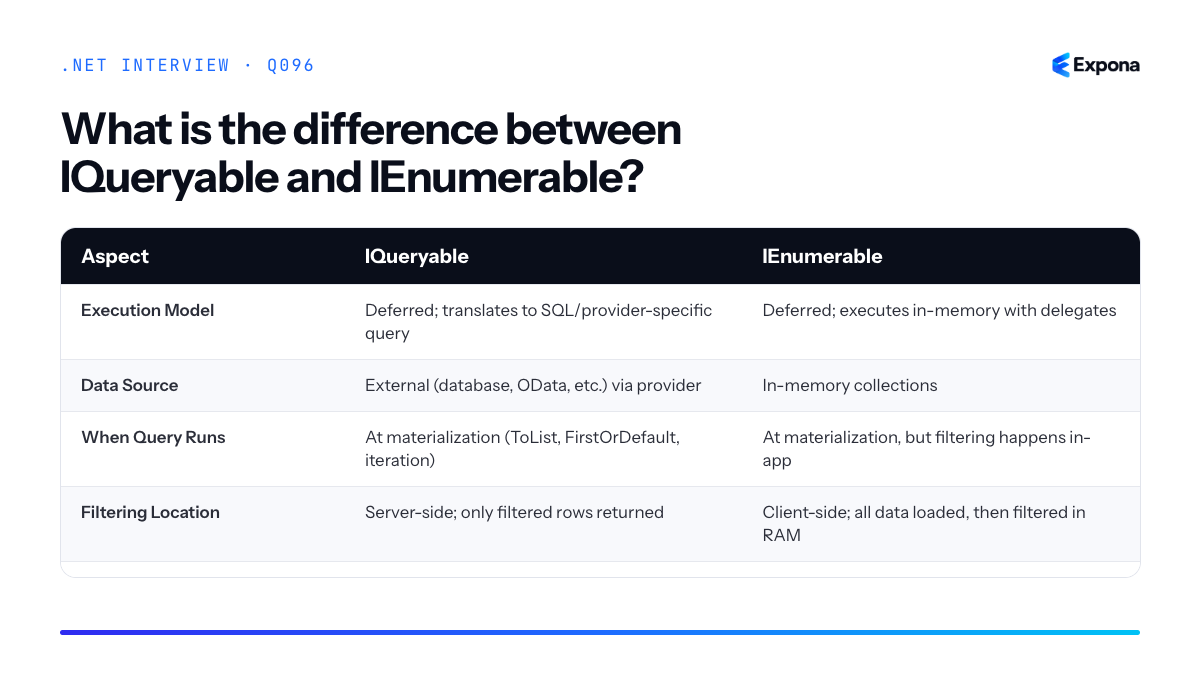
Related interview questions
.NETCsharpefcorelinq97What is eager loading in EF Core?
BeginnerEager loading is a technique in EF Core where you explicitly load related data from the database in the same query as the parent entity, using the
Include()method. This prevents the N+1 query problem by combining multiple tables into a single database round trip instead of executing separate queries for each related entity.How it works
When you query an entity in EF Core, by default only that entity's columns are loaded from the database. Related entities are loaded lazily—meaning they're fetched only when you access them in code, triggering additional queries. Eager loading changes this behavior by telling EF Core to fetch related data upfront using
Include()orThenInclude().EF Core translates your
Include()chains into SQL JOINs (for single relationships) or separate queries (depending on the navigation structure). The result is that all necessary data arrives in one or two round trips, eliminating the performance penalty of lazy loading.Eager loading is particularly useful when you know you'll need related data immediately. It's a deliberate, explicit choice—you declare your data dependencies upfront, making queries more predictable and performant in high-traffic scenarios.
Example
csharp// Entities public class Author { public int AuthorId { get; set; } public string Name { get; set; } public ICollection<Book> Books { get; set; } } public class Book { public int BookId { get; set; } public string Title { get; set; } public int AuthorId { get; set; } public Author Author { get; set; } } // Eager loading example using var context = new LibraryContext(); // Load all authors with their books in a single query var authors = context.Authors .Include(a => a.Books) .ToList(); // Access related data without extra queries foreach (var author in authors) { Console.WriteLine($"{author.Name} wrote {author.Books.Count} books"); }This query generates a JOIN or a query with the related
Booksdata included, so all books are available immediately without triggering additional database queries.Key points to mention
- Use
Include()to specify related data: ChainInclude()for single-level relationships andThenInclude()for nested relationships (e.g.,.Include(a => a.Books).ThenInclude(b => b.Publisher)). - Improves performance for known dependencies: Eager loading reduces database round trips when you're certain you'll access related entities, avoiding the N+1 problem.
- Explicit and declarative: Unlike lazy loading, eager loading makes your data requirements visible in code, improving maintainability and debugging.
- Applies to
DbContext.SaveChanges()queries: You callToList(),FirstOrDefault(), or similar to materialize results; eager loading happens at query execution time. - Trade-off with memory: Eager loading can load more data than needed, so use it judiciously for critical queries.
Common follow-up questions
- What's the difference between eager loading and lazy loading? Eager loading fetches related data upfront with
Include(); lazy loading fetches it on-demand when accessed. Eager loading prevents extra queries but loads more data; lazy loading is flexible but risks N+1 queries. - When should I use eager loading versus explicit loading or projection? Use eager loading when you need all related data. Use explicit loading (
context.Entry().Collection().Load()) for conditional scenarios. Use projections (selecting only needed columns withSelect()) for read-only scenarios to reduce memory footprint. - How does eager loading affect SQL performance? Eager loading generates JOINs, which can be large result sets. For complex graphs,
Select()projections or multiple queries may be faster than a massive JOIN.
Related interview questions
.NETCsharpefcore- Use
98What is logging in ASP.NET Core?
BeginnerLogging in ASP.NET Core is the built-in mechanism for recording application events and diagnostics using the
ILogger<T>interface. It provides structured logging that routes messages to configurable providers (console, files, cloud services) with minimal setup. Unlike older logging frameworks, ASP.NET Core logging is lightweight, performant, and integrated by default.How it works
ASP.NET Core uses a provider-based architecture where the
ILoggerFactorycreates logger instances for your classes. You injectILogger<T>into any service via dependency injection, and it automatically uses providers registered inProgram.cs. Message templates allow structured logging with named parameters (like"User {UserId} logged in"), which enables filtering, querying, and rich analysis in external log aggregators like Seq or Application Insights. Log levels (Trace, Debug, Information, Warning, Error, Critical) control verbosity per category or provider. Each log entry is enriched with timestamp, level, category name, and scope information automatically.Example
csharp// Program.cs var builder = WebApplication.CreateBuilder(args); builder.Services.AddLogging(config => { config.ClearProviders(); config.AddConsole(); config.AddDebug(); config.SetMinimumLevel(LogLevel.Information); }); builder.Services.AddScoped<UserService>(); var app = builder.Build(); app.Run(); // UserService.cs public class UserService { private readonly ILogger<UserService> _logger; public UserService(ILogger<UserService> logger) { _logger = logger; } public void LoginUser(int userId, string email) { _logger.LogInformation("User {UserId} with email {Email} is logging in", userId, email); if (userId < 1) { _logger.LogWarning("Invalid user ID attempted: {UserId}", userId); } } }This code injects
ILogger<UserService>, adds console and debug providers, and logs structured messages with named parameters—enabling external tools to query logs byUserIdorEmailwithout parsing strings.Key points to mention
- Built-in and zero-config: No NuGet packages required; logging works out of the box in ASP.NET Core templates.
- Use message templates, not string concatenation: Write
_logger.LogInformation("User {Id}", id)instead of_logger.LogInformation($"User {id}")for structured data. - Multiple providers: Console, Debug, EventLog, EventSource, and third-party providers (Serilog, NLog, Seq) work interchangeably.
- Log filtering: Control verbosity per category and log level in configuration; production typically uses Warning or higher.
- Performance: ASP.NET Core logs only when the level is enabled, and uses efficient structured formats instead of string building.
Common follow-up questions
- How do you configure different log levels for different namespaces or providers?
- What is the difference between
LogDebug,LogInformation, andLogError, and when should you use each? - How do you add custom log providers or integrate Serilog for enhanced structured logging?
Related interview questions
Further reading
.NETCsharpaspnetcore99What is a Razor Page?
BeginnerA Razor Page is a page-focused programming model in ASP.NET Core where each page consists of a .cshtml view file paired with a C# code-behind class called a PageModel. It simplifies web application development by combining routing, rendering, and request handling into a single, cohesive unit per page, making it ideal for form-driven applications and smaller to medium-sized projects.
How it works
Razor Pages operates on a file-based routing convention rather than explicit controller actions. When you create a .cshtml file in the Pages folder, ASP.NET Core automatically maps it to a URL route based on its file path. For example, a file at
Pages/Products/Index.cshtmlis accessible at/Products/Index.Each Razor Page has an associated PageModel class that handles:
- HTTP request handling: OnGet, OnPost, OnPut, OnDelete methods correspond to HTTP verbs
- Data binding: Form data automatically binds to public properties via model binding
- Business logic: Validation, database operations, and service calls
- View data: Properties and methods accessible directly in the .cshtml markup
This differs from MVC in ASP.NET Core, which separates controllers from views more explicitly. Razor Pages keeps the code and markup relationships tighter and more discoverable.
Example
csharp// Pages/Products/Create.cshtml.cs using Microsoft.AspNetCore.Mvc; using Microsoft.AspNetCore.Mvc.RazorPages; public class CreateModel : PageModel { private readonly IProductService _productService; public CreateModel(IProductService productService) { _productService = productService; } [BindProperty] public Product Product { get; set; } = new(); public void OnGet() { } public async Task<IActionResult> OnPostAsync() { if (!ModelState.IsValid) return Page(); await _productService.AddProductAsync(Product); return RedirectToPage("Index"); } }The corresponding .cshtml file uses the PageModel properties directly via
@Model, and form posts automatically invokeOnPostAsync()with data bound to theProductproperty.Key points to mention
- Convention-based routing: File location determines URL without explicit route declarations
- Built-in model binding:
[BindProperty]automatically maps form data to public properties - Simpler for small-to-medium projects: Less boilerplate than full MVC, faster to build form-heavy applications
- Handler methods: OnGet, OnPost, OnPut, OnDelete with optional async variants (OnGetAsync, OnPostAsync, etc.)
- Dependency injection support: Constructor injection works seamlessly with PageModel classes
Common follow-up questions
- When would you choose Razor Pages over MVC? — When building form-centric applications, line-of-business apps, or small projects where file-per-page organization improves maintainability
- How does routing work in Razor Pages? — It's convention-based; the folder structure under
Pages/maps directly to URLs, with optional@pagedirectives for custom routes - Can you share code between Razor Pages? — Yes, via Partial Pages, base PageModel classes, services, and TagHelpers for reusable UI and logic
Related interview questions
.NETCsharpaspnetcore100What is MVC in ASP.NET Core?
BeginnerMVC (Model-View-Controller) is an architectural pattern in ASP.NET Core that separates an application into three interconnected components: Models (data), Views (UI), and Controllers (request handlers). Controllers receive HTTP requests, process business logic, and return Views rendered with Razor—making it ideal for server-side web applications where the server generates HTML.
How it works
The MVC pattern divides responsibility to improve maintainability and testability. When a user makes a request:
- Controller receives the HTTP request and routes to an action method.
- Model represents the data—either retrieved from a database or accepted from the request. It contains both data and validation logic.
- View is a Razor template (.cshtml file) that renders HTML to the user, displaying the Model data dynamically.
- The controller returns the View with the Model, and Razor renders it server-side before sending HTML to the browser.
This separation means your data layer doesn't know about UI rendering, UI doesn't contain business logic, and controllers orchestrate the flow. Unlike Razor Pages, which combine these concerns in a single file, MVC keeps them strictly separate.
Example
csharp// Model public class Product { public int Id { get; set; } public string Name { get; set; } public decimal Price { get; set; } } // Controller public class ProductController : Controller { private readonly ApplicationDbContext _context; public ProductController(ApplicationDbContext context) { _context = context; } // Action method receives request, fetches model, returns view public async Task Details(int id) { var product = await _context.Products.FindAsync(id); if (product == null) return NotFound(); return View(product); // Pass model to view } } // View (Details.cshtml) @model Product <h1>@Model.Name</h1> <p>Price: $@Model.Price</p>The controller fetches a Product from the database, passes it to the Details.cshtml view, which renders it as HTML with the product's name and price.
Key points to mention
- Separation of concerns: Each component has a single responsibility, making code easier to test and maintain.
- Server-side rendering: HTML is generated on the server using Razor before being sent to the browser, unlike client-side frameworks.
- Routing: ASP.NET Core maps URLs to controller actions automatically (e.g., /Product/Details/5 calls ProductController.Details(5)).
- Model binding: ASP.NET Core automatically binds request data (query strings, form data) to action method parameters—reducing boilerplate code.
- Dependency injection: Controllers receive dependencies via constructor injection, enabling testability and loose coupling.
Common follow-up questions
- What's the difference between MVC and Razor Pages? (Razor Pages combine Model and View logic in a single file with a code-behind, while MVC separates them completely.)
- How does model validation fit into MVC? (Validation logic lives in the Model via data annotations or FluentValidation; controllers check ModelState before processing.)
- Can I use MVC and Razor Pages in the same project? (Yes, ASP.NET Core supports both patterns simultaneously.)
Related interview questions
.NETCsharpaspnetcore101What is Blazor?
BeginnerBlazor is a .NET framework for building interactive web applications using C# and Razor syntax instead of JavaScript. It runs either on the server (Blazor Server) or in the browser via WebAssembly (Blazor WebAssembly), and in .NET 8+ you can use Interactive Auto mode to combine both. This allows full-stack .NET development where your UI logic, business logic, and data access all use C#.
How it works
Blazor uses a component-based architecture where you build reusable UI components with C# and Razor markup. The framework handles rendering and interactivity through different hosting models:
Blazor Server runs your component logic on the server. When a user interacts with the page, a WebSocket connection sends events to the server, which re-renders the component and sends UI updates back to the browser. This model is ideal for real-time applications and complex server-side logic, but requires a persistent connection.
Blazor WebAssembly compiles your .NET code to WebAssembly, which runs directly in the browser. Your entire application downloads to the client, so it works offline and reduces server load, but initial load time is larger and server communication requires HTTP calls.
Interactive Auto (introduced in .NET 8) intelligently switches between Server rendering (initial load) and WebAssembly (interactive updates) to optimize performance automatically.
Blazor components are Razor files (.razor) containing markup, C# code, and CSS. They use familiar ASP.NET Core concepts like dependency injection, routing, forms, and data binding, making the transition from traditional ASP.NET smooth for .NET developers.
Example
csharp@page "/counter" @rendermode InteractiveAuto <PageTitle>Counter</PageTitle> <h1>Counter</h1> <p role="status">Current count: @count</p> <button class="btn btn-primary" @onclick="IncrementCount">Click me</button> @code { private int count = 0; private void IncrementCount() { count++; } }This Blazor component renders a counter button that increments a variable. The
@rendermode InteractiveAutodirective enables automatic mode switching,@onclickbinds the button click to the C# method, and the markup updates when state changes.Key points to mention
- Blazor eliminates the need to write JavaScript for interactive UIs; C# developers can build full-stack web apps in a single language.
- Three hosting models exist: Server (persistent WebSocket connection), WebAssembly (runs in browser), and Interactive Auto (.NET 8+, combines both intelligently).
- Components use Razor syntax with embedded C# code, similar to ASP.NET MVC Razor views, making it familiar to .NET developers.
- Blazor supports dependency injection and scoped services, allowing clean architecture and testable code.
- WebAssembly apps are larger on first load but offer offline capability and reduce server workload, while Server mode provides real-time updates with smaller payload sizes.
Common follow-up questions
- What is the difference between Blazor Server and Blazor WebAssembly? – Expect to discuss connection models, latency, offline support, and when to use each.
- How do you call a .NET API from a Blazor WebAssembly app? – You'll use HttpClient to make HTTP requests to backend endpoints, similar to JavaScript SPAs.
- Can Blazor replace ASP.NET MVC? – Blazor is for interactive UIs; traditional ASP.NET Core MVC is still better for traditional server-rendered pages or when you want simpler HTML without JavaScript interactivity.
Related interview questions
.NETCsharpaspnetcore102What is a unit test?
BeginnerA unit test is an automated test that verifies a single, small piece of code—typically a method or function—in isolation from the rest of the application. Unit tests are the foundation of the testing pyramid and help catch bugs early, ensure code quality, and make refactoring safer. In .NET, popular frameworks include xUnit, NUnit, and MSTest.
How it works
Unit testing follows a simple pattern: Arrange, Act, Assert (AAA). First, you set up the conditions and inputs (Arrange). Then, you execute the code you're testing (Act). Finally, you verify that the output matches your expectations (Assert).
A unit test isolates the code under test by removing external dependencies like databases, APIs, or file systems. This isolation is achieved through mocking and stubbing—replacing real dependencies with test doubles that behave in a controlled way. This ensures your test fails only when the code logic itself is wrong, not because an external service is unavailable.
Each unit test should be small, focused, and independent. It should run quickly (milliseconds), require no special setup, and not depend on other tests or external systems. This allows you to run hundreds of tests in seconds and get immediate feedback during development.
Example
csharp// Production code public class Calculator { public int Add(int a, int b) => a + b; public int Subtract(int a, int b) => a - b; } // Unit test using xUnit public class CalculatorTests { [Fact] public void Add_WithTwoPositiveNumbers_ReturnsSum() { // Arrange var calculator = new Calculator(); int a = 5, b = 3; // Act int result = calculator.Add(a, b); // Assert Assert.Equal(8, result); } [Theory] [InlineData(10, 5, 5)] [InlineData(0, 0, 0)] [InlineData(-5, 3, -2)] public void Subtract_WithVariousInputs_ReturnsCorrectDifference(int a, int b, int expected) { var calculator = new Calculator(); int result = calculator.Subtract(a, b); Assert.Equal(expected, result); } }This example shows two unit tests: one that tests a specific case and another that uses
[Theory]with multiple data sets to test the same logic with different inputs.Key points to mention
- Isolation: Tests should verify one logical unit of behavior without external dependencies; mock or stub external services.
- Speed: Unit tests must run in milliseconds, enabling frequent execution and rapid feedback during development.
- Clarity: Test names should describe what is being tested and the expected outcome (e.g.,
Add_WithTwoPositiveNumbers_ReturnsSum). - Independence: Each test should be independent; tests should not rely on shared state or the order of execution.
- Coverage: Aim for meaningful coverage of business logic and edge cases, not arbitrary percentage targets; quality over quantity.
Common follow-up questions
- How do you mock dependencies in unit tests? (Typically answered with Moq or NSubstitute libraries.)
- What's the difference between unit tests, integration tests, and end-to-end tests? (Unit tests isolate a single method; integration tests verify multiple components together; E2E tests simulate real user workflows.)
- How do you achieve good test coverage without over-testing? (Focus on critical paths, edge cases, and error scenarios rather than testing every line.)
Related interview questions
Further reading
.NETCsharpTesting103What is xUnit?
BeginnerxUnit is a free, open-source unit testing framework for .NET that provides a clean, simple API for writing and organizing tests. It uses attributes like
[Fact]for single test cases and[Theory]with[InlineData]for parameterized tests. xUnit is designed to be developer-friendly and integrates seamlessly with Visual Studio, Visual Studio Code, and the dotnet CLI.How it works
xUnit works by allowing you to mark test methods with attributes that tell the test runner how to execute them. When you run tests using the dotnet test command, xUnit discovers all methods decorated with
[Fact]or[Theory], executes them in isolation, and reports pass/fail results. Each test is independent—xUnit creates a fresh instance of your test class for each test method, ensuring tests don't interfere with each other.The framework follows the AAA pattern (Arrange, Act, Assert): you set up your test data, execute the code being tested, and verify the results using assertion methods. xUnit provides clear assertion helpers like
Assert.Equal(),Assert.True(),Assert.Throws(), and many others. You can also use third-party assertion libraries like FluentAssertions for more expressive assertions.xUnit also supports fixtures for shared setup/teardown logic, collections to run tests sequentially, and traits to organize and filter tests—all without requiring base classes or static setup methods.
Example
csharpusing Xunit; public class CalculatorTests { [Fact] public void Add_WithTwoNumbers_ReturnsCorrectSum() { // Arrange var calculator = new Calculator(); int num1 = 5; int num2 = 3; // Act int result = calculator.Add(num1, num2); // Assert Assert.Equal(8, result); } [Theory] [InlineData(2, 3, 5)] [InlineData(10, 5, 15)] [InlineData(-1, 1, 0)] public void Add_WithMultipleInputs_ReturnsCorrectSum(int a, int b, int expected) { var calculator = new Calculator(); int result = calculator.Add(a, b); Assert.Equal(expected, result); } } public class Calculator { public int Add(int a, int b) => a + b; }The first test uses
[Fact]to test a single scenario, while the second uses[Theory]with[InlineData]to run the same test logic with different input values, reducing code duplication for testing edge cases.Key points to mention
- xUnit is the modern, recommended testing framework for .NET Core and .NET 5+ projects, widely adopted in the .NET community
[Fact]runs a single test;[Theory]runs the same test with multiple data sets using[InlineData],[MemberData], or[ClassData]- It follows the AAA pattern (Arrange, Act, Assert) and provides comprehensive assertion methods for validating behavior
- xUnit uses class-per-fixture design, creating a new test class instance per test method, eliminating shared state issues
- You can organize tests with
[Trait]attributes and run them selectively using the dotnet CLI or IDE filters
Common follow-up questions
- What's the difference between
[Fact]and[Theory]attributes? - How do you test for expected exceptions in xUnit? (Answer: Use
Assert.Throws<T>()with a lambda expression) - How does xUnit compare to NUnit or MSTest? (Answer: xUnit is simpler, uses no base classes, and has better async support—see what is a unit test for context)
Related interview questions
- What is a unit test?
- What does the dotnet CLI do?
- How do you write integration tests for ASP.NET Core?
Further reading
.NETCsharpTesting104What is mocking?
BeginnerMocking is a unit testing technique that replaces real dependencies with fake objects to isolate the code under test. Mocks allow you to control external behavior, verify interactions, and test in isolation without relying on databases, APIs, or other services. Libraries like Moq and NSubstitute make it easy to create and configure mocks in .NET.
How it works
When you write a unit test, your code often depends on external services—a database, an HTTP client, a payment gateway, or a logging service. Testing against real dependencies is slow, brittle, and couples your tests to implementation details. Mocking solves this by creating a substitute object that implements the same interface as the real dependency.
The mock intercepts method calls, returns predefined values, and records what methods were called and with what arguments. This lets you:
- Control behavior—specify exactly what the dependency returns in each test scenario
- Isolate the unit—test only your code logic without external side effects
- Verify interactions—assert that your code called the dependency correctly
- Test edge cases—easily simulate errors, timeouts, or unusual responses
Mocking works best with dependency injection, where dependencies are passed in rather than created inside the class. This makes it trivial to swap the real dependency for a mock.
Example
csharp// Interface that can be mocked public interface IUserRepository { Task<User> GetUserByIdAsync(int id); } // Service that depends on the repository public class UserService { private readonly IUserRepository _repository; public UserService(IUserRepository repository) { _repository = repository; } public async Task<string> GetUserNameAsync(int id) { var user = await _repository.GetUserByIdAsync(id); return user?.Name ?? "Unknown"; } } // Unit test with a mock using Moq [TestClass] public class UserServiceTests { [TestMethod] public async Task GetUserNameAsync_WhenUserExists_ReturnsUserName() { // Arrange var mockRepository = new Mock<IUserRepository>(); mockRepository .Setup(r => r.GetUserByIdAsync(1)) .ReturnsAsync(new User { Id = 1, Name = "Alice" }); var service = new UserService(mockRepository.Object); // Act var result = await service.GetUserNameAsync(1); // Assert Assert.AreEqual("Alice", result); mockRepository.Verify(r => r.GetUserByIdAsync(1), Times.Once); } }The test creates a mock repository that returns a specific user when called, injects it into the service, and then verifies both the result and that the repository was called exactly once.
Key points to mention
- Mocks are for behavior verification—they let you check that your code called dependencies correctly, not just that results are correct
- Use interfaces, not concrete classes—mocking requires an interface to implement; abstract base classes work too
- Setup and verify are core operations—Setup configures return values, Verify asserts method calls occurred as expected
- Different from stubs—stubs only return values; mocks also track interactions and allow verification
- Improves test speed and reliability—no network calls, database queries, or file I/O means tests run fast and consistently
Common follow-up questions
- What's the difference between a mock and a stub? (Stubs provide canned responses; mocks verify behavior.)
- When should you use mocks versus integration tests? (Mocks for unit tests and fast feedback; integration tests for real dependencies and end-to-end scenarios.)
- How do you mock static methods or sealed classes? (Use libraries like Telerik JustMock or restructure to use interfaces instead.)
Related interview questions
- What is dependency injection?
- How do you map objects in .NET?
- What is Domain-Driven Design in .NET terms?
Further reading
.NETCsharpTesting105What is JSON serialization in .NET?
BeginnerJSON serialization in .NET is the process of converting C# objects into JSON format (serialization) and converting JSON back into C# objects (deserialization). The built-in
System.Text.Jsonnamespace provides fast, efficient, and configurable APIs for this conversion, making it the standard choice for modern .NET applications.How it works
JSON serialization works by inspecting the properties and fields of your C# objects and converting their values into JSON text representation. The
JsonSerializerclass uses reflection to read object metadata and then writes data to a JSON string or stream. When deserializing, it parses JSON text and reconstructs C# objects by mapping JSON properties back to corresponding class members.System.Text.Jsonis part of the Base Class Library (BCL) and was introduced in .NET Core 3.0 as a replacement for Newtonsoft.Json (Json.NET). It prioritizes performance by using stack-based parsing and avoids unnecessary allocations. You can control serialization behavior throughJsonSerializerOptions, which allows you to customize naming conventions, date formats, null handling, and more. Additionally, attributes like[JsonPropertyName]and[JsonIgnore]give fine-grained control over individual properties.For even better performance, System.Text.Json source generation generates serialization code at compile time rather than relying on runtime reflection, eliminating reflection overhead and improving startup time in high-performance scenarios.
Example
csharpusing System.Text.Json; using System.Text.Json.Serialization; public class Person { [JsonPropertyName("full_name")] public string Name { get; set; } [JsonIgnore] public int InternalId { get; set; } public int Age { get; set; } } // Serialization var person = new Person { Name = "Alice", Age = 30, InternalId = 123 }; string json = JsonSerializer.Serialize(person); Console.WriteLine(json); // Output: {"full_name":"Alice","Age":30} // Deserialization with options var options = new JsonSerializerOptions { PropertyNameCaseInsensitive = true }; var deserialized = JsonSerializer.Deserialize<Person>(json, options); Console.WriteLine(deserialized.Name); // Output: AliceThis example shows serialization of a
Personobject to JSON (with renamed and ignored properties), then deserialization back to a C# object using case-insensitive property matching.Key points to mention
System.Text.Jsonis the modern, built-in serializer for .NET; it is faster and more lightweight than Newtonsoft.Json- Use
JsonSerializer.Serialize()for serialization andJsonSerializer.Deserialize<T>()for deserialization JsonSerializerOptionsallows global configuration:PropertyNamingPolicy,WriteIndented,DefaultIgnoreCondition, etc.- Attributes like
[JsonPropertyName],[JsonIgnore], and[JsonConverter]provide property-level control - Source generation mode eliminates runtime reflection, ideal for AOT compilation and performance-critical applications
Common follow-up questions
- What is the difference between System.Text.Json and Newtonsoft.Json? System.Text.Json is faster, built-in, and uses stack-based parsing; Newtonsoft.Json is more flexible and widely compatible with older code.
- How do I handle polymorphic types during deserialization? Use
[JsonDerivedType]attributes or implement a customJsonConverterto handle type discrimination. - Can I use System.Text.Json with async streams? Yes,
JsonSerializer.DeserializeAsyncEnumerable<T>()streams JSON arrays efficiently without loading everything into memory.
Related interview questions
- How does System.Text.Json source generation help?
- What is JIT compilation?
- What is the Base Class Library (BCL)?
Further reading
.NETCsharp106What is HttpClient?
BeginnerHttpClient is a .NET class that sends HTTP requests to web servers and receives responses. It provides methods like GetAsync, PostAsync, and PutAsync for making REST API calls. You should reuse a single HttpClient instance or use IHttpClientFactory to avoid socket exhaustion and connection pooling issues.
How it works
HttpClient sits on top of the HTTP protocol and provides a high-level abstraction for sending requests and handling responses. When you call a method like GetAsync, HttpClient constructs an HTTP request message, sends it over the network to a specified URI, waits for the server to respond, and returns an HttpResponseMessage containing the status code, headers, and body content.
HttpClient maintains an underlying socket connection pool to reuse connections across requests. Creating a new HttpClient instance for each request exhausts sockets (especially under load), causing
SocketExceptionerrors. This is why best practice dictates either reusing a static HttpClient or using IHttpClientFactory in dependency injection scenarios. HttpClient is thread-safe, so sharing one instance across multiple concurrent requests is safe and efficient.The class also handles common HTTP operations transparently—compression, cookies via CookieContainer, automatic redirects, and authentication headers can all be configured on the DefaultRequestHeaders property or per-request.
Example
csharp// Modern approach: inject IHttpClientFactory public class ApiService { private readonly IHttpClientFactory _httpClientFactory; public ApiService(IHttpClientFactory httpClientFactory) { _httpClientFactory = httpClientFactory; } public async Task<string> GetUserAsync(int userId) { var client = _httpClientFactory.CreateClient(); var response = await client.GetAsync($"https://api.example.com/users/{userId}"); response.EnsureSuccessStatusCode(); return await response.Content.ReadAsStringAsync(); } } // Register in Program.cs builder.Services.AddHttpClient();This example uses IHttpClientFactory to create an HttpClient, sends a GET request, checks the status code, and reads the response body as a string—all asynchronously.
Key points to mention
- Reuse or use IHttpClientFactory: Never create a new HttpClient per request; this exhausts sockets and degrades performance.
- Thread-safe and asynchronous: HttpClient is designed for concurrent, async operations, making it ideal for high-throughput applications.
- Configurable defaults: Set DefaultRequestHeaders for common headers (User-Agent, Authorization) to avoid repetition.
- Timeout management: Set Timeout and individual request timeouts to prevent hanging requests and resource leaks.
- Response validation: Always call EnsureSuccessStatusCode() or check StatusCode to handle HTTP errors gracefully.
Common follow-up questions
- Why not just create a new HttpClient each time? Creating new instances exhausts the socket pool, leading to
SocketException: Too many open filesor connection failures under load. Socket reuse dramatically improves scalability. - How do you handle timeouts and retries? Set the Timeout property, or use libraries like Polly for sophisticated retry policies with exponential backoff.
- What's the difference between HttpClient and HttpClientFactory? HttpClient is the low-level class; IHttpClientFactory is a factory pattern that manages HttpClient lifetimes, handles socket pooling, and integrates with dependency injection for cleaner, more testable code.
Related interview questions
Further reading
.NETCsharp107What is the difference between Debug and Release builds?
BeginnerDebug builds include debugging symbols, disable optimizations, and enable runtime checks to help you find and fix bugs during development. Release builds are optimized for performance and size, remove debugging information, and are intended for production deployment.
How it works
When you compile a .NET project, the build configuration determines how the compiler and runtime treat your code. In Debug mode, the compiler preserves full symbol information (variable names, line numbers, stack traces) and applies minimal optimizations so code execution matches your source code line-by-line. This makes debugging easier but produces slower, larger binaries.
Release mode strips debugging symbols, applies aggressive optimizations (inlining, dead code elimination, loop unrolling), and removes conditional compilation blocks marked for Debug only. The result is a faster, smaller executable suitable for end users.
Both configurations are controlled via preprocessor directives and project properties. You can conditionally compile code using
#if DEBUGblocks, and the runtime behavior differs too—Debug builds may include extra validation that Release builds skip entirely.Example
csharpusing System; using System.Diagnostics; class Program { static void Main() { #if DEBUG Console.WriteLine("Debug mode: Running with full logging enabled"); LogDetailedMetrics(); #endif int result = CalculateSum(1000000); Console.WriteLine($"Result: {result}"); Debug.Assert(result > 0, "Result should be positive"); } static int CalculateSum(int n) { int sum = 0; for (int i = 0; i < n; i++) { sum += i; } return sum; } static void LogDetailedMetrics() { var sw = Stopwatch.StartNew(); // Expensive logging operations sw.Stop(); Console.WriteLine($"Metrics logged in {sw.ElapsedMilliseconds}ms"); } }This example demonstrates conditional compilation: the Debug logging and assertion only execute in Debug builds; in Release, they're stripped entirely, leaving a lean executable.
Key points to mention
- Symbols and debugging: Debug builds embed PDB (Program Database) files containing source-level debugging information; Release strips these for smaller, faster binaries.
- Optimizations: Release enables compiler optimizations like inlining and tail-call optimization; Debug disables them to preserve step-through execution.
- Preprocessor directives: Use
#if DEBUGblocks to conditionally include expensive logging, assertions, or validation only during development. - Performance difference: Release builds can be 2–10× faster depending on the workload; Debug builds prioritize debuggability over speed.
- Deployment: Always deploy Release builds to production; Debug builds waste resources and expose internal details.
Aspect Debug Build Release Build Optimization Level Minimal (preserves line-by-line execution) Aggressive (inlining, dead-code elimination) Debug Symbols Included (full PDB file with variable names, line numbers) Stripped (no debugging information) Binary Size Larger (includes metadata and symbols) Smaller (optimized, no extra info) Execution Speed Slower (optimizations disabled) Faster (fully optimized) #if DEBUG Blocks Included (compiled in) Excluded (compiled out) Use Case Development and local testing Production and release deployment 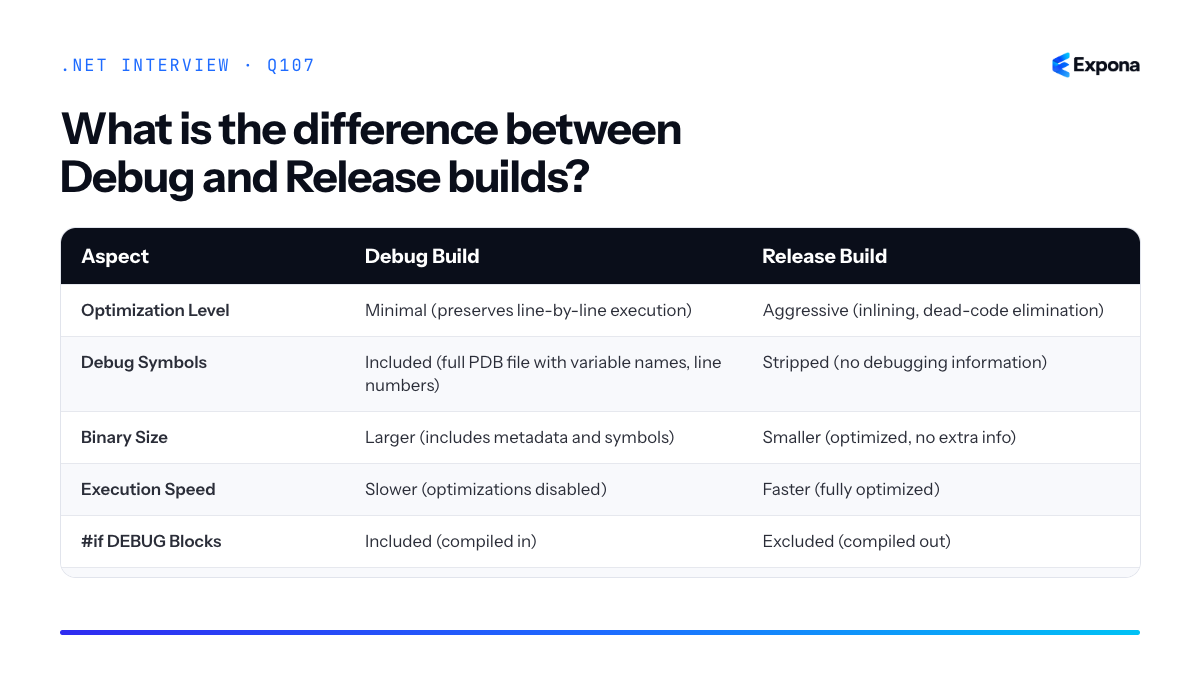
Common follow-up questions
- Can I debug a Release build? Yes, if you have the matching PDB file and enable "Debug release binaries" in your debugger, but stepping through optimized code can be confusing since instructions don't map 1:1 to source lines.
- How do I set the build configuration in Visual Studio? Use the Solution Configuration dropdown in the toolbar, or go to Project Properties → Build and set the "Configuration" to Debug or Release.
- Should I ever run Release locally? Yes—test Release builds locally before deployment to catch performance regressions or environment-specific issues.
Related interview questions
.NETCsharpPerformanceDevOps108What is .NET LTS vs STS?
Beginner.NET LTS (Long Term Support) versions receive three years of support and are released every two years in even-numbered years, while .NET STS (Standard Term Support) versions receive 18 months of support and are released in odd-numbered years. LTS versions are intended for production workloads requiring stability and long-term compatibility, whereas STS versions offer new features more frequently for teams that can upgrade regularly.
How it works
Microsoft maintains two release cadences for .NET to balance innovation with stability. Every even year (2022, 2024, 2026), an LTS release ships with a guarantee of three years of mainstream support plus an additional year of extended support if needed. These versions become the backbone of enterprise applications because they receive critical security and bug fixes over an extended period without major breaking changes.
In odd years (2023, 2025), Microsoft releases STS versions that receive 18 months of support. These versions introduce new language features, performance improvements, and library enhancements, but they have a shorter support window. Teams using STS must plan to upgrade within that timeframe or risk running unsupported software.
The rationale is straightforward: organizations with large codebases, regulatory requirements, or conservative upgrade schedules need LTS for predictability. Teams working on greenfield projects or microservices that update frequently benefit from STS innovations. For example, .NET 8 (released November 2023) is LTS, while .NET 9 (released November 2024) is STS.
Comparison table
Aspect LTS (Long Term Support) STS (Standard Term Support) Release cycle Every 2 years (even years: 2022, 2024, 2026) Every year (odd years: 2023, 2025) Mainstream support duration 3 years 18 months Extended support 1 additional year available None Target audience Enterprise, regulated industries, stable workloads Fast-moving teams, microservices, new projects Feature velocity Conservative; focused on stability High; new features every 12 months Examples .NET 6, .NET 8 .NET 7, .NET 9 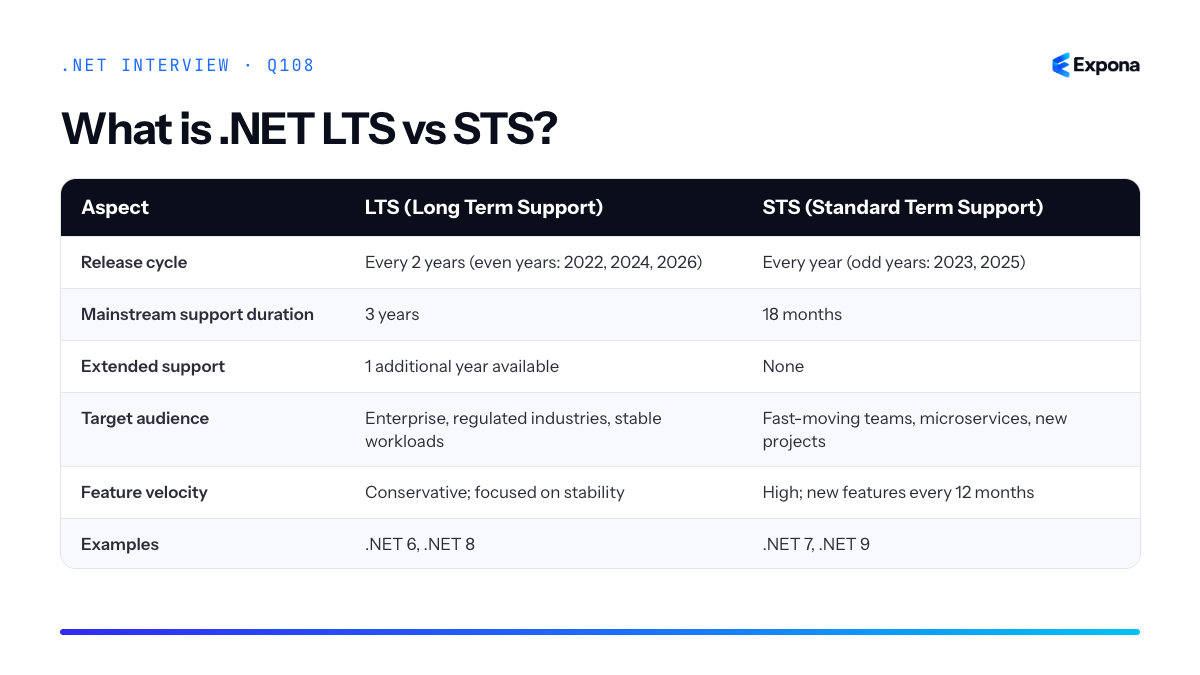
Example
csharp// Checking runtime version at startup var runtimeVersion = System.Runtime.InteropServices.RuntimeInformation.FrameworkDescription; Console.WriteLine($"Running on: {runtimeVersion}"); // Output example: Running on: .NET 8.0.0 // .NET 8 is LTS (supported until November 2026) var version = Environment.Version; bool isLtsVersion = version.Major is 6 or 8; // .NET 6 and 8 are LTS Console.WriteLine($"Using LTS: {isLtsVersion}");This code detects the running .NET version and identifies whether it is an LTS release; in production, you might log this during startup or enforce minimum version requirements.
Key points to mention
- Support timeline matters in production: Running unsupported versions exposes you to unpatched security vulnerabilities and lack of official bug fixes.
- LTS is not "slow": LTS versions still receive performance improvements and new minor features; the difference is they avoid breaking changes to the runtime and framework APIs.
- Plan upgrades accordingly: Teams using STS must budget time for annual or biennial upgrades; LTS teams have more flexibility but should still plan a transition path before support ends.
- Container and CI/CD matter: With containerization, upgrading base images from one LTS to the next is simpler than it was with .NET Framework, making LTS transitions more manageable.
- Hybrid approach is common: Large organizations often run LTS for core services and STS for experimental or microservice projects.
Common follow-up questions
- "How do I know when support ends for my current .NET version?" — Check the official dotnet.microsoft.com release calendar or use
dotnet --infoto see your current version and compare against the support matrix. - "Should we always use LTS?" — Not necessarily; it depends on your team's ability to update. If you have CI/CD automation and lightweight microservices, STS can work well. If you're managing legacy monoliths with compliance requirements, LTS is safer.
- "Can we stay on an older LTS forever?" — Technically yes, but not recommended; security patches eventually stop, and interoperability with new libraries becomes problematic. Plan a refresh cycle before end-of-life arrives.
Related interview questions
Further reading
.NETCsharp109What is a DTO?
BeginnerA Data Transfer Object (DTO) is a simple object used to transfer data between different layers of an application or over network boundaries like REST APIs. It decouples your API contract from your internal domain models, allowing you to expose only the data clients need without exposing implementation details or sensitive database fields.
How it works
DTOs act as intermediaries between your application's internal representation and external consumers. When a client makes an API request, your controller receives the request, maps incoming data to a DTO, processes it through your business logic layer, and then maps your domain model back to a response DTO before sending it to the client. This separation provides several benefits: it protects your database schema from direct exposure, allows you to include or exclude fields on a per-endpoint basis, enables versioning of API contracts independently from your domain model, and simplifies serialization by having flat, predictable structures.
Think of a DTO as a "data envelope" specifically designed for transport. Your database entity might have computed properties, navigation collections, or sensitive fields that should never be exposed. A DTO contains only the fields you explicitly want to send, with exactly the structure your API clients expect. This becomes especially important as your application grows—changing your database schema doesn't automatically break your API if you manage the DTO mapping carefully.
Example
csharp// Domain model (internal) public class User { public int Id { get; set; } public string Email { get; set; } public string PasswordHash { get; set; } public DateTime CreatedAt { get; set; } public ICollection<Order> Orders { get; set; } } // DTO for API response public class UserDto { public int Id { get; set; } public string Email { get; set; } public DateTime CreatedAt { get; set; } } // Controller usage [HttpGet("{id}")] public async Task<ActionResult<UserDto>> GetUser(int id) { var user = await _context.Users.FindAsync(id); if (user == null) return NotFound(); var userDto = new UserDto { Id = user.Id, Email = user.Email, CreatedAt = user.CreatedAt }; return Ok(userDto); }This example shows how the DTO excludes sensitive fields like
PasswordHashand navigation properties likeOrders, exposing only what the client needs and protecting your internal domain model.Key points to mention
- Separation of concerns: Your API contract remains independent of your database schema, allowing each to evolve separately without breaking clients.
- Security: DTOs prevent accidental exposure of sensitive fields like password hashes, internal timestamps, or admin flags that should never leave the server.
- Performance: By excluding unnecessary fields, you reduce payload size and improve serialization performance, especially when dealing with large object graphs.
- Mapping: Libraries like AutoMapper simplify DTO-to-domain model conversion, reducing boilerplate code and keeping mappings centralized and testable.
- API versioning: Different API versions can use different DTOs, allowing you to support multiple client versions without maintaining multiple domain models.
Common follow-up questions
- Should I use DTOs for every entity, or only for API responses? (Answer: Use them for public API boundaries; internal layer-to-layer transfers are less critical.)
- How do you handle DTO mapping at scale? (Answer: Use AutoMapper or similar libraries with profiles; define mappings in one place to avoid duplication.)
- Can a DTO contain business logic? (Answer: No; DTOs should be simple data containers with only properties. Business logic belongs in services or domain models. When securing sensitive data in transit, ensure DTOs and their contents are transmitted securely.)
Related interview questions
- How do you secure configuration and data in transit?
- How does EF Core change tracking work?
- What is ExecuteUpdate and ExecuteDelete?
Further reading
.NETCsharpefcore110What is the difference between authentication and authorization?
BeginnerAuthentication verifies who the user is by validating their credentials (username, password, token, etc.), while authorization determines what that authenticated user is allowed to do based on their roles, permissions, or policies. In short: authentication answers "Who are you?" and authorization answers "What can you do?"
How it works
Authentication is the first step in any secure system. When a user logs in, the application verifies their identity against stored credentials (typically a hashed password in a database). Once authenticated, the user receives proof of identity—usually a session token or JWT. This proof is included in subsequent requests so the server knows who is making the request.
Authorization happens after authentication. Once the server confirms who the user is, it checks what that user is permitted to access or modify. This is typically done through roles (Admin, User, Guest), claims (permissions attached to a user), or policies (custom business rules). For example, a user might be authenticated but not authorized to delete other users' accounts.
In ASP.NET Core, authentication middleware runs early in the request pipeline order, extracting the user's identity from cookies, headers, or tokens. Authorization middleware runs later, using that identity to enforce access control. You can also use resource-based authorization for more granular control over specific objects or data.
Example
csharp[ApiController] [Route("api/[controller]")] public class AdminController : ControllerBase { [HttpDelete("{id}")] [Authorize(Roles = "Admin")] // Authorization: only Admin role public IActionResult DeleteUser(int id) { // Authentication already verified in [Authorize] // This code only runs if user is authenticated AND in Admin role return Ok($"User {id} deleted"); } } // In Program.cs: builder.Services.AddAuthentication("Bearer") .AddJwtBearer("Bearer", options => options.Authority = "https://auth-server"); builder.Services.AddAuthorization(); builder.Services.AddControllers();The
[Authorize(Roles = "Admin")]attribute first confirms the user is authenticated (authentication), then verifies they belong to the Admin role (authorization). Without both checks passing, the request is rejected.Key points to mention
- Sequential process: Authentication must succeed before authorization is even evaluated.
- Different concerns: Authentication is about identity verification; authorization is about access control based on identity.
- Flexible authorization: You can use roles, claims, policies, or custom handlers to implement authorization logic.
- Stateless is common: Modern APIs use tokens (like JWT authentication) to carry authentication info without server-side sessions.
- Multiple layers: Authorization can be applied at the action level, controller level, or globally via policies.
Common follow-up questions
- How do you implement custom authorization policies in ASP.NET Core?
- What's the difference between role-based and claims-based authorization?
- How do you handle authorization for protected API endpoints?
Aspect Authentication Authorization Purpose Verifies the user's identity Determines user access rights Question it answers "Who are you?" "What can you do?" Timing Happens first, before authorization Happens after authentication succeeds Common methods Username/password, tokens (JWT, OAuth), certificates, MFA Roles, claims, policies, resource-based rules Failure result 401 Unauthorized (identity not verified) 403 Forbidden (authenticated but not allowed) ASP.NET Core attribute [Authorize](checks if authenticated)[Authorize(Roles = "...")]or policies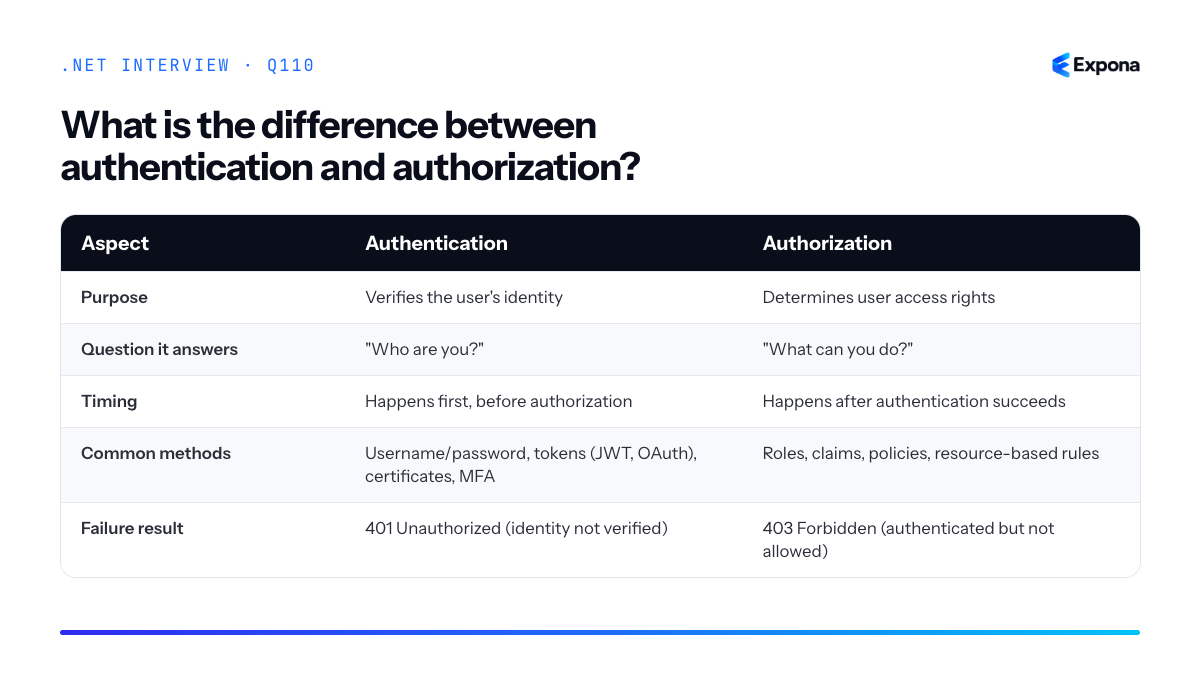
Related interview questions
.NETCsharpSecurity111How does the ASP.NET Core middleware pipeline work internally?
ExperiencedThe ASP.NET Core middleware pipeline is a chain of RequestDelegate functions composed at startup, where each middleware receives the HttpContext and a reference to the next middleware in the chain. When a request arrives, it flows through each middleware in registration order; each middleware can inspect, modify, or short-circuit the request, then call the next delegate or return early. On the response path, middleware executes in reverse order, allowing each to wrap the response before it goes back to the client.
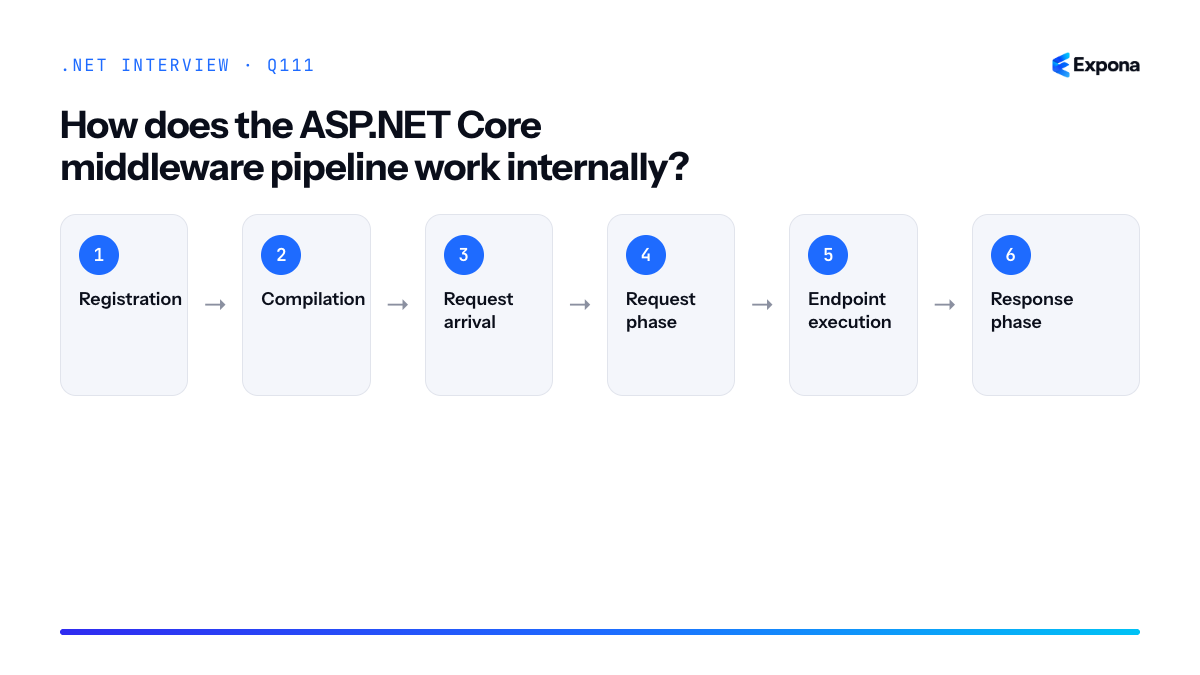
How it works
At application startup,
IApplicationBuildercompiles all registered middlewares into a single nested delegate chain. Each middleware is wrapped as aRequestDelegate—a function with signatureFunc<HttpContext, Task>. During registration (inProgram.csorStartup.cs), the builder stores each middleware and creates a composite function where the "next" pointer of one middleware points to the next registered middleware.When an HTTP request arrives, it enters the outermost middleware. That middleware can examine the
HttpContext, perform setup (logging, authentication checks, etc.), then decide to callawait next(httpContext)to pass control to the next middleware. If a middleware does not callnext(), it short-circuits the pipeline and returns a response immediately. After the next middleware completes, control returns to the caller, allowing each middleware to perform cleanup or modify the response on the way back.This design—often called the Russian doll or onion model—ensures that middleware can both pre-process requests and post-process responses in a predictable, composable way. The order of
app.Use*()calls determines execution order for the request phase; the response phase reverses that order.Example
csharpvar builder = WebApplication.CreateBuilder(args); var app = builder.Build(); // Middleware 1: Authentication app.Use(async (context, next) => { Console.WriteLine("→ Authentication: checking token..."); context.Items["User"] = "Alice"; await next(context); Console.WriteLine("← Authentication: response ready"); }); // Middleware 2: Logging app.Use(async (context, next) => { Console.WriteLine("→ Logging: request for " + context.Request.Path); await next(context); Console.WriteLine("← Logging: response status " + context.Response.StatusCode); }); // Endpoint app.MapGet("/", () => "Hello!"); app.Run();This example shows two middlewares wrapping the request/response cycle: Authentication runs first on the way in, then Logging, then the endpoint handler; on the way back, Logging completes before Authentication, demonstrating the nested execution model.
Key points to mention
- RequestDelegate composition: The pipeline is built at startup as a chain of delegates, not executed dynamically per request.
- Order matters: Registration order determines request processing order; response processing reverses that order.
- Short-circuiting: Middleware can skip calling
next()to return a response early, preventing further middlewares from running. - HttpContext carries state: The
HttpContext.Itemsdictionary allows middlewares to share data along the pipeline. - Scoped and request-level dependencies: Each request creates a scope, so middleware can inject and use DI-resolved services specific to that request.
Common follow-up questions
- How do you write custom middleware as a class versus inline, and what are the pros/cons?
- What happens if you register middleware after calling
app.MapControllers()or other terminal middleware? - How do exception-handling middleware (like
app.UseExceptionHandler()) fit into the pipeline, and why does their position matter?
Main steps
- Registration: During app startup, each
app.Use*()call adds a middleware to a list inIApplicationBuilder. - Compilation: Before the app listens for requests, the builder composes all middlewares into a single nested
RequestDelegatechain, with each middleware'snextpointer referencing the subsequent middleware. - Request arrival: An HTTP request enters the outermost (first-registered) middleware, which receives the
HttpContext. - Request phase: Each middleware executes its pre-logic (authentication, logging setup, etc.), then calls
await next(context)to hand control to the next middleware in the chain. - Endpoint execution: The final middleware or route handler processes the request and generates a response.
- Response phase: Control returns up the chain in reverse order; each middleware executes post-logic (logging completion, response header modification, etc.) as the response propagates back to the client.
Related interview questions
Further reading
.NETCsharpaspnetcore112How do you write custom middleware?
ExperiencedCustom middleware in ASP.NET Core is written by creating a class with a constructor accepting
RequestDelegateand anInvokeAsync(HttpContext)method, or by implementingIMiddlewarefor better dependency injection support. Register it in the pipeline usingapp.UseMiddleware<T>()at the appropriate point to intercept and process HTTP requests and responses.How it works
ASP.NET Core middleware forms a chain where each component can inspect, modify, or short-circuit the request before passing it to the next middleware, and then inspect or modify the response on the way back. When you write custom middleware, you're inserting a handler into this pipeline.
The convention-based approach requires a public class with a constructor taking
RequestDelegate next(the next middleware in the chain) and a publicInvokeAsync(HttpContext context)method. InsideInvokeAsync, you perform your logic, then callawait next(context)to pass control forward. This pattern is simple but ties middleware to the request pipeline.The
IMiddlewareinterface approach is cleaner for dependency injection scenarios. ImplementInvokeAsync(HttpContext context, RequestDelegate next)directly on a class registered in the DI container. This allows you to inject dependencies into the middleware constructor, making it testable and loosely coupled. Useapp.UseMiddleware<T>()for convention-based orapp.Use(async (context, next) => {...})for inline middleware.Example
csharp// Convention-based custom middleware public class RequestTimingMiddleware { private readonly RequestDelegate _next; private readonly ILogger<RequestTimingMiddleware> _logger; public RequestTimingMiddleware(RequestDelegate next, ILogger<RequestTimingMiddleware> logger) { _next = next; _logger = logger; } public async Task InvokeAsync(HttpContext context) { var stopwatch = System.Diagnostics.Stopwatch.StartNew(); // Before the request context.Items["RequestStartTime"] = DateTime.UtcNow; try { await _next(context); } finally { stopwatch.Stop(); _logger.LogInformation($"Request to {context.Request.Path} took {stopwatch.ElapsedMilliseconds}ms"); } } } // Registration in Program.cs var builder = WebApplicationBuilder.CreateBuilder(args); var app = builder.Build(); app.UseMiddleware<RequestTimingMiddleware>(); app.MapGet("/", () => "Hello").WithName("GetRoot").WithOpenApi(); app.Run();This middleware logs the execution time of each request by wrapping the
await next(context)call in a stopwatch, demonstrating how middleware can execute code before and after the rest of the pipeline.Key points to mention
- Order matters: middleware registered first executes first on the way in, last on the way out (like nested function calls).
- Use
IMiddlewarewith DI for cleaner, testable code; use convention-based for simple, lightweight middleware. - Always call
await next(context)unless you intentionally short-circuit (e.g., for authentication failures or global exception handling). - Middleware can read/modify request headers, response status, and store data in
context.Itemsfor downstream handlers. - Async all the way: use
async Task InvokeAsyncto avoid blocking the request pipeline.
Common follow-up questions
- What's the difference between middleware and filters? Middleware operates on all requests at the pipeline level; filters are MVC/Minimal API constructs that apply to specific controllers or endpoints.
- How do you write middleware that runs only for specific routes? Check
context.Request.PathinsideInvokeAsync, or useapp.UseWhen(predicate, ...)to conditionally branch the pipeline. - Can middleware access DI services? Yes—inject them into the constructor for convention-based or via method parameters. With
IMiddleware, inject into the constructor and use inInvokeAsync.
Related interview questions
- How does the ASP.NET Core middleware pipeline work internally?
- How do you implement global exception handling?
- How do you write a custom awaiter?
Further reading
.NETCsharpaspnetcore113What is the difference between Use, Run and Map in middleware?
ExperiencedUse adds general-purpose middleware that can pass control to the next middleware via
next(). Run adds terminal middleware that short-circuits the pipeline and never callsnext(). Map branches the pipeline conditionally based on a request path prefix, allowing different middleware chains for different routes.How it works
In ASP.NET Core's middleware pipeline, each component processes the request and either passes it forward or terminates it.
Use()is the standard method for adding middleware—it receives anextdelegate that represents the remainder of the pipeline. The middleware must decide whether to callnextto continue processing or skip it to end execution early.Run()is a terminal middleware extension that never callsnext. It always ends the pipeline and produces a final response. MultipleRun()calls can exist, but only the first one reached will execute—subsequent ones never run because the pipeline has already terminated. This makesRun()useful for catch-all handlers or default responses at the end of your middleware chain.Map()is a branching mechanism that evaluates a path predicate and directs matching requests to a separate middleware pipeline. If the condition matches (typically a path prefix like/admin), the mapped middleware executes. If it doesn't match, the request continues to the next middleware in the main pipeline. Importantly, mapped pipelines are independent; middleware registered inside aMap()block doesn't affect requests outside that branch.Example
csharpvar builder = WebApplication.CreateBuilder(args); var app = builder.Build(); // General middleware - can call next or not app.Use(async (context, next) => { context.Response.Headers.Add("X-Custom-Header", "From Use"); await next(); }); // Branch for /admin path app.Map("/admin", admin => { admin.Use(async (context, next) => { context.Response.Headers.Add("X-Admin", "true"); await next(); }); // Terminal middleware in admin branch admin.Run(async context => { await context.Response.WriteAsJsonAsync(new { message = "Admin area" }); }); }); // Terminal middleware - pipeline ends here if reached app.Run(async context => { await context.Response.WriteAsJsonAsync(new { message = "Main response" }); }); app.Run();This example shows a general middleware adding a header, a branched route for
/adminwith its own chain, and a terminalRun()for all other requests. Requests to/adminnever reach the finalRun().Key points to mention
Use()is composable and non-terminal—middleware must explicitly callnextto continue the pipeline or choose to short-circuit.Run()is a convenience extension that creates terminal middleware; it's semantically clearer thanUse()when you know the pipeline ends there.Map()creates a conditional branch that doesn't interfere with the main pipeline—non-matching requests skip the mapped block entirely.- Order matters: middleware registered earlier always executes before later middleware, and
Map()conditions are evaluated in registration order. MapWhen()is a related method that branches on a custom predicate instead of just a path prefix, offering more flexible branching logic.
Comparison table
Method Purpose Calls next?Terminates Pipeline? Common Use Case Use()General-purpose middleware Optional (your choice) No (unless you skip next)Logging, authentication, request modification Run()Terminal middleware Never Yes (always) Default response, catch-all handler Map()Path-based branching Depends on mapped middleware No (main pipeline continues if no match) Route-specific logic ( /api,/admin)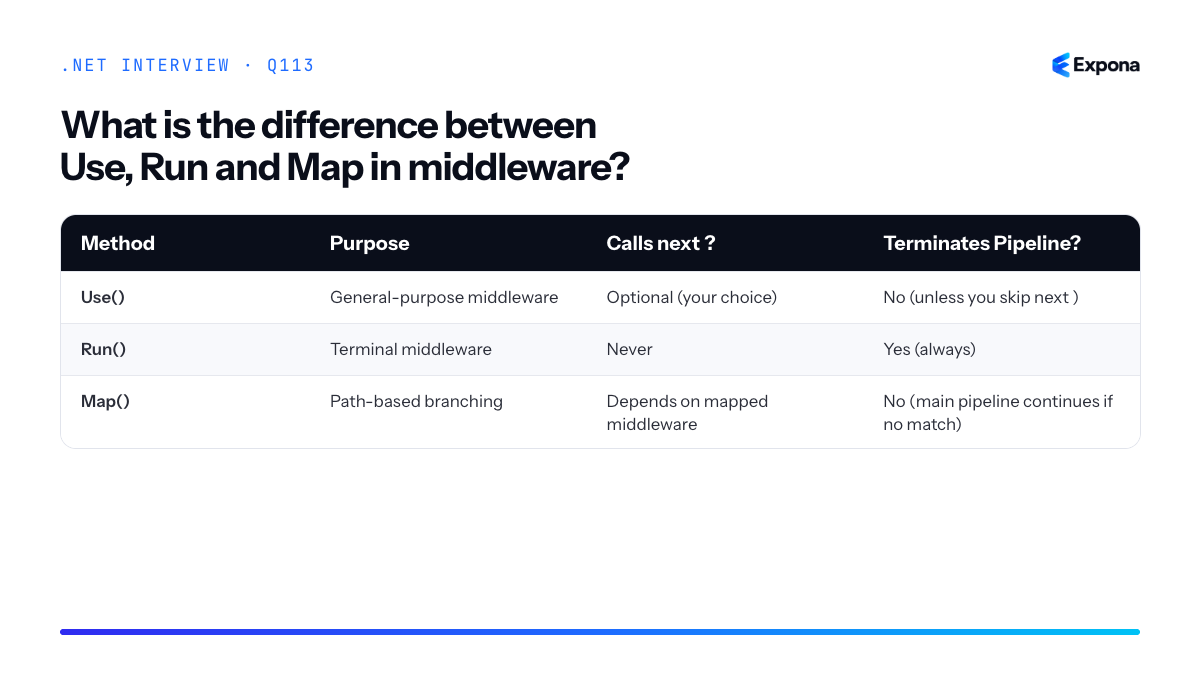
Common follow-up questions
- What happens if I call
next()in aRun()middleware? You can't—Run()is an extension that doesn't accept anextparameter. If you need conditional behavior, useUse()instead. - Can I nest
Map()calls? Yes, you can map within a map to create hierarchical branching (e.g.,Map("/api").Map("/v1")), though this can get complex. - How does
MapWhen()differ fromMap()?MapWhen()accepts a custom predicate function instead of a path prefix, allowing branching on headers, query parameters, or custom logic.
Related interview questions
- What is middleware?
- How does the ASP.NET Core middleware pipeline work internally?
- What is Program.cs in ASP.NET Core?
Further reading
.NETCsharpaspnetcore114What happens if you inject a scoped service into a singleton?
ExperiencedWhen you inject a scoped service into a singleton, the scoped service becomes a "captive dependency" that lives for the entire lifetime of the application. This violates the intended scope isolation and causes shared state across requests, disposed resources, and unpredictable behavior. ASP.NET Core's scope validation in Development throws an exception to catch this mistake; in Production, you won't detect it until bugs surface.
How it works
Dependency injection containers manage service lifetimes strictly: singleton instances exist once for the application, transient instances are created per request, and scoped instances live for the duration of a web request (or logical scope).
When a singleton depends on a scoped service, the container must inject that scoped service instance into the singleton at the time the singleton is constructed. Since the singleton is created only once (typically on first use), the scoped service instance is also created only once and reused forever—captured by the singleton's reference. This is the "captive dependency" problem.
The consequences are severe: if the scoped service holds request-specific state (like a
DbContext), that state persists across all requests. Multiple concurrent requests end up sharing the same instance, causing race conditions, connection pool exhaustion, and DbContext disposal errors. This is particularly dangerous because it often works in single-threaded testing but fails catastrophically under production load.ASP.NET Core's scope validation (enabled by default in Development) detects this anti-pattern and throws an
InvalidOperationExceptionwith a message like "Cannot consume scoped service from singleton." In Production, validation is disabled for performance, so the bug silently corrupts your application.Example
csharp// Scoped service (request-specific) public interface IRequestHandler { Guid RequestId { get; } } public class RequestHandler : IRequestHandler { public Guid RequestId { get; } = Guid.NewGuid(); } // Singleton that incorrectly depends on scoped service public class BadSingletonService { private readonly IRequestHandler _handler; public BadSingletonService(IRequestHandler handler) { _handler = handler; // Captured scoped instance } public void ProcessRequest() => Console.WriteLine(_handler.RequestId); } // Registration var services = new ServiceCollection(); services.AddScoped<IRequestHandler, RequestHandler>(); services.AddSingleton<BadSingletonService>(); // ❌ Throws in Development var provider = services.BuildServiceProvider(validateScopes: true);This code throws an exception during build in Development because the container detects that a singleton is consuming a scoped dependency. The
RequestHandlerinstance created for the singleton would be reused across all requests, violating scope isolation.Key points to mention
- Captive dependency: A scoped or transient service captured by a longer-lived service, causing it to live longer than intended.
- Scope validation: Enable
validateScopes: truewhen building the service provider in Development to catch this pattern early. - IServiceScopeFactory: Use this to create child scopes within singletons and resolve scoped services safely, as shown in how to resolve scoped services in a background service.
- Silent failures in Production: Validation is disabled for performance, so these bugs often go undetected until they cause mysterious concurrency or resource exhaustion issues.
- Related to lifetime rules: Understand ASP.NET Core service lifetimes to design dependency graphs correctly.
Common follow-up questions
- How do you safely use a scoped service from a singleton? Inject
IServiceScopeFactoryand create a child scope when needed:using var scope = factory.CreateScope(); var handler = scope.ServiceProvider.GetRequiredService<IRequestHandler>(); - Does this apply to transient services too? Yes—a transient service captured by a singleton becomes a captive dependency. However, transient-in-scoped is safe because each request gets fresh instances.
- Why doesn't ASP.NET Core prevent this at compile time? Because the container is dynamic and lifetime violations are discovered at runtime during configuration validation.
Related interview questions
- How do you resolve scoped services in a background service?
- What are the service lifetimes in ASP.NET Core?
- What is the difference between AddTransient services that hold state and stateless services?
Further reading
.NETCsharpdependency-injection115How do you resolve scoped services in a background service?
ExperiencedInject IServiceScopeFactory into your background service, then create a new scope per unit of work using CreateAsyncScope() or CreateScope(). Resolve your scoped services (like DbContext) from scope.ServiceProvider, and dispose the scope when finished to ensure cleanup. This pattern prevents scoped service lifetime violations and ensures each background task operates in isolation.
How it works
Background services (like BackgroundService or hosted services) are singletons by nature—they live for the application's entire lifetime. Scoped services, by contrast, are meant to live for a single request or logical unit of work. Directly injecting scoped services into a singleton background service creates a captive dependency problem, where the scoped service is promoted to singleton lifetime, defeating its purpose.
The solution is to use IServiceScopeFactory, which is a singleton that can create new scopes on demand. Each time your background service performs a discrete unit of work (processing a queue item, running a scheduled task, etc.), you create a fresh scope, resolve your scoped dependencies from that scope's ServiceProvider, execute the work, and dispose the scope. This ensures proper lifetime management and allows scoped services like DbContext to be properly cleaned up after each logical operation.
Example
csharpusing Microsoft.Extensions.DependencyInjection; using Microsoft.Extensions.Hosting; public class DataProcessingService : BackgroundService { private readonly IServiceScopeFactory _scopeFactory; private readonly ILogger<DataProcessingService> _logger; public DataProcessingService( IServiceScopeFactory scopeFactory, ILogger<DataProcessingService> logger) { _scopeFactory = scopeFactory; _logger = logger; } protected override async Task ExecuteAsync(CancellationToken stoppingToken) { while (!stoppingToken.IsCancellationRequested) { try { // Create a new scope for this unit of work using (var scope = _scopeFactory.CreateAsyncScope()) { var dbContext = scope.ServiceProvider.GetRequiredService<AppDbContext>(); var repository = scope.ServiceProvider.GetRequiredService<IOrderRepository>(); var pendingOrders = await dbContext.Orders .Where(o => o.Status == OrderStatus.Pending) .ToListAsync(stoppingToken); foreach (var order in pendingOrders) { await repository.ProcessOrderAsync(order); } await dbContext.SaveChangesAsync(stoppingToken); _logger.LogInformation("Processed {Count} orders", pendingOrders.Count); } await Task.Delay(TimeSpan.FromMinutes(1), stoppingToken); } catch (Exception ex) { _logger.LogError(ex, "Error in background service"); await Task.Delay(TimeSpan.FromSeconds(10), stoppingToken); } } } } // Registration in Program.cs services.AddScoped<AppDbContext>(); services.AddScoped<IOrderRepository, OrderRepository>(); services.AddHostedService<DataProcessingService>();This example creates a new scope each time the background service processes orders, ensuring the DbContext and repository are fresh and properly disposed after each iteration.
Key points to mention
- Background services are singletons and cannot directly inject scoped dependencies without creating a captive dependency.
- Use IServiceScopeFactory (a singleton) to create scopes on demand within your background work loops.
- Always use
using (var scope = _scopeFactory.CreateAsyncScope())orusing (var scope = _scopeFactory.CreateScope())to ensure the scope is disposed and scoped services are cleaned up. - Resolve DbContext and other scoped services fresh from scope.ServiceProvider for each logical unit of work.
- Wrap the scoped work in try-catch to handle exceptions gracefully without leaving broken scopes in memory.
Common follow-up questions
- Can I use CreateScope() instead of CreateAsyncScope()? Yes, both return an IServiceScope. CreateAsyncScope() is the async variant. Use CreateAsyncScope() if you're already in an async context to avoid unnecessary thread switches.
- What happens if I forget to dispose the scope? Scoped services won't be cleaned up, potentially causing resource leaks (e.g., DbContext connections staying open). Always use
usingstatements. - Should I create one scope for the entire background service lifetime or per iteration? Create a new scope per logical unit of work (per queue item, per scheduled interval, etc.) to ensure isolation and proper resource cleanup.
Related interview questions
- What happens if you inject a scoped service into a singleton?
- How do you manage DbContext lifetime?
- How do you use the Channel-based background queue pattern?
Further reading
.NETCsharpdependency-injection116What are keyed services in .NET 8?
ExperiencedKeyed services in .NET 8 allow you to register multiple implementations of the same interface under distinct keys, then inject a specific implementation at runtime using the
[FromKeyedServices]attribute. This feature eliminates the need for factory patterns or Dictionary<TKey, TValue> workarounds, providing a cleaner, type-safe way to manage polymorphic dependencies.How it works
Keyed services extend the dependency injection (DI) container to associate each registration with a key. When multiple implementations exist for an interface, you assign a unique key (typically a string or object) to each one during registration. At injection time, you decorate the parameter with
[FromKeyedServices("keyName")]to specify which implementation the container should resolve. This approach is particularly useful when you need to select different implementations based on configuration, feature flags, or runtime conditions without creating explicit factories or service locators.The DI container maintains a mapping of interface → key → implementation internally. When resolving, it looks up the key to find the correct type, then constructs and returns that specific instance. This works seamlessly with dependency injection scopes (singleton, transient, scoped), maintaining all the benefits of DI while adding runtime selection capability.
Example
csharp// Define interface public interface IPaymentProcessor { void ProcessPayment(decimal amount); } // Multiple implementations public class StripeProcessor : IPaymentProcessor { public void ProcessPayment(decimal amount) => Console.WriteLine($"Processing ${amount} via Stripe"); } public class PayPalProcessor : IPaymentProcessor { public void ProcessPayment(decimal amount) => Console.WriteLine($"Processing ${amount} via PayPal"); } // Register keyed services var builder = WebApplication.CreateBuilder(args); builder.Services .AddKeyedSingleton("stripe") .AddKeyedSingleton("paypal"); var app = builder.Build(); // Inject specific implementation app.MapPost("/pay", ( [FromKeyedServices("stripe")] IPaymentProcessor processor, decimal amount) => { processor.ProcessPayment(amount); return "Payment processed"; }); app.Run();This example registers two payment processors under keys "stripe" and "paypal". The endpoint injects the Stripe processor by requesting the "stripe" key, while other endpoints could request "paypal" independently.
Key points to mention
- Registration methods: Use
AddKeyedSingleton<TInterface, TImplementation>(key),AddKeyedScoped, orAddKeyedTransientto register with a key. - Injection attribute: The
[FromKeyedServices]attribute works in controllers, minimal APIs, and constructor injection to specify which keyed service to resolve. - Replaces factories: Eliminates boilerplate factory classes or service locators like
IServiceProvider.GetKeyedService<T>(key). - Type-safe and discoverable: Compile-time safety with clear dependencies; IDE tools can track which keys are registered and used.
- Works with dependency graphs: A keyed service can itself have dependencies that the container resolves automatically.
Common follow-up questions
- How do you handle keyed services in background services or hosted services?
- Can you combine keyed services with factory patterns for more complex scenarios?
- What happens if you request a key that was never registered—does it throw an exception or return null?
Related interview questions
.NETCsharpdependency-injection- Registration methods: Use
117What is the difference between IOptions, IOptionsSnapshot and IOptionsMonitor?
ExperiencedIOptions, IOptionsSnapshot, and IOptionsMonitor are three ways to inject configuration into ASP.NET Core services, each with different lifetimes and behaviors. IOptions is a singleton that reads configuration once at startup; IOptionsSnapshot is scoped and recomputes per request; IOptionsMonitor is a singleton that watches for configuration changes and notifies subscribers in real time.
How it works
These interfaces provide access to strongly-typed configuration objects bound from your
appsettings.jsonor other configuration sources. The key difference lies in their service lifetimes and when they read configuration values.IOptions is registered as a singleton and caches the configuration object for the application's lifetime. It reads configuration once during dependency injection setup. This is the most performant but cannot reflect runtime changes.
IOptionsSnapshot is scoped to each request and reads the current configuration at the start of each scope. It allows you to see configuration changes between requests without restarting the application, but the values remain constant within a single request.
IOptionsMonitor is a singleton that actively monitors configuration changes. It holds a reference to the latest configuration value and provides an
OnChangeevent for subscribers to react to configuration updates immediately. This is useful for settings that change frequently and require immediate application without restarting.Example
csharppublic class AppSettings { public string ApiKey { get; set; } public int MaxRetries { get; set; } } public class ConfigurationService { private readonly IOptions<AppSettings> _options; private readonly IOptionsSnapshot<AppSettings> _snapshot; private readonly IOptionsMonitor<AppSettings> _monitor; public ConfigurationService( IOptions<AppSettings> options, IOptionsSnapshot<AppSettings> snapshot, IOptionsMonitor<AppSettings> monitor) { _options = options; _snapshot = snapshot; _monitor = monitor; // Subscribe to configuration changes monitor.OnChange((newSettings, name) => { Console.WriteLine($"Configuration changed: MaxRetries = {newSettings.MaxRetries}"); }); } public void DemonstrateUsage() { // IOptions: reads once at startup, cached var apiKey1 = _options.Value.ApiKey; // IOptionsSnapshot: reads current configuration var retries = _snapshot.Value.MaxRetries; // IOptionsMonitor: always reflects latest value var currentKey = _monitor.CurrentValue.ApiKey; } } // Startup configuration builder.Services.Configure<AppSettings>( builder.Configuration.GetSection("Settings"));This example demonstrates injecting all three interfaces into a service. IOptions caches the value once, IOptionsSnapshot reads fresh values per request, and IOptionsMonitor actively watches for changes and triggers callbacks when configuration updates.
Comparison table
Interface Lifetime Reads Configuration Reflects Changes Best Use Case IOptions<T>Singleton Once at startup No (cached) Static settings that never change IOptionsSnapshot<T>Scoped Per request Between requests only Settings that change rarely, per-request consistency required IOptionsMonitor<T>Singleton On demand (latest) Yes (immediate) Dynamic settings requiring real-time updates and notifications 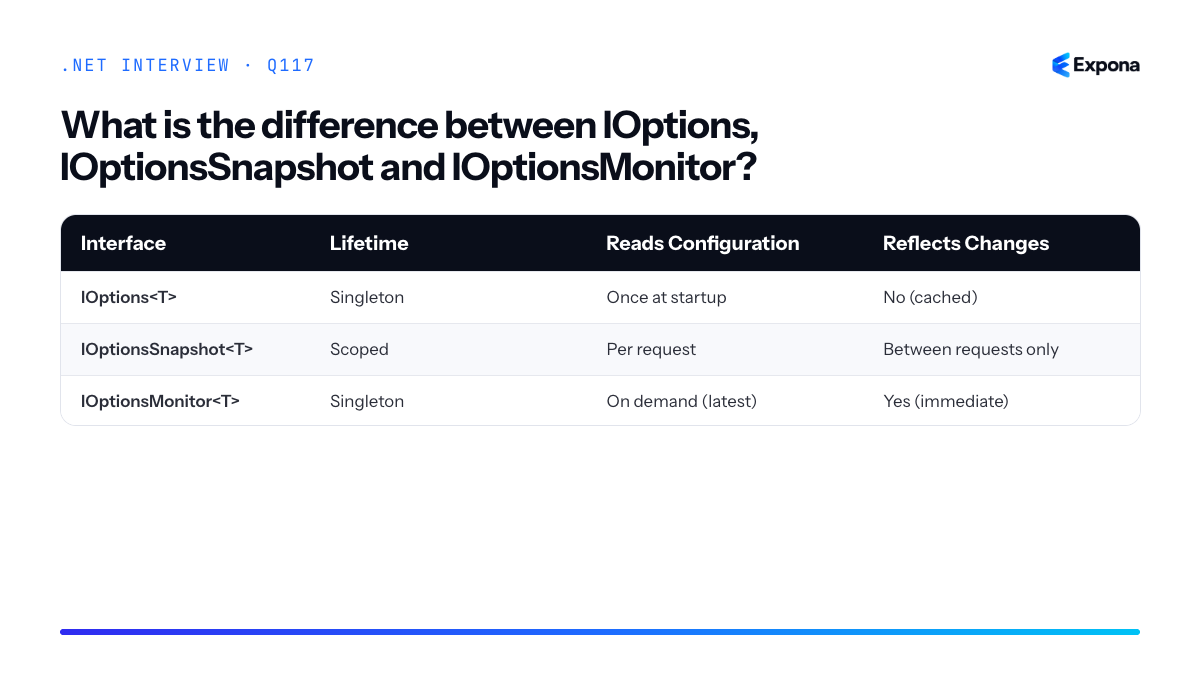
Key points to mention
- Performance vs. flexibility: IOptions is fastest because it caches; IOptionsMonitor is more flexible but slightly slower due to change detection.
- Request consistency: IOptionsSnapshot guarantees the same configuration value throughout a single request, avoiding inconsistencies if settings change mid-request.
- OnChange events: Only IOptionsMonitor provides the OnChange callback, allowing services to react immediately to configuration updates without restarting.
- Named options: All three support named configuration instances using
IOptionsMonitor.Get(name)for multiple configuration sets. - File watchers: IOptionsSnapshot and IOptionsMonitor require file watchers enabled in your configuration provider to detect changes at runtime.
Common follow-up questions
- How do you reload configuration without restarting the application, and what constraints apply?
- Why does IOptionsSnapshot use the scoped lifetime instead of transient?
- Can you use IOptionsMonitor with database-backed configuration, and what are the performance implications?
Related interview questions
- What are the service lifetimes in ASP.NET Core?
- How do you manage DbContext lifetime?
- How do you use the Channel-based background queue pattern?
Further reading
.NETCsharpdependency-injection118How do you validate options at startup?
ExperiencedDirect answer: Options validation at startup is accomplished using the Options pattern with
ValidateDataAnnotations()andValidateOnStart(), or by implementingIValidateOptions<T>. This ensures configuration errors are caught during application initialization rather than at runtime when a feature first accesses the options, preventing silent failures in production.How it works
The Options pattern in .NET provides a mechanism to validate configuration before the application runs. By default, options are validated lazily—only when first accessed. This can mask configuration problems that don't surface until a specific code path executes. Startup validation changes this behavior by triggering validation during the host build phase, causing the application to fail immediately if the configuration is invalid.
There are two primary approaches. The first uses fluent configuration with
ValidateDataAnnotations(), which validates properties decorated with data annotation attributes (like[Required],[Range]). The second isValidateOnStart(), which registers a hosted service that validates options during startup. For complex custom validation logic, you implementIValidateOptions<T>directly, giving you full control over validation rules and error messages.Example
csharp// AppSettings class with validation attributes public class DatabaseOptions { [Required] public string ConnectionString { get; set; } [Range(1, 100)] public int MaxConnections { get; set; } = 10; [EmailAddress] public string AdminEmail { get; set; } } // Custom validator implementing IValidateOptions public class DatabaseOptionsValidator : IValidateOptions<DatabaseOptions> { public ValidateOptionsResult Validate(string name, DatabaseOptions options) { if (string.IsNullOrEmpty(options.ConnectionString)) return ValidateOptionsResult.Fail("ConnectionString is required"); if (!options.ConnectionString.Contains("Server=")) return ValidateOptionsResult.Fail("ConnectionString must contain Server= parameter"); if (options.MaxConnections < 1 || options.MaxConnections > 100) return ValidateOptionsResult.Fail("MaxConnections must be between 1 and 100"); return ValidateOptionsResult.Success; } } // Startup configuration var builder = WebApplication.CreateBuilder(args); // Approach 1: Data annotations + ValidateOnStart builder.Services .AddOptions<DatabaseOptions>() .Bind(builder.Configuration.GetSection("Database")) .ValidateDataAnnotations() .ValidateOnStart(); // Approach 2: Custom validator builder.Services.AddSingleton<IValidateOptions<DatabaseOptions>, DatabaseOptionsValidator>(); builder.Services .AddOptions<DatabaseOptions>() .Bind(builder.Configuration.GetSection("Database")) .ValidateOnStart(); var app = builder.Build(); // If validation fails here, the app crashes with clear error messagesThis example demonstrates both data annotation validation and custom validation logic. The
ValidateOnStart()method ensures both approaches run during application startup, causing the app to fail fast with descriptive errors if the database configuration is invalid.Key points to mention
- Fail-fast principle: Validation at startup catches configuration errors immediately, preventing silent failures that might only appear hours into production operation.
- ValidateDataAnnotations(): Automatically validates properties with standard .NET data annotations; simple and declarative for common validation scenarios.
- IValidateOptions<T>: Provides full control for complex validation logic involving multiple properties, external dependencies, or business rules that can't be expressed with attributes.
- ValidateOnStart(): Registers a hosted service that forces options validation during host build; without it, validation happens only on first access.
- Error clarity: Startup validation errors include details about which option failed and why, making troubleshooting faster than runtime errors buried in logs.
Common follow-up questions
- What happens if validation fails? The application throws an
OptionsValidationExceptionand exits immediately duringbuilder.Build(), before any middleware or services run. This is intentional—bad configuration should prevent startup. - Can you validate options after dependency injection is available? Yes, implement
IValidateOptions<T>and inject dependencies through its constructor; you can call external services, databases, or APIs as part of validation logic. - How does this differ from configuration validation in configuration providers? Configuration providers validate raw config sources; options validation validates the strongly-typed, bound result, catching type mismatches and business rule violations after binding.
Related interview questions
.NETCsharp119How does configuration precedence work in ASP.NET Core?
ExperiencedASP.NET Core uses a layered configuration system where configuration providers are registered in a specific order, and later providers override earlier ones. This means command-line arguments take highest priority, followed by environment variables, then file-based sources like
appsettings.json. Understanding this precedence is critical for managing settings across development, staging, and production environments.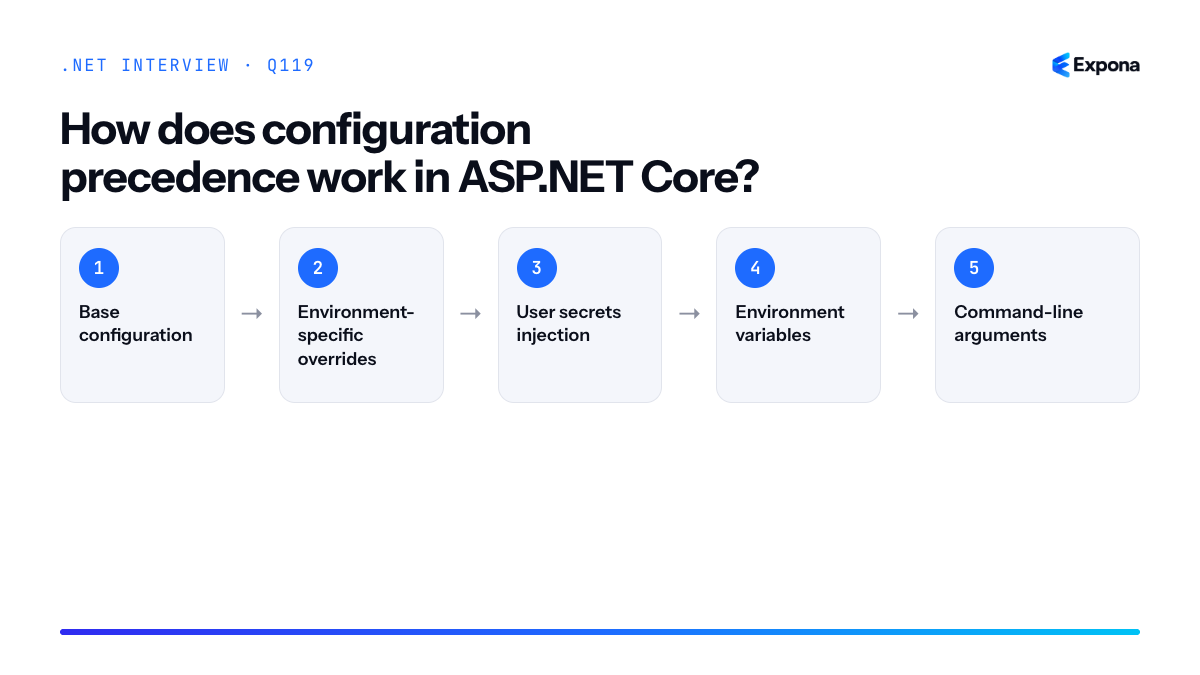
How it works
ASP.NET Core's configuration system builds a composite configuration by chaining multiple providers together. Each provider reads configuration from a different source—files, environment variables, command-line arguments, or even Azure Key Vault. When you request a configuration value, the system traverses the providers in reverse order of registration: the last registered provider is checked first, and if a value is found, it's returned immediately. This "last-one-wins" approach means you can layer configurations, with sensitive or environment-specific values overriding defaults.
The default configuration pipeline established by
CreateDefaultBuilder()orAddJsonFile()follows this order:- Base configuration: Load
appsettings.jsonfirst as the baseline configuration. - Environment-specific overrides: Load
appsettings.{Environment}.json(e.g.,appsettings.Development.json) to override base settings for specific environments. - User secrets injection: In Development only, load user secrets from the secrets store to avoid committing sensitive data.
- Environment variables: Read system or application environment variables to allow container/cloud deployments to inject configuration.
- Command-line arguments: Parse arguments passed directly to the application, giving operators final control at runtime.
Example
csharp// Program.cs - .NET 8 minimal hosting var builder = WebApplication.CreateBuilder(args); // Default builder already registers: appsettings.json, // appsettings.{Environment}.json, user secrets, env vars, command-line args var config = builder.Configuration; // Accessing a value - checks all providers in precedence order string connectionString = config["ConnectionStrings:DefaultConnection"]; // If env var "ConnectionStrings__DefaultConnection" exists, it wins // Otherwise falls back to appsettings.json value builder.Services.AddSingleton(config); builder.Services.Configure<AppSettings>(config.GetSection("AppSettings")); var app = builder.Build(); app.Run(); // Real-world scenario: Running in Docker // docker run -e ConnectionStrings__DefaultConnection="Server=prod-db;..." myapp // This environment variable overrides the appsettings.json connection stringThis example shows how environment variables override file-based configuration—a common pattern when deploying containers or to cloud platforms where secrets are injected as environment variables rather than stored in files.
Key points to mention
- Last provider wins: Configuration providers are checked in reverse registration order. The most recently added provider takes precedence, allowing environment-specific or runtime overrides.
- Environment-specific files:
appsettings.{Environment}.jsonfiles are automatically loaded based on theASPNETCORE_ENVIRONMENTvariable, making multi-environment management seamless. - User secrets for Development: User secrets are only loaded in Development to prevent accidental commits of sensitive data while keeping them available locally.
- Double underscore for nested values: Environment variables use
__(double underscore) to represent nested configuration keys (e.g.,ConnectionStrings__DefaultConnectionmaps toConnectionStrings:DefaultConnection). - Immutability after build: Once
builder.Build()is called, the configuration is frozen. Dynamic reloading requires special handling withIOptionsMonitor<T>or file watchers.
Common follow-up questions
- How do you reload configuration at runtime without restarting? Use
IOptionsMonitor<T>instead ofIOptions<T>, which polls the configuration source for changes. Forappsettings.json, ensurereloadOnChange: trueis set inAddJsonFile(). - Can you customize the configuration precedence order? Yes. After
CreateDefaultBuilder(), you can callbuilder.Configuration.AddJsonFile(),AddEnvironmentVariables(), or custom providers in any order to override the defaults. - What happens if a configuration key doesn't exist? The system returns
null. Useconfig["key"] ?? "defaultValue"or binding to a class with default properties to handle missing values gracefully.
Related interview questions
- What is appsettings.json?
- How do you store secrets safely in .NET apps?
- What are environments in ASP.NET Core?
Further reading
.NETCsharpaspnetcore- Base configuration: Load
120How do you store secrets safely in .NET apps?
ExperiencedUse user secrets during development and cloud secret stores (Azure Key Vault, AWS Secrets Manager) in production, loaded via configuration providers. Never commit secrets to
appsettings.jsonor version control, and always rotate secrets regularly.How it works
.NET provides a layered secret management approach. During development, the user secrets manager stores sensitive data outside your project directory—typically in
%APPDATA%\Microsoft\UserSecretson Windows or~/.microsoft/usersecretson Linux/macOS. This prevents accidental commits while allowing local configuration.In production, secrets are stored in dedicated services like Azure Key Vault or AWS Secrets Manager, which provide encryption at rest, audit logging, access control, and rotation capabilities. .NET's configuration system loads these via providers that fetch and cache secrets in memory, integrating seamlessly with
IConfiguration.The flow is: application requests configuration → configuration provider checks sources in order (environment variables, Key Vault, appsettings) → secret is returned and used. This follows the configuration precedence model, where environment-specific sources override defaults.
Example
csharp// Program.cs (.NET 8) var builder = WebApplication.CreateBuilder(args); // Development: user secrets if (builder.Environment.IsDevelopment()) { builder.Configuration.AddUserSecrets<Program>(); } // Production: Azure Key Vault var keyVaultUrl = builder.Configuration["KeyVault:Url"]; if (!string.IsNullOrEmpty(keyVaultUrl)) { var credential = new DefaultAzureCredential(); builder.Configuration.AddAzureKeyVault( new Uri(keyVaultUrl), credential); } var dbPassword = builder.Configuration["Database:Password"]; // Use dbPassword safely—never log or expose it builder.Services.AddSingleton(new DbConfig { Password = dbPassword }); var app = builder.Build(); app.Run();This example loads user secrets in development and Azure Key Vault in production, ensuring secrets are never in source code and are centrally managed.
Key points to mention
- User Secrets Manager: Initialize with
dotnet user-secrets init, set values withdotnet user-secrets set "Key" "value"—stored outside the project directory. - Cloud Providers: Azure Key Vault, AWS Secrets Manager, HashiCorp Vault offer encryption, audit trails, rotation, and access policies; integrate via
AddAzureKeyVault()or similar. - Never in appsettings: Even in appsettings.Production.json, secrets should not appear; use environment-based configuration providers instead.
- Environment Variables: Use for simple deployments; configuration system reads
ASPNETCORE_prefixed variables automatically. - Encryption & Access Control: Cloud stores encrypt secrets at rest and in transit; restrict access via IAM/RBAC and enable audit logging for compliance.
Common follow-up questions
- How do you rotate secrets without downtime? — Most cloud providers support versioning; update the secret, set an expiration on the old version, and applications automatically fetch the new one on next configuration refresh or restart.
- What if Key Vault is unavailable? — Implement circuit breaker patterns, cache secrets in memory with TTL, or fall back to environment variables; consider the security/availability trade-off.
- How do you handle local development without Azure access? — Use user secrets locally; in CI/CD, inject secrets as environment variables or use a mock secret store for testing.
Related interview questions
- How does configuration precedence work in ASP.NET Core?
- What is appsettings.json?
- What are environments in ASP.NET Core?
Further reading
.NETCsharpSecurity- User Secrets Manager: Initialize with
121What is the difference between a filter and middleware?
ExperiencedMiddleware runs globally for every HTTP request in the ASP.NET Core pipeline and has no knowledge of MVC concepts, while filters are MVC-specific components that execute within the action invocation pipeline and have full access to action context, model state, and action results. Middleware is infrastructure-level, whereas filters are application-logic-level.
How it works
Middleware operates at the lowest level of the request pipeline. It forms a chain where each middleware component can inspect the request, modify it, pass it to the next component, and then inspect the response on the way back. Middleware runs regardless of whether the request reaches an MVC controller or not—it applies to static files, API endpoints, health checks, and everything in between.
Filters, by contrast, are part of the MVC pipeline specifically. They execute only when a request reaches an MVC controller action. Filters have access to rich MVC-specific information like
ActionContext,ModelStateDictionary,ActionResult, and the controller instance itself. This makes filters ideal for cross-cutting concerns that need awareness of MVC semantics, such as model validation, authorization based on user roles, or result transformation.The request pipeline order shows middleware wrapping everything, with filters nested inside the MVC layer. If you need to intercept requests before they reach routing or handle non-MVC traffic, use middleware. If you need to intercept at the action level with MVC context, use filters.
Example
csharp// Middleware: runs for ALL requests public class LoggingMiddleware { private readonly RequestDelegate _next; public LoggingMiddleware(RequestDelegate next) { _next = next; } public async Task InvokeAsync(HttpContext context) { Console.WriteLine($"[Middleware] Request: {context.Request.Path}"); await _next(context); Console.WriteLine($"[Middleware] Response: {context.Response.StatusCode}"); } } // Filter: runs only for MVC action invocations public class ValidateModelAttribute : ActionFilterAttribute { public override void OnActionExecuting(ActionExecutingContext context) { if (!context.ModelState.IsValid) { Console.WriteLine($"[Filter] Model validation failed for action {context.ActionDescriptor.DisplayName}"); context.Result = new BadRequestObjectResult(context.ModelState); } } } // Usage in Program.cs app.UseMiddleware(); // Usage on controller action [HttpPost] [ValidateModel] public IActionResult Create([FromBody] UserDto dto) => Ok();The middleware logs all HTTP requests and responses globally, while the filter validates model state only when an MVC action is about to execute, with access to the actual action context.
Aspect Middleware Filters Scope Global; runs for every request MVC-specific; runs only for controller actions Access to Context Only HttpContextActionContext,ModelState, route data, action descriptorExecution Timing Before routing, before MVC layer During action invocation pipeline Use Cases Logging, authentication, CORS, compression, static files Authorization, model validation, result transformation, exception handling Configuration app.UseMiddleware<T>()inProgram.csAttribute on controller/action or global filter Performance Lower overhead for infrastructure concerns Only invoked when MVC action matches 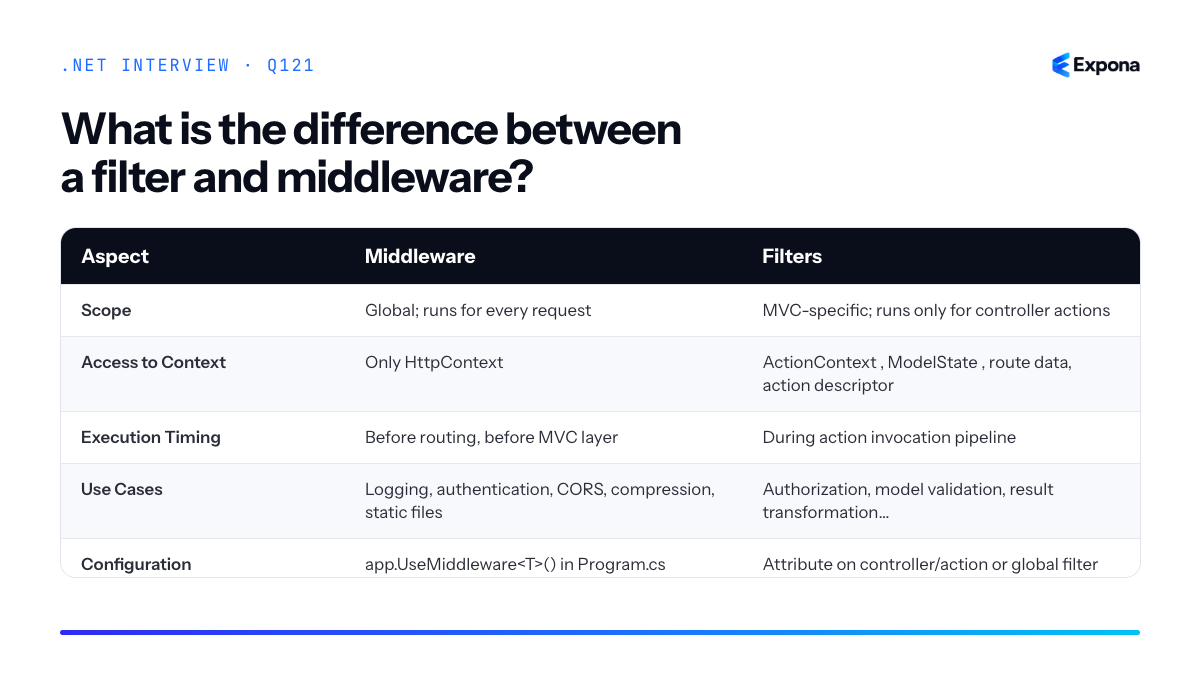
Key points to mention
- Middleware has no knowledge of MVC concepts; it sees only raw HTTP requests and responses.
- Filters are MVC-aware and can access model state, action parameters, and action results—use them for business logic validation.
- Middleware executes before routing; filters execute after routing and model binding are complete.
- Use middleware for cross-cutting infrastructure concerns; use filters for action-level concerns.
- Both can be chained, and both support async operations, but they serve different layers of the application.
Common follow-up questions
- What is middleware and how does it form a pipeline?
- Can a filter access the request body, and should it? What are the performance implications?
- When would you use a global filter versus a middleware component for authentication?
Related interview questions
Further reading
.NETCsharpaspnetcore122What are the types of filters in ASP.NET Core?
ExperiencedASP.NET Core supports five main filter types that execute at different stages of the request pipeline: Authorization, Resource, Action, Exception, and Result filters. Each filter type serves a distinct purpose and runs in a predictable order. Additionally, Minimal APIs introduce Endpoint filters for similar cross-cutting concerns without controllers.
How it works
Filters in ASP.NET Core form a pipeline that intercepts request processing. The execution order is fixed and predictable:
- Authorization Filters – Run first; determine if the user is authorized to access the resource. Execution stops here if authorization fails.
- Resource Filters – Run after authorization; useful for short-circuiting expensive operations or caching responses before model binding.
- Action Filters – Run before and after action method execution; modify parameters before execution or the result after execution.
- Exception Filters – Run only if an unhandled exception occurs; handle and transform exceptions into responses.
- Result Filters – Run after the action returns a result; modify the response or response format.
For Minimal APIs, endpoint filters provide similar functionality with a different API surface. Filters can be applied globally, per-controller, or per-action/endpoint. They implement interfaces like
IAuthorizationFilter,IActionFilter, orIExceptionFilter.Example
csharp// Action Filter example – logs execution time public class ExecutionTimeFilter : IActionFilter { private Stopwatch _stopwatch; public void OnActionExecuting(ActionExecutingContext context) { _stopwatch = Stopwatch.StartNew(); } public void OnActionExecuted(ActionExecutedContext context) { _stopwatch.Stop(); Console.WriteLine($"Action executed in {_stopwatch.ElapsedMilliseconds}ms"); } } // Exception Filter example – handles specific exceptions public class ApiExceptionFilter : IExceptionFilter { public void OnException(ExceptionContext context) { if (context.Exception is ArgumentNullException) { context.Result = new BadRequestObjectResult( new { error = "Invalid argument provided" }); context.ExceptionHandled = true; } } } // Register globally in Program.cs builder.Services.AddControllers(options => { options.Filters.Add<ExecutionTimeFilter>(); options.Filters.Add<ApiExceptionFilter>(); });This example shows an action filter that measures execution time and an exception filter that converts
ArgumentNullExceptioninto a friendly400 Bad Requestresponse.Key points to mention
- Filters execute in a strict, predictable order: Authorization → Resource → Action → Exception → Result.
- Filters can be applied at three scopes: globally (all requests), per-controller, or per-action—more specific scopes override broader ones.
- Authorization and Resource filters run before model binding; Action and Result filters run after.
- Short-circuiting is possible in early filters (Authorization, Resource) by setting a result; subsequent filters won't execute.
- Minimal APIs use endpoint filters (registered via
AddEndpointFilter()) rather than attribute-based filters, providing a functional approach.
Common follow-up questions
- What's the difference between an Action Filter and a Resource Filter? – Resource filters run before model binding and can short-circuit the pipeline earlier; use them for caching or early validation. Action filters run after model binding and are ideal for logging or modifying action parameters.
- Can you use async filters? – Yes; implement
IAsyncActionFilter,IAsyncAuthorizationFilter, etc., which provide async methods likeOnActionExecutionAsync(). - How do you control filter execution order when multiple filters are registered? – Use the
Orderproperty; lower values run first. Scopes (action-level, controller-level, global) also matter.
Related interview questions
- How do endpoint filters work in Minimal APIs?
- How do you organize a large Minimal API project?
- How do you choose between Minimal APIs and controllers for large systems?
Further reading
.NETCsharpaspnetcore123How do you implement global exception handling?
ExperiencedGlobal exception handling in .NET is implemented using the UseExceptionHandler middleware combined with IExceptionHandler implementations (in .NET 8+), or by creating custom middleware that catches all unhandled exceptions, logs them, and returns standardized ProblemDetails responses to clients. This approach ensures consistent error responses, hides sensitive internal details, and centralizes logging without requiring try-catch blocks throughout your application.
How it works
Global exception handling works by intercepting all unhandled exceptions at the middleware level before they reach the client. In .NET 8+, the recommended approach uses the built-in
UseExceptionHandlermiddleware paired withIExceptionHandlerimplementations. When an exception occurs, the middleware catches it, logs the error, and converts it into a standardizedProblemDetailsresponse (RFC 7807 format). Custom exception handlers can map specific exception types to appropriate HTTP status codes and error messages. Older approaches involve writing custom middleware that wraps the request pipeline. The key benefit is that all exceptions follow one path, making it easier to enforce security (no stack traces to clients), consistency (uniform error format), and observability (centralized logging).Example
csharp// Program.cs - .NET 8+ approach var builder = WebApplication.CreateBuilder(args); builder.Services.AddExceptionHandler<GlobalExceptionHandler>() .AddProblemDetails(); var app = builder.Build(); app.UseExceptionHandler(); app.MapControllers(); app.Run(); // GlobalExceptionHandler.cs public class GlobalExceptionHandler : IExceptionHandler { private readonly ILogger<GlobalExceptionHandler> _logger; public GlobalExceptionHandler(ILogger<GlobalExceptionHandler> logger) { _logger = logger; } public async ValueTask<bool> TryHandleAsync( HttpContext httpContext, Exception exception, CancellationToken cancellationToken) { _logger.LogError(exception, "An unhandled exception occurred"); var response = new ProblemDetails { Status = StatusCodes.Status500InternalServerError, Title = "An error occurred", Detail = exception.Message }; if (exception is ArgumentException argEx) { response.Status = StatusCodes.Status400BadRequest; response.Title = "Validation error"; } else if (exception is KeyNotFoundException) { response.Status = StatusCodes.Status404NotFound; response.Title = "Resource not found"; } httpContext.Response.StatusCode = response.Status.Value; await httpContext.Response.WriteAsJsonAsync(response, cancellationToken); return true; } }This example registers a custom exception handler that catches all exceptions, maps specific exception types to appropriate HTTP status codes, logs the error, and returns a standardized ProblemDetails response to the client.
Key points to mention
- Middleware ordering matters –
UseExceptionHandlermust be placed early in the pipeline (typically after routing but before other middleware) to catch exceptions from subsequent middleware. See more about request pipeline order. - Use ProblemDetails (RFC 7807) – standardizes error responses across APIs with fields like status, title, detail, and extensions for structured error information.
- Never expose internal details to clients – log full stack traces server-side but return generic messages to clients in production to avoid leaking sensitive information.
- Custom exception handlers enable type-specific mapping – different exception types can map to different HTTP status codes and error messages for better API semantics.
- IExceptionHandler is testable – can be unit tested independently by passing a mock HttpContext and verifying ProblemDetails responses.
Common follow-up questions
- How do you differentiate error responses by exception type, and should you log all exceptions the same way? (Answer: Map known exceptions to specific status codes; log errors as errors, validation failures as warnings.)
- What's the difference between exception handling middleware and custom middleware? (Answer: UseExceptionHandler is purpose-built for exceptions; custom middleware is more flexible but requires manual exception handling.)
- How do you handle async exceptions in middleware, and can they always be caught? (Answer: Async exceptions in tasks may not be caught by middleware; use try-catch in async endpoints and ensure the handler uses async/await properly.)
Related interview questions
- What is the request pipeline order?
- How do you write custom middleware?
- What is exception handling in C#?
Further reading
.NETCsharpaspnetcore- Middleware ordering matters –
124What is ProblemDetails?
ExperiencedProblemDetails is the RFC 9457 standard format for representing HTTP API errors in a consistent, machine-readable way. In ASP.NET Core, it defines a structured response with fields like
type,title,status,detail, andinstance, plus custom extensions. TheAddProblemDetails()middleware automatically converts exceptions into standardized error responses across your entire application.How it works
ProblemDetails provides a unified contract for error responses that clients can reliably parse and handle. When you enable it in your middleware pipeline via
AddProblemDetails()andUseProblemDetails(), any unhandled exception or explicit problem response is serialized into the RFC 9457 format. This replaces ad-hoc error responses with a predictable structure.The standard fields are:
type– URI identifying the problem category (e.g.,https://api.example.com/errors/validation-failed)title– Short, human-readable summary (e.g., "Validation Failed")status– HTTP status code (400, 404, 500, etc.)detail– Detailed explanation of the specific occurrenceinstance– URI uniquely identifying this problem instance- Custom extensions – Additional fields specific to your domain
You can customize behavior by registering a
ProblemDetailsServicethat maps specific exceptions to appropriate HTTP responses and enriches the problem details with domain-specific data.Example
csharp// Program.cs var builder = WebApplication.CreateBuilder(args); builder.Services.AddProblemDetails(options => { options.CustomizeProblemDetails = context => { context.ProblemDetails.Instance = $"{context.HttpContext.Request.Method} {context.HttpContext.Request.Path}"; if (context.Exception is ArgumentException argEx) { context.ProblemDetails.Title = "Invalid Argument"; context.ProblemDetails.Status = StatusCodes.Status400BadRequest; context.ProblemDetails.Detail = argEx.Message; context.HttpContext.Response.StatusCode = StatusCodes.Status400BadRequest; } }; }); var app = builder.Build(); app.UseProblemDetails(); app.MapGet("/users/{id}", (int id) => { if (id <= 0) throw new ArgumentException("User ID must be positive"); return Results.Ok(new { id, name = "John" }); }); app.Run(); // Response for GET /users/-1: // HTTP 400 // { // "type": "https://tools.ietf.org/html/rfc9457", // "title": "Invalid Argument", // "status": 400, // "detail": "User ID must be positive", // "instance": "GET /users/-1" // }This example shows how
AddProblemDetailscaptures anArgumentException, maps it to a 400 status, and returns a standardized error response that clients can consistently parse.Key points to mention
- ProblemDetails is an RFC 9457 standard, ensuring interoperability across tools and platforms; it replaces ad-hoc JSON error formats.
- Use
CustomizeProblemDetailsto map domain exceptions to appropriate HTTP status codes and enrich responses with business logic details. - Works seamlessly with controllers and minimal APIs, capturing both handled and unhandled exceptions.
- You can extend the standard schema with custom properties (e.g.,
errors,traceId) by setting them oncontext.ProblemDetails.Extensions. - Improves REST API design by providing a predictable error contract, reducing client-side error-handling complexity.
Common follow-up questions
- How do you return a ProblemDetails response explicitly in an endpoint? – Use
Results.Problem()orResults.BadRequest(new ProblemDetails { ... })to explicitly return a problem response without throwing an exception. - Can you customize ProblemDetails per exception type? – Yes, check
context.Exception's type inCustomizeProblemDetailsand conditionally set title, status, and detail fields based on the exception. - What HTTP status codes should map to specific error scenarios? – Use 400 for validation errors, 404 for not found, 409 for conflicts, 500 for server errors, and 422 for unprocessable entities.
Related interview questions
- How do you design a good REST API in .NET?
- What is a controller?
- What are the common HTTP status codes for APIs?
Further reading
.NETCsharp125How do you version APIs in ASP.NET Core?
ExperiencedAPI versioning in ASP.NET Core is implemented using the Asp.Versioning NuGet package, which supports multiple versioning strategies including URL segment, query string, header, and media type versioning. You configure versioning in the DI container, apply it to controllers or actions, and optionally report supported and deprecated versions in response headers to guide clients toward current API versions.
How it works
The Asp.Versioning package (formerly Asp.Versioning.Mvc.ApiExplorer) integrates with ASP.NET Core's routing and controller selection to map incoming requests to the correct API version. When you register versioning in the service container, you define how versions are communicated—typically via URL path (e.g., /api/v1/products), query string (?api-version=1.0), HTTP headers (api-version: 1.0), or Accept header media types (application/vnd.company.v1+json).
Each controller or action method is decorated with
[ApiVersion]attributes specifying which versions it supports. The middleware then matches the incoming request's version to the appropriate handler. You can also mark versions as deprecated using[ApiVersion(..., Deprecated = true)], which adds deprecation warnings to response headers, prompting clients to upgrade.For backward compatibility, you often maintain multiple controller versions side-by-side (ProductsV1Controller, ProductsV2Controller) or use branching logic within a single controller. This approach ensures old clients continue working while new clients benefit from improved endpoints.
Example
csharp// Program.cs var builder = WebApplication.CreateBuilder(args); builder.Services.AddApiVersioning(options => { options.DefaultApiVersion = new ApiVersion(1, 0); options.AssumeDefaultVersionWhenUnspecified = true; options.ReportApiVersions = true; options.ApiVersionReader = ApiVersionReader.Combine( new UrlSegmentApiVersionReader(), new QueryStringApiVersionReader("api-version"), new HeaderApiVersionReader("api-version") ); }) .AddApiExplorer(options => { options.GroupNameFormat = "'v'VVV"; options.SubstituteApiVersionInUrl = true; }); builder.Services.AddControllers(); var app = builder.Build(); app.MapControllers(); app.Run(); // Controllers [ApiController] [Route("api/v{version:apiVersion}/[controller]")] public class ProductsController : ControllerBase { [HttpGet] [ApiVersion("1.0")] public IActionResult GetV1() => Ok(new { message = "Products v1 - basic data" }); [HttpGet] [ApiVersion("2.0")] public IActionResult GetV2() => Ok(new { message = "Products v2 - enhanced data", enhanced = true }); [HttpPost] [ApiVersion("1.0", Deprecated = true)] public IActionResult CreateV1([FromBody] CreateProductRequest req) => Ok("Use v2 for better validation"); [HttpPost] [ApiVersion("2.0")] public IActionResult CreateV2([FromBody] CreateProductRequest req) => CreatedAtAction(nameof(GetV2), new { id = 1 }, req); }This configuration accepts versions via URL segment (/api/v1/...), query string, or header, applies version constraints to controller actions, marks v1 POST as deprecated, and includes version info in response headers.
Key points to mention
- Multiple versioning strategies: Choose the approach that fits your client base—URL segment is most discoverable, headers are REST-pure, media types are content-negotiation aligned.
- Deprecation signaling: Use response headers (api-supported-versions, api-deprecated-versions) to inform clients when to migrate, reducing support burden.
- Backward compatibility: Maintain multiple controller versions or use conditional logic to ensure existing clients aren't broken by new releases.
- Swagger/OpenAPI integration: The package automatically generates separate Swagger specs per version, helping API consumers understand available endpoints.
- Default versioning: Set a sensible default (usually latest stable) so unversioned requests don't fail unexpectedly.
Common follow-up questions
- How do you handle data model changes between versions? Create separate DTO classes (ProductV1Dto, ProductV2Dto) and map domain models to the appropriate version in each action, or use polymorphic deserialization to accept both old and new shapes.
- What strategy minimizes code duplication across versions? Extract common business logic into shared services, use inheritance or composition for version-specific behavior, and avoid copying entire controllers unnecessarily.
- How do you deprecate an old API version? Set
Deprecated = true, document the sunset date, return a 410 Gone or warning headers for final requests, and provide clear migration guidance in API docs and logs.
Related interview questions
.NETCsharpaspnetcore126How do endpoint filters work in Minimal APIs?
ExperiencedEndpoint filters in Minimal APIs are middleware-like components that wrap the endpoint handler, executing custom logic before and after the handler runs. They enable cross-cutting concerns such as validation, logging, authorization, and request/response transformation without modifying the handler itself. Filters are added per-endpoint using
AddEndpointFilter()and form a pipeline where each filter can short-circuit execution or pass control to the next filter.How it works
Endpoint filters implement the
IEndpointFilterinterface and receive anEndpointFilterInvocationContextcontaining the HTTP context, arguments, and a delegate to invoke the next filter or handler. The filter can inspect or modify the request before callingcontext.Proceed(), and then inspect or modify the response afterward. Multiple filters chain together in the order they were added, creating a pipeline similar to middleware but scoped to a single endpoint.When a request arrives, the first filter executes its pre-handler logic. It then calls
context.Proceed(), which invokes the next filter in the chain. Once all filters have executed and the actual handler runs, control unwinds back through the filters, allowing post-handler logic to execute. If any filter returns early without callingProceed(), the handler is short-circuited and subsequent filters don't run.Filters differ from traditional ASP.NET Core filters in that they are specific to Minimal APIs and operate at the endpoint handler level rather than globally or at the controller action level.
Example
csharp// Custom endpoint filter for validation and logging public class ValidationAndLoggingFilter : IEndpointFilter { private readonly ILogger<ValidationAndLoggingFilter> _logger; public ValidationAndLoggingFilter(ILogger<ValidationAndLoggingFilter> logger) { _logger = logger; } public async ValueTask<object?> InvokeAsync( EndpointFilterInvocationContext context, EndpointFilterDelegate next) { var httpContext = context.HttpContext; _logger.LogInformation("Request received: {Method} {Path}", httpContext.Request.Method, httpContext.Request.Path); // Pre-handler logic: validate request if (!httpContext.Request.Headers.ContainsKey("X-Api-Key")) { return Results.BadRequest("Missing X-Api-Key header"); } // Call next filter or handler var result = await next(context); // Post-handler logic: log response _logger.LogInformation("Response sent: {StatusCode}", httpContext.Response.StatusCode); return result; } } // Register and use the filter var builder = WebApplication.CreateBuilder(); var app = builder.Build(); app.MapPost("/users", CreateUser) .AddEndpointFilter<ValidationAndLoggingFilter>() .WithName("CreateUser"); async Task<IResult> CreateUser(CreateUserRequest req) { return Results.Ok(new { id = 1, name = req.Name }); } record CreateUserRequest(string Name);This filter logs incoming requests, validates the presence of an API key header (short-circuiting if missing), calls the handler, and then logs the outgoing response status code.
Key points to mention
- Filters implement
IEndpointFilterand receiveEndpointFilterInvocationContextwith HTTP context and handler arguments. - Multiple filters chain in order; each calls
context.Proceed()to pass control to the next filter or handler. - Returning early from a filter (without calling
Proceed()) short-circuits the pipeline and prevents the handler from running. - Filters are endpoint-specific (added via
AddEndpointFilter()) rather than global, making them ideal for fine-grained control. - Filters can access and modify request/response data, making them useful for validation, authorization, transformation, and logging.
Common follow-up questions
- Can filters access endpoint metadata or route parameters? Yes, the
EndpointFilterInvocationContextprovides access toHttpContext, route parameters, and the endpoint definition itself. - How do endpoint filters compare to middleware? Filters are endpoint-scoped and have access to endpoint-specific data, whereas middleware is global; filters are better for per-endpoint concerns.
- Can I use dependency injection in filters? Yes, filters can be registered in the DI container and receive dependencies via constructor injection, similar to services.
Related interview questions
- What are the types of filters in ASP.NET Core?
- How do you choose between Minimal APIs and controllers for large systems?
- What are pipeline behaviors?
Further reading
.NETCsharpaspnetcore- Filters implement
127How do you organize a large Minimal API project?
ExperiencedOrganize a large Minimal API project by grouping related endpoints using
MapGroup, isolating each feature into dedicated extension methods or module classes, and applying filters, authentication, and metadata at the group level to reduce duplication. This structure mirrors controller-based organization while maintaining the simplicity and performance benefits of Minimal APIs.How it works
Minimal API organization relies on grouping endpoints by feature domain (Users, Orders, Products) rather than scattering them throughout Program.cs.
MapGroupallows you to define a route prefix and apply shared middleware, authentication policies, and metadata to multiple endpoints at once. Each feature group is typically housed in its own extension method onWebApplicationor in a dedicated module class, making the application structure immediately clear to new team members.The pattern follows these layers: Program.cs orchestrates feature registration, extension methods or modules organize endpoint logic, and shared concerns (auth, logging, validation) are applied at the group level rather than per-endpoint. This reduces boilerplate, centralizes cross-cutting concerns, and scales cleanly as the API grows from dozens to hundreds of endpoints.
Example
csharp// Program.cs var builder = WebApplicationBuilder.CreateBuilder(args); builder.Services.AddScoped<IUserService>(sp => new UserService()); builder.Services.AddScoped<IOrderService>(sp => new OrderService()); var app = builder.Build(); // Register feature endpoints app.MapUserEndpoints(); app.MapOrderEndpoints(); app.Run(); // Users/UserEndpoints.cs public static class UserEndpoints { public static void MapUserEndpoints(this WebApplication app) { var group = app.MapGroup("/api/users") .WithName("Users") .WithOpenApi() .RequireAuthorization("ApiKey"); group.MapGet("", GetUsers) .WithSummary("List all users") .WithDescription("Retrieves a paginated list of users"); group.MapGet("{id}", GetUserById) .WithName("GetUserById") .WithOpenApi(); group.MapPost("", CreateUser) .RequireAuthorization("AdminOnly"); group.MapPut("{id}", UpdateUser); group.MapDelete("{id}", DeleteUser); } private static async Task<IResult> GetUsers(IUserService service) { var users = await service.GetAllAsync(); return Results.Ok(users); } private static async Task<IResult> GetUserById(int id, IUserService service) { var user = await service.GetByIdAsync(id); return user is null ? Results.NotFound() : Results.Ok(user); } private static async Task<IResult> CreateUser(CreateUserDto dto, IUserService service) { var user = await service.CreateAsync(dto); return Results.Created($"/api/users/{user.Id}", user); } private static async Task<IResult> UpdateUser(int id, UpdateUserDto dto, IUserService service) { var success = await service.UpdateAsync(id, dto); return success ? Results.NoContent() : Results.NotFound(); } private static async Task<IResult> DeleteUser(int id, IUserService service) { var success = await service.DeleteAsync(id); return success ? Results.NoContent() : Results.NotFound(); } }This example demonstrates grouping all user-related endpoints under a single
/api/usersprefix, applying authorization and OpenAPI metadata once for the entire group, and handling create, read, update, and delete operations with clean separation of concerns.Key points to mention
- MapGroup for shared configuration: Centralize
RequireAuthorization,WithOpenApi,WithName, and middleware application to eliminate per-endpoint duplication. - Feature-based extension methods: Each domain (Users, Orders, Products) gets its own extension method on
WebApplication, making Program.cs readable and modular even with 50+ endpoints. - Dependency injection inside handlers: Pass service dependencies directly into handler methods; ASP.NET Core resolves them automatically, keeping handler signatures clean.
- Namespace and file organization: Use folder structure like
Features/Users/,Features/Orders/to mirror API routes and make navigation intuitive. - Reusable metadata and policies: Apply
WithOpenApi(),RequireAuthorization(), and validation filters at group level; individual endpoints override only when necessary.
Common follow-up questions
- How do you handle shared validation and error handling across groups? Use endpoint filters or middleware registered at the group level or globally in Program.cs to standardize validation logic and error responses.
- When should you use a module class instead of an extension method? For large features with internal helpers and significant complexity, a dedicated module class with static methods is more maintainable; for simple feature groups, extension methods keep code concise.
- How do you test Minimal API endpoints organized this way? Use
WebApplicationFactoryin xUnit or NUnit to spin up the full application, then send HTTP requests to test endpoints without coupling to individual handler methods.
Related interview questions
- What is routing in ASP.NET Core?
- What are the types of filters in ASP.NET Core?
- How do you choose between Minimal APIs and controllers for large systems?
Further reading
.NETCsharpaspnetcore- MapGroup for shared configuration: Centralize
128What are TypedResults in Minimal APIs?
ExperiencedTypedResults in Minimal APIs are a helper class that returns strongly typed HTTP responses (like
Ok<T>,NotFound, orBadRequest<T>) instead of genericIResult. They enable compile-time type safety, improve testability, and allow ASP.NET Core to generate accurate OpenAPI documentation automatically without additional metadata attributes.How it works
TypedResultsis a static helper class in theMicrosoft.AspNetCore.Httpnamespace that provides factory methods for creating strongly typed response objects. Each method returns a concrete type that implementsIResultand includes generic type parameters for the response body.When you use
TypedResults.Ok<Product>(product), the compiler knows the exact return type. This allows:- Compile-time type checking: The endpoint's return type can be declared as the specific result type, not just
IResult. - OpenAPI introspection: ASP.NET Core automatically infers response schemas, status codes, and media types from the return type without needing
[Produces]or[ProduceResponseType]attributes. - Unit test clarity: Tests can assert the exact response type and inspect properties directly without casting.
The key difference from
Resultshelper is thatResultsreturns untypedIResult, whileTypedResultsreturns strongly typed responses that preserve generic information at runtime.Example
csharpusing Microsoft.AspNetCore.Http.HttpResults; var builder = WebApplication.CreateBuilder(); var app = builder.Build(); app.MapGet("/products/{id}", GetProductById); async Task<Results<Ok<Product>, NotFound>> GetProductById(int id) { var product = await db.Products.FindAsync(id); if (product == null) return TypedResults.NotFound(); return TypedResults.Ok(product); } // Unit test example [Fact] public async Task GetProduct_WithValidId_ReturnsOkWithProduct() { var result = await GetProductById(1); // Direct type assertion, no casting needed var okResult = Assert.IsType<Ok<Product>>(result); Assert.NotNull(okResult.Value); Assert.Equal(1, okResult.Value.Id); }The endpoint declares its return type as
Results<Ok<Product>, NotFound>, making both possible outcomes explicit, and OpenAPI automatically documents both a 200 response with a Product schema and a 404 response.Key points to mention
TypedResultspreserves generic type information thatResultsdiscards, enabling accurate schema generation in OpenAPI documentation.- Return types can use the
Results<T1, T2, ...>union syntax to declare all possible outcomes, improving code clarity and API contracts. - No need for
[Produces],[ProduceResponseType], or response type metadata attributes when using TypedResults—ASP.NET Core infers them automatically. - TypedResults works seamlessly with Minimal APIs and is the recommended approach for modern ASP.NET Core applications.
- Unit tests can directly assert and inspect the response type without casting to
IResult, improving test readability and maintainability.
Common follow-up questions
- What's the difference between
ResultsandTypedResults? —Resultsreturns untypedIResult, losing generic type info;TypedResultsreturns strongly typed responses that preserve the response body type for OpenAPI and testing. - How does TypedResults improve OpenAPI generation? — ASP.NET Core reflects on the generic types to automatically populate response schemas, status codes, and media types without manual metadata attributes.
- Can I mix
ResultsandTypedResultsin the same endpoint? — Yes, but it's cleaner and more consistent to useTypedResultsexclusively for strongly typed contracts.
Related interview questions
Further reading
.NETCsharpaspnetcore- Compile-time type checking: The endpoint's return type can be declared as the specific result type, not just
129How does JWT authentication work in ASP.NET Core?
ExperiencedJWT authentication in ASP.NET Core works by having the JwtBearer middleware validate a Bearer token from the Authorization header, verify its signature and claims, and then construct a ClaimsPrincipal that the authorization system uses to enforce access policies. The server signs tokens at login, and clients send them with every request; the server never stores sessions. This stateless approach scales well for distributed systems and APIs.
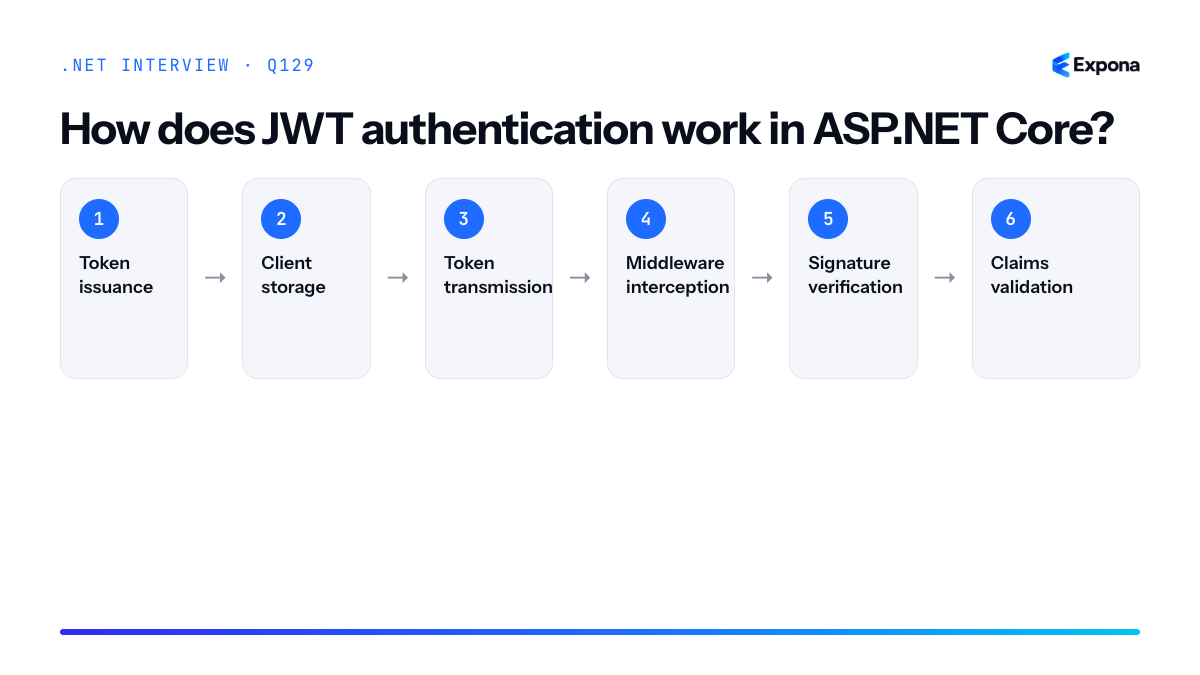
How it works
JWT (JSON Web Token) authentication is a token-based, stateless mechanism. When a user logs in, the server creates a token containing claims (identity information) and signs it with a secret key. The client stores this token and includes it in the Authorization header as
Bearer <token>for subsequent requests.On each request, the JwtBearer authentication handler intercepts the token, validates its signature using the same secret key (or public key in asymmetric scenarios), checks expiration, issuer, and audience claims, and reconstructs a ClaimsPrincipal. This principal is then attached to the HttpContext and used by authorization policies to control access to endpoints.
The key advantage is statelessly validating identity without server-side session storage. The token itself is the proof of authentication, so it works seamlessly across multiple servers and microservices. However, tokens cannot be revoked instantly—only new tokens issued after a revocation event will reflect the change.
Example
csharp// Program.cs – Configure JWT authentication var builder = WebApplication.CreateBuilder(args); builder.Services .AddAuthentication(JwtBearerDefaults.AuthenticationScheme) .AddJwtBearer(options => { options.TokenValidationParameters = new TokenValidationParameters { ValidateIssuerSigningKey = true, IssuerSigningKey = new SymmetricSecurityKey(Encoding.UTF8.GetBytes("your-secret-key-min-32-chars-long")), ValidateIssuer = true, ValidIssuer = "https://myapp.com", ValidateAudience = true, ValidAudience = "myapp-api", ValidateLifetime = true, ClockSkew = TimeSpan.Zero }; }); builder.Services.AddAuthorization(); var app = builder.Build(); app.UseAuthentication(); app.UseAuthorization(); // Login endpoint – issue token app.MapPost("/login", (ITokenService tokenService) => { var token = tokenService.GenerateToken("user123", "admin"); return Results.Ok(new { accessToken = token }); }); // Protected endpoint app.MapGet("/protected", (HttpContext ctx) => Results.Ok($"Hello {ctx.User.FindFirst(ClaimTypes.NameIdentifier)?.Value}")) .RequireAuthorization(); app.Run();This configures JWT validation with issuer, audience, and lifetime checks, creates a login endpoint that issues tokens, and protects an endpoint with
.RequireAuthorization()—middleware validates the Bearer token and populates the ClaimsPrincipal before the handler executes.Key points to mention
- Stateless validation: The server does not store tokens or sessions; validation is purely cryptographic.
- Token structure: JWTs consist of header (algorithm), payload (claims), and signature; only the signature proves authenticity.
- Claim validation: Issuer, audience, expiration, and custom claims are checked; misconfiguration allows token hijacking.
- No instant revocation: Tokens remain valid until expiration; implement token blacklists or short lifetimes and refresh tokens for revocation.
- Asymmetric keys optional: Use symmetric keys (HS256) for simple scenarios or asymmetric (RS256) when multiple servers validate tokens signed by a central authority.
Common follow-up questions
- How do you handle token refresh and revocation? (Usually via refresh tokens and token blacklists or short lifetimes.)
- What is the difference between cookie and JWT authentication, and when would you use each?
- How do you test authorization rules in integration tests with JWT tokens?
Main steps
- Token issuance: Server creates a JWT containing claims (subject, roles, expiration) and signs it with a secret or private key.
- Client storage: Client receives the token and stores it (typically in memory or localStorage for SPAs).
- Token transmission: Client includes the token in the Authorization header as
Bearer <token>with each request. - Middleware interception: JwtBearer middleware extracts and parses the token from the Authorization header.
- Signature verification: Middleware validates the token's signature using the configured key.
- Claims validation: Issuer, audience, expiration, and custom claims are checked against configured parameters.
- Principal construction: A valid token is converted into a ClaimsPrincipal and attached to HttpContext.User.
- Authorization enforcement: Authorization policies and
[Authorize]attributes use the ClaimsPrincipal to grant or deny access.
Related interview questions
- How do you test authorization rules in integration tests?
- What is the request pipeline order?
- What is the difference between cookie and JWT authentication?
Further reading
.NETCsharpaspnetcoreSecurity130How do refresh tokens work?
ExperiencedRefresh tokens are long-lived credentials that allow a client to obtain a new short-lived access token without requiring the user to re-authenticate. When an access token expires, the client sends the refresh token to the authorization server to receive a fresh access token and optionally a new refresh token. Implementing proper refresh token rotation and revocation strategies is critical for security.
How it works
The refresh token flow operates in distinct phases. First, during initial authentication, the authorization server issues both an access token (valid for minutes) and a refresh token (valid for days or weeks). The access token is used to authenticate API requests, while the refresh token is stored securely on the client—typically in an HTTP-only cookie or encrypted local storage.
When the access token expires, instead of forcing re-authentication, the client sends the refresh token to the token endpoint. The server validates the refresh token, checks it hasn't been revoked, and issues a new access token. Modern implementations employ refresh token rotation: each refresh returns a fresh refresh token and invalidates the old one. This limits the window of exposure if a token is compromised.
The server maintains a token store (database or cache) tracking issued refresh tokens, their expiration, associated user IDs, and revocation status. When a refresh token is used, the server marks it as consumed and issues a new one. If the same refresh token is used twice, it indicates token theft, and the server can invalidate the entire token family and force re-authentication.
Secure storage is paramount: refresh tokens must never be exposed to JavaScript (use HTTP-only cookies), encrypted in transit (HTTPS only), and rotated regularly. Access tokens should be short-lived (5-15 minutes) to minimize damage if stolen, while refresh tokens live longer (days to weeks) but remain protected.
Example
csharppublic class TokenService { private readonly ITokenRepository _tokenRepo; private readonly IConfiguration _config; public async Task<TokenResponse> RefreshAccessTokenAsync(string refreshToken) { var storedToken = await _tokenRepo.GetRefreshTokenAsync(refreshToken); if (storedToken == null || storedToken.IsRevoked || storedToken.ExpiryDate < DateTime.UtcNow) throw new UnauthorizedAccessException("Invalid or expired refresh token"); var userId = storedToken.UserId; var newAccessToken = GenerateAccessToken(userId); // Rotate: invalidate old token and issue new one storedToken.IsRevoked = true; var newRefreshToken = GenerateRefreshToken(); await _tokenRepo.UpdateAsync(storedToken); await _tokenRepo.AddRefreshTokenAsync(new RefreshTokenEntity { Token = newRefreshToken, UserId = userId, ExpiryDate = DateTime.UtcNow.AddDays(7), CreatedAt = DateTime.UtcNow }); return new TokenResponse { AccessToken = newAccessToken, RefreshToken = newRefreshToken, ExpiresIn = 900 // 15 minutes }; } private string GenerateAccessToken(string userId) => new JwtSecurityTokenHandler().WriteToken(new JwtSecurityToken( issuer: _config["Jwt:Issuer"], audience: _config["Jwt:Audience"], claims: new[] { new Claim(ClaimTypes.NameIdentifier, userId) }, expires: DateTime.UtcNow.AddMinutes(15), signingCredentials: new SigningCredentials( new SymmetricSecurityKey(Encoding.UTF8.GetBytes(_config["Jwt:Key"])), SecurityAlgorithms.HmacSha256) )); private string GenerateRefreshToken() => Convert.ToBase64String(RandomNumberGenerator.GetBytes(64)); }This code demonstrates refresh token rotation: the old token is revoked, a new access token is generated with a short expiry, and a new refresh token is issued, all in a single atomic operation.
Key points to mention
- Token lifetime asymmetry: Access tokens are short-lived (minutes); refresh tokens are long-lived (days/weeks) and stored securely.
- Rotation strategy: Each refresh invalidates the old token and issues a new one, reducing exposure window and detecting token theft via reuse detection.
- Storage security: Refresh tokens must be stored in HTTP-only cookies or encrypted at rest; never expose them to client-side JavaScript.
- Revocation and blacklisting: Maintain a database or cache of valid refresh tokens; revoke on logout, password change, or suspicious reuse patterns.
- Family tracking: If the same refresh token is used twice, revoke all tokens in that family and force re-authentication, indicating compromise.
Common follow-up questions
- What happens if a refresh token expires before it's used? The client must re-authenticate; there is no grace period.
- How do you detect token theft in a refresh token rotation scheme? If the same (now-revoked) refresh token is used again, it indicates the original token was stolen.
- Can you revoke all active refresh tokens for a user? Yes—maintain a "revocation epoch" timestamp in the user record; any token issued before that epoch is considered revoked.
Related interview questions
- How do you secure service-to-service calls?
- What is the difference between AddScoped DbContext and a factory in Blazor Server?
- What causes memory leaks in managed code?
Further reading
.NETCsharpSecurity131What is policy-based authorization?
ExperiencedPolicy-based authorization is a declarative, reusable approach to defining and enforcing authorization rules in ASP.NET Core. Instead of scattering role or permission checks throughout your code, you define named policies that combine requirements (roles, claims, custom logic) in one place, then apply them via attributes or middleware. This separates authorization concerns from business logic and makes policies easy to test, update, and reuse across endpoints.
How it works
Policy-based authorization operates through ASP.NET Core's authorization service. You register policies in the dependency injection container during startup using
AddAuthorization. Each policy can contain one or more requirements—such as role membership, claim values, or custom logic evaluated by a handler. When a request hits an endpoint decorated with[Authorize(Policy = "...")]orRequireAuthorization(policy), the framework invokes the authorization service. The service evaluates all requirements in that policy and succeeds only if every requirement passes. If any requirement fails, the request is forbidden.Custom requirements inherit from
IAuthorizationRequirementand are paired with handlers that inherit fromAuthorizationHandler<TRequirement>. Handlers examine theAuthorizationHandlerContext(which includes the authenticated user's claims and principal) and callcontext.Succeed(requirement)if the condition is met.Example
csharp// Register policies in Program.cs builder.Services.AddAuthorization(options => { options.AddPolicy("AdminOnly", policy => policy.RequireRole("Administrator")); options.AddPolicy("PremiumUser", policy => policy.RequireClaim("subscription", "premium")); options.AddPolicy("MinimumAge18", policy => policy.AddRequirements(new MinimumAgeRequirement(18))); }); // Custom requirement public class MinimumAgeRequirement : IAuthorizationRequirement { public int MinimumAge { get; } public MinimumAgeRequirement(int minimumAge) => MinimumAge = minimumAge; } // Custom handler public class MinimumAgeHandler : AuthorizationHandler<MinimumAgeRequirement> { protected override Task HandleRequirementAsync( AuthorizationHandlerContext context, MinimumAgeRequirement requirement) { var ageClaim = context.User.FindFirst("age"); if (ageClaim != null && int.TryParse(ageClaim.Value, out var age)) { if (age >= requirement.MinimumAge) context.Succeed(requirement); } return Task.CompletedTask; } } // Apply policy to controller or action [Authorize(Policy = "AdminOnly")] [HttpDelete("users/{id}")] public async Task<IActionResult> DeleteUser(int id) => Ok(); [Authorize(Policy = "PremiumUser")] [HttpGet("premium-content")] public IActionResult GetPremiumContent() => Ok();This example defines three policies: one requiring the Administrator role, one requiring a "premium" subscription claim, and one using a custom handler to validate a user's age claim. Endpoints apply the appropriate policy via the
[Authorize]attribute.Key points to mention
- Centralized configuration: Define all policies once in
Program.cs, making authorization logic consistent and easier to maintain. - Composable requirements: A single policy can combine multiple requirements (roles, claims, custom logic). All must succeed for authorization to pass.
- Custom handlers: Use
AuthorizationHandler<TRequirement>to implement complex, domain-specific authorization logic without cluttering controllers. - Reusability: Apply the same policy to multiple endpoints or even different applications, reducing duplication.
- Testing-friendly: Mock the authorization service or use
WithWebHostBuilderin integration tests to verify policy behavior independently.
Common follow-up questions
- How does policy-based authorization differ from role-based authorization? Role-based uses fixed role names; policies are more flexible and can combine multiple requirement types. Policies are similar to resource-based authorization but applied at the route level rather than the resource instance level.
- Can I combine multiple policies on one endpoint? No,
[Authorize(Policy = "...")]accepts one policy. Combine multiple requirements into a single policy or use multiple handlers on shared requirements. - How do I test custom authorization handlers? See testing authorization rules in integration tests for patterns using
WithWebHostBuilderto inject mock handlers.
Related interview questions
- How do you secure a .NET API end to end?
- How do you implement resource-based authorization?
- How do you test authorization rules in integration tests?
Further reading
.NETCsharpSecurity- Centralized configuration: Define all policies once in
132How do you implement resource-based authorization?
ExperiencedResource-based authorization checks permissions based on specific resource ownership or properties by injecting
IAuthorizationServiceand callingAuthorizeAsync(user, resource, requirement)inside action methods, paired with a custom authorization handler that evaluates the resource state.How it works
Resource-based authorization differs from policy-based authorization because the decision depends on the actual resource instance, not just the user's claims or roles. Instead of decorating actions with
[Authorize(Policy = "...")], you injectIAuthorizationServiceand call it at runtime after retrieving the resource from your database or service layer.The flow is: retrieve the resource → create an authorization requirement → pass the user, resource, and requirement to
AuthorizeAsync→ your custom handler receives both and evaluates ownership or permissions. This is powerful because you can check properties like "is this user the owner of this document?" or "does this user have edit permission on this project?"You define a custom requirement (inheriting from
IAuthorizationRequirement) and a handler (inheriting fromAuthorizationHandler<TRequirement, TResource>). The handler'sHandleRequirementAsyncmethod receives the resource and decides whether the requirement is satisfied.Example
csharp// Define the requirement public class EditDocumentRequirement : IAuthorizationRequirement { } // Define the handler public class EditDocumentHandler : AuthorizationHandler<EditDocumentRequirement, Document> { protected override Task HandleRequirementAsync( AuthorizationHandlerContext context, EditDocumentRequirement requirement, Document resource) { if (resource.OwnerId == context.User.FindFirst(ClaimTypes.NameIdentifier)?.Value) { context.Succeed(requirement); } return Task.CompletedTask; } } // Register in Program.cs services.AddAuthorizationBuilder() .AddPolicy("EditDocument", policy => policy.Requirements.Add(new EditDocumentRequirement())); services.AddSingleton<IAuthorizationHandler, EditDocumentHandler>(); // Use in controller [ApiController] [Route("api/documents")] public class DocumentsController(IAuthorizationService authorizationService) : ControllerBase { [HttpPut("{id}")] public async Task<IActionResult> UpdateDocument(int id, UpdateDocumentDto dto) { var document = await _db.Documents.FindAsync(id); if (document == null) return NotFound(); var result = await authorizationService.AuthorizeAsync( User, document, new EditDocumentRequirement()); if (!result.Succeeded) return Forbid(); document.Title = dto.Title; await _db.SaveChangesAsync(); return Ok(); } }This example checks if the current user owns the document before allowing updates, with the handler evaluating ownership by comparing the document's
OwnerIdto the user's identity claim.Key points to mention
IAuthorizationService.AuthorizeAsync(user, resource, requirement)is called inside your action after loading the resource, enabling dynamic, context-aware decisions.- Custom handlers inherit from
AuthorizationHandler<TRequirement, TResource>and access both the user context and the specific resource inHandleRequirementAsync. - Resource-based authorization complements authentication and authorization by checking ownership or object-level permissions rather than just roles or claims.
- You can combine multiple handlers and requirements; if any handler calls
context.Fail(), the overall result is forbidden. - This pattern scales well for multi-tenant systems, collaborative platforms, or any scenario where permissions vary per resource instance.
Common follow-up questions
- How do you test this? — Use integration tests with test users and resources to verify handlers correctly approve or deny access.
- Can you use filters instead? — Yes, you could implement a custom authorization filter, but injecting the service is clearer and keeps authorization logic in your handlers.
- What if the resource has hierarchical permissions? — Pass the resource or its parent to the handler; the handler can check ownership at any level in your permission hierarchy.
Related interview questions
- How do you test authorization rules in integration tests?
- What are the types of filters in ASP.NET Core?
- What is the difference between authentication and authorization?
Further reading
.NETCsharpSecurity133What is the difference between cookie and JWT authentication?
ExperiencedCookie-based authentication stores session state on the server and uses HTTP-only cookies for browser clients, requiring explicit CSRF protection and server memory. JWT (JSON Web Token) authentication is stateless, encoding claims directly in a signed token that the client includes in request headers, making it ideal for APIs and distributed systems. The choice depends on your architecture: cookies for traditional server-rendered apps, JWT for APIs and mobile clients.
How it works
Cookie-based authentication follows a traditional session model. When a user logs in, the server validates credentials, creates a session record in memory or a data store (Redis, SQL Server), and sends a session ID back as an HTTP-only cookie. The browser automatically includes this cookie on every request to the same domain. The server looks up the session, verifies it's valid and not expired, and processes the request. On logout, the session is destroyed. Because cookies are automatically sent, CSRF attacks are possible—an attacker can trick your browser into making unwanted requests—so you must implement CSRF protection tokens.
JWT authentication is stateless. When a user logs in, the server creates a signed token containing user claims (ID, roles, permissions) and an expiration time, then returns it to the client. The client stores the token (localStorage, sessionStorage, or a secure cookie) and includes it in the
Authorization: Bearer <token>header on every request. The server validates the signature and expiration without looking up any session. Because the token is explicitly passed by the client and not automatically included, CSRF is not a concern; XSS (Cross-Site Scripting) is the primary threat if the token is stored in JavaScript-accessible storage.Example
csharp// Cookie-based authentication (ASP.NET Core) app.MapPost("/login-cookie", async (LoginRequest req, IAuthService auth, HttpContext ctx) => { var user = await auth.ValidateCredentialsAsync(req.Email, req.Password); if (user == null) return Results.Unauthorized(); await ctx.SignInAsync(CookieAuthenticationDefaults.AuthenticationScheme, new ClaimsPrincipal(new ClaimsIdentity(new[] { new Claim(ClaimTypes.NameIdentifier, user.Id), new Claim(ClaimTypes.Email, user.Email) }, "cookie"))); return Results.Ok(); }); // JWT authentication (ASP.NET Core) app.MapPost("/login-jwt", async (LoginRequest req, IAuthService auth, ITokenService tokenService) => { var user = await auth.ValidateCredentialsAsync(req.Email, req.Password); if (user == null) return Results.Unauthorized(); var token = tokenService.GenerateToken(new[] { new Claim(ClaimTypes.NameIdentifier, user.Id), new Claim(ClaimTypes.Email, user.Email) }); return Results.Ok(new { token }); });The cookie example uses
SignInAsyncto create a secure, HTTP-only cookie that the browser manages automatically. The JWT example generates a signed token the client must store and include explicitly on subsequent requests.Comparison table
Aspect Cookie-based JWT State Stateful (server stores sessions) Stateless (token is self-contained) Storage HTTP-only cookie (automatic on browser) Client (localStorage, sessionStorage, or cookie) Transmission Automatic with every same-domain request Manual in Authorization header CSRF risk High; requires CSRF token protection Low; client explicitly sends token Best for Browser-based apps (MVC, Blazor Server) APIs, SPAs, mobile apps, microservices Scalability Requires shared session store (Redis, DB) No server-side session storage needed 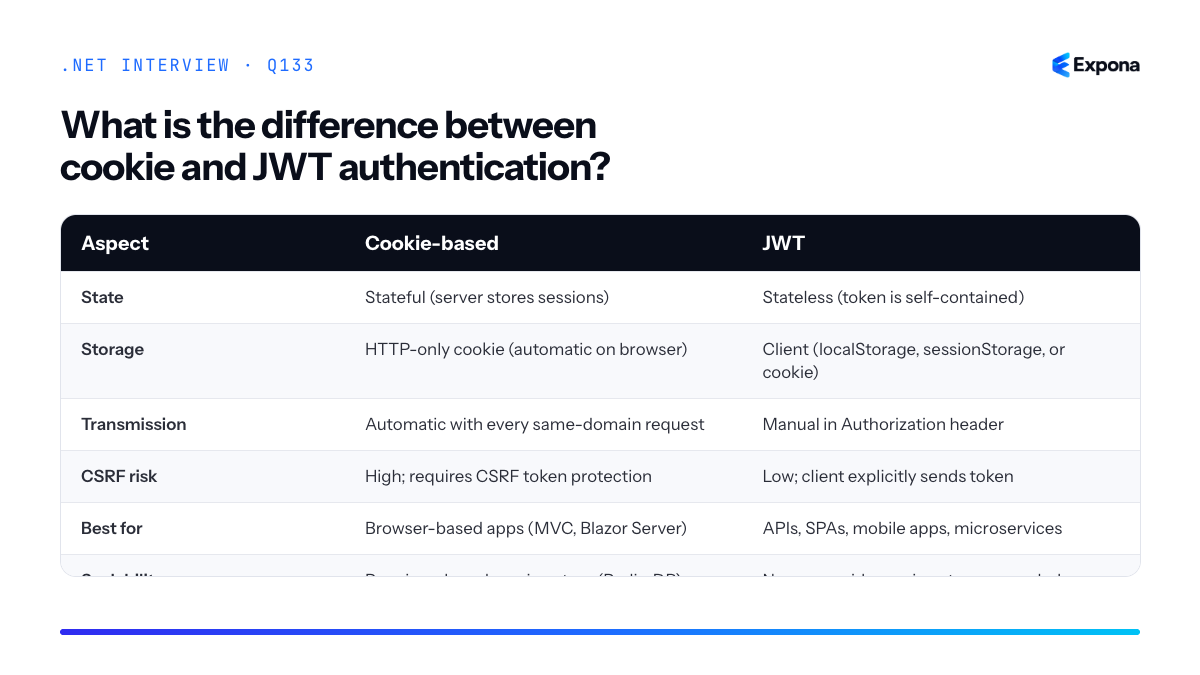
Key points to mention
- Cookies are automatic and transparent to the client but tie authentication to the browser and same-origin policy; JWTs require explicit client management but work across domains and with mobile apps.
- Cookie sessions must be validated against server state every request; JWT tokens are validated cryptographically and do not require a database lookup, improving performance at scale.
- Cookies mitigate XSS (HTTP-only flag) but require CSRF protection; JWTs mitigate CSRF but are vulnerable to XSS if stored in JavaScript. Use secure HTTP-only cookies for JWTs when possible.
- JWT authentication in ASP.NET Core is configured with
AddJwtBearermiddleware; cookie authentication usesAddAuthentication(CookieAuthenticationDefaults.AuthenticationScheme). - Token expiration and refresh strategies are critical for JWT; with cookies, session expiration is server-controlled.
Common follow-up questions
- How do you handle token refresh with JWT? Issue a short-lived access token and a longer-lived refresh token; when the access token expires, the client uses the refresh token to get a new access token without re-entering credentials.
- Can you use both cookies and JWT together? Yes; store the JWT in an HTTP-only cookie so the browser sends it automatically, gaining JWT's stateless benefits with cookie's automatic transmission and XSS protection.
- Why is revocation harder with JWT than cookies? JWTs are valid until expiration; to revoke early, you must maintain a blacklist or use a token version in your user record, defeating some stateless benefits.
Related interview questions
- How do you protect APIs against CSRF?
- How does JWT authentication work in ASP.NET Core?
- What are the common HTTP status codes for APIs?
Further reading
.NETCsharpSecurity134How do you protect APIs against CSRF?
ExperiencedDirect Answer: CSRF protection depends on your authentication mechanism. For cookie-authenticated endpoints, use antiforgery tokens (like ASP.NET Core's built-in AntiforgeryToken) or enforce SameSite cookie attributes. Bearer token APIs are inherently safe from classic CSRF because browsers cannot automatically attach custom authorization headers—attackers must trick users into submitting forms with valid tokens, which is much harder.
How it works
Cross-Site Request Forgery (CSRF) exploits the browser's automatic cookie inclusion behavior. When a user visits a malicious site while authenticated to your API, the browser automatically sends stored cookies with any request to your domain, allowing the attacker to perform unwanted actions on the user's behalf.
Cookie-based authentication: The classic solution is the double-submit cookie pattern or synchronizer token pattern. A unique token is generated per session and embedded in forms or response headers. The server validates that the token in the request matches the token stored in the cookie. Since JavaScript on malicious domains cannot read tokens stored in httpOnly cookies, attackers cannot forge valid requests.
Bearer token authentication: APIs using JWT or other bearer tokens in the Authorization header are protected by the browser's Same-Origin Policy for custom headers. JavaScript from malicious origins cannot set the Authorization header due to CORS restrictions, making automatic token inclusion impossible. This is why bearer tokens are inherently CSRF-safe compared to cookies.
SameSite cookies: A modern browser feature that restricts cookie inclusion in cross-site requests. Strict mode prevents all cross-site submissions; Lax allows safe GET requests but blocks POST requests from external sites.
Example
csharp// Startup configuration services.AddAntiforgery(options => { options.HeaderName = "X-CSRF-TOKEN"; options.FormFieldName = "AntiforgeryToken"; options.SuppressXFrameOptionsHeader = false; }); services.ConfigureApplicationCookie(options => { options.Cookie.SameSite = SameSiteMode.Strict; options.Cookie.HttpOnly = true; options.Cookie.SecurePolicy = CookieSecurePolicy.Always; }); // Controller action [HttpPost] [ValidateAntiforgeryToken] public IActionResult ChangeEmail([FromForm] string newEmail) { // Token is automatically validated by the attribute _userService.UpdateEmail(User.Identity.Name, newEmail); return Ok(); } // In the view, include the token <form method="post" asp-action="ChangeEmail"> @Html.AntiForgeryToken() <input type="email" name="newEmail" /> <button type="submit">Update</button> </form>The ValidateAntiforgeryToken attribute checks that the submitted token matches the token in the user's cookie, preventing CSRF attacks while allowing legitimate form submissions.
Key points to mention
- Cookie authentication requires antiforgery tokens — always use [ValidateAntiforgeryToken] on state-changing endpoints (POST, PUT, DELETE)
- Bearer tokens are CSRF-safe by default — the Same-Origin Policy prevents cross-site header injection
- SameSite=Strict/Lax mitigates CSRF — use this in addition to tokens for defense-in-depth on cookie-based APIs
- httpOnly and Secure flags are essential — prevent JavaScript access and ensure encrypted transport
- SPAs and single-page apps — verify tokens are stored securely (not localStorage for sensitive values) and sent in every state-changing request
Common follow-up questions
- Why is SameSite not enough? — SameSite relies on browser support and doesn't protect against same-site requests; combining it with antiforgery tokens provides stronger defense.
- Do I need CSRF protection for public endpoints? — No, only endpoints that modify state and require authentication. Public read-only endpoints are safe from CSRF.
- How do I handle CSRF tokens in SPAs with multiple tabs? — Use a single token per session stored in httpOnly cookies and include it in request headers; refreshing a tab will resync the token if needed.
Related interview questions
- What is the difference between cookie and JWT authentication?
- How do you protect against mass assignment in APIs?
- What are Minimal APIs?
Further reading
.NETCsharpSecurity135How do you implement rate limiting in .NET 8?
ExperiencedRate limiting in .NET 8 is implemented using the built-in
System.Threading.RateLimitingnamespace, which provides middleware and APIs for controlling request flow. You define a rate limiter policy (fixed window, sliding window, token bucket, or concurrency), partition by user/IP/custom key, and return HTTP 429 (Too Many Requests) when limits are exceeded. The middleware integrates seamlessly into the Minimal APIs or controller pipeline.How it works
.NET 8 introduced a standardized rate limiting system that operates at multiple levels. At the core, you create a
RateLimiterinstance with a specific algorithm and partition strategy. The middleware intercepts requests, checks if the consumer (identified by user ID, IP address, or custom key) has capacity remaining, and either allows the request through or rejects it with a 429 status code.The main algorithms are: Fixed Window (allow N requests per fixed time period), Sliding Window (overlapping windows for smoother throttling), Token Bucket (tokens accumulate over time; each request consumes tokens), and Concurrency (limit simultaneous requests). You can partition by any key—common choices are IP address, authenticated user ID, or custom identifiers—enabling per-consumer limits rather than global limits.
When a request is rejected, the middleware optionally sets retry-after headers and logs telemetry, helping clients implement intelligent backoff strategies. For distributed scenarios, consider how to design a rate limiter for a distributed system using Redis or external services.
Example
csharpvar builder = WebApplication.CreateBuilder(args); // Add rate limiting service builder.Services.AddRateLimiter(options => { options.AddFixedWindowLimiter("fixed", config => { config.PermitLimit = 10; config.Window = TimeSpan.FromMinutes(1); config.QueueProcessingOrder = QueueProcessingOrder.OldestFirst; config.QueueLimit = 2; }); options.AddTokenBucketLimiter("token", config => { config.TokenLimit = 100; config.QueueProcessingOrder = QueueProcessingOrder.OldestFirst; config.ReplenishmentPeriod = TimeSpan.FromSeconds(10); config.TokensPerPeriod = 20; config.QueueLimit = 5; }); options.RejectionStatusCode = StatusCodes.Status429TooManyRequests; }); var app = builder.Build(); app.UseRateLimiter(); app.MapGet("/api/data", () => "Success") .RequireRateLimiting("fixed"); app.MapPost("/api/upload", () => "Uploaded") .RequireRateLimiting("token"); app.Run();This example defines two policies: a fixed window allowing 10 requests per minute, and a token bucket replenishing 20 tokens every 10 seconds with a max of 100 tokens. Endpoints apply policies using
RequireRateLimiting(), and requests exceeding limits receive a 429 response.Key points to mention
- Use
AddRateLimiter()in the service container andUseRateLimiter()middleware to enable the feature globally or per-endpoint. - Partition strategies allow per-user or per-IP limits; use custom partition keys for more granular control (e.g., API key, tenant ID).
- Queuing options (
QueueLimit,QueueProcessingOrder) determine whether excess requests wait or are rejected immediately. - For distributed systems, in-memory rate limiting works only on a single instance; consider Redis-backed solutions for multi-node deployments.
- Combine with resilience patterns like exponential backoff and circuit breakers to handle 429 responses gracefully.
Common follow-up questions
- How do you partition by user or IP address? — Override the partition key by implementing a custom partitioner or using the built-in extension methods like
PartitionByAuthenticatedUser()andPartitionByIpAddress()on your limiter configuration. - How do you handle rate limiting in a distributed system? — Use a shared backing store (Redis, MemoryCache with sync, or custom
RateLimiterStatistics) so all instances respect the same limits; .NET 8's built-in implementation is in-memory only. - What should clients do when they receive a 429 response? — Implement exponential backoff with jitter, respect the
Retry-Afterheader, and consider circuit breakers to avoid hammering the endpoint.
Related interview questions
- How do you design a rate limiter for a distributed system?
- How do you add resilience to HttpClient calls?
- How do you implement token exchange or on-behalf-of flows?
Further reading
.NETCsharpaspnetcoreasync- Use
136What is output caching in ASP.NET Core?
ExperiencedOutput caching in ASP.NET Core is a server-side response caching mechanism that stores complete HTTP responses based on configurable policies, tags, and eviction rules. Unlike HTTP response caching which relies on Cache-Control headers sent to clients or intermediaries, output caching gives you fine-grained control over what gets cached, for how long, and how it gets invalidated—all on the server.
How it works
Output caching middleware intercepts HTTP responses before they're sent to the client. When a request matches a configured cache policy, the middleware checks if a cached response exists for that request. If it does, it returns the cached response immediately without executing the endpoint logic. If not, the endpoint executes normally, and the middleware stores the response according to the policy rules.
Policies are defined declaratively using the
OutputCacheattribute or fluent builder methods. Each policy specifies cache duration, which request properties to consider (query strings, headers, cookies), and optional cache tags for grouped invalidation. When you tag cached responses, you can invalidate entire groups at once—for example, invalidating all "product" cache tags when product data changes.The cache itself is an in-memory store by default, though you can implement custom providers for distributed scenarios. Key features include conditional caching (cache only under certain conditions), Vary headers support (cache different responses for different Accept headers or other conditions), and automatic cache busting through tag-based invalidation.
Example
csharp// Program.cs var builder = WebApplication.CreateBuilder(args); builder.Services.AddOutputCache(options => { options.AddPolicy("ProductList", policy => policy .Expire(TimeSpan.FromMinutes(5)) .WithTag("products") .VaryByQuery("category")); options.AddPolicy("UserProfile", policy => policy .Expire(TimeSpan.FromMinutes(10)) .WithTag("user-profile") .VaryByCookie("userId")); }); var app = builder.Build(); app.UseOutputCache(); // Endpoint app.MapGet("/products", (string category) => GetProducts(category)) .CacheOutput("ProductList") .WithName("GetProducts") .WithOpenApi(); // Invalidate by tag app.MapPost("/products/invalidate", async (IOutputCacheStore cache) => { await cache.EvictByTagAsync("products", default); return Results.Ok(); });This example demonstrates a cached product list endpoint that varies by query string category, a profile endpoint that varies by user cookie, and an invalidation endpoint that clears all cached responses tagged as "products".
Key points to mention
- Server-side only: Output caching stores responses on the server, unlike HTTP caching headers that may be cached by clients or CDNs.
- Policy-based control: Define policies declaratively to specify duration, cache keys (vary by), conditions, and tags—no HTTP header configuration needed.
- Tag-based invalidation: Group cached responses by tags and invalidate multiple entries at once, ideal for cache coherency when upstream data changes.
- Request matching: Vary cache by query strings, headers, cookies, or custom logic to ensure different requests get appropriate cached or fresh responses.
- Extensible storage: Default in-memory store is suitable for single-server scenarios; implement
IOutputCacheStorefor distributed caching (Redis, etc.).
Common follow-up questions
- How does output caching differ from response caching? Response caching uses HTTP headers (Cache-Control, ETag) and relies on browser or intermediary caches; output caching is purely server-side with fine-grained policies and tag-based invalidation.
- Can I use output caching with distributed systems? Yes, by implementing a custom
IOutputCacheStorebacked by Redis or another distributed cache, though setup is more involved than the default in-memory provider. - How do I cache conditional responses? Use the
WithCacheableStatus()method to cache specific HTTP status codes, or add custom conditions via policy builders to cache only when business rules are met.
Related interview questions
- How do you tune Kestrel for production?
- What are the common HTTP status codes for APIs?
- How do you scale reads with EF Core and SQL Server or PostgreSQL?
Further reading
.NETCsharpaspnetcore137What is the difference between IMemoryCache and IDistributedCache?
ExperiencedIMemoryCache stores objects in-process memory within a single application instance and offers the fastest access, but data is not shared across multiple server instances. IDistributedCache stores serialized data in an external store (Redis, SQL Server, or other backends) and is accessible across all instances in a distributed system, but with higher latency and serialization overhead.
How it works
IMemoryCache is an in-process cache that lives in your application's memory. When you store an object, it remains in RAM for the lifetime of that application instance. Retrieval is extremely fast because there's no network round-trip or deserialization. However, if your application restarts or if you're running multiple instances behind a load balancer, each instance has its own separate cache. This means cached data on Server A is invisible to Server B.
IDistributedCache abstracts over a remote cache store. The most common implementation uses Redis, but it can also use SQL Server, NCache, or custom implementations. When you store data, it's serialized (usually to JSON or binary) and sent over the network to the external store. All application instances connect to the same backend, so they share the same cached data. This makes it ideal for scaling horizontally, but introduces network latency and serialization costs.
Aspect IMemoryCache IDistributedCache Storage Location In-process memory (RAM) External remote store (Redis, SQL, etc.) Performance Fastest; no network or serialization Slower; includes network I/O and deserialization Data Sharing Not shared; each instance has its own cache Shared across all application instances Scalability Poor for multi-instance deployments Excellent for distributed/scaled systems Memory Usage Consumes application process memory Offloaded to external service Persistence Lost on application restart Can survive application restarts (depends on backend) 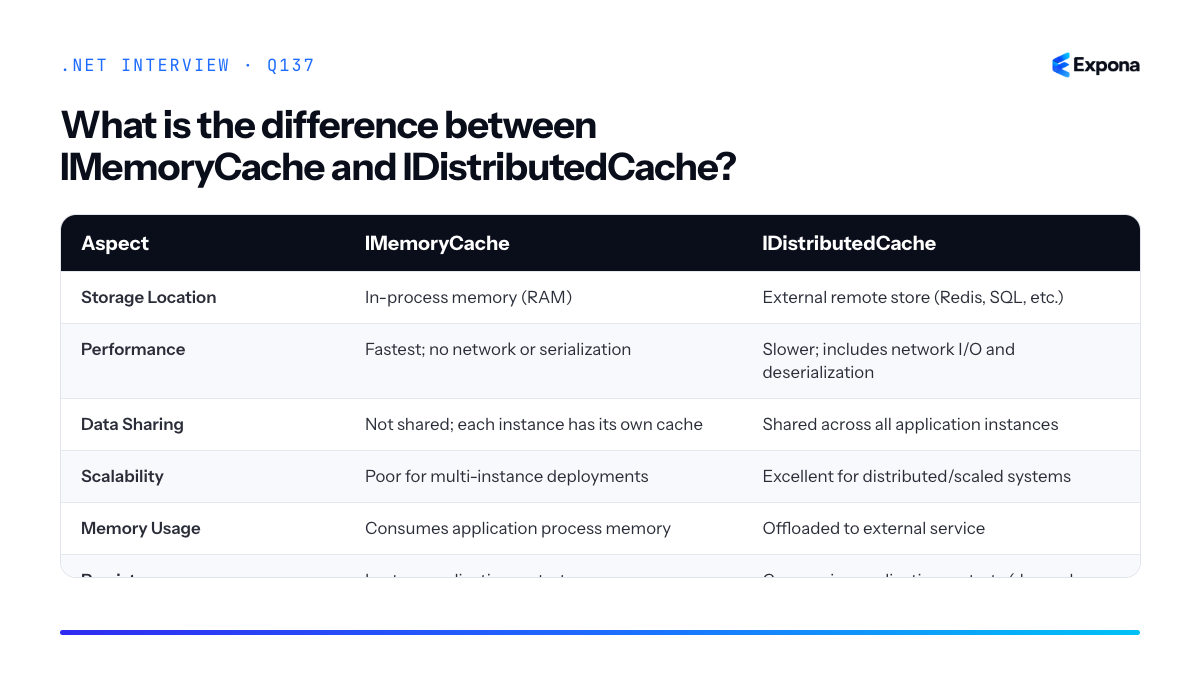
Example
csharp// IMemoryCache - single instance only public class UserService { private readonly IMemoryCache _memoryCache; public UserService(IMemoryCache memoryCache) { _memoryCache = memoryCache; } public async Task<User> GetUserAsync(int userId) { string key = $"user_{userId}"; if (_memoryCache.TryGetValue(key, out User cachedUser)) return cachedUser; var user = await FetchUserFromDb(userId); _memoryCache.Set(key, user, TimeSpan.FromHours(1)); return user; } } // IDistributedCache - shared across instances public class DistributedUserService { private readonly IDistributedCache _distributedCache; public DistributedUserService(IDistributedCache distributedCache) { _distributedCache = distributedCache; } public async Task<User> GetUserAsync(int userId) { string key = $"user_{userId}"; var json = await _distributedCache.GetStringAsync(key); if (json != null) return JsonSerializer.Deserialize<User>(json); var user = await FetchUserFromDb(userId); await _distributedCache.SetStringAsync(key, JsonSerializer.Serialize(user), new DistributedCacheEntryOptions { AbsoluteExpirationRelativeToNow = TimeSpan.FromHours(1) }); return user; } }The first example caches in-process and is only visible to that server instance. The second serializes to a distributed cache backend that all instances can access.
Key points to mention
- Use IMemoryCache for single-server applications or for very fast, instance-local caching of non-critical data (like calculated UI state).
- Use IDistributedCache in multi-instance deployments or when cache data must survive application restarts.
- IDistributedCache requires external infrastructure (Redis, SQL Server) and adds network latency; don't over-engineer single-instance apps.
- IMemoryCache can cause cache consistency issues in load-balanced scenarios if different instances have stale or different cached values.
- You can layer both: use IDistributedCache for the authoritative store and IMemoryCache as a local L1 cache in front of it.
Common follow-up questions
- How would you implement cache invalidation across multiple instances? (Answer: use a distributed cache event or pub/sub pattern with Redis; IMemoryCache has no cross-instance invalidation mechanism.)
- When would you combine both IMemoryCache and IDistributedCache? (Answer: two-tier caching—IDistributedCache as the authoritative shared store, IMemoryCache as a local L1 cache for ultra-fast access to frequently requested items.)
- What happens to IMemoryCache during a deployment or restart? (Answer: it's completely lost; use IDistributedCache if you need cache to survive application lifecycle events.)
Related interview questions
- What is the difference between AddTransient services that hold state and stateless services?
- What is the difference between stack and heap memory?
- What is the difference between a value type and a reference type?
Further reading
.NETCsharpPerformance138What is HybridCache in .NET 9?
ExperiencedHybridCache is a new caching abstraction introduced in .NET 9 that intelligently combines in-memory and distributed caching layers into a single, unified API. It automatically handles cache stampede protection by ensuring that when multiple concurrent requests miss the cache for the same key, the data factory function executes only once, with other requests waiting for that single result.
How it works
HybridCache operates as a two-tier caching system. First, it checks the in-memory cache (L1), which is extremely fast. If the data isn't found, it checks the distributed cache (L2, such as Redis), which is shared across multiple instances. If both miss, the factory function runs once, and the result is cached in both layers simultaneously.
The stampede protection works through coordinated locking. When multiple threads or processes request the same missing key concurrently, HybridCache uses a distributed lock mechanism to ensure only one factory execution occurs. Other concurrent requests block briefly and receive the result from that single execution, rather than each spawning their own database query or computation.
HybridCache integrates seamlessly with
IDistributedCacheimplementations and provides sensible defaults while allowing fine-grained control over timeouts, serialization, and tag-based invalidation. It's designed to reduce latency and database load in modern distributed applications where you need both speed (in-process) and consistency (distributed).Example
csharppublic class ProductService { private readonly HybridCache _cache; private readonly IProductRepository _repo; public ProductService(HybridCache cache, IProductRepository repo) { _cache = cache; _repo = repo; } public async Task<Product> GetProductAsync(int id, CancellationToken ct = default) { // HybridCache checks L1 (in-memory), then L2 (distributed). // If both miss, runs factory once, caches in both layers. return await _cache.GetOrCreateAsync( $"product-{id}", async cancel => await _repo.GetProductByIdAsync(id, cancel), options: new HybridCacheEntryOptions { LocalCacheExpiration = TimeSpan.FromMinutes(5), DistributedCacheExpiration = TimeSpan.FromHours(1) }, token: ct ); } }This code retrieves a product from the database only once even if ten concurrent requests arrive for the same missing product ID, with all receiving the result from a single query execution.
Key points to mention
- Stampede protection: Prevents the cache stampede problem by serializing factory execution for concurrent misses on the same key.
- Dual-layer caching: Combines fast in-memory (L1) with distributed (L2) storage, optimizing both latency and consistency across instances.
- Unified API: Single abstraction replaces the need to manually manage both
IMemoryCacheandIDistributedCache. - Flexible expiration: Allows different TTLs for in-memory versus distributed cache, adapting to your consistency and performance needs.
- Tag-based invalidation: Supports tagging entries for efficient bulk invalidation (useful for related data dependencies).
Common follow-up questions
- How does HybridCache compare to using IMemoryCache and IDistributedCache separately? — HybridCache eliminates boilerplate, automatically handles stampede protection, and provides coordinated expiration across both layers, whereas manual approaches require explicit locking and synchronization logic.
- What happens if the distributed cache is unavailable? — HybridCache gracefully falls back to in-memory cache; it doesn't fail the request. However, you lose cross-instance consistency until the distributed cache recovers.
- Can I use HybridCache without a distributed cache? — Yes; it works with only an in-memory layer, though you lose multi-instance coherence. The factory logic remains protected against stampedes within a single process.
Related interview questions
Further reading
.NETCsharpasyncPerformance139How do you avoid cache stampedes?
ExperiencedA cache stampede occurs when a cached entry expires and many concurrent requests simultaneously try to rebuild it, overwhelming the database or backend service. You prevent this by using locking (single-flight pattern), probabilistic early refresh with jitter, or distributed cache solutions like HybridCache in .NET 9, ensuring only one request rebuilds the cache while others wait for the result.
How it works
A cache stampede happens because cache expiration is a hard boundary: when a key expires, the next request sees a cache miss and starts a potentially expensive operation. If many requests arrive simultaneously at that moment, they all see the miss and all rebuild the cache independently—multiplying database load.
Locking and single-flight patterns ensure only one goroutine (or thread) rebuilds; others block or queue on a lock and reuse the result. Probabilistic early refresh uses jitter to stagger expiration across instances, so not all requests refresh at once. HybridCache provides distributed coordination automatically. The key principle is: one cache miss should trigger one rebuild, not N rebuilds.
Example
csharp// Single-flight pattern with SemaphoreSlim public class CacheService { private readonly IDistributedCache _cache; private readonly SemaphoreSlim _lock = new(1, 1); public async Task<string> GetDataAsync(string key) { var cached = await _cache.GetStringAsync(key); if (cached != null) return cached; // Only one thread rebuilds; others wait for the result await _lock.WaitAsync(); try { cached = await _cache.GetStringAsync(key); if (cached != null) return cached; var data = await FetchFromDatabaseAsync(); await _cache.SetStringAsync(key, data, new DistributedCacheEntryOptions { AbsoluteExpirationRelativeToNow = TimeSpan.FromMinutes(5) }); return data; } finally { _lock.Release(); } } private async Task<string> FetchFromDatabaseAsync() => "data from db"; }This locks during cache misses so concurrent requests queue; only the first rebuilds, and the rest reuse its result. In distributed scenarios, use a distributed lock (Redis SETNX, database mutex) instead of SemaphoreSlim.
Key points to mention
- Root cause: Hard cache expiration + concurrent miss = N simultaneous rebuild attempts.
- Locking/single-flight: Serialize cache rebuilds so one request computes, others wait and reuse.
- Probabilistic refresh: Add jitter to TTL or refresh before expiration so not all instances refresh simultaneously.
- Distributed lock: In multi-server deployments, use Redis, database, or Consul to coordinate—SemaphoreSlim only works per process.
- HybridCache: .NET 9+ handles this automatically with built-in coordination and layered caching.
Common follow-up questions
- How do you handle distributed cache stampedes? Use a distributed lock (Redis SET with NX and EX, or SETNX) to elect one server to rebuild, or use HybridCache's built-in L1/L2 coordination.
- What is probabilistic early refresh and how does it help? Refresh cache slightly before expiration with randomized jitter so not all servers refresh at the exact same time, spreading load.
- When would you use HybridCache over manual locking? Always prefer HybridCache for new projects—it combines local + distributed caching with automatic stampede prevention, reducing boilerplate.
Related interview questions
- What is HybridCache in .NET 9?
- What is the difference between record class and record struct?
- What is false sharing?
Further reading
.NETCsharpasyncPerformance140How does IHttpClientFactory help?
ExperiencedIHttpClientFactory is a factory pattern implementation that manages and pools
HttpMessageHandlerinstances to prevent socket exhaustion and DNS caching issues, while providing a clean abstraction for dependency injection and resilience policy integration. It replaces the anti-pattern of creating newHttpClientinstances per request, ensuring efficient resource use and proper lifetime management across your application.How it works
When you register
IHttpClientFactoryviaAddHttpClient(), it creates a pool of reusableHttpMessageHandlerobjects. Each handler manages a connection pool to remote endpoints, reducing the overhead of establishing new TCP connections and DNS lookups. The factory creates newHttpClientinstances on demand, but these are cheap wrappers around the pooled handlers—the expensive part (sockets, DNS, connection state) is shared.The factory supports three patterns: default clients, named clients, and typed clients. Named clients allow you to configure multiple HttpClient instances with different base addresses or timeout policies. Typed clients go further by wrapping
IHttpClientFactoryin strongly-typed classes injected directly into your services, encapsulating API logic and promoting testability.IHttpClientFactory integrates seamlessly with resilience libraries like Polly, allowing you to attach retry policies, circuit breakers, and timeout handlers at registration time. This ensures every request using that client factory benefits from consistent resilience behavior without scattered try-catch logic.
Example
csharp// Startup/Program.cs services.AddHttpClient<GitHubApiClient>() .ConfigureHttpClient(client => { client.BaseAddress = new Uri("https://api.github.com"); client.DefaultRequestHeaders.Add("User-Agent", "MyApp"); }) .AddPolicyHandler(GetRetryPolicy()); // GitHubApiClient.cs public class GitHubApiClient { private readonly HttpClient _httpClient; public GitHubApiClient(HttpClient httpClient) { _httpClient = httpClient; } public async Task<UserData> GetUserAsync(string username) { var response = await _httpClient.GetAsync($"/users/{username}"); response.EnsureSuccessStatusCode(); return await response.Content.ReadAsAsync<UserData>(); } } // In your controller/service public class MyService { private readonly GitHubApiClient _client; public MyService(GitHubApiClient client) => _client = client; public async Task DoWork() => await _client.GetUserAsync("octocat"); } static IAsyncPolicy<HttpResponseMessage> GetRetryPolicy() => HttpPolicyExtensions .HandleTransientHttpError() .WaitAndRetryAsync(3, retryAttempt => TimeSpan.FromSeconds(Math.Pow(2, retryAttempt)));This example registers a typed client for GitHub API calls with automatic retry logic and a shared base address, so every injected instance reuses the same connection pool and resilience behavior.
Key points to mention
- Prevents socket exhaustion: Pooled handlers maintain persistent connections rather than opening a new socket per request, avoiding "too many open files" errors under load.
- Solves DNS staleness: By keeping connections alive, stale DNS cache in
HttpClientHandleris refreshed periodically rather than persisting indefinitely. - Three usage patterns: default factory, named clients (multiple configs), and typed clients (strongly-typed wrappers with injected logic).
- Polly integration: Decorates clients with resilience policies (retry, circuit break, timeout) at registration, applied transparently to all requests.
- Lifetime control: Factory manages handler lifetime; you inject cheap
HttpClientinstances without worrying about disposal.
Common follow-up questions
- "Should HttpClient ever be disposed?" – No; the factory handles disposal. If you inject
HttpClientdirectly (via the factory), treat it as long-lived and reusable. - "How do you test a typed client?" – Mock
HttpClientFactoryor inject a mockHttpClientin unit tests; useHttpClientFactory.CreateClient()in integration tests. - "What's the difference between named and typed clients?" – Named clients are retrieved by string key; typed clients are specific classes injected directly, offering better type safety and encapsulation.
Related interview questions
.NETCsharpPerformance141How do you add resilience to HttpClient calls?
ExperiencedAdd resilience to HttpClient calls using Microsoft.Extensions.Http.Resilience with AddStandardResilienceHandler, which provides out-of-the-box retry policies, timeouts, circuit breakers, and rate limiting—all built on Polly. This is the modern, recommended approach in .NET 8+ that eliminates manual Polly configuration for typical scenarios.
How it works
Microsoft.Extensions.Http.Resilience is a NuGet package that wraps Polly policies and integrates them directly into the HttpClient pipeline via message handlers. When you add
AddStandardResilienceHandler()to your HttpClientBuilder, it automatically applies a preconfigured set of policies:- Retry policy: Retries transient failures (5xx, 408 timeouts) using exponential backoff with jitter.
- Timeout policy: Enforces request and total timeouts to prevent hanging requests.
- Circuit breaker: Opens after consecutive failures to fast-fail and protect downstream services.
- Rate limiter: Throttles outbound requests to respect API limits and backpressure.
These policies compose into a pipeline where each request flows through retry → timeout → circuit breaker → rate limiter logic. You can also customize the handler's configuration to adjust thresholds, retry counts, and timeout durations to match your service's SLAs.
Example
csharpusing Microsoft.Extensions.DependencyInjection; using Microsoft.Extensions.Http.Resilience; var services = new ServiceCollection(); // Add HttpClient with standard resilience services.AddHttpClient<MyApiClient>() .AddStandardResilienceHandler(options => { options.Retry.MaxRetryAttempts = 3; options.CircuitBreaker.FailureThreshold = 0.5; // Open after 50% failure rate options.TotalRequestTimeout = TimeSpan.FromSeconds(30); options.AttemptTimeout = TimeSpan.FromSeconds(10); }); var provider = services.BuildServiceProvider(); var client = provider.GetRequiredService<MyApiClient>(); public class MyApiClient { private readonly HttpClient _httpClient; public MyApiClient(HttpClient httpClient) { _httpClient = httpClient; } public async Task<string> GetDataAsync(string id) { var response = await _httpClient.GetAsync($"https://api.example.com/data/{id}"); response.EnsureSuccessStatusCode(); return await response.Content.ReadAsStringAsync(); } }This code configures an HttpClient with standard resilience policies—retry attempts, timeout limits, and circuit breaker thresholds are applied transparently to all requests made through
_httpClient.Key points to mention
- AddStandardResilienceHandler is the modern, recommended approach over manually composing Polly policies for typical scenarios.
- Policies are applied in order: retry → timeout → circuit breaker → rate limiter; transient failures like 5xx and 408 are retried automatically.
- Configuration is optional; the handler provides sensible defaults that work for most services without customization.
- The circuit breaker prevents cascading failures by failing fast once a threshold of failures is reached, protecting upstream services.
- When designing resilient service-to-service communication, combine this with proper error handling, fallbacks, and monitoring.
Common follow-up questions
- What happens when the circuit breaker opens? — Once open, the circuit breaker immediately rejects requests without calling the endpoint for a configured timeout period (usually 30 seconds), allowing the downstream service to recover. After that period, it transitions to half-open and tests one request; if successful, it closes again.
- How does this differ from manually using Polly? — AddStandardResilienceHandler provides preconfigured, composable policies out-of-the-box, reducing boilerplate. Manual Polly gives finer control but requires more code and understanding of policy composition.
- Can I implement custom resilience logic? — Yes; you can add custom handlers or policies by chaining
.AddTransientHttpErrorPolicy()or.AddPolicyHandler()after AddStandardResilienceHandler, or use rate limiting in .NET 8 for more advanced scenarios.
Related interview questions
- How do you design resilient service-to-service communication?
- How do you implement rate limiting in .NET 8?
- What is HttpClient?
Further reading
.NETCsharp142How do you implement health checks?
ExperiencedHealth checks in ASP.NET Core are implemented using the
AddHealthChecks()extension, which registers custom checks for critical dependencies like databases, caches, and external services. These checks are then mapped to separate liveness and readiness endpoints that orchestrators like Kubernetes use to monitor application health and make deployment decisions.How it works
Health checks provide a standardized way to communicate application state to infrastructure automation tools. The pattern involves three layers:
Registration: You call
AddHealthChecks()in the DI container and add individual checks using fluent methods likeAddDbContextCheck(),AddCheck(), or custom implementations ofIHealthCheck.Checks: Each check returns a
HealthCheckResultindicatingHealthy,Degraded, orUnhealthy. Checks run independently and report on specific components—a database query, Redis connection, or an HTTP call to a dependency.Endpoints: Liveness checks verify the process is running (should be fast, minimal I/O). Readiness checks confirm the app is ready to handle traffic (may query dependencies). Kubernetes uses these separately: liveness restarts containers, readiness routes traffic.
You map health check endpoints via
MapHealthChecks(), typically as/health/liveand/health/ready. Each endpoint can execute a different subset of checks and return JSON or simple status codes.Example
csharppublic class Program { public static void Main(string[] args) { var builder = WebApplication.CreateBuilder(args); builder.Services.AddHealthChecks() .AddDbContextCheck<AppDbContext>( tags: new[] { "ready" }) .AddCheck("DatabaseSeeding", new DatabaseSeedingHealthCheck(), tags: new[] { "ready" }) .AddRedis( builder.Configuration.GetConnectionString("Redis"), tags: new[] { "ready" }) .AddCheck("SelfHealthy", new AlwaysHealthyCheck(), tags: new[] { "live" }); var app = builder.Build(); app.MapHealthChecks("/health/live", new HealthCheckOptions { Predicate = reg => reg.Tags.Contains("live"), ResponseWriter = WriteResponse }); app.MapHealthChecks("/health/ready", new HealthCheckOptions { Predicate = reg => reg.Tags.Contains("ready"), ResponseWriter = WriteResponse }); app.Run(); } private static Task WriteResponse(HttpContext ctx, HealthReport report) { ctx.Response.ContentType = "application/json"; return ctx.Response.WriteAsJsonAsync(new { status = report.Status.ToString(), checks = report.Entries.Select(e => new { name = e.Key, status = e.Value.Status.ToString(), description = e.Value.Description }) }); } } public class DatabaseSeedingHealthCheck : IHealthCheck { private readonly AppDbContext _db; public DatabaseSeedingHealthCheck(AppDbContext db) => _db = db; public async Task<HealthCheckResult> CheckHealthAsync( HealthCheckContext context, CancellationToken ct) { var count = await _db.Users.CountAsync(ct); return count > 0 ? HealthCheckResult.Healthy("Database seeded") : HealthCheckResult.Unhealthy("No seed data found"); } } public class AlwaysHealthyCheck : IHealthCheck { public Task<HealthCheckResult> CheckHealthAsync( HealthCheckContext context, CancellationToken ct) { return Task.FromResult(HealthCheckResult.Healthy()); } }This example registers database, Redis, and custom checks with tags, then maps separate endpoints that filter by tag—liveness runs only fast checks, readiness validates dependencies before accepting traffic.
Key points to mention
- Tags separate concerns: Use tags to group checks by purpose (liveness vs. readiness), so each endpoint executes only relevant checks and responds appropriately.
- Custom IHealthCheck: Implement
IHealthCheckfor domain logic—verify seed data, check external APIs, validate feature flags—allowing fine-grained control over what "healthy" means. - Timeouts prevent hangs: Always set timeouts on checks to avoid blocking the orchestrator; if a database query hangs, the health check should fail fast rather than block Kubernetes probes.
- ResponseWriter customization: Use
HealthCheckOptions.ResponseWriterto format JSON, include additional metadata, or log failures for monitoring systems like Prometheus. - Production integration: Health checks work seamlessly with container orchestrators and CI/CD pipelines; Kubernetes uses them for pod lifecycle decisions, and monitoring tools scrape endpoints for alerting.
Common follow-up questions
- What is the difference between liveness and readiness probes, and when would each fail? (Readiness can fail on transient dependency issues; liveness should only fail if the process itself is corrupted.)
- How do you test health checks in unit tests? (Mock
IHealthCheck, inject test doubles, and assert onHealthCheckResultstatus and description.) - Can health checks affect performance? (Yes—if checks perform expensive I/O and run frequently, they can strain databases; keep them lightweight or increase probe intervals in Kubernetes configuration.)
Related interview questions
- What is the request pipeline order?
- What are Minimal APIs?
- How would you build a multi-tenant SaaS on ASP.NET Core?
Further reading
.NETCsharpaspnetcoreefcore143What is a BackgroundService?
ExperiencedBackgroundService is an abstract base class in the
Microsoft.Extensions.Hostingnamespace that simplifies building long-running hosted services in .NET. It implementsIHostedServiceand handles the lifecycle management (start, stop, dispose) automatically, requiring you only to overrideExecuteAsyncand implement your background work while respecting the cancellation token.How it works
BackgroundService wraps the complexity of
IHostedServiceby providing default implementations ofStartAsyncandStopAsync. When the host starts, it callsStartAsync, which launchesExecuteAsyncon a background thread pool thread. The service runs until either the host shuts down or an exception occurs. The cancellation token passed toExecuteAsyncsignals shutdown, allowing graceful termination of your background work.The key pattern is that
ExecuteAsyncshould be a long-running operation—typically an infinite loop checking the cancellation token. When the token is cancelled, your loop exits, the task completes, andStopAsyncreturns. This design ensures the host can shut down cleanly without killing threads abruptly.BackgroundService integrates seamlessly with dependency injection and the generic host builder, making it the standard choice for background tasks like message queues, timers, file watchers, and polling operations.
Example
csharpusing Microsoft.Extensions.Hosting; using Microsoft.Extensions.Logging; public class EmailQueueService : BackgroundService { private readonly ILogger<EmailQueueService> _logger; private readonly IEmailQueue _queue; public EmailQueueService(ILogger<EmailQueueService> logger, IEmailQueue queue) { _logger = logger; _queue = queue; } protected override async Task ExecuteAsync(CancellationToken stoppingToken) { _logger.LogInformation("Email queue service starting."); try { while (!stoppingToken.IsCancellationRequested) { var email = await _queue.DequeueAsync(stoppingToken); if (email != null) { await SendEmailAsync(email, stoppingToken); } else { await Task.Delay(1000, stoppingToken); } } } catch (OperationCanceledException) when (stoppingToken.IsCancellationRequested) { _logger.LogInformation("Email queue service stopping."); } catch (Exception ex) { _logger.LogError(ex, "Unhandled exception in email queue service."); throw; } } private async Task SendEmailAsync(Email email, CancellationToken ct) { // Send email logic await Task.CompletedTask; } } // Register in Program.cs var host = Host.CreateDefaultBuilder(args) .ConfigureServices(services => services.AddHostedService<EmailQueueService>()) .Build(); await host.RunAsync();This example shows a background service that continuously dequeues emails from a queue and sends them, respecting the cancellation token for clean shutdown and catching exceptions to prevent host termination.
Key points to mention
- Override ExecuteAsync: This is where your long-running work happens; it receives a
CancellationTokenthat signals shutdown. - Honor the cancellation token: Always check
stoppingToken.IsCancellationRequestedand pass the token to async operations to enable graceful shutdown. - Handle exceptions carefully: Unhandled exceptions terminate the host; catch and log them, or rethrow if intentional.
- Dependency injection friendly: Constructor injection works naturally; register with
AddHostedService<T>(). - No threading complexity: BackgroundService runs on the thread pool; you don't manage threads directly.
Common follow-up questions
- How do I ensure my background service shuts down gracefully? (See how do you implement graceful shutdown?)
- What's the difference between BackgroundService and IHostedService?
- How do I unit test a BackgroundService?
Related interview questions
- How do you implement graceful shutdown?
- What is method overriding?
- What is the saga pattern and how do you implement it in .NET?
Further reading
.NETCsharpasyncSecurity- Override ExecuteAsync: This is where your long-running work happens; it receives a
144How do you implement graceful shutdown?
ExperiencedGraceful shutdown means allowing your application to finish in-flight requests, clean up resources, and complete background work before the process terminates. You implement it by respecting
CancellationTokenin hosted services, configuringHostOptions.ShutdownTimeout, and letting Kestrel drain active connections before exit.How it works
When a shutdown signal arrives (SIGTERM on Linux, Ctrl+C, or container stop), the .NET host orchestrates a multi-phase shutdown:
- Signal reception: The host receives a termination signal and begins the shutdown sequence.
- StopAsync phase: All
IHostedServiceimplementations have theirStopAsyncmethod called with a cancellation token. - Request draining: Kestrel stops accepting new requests but allows existing ones to complete within the timeout window.
- Resource cleanup: Services dispose of connections, flush buffers, and release locks.
- Timeout enforcement: If shutdown takes longer than
ShutdownTimeout, the process forcibly terminates.
The
CancellationTokensignals to long-running loops that they should exit gracefully rather than abruptly.HostOptions.ShutdownTimeout(default 5 seconds) provides a hard deadline; exceeding it results in immediate termination.Example
csharppublic class GracefulBackgroundService : BackgroundService { private readonly ILogger<GracefulBackgroundService> _logger; public GracefulBackgroundService(ILogger<GracefulBackgroundService> logger) { _logger = logger; } protected override async Task ExecuteAsync(CancellationToken stoppingToken) { try { while (!stoppingToken.IsCancellationRequested) { _logger.LogInformation("Processing work..."); await Task.Delay(1000, stoppingToken); } } catch (OperationCanceledException) { _logger.LogInformation("Graceful shutdown initiated"); } } public override async Task StopAsync(CancellationToken cancellationToken) { _logger.LogInformation("StopAsync called, cleaning up resources..."); await Task.Delay(500, cancellationToken); // Simulate cleanup await base.StopAsync(cancellationToken); } } // In Program.cs var builder = Host.CreateDefaultBuilder(args); builder.ConfigureServices(services => { services.AddHostedService<GracefulBackgroundService>(); services.Configure<HostOptions>(opts => { opts.ShutdownTimeout = TimeSpan.FromSeconds(10); }); }); var host = builder.Build(); await host.RunAsync();This example shows a BackgroundService that respects the cancellation token in its loop, implements
StopAsyncfor cleanup, and configures a 10-second shutdown timeout at the host level.Key points to mention
- Always check
CancellationToken: UsestoppingToken.IsCancellationRequestedin loops or pass it to async operations so they terminate promptly. - Implement
StopAsync: Hosted services must overrideStopAsyncto perform synchronous resource cleanup (closing database connections, committing transactions) before the timeout expires. - Set appropriate timeout: Balance between safety (longer timeout) and responsiveness (shorter timeout); container orchestrators (Kubernetes, Docker) often have their own kill timeouts that must align with your shutdown timeout.
- Avoid blocking indefinitely: Long-running operations in
StopAsynccan prevent graceful shutdown; use the cancellation token and respect the deadline. - Kestrel drains naturally: With proper configuration, Kestrel automatically closes the listener and drains active requests; tuning Kestrel for production includes setting
Limits.KeepAliveTimeoutappropriately.
Common follow-up questions
- What happens if
StopAsyncexceeds the shutdown timeout? The host forcibly terminates the process, potentially losing in-flight work. This is why you must respect the cancellation token and avoid indefinite waits. - How do you test graceful shutdown? Send SIGTERM, Ctrl+C, or use
host.StopAsync()programmatically in tests; verify logs show cleanup and in-flight requests complete before process exit. - Should I use a
saga patternfor distributed transactions during shutdown? Yes, if your shutdown involves coordinating cleanup across multiple services; a saga pattern ensures transactional consistency even if a step fails.
Related interview questions
.NETCsharpaspnetcoreSecurity145What is the difference between ConfigureAwait(false) and default awaiting?
ExperiencedConfigureAwait(false) tells the await expression to not capture and resume on the original synchronization context. The default behavior (no ConfigureAwait or ConfigureAwait(true)) captures the current context and resumes the continuation on that same context after the awaited task completes. In ASP.NET Core, this distinction matters less because there is no synchronization context by default, but it remains crucial in libraries, UI applications (WinForms, WPF), and anywhere a SynchronizationContext is active.
How it works
When you await a task, the runtime checks if a SynchronizationContext exists. If one does, the continuation (code after the await) is queued back to that context. This ensures thread affinity and is essential for UI frameworks that require all UI updates to happen on the UI thread.
ConfigureAwait(false) bypasses this mechanism. It tells the runtime: "I don't need to resume on the original context; use any available thread." This eliminates the overhead of context switching and prevents potential deadlocks caused by context capture.
In ASP.NET Core, the default SynchronizationContext is null, so ConfigureAwait(false) has minimal performance impact. However, in library code that may be consumed by Windows Forms or WPF applications, or in console apps where a custom context might be set, ConfigureAwait(false) is a best practice to avoid unnecessarily blocking the UI thread.
Example
csharp// Library method – should use ConfigureAwait(false) public async Task<string> FetchDataAsync() { using var client = new HttpClient(); var response = await client.GetAsync("https://api.example.com/data") .ConfigureAwait(false); var content = await response.Content.ReadAsStringAsync() .ConfigureAwait(false); return content; } // UI application – may omit ConfigureAwait(false) if UI updates needed public async void OnButtonClick() { var data = await FetchDataAsync(); // default: captures UI context MessageBox.Show(data); // safe to update UI } // ASP.NET Core – ConfigureAwait(false) is optional but recommended public async Task<IActionResult> GetDataAsync() { var data = await FetchDataAsync().ConfigureAwait(false); return Ok(data); }This example shows a reusable library method that uses ConfigureAwait(false) throughout, making it safe for any caller. The UI application omits it to maintain thread affinity for UI updates, and ASP.NET Core includes it as a best practice even though the context is typically null.
Aspect Default await (no ConfigureAwait) ConfigureAwait(false) Context Capture Captures current SynchronizationContext if present Does not capture context Continuation Location Resumes on the same context thread Resumes on any available thread from thread pool Performance Overhead Context switch cost (if context exists) Minimal; avoids marshalling UI Safety Safe for UI updates (maintains thread affinity) Not safe for direct UI updates unless marshalled back Best Used In UI applications (WinForms, WPF), code that updates UI Libraries, service layers, ASP.NET Core, background tasks Deadlock Risk Higher if context is saturated and caller blocks Lower; no context dependency 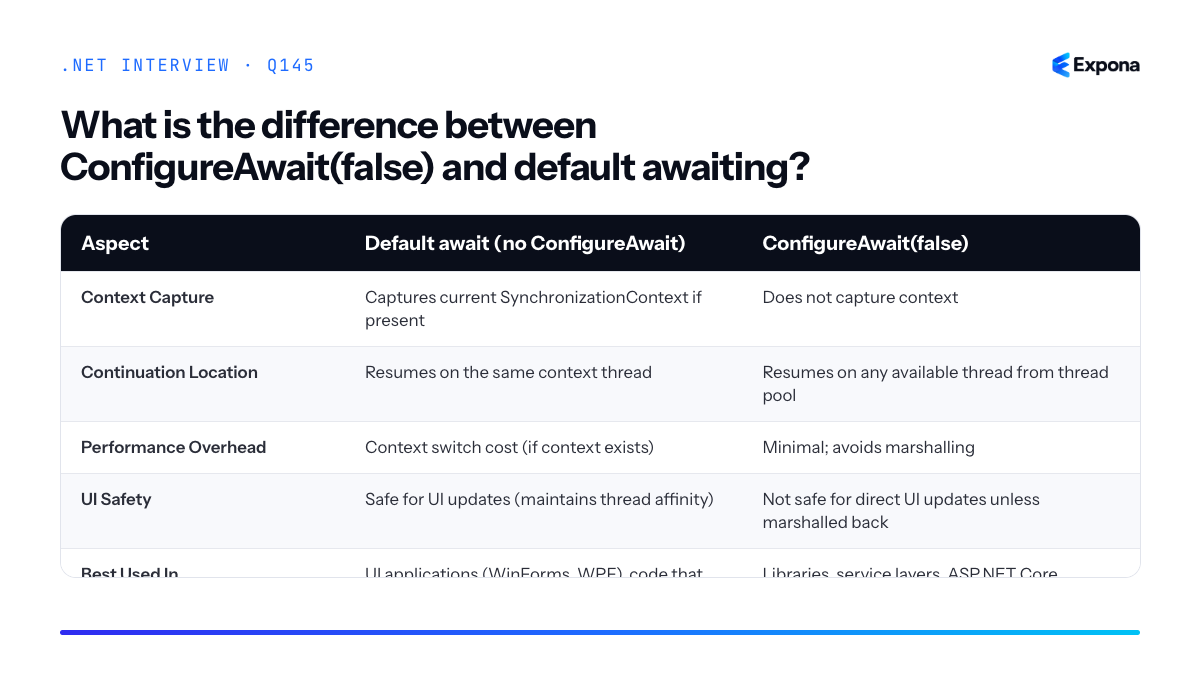
Key points to mention
- ConfigureAwait(false) is a best practice in library code and utility methods to avoid forcing callers into a specific thread context.
- ASP.NET Core has no SynchronizationContext by default, so ConfigureAwait(false) has minimal performance benefit but is still recommended for consistency and portability.
- Forgetting ConfigureAwait(false) in libraries can cause deadlocks if a synchronous caller blocks waiting for an async operation on a limited-capacity context (classic example: blocking on async in console apps with a custom context).
- UI frameworks (WinForms, WPF) rely on the default behavior to ensure UI updates occur on the UI thread; omitting ConfigureAwait(false) is correct for UI code.
- In modern .NET, consider using CancellationToken alongside ConfigureAwait for robust async patterns.
Common follow-up questions
- Can ConfigureAwait(false) cause a deadlock? No; it actually prevents deadlocks by avoiding context starvation. However, the opposite (default await in saturated contexts) can cause deadlocks.
- Should ASP.NET Core code always use ConfigureAwait(false)? While not strictly necessary (null context), it is still recommended as a defensive practice and for consistency when code may be reused in libraries.
- How do I handle UI updates after ConfigureAwait(false)? Use Dispatcher.Invoke() or Control.Invoke() to marshal the update back to the UI thread if needed.
Related interview questions
Further reading
.NETCsharpasync146What is a CancellationToken and why pass it everywhere?
ExperiencedA CancellationToken is a cooperative signaling mechanism that tells long-running operations to stop gracefully. It's passed through method chains to propagate cancellation requests—for example, when an HTTP client disconnects or a timeout occurs. Passing it everywhere ensures that database queries, API calls, and background work respect the cancellation signal and free resources immediately rather than completing unnecessarily.
How it works
CancellationToken operates on a cooperative model: it doesn't forcibly stop threads, but signals that cancellation has been requested. Methods that accept a token periodically check
token.IsCancellationRequestedor wait for the token to be signaled. WhenCancellationTokenSource.Cancel()is called, all tokens derived from it enter a cancelled state.In ASP.NET Core,
HttpContext.RequestAbortedis automatically signaled when the client disconnects or the request times out. By threading this token through your entire call stack—into database queries, external API calls, and business logic—you ensure the entire operation stops when the client is no longer waiting. This prevents wasted CPU, database connections, and network I/O.The token itself is lightweight and can be passed by value. You create tokens via
CancellationTokenSource, which provides theCancel()method to trigger cancellation and yields aCancellationTokento consumers. This separation allows callers to cancel without exposing control to every layer of your code.Example
csharp// ASP.NET Core controller method [HttpPost("process")] public async Task<IActionResult> ProcessData( [FromBody] DataRequest request, CancellationToken cancellationToken) { try { // Pass the token to your service layer var result = await _dataService.ProcessAsync(request, cancellationToken); return Ok(result); } catch (OperationCanceledException) { // Client disconnected or request timed out return StatusCode(StatusCodes.Status499ClientClosedRequest); } } // Service layer passes token to database public async Task<ProcessResult> ProcessAsync( DataRequest request, CancellationToken cancellationToken) { // Entity Framework respects CancellationToken var data = await _context.Users .AsNoTracking() .Where(u => u.Active) .ToListAsync(cancellationToken); // External API call also respects the token var enriched = await _httpClient.PostAsync( "https://api.example.com/enrich", new StringContent(JsonSerializer.Serialize(data)), cancellationToken); return new ProcessResult { Count = data.Count }; }This example shows how
HttpContext.RequestAbortedflows from the controller through the service layer, stopping both the database query and HTTP call if the client disconnects before either completes.Key points to mention
- Cooperative, not forceful: A cancelled token signals intent; operations must check it or support it natively (as EF Core and HttpClient do).
- Prevents resource waste: Stopping unnecessary work frees database connections, memory, and network bandwidth, improving server responsiveness under load.
- ASP.NET Core integration:
HttpContext.RequestAbortedis automatically cancelled on client disconnect or timeout; pass it everywhere to propagate that signal. - Proper exception handling: When cancelled, async methods raise
OperationCanceledException; catch it and return an appropriate HTTP status (e.g., 499 Client Closed Request). - Performance at scale: In high-traffic applications, propagating cancellation prevents cascading resource exhaustion and improves tail latencies.
Common follow-up questions
- "What happens if I don't pass the token?" — Operations run to completion even if the client has disconnected, wasting server resources. Critical for high-throughput APIs.
- "Can you cancel a CancellationToken multiple times?" — Once cancelled, it remains cancelled. A new
CancellationTokenSourceis needed for a new cancellation cycle. - "How does this relate to async/await?" — Async methods that accept CancellationToken yield control back to the thread pool when awaiting cancellation, allowing the thread to serve other requests.
Related interview questions
Further reading
.NETCsharpSecurity147What is ValueTask and when should you use it?
ExperiencedValueTask is a struct that represents an asynchronous operation result, designed to avoid heap allocation when the result is already available synchronously. Use it in performance-critical paths where you expect synchronous completion most of the time, but must never await the same ValueTask instance twice.
How it works
ValueTask<T> is a discriminated union that can hold either a synchronous result (T) or a Task<T>. When an async method completes synchronously, no Task object is allocated on the heap—the result is stored directly in the struct. This eliminates garbage collection pressure in hot paths.
The runtime determines whether to allocate a Task based on the operation's state. If the operation completes before the first await, the ValueTask stores the result directly. If the operation genuinely requires asynchronous work, a Task is allocated and wrapped. The caller's code remains unchanged—they simply await the ValueTask, and the await expression unwraps either the synchronous result or waits for the underlying Task.
This makes ValueTask ideal for scenarios like cached data lookups, in-memory queries, or operations that frequently complete immediately. However, ValueTask comes with strict constraints: you cannot await it multiple times, pass it to multiple consumers, or store it for later use. These restrictions exist because structs are value types—copying a ValueTask that contains a Task reference can lead to unpredictable behavior.
Example
csharppublic class UserCache { private readonly Dictionary<int, User> _cache = new(); // Returns ValueTask to avoid allocation when user is cached public ValueTask<User> GetUserAsync(int id) { if (_cache.TryGetValue(id, out var cachedUser)) { // Synchronous path: no Task allocation return new ValueTask<User>(cachedUser); } // Asynchronous path: allocates Task only when needed return new ValueTask<User>(FetchFromDatabaseAsync(id)); } private async Task<User> FetchFromDatabaseAsync(int id) { await Task.Delay(100); // Simulate DB call return new User { Id = id, Name = "John" }; } } // Usage var cache = new UserCache(); var user = await cache.GetUserAsync(1); // First call: allocates Task var cachedUser = await cache.GetUserAsync(1); // Second call: no allocationThis example shows a cache lookup that returns synchronously most of the time (no Task allocation) but falls back to async database access when needed. The caller's code is identical whether the operation completes synchronously or asynchronously.
Key points to mention
- Allocation avoidance: ValueTask eliminates heap allocation for synchronous completions, reducing GC pressure in performance-critical code.
- Single await only: Never await the same ValueTask instance twice or pass it to multiple consumers; doing so causes undefined behavior because structs are copied by value.
- Expect synchronous completion: Use ValueTask only when synchronous completion is common; if operations are mostly asynchronous, a regular Task is clearer and more efficient.
- Compiler support: Modern async state machines (C# 7.1+) are optimized for ValueTask, making it safe and efficient when used correctly.
- Not a general-purpose replacement: ValueTask is not a drop-in replacement for Task; its constraints make it suitable only for specific scenarios like caching, validation, or in-memory operations.
Common follow-up questions
- When should I use ValueTask vs. Task? Use Task for normal async operations and APIs. Use ValueTask only in hot paths where synchronous completion is frequent (typically >80% of the time) and you need maximum performance. Most application code should use Task.
- What happens if I await a ValueTask twice? The behavior is undefined. If the ValueTask contains a synchronous result, the struct gets copied and the second await may see corrupted state. Always treat ValueTask as a single-use type.
- Can I use ValueTask with async/await patterns? Yes, ValueTask integrates seamlessly with async/await syntax. The compiler recognizes the GetAwaiter() method and handles both synchronous and asynchronous completions transparently.
Related interview questions
- Why should you avoid async void?
- What is the difference between Task.Run and async/await?
- What are IAsyncEnumerable and await foreach?
Further reading
.NETCsharpasync148What is the danger of sync over async?
ExperiencedSync over async—calling
.Result,.Wait(), or.GetAwaiter().GetResult()on a Task—blocks the current thread indefinitely while waiting for an async operation to complete. This defeats the entire purpose of async/await, causes thread pool starvation under load, and can trigger deadlocks in UI or context-bound applications where the blocked thread is needed to resume the async operation.How it works
When you call
.Resultor.Wait()on a Task, the calling thread enters a synchronous block, yielding to the OS scheduler but not relinquishing its thread pool slot. The async operation continues on another thread or I/O completion port, but the original thread sits idle, waiting. In a high-concurrency scenario—such as an ASP.NET web server handling 100 concurrent requests—if each request blocks a thread via.Wait(), you exhaust the thread pool. New requests queue up with no threads available to process them, and throughput collapses.The deadlock scenario is more insidious. Many UI frameworks (WinForms, WPF) and some synchronization contexts (like
WindowsFormsSynchronizationContext) enforce single-threaded execution. When you block a thread with.Result, that thread cannot execute continuations that require the UI context. The async operation waits for the context to schedule its continuation; the blocked thread waits for the result. Classic deadlock.Example
csharp// DANGEROUS - blocks thread and can deadlock public string FetchDataBadly() { var task = HttpClient.GetAsync("https://api.example.com/data"); return task.Result; // Blocks current thread indefinitely } // CORRECT - propagates async all the way up public async Task<string> FetchDataCorrectly() { var response = await HttpClient.GetAsync("https://api.example.com/data"); return await response.Content.ReadAsStringAsync(); } // In ASP.NET Core controller: public async Task<IActionResult> GetData() { var data = await FetchDataCorrectly(); // Releases thread while waiting return Ok(data); }The first method blocks the thread pool thread; the second releases it, allowing the thread to handle other work while the I/O completes.
Key points to mention
.Result,.Wait(), and.GetAwaiter().GetResult()all perform blocking synchronous waits on async operations, defeating async's concurrency benefits.- Thread pool starvation occurs under load: blocked threads cannot process new requests, queue depth explodes, and latency skyrockets.
- Deadlock risk is highest in UI and context-bound scenarios where the blocked thread is required to resume the continuation.
- The solution is to stay async all the way: propagate
async/awaitfrom the leaf to the caller, avoiding sync wrappers entirely. - If you absolutely must bridge sync and async (legacy code), use
Task.Run(() => asyncMethod()).Resulton a thread pool thread, never on the UI thread; even better, refactor.
Common follow-up questions
- When is it acceptable to call
.Result? (Answer: Main method entry point in console apps,async Mainis now preferred, and rarely in background tasks—but generally never in request-handling code.) - How do you investigate a deadlock or hang? (Answer: Dump analysis, breakpoints, Task scheduler inspection, correlation with
.Result/.Wait()calls.) - How does the thread pool work? and how does sync over async stress it? (Answer: Limited threads; blocking threads without returning work starves the pool.)
Related interview questions
.NETCsharpasync149How do you run tasks in parallel safely?
ExperiencedRun tasks in parallel safely by using Task.WhenAll for independent I/O-bound operations, Parallel.ForEachAsync with MaxDegreeOfParallelism for bounded CPU/I/O concurrency, and strictly avoiding sharing non-thread-safe objects like DbContext across threads. Always isolate mutable state per task and use thread-safe collections or synchronization primitives when state must be shared.
How it works
Parallel execution in .NET requires two separate concerns: task scheduling and thread safety. Task.WhenAll schedules multiple independent tasks to run concurrently on the thread pool but doesn't control concurrency level—it's ideal for fire-and-forget I/O like HTTP requests. Parallel.ForEachAsync, by contrast, enforces a MaxDegreeOfParallelism limit, ensuring only N tasks execute simultaneously, preventing resource exhaustion. The safety problem arises because DbContext, most collections, and stateful objects aren't thread-safe. Running multiple tasks against the same DbContext instance causes corruption because EF Core's change tracker and query cache aren't guarded for concurrent access. The solution: create isolated instances per task. Use dependency injection scopes, thread-local storage, or task-local captures to ensure each parallel operation owns its own context.
Example
csharppublic class OrderProcessor { private readonly IServiceProvider _services; public OrderProcessor(IServiceProvider services) => _services = services; // Unsafe: shared DbContext across tasks public async Task ProcessOrdersUnsafeAsync(List<int> orderIds) { using var db = _services.GetRequiredService<AppDbContext>(); var tasks = orderIds.Select(id => db.Orders .Where(o => o.Id == id) .ExecuteUpdateAsync(s => s.SetProperty(o => o.Status, "Processing"))); await Task.WhenAll(tasks); // RACE CONDITION: same DbContext } // Safe: isolated scope per task public async Task ProcessOrdersSafeAsync(List<int> orderIds) { await Parallel.ForEachAsync(orderIds, new ParallelOptions { MaxDegreeOfParallelism = 5 }, async (orderId, ct) => { // Each task gets its own DbContext scope using var scope = _services.CreateScope(); var db = scope.ServiceProvider.GetRequiredService<AppDbContext>(); await db.Orders .Where(o => o.Id == orderId) .ExecuteUpdateAsync(s => s.SetProperty(o => o.Status, "Processing"), ct); }); } // Alternative: Task.WhenAll for independent I/O (no DbContext sharing) public async Task FetchOrdersAsync(List<int> orderIds) { var tasks = orderIds.Select(async id => { using var scope = _services.CreateScope(); var db = scope.ServiceProvider.GetRequiredService<AppDbContext>(); return await db.Orders.FirstOrDefaultAsync(o => o.Id == id); }); var orders = await Task.WhenAll(tasks); } }The unsafe version shares one DbContext across all parallel tasks, causing change-tracker corruption. The safe version creates a new scope (and DbContext) per task using Parallel.ForEachAsync, which limits concurrency to 5 operations. The third example uses Task.WhenAll for pure reads where you don't need concurrency control.
Key points to mention
- DbContext isolation: Always create a new DbContext (via DI scope) per parallel task; never share instances across threads. See how to manage DbContext lifetime for details.
- Task.WhenAll vs. Parallel.ForEachAsync: Task.WhenAll has no concurrency limit and suits independent I/O; Parallel.ForEachAsync enforces MaxDegreeOfParallelism and is safer for resource-intensive operations. (Read the detailed comparison.)
- Thread-safe collections: If you must aggregate results, use ConcurrentBag<T>, ConcurrentDictionary<K,V>, or lock/SemaphoreSlim around non-thread-safe writes.
- CancellationToken propagation: Pass CancellationToken through Parallel.ForEachAsync to enable graceful cancellation of all tasks.
- Exception handling: Task.WhenAll re-throws aggregate exceptions; wrap in try-catch or use .Unwrap() to handle individual task failures.
Common follow-up questions
- How do you choose between Task.WhenAll and Parallel.ForEachAsync? Use Task.WhenAll for unbounded independent I/O (e.g., multiple API calls). Use Parallel.ForEachAsync when you need backpressure or resource limits (e.g., database writes, limited thread pool).
- What happens if one task in Task.WhenAll throws an exception? An AggregateException is thrown containing all exceptions from failed tasks. Other running tasks continue to completion unless you cancel them manually.
- Is async-await alone enough for thread safety? No. Async only enables concurrency; it doesn't guard shared mutable state. You still need isolation or synchronization primitives like lock, SemaphoreSlim, or thread-safe collections.
Related interview questions
- What is the difference between Task.WhenAll and Parallel.ForEach?
- How do you manage DbContext lifetime?
- Why are strings immutable in .NET?
Further reading
.NETCsharpasync150What is SemaphoreSlim used for?
ExperiencedSemaphoreSlim is a lightweight synchronization primitive that limits the number of threads or tasks that can access a protected resource concurrently. It supports both synchronous and asynchronous waits, making it ideal for throttling concurrent operations, protecting critical sections in async code, and controlling resource consumption in high-concurrency scenarios.
How it works
SemaphoreSlim maintains an internal counter representing available "slots." When a task calls
WaitAsync(), it decrements the counter; when it callsRelease(), it increments it. If the counter is zero whenWaitAsync()is called, the task waits asynchronously until another task releases a slot.Unlike the older
Semaphoreclass, SemaphoreSlim is designed for async/await patterns and uses less memory because it doesn't create OS-level synchronization objects. You specify an initial count (and optionally a maximum count) in the constructor. The initial count represents how many concurrent acquisitions are allowed before subsequent callers must wait.This makes it perfect for scenarios like rate-limiting API calls, controlling database connection pools, or ensuring only a fixed number of long-running operations execute simultaneously without blocking threads.
Example
csharppublic class ApiRateLimiter { private readonly SemaphoreSlim _semaphore = new SemaphoreSlim(initialCount: 5, maxCount: 5); public async Task<string> CallExternalApiAsync(string endpoint) { await _semaphore.WaitAsync(); try { using var client = new HttpClient(); return await client.GetStringAsync($"https://api.example.com{endpoint}"); } finally { _semaphore.Release(); } } } // Usage: allows only 5 concurrent API calls var limiter = new ApiRateLimiter(); var tasks = Enumerable.Range(1, 20) .Select(i => limiter.CallExternalApiAsync("/data")) .ToList(); await Task.WhenAll(tasks);This example limits concurrent API calls to 5, queuing additional requests asynchronously until a slot becomes available.
Key points to mention
- Async-first design: SemaphoreSlim integrates naturally with async/await and doesn't block threads, making it suitable for high-concurrency applications.
- Lightweight: It doesn't rely on OS kernel objects, reducing memory overhead compared to classic Semaphore.
- Disposable: Implement
usingorusingdeclarations to ensure the semaphore is properly cleaned up, especially when cancellation tokens are involved. - Cancellation support:
WaitAsync()accepts aCancellationToken, allowing callers to be interrupted if waiting too long. - Common in throttling scenarios: Frequently used to limit concurrent HTTP requests, database queries, or background job processing.
Common follow-up questions
- What is the difference between SemaphoreSlim and
Mutex? (A semaphore allows multiple concurrent accesses; a mutex allows only one.) - How would you combine SemaphoreSlim with concurrent collections to build a thread-safe work queue?
- Can you use SemaphoreSlim in a distributed system with multiple machines? (No—it's in-process; use Redis or other distributed locks for that.)
Related interview questions
.NETCsharpasyncSecurity151What are Channels in .NET?
ExperiencedChannels are high-performance, thread-safe producer-consumer queues in
System.Threading.Channelsthat enable efficient in-process communication between async tasks. They support bounded (size-limited) or unbounded capacity, backpressure handling, and are designed for building background pipelines and concurrent processing workflows with minimal allocation and lock overhead.How it works
Channels provide a publish-subscribe pattern where producers write data to a channel and consumers read from it asynchronously. Unlike
BlockingCollection<T>orConcurrentQueue<T>, Channels are built specifically for async/await andValueTask-based APIs, making them allocation-efficient and GC-friendly.A Channel consists of two parts: a
ChannelWriter<T>for sending data and aChannelReader<T>for receiving it. You create a channel usingChannel.CreateUnbounded<T>()orChannel.CreateBounded<T>(capacity). Bounded channels apply backpressure—if the buffer is full,WriteAsyncpauses the producer until space becomes available. This prevents memory exhaustion in scenarios where producers outpace consumers.Consumers use
ReadAsyncto wait for items, orTryReadfor non-blocking attempts. When no data is available,ReadAsynccompletes only when an item arrives or the channel is closed. Channels signal completion viaTryComplete(), allowing consumers to detect end-of-stream cleanly.Example
csharpusing System.Threading.Channels; var channel = Channel.CreateBounded<int>(new BoundedChannelOptions(10) { FullMode = BoundedChannelFullMode.Wait }); // Producer async Task ProduceAsync() { for (int i = 0; i < 100; i++) { await channel.Writer.WriteAsync(i); } channel.Writer.TryComplete(); } // Consumer async Task ConsumeAsync() { await foreach (var item in channel.Reader.ReadAllAsync()) { Console.WriteLine($"Received: {item}"); await Task.Delay(100); // Simulate work } } await Task.WhenAll(ProduceAsync(), ConsumeAsync());This example creates a bounded channel with a capacity of 10. The producer writes 100 integers, and the consumer reads and processes them with simulated delay; backpressure automatically pauses the producer when the buffer fills.
Key points to mention
- Allocation-efficient: Returns
ValueTaskinstead ofTask, avoiding heap allocations for already-completed operations. - Backpressure: Bounded channels naturally throttle fast producers, preventing unbounded memory growth and improving system stability.
- Graceful shutdown:
TryComplete()signals end-of-stream; consumers usingawait foreachorReadAllAsync()exit cleanly. - Fair contention: Channels handle concurrent readers and writers without locks, using optimized signaling mechanisms.
- Integration with pipelines: Commonly used in background queue patterns and work distribution systems.
Common follow-up questions
- How do you choose between bounded and unbounded channels, and what are the trade-offs?
- Can multiple producers or consumers read from the same channel safely?
- How does
System.Threading.Channelscompare to System.IO.Pipelines?
Related interview questions
- What is System.IO.Pipelines?
- How does the Kestrel request pipeline achieve high performance?
- How do you use the Channel-based background queue pattern?
Further reading
.NETCsharpasync- Allocation-efficient: Returns
152What is the difference between lock and Monitor?
Experiencedlock is syntactic sugar over Monitor.Enter and Monitor.Exit wrapped in a try/finally block, providing a simpler, safer way to acquire mutual exclusion on an object. Monitor gives you more control over timing and behavior, including the ability to wait, pulse, and release with explicit method calls. Starting with .NET 9, the new System.Threading.Lock type offers a dedicated, faster locking primitive that avoids boxing and provides better performance than both.
How it works
When you write a lock statement, the compiler transforms it into calls to Monitor.Enter (acquiring the lock) and Monitor.Exit (releasing it) inside a try/finally block. This ensures the lock is always released, even if an exception occurs.
Monitor is a static class that provides low-level synchronization primitives. It can lock any reference type object and supports additional operations like Wait() (release the lock and wait for a signal), Pulse() (wake one waiting thread), and PulseAll() (wake all waiting threads). This makes Monitor suitable for producer-consumer patterns and more complex signaling scenarios.
System.Threading.Lock (.NET 9+) is a value type struct that wraps a dedicated internal lock mechanism. It avoids the overhead of boxing an object reference and provides faster acquisition and release. It supports EnterScope() which returns a disposable struct for use with the using statement, combining safety with performance.
Example
csharp// Traditional lock (syntax sugar over Monitor) object lockObj = new object(); lock (lockObj) { // Critical section Console.WriteLine("Protected by lock"); } // Equivalent to: Monitor.Enter(lockObj); try { Console.WriteLine("Protected by Monitor"); } finally { Monitor.Exit(lockObj); } // .NET 9+ Lock type (faster, value-type) System.Threading.Lock myLock = new(); using (myLock.EnterScope()) { Console.WriteLine("Protected by System.Threading.Lock"); }The lock statement is the most common choice for straightforward mutual exclusion; Monitor gives you fine-grained control when you need Wait/Pulse signaling; the new Lock type is optimal for performance-critical code in .NET 9+.
Key points to mention
- lock is compiler sugar that translates to Monitor.Enter/Exit in a try/finally, guaranteeing safe release
- Monitor provides advanced operations (Wait, Pulse, PulseAll) for thread coordination, essential for producer-consumer and condition-based scenarios
- System.Threading.Lock (.NET 9+) is a value-type alternative that avoids boxing overhead and delivers better performance than locking objects
- All three are reentrant on the same thread; a thread can acquire the same lock multiple times if the lock tracks ownership
- Choosing between them depends on your needs: simplicity (lock), signaling (Monitor), or raw performance (System.Threading.Lock)
Feature lock Monitor System.Threading.Lock Syntax lock (obj) { } Monitor.Enter/Exit using (lock.EnterScope()) { } Type Reference type required Reference type required Value type (struct) Wait/Pulse support No (not directly) Yes (Wait, Pulse, PulseAll) No Boxing overhead Yes, if not using object Yes, if not using object None (value type) Performance Good Good Best (dedicated, .NET 9+) Availability .NET Framework 1.0+ .NET Framework 1.0+ .NET 9.0+ 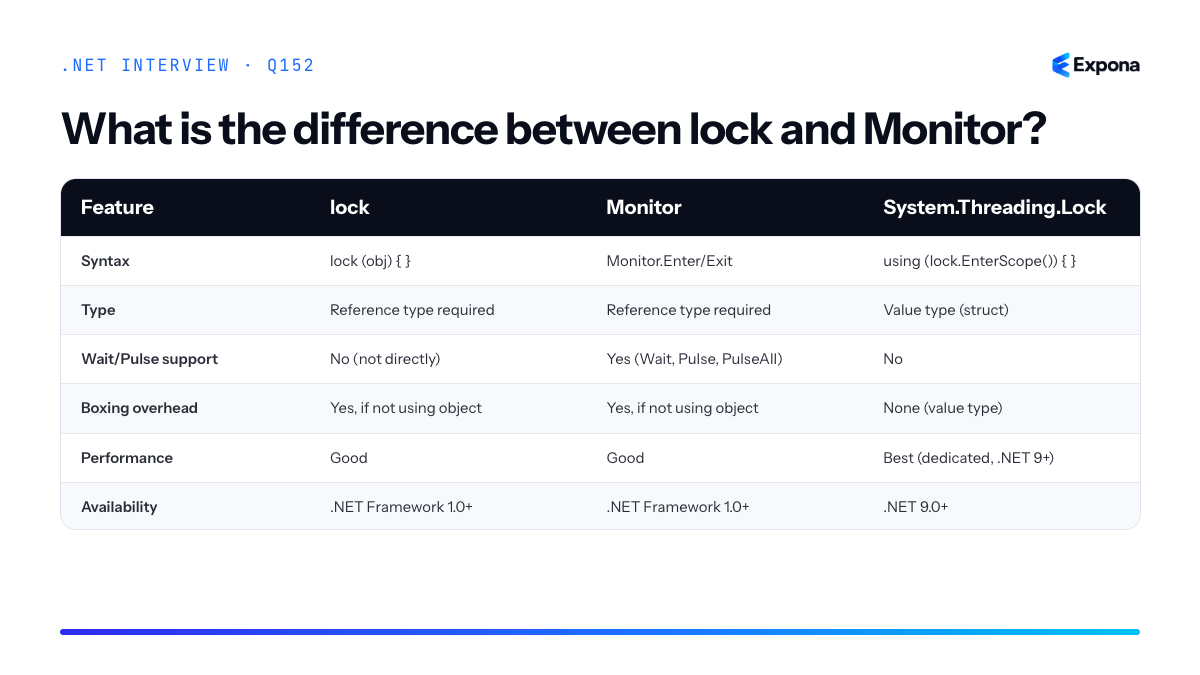
Common follow-up questions
- What happens if you try to lock on a null reference, or lock the same object from two different threads? (Null raises an exception; same object blocks until the first thread exits; see How do you investigate a deadlock or hang?)
- Why would you use Interlocked over lock? (Interlocked operations are atomic without acquiring a full lock, better for simple value updates.)
- Can lock be used with async/await? (No; lock blocks threads and cannot await inside it; use SemaphoreSlim or other async-safe primitives instead.)
Related interview questions
- What are Channels in .NET?
- When would you use Interlocked over lock?
- How do you investigate a deadlock or hang?
Further reading
.NETCsharpasync153What are concurrent collections?
ExperiencedConcurrent collections are thread-safe data structures in the
System.Collections.Concurrentnamespace that allow multiple threads to safely access and modify them without explicit locking. Common types includeConcurrentDictionary,ConcurrentQueue,ConcurrentBag, andConcurrentStack, each optimized for specific access patterns and use cases.How it works
Concurrent collections use fine-grained locking or lock-free algorithms internally to protect individual buckets or segments rather than locking the entire collection. For example,
ConcurrentDictionarypartitions its hash table into segments, allowing multiple threads to operate on different segments simultaneously without contention. This approach significantly improves throughput compared to wrapping a regular dictionary with a singlelock.Each concurrent collection is designed for specific scenarios:
ConcurrentQueueis optimized for FIFO (first-in-first-out) access with lock-free dequeuing and enqueuing;ConcurrentBagprovides an unordered collection ideal for producer-consumer patterns;ConcurrentDictionarysupports atomic operations likeAddOrUpdateandTryRemovethat combine multiple steps safely.These collections also provide consistent snapshots through enumerators and support operations like
TryAdd,TryRemove, andTryGetValue, which return boolean values indicating success rather than throwing exceptions, making them natural for concurrent scenarios where collisions are expected.Example
csharpvar cache = new ConcurrentDictionary<string, string>(); var tasks = Enumerable.Range(0, 10) .Select(i => Task.Run(() => { cache.AddOrUpdate($"key-{i % 3}", $"value-{i}", (k, old) => $"value-{i}"); if (cache.TryGetValue($"key-{i % 3}", out var value)) Console.WriteLine($"Thread {Thread.CurrentThread.ManagedThreadId}: {value}"); })) .ToArray(); Task.WaitAll(tasks); Console.WriteLine($"Final count: {cache.Count}");This code demonstrates multiple threads safely adding, updating, and reading from a
ConcurrentDictionarywithout explicit locks;AddOrUpdateatomically checks if a key exists and either adds or updates it, preventing race conditions.Key points to mention
- Concurrent collections use internal partitioning and fine-grained locking to reduce contention compared to a single lock protecting the entire structure.
- Operations like
TryAdd,TryRemove, andAddOrUpdateare atomic, combining multiple logical steps into a single thread-safe operation. - Enumerators reflect a point-in-time snapshot; they do not block writers, so the collection may change during enumeration without throwing exceptions.
- Concurrent collections are preferred over manually locking regular collections in multi-threaded scenarios because they offer better scalability and clearer intent.
- Choose the right collection for your pattern:
ConcurrentQueuefor FIFO,ConcurrentBagfor unordered,ConcurrentDictionaryfor key-value lookups, andConcurrentStackfor LIFO.
Common follow-up questions
- When would you use a concurrent collection over a lock-protected regular collection? Concurrent collections are better for high-contention scenarios with many readers and writers because their fine-grained locking reduces bottlenecks. Use them when scalability matters; for simple, low-contention cases, a regular lock may be simpler.
- What happens if you enumerate a
ConcurrentDictionarywhile another thread modifies it? The enumerator provides a snapshot, so you see a consistent view of the collection at the point enumeration started; modifications after enumeration begins are not guaranteed to be visible. - How does
AddOrUpdatediffer from separateTryAddandTryGetValuecalls?AddOrUpdateis atomic and executes the update delegate only once under lock, whereas separate calls create a race condition where the value could change betweenTryGetValueand your update logic.
Related interview questions
- What is the difference between Task.WhenAll and Parallel.ForEach?
- When would you use Interlocked over lock?
- What are the memory model guarantees in .NET?
Further reading
.NETCsharpasync154How does EF Core change tracking work?
ExperiencedEF Core's ChangeTracker monitors entity state by maintaining snapshots of all loaded entities and comparing them against their current in-memory state when SaveChanges() is called. On SaveChanges, it generates the appropriate INSERT, UPDATE, or DELETE SQL statements based on detected changes, then executes them in a transaction. This mechanism is fundamental to how EF Core knows what to persist to the database.
How it works
When you load an entity via EF Core, the ChangeTracker creates an internal snapshot of that entity's property values. Every entity is assigned a state:
Unchanged,Added,Modified,Deleted, orDetached.As your application code modifies entities in memory, the ChangeTracker does not automatically detect changes. Instead, when you call SaveChanges(), EF Core performs a change detection scan by comparing current property values against the stored snapshot. If values differ, the entity is marked as
Modified. New entities added viaAdd()are markedAdded, and entities passed toRemove()are markedDeleted.Once all entities are assigned states, EF Core generates SQL statements in dependency order (respecting foreign keys), wraps them in a transaction, and executes them. If any statement fails, the entire transaction rolls back.
This design allows EF Core to batch changes and minimize database round trips. However, by default, change detection is relatively expensive for large object graphs because EF must compare each property. You can optimize this using AsNoTracking() for read-only queries, or use ExecuteUpdate and ExecuteDelete to bypass change tracking entirely for bulk operations.
Example
csharpusing (var context = new AppDbContext()) { // Load entity — snapshot created, state = Unchanged var user = context.Users.First(u => u.Id == 1); // Modify in memory — state still Unchanged until SaveChanges user.Email = "newemail@example.com"; user.LastModified = DateTime.UtcNow; // Change detection runs here; user.Email differs from snapshot // State changes to Modified context.SaveChanges(); // Generates: UPDATE Users SET Email = '...', LastModified = '...' WHERE Id = 1 // Add new entity var newUser = new User { Name = "Alice", Email = "alice@example.com" }; context.Users.Add(newUser); // state = Added context.SaveChanges(); // Generates: INSERT INTO Users (...) VALUES (...) }This example shows how a loaded user entity is tracked, modified, and then persisted. The ChangeTracker detects the Email and LastModified changes and generates an UPDATE statement.
Key points to mention
- Snapshot-based detection: EF Core stores original values and compares them on SaveChanges(); changes are not detected in real time.
- Entity states: Entities move through states (Unchanged → Modified → SaveChanges → Unchanged again) as you work with them.
- Tracking overhead: Tracking all entities in a large query can consume memory and slow change detection; use AsNoTracking() for read-only scenarios.
- Foreign key relationships: EF Core respects referential integrity when ordering INSERT, UPDATE, DELETE statements to avoid constraint violations.
- Transactions: All generated statements are wrapped in a single transaction, ensuring atomic persistence.
Common follow-up questions
- How do you improve change tracking performance for large datasets?
- What happens if you modify an entity without calling SaveChanges()? Will the changes persist if you load it again later?
- Can you manually set entity state, and why would you do it?
Related interview questions
- What is ExecuteUpdate and ExecuteDelete?
- Why use projections with Select in EF Core?
- What is AsNoTracking?
Further reading
.NETCsharpefcore155What is the N+1 query problem in EF Core?
ExperiencedThe N+1 query problem in EF Core occurs when you execute one query to fetch a collection of entities, then execute one additional query for each entity to load related data—resulting in 1 + N database round-trips instead of 1 or 2. This severely degrades performance, especially with large datasets. You fix it using Include() for eager loading, projections, or split queries.
How it works
When you query a parent entity and access a child collection property, EF Core's default behavior depends on your configuration. If lazy loading is enabled or you're accessing an unmaterialized navigation property, EF Core fires a separate query for each parent row to fetch related children. For example, loading 100 orders and then iterating through each to access its order items triggers 100 additional queries—hence "N+1."
This happens because the initial query only loads the parent entity. The related data isn't fetched until you access the navigation property, and by that time, you're in a loop where each access triggers a fresh query. Even in no-tracking scenarios or with AsNoTracking(), the lazy load still fires if the navigation property hasn't been loaded.
The performance impact is compounded by network latency. Each round-trip to the database incurs overhead; executing 101 queries serially is far slower than combining the work into 1–2 intelligent queries.
Example
csharp// ❌ N+1 Problem public async Task<List<OrderDto>> GetOrdersNPlus1(AppDbContext db) { var orders = await db.Orders.ToListAsync(); // 1 query var result = new List<OrderDto>(); foreach (var order in orders) { var items = order.OrderItems; // ❌ N queries (one per order) result.Add(new OrderDto { OrderId = order.Id, ItemCount = items.Count }); } return result; } // ✅ Fixed with Include (eager loading) public async Task<List<OrderDto>> GetOrdersFixed(AppDbContext db) { return await db.Orders .Include(o => o.OrderItems) .Select(o => new OrderDto { OrderId = o.Id, ItemCount = o.OrderItems.Count }) .ToListAsync(); // 1 query with JOIN } // ✅ Alternative: Split Query (SQL Server/PostgreSQL) public async Task<List<OrderDto>> GetOrdersSplit(AppDbContext db) { return await db.Orders .Include(o => o.OrderItems) .AsSplitQuery() .Select(o => new OrderDto { OrderId = o.Id, ItemCount = o.OrderItems.Count }) .ToListAsync(); // 2 queries instead of N+1 }The first method loads orders, then iterates and accesses the unmaterialized
OrderItemsproperty, triggering one query per order. The fixed version usesInclude()to eagerly load related items in a single query with a JOIN, orAsSplitQuery()to use two efficient queries instead of N+1.Key points to mention
- Root cause: Lazy loading or accessing unmaterialized navigation properties inside loops causes cascading queries.
- Detection: Monitor SQL logs (EF.CreateLogger) or use tools like MiniProfiler to spot duplicate queries during iteration.
- Eager loading with Include(): The most common fix; combines parent and child data in one query using JOINs.
- Projections: Using
Select()to fetch only the columns you need avoids materializing unnecessary navigation properties and reduces payload. - Split queries: In EF Core 5+,
AsSplitQuery()executes multiple focused queries instead of one large JOIN, sometimes improving performance on large result sets.
Common follow-up questions
- When should you use
AsSplitQuery()instead ofInclude()? (Answer: When JOINs cause cartesian products with large child collections; split queries fetch data separately and are faster.) - How do you detect N+1 problems in production? (Answer: Enable EF Core SQL logging, use Application Insights, or tools like MiniProfiler to track query count and execution time.)
- Does
AsNoTracking()eliminate N+1? (Answer: No; it disables change tracking but lazy loading still fires if navigation properties are accessed. UseInclude()orSelect()projections instead.)
Related interview questions
- What is eager loading in EF Core?
- What is parameter sniffing and how does it affect .NET apps?
- What is model binding?
Further reading
.NETCsharpefcore156What are split queries?
ExperiencedSplit queries are an Entity Framework Core feature that loads related collections in separate SQL queries instead of using a single large join, preventing cartesian explosion and improving performance when eager-loading multiple collections. The
AsSplitQuery()method tells EF Core to generate multiple queries: one for the root entity and one for each collection, then stitch the results together in memory.How it works
When you use
Include()to load multiple collections on a single entity, EF Core traditionally generates one query with multiple JOINs. This creates a cartesian product: if you load an Order with 10 OrderItems and 5 Payments, the result set will have 50 rows (10 × 5), with redundant Order data repeated. This wastes bandwidth and can severely degrade performance.Split queries solve this by executing separate queries. EF Core runs one query to fetch Orders, then additional queries to fetch OrderItems and Payments independently. The framework then correlates results by primary/foreign keys and reconstructs the object graph in memory. This approach eliminates redundancy and is often faster for larger result sets.
Split queries work best when:
- You're loading multiple collections on the same entity
- Collections are large relative to the root entity count
- Network latency is not the primary bottleneck
- You're using a modern version of EF Core (6.0+) with good caching support
Example
csharp// Without split query – cartesian explosion var orders = await dbContext.Orders .Include(o => o.OrderItems) .Include(o => o.Payments) .ToListAsync(); // Generates: SELECT * FROM Orders // JOIN OrderItems ON Orders.Id = OrderItems.OrderId // JOIN Payments ON Orders.Id = Payments.OrderId // Result: many duplicate Order rows // With split query – separate queries var orders = await dbContext.Orders .Include(o => o.OrderItems) .Include(o => o.Payments) .AsSplitQuery() .ToListAsync(); // Generates: // Query 1: SELECT * FROM Orders // Query 2: SELECT * FROM OrderItems WHERE OrderId IN (...) // Query 3: SELECT * FROM Payments WHERE OrderId IN (...) // No duplication; cleaner resultThis example loads Orders with their items and payments without cartesian explosion; EF Core executes three queries and reconstructs the graph in memory.
Key points to mention
- Cartesian explosion – traditional JOINs multiply row counts; split queries eliminate this by separating the load
- Memory vs. network – split queries trade extra round-trips for reduced data transfer; best when bandwidth is the constraint
- Default behavior – EF Core 8+ may use split queries automatically for complex includes; you can override with
AsSingleQuery()if needed - Tracking and identity – split queries still respect identity resolution, so duplicate entities in memory are deduplicated correctly
- Configuration-wide setting – you can enable split queries by default:
builder.UseSqlServer(conn, o => o.UseQuerySplittingBehavior(QuerySplittingBehavior.SplitQuery))
Common follow-up questions
- When should I use split queries vs. single queries? – Use split queries for large, complex object graphs with multiple collections; use single queries for simple scenarios or when you need a specific SQL shape. Profile both approaches.
- How does this relate to the N+1 query problem? – Split queries are intentional multiple queries to avoid cartesian explosion; N+1 is an unintended performance bug from missing
Include()clauses. - Can split queries affect DISTINCT or filtering? – Yes; some query shapes (e.g., DISTINCT, GROUP BY) may not work correctly with split queries and require
AsSingleQuery()instead.
Related interview questions
- What is Dapper and when would you use it?
- How do you scale reads with EF Core and SQL Server or PostgreSQL?
- What is the N+1 query problem in EF Core?
Further reading
.NETCsharpefcore157Why use projections with Select in EF Core?
ExperiencedProjections with Select in EF Core allow you to retrieve only the columns you need into DTOs, eliminating unnecessary database queries and avoiding change tracking overhead. This approach translates directly to optimized SQL queries that fetch fewer columns, reduce memory consumption, and improve application performance significantly.
How it works
When you project data using Select, EF Core's query provider converts your LINQ expression into a SQL SELECT statement that retrieves only the specified columns. Unlike loading full entities, projections skip the change tracking machinery entirely—EF Core doesn't need to maintain state for objects that won't be modified. This dual benefit means both the database does less work and your application consumes less memory.
The key mechanism is that EF Core examines your lambda expression in Select and generates a targeted SQL query before data ever leaves the database. If you select three properties from a ten-property entity, only those three columns appear in the SQL SELECT clause. This is dramatically different from loading the full entity and then filtering in memory, which would fetch all ten columns unnecessarily.
Projections are especially powerful because they work seamlessly with complex queries: you can include filters, joins, and aggregations in the same LINQ query, and the entire expression is still translated to SQL.
Example
csharp// Without projection - fetches full Product entity with change tracking var products = await dbContext.Products .Where(p => p.Price > 100) .ToListAsync(); // Loads all columns, tracks all objects // With projection - fetches only needed columns, no change tracking var productDtos = await dbContext.Products .Where(p => p.Price > 100) .Select(p => new ProductDto { Id = p.Id, Name = p.Name, Price = p.Price }) .ToListAsync(); // Generates: SELECT Id, Name, Price FROM Products WHERE Price > 100 public record ProductDto(int Id, string Name, decimal Price);The projected query generates a SQL statement with only the three columns needed, while the full-entity version requests every column from the Products table, including metadata that won't be used.
Key points to mention
- Performance benefit: Less data transferred from database, smaller result sets in memory, faster deserialization.
- No change tracking: Projected DTOs are never tracked, so there's zero overhead from the change tracking system—ideal for read-only scenarios.
- Query composition: Projections can include computed properties, anonymous types, or explicit DTOs; the SQL is generated before execution.
- Best for read operations: Projections excel in API responses, reports, and displays where you don't need to update entities.
- Works with joins and aggregations: You can project data from multiple related entities or perform grouping operations within the projection.
Common follow-up questions
- Can I project from multiple related entities in a single query? (Yes, using joins and navigation properties; the entire query is still translated to SQL.)
- What's the difference between Select projections and AsNoTracking? (AsNoTracking loads full entities but skips tracking; Select loads only needed columns and skips tracking, making Select more efficient for read-only scenarios.)
- Can I use projections with updates? (No—you cannot track changes on projected DTOs. Map them back to entities if you need to update.)
Related interview questions
Further reading
.NETCsharpefcore158How do you handle concurrency conflicts in EF Core?
ExperiencedConcurrency conflicts in EF Core occur when two users modify the same record simultaneously. You handle them by adding a concurrency token (typically a rowversion column), catching
DbUpdateConcurrencyException, and then deciding whether to reload the database values, merge changes client-side, or return a 409 Conflict response to the client.How it works
EF Core uses optimistic concurrency control by default. When you mark a property as a concurrency token, EF Core includes it in the WHERE clause of UPDATE and DELETE statements. If another user has modified the row since you loaded it, the rowversion (or timestamp) value will differ, causing the UPDATE to affect zero rows. EF Core detects this and throws
DbUpdateConcurrencyException.You then have three main strategies:
- Reload from database: Discard your changes and reload the current state.
- Client wins: Overwrite the database values with your changes.
- Merge: Intelligently combine both versions.
- Return conflict to client: Send a 409 status so the UI can show differences and let the user decide.
Example
csharp// Model with rowversion concurrency token public class Product { public int Id { get; set; } public string Name { get; set; } public decimal Price { get; set; } [Timestamp] public byte[] RowVersion { get; set; } } // DbContext configuration protected override void OnModelCreating(ModelBuilder modelBuilder) { modelBuilder.Entity<Product>() .Property(p => p.RowVersion) .IsRowVersion(); } // Handle concurrency in your service public async Task<(bool Success, string Message)> UpdateProductAsync(Product product) { try { _context.Products.Update(product); await _context.SaveChangesAsync(); return (true, "Product updated successfully"); } catch (DbUpdateConcurrencyException ex) { // Strategy 1: Reload from database var entry = ex.Entries.First(); var databaseValues = await entry.GetDatabaseValuesAsync(); entry.OriginalValues.SetValues(databaseValues); // Strategy 2: Return conflict to client (recommended for APIs) return (false, "Product was modified by another user. Please refresh and try again."); } } // In a controller, return appropriate status [HttpPut("products/{id}")] public async Task<IActionResult> UpdateProduct(int id, UpdateProductDto dto) { var (success, message) = await _productService.UpdateProductAsync(product); return success ? Ok() : Conflict(new { error = message }); }This example shows a Product entity with a rowversion token, how to configure it, and how to catch and handle the concurrency exception by returning a 409 Conflict response to the client.
Key points to mention
- Rowversion/Timestamp: Use
[Timestamp]attribute or.IsRowVersion()—it's automatically updated by SQL Server on every change. - DbUpdateConcurrencyException: Thrown only if zero rows are affected by the UPDATE; catch it explicitly and decide on recovery strategy.
- Optimistic vs. Pessimistic: EF Core uses optimistic locking by default (no locks); consider pessimistic if you need guaranteed isolation.
- API best practice: Return 409 Conflict with current values so the client can show a merge dialog or request a refresh.
- Shadow properties: You can use
.Property<byte[]>("RowVersion").IsRowVersion()if you don't want to expose the token in your model.
Common follow-up questions
- How do you decide between client-wins, database-wins, and merge strategies? Client-wins is risky (data loss); database-wins is simpler but may surprise users; merge requires domain logic to intelligently combine changes. APIs typically return 409 to let the client decide.
- Can you use multiple concurrency tokens? Yes, but rowversion is often sufficient. Multiple tokens let you track changes to specific columns and merge more intelligently.
- What if you don't have a rowversion column? Use
.IsConcurrencyToken()on a regular property (string, Guid, or int), though you must manually increment or update it; rowversion is automated and preferred.
Related interview questions
.NETCsharpefcoreasync159What are owned types in EF Core?
ExperiencedOwned types in EF Core are value objects that don't have their own identity and are always associated with an owner entity. They are mapped directly into the owner's table (table splitting) or into a separate table without a primary key, allowing you to model Domain-Driven Design (DDD) value objects cleanly in the database.
How it works
Owned types represent conceptual objects that only make sense in the context of their owner. Unlike regular entities that have their own identity and can exist independently, owned types are dependent objects. EF Core stores owned type data either:
- In the owner's table (default): All columns from the owned type are prefixed and stored in the same table as the owner.
- In a separate table: Via table splitting or explicit configuration, creating a one-to-one relationship without the owned type having its own primary key.
You configure owned types using the
OwnsOne()orOwnsMany()methods inOnModelCreating, or by using the[Owned]attribute. This tells EF Core to treat the type as a value object rather than a separate entity, preventing it from being tracked independently and ensuring it cannot exist without its owner.Example
csharpusing Microsoft.EntityFrameworkCore; [Owned] public class Address { public string Street { get; set; } public string City { get; set; } public string PostalCode { get; set; } } public class Customer { public int Id { get; set; } public string Name { get; set; } public Address BillingAddress { get; set; } public Address ShippingAddress { get; set; } } public class AppDbContext : DbContext { public DbSet<Customer> Customers { get; set; } protected override void OnModelCreating(ModelBuilder modelBuilder) { modelBuilder.Entity<Customer>() .OwnsOne(c => c.BillingAddress, nav => { nav.Property(a => a.Street).HasColumnName("BillingStreet"); nav.Property(a => a.City).HasColumnName("BillingCity"); }) .OwnsOne(c => c.ShippingAddress, nav => { nav.Property(a => a.Street).HasColumnName("ShippingStreet"); nav.Property(a => a.City).HasColumnName("ShippingCity"); }); } }This example maps
Addressas an owned type onCustomer. The database will store billing and shipping address columns in theCustomerstable with prefixed names, keeping related data together while modeling it as a distinct value object.Key points to mention
- No independent identity: Owned types cannot exist without their owner and cannot be queried directly.
- Table splitting by default: Owned type properties are stored in the owner's table with prefixed column names, reducing joins and improving query performance.
- Multiple instances: An owner can have multiple owned type instances (e.g.,
BillingAddressandShippingAddress) with configurable column naming. - Collections support: Use
OwnsMany()to support collections of owned types, which are stored in a separate table linked by a foreign key. - DDD alignment: Owned types naturally model value objects from Domain-Driven Design, promoting better domain modeling and encapsulation.
Common follow-up questions
- What is the difference between
OwnsOne()andOwnsMany()? - Can owned types have navigation properties to other entities?
- How do you query data when the owned type is split into a separate table versus stored in the owner's table?
Related interview questions
- What is the difference between a value type and a reference type?
- What is the difference between stack and heap memory?
- What is a modular monolith?
Further reading
.NETCsharpefcore160What are global query filters?
ExperiencedGlobal query filters are automatic Where conditions applied by Entity Framework Core to every query for a specific entity type. They enforce business rules consistently across the application without requiring developers to remember filter conditions in each query. The most common use cases are soft delete and multi-tenancy, where you need to exclude logically deleted records or filter by tenant automatically.
How it works
Global query filters are configured in the DbContext's OnModelCreating method using the HasQueryFilter extension method. When you define a filter, EF Core intercepts all LINQ queries targeting that entity and adds the filter condition to the generated SQL WHERE clause. This happens transparently at the query level, meaning every DbSet query inherits the filter unless explicitly bypassed using IgnoreQueryFilters().
The filter accepts a lambda expression that returns a boolean predicate. This predicate is evaluated during query translation to SQL. Importantly, filters apply to all queries—LINQ, SQL queries, eager loading, and navigation properties—ensuring consistent enforcement of your business logic.
You can bypass filters when necessary using IgnoreQueryFilters() on a DbSet query. This is useful for administrative operations where you need to access logically deleted data or data from other tenants temporarily.
Example
csharp// Entity classes public class Post { public int Id { get; set; } public string Title { get; set; } public bool IsDeleted { get; set; } public int TenantId { get; set; } } public class BlogContext : DbContext { private readonly int _tenantId; public BlogContext(DbContextOptions options, int tenantId) : base(options) { _tenantId = tenantId; } public DbSet<Post> Posts { get; set; } protected override void OnModelCreating(ModelBuilder modelBuilder) { // Global query filter: exclude soft-deleted posts for the current tenant modelBuilder.Entity<Post>() .HasQueryFilter(p => !p.IsDeleted && p.TenantId == _tenantId); } } // Usage var context = new BlogContext(options, tenantId: 1); var posts = context.Posts.ToList(); // Automatically filters out IsDeleted=true and TenantId!=1 // Bypass filter to get all posts including deleted ones var allPosts = context.Posts.IgnoreQueryFilters().ToList();This example demonstrates a combined soft-delete and multi-tenant filter: every query on Posts automatically excludes deleted records and filters to the current tenant, but administrators can override this with IgnoreQueryFilters() when auditing is required.
Key points to mention
- Transparent enforcement: Filters apply to all queries automatically, reducing the risk of accidentally exposing sensitive data or showing deleted records.
- IgnoreQueryFilters() bypass: Use this method when you need to access filtered-out data for reporting, auditing, or administrative tasks.
- Performance consideration: Filters are translated to SQL WHERE clauses and indexed appropriately, so they have minimal performance impact when properly designed.
- Filter expression limitations: The lambda cannot reference DbSet queries or external methods; it must translate to SQL. Use only properties, constants, and simple expressions.
- Inheritance and composition: Filters can be combined using AND/OR logic and work with inheritance hierarchies, affecting both base and derived entity types.
Common follow-up questions
- How do you test global query filters? Use an in-memory database or mocking to verify filters apply correctly, and test both filtered and IgnoreQueryFilters() scenarios.
- Can you combine multiple global filters on one entity? Yes, you can call HasQueryFilter multiple times; EF combines them with AND logic, or use expressions with || for OR conditions.
- What happens to navigation properties with global filters applied? Filters apply to eager-loaded and lazy-loaded navigation collections, ensuring consistency, but explicit joins may require manual filtering if the related entity also has filters.
Related interview questions
- How do you implement soft delete?
- How would you build a multi-tenant SaaS on ASP.NET Core?
- What is the difference between a filter and middleware?
Further reading
.NETCsharpaspnetcoreefcore161What are compiled queries in EF Core?
ExperiencedCompiled queries in EF Core are LINQ queries that are pre-compiled and cached, eliminating the overhead of translating the query expression tree to SQL on each execution. Using
EF.CompileQuery()orEF.CompileAsyncQuery(), you create a delegate that captures the compiled query plan, which is then reused whenever the query runs with different parameters. This is a performance optimization for frequently executed queries in hot paths.How it works
When you execute a standard LINQ query against EF Core, the query provider translates the expression tree into SQL on each invocation. For queries that run hundreds or thousands of times with only parameter variations, this translation overhead accumulates significantly.
Compiled queries short-circuit this process. You call
EF.CompileQuery()orEF.CompileAsyncQuery()with a lambda expression representing your query, and EF Core immediately translates it to SQL and caches the compiled delegate. Subsequent executions skip the translation phase entirely—they just invoke the delegate with new parameters.The compiled query is effectively a
Funcdelegate that accepts yourDbContextand any query parameters, then returns the result. This delegate is thread-safe and can be stored as a static field for maximum reuse across requests.Example
csharppublic class OrderContext : DbContext { public DbSet<Order> Orders { get; set; } // Define compiled query at class level private static readonly Func<OrderContext, int, Task<Order?>> GetOrderByIdCompiled = EF.CompileAsyncQuery((OrderContext ctx, int orderId) => ctx.Orders.FirstOrDefaultAsync(o => o.Id == orderId)); public Task<Order?> GetOrderByIdAsync(int orderId) { return GetOrderByIdCompiled(this, orderId); } } // Usage using var context = new OrderContext(); var order = await context.GetOrderByIdAsync(42); // Compiled query reusedThis example defines a compiled async query that finds an order by ID; the query translation happens once, and every subsequent call with a different
orderIdreuses the cached plan.Key points to mention
- Static field storage: Compiled queries are typically stored as static fields to ensure they persist and are reused across the lifetime of the application, maximizing benefit.
- Parameter passing: The compiled query delegate requires the
DbContextas the first parameter, followed by your domain parameters; this allows parameterized queries without string concatenation. - Significant gains in hot paths: Compiled queries provide the most benefit for high-frequency queries (e.g., user lookups, permission checks, repeated dashboard queries) where translation overhead would otherwise compound.
- Limited query complexity: Compiled queries work best with relatively simple, deterministic queries; dynamic filtering or complex conditional logic may reduce effectiveness or require separate compiled variants.
- EF Core 5.0+:
EF.CompileAsyncQuery()is the modern approach; synchronousEF.CompileQuery()still exists but async is generally preferred in modern applications.
Common follow-up questions
- How much performance improvement can you expect? In benchmarks, compiled queries can eliminate 30–50% of overhead for repeated executions by skipping LINQ-to-SQL translation, though the absolute gain depends on query complexity and parameter changes.
- Can I use compiled queries with dynamic filters or
.Where()conditions built at runtime? No; compiled queries must capture the complete query structure at compile time. Dynamic queries require either separate compiled variants or acceptance of per-execution translation cost. - How does this relate to deferred execution in LINQ? Deferred execution postpones evaluation until enumeration; compiled queries go further by caching the translation plan itself, making them orthogonal optimization strategies.
Related interview questions
- What is deferred execution in LINQ?
- What is high-performance logging with LoggerMessage?
- What is the difference between LINQ query syntax and method syntax?
Further reading
.NETCsharpefcore162What is ExecuteUpdate and ExecuteDelete?
ExperiencedExecuteUpdate and ExecuteDelete are EF Core methods that execute set-based UPDATE and DELETE statements directly at the database level without loading entities into memory. This approach bypasses the change tracker entirely, making bulk modifications dramatically faster than the traditional load-modify-save pattern.
How it works
Traditionally, updating or deleting multiple records requires loading each entity into memory, modifying it, and calling SaveChanges(). This triggers EF Core change tracking, generates individual UPDATE or DELETE statements for each entity, and consumes significant memory for large datasets.
ExecuteUpdate and ExecuteDelete (introduced in EF Core 7) compile a LINQ query directly into a single SQL SET operation that runs entirely on the server. No entities are materialized; only the IQueryable filter and update expressions are translated to SQL. The database executes one atomic statement, and EF Core returns the number of rows affected. This is especially powerful for:
- Bulk updates across thousands of records
- Conditional deletes without loading data
- Performance-critical operations where memory and round-trips matter
Example
csharp// Traditional approach: load and modify (slow for bulk) var users = await dbContext.Users .Where(u => u.LastLoginDate < DateTime.UtcNow.AddYears(-1)) .ToListAsync(); foreach (var user in users) { user.IsActive = false; } await dbContext.SaveChangesAsync(); // Multiple UPDATE statements // ExecuteUpdate: one SET statement in database (fast) int rowsAffected = await dbContext.Users .Where(u => u.LastLoginDate < DateTime.UtcNow.AddYears(-1)) .ExecuteUpdateAsync(s => s .SetProperty(u => u.IsActive, false) .SetProperty(u => u.ModifiedDate, DateTime.UtcNow)); // ExecuteDelete: one DELETE statement int deletedCount = await dbContext.Users .Where(u => u.Status == "Inactive") .ExecuteDeleteAsync();The ExecuteUpdate example deactivates all users inactive for one year in a single database operation; ExecuteDelete removes inactive users without materializing them.
Key points to mention
- No change tracking: These methods skip EF Core's change tracker entirely, so SaveChanges() is not required.
- Set-based, not row-by-row: One SQL statement updates or deletes all matching rows atomically.
- Returns affected count: Both return an int indicating how many rows were modified.
- LINQ-to-SQL translation: The Where clause and property assignments are translated directly to SQL, so only supported LINQ operations work.
- Related entities not loaded: Navigation properties and includes have no effect; only the queried entity is considered.
Common follow-up questions
- What happens if I call ExecuteUpdate on a DbSet without a Where clause? (It will update every row, so filtering is critical.)
- Can I use ExecuteUpdate to modify related entities in one call? (No; you must run separate ExecuteUpdate calls per entity type.)
- How does this compare to bulk operations with third-party libraries like EFCore.BulkInsert? (ExecuteUpdate/Delete handle updates and deletes; for inserts, specialized bulk libraries are often faster.)
Related interview questions
- How does EF Core change tracking work?
- Why use projections with Select in EF Core?
- How do you implement bulk operations efficiently?
Further reading
.NETCsharpefcore163How do you manage DbContext lifetime?
ExperiencedDbContext lifetime should be scoped per HTTP request in web applications by default—register it with
AddDbContext<YourContext>()in dependency injection. For scenarios outside the request lifecycle (background jobs, Blazor, parallel operations), useIDbContextFactory<T>to create instances on-demand, because DbContext is not thread-safe and cannot be shared across concurrent operations.How it works
DbContext is a stateful object that tracks entity changes, maintains identity resolution, and buffers queries. The scoped lifetime ensures each HTTP request gets its own isolated instance, with automatic disposal at the end of the request.
When you register
services.AddDbContext<ApplicationDbContext>(), the DI container creates one instance per scope. In ASP.NET Core, a new scope is created for each request, so the DbContext lives for the duration of that request and is disposed when the request completes. This prevents connection pooling exhaustion, stale change tracking, and memory leaks.However, scoped registration doesn't work for:
- Background jobs / hosted services: No HTTP request scope exists.
- Blazor Server: Circuit lifetime differs from request lifetime; multiple requests share one circuit.
- Parallel operations: Each task needs its own DbContext instance.
For these, inject
IDbContextFactory<ApplicationDbContext>and callCreateDbContextAsync()to get a new instance. You manage its lifetime explicitly.Example
csharp// Startup: scoped registration for HTTP requests services.AddDbContext<ApplicationDbContext>(options => options.UseSqlServer(connectionString)); // In a controller: DbContext is injected and managed by DI public class ProductsController : ControllerBase { private readonly ApplicationDbContext _context; public ProductsController(ApplicationDbContext context) { _context = context; // Scoped instance } [HttpGet("{id}")] public async Task<IActionResult> GetProduct(int id) { var product = await _context.Products.FindAsync(id); return Ok(product); } // DbContext disposed automatically after response } // For background jobs: use IDbContextFactory public class BackgroundJobService : BackgroundService { private readonly IDbContextFactory<ApplicationDbContext> _factory; public BackgroundJobService(IDbContextFactory<ApplicationDbContext> factory) { _factory = factory; } protected override async Task ExecuteAsync(CancellationToken stoppingToken) { while (!stoppingToken.IsCancellationRequested) { using (var context = _factory.CreateDbContext()) { var orders = await context.Orders.Where(o => !o.IsProcessed) .ToListAsync(stoppingToken); // Process orders } await Task.Delay(TimeSpan.FromMinutes(5), stoppingToken); } } }The first example shows scoped injection in a controller—DbContext lives for the request. The second shows factory usage in a hosted service—you create and dispose instances explicitly for background work.
Key points to mention
- Scoped is the default for web: One instance per HTTP request, automatic disposal—matches request lifetime.
- DbContext is not thread-safe: Never share one instance across threads or concurrent operations; use a factory instead.
- IDbContextFactory enables explicit lifetime control: Call
CreateDbContext()to get a new instance you manage withusing. - Pooling improves performance: Enable with
.AddPooledDbContextFactory()orAddDbContextPool()to reuse pooled instances instead of creating new ones. - Change tracker state is isolated per instance: Each DbContext has its own identity map; sharing across requests causes tracking conflicts and stale data.
Common follow-up questions
- What happens if I don't dispose a DbContext? — Connection remains open in the pool, leaking resources; change tracker memory accumulates. Always use scoped injection or
usingstatements. - Can I use a singleton DbContext? — No. Singletons are shared across all requests and threads, breaking thread-safety guarantees and creating race conditions on change tracking.
- How does this relate to service lifetimes in ASP.NET Core? — DbContext follows the scoped lifetime pattern; understand scoped vs. singleton vs. transient to avoid common mistakes.
Related interview questions
- What is the difference between AddScoped DbContext and a factory in Blazor Server?
- What are the service lifetimes in ASP.NET Core?
- How do you resolve scoped services in a background service?
Further reading
.NETCsharpefcoredependency-injection164What is DbContext pooling?
ExperiencedDbContext pooling is a performance optimization that reuses DbContext instances across requests instead of creating and disposing new ones each time. It reduces memory allocations and initialization overhead by maintaining a pool of pre-configured contexts. You enable it with
AddDbContextPoolinstead ofAddScopedin dependency injection, making it ideal for high-throughput applications like APIs.How it works
When you register a DbContext with
AddDbContextPool, EF Core creates and maintains a pool of context instances. When a component requests a DbContext, the pool returns an available instance rather than constructing a new one. Once the context is released (typically at the end of a request), it's returned to the pool for reuse instead of being disposed.The pool clears the context state between reuses: it clears the change tracker, resets configuration, and ensures the instance is clean for the next consumer. This happens transparently, so from the consumer's perspective, they receive a fresh context.
The pool size defaults to the number of CPU cores and can be configured. If all pooled instances are in use, a new temporary instance is created. This design balances memory efficiency with throughput under load.
Example
csharp// Startup configuration services.AddDbContextPool<ApplicationDbContext>(options => options.UseSqlServer(connectionString), poolSize: 128 // Optional: set pool size ); // Usage in a service—no different from AddScoped public class ProductService { private readonly ApplicationDbContext _context; public ProductService(ApplicationDbContext context) { _context = context; // Reused from pool, not newly created } public async Task<Product> GetProductAsync(int id) { return await _context.Products.FindAsync(id); } }The service receives a DbContext from the pool; EF Core handles returning it when the request ends. The pool size can be tuned for your workload—higher values reduce contention but increase memory.
Key points to mention
- Do not store per-request state in pooled contexts: Avoid instance fields that hold request-specific data, as they persist between requests and cause state leakage.
- Thread-safe and async-aware: The pool handles concurrent requests correctly; each request gets its own context instance.
- Significant memory and CPU savings: Eliminates allocations, GC pressure, and DbContext initialization overhead—especially valuable in high-throughput scenarios like APIs serving thousands of requests/sec.
- Transparent to consumers: Code looks identical to
AddScoped; the pooling is implementation detail managed by EF Core. - Not ideal for all scenarios: Long-running operations, Blazor Server, or apps with persistent state should use AddScoped DbContext instead.
Common follow-up questions
- What state must be avoided in pooled contexts? — Instance fields, session-specific configuration, and any mutable fields that should not leak between requests. Use local variables or services for per-request state.
- How do you monitor pool usage? — You can log pool events using a custom DbContext factory or enable EF Core diagnostics to track how often the pool creates vs. reuses instances.
- Can pooling cause issues with lazy-loading or navigation properties? — No; once a context is used and returned to the pool, its tracked entities are detached. The next consumer receives a clean context without orphaned references.
Related interview questions
.NETCsharpefcorePerformance165How do you write raw SQL safely in EF Core?
ExperiencedIn EF Core, write raw SQL safely using
FromSql()orSqlQuery()with C# string interpolation, which automatically converts interpolated values into parameterized queries. Never concatenate user input directly into SQL strings. This approach prevents SQL injection while maintaining the flexibility of raw SQL when LINQ-to-Entities is insufficient.How it works
EF Core's
FromSql()method (for queries returning entities) andSqlQuery()(for arbitrary results) accept interpolated strings. When you use C# string interpolation syntax (the$prefix with{variable}), EF Core recognizes this pattern and automatically converts each interpolated value into a SQL parameter rather than embedding it as a string literal. This parameterization is the foundation of SQL injection prevention.The key distinction is between
FormattableString(which EF Core inspects and parameterizes) and simple string concatenation (which bypasses safety entirely). EF Core analyzes the interpolated string's structure at query-building time, extracts the values, and constructs a prepared statement with placeholders like@p0,@p1, etc.This mechanism works because the database engine receives the SQL structure and data separately. The database never interprets interpolated values as SQL code—only as data values—regardless of their content.
Example
csharp// ✅ SAFE: Using string interpolation with FromSql public async Task<List<User>> SearchUsers(string searchTerm, int minAge) { var users = await _context.Users .FromSql($"SELECT * FROM Users WHERE Name LIKE {searchTerm} AND Age > {minAge}") .ToListAsync(); return users; } // ✅ SAFE: Using SqlQuery for scalar or anonymous results public async Task<List<(string Name, int Score)>> GetTopScores(int threshold) { var results = await _context.Database .SqlQuery<(string Name, int Score)>($"SELECT Name, Score FROM LeaderBoard WHERE Score > {threshold}") .ToListAsync(); return results; } // ❌ DANGEROUS: String concatenation (never do this) var dangerousQuery = $"SELECT * FROM Users WHERE Name = '" + userInput + "'"; var users = _context.Users.FromSqlRaw(dangerousQuery).ToList();The first example safely accepts user input via interpolation; EF Core converts it to a parameterized query. The dangerous example shows concatenation, which would allow injection if
userInputcontained SQL code.Key points to mention
- Interpolation is mandatory: Only
FormattableString(created with$"..."syntax) triggers automatic parameterization. Plain string concatenation orFromSqlRaw()bypass this safety. - Works with complex types: You can interpolate objects, collections, and even null values; EF Core handles the type mapping to SQL parameters.
- Performance benefit: Parameterized queries allow the database to cache execution plans, improving performance on repeated queries with different parameter values.
- Escaping is unnecessary: Because values are parameters, you don't need to escape quotes, backslashes, or other special characters.
- Combine with LINQ when possible: Raw SQL should be a fallback for complex queries; LINQ-to-Entities is generally safer and more maintainable. See how to prevent SQL injection in .NET for broader context.
Common follow-up questions
- What's the difference between
FromSql()andSqlQuery()?FromSql()returns mapped entity types and integrates with the DbSet;SqlQuery()works on the Database object and supports scalar or anonymous result types. - Can I use
FromSqlRaw()orSqlQueryRaw()safely? Only if you construct the entire SQL string without user input or if you manually add parameters usingSqlParameterobjects—but this is verbose and error-prone compared to interpolation. - What happens if I pass a complex object to an interpolated query? EF Core attempts to convert it to a suitable SQL parameter type; if conversion fails, an exception is thrown before the query reaches the database.
Related interview questions
- How do you prevent SQL injection in .NET?
- How do you store secrets safely in .NET apps?
- What is model binding?
Further reading
.NETCsharpefcore- Interpolation is mandatory: Only
166How do you seed data in EF Core?
ExperiencedData seeding in EF Core is the process of populating your database with initial or static data. You can seed data using
HasData()in your model configuration (which creates data in migrations), or useUseSeeding()andUseAsyncSeeding()in EF Core 9+ for runtime seeding logic that runs after migrations.How it works
EF Core provides two primary seeding mechanisms:
Model-level seeding with HasData(): You configure seed data directly in your
OnModelCreatingmethod using the fluent API. This data is embedded into migrations as SQL INSERT statements, making it part of your schema version control. It's ideal for static reference data like roles, countries, or status codes that rarely change.Runtime seeding: In EF Core 9+,
UseSeeding()andUseAsyncSeeding()allow you to execute custom seeding logic at runtime, after all migrations have been applied. This is useful for environment-specific data, data that needs computation, or conditional seeding based on the current state of the database. UnlikeHasData(), runtime seeding doesn't create migration entries—it runs independently each time your application starts.The key difference:
HasData()is deterministic and version-controlled via migrations, while runtime seeding is flexible but requires explicit idempotency handling to avoid duplicate inserts.Example
csharp// Model configuration with HasData() public class ApplicationDbContext : DbContext { public DbSet<Role> Roles { get; set; } protected override void OnModelCreating(ModelBuilder modelBuilder) { modelBuilder.Entity<Role>().HasData( new Role { Id = 1, Name = "Admin" }, new Role { Id = 2, Name = "User" }, new Role { Id = 3, Name = "Guest" } ); } } // EF Core 9+ runtime seeding services.AddDbContext<ApplicationDbContext>((sp, options) => { options.UseSqlServer(connectionString) .UseSeeding((context, _) => { if (!context.Set<Role>().Any()) { context.Set<Role>().AddRange( new Role { Id = 1, Name = "Admin" }, new Role { Id = 2, Name = "User" } ); context.SaveChanges(); } }); });The first example uses
HasData()to seed roles into the migration SQL, ensuring they exist whenever the database is created or migrated. The second example uses runtime seeding to conditionally add roles if they don't already exist, running every time the application starts.Key points to mention
HasData()creates INSERT statements in migrations, so seed data is version-controlled and applied during database initialization or updates.- Runtime seeding with
UseSeeding()(EF Core 9+) runs after all migrations and is useful for dynamic or environment-specific data; you must implement idempotency checks to avoid duplicates. - For
HasData(), use only simple scalar values—complex objects or relationships require careful configuration or alternative seeding methods. - Always check if data exists before inserting in runtime seeding to prevent duplicate key violations on repeated application starts.
HasData()is best for static reference data; runtime seeding is better for computed or conditionally-required data.
Common follow-up questions
- How do you seed related data with foreign keys? — Use
HasData()with both principal and dependent entities configured, ensuring foreign key values match. For complex relationships, runtime seeding often works better. - What's the difference between HasData() and a separate seeding service? —
HasData()is automatic and migration-based; a seeding service gives you more control and flexibility but requires explicit invocation in your application startup logic. - Can you seed data conditionally based on the environment? — Yes, use runtime seeding with
UseSeeding()or implement environment checks in your seeding service to apply different data for development, staging, and production.
Related interview questions
.NETCsharpefcore167How do you deploy EF Core migrations to production?
ExperiencedDeploy EF Core migrations to production by generating idempotent SQL scripts or migration bundles during CI/CD, then executing them as a dedicated release step before or during deployment—never by calling
Migrate()at app startup across multiple instances. This prevents race conditions, ensures auditable schema changes, and gives you control over timing and rollback.How it works
The production migration workflow separates script generation from execution. During CI, you use the EF Core CLI to produce idempotent SQL scripts or bundles that can run safely multiple times without error. These artifacts are stored as part of your release package. During deployment, a dedicated migration step (often a separate job or manual gate) applies the scripts to the production database before or after the application is updated, depending on your zero-downtime strategy.
Idempotent scripts include
IF NOT EXISTSorIF EXISTSchecks, so re-running them is harmless. This is critical because you may need to retry failed deployments. Unlike callingapp.Services.GetRequiredService<DataContext>().Database.Migrate()at startup (which can cause deadlocks and race conditions when multiple app instances start simultaneously), a planned migration job runs once, atomically, with proper monitoring and rollback procedures.You have two primary options: SQL scripts (human-readable, version-controlled, database-agnostic syntax) or migration bundles (self-contained executables that embed the EF Core runtime and your DbContext). Bundles are convenient for simple deployments; scripts offer more transparency and integration with existing database deployment tools.
Example
csharp// In your CI pipeline (e.g., GitHub Actions, Azure Pipelines) // Step 1: Generate idempotent SQL script dotnet ef migrations script --idempotent --output migrations.sql --project MyApp.Data // Step 2: Generate a migration bundle (alternative) dotnet ef migrations bundle --output efbundle.exe --self-contained // In your release pipeline (dedicated migration job) // Option A: Execute the SQL script using sqlcmd sqlcmd -S "server.database.windows.net" -d "MyDb" -U "admin" -P "***" -i migrations.sql // Option B: Run the bundle ./efbundle.exe --connection "Server=...;Database=MyDb;..." // In your Startup.cs or Program.cs (ONLY in development) if (app.Environment.IsDevelopment()) { using (var scope = app.Services.CreateScope()) { var context = scope.ServiceProvider.GetRequiredService<DataContext>(); context.Database.Migrate(); // Safe only in dev } }This example shows generating an idempotent SQL script in CI, then executing it via
sqlcmdas a separate release job, keeping the app startup code clean and migration-free for production.Key points to mention
- Always use
--idempotentwhen generating scripts; this ensures the script can run multiple times safely without causing errors on retry. - Separate concerns: Script generation happens in CI (where your code is built); execution happens in a dedicated, monitored release step with proper error handling and alerting.
- Avoid
Migrate()at startup in production; multiple app instances starting simultaneously can cause deadlocks, race conditions, and unpredictable schema states. Use it only in development. - Version-control your migrations; keep the generated SQL scripts in your repository (or at least in your artifact store) so you have an audit trail of every schema change and can correlate it with application releases.
- Plan for rollback; idempotent scripts make forward recovery easier, but you should also maintain a rollback strategy (e.g., backup before deployment, or keep a reverse migration script).
Common follow-up questions
- What happens if a migration fails halfway through? — With transactions, the entire migration rolls back. With non-transactional operations, you may need manual intervention. This is why idempotent scripts are essential: re-running them after fixing the issue is safe. Consider a zero-downtime migration strategy for complex scenarios.
- Should I commit the generated SQL to version control? — Yes, or store it in your artifact repository. It gives you a permanent record of what changed and when, and lets you audit schema evolution alongside code changes.
- Can I use a migration bundle instead of SQL scripts? — Yes, if your DevOps workflow allows executable files. Bundles are convenient but less transparent; SQL scripts are more portable and easier to review with standard database tooling.
Related interview questions
- How do you manage zero-downtime database migrations?
- What is Entity Framework Core?
- What are EF Core migrations?
Further reading
.NETCsharpefcoreDevOps- Always use
168What is Dapper and when would you use it?
ExperiencedDapper is a lightweight, high-performance micro-ORM (Object-Relational Mapper) for .NET that maps SQL query results directly to C# objects. Unlike Entity Framework Core, which provides a full ORM abstraction, Dapper sits closer to raw SQL while eliminating manual object mapping boilerplate. Use it when you need performance-critical queries, complex stored procedures, bulk operations, or fine-grained control over SQL—often alongside EF Core in the same application.
How it works
Dapper extends
IDbConnectionwith extension methods that execute SQL queries and automatically map result sets to objects. It uses reflection to match column names in query results to property names on your C# classes. The mapping is cached for performance, making Dapper extremely fast—often only marginally slower than raw ADO.NET but with much less code.Under the hood, Dapper parses your SQL query, executes it against the database connection, reads the result set row-by-row, and populates your objects by matching columns to properties. It handles type conversions, null values, and nested object graphs (with multi-mapping). Because it's a thin wrapper around ADO.NET, you write SQL directly, which gives you full control over query optimization and execution plans.
Example
csharpusing Dapper; using System.Data; using System.Data.SqlClient; public class Product { public int Id { get; set; } public string Name { get; set; } public decimal Price { get; set; } } public class ProductRepository { private const string ConnectionString = "Server=.;Database=Shop;Integrated Security=true;"; public Product GetProductById(int id) { using (IDbConnection connection = new SqlConnection(ConnectionString)) { connection.Open(); var product = connection.QuerySingleOrDefault( "SELECT Id, Name, Price FROM Products WHERE Id = @Id", new { Id = id } ); return product; } } public IEnumerable GetAllProducts() { using (IDbConnection connection = new SqlConnection(ConnectionString)) { connection.Open(); return connection.Query("SELECT Id, Name, Price FROM Products"); } } public void InsertProduct(Product product) { using (IDbConnection connection = new SqlConnection(ConnectionString)) { connection.Open(); connection.Execute( "INSERT INTO Products (Name, Price) VALUES (@Name, @Price)", new { product.Name, product.Price } ); } } }This example shows basic CRUD operations:
QuerySingleOrDefaultretrieves a single product,Queryreturns multiple products, andExecuteperforms an insert. Column names automatically map to property names, and Dapper handles SQL injection prevention through parameterized queries.Key points to mention
- Performance: Dapper is one of the fastest .NET data access libraries because it does minimal abstraction and caches reflection metadata.
- Control: You write raw SQL, giving you precise control over queries, joins, and performance tuning—no query translation or lazy loading surprises.
- Simplicity: No DbContext setup, migrations, or lazy loading overhead; just execute SQL and map results.
- Complementary to EF Core: Many teams use Dapper for complex queries or reporting while using EF Core for standard CRUD, reducing contention.
- Multi-mapping: Dapper can map a single query result to multiple object graphs (e.g., parent-child relationships) in one round-trip.
Common follow-up questions
- "How does Dapper handle relationships differently than EF Core?" Dapper requires manual SQL joins and multi-mapping; it has no navigation properties or automatic eager loading. You control exactly what is fetched in each query.
- "When would you choose EF Core over Dapper?" Choose EF Core for rapid development, standard CRUD, and scenarios where query optimization is less critical. Choose Dapper when performance, complex queries, or bulk operations dominate.
- "Does Dapper support async operations?" Yes—Dapper has async variants like
QueryAsync,QuerySingleOrDefaultAsync, andExecuteAsyncfor non-blocking database calls.
Related interview questions
Further reading
.NETCsharpefcore169What is the repository pattern and is it needed with EF Core?
ExperiencedThe repository pattern is an abstraction layer that mediates between your business logic and data access code, typically wrapping a database or ORM. With EF Core, DbContext already implements both repository and Unit of Work patterns, so you don't need repositories by default—add them only when you need domain-focused interfaces, improved testability, or want to hide persistence details from your application.
How it works
The repository pattern abstracts data access behind a collection-like interface. Instead of scattering database queries throughout your code, you centralize them in repository classes that expose methods like
GetById(),GetAll(),Add(), andSave().In the EF Core context, DbContext already does this work:
DbSet<T>acts like an in-memory collection, andSaveChanges()implements the Unit of Work pattern by batching all changes into a single transaction. This means EF Core fulfills the core repository responsibilities out of the box.However, there are legitimate reasons to add repositories on top:
- Domain alignment: Repositories can expose business-focused query methods (e.g.,
GetActiveCustomersInRegion()) instead of generic LINQ queries scattered in handlers or services. - Testability: An IRepository interface allows you to mock data access in unit tests without touching a real database.
- Persistence hiding: Your domain logic stays unaware of EF Core; you can swap databases without touching business code.
- Query complexity: Complex LINQ expressions or stored procedures can be encapsulated, keeping handlers and services clean.
Example
csharp// Domain repository interface (no EF Core references) public interface IOrderRepository { Task<Order> GetByIdAsync(int id); Task<List<Order>> GetPendingOrdersAsync(); Task AddAsync(Order order); Task SaveAsync(); } // EF Core implementation public class OrderRepository : IOrderRepository { private readonly AppDbContext _context; public OrderRepository(AppDbContext context) => _context = context; public async Task<Order> GetByIdAsync(int id) => await _context.Orders.FirstOrDefaultAsync(o => o.Id == id); public async Task<List<Order>> GetPendingOrdersAsync() => await _context.Orders.Where(o => o.Status == OrderStatus.Pending).ToListAsync(); public async Task AddAsync(Order order) => await _context.Orders.AddAsync(order); public async Task SaveAsync() => await _context.SaveChangesAsync(); } // Usage in application service public class ProcessOrderHandler { private readonly IOrderRepository _repo; public ProcessOrderHandler(IOrderRepository repo) => _repo = repo; public async Task Handle(int orderId) { var order = await _repo.GetByIdAsync(orderId); order.Process(); await _repo.SaveAsync(); // Single database call } }This example shows a repository providing domain-focused methods (
GetPendingOrdersAsync) and allowing the handler to work with business objects without knowing about EF Core or database details.Key points to mention
- DbContext and DbSet already implement repository and Unit of Work patterns; repositories are optional, not mandatory.
- Add repositories when you want domain-aligned queries, improved testing, or loose coupling to EF Core.
- Avoid creating generic repositories (
IRepository<T>) for every entity—they usually add noise without benefit and hide your actual queries. - If you skip repositories, ensure your query logic is organized (e.g., in a query handler or service) and testable.
- Repositories work well with domain events and CQRS to keep domain logic and persistence concerns separate.
Common follow-up questions
- Should I create a generic repository? Usually no. Generic repositories hide what queries you're actually running and don't align with your domain. Specific repositories with meaningful method names are clearer and easier to test.
- How do I test code that uses repositories? Mock the IRepository interface in your unit tests, returning fake data. This avoids database dependencies and keeps tests fast.
- Can I use repositories with CQRS? Yes. Query handlers can inject repositories to fetch data, and command handlers can inject repositories to persist changes. Repositories help keep persistence logic separate from query and command logic.
Related interview questions
- What is the Unit of Work pattern?
- How do you raise and dispatch domain events?
- How do you design a system to handle 10x traffic growth?
Further reading
.NETCsharpefcoreArchitecture- Domain alignment: Repositories can expose business-focused query methods (e.g.,
170What is the Unit of Work pattern?
ExperiencedThe Unit of Work pattern is a behavioral pattern that groups a collection of database operations (Create, Read, Update, Delete) into a single atomic transaction. In Entity Framework Core, the
DbContextitself acts as the Unit of Work—you accumulate changes on tracked entities and then commit them all together with a singleSaveChanges()call, ensuring all-or-nothing consistency.How it works
The Unit of Work pattern maintains a list of objects affected by a business transaction and coordinates writing changes out to the database. Rather than each operation hitting the database independently, the pattern batches them together. When you call
SaveChanges(), the DbContext:- Detects all changes on tracked entities (additions, modifications, deletions)
- Generates the necessary SQL commands
- Executes them within a single database transaction
- Commits atomically—all succeed or all rollback
This guarantees referential integrity and consistency. If halfway through your business operation something fails, the entire transaction rolls back and the database remains in a known state. Without this pattern, you risk partial updates that leave the database in an inconsistent state.
Example
csharppublic class OrderService { private readonly ApplicationDbContext _context; public OrderService(ApplicationDbContext context) { _context = context; } public async Task PlaceOrderAsync(Order order, List<OrderItem> items) { try { // All changes tracked but not yet persisted _context.Orders.Add(order); foreach (var item in items) { item.OrderId = order.Id; _context.OrderItems.Add(item); // Update inventory var product = await _context.Products.FindAsync(item.ProductId); product.StockQuantity -= item.Quantity; } // Single transaction: all changes committed together await _context.SaveChangesAsync(); } catch (DbUpdateException ex) { // Entire transaction rolls back; database remains consistent throw new InvalidOperationException("Order placement failed", ex); } } }This example demonstrates the Unit of Work pattern: the order, items, and inventory updates are grouped and committed atomically with one
SaveChangesAsync()call.Key points to mention
- Atomicity: All operations succeed or fail together; the database never sees a partial update.
- DbContext as UoW: In EF Core, the DbContext itself is the Unit of Work implementation—you don't typically need a separate abstraction.
- Change tracking: EF Core tracks entity state (Added, Modified, Deleted, Unchanged) and only writes changes on commit.
- Transaction scope: You can explicitly wrap
SaveChangeswithDbContext.Database.BeginTransaction()for finer control or nested transactions. - Idempotency consideration: If an operation fails mid-transaction, your business logic should handle potential retries safely.
Common follow-up questions
- How does the Unit of Work pattern interact with the Repository pattern, and when should you use both?
- What happens if you call
SaveChangesmultiple times within a single logical business operation—is each call a separate unit of work? - How do you handle long-running operations where you need to persist intermediate state without losing atomicity across the entire workflow?
Related interview questions
- What is the repository pattern and is it needed with EF Core?
- How do you raise and dispatch domain events?
- What is a DbContext?
Further reading
.NETCsharpArchitecture171How do you implement soft delete?
ExperiencedSoft delete is a pattern where records are marked as deleted rather than permanently removed from the database. You implement it by adding an
IsDeletedorDeletedAtcolumn, then automatically apply a global query filter to exclude deleted rows from all queries. This preserves data integrity and audit trails while appearing as deletion to the application.How it works
Soft delete works by intercepting delete operations and converting them into update operations. Instead of removing a row, you set a flag or timestamp that marks it as deleted. EF Core's global query filters automatically apply a WHERE clause to all queries, filtering out soft-deleted records transparently.
The pattern typically involves:
- Adding a
DeletedAt(nullable DateTime) orIsDeleted(boolean) property to your entity - Configuring a global query filter in ModelBuilder to exclude soft-deleted rows
- Overriding
SaveChangesor using EF Core interceptors to intercept deletions and convert them to updates - Optionally tracking who deleted what and when for audit purposes
This approach maintains referential integrity, allows data recovery, and keeps audit trails intact—critical for compliance and troubleshooting.
Example
csharppublic class User { public int Id { get; set; } public string Name { get; set; } public DateTime? DeletedAt { get; set; } } public class AppDbContext : DbContext { public DbSet<User> Users { get; set; } protected override void OnModelCreating(ModelBuilder modelBuilder) { base.OnModelCreating(modelBuilder); // Global query filter: exclude soft-deleted rows modelBuilder.Entity<User>() .HasQueryFilter(u => u.DeletedAt == null); } public override int SaveChanges() { // Intercept deletions and convert to soft delete foreach (var entry in ChangeTracker.Entries<User>() .Where(e => e.State == EntityState.Deleted)) { entry.State = EntityState.Modified; entry.Entity.DeletedAt = DateTime.UtcNow; } return base.SaveChanges(); } } // Usage var user = context.Users.First(); context.Users.Remove(user); // Intercepted in SaveChanges context.SaveChanges(); // Sets DeletedAt instead of deleting // user still exists with DeletedAt = DateTime.UtcNow var activeUsers = context.Users.ToList(); // Filter applied automatically // Soft-deleted user not includedThe example adds a
DeletedAtcolumn toUser, applies a query filter to hide soft-deleted rows, and intercepts deletions inSaveChangesto set the timestamp instead of removing the row.Key points to mention
- Query filters are transparent: Developers don't need to remember to add
.Where(x => x.DeletedAt == null)—the filter applies automatically to all queries - Interception strategy: Use
SaveChangesoverride for simplicity, or EF Core interceptors for more complex scenarios or dependency injection - Allow recovery: Store
DeletedAtand optionallyDeletedByfor audit trails and restoration capabilities - Querying deleted data: Use
.IgnoreQueryFilters()when you need to access soft-deleted records (admin panels, recovery tools) - Cascade behavior: Ensure child entities are also soft-deleted or handled according to your business rules
Common follow-up questions
- How do you restore a soft-deleted record? Set
DeletedAt = nulland update the entity. You may want a separateRestore()method for clarity and audit logging. - What about performance with large tables? Add an index on
DeletedAtto improve filter performance, or consider partitioning deleted vs. active data if the table grows very large. - How do you handle unique constraints with soft delete? Use filtered unique indexes:
.HasIndex(u => u.Email).IsUnique().HasFilter("DeletedAt IS NULL")so deleted records don't block reuse of unique fields.
Related interview questions
- What are global query filters?
- What are EF Core interceptors?
- How would you build a multi-tenant SaaS on ASP.NET Core?
Further reading
.NETCsharpaspnetcoreefcore- Adding a
172What are EF Core interceptors?
ExperiencedEF Core interceptors are middleware-like hooks that intercept database operations at key points—before and after command execution, connection open/close, and SaveChanges—allowing you to inject cross-cutting concerns like auditing, logging, soft deletes, and tenant filtering without modifying business logic. They integrate directly into the DbContext lifecycle and execute synchronously or asynchronously with full access to command details and context state.
How it works
EF Core provides several interceptor interfaces, each targeting a specific operation stage. The most common are
ICommandInterceptor(database commands),IConnectionInterceptor(connection lifecycle), andISaveChangesInterceptor(SaveChanges pipeline). When you register an interceptor on the DbContextOptions, EF Core automatically calls your implementation at the appropriate moment with the relevant context object—before the operation executes (allowing modification) and after it completes (allowing observation or correction).Interceptors are designed for scenarios where the same logic applies across many queries or commands. Unlike query filters (which work only on queries) or event handlers (which are DbContext-specific), interceptors operate at a lower layer and can modify SQL, add parameters, handle connection pooling events, or enrich entities during materialization. They're particularly useful for implementing auditing and soft delete patterns globally.
Example
csharppublic class AuditingInterceptor : SaveChangesInterceptor { public override ValueTask<InterceptionResult<int>> SavingChangesAsync( DbContextEventData eventData, InterceptionResult<int> result, CancellationToken cancellationToken = default) { var context = eventData.Context; var now = DateTime.UtcNow; foreach (var entry in context.ChangeTracker.Entries<IAuditableEntity>()) { if (entry.State == EntityState.Added) { entry.Entity.CreatedAt = now; entry.Entity.CreatedBy = "CurrentUser"; } else if (entry.State == EntityState.Modified) { entry.Entity.ModifiedAt = now; entry.Entity.ModifiedBy = "CurrentUser"; } } return base.SavingChangesAsync(eventData, result, cancellationToken); } } // Register in DbContext protected override void OnConfiguring(DbContextOptionsBuilder optionsBuilder) { optionsBuilder .UseSqlServer("connection-string") .AddInterceptors(new AuditingInterceptor()); }This interceptor automatically stamps
CreatedAt,CreatedBy,ModifiedAt, andModifiedByon all auditable entities before SaveChanges executes, centralizing audit logic in one place.Key points to mention
- Multiple interceptor types:
ICommandInterceptor(modify SQL),ISaveChangesInterceptor(enrich entities),IConnectionInterceptor(connection lifecycle),ITransactionInterceptor(transaction events), and others. - Both sync and async: Each interceptor method has synchronous and asynchronous variants; use async to avoid blocking for I/O-bound operations like logging to an external service.
- Registered on DbContextOptions: Interceptors are configured once during context setup via
AddInterceptors()and apply to all queries and commands for that context instance. - Inspection and modification: Before-execution interceptors can inspect and modify the operation (SQL, parameters, connection string), while after-execution interceptors can log, suppress exceptions, or enrich results.
- Performance consideration: Interceptors run on every operation, so keep logic lightweight; avoid N+1 queries or heavy computations inside them.
Common follow-up questions
- How do interceptors differ from query filters? Query filters apply to LINQ queries only and generate SQL WHERE clauses; interceptors hook into the entire EF Core pipeline and work on raw commands and SaveChanges, so they're more powerful but lower-level.
- Can I modify the SQL command inside an interceptor? Yes, in
CommandInterceptoryou can modify theDbCommand.CommandTextand parameters before execution; this is useful for query rewriting or adding tenant filtering at the SQL level. - What happens if an interceptor throws an exception? By default, the exception propagates and stops the operation; you can return a suppressed result using
InterceptionResult.SuppressWithResult()orInterceptionResult<T>.SuppressWithResult(value)to prevent the database operation and return a default value instead.
Related interview questions
- How do you implement soft delete?
- How do you implement auditing across an application?
- How does EF Core change tracking work?
Further reading
.NETCsharpefcore- Multiple interceptor types:
173What is the difference between Clean Architecture and N-tier?
ExperiencedClean Architecture and N-tier are both layered approaches, but they differ fundamentally in dependency direction. In N-tier, layers depend downward on data access and infrastructure; in Clean Architecture, all dependencies point inward toward the domain core, keeping frameworks and databases at the outer edges as interchangeable details.
How it works
N-tier (typically Presentation → Business Logic → Data Access → Database) is a horizontal layering pattern where upper layers depend on lower layers. The business logic layer imports data access classes, which import database-specific libraries. This creates tight coupling to infrastructure and makes it difficult to swap implementations or test without a real database.
Clean Architecture inverts this dependency flow using the Dependency Inversion Principle. The domain layer (Entities and Use Cases) remains at the core and depends on nothing. Application services depend only on domain abstractions. Infrastructure adapters (repositories, API clients, database drivers) live at the outer circle and depend on interfaces defined by the core, not the other way around. This creates a testable, framework-agnostic business logic layer.
The key architectural advantage is testability and flexibility. In Clean Architecture, you test domain logic without mocking database calls because the domain knows nothing about persistence. You can replace SQL Server with PostgreSQL, REST with gRPC, or add new features without modifying core business rules.
Aspect N-tier Clean Architecture Dependency Direction Top-down (UI → Business → Data) Inward-pointing (all toward domain core) Database Coupling Business logic depends on data access layer Domain core independent; DB at edges Testability Requires mocks/stubs for infrastructure Domain logic tests need no infrastructure Framework Lock-in Business logic imports ORM, EF DbContext Core depends only on abstractions Typical Layers 4–5 horizontal layers (strict order) 4 circles (Entities, Use Cases, Interface Adapters, Frameworks) Complexity Simpler for CRUD applications Higher upfront cost; pays off in scale 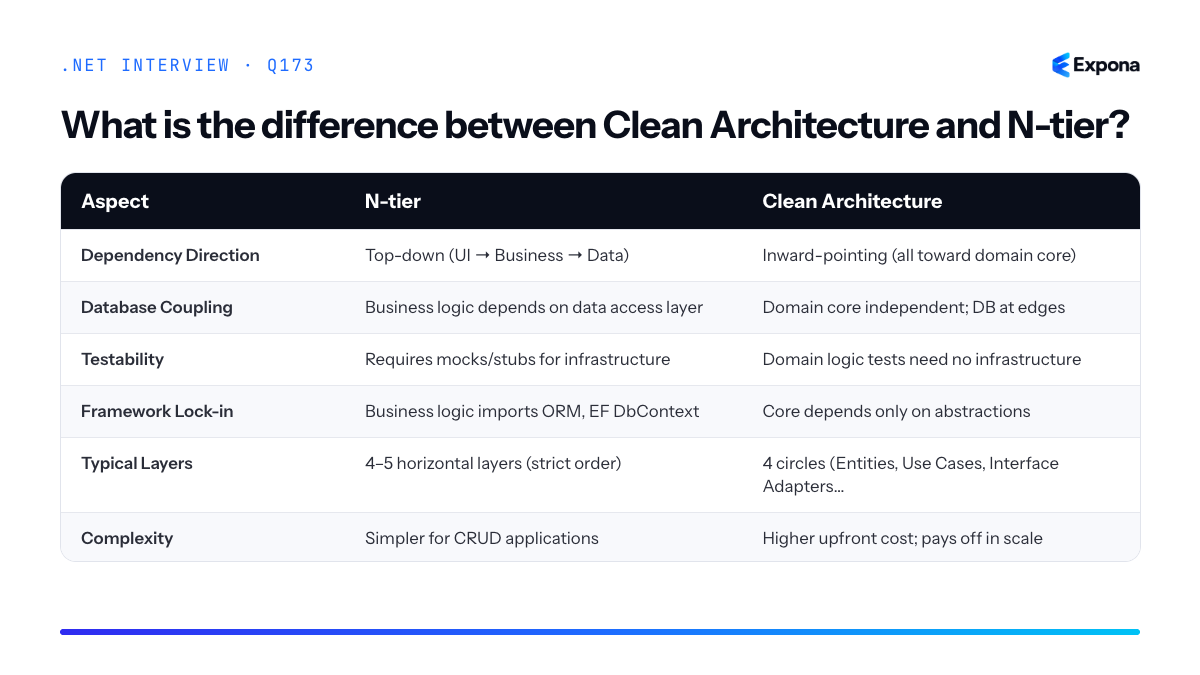
Example
csharp// Clean Architecture: Domain core (no dependencies) public class Order { public int Id { get; set; } public decimal Total { get; set; } public void ApplyDiscount(decimal percentage) { Total *= (1 - percentage / 100); } } // Use Case (Application layer) public interface IOrderRepository { Task SaveAsync(Order order); } public class PlaceOrderUseCase { private readonly IOrderRepository _repo; public PlaceOrderUseCase(IOrderRepository repo) => _repo = repo; public async Task ExecuteAsync(Order order) { order.ApplyDiscount(10); await _repo.SaveAsync(order); } } // Infrastructure (outer layer) - EF repository implementation public class EfOrderRepository : IOrderRepository { private readonly DbContext _db; public EfOrderRepository(DbContext db) => _db = db; public async Task SaveAsync(Order order) { _db.Orders.Add(order); await _db.SaveChangesAsync(); } } // Test: no database needed [Test] public async Task PlaceOrder_AppliesDiscount() { var mockRepo = new Mock<IOrderRepository>(); var useCase = new PlaceOrderUseCase(mockRepo.Object); var order = new Order { Total = 100 }; await useCase.ExecuteAsync(order); Assert.That(order.Total, Is.EqualTo(90)); }This example shows the domain
Orderclass containing pure business logic with zero infrastructure knowledge, while the repository interface is defined by the use case and implemented by infrastructure—the dependency points inward.Key points to mention
- Dependency Inversion: Clean Architecture uses interfaces to flip dependency direction; business logic defines what it needs, infrastructure provides it.
- Testability: Domain logic is trivial to unit test; you never need a test database in Clean Architecture.
- Maintainability: Business rules stay isolated from framework changes (EF version bump, database migration, API protocol switch).
- Framework Independence: Clean Architecture treats frameworks (ASP.NET, EF, logging) as plugins; N-tier embeds them in business logic.
- Complexity Trade-off: N-tier is faster for small CRUD apps; Clean Architecture shines at domain-driven, enterprise-scale systems (see Domain-Driven Design in .NET terms).
Common follow-up questions
- Isn't Clean Architecture overengineering for a simple CRUD API? — Yes, for simple projects N-tier may be faster. But consider: does your business logic ever change? If yes, Clean Architecture scales better.
- How does Clean Architecture handle cross-cutting concerns like logging or transactions? — Use decorators, middleware, or aspect-oriented patterns at the adapter layer to keep the domain clean.
- How does this relate to vertical slice architecture? — Vertical slice architecture organizes by feature rather than layer; it's an alternative to layering that can coexist with Clean Architecture principles.
Related interview questions
- What is vertical slice architecture?
- What is Domain-Driven Design in .NET terms?
- How do you raise and dispatch domain events?
Further reading
.NETCsharpArchitecture174What is CQRS?
ExperiencedCQRS (Command Query Responsibility Segregation) is an architectural pattern that separates read and write operations into distinct command and query paths. Commands modify state and return nothing; queries retrieve data and cause no side effects. This separation allows you to optimize each path independently—using different models, databases, or technologies for reads versus writes.
How it works
Traditional applications use a single model for both reading and writing data. CQRS inverts this by creating separate concerns:
- Commands represent intent to change state (CreateOrder, UpdateInventory). They are executed, validated, and may trigger events or side effects. The command handler processes the request and typically returns nothing or a confirmation identifier.
- Queries retrieve current or historical data without modifying it. They bypass domain logic and often read from denormalized read models optimized for specific views.
- Read Models are synchronized copies of data shaped specifically for query patterns. They may live in separate databases or caches, allowing independent scaling.
- Event Sourcing (optional but common) logs every state change as an immutable event, enabling audit trails and eventual consistency between write and read models.
The pattern works well with event-driven architectures and message buses (MediatR, NServiceBus) where commands and queries are routed through handlers.
Example
csharp// Command: intent to change state public record CreateOrderCommand(int CustomerId, List<OrderItem> Items) : IRequest<OrderId>; // Query: intent to retrieve data public record GetOrderDetailsQuery(OrderId OrderId) : IRequest<OrderDetailsDto>; // Command handler: modifies write model public class CreateOrderCommandHandler : IRequestHandler<CreateOrderCommand, OrderId> { private readonly IOrderRepository _repository; public async Task<OrderId> Handle(CreateOrderCommand cmd, CancellationToken ct) { var order = Order.Create(cmd.CustomerId, cmd.Items); await _repository.SaveAsync(order, ct); return order.Id; } } // Query handler: reads from optimized read model public class GetOrderDetailsQueryHandler : IRequestHandler<GetOrderDetailsQuery, OrderDetailsDto> { private readonly OrderReadDbContext _readDb; public async Task<OrderDetailsDto> Handle(GetOrderDetailsQuery query, CancellationToken ct) { return await _readDb.Orders .AsNoTracking() .Where(o => o.Id == query.OrderId) .Select(o => new OrderDetailsDto(o.Id, o.Total, o.Items)) .FirstOrDefaultAsync(ct); } } // Usage var orderId = await mediator.Send(new CreateOrderCommand(123, items)); var details = await mediator.Send(new GetOrderDetailsQuery(orderId));This example shows a command handler updating the write model (database) and a query handler reading from a denormalized read model without change tracking, demonstrating independent optimization.
Key points to mention
- CQRS enables independent scaling: read models can scale horizontally on cache layers while write models remain strongly consistent.
- Read models are eventually consistent when using event sourcing; the gap depends on event propagation latency.
- It adds complexity: multiple data stores, synchronization logic, and distributed consistency challenges. Use only when read/write patterns differ significantly.
- Scaling reads with EF Core and denormalization are natural companions to CQRS.
- MediatR simplifies CQRS implementation in .NET by providing a mediator pipeline for routing commands and queries to handlers.
Common follow-up questions
- When should you use CQRS? When read and write volumes are asymmetric, domain logic is complex, or you need audit trails and event history.
- How do you keep read and write models in sync? Use event sourcing with event subscribers, or message-driven synchronization (publish-subscribe).
- Is CQRS the same as event sourcing? No—CQRS separates command and query responsibilities; event sourcing logs state changes as events. They complement each other but are independent patterns.
Related interview questions
- How do you scale reads with EF Core and SQL Server or PostgreSQL?
- How do you design a read model in CQRS?
- What is AsNoTracking?
Further reading
.NETCsharpArchitecture175What is MediatR and why do teams use it?
ExperiencedMediatR is a .NET library that implements the Mediator pattern, providing in-process request and notification handling to decouple command/query logic from their handlers. Teams use it to organize cross-cutting concerns like logging, validation, and caching through pipeline behaviors, and to enforce CQRS (Command Query Responsibility Segregation) patterns without tight coupling.
How it works
MediatR acts as a central dispatcher for requests and notifications. When you send a request through the mediator, it resolves the appropriate handler from your dependency injection container and executes it. Requests expect a response; notifications are fire-and-forget.
Before the handler executes, MediatR can run pipeline behaviors—middleware-like components that wrap handler execution. This enables cross-cutting concerns (logging, validation, authorization, caching) without polluting handler code. The request pipeline order ensures predictable execution: pre-behaviors → handler → post-behaviors.
The library uses generics and reflection to match requests to handlers at runtime, so you write minimal wiring code. Dependency injection integration is seamless, making handler injection straightforward.
Example
csharp// Define a request and response public record CreateUserCommand(string Name, string Email) : IRequest<UserResponse>; public record UserResponse(int Id, string Name, string Email); // Define the handler public class CreateUserCommandHandler : IRequestHandler<CreateUserCommand, UserResponse> { private readonly IUserRepository _repository; public CreateUserCommandHandler(IUserRepository repository) => _repository = repository; public async Task<UserResponse> Handle(CreateUserCommand request, CancellationToken cancellationToken) { var user = new User { Name = request.Name, Email = request.Email }; var created = await _repository.AddAsync(user, cancellationToken); return new UserResponse(created.Id, created.Name, created.Email); } } // Usage in a controller public class UsersController : ControllerBase { private readonly IMediator _mediator; public UsersController(IMediator mediator) => _mediator = mediator; [HttpPost] public async Task<ActionResult<UserResponse>> Create(CreateUserCommand command, CancellationToken ct) { var result = await _mediator.Send(command, ct); return CreatedAtAction(nameof(Create), result); } }The controller sends a
CreateUserCommandthrough the mediator, which automatically resolves and invokes the handler without the controller knowing handler details, enabling loose coupling.Key points to mention
- Decoupling: Handlers are isolated from request sources; controllers don't reference handler logic directly.
- Pipeline behaviors: Cross-cutting concerns (logging, validation, error handling, caching) are applied consistently via behaviors, not duplicated across handlers.
- CQRS support: Commands and queries are naturally separated; different handlers process writes vs. reads.
- Testability: Mocking the mediator in tests is straightforward; handlers are pure, focused functions.
- Indirection trade-off: While it improves organization, MediatR adds a layer of indirection; use it where it genuinely reduces complexity, not everywhere.
Common follow-up questions
- How do pipeline behaviors work, and what order do they execute in?
- What's the difference between sending requests and publishing notifications in MediatR?
- When should you not use MediatR—what are scenarios where it adds unnecessary overhead?
Related interview questions
Further reading
.NETCsharpArchitecture176What are pipeline behaviors?
ExperiencedPipeline behaviors are interceptors in MediatR that wrap request handlers to apply cross-cutting concerns—such as validation, logging, caching, and transaction management—before and after handler execution. They follow the decorator pattern and execute in a chain, allowing you to separate infrastructure concerns from business logic and apply policies consistently across multiple handlers without duplicating code.
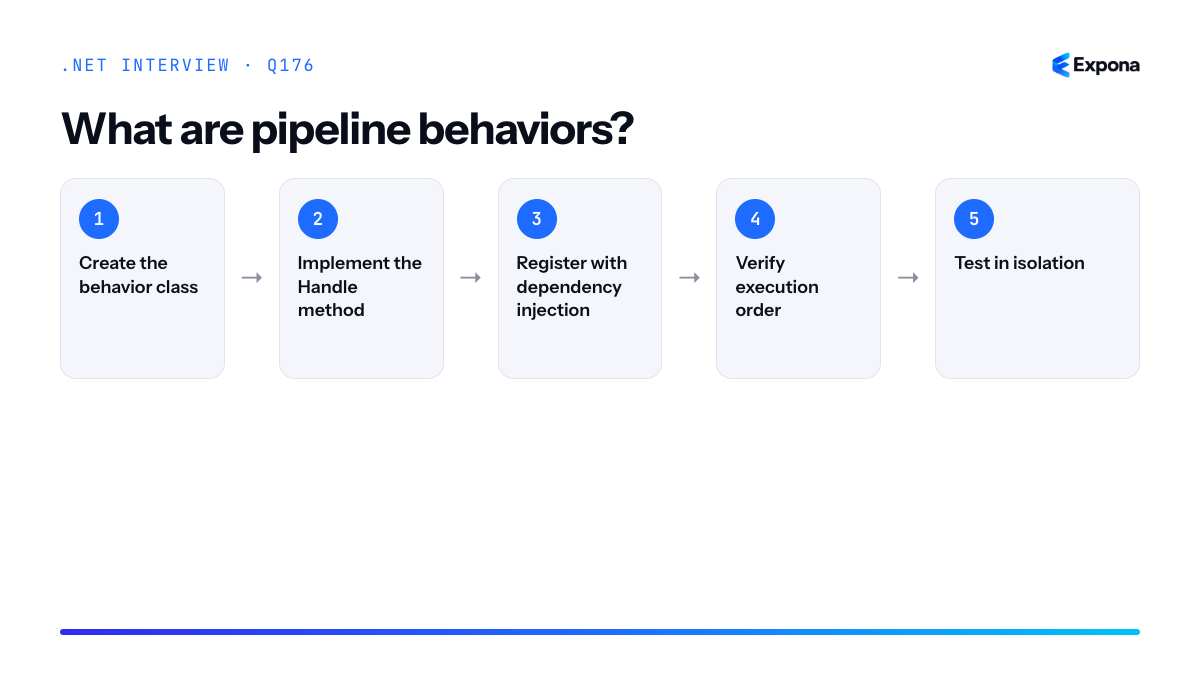
How it works
Pipeline behaviors implement
IPipelineBehavior<TRequest, TResponse>and intercept the request flow between the MediatR dispatcher and the actual handler. When a request is sent, MediatR passes it through each registered behavior in order. Each behavior receives a handle delegate pointing to the next behavior (or the handler itself). This creates a chain-of-responsibility pattern where each behavior decides whether to pass control forward, short-circuit, modify the request/response, or apply side effects.The execution order follows registration order: behaviors registered first execute outermost (run their pre-logic first, post-logic last). This allows you to stack concerns logically—for example, transaction management wraps validation, which wraps the actual business logic.
Example
csharppublic class LoggingBehavior<TRequest, TResponse> : IPipelineBehavior<TRequest, TResponse> where TRequest : IRequest<TResponse> { private readonly ILogger<LoggingBehavior<TRequest, TResponse>> _logger; public LoggingBehavior(ILogger<LoggingBehavior<TRequest, TResponse>> logger) => _logger = logger; public async Task<TResponse> Handle( TRequest request, RequestHandlerDelegate<TResponse> next, CancellationToken cancellationToken) { var requestName = typeof(TRequest).Name; _logger.LogInformation("Handling {RequestName}", requestName); try { var response = await next(); _logger.LogInformation("Handled {RequestName} successfully", requestName); return response; } catch (Exception ex) { _logger.LogError(ex, "Error handling {RequestName}", requestName); throw; } } } // Registration in Program.cs services.AddMediatR(config => config.RegisterServicesFromAssemblyContaining<Program>() .AddOpenBehavior(typeof(LoggingBehavior<,>)));This logging behavior wraps every request handler: it logs before execution, awaits the next behavior/handler, logs the result, and re-throws any exceptions—all without modifying handler code.
Key points to mention
- Decorator pattern: Behaviors wrap handlers without changing their interfaces, enabling open/closed principle compliance.
- Execution order: Behaviors execute in registration order; the first registered behavior is outermost, running its pre-logic before others.
- Generic and open: Use
IPipelineBehavior<TRequest, TResponse>for specific request types or open generics (typeof(Behavior<,>)) to apply to all requests. - Common use cases: Validation, logging, performance monitoring, caching, transaction/unit-of-work management, and authorization.
- Testability: Behaviors are independently testable; you can test them in isolation without coupling to handlers.
Common follow-up questions
- How do you handle conditional behavior execution or skip behaviors for certain request types?
- What is the difference between pipeline behaviors and middleware?
- How would you implement caching or validation behaviors, and what order should they run in?
Steps to implement and use pipeline behaviors
- Create the behavior class: Implement
IPipelineBehavior<TRequest, TResponse>with a constructor accepting dependencies (logger, validator, etc.) and aHandlemethod. - Implement the Handle method: Apply pre-logic, await
next()to pass control to the next behavior or handler, then apply post-logic (logging results, exceptions, side effects). - Register with dependency injection: In
Program.cs, callservices.AddMediatR()and chain.AddOpenBehavior(typeof(YourBehavior<,>))for generic or specific registrations for concrete types. - Verify execution order: Test that behaviors run in the expected sequence (e.g., validation before transactions) by inspecting logs or test assertions.
- Test in isolation: Unit test each behavior with mock delegates and verify it correctly handles successful and exceptional cases.
Related interview questions
- What is MediatR and why do teams use it?
- How do endpoint filters work in Minimal APIs?
- What is middleware?
Further reading
.NETCsharp177How do you validate requests with FluentValidation?
ExperiencedFluentValidation allows you to define validation rules declaratively using a fluent API in separate validator classes, then execute them via dependency injection and either a MediatR pipeline behavior or an ASP.NET Core filter. This keeps validation logic out of your domain models and handlers, making it testable, reusable, and maintainable.
How it works
FluentValidation works by separating validation concerns from your business logic. You create a validator class that inherits from
AbstractValidator<T>whereTis the request or entity type you're validating. Inside the validator's constructor, you define rules using a fluent API:RuleFor(x => x.Property)chains methods likeNotEmpty(),MaximumLength(),Matches(), andCustom()to express constraints.When integrated with MediatR, you register validators and add a validation behavior to the pipeline. This behavior runs before your handler executes, collecting all validation errors into a
ValidationException. You then map that exception to a standardizedProblemDetailsresponse in your exception handler or middleware. This approach also works with ASP.NET Core model binding filters or custom middleware for non-MediatR scenarios.Example
csharp// Request/Command public class CreateUserCommand { public string Email { get; set; } public string Name { get; set; } public int Age { get; set; } } // Validator public class CreateUserCommandValidator : AbstractValidator<CreateUserCommand> { public CreateUserCommandValidator() { RuleFor(x => x.Email) .NotEmpty().WithMessage("Email is required") .EmailAddress().WithMessage("Email format is invalid"); RuleFor(x => x.Name) .NotEmpty().WithMessage("Name is required") .MaximumLength(100).WithMessage("Name must not exceed 100 characters"); RuleFor(x => x.Age) .InclusiveBetween(18, 120).WithMessage("Age must be between 18 and 120"); } } // Register in Program.cs builder.Services.AddValidatorsFromAssembly(typeof(Program).Assembly); builder.Services.AddMediatR(config => { config.RegisterServicesFromAssembly(typeof(Program).Assembly); config.AddOpenBehavior(typeof(ValidationBehavior<,>)); }); // MediatR Pipeline Behavior public class ValidationBehavior<TRequest, TResponse> : IPipelineBehavior<TRequest, TResponse> where TRequest : notnull { private readonly IEnumerable<IValidator<TRequest>> _validators; public ValidationBehavior(IEnumerable<IValidator<TRequest>> validators) { _validators = validators; } public async Task<TResponse> Handle(TRequest request, RequestHandlerDelegate<TResponse> next, CancellationToken ct) { var context = new ValidationContext<TRequest>(request); var failures = (await Task.WhenAll( _validators.Select(v => v.ValidateAsync(context, ct)))) .SelectMany(r => r.Errors) .Where(f => f != null) .ToList(); if (failures.Count != 0) { throw new ValidationException(failures); } return await next(); } } // Exception handler app.UseExceptionHandler(exceptionHandlerApp => { exceptionHandlerApp.Run(async context => { var exception = context.Features.Get<IExceptionHandlerFeature>()?.Error; if (exception is ValidationException vex) { context.Response.StatusCode = StatusCodes.Status400BadRequest; await context.Response.WriteAsJsonAsync(new ProblemDetails { Type = "https://example.com/problems/validation-error", Title = "One or more validation errors occurred.", Status = 400, Extensions = new Dictionary<string, object?> { { "errors", vex.Errors .GroupBy(e => e.PropertyName) .ToDictionary(g => g.Key, g => g.Select(e => e.ErrorMessage).ToArray()) } } }); } }); });This example defines a validator for a user creation command, registers it with MediatR, injects it into a pipeline behavior that runs before the handler, and returns validation errors as a structured ProblemDetails response.
Key points to mention
- Separation of concerns: Validators live in separate classes, keeping domain models and handlers clean and focused.
- Reusability: A single validator can be used across MediatR handlers, API controllers, and background jobs by injecting it directly.
- Composability: Validators can inherit from and compose other validators, and you can use
Include()to reuse rule sets. - Async validation: Rules support
MustAsync()andCustom()with async callbacks for database or external API checks. - Localization: Error messages are easily localized via resource files or message factories.
Common follow-up questions
- How do you handle cross-property validation or conditional rules? Use
RuleFor(x => x.Property).Must((model, value) => ...)orWhen()conditions to validate based on other property values. - Can you validate nested objects or collections? Yes, use
RuleForEach(x => x.Items).SetValidator(new ItemValidator())orRuleFor(x => x.Address).SetValidator(new AddressValidator()). - What's the difference between validation and enforcing aggregate invariants? Validation ensures input correctness (format, range); invariants ensure domain consistency (business rules, state transitions) and typically live in your aggregate or domain service.
Related interview questions
- How do you enforce aggregate invariants?
- How does the ASP.NET Core middleware pipeline work internally?
- How do you write custom middleware?
Further reading
.NETCsharpaspnetcore178What is the Result pattern?
ExperiencedThe Result pattern is a functional programming approach where methods return a Result object that contains either a success value or an error information, instead of throwing exceptions for expected failures. This makes error handling explicit, composable, and more efficient by treating failures as ordinary return values rather than exceptional control flow.
How it works
The Result pattern encapsulates the outcome of an operation in a type-safe container. A Result is typically a discriminated union (or sealed type hierarchy) with two states: Success (containing a value) and Failure (containing error details). Instead of relying on exceptions for recoverable errors, code returns a Result and the caller pattern-matches or unwraps it to handle both paths.
This approach separates concerns: exceptions remain for truly exceptional situations (null references, out-of-memory), while expected failures (validation errors, business rule violations, API failures) flow through the Result type. Result types compose well with LINQ, enable railway-oriented programming, and reduce the cognitive overhead of exception handling. They also avoid the performance cost of stack unwinding for expected errors.
Modern C# supports this well through pattern matching, allowing clean, readable syntax for working with Results.
Example
csharppublic abstract record Result<T> { public sealed record Success(T Value) : Result<T>; public sealed record Failure(string Error) : Result<T>; } public static class ResultExtensions { public static Result<TOut> Bind<T, TOut>( this Result<T> result, Func<T, Result<TOut>> f) => result switch { Result<T>.Success(var value) => f(value), Result<T>.Failure(var error) => new Result<TOut>.Failure(error), _ => throw new InvalidOperationException() }; } public class UserService { public Result<User> GetUser(int id) => id <= 0 ? new Result<User>.Failure("Invalid user ID") : new Result<User>.Success(new User { Id = id, Name = "John" }); public Result<string> UpdateUserEmail(int id, string email) => GetUser(id) .Bind(user => ValidateEmail(email) .Bind(validEmail => new Result<string>.Success($"User {user.Name} updated"))); private Result<string> ValidateEmail(string email) => string.IsNullOrEmpty(email) ? new Result<string>.Failure("Email is required") : new Result<string>.Success(email); } // Usage var result = new UserService().UpdateUserEmail(1, "test@example.com"); var message = result switch { Result<string>.Success(var value) => $"Success: {value}", Result<string>.Failure(var error) => $"Error: {error}", };This demonstrates a composable Result type using records and pattern matching to chain operations elegantly without throwing exceptions.
Key points to mention
- Explicit error handling: Callers see that a method can fail and must decide how to handle it, making bugs less likely.
- Composability: Result types work well with monadic operators like Bind and Map, enabling fluent chaining of operations.
- Performance: Returning error values is faster than exception handling's stack unwinding and allocation overhead.
- Exceptions still matter: Use exceptions for truly exceptional, unrecoverable conditions; use Result for expected, recoverable failures.
- Type safety: Languages with discriminated unions (C# records, Rust) make Result patterns safe and ergonomic.
Common follow-up questions
- How does the Result pattern differ from throwing exceptions for error handling?
- What libraries implement Result patterns in .NET (FluentResults, LanguageExt, CSharpFunctionalExtensions)?
- How do you handle multiple chained Result operations and short-circuit on the first failure?
Related interview questions
- What is the difference between Results.Problem and throwing exceptions?
- What is the Options pattern?
- What is pattern matching in C#?
Further reading
.NETCsharpArchitecture179What is vertical slice architecture?
ExperiencedVertical slice architecture organizes code by feature rather than by technical layer. Instead of grouping all controllers, services, and repositories together, each feature (or slice) is self-contained and includes its own endpoint, business logic, validation, and data access. This approach reduces coupling and makes features easier to understand, test, and modify independently.
How it works
In traditional layered architecture, a request flows through multiple layers: presentation → business logic → data access. Code for the same feature is scattered across different folders and projects. Vertical slice architecture flips this perspective—imagine slicing a cake vertically so each slice contains all the layers needed for one feature.
Each slice is organized by business domain or feature (e.g.,
CreateOrder,GetProductDetails,UpdateUserProfile). Within each slice, you define everything needed: the endpoint handler, request/response models, validation logic, and database queries. Slices are independent units that can be developed, tested, and deployed with minimal impact on other features.This architecture aligns well with Minimal APIs and the mediator pattern (CQRS), where each request is routed to a specific handler. It also encourages high cohesion—related code lives together—while maintaining loose coupling between features.
Example
csharp// Features/Orders/CreateOrder/CreateOrderRequest.cs public record CreateOrderRequest(string CustomerId, List Items); // Features/Orders/CreateOrder/CreateOrderHandler.cs public class CreateOrderHandler { private readonly IOrderRepository _repository; public CreateOrderHandler(IOrderRepository repository) => _repository = repository; public async Task Handle(CreateOrderRequest request) { var order = new Order { CustomerId = request.CustomerId, Items = request.Items }; await _repository.SaveAsync(order); return new OrderResponse(order.Id, order.Status); } } // Features/Orders/CreateOrder/CreateOrderValidator.cs public class CreateOrderValidator : AbstractValidator { public CreateOrderValidator() { RuleFor(x => x.CustomerId).NotEmpty(); RuleFor(x => x.Items).NotEmpty(); } } // Program.cs - endpoint registration app.MapPost("/orders", async (CreateOrderRequest req, CreateOrderHandler handler) => { var validator = new CreateOrderValidator(); var validation = await validator.ValidateAsync(req); if (!validation.IsValid) return Results.BadRequest(validation.Errors); var result = await handler.Handle(req); return Results.Created($"/orders/{result.Id}", result); });This example shows a
CreateOrderslice containing the request model, handler, validator, and endpoint registration—all the code needed for that feature in one place.Key points to mention
- High cohesion, loose coupling: Features are self-contained and independent, making the codebase easier to navigate and refactor.
- Scalability: New features can be added without modifying existing code; teams can work on different slices in parallel.
- Testability: Each slice can be unit tested in isolation without dependencies on other features.
- Works well with Minimal APIs and CQRS: Natural fit for handling individual requests through dedicated handlers and mediators.
- Prevents the "shared services trap": Discourages creating bloated, god-like service classes that handle unrelated business logic.
Common follow-up questions
- How do you share code between slices without creating coupling?
- How does vertical slice architecture compare to Clean Architecture?
- What happens when slices need to communicate or share database entities?
Related interview questions
- What is the difference between Clean Architecture and N-tier?
- How do endpoint filters work in Minimal APIs?
- What is the difference between a field and a property?
Further reading
.NETCsharpArchitecture180What is a modular monolith?
ExperiencedA modular monolith is a single, deployable application organized into well-bounded, independent modules—each with its own data storage, business logic, and clearly defined public contracts. It provides microservice-like organizational benefits and loose coupling without the operational complexity of distributed systems, making it an ideal intermediate step between a traditional monolith and microservices.
How it works
In a modular monolith, the application is divided into feature-based or domain-driven modules that communicate through well-defined interfaces rather than shared databases. Each module owns its data and exposes only a public API (contracts or interfaces) to other modules. Communication typically occurs in-process via dependency injection or event-driven patterns, avoiding network calls.
The key principle is independence without distribution: modules can be developed, tested, and reasoned about in isolation, but they run in the same process and memory space. This means you gain architectural clarity and maintainability without the latency, eventual consistency, or deployment complexity of microservices. Each module is also easier to extract into a microservice later if scaling or organizational needs demand it.
Data separation is enforced through separate schemas, separate database instances (logical or physical), or a shared database with strict access controls. Communication patterns typically include synchronous in-process calls, asynchronous events via a message bus, or both.
Example
csharp// OrderModule - public contract public interface IOrderService { Task<OrderResponse> CreateOrderAsync(CreateOrderRequest request); } public class OrderService : IOrderService { private readonly OrderDbContext _dbContext; private readonly IEventPublisher _eventPublisher; public async Task<OrderResponse> CreateOrderAsync(CreateOrderRequest request) { var order = new Order { CustomerId = request.CustomerId, Total = request.Total }; _dbContext.Orders.Add(order); await _dbContext.SaveChangesAsync(); // Publish domain event—other modules subscribe await _eventPublisher.PublishAsync(new OrderCreatedEvent { OrderId = order.Id }); return new OrderResponse { OrderId = order.Id, Status = "Created" }; } } // InventoryModule - listens to events public class InventoryEventHandler { private readonly IInventoryService _inventoryService; public async Task HandleOrderCreatedAsync(OrderCreatedEvent evt) { // React asynchronously without direct coupling await _inventoryService.ReserveItemsAsync(evt.OrderId); } } // Startup - register modules services.AddScoped<IOrderService, OrderService>(); services.AddScoped<IInventoryService, InventoryService>(); services.AddEventPublisher(); // Shared event bus, in-processThis example shows two modules—Order and Inventory—communicating through an event-driven contract rather than shared tables or HTTP calls, maintaining independence while staying in the same process.
Key points to mention
- Single deployment unit: The entire modular monolith is deployed together, avoiding coordination overhead and distributed transaction complexity.
- Data ownership: Each module has its own data store or schema, preventing tight coupling and enabling independent evolution.
- Clear contracts: Modules expose only interfaces and events, not internal domain models, encouraging loose coupling.
- Stepping stone to microservices: A well-structured modular monolith can be decomposed into microservices when scale or organizational boundaries demand it.
- In-process communication: No network overhead; modules interact via method calls or local event buses, keeping latency low and debugging simple.
Common follow-up questions
- How do you enforce module boundaries and prevent circular dependencies? (Answer: dependency graphs, module facades, and code organization; some teams use NDepend or Roslyn analyzers.)
- When should you move from a modular monolith to microservices? (Answer: when scaling, team autonomy, or deployment frequency demands it; not before you have clear module boundaries.)
- How do you handle transactions across modules? (Answer: use saga patterns or compensating transactions for async workflows; keep sync operations within a single module.)
Related interview questions
- What are owned types in EF Core?
- How do you use the Channel-based background queue pattern?
- What is the difference between a value type and a reference type?
Further reading
.NETCsharpArchitecture181How do you map objects in .NET?
ExperiencedObject mapping in .NET transforms data from one object type to another—commonly converting domain models to DTOs, API responses to entities, or database records to view models. You can use manual mapping, reflection-based libraries like AutoMapper, or modern source-generated mappers like Mapperly, each with trade-offs between explicitness, performance, and maintainability.
How it works
Object mapping bridges the gap between different layers of your application. When data flows between your database, business logic, and API response layers, the shapes often differ. Mapping copies values from a source object to a target object, transforming the structure and sometimes the data itself.
Manual mapping means writing assignment code by hand—explicit but verbose. Reflection-based mappers like AutoMapper inspect types at runtime, discovering properties and creating mappings on-the-fly; this adds convenience but runtime overhead. Source-generated mappers like Mapperly analyze your code at compile-time and generate optimized mapping code, combining the performance of manual mapping with the convenience of convention-based tools. Generated code is visible and debuggable, making issues easier to trace.
Most modern .NET projects use a combination: manual mapping for complex business logic transformations, and source-generated or reflection-based mappers for straightforward property-to-property conversions.
Example
csharp// Domain model public class User { public int Id { get; set; } public string Name { get; set; } public string Email { get; set; } } // DTO public class UserDto { public int Id { get; set; } public string Name { get; set; } public string Email { get; set; } } // Manual mapping public class UserMapper { public static UserDto MapToDto(User user) => new UserDto { Id = user.Id, Name = user.Name, Email = user.Email }; } // Using Mapperly (source-generated) [Mapper] public partial class UserAutoMapper { public partial UserDto MapToDto(User user); } // Usage var user = new User { Id = 1, Name = "Alice", Email = "alice@example.com" }; var dto = UserMapper.MapToDto(user); // Manual // or var mapper = new UserAutoMapper(); var dto = mapper.MapToDto(user); // GeneratedThis example shows three approaches: manual mapping (explicit control), and Mapperly (attribute-based source generation with zero runtime overhead). Both produce fast, predictable results.
Key points to mention
- Manual mapping is most explicit and fastest; use it for complex transformations or performance-critical code paths.
- Source-generated mappers (Mapperly, Riok.Mapperly) offer performance similar to manual code but with less boilerplate; generated code is debuggable and transparent.
- Reflection-based mappers (AutoMapper) provide convenience and reduce boilerplate but incur runtime reflection overhead and can mask breaking changes until runtime.
- Flatten or unflatten hierarchical data structures—convert nested objects to flat DTOs and vice versa, often a key responsibility of mappers.
- Consider flattening for DTOs; deeply nested API responses are harder to consume, and mappers handle this translation cleanly.
Common follow-up questions
- What is the performance difference between manual mapping, AutoMapper, and Mapperly?
- How do you handle circular references or complex nested object graphs during mapping?
- When would you use a mapper versus a factory pattern or a constructor that accepts another object?
Related interview questions
.NETCsharp182What are source generators?
ExperiencedSource generators are compile-time tools that analyze your code and automatically generate new C# source files during compilation. They run in the compiler pipeline before the CLR executes, eliminating the need for runtime reflection in many scenarios and producing faster, more efficient code.
How it works
Source generators are .NET libraries that implement
ISourceGeneratororIIncrementalGenerator(the newer, more efficient API). When you compile your project, the compiler invokes these generators with access to your syntax trees and semantic models. The generators analyze your code—looking for specific attributes, patterns, or types—and produce new C# source code that the compiler then includes in the compilation.The process is entirely compile-time: no reflection happens at runtime. The generated code is as if you had written it manually, but you didn't have to. This is transformative for performance-critical scenarios like JSON serialization, where System.Text.Json source generation can eliminate thousands of reflection calls per serialization operation.
Generators see your code through Roslyn analyzers—they get syntax trees, symbols, and semantic information—allowing them to make intelligent decisions about what code to generate. You reference generators via NuGet packages, and they activate automatically when you include them in your project.
Example
csharpusing System.Text.Json.Serialization; [JsonSerializable(typeof(Person))] public partial class PersonContext : JsonSerializerContext { } public class Person { public string Name { get; set; } public int Age { get; set; } } // Usage var person = new Person { Name = "Alice", Age = 30 }; var json = JsonSerializer.Serialize(person, PersonContext.Default.Person);The
[JsonSerializable]attribute signals the source generator to create fast, reflection-free serialization code for thePersontype—you never see the generated code, but the compiler includes it in the build.Key points to mention
- Compile-time execution: Generators run during compilation, not at runtime, eliminating reflection overhead and improving performance.
- Zero runtime cost: The generated code is static and compiled into your assembly—there's no dynamic invocation or discovery cost.
- IDE integration: Modern IDEs support generators, showing generated code and enabling IntelliSense on generated members.
- Incremental generation: The newer
IIncrementalGeneratorAPI caches results and only regenerates when dependencies change, speeding up rebuilds. - Common use cases: JSON serialization, logging, regex patterns, dependency injection, and object mapping frameworks all benefit significantly.
Common follow-up questions
- How do you debug a source generator? — Attach a debugger to the compiler process or use
[System.Diagnostics.Debugger.Launch()]in your generator's Execute method. - Can you write your own source generator? — Yes; create a library targeting
netstandard2.0that implementsIIncrementalGenerator, register it in a .csproj with<CompilerVisibleProperty>items, and distribute via NuGet. - How do they differ from reflection? — Generators produce static, compiled code with zero runtime overhead; reflection discovers types and members at runtime, incurring performance penalties every time it runs.
Related interview questions
Further reading
.NETCsharp183How does System.Text.Json source generation help?
ExperiencedSystem.Text.Json source generation uses a compile-time code generator to create serialization logic ahead of time, eliminating reflection overhead and enabling trimming and Native AOT support. By deriving a class from
JsonSerializerContextand marking it with[JsonSourceGenerationOptions], you instruct the compiler to generate optimized serialization code for your types during the build process, dramatically improving startup performance and throughput in constrained environments.How it works
System.Text.Json source generation leverages source generators to analyze your types at compile time and emit IL-equivalent serialization methods directly into your assembly. When you create a
JsonSerializerContextsubclass and apply the[JsonSerializerContext]attribute, the Roslyn compiler examines the context's generic type parameters (your DTO classes) and generates specialized serialization and deserialization code tailored to each type.This contrasts sharply with reflection-based serialization, which discovers type structure at runtime. The generated code is monolithic, fast, and deterministic—there are no dynamic method invocations or repeated reflection calls. The compiler also performs tree-shaking: only types and properties you explicitly register in the context are included in the final binary, reducing code size and enabling full Native AOT compatibility.
The process is transparent: you pass your context instance to
JsonSerializer.Serialize()orDeserialize()overloads, and the runtime automatically uses the generated fast paths instead of falling back to reflection.Example
csharpusing System.Text.Json; using System.Text.Json.Serialization; public class Person { public string Name { get; set; } public int Age { get; set; } } [JsonSerializerContext] [JsonSourceGenerationOptions(WriteIndented = true)] public partial class AppJsonSerializerContext : JsonSerializerContext { public override JsonTypeInfo GetTypeInfo(Type type) { if (type == typeof(Person)) return GetTypeInfo(typeof(Person)) as JsonTypeInfo; return base.GetTypeInfo(type); } } class Program { static void Main() { var person = new Person { Name = "Alice", Age = 30 }; var options = new JsonSerializerOptions { TypeInfoResolver = new AppJsonSerializerContext() }; string json = JsonSerializer.Serialize(person, options); var deserialized = JsonSerializer.Deserialize(json, options); Console.WriteLine(json); } }This example defines a context for
Personand uses it during serialization; the compiler generates optimized code that avoids reflection entirely.Key points to mention
- Compile-time code generation: Serialization logic is baked into the assembly as regular IL, eliminating runtime reflection and JIT costs.
- Startup and throughput gains: Especially significant in containerized or serverless scenarios where cold starts matter; throughput can improve 2–5× for large payloads.
- Native AOT and trimming: Source generation is the primary enabler for JSON serialization in .NET applications compiled with Native AOT, since reflection is unavailable at runtime.
- Explicit registration: Only types added to the context are generated; this provides control but requires upfront declaration of all serialized types.
- Backward compatible: You can still use reflection-based
JsonSerializerOptionsas a fallback; the context simply provides a faster path.
Common follow-up questions
- What happens if I serialize a type not in the context? By default, the runtime falls back to reflection. You can configure
JsonSerializerOptions.TypeInfoResolverto throw or handle unknown types explicitly. - Can source generation handle inheritance and polymorphism? Yes, but you must explicitly register derived types and configure a discriminator via attributes like
[JsonDerivedType]. - Does this work with ASP.NET Core serialization? Yes; ASP.NET Core 8+ automatically uses source-generated contexts for controller responses when available, and you can inject a custom context in dependency injection.
Related interview questions
- What are the trade-offs of Native AOT for ASP.NET Core?
- What is JSON serialization in .NET?
- What are source generators?
Further reading
.NETCsharpPerformanceDevOps184What is high-performance logging with LoggerMessage?
ExperiencedLoggerMessage is a code-generation feature in .NET that uses the
[LoggerMessage]attribute to create strongly-typed, compile-time-generated logging methods that eliminate boxing, string template parsing, and allocations on each call. This makes logging in high-performance scenarios (hot paths) significantly faster and more efficient than traditionallogger.LogInformation()calls.How it works
When you decorate a partial method with
[LoggerMessage], the .NET source generator analyzes the method signature and log message template at compile time. It then generates an optimized implementation that:- Parses the message template once during code generation, not at runtime
- Pre-computes parameter names and positions
- Avoids boxing of value types by using generics and
structparameters directly - Generates an efficient state object for structured logging without intermediate allocations
The generated code is essentially hand-optimized logging logic, eliminating the overhead that occurs with reflection-based approaches. Traditional logging calls like
logger.LogInformation("User {UserId} logged in", userId)parse the template string at runtime, potentially box theuserIdinteger, and allocate a parameters array. LoggerMessage generates a bespoke method for each call site.Example
csharppublic static partial class Log { [LoggerMessage(Level = LogLevel.Information, Message = "User {UserId} logged in from {IpAddress}")] public static partial void UserLoggedIn(this ILogger logger, int userId, string ipAddress); [LoggerMessage(Level = LogLevel.Error, Message = "Database error: {ErrorCode}")] public static partial void DatabaseError(this ILogger logger, int errorCode, Exception ex); } // Usage in your application var logger = app.Services.GetRequiredService<ILogger<Program>>(); logger.UserLoggedIn(userId: 42, ipAddress: "192.168.1.1"); logger.DatabaseError(errorCode: 5000, new SqlException());The source generator creates the full implementation of
UserLoggedInandDatabaseErrormethods at compile time, making the calls as efficient as possible with zero-allocation logging in most scenarios.Key points to mention
- Compile-time code generation: The method body is generated by a Roslyn source generator, so there's no runtime reflection or parsing overhead.
- Zero boxing for value types: Unlike
params object[]approaches, LoggerMessage methods accept strongly-typed parameters directly, avoiding boxing and unboxing. - Structured logging friendly: Integrates seamlessly with Serilog, Application Insights, and other structured logging frameworks, extracting key-value pairs automatically.
- Performance in hot paths: Ideal for scenarios where logging is called millions of times per second (request handlers, real-time systems, or tight loops).
- Requires .NET 6+: Source generators were introduced in .NET 5, but LoggerMessage attribute was formalized in .NET 6 for broader support.
Common follow-up questions
- When should I use LoggerMessage vs. traditional logging? — Use LoggerMessage in hot paths and performance-critical code; traditional logging is fine for non-critical paths where overhead is negligible.
- Can LoggerMessage work with dynamic templates? — No; the template must be a compile-time constant string, so you cannot pass templates from configuration at runtime.
- What happens if the log level is not enabled? — The generated code checks log level first, so if
LogLevel.Informationis disabled, the method exits immediately without allocating or processing arguments.
Related interview questions
- What is boxing and unboxing?
- What are IValueTaskSource and pooled ValueTasks?
- What is System.IO.Pipelines?
Further reading
.NETCsharpPerformance185What is structured logging?
ExperiencedStructured logging is a logging approach where you record data as named key-value properties rather than concatenating everything into a single text string. This allows log aggregation tools like Seq, Elasticsearch, or Application Insights to parse, filter, search, and aggregate logs by individual fields—making troubleshooting and analysis far more powerful than unstructured plain-text logs.
How it works
Instead of writing a log message like "Order 12345 processed for customer John Doe at 2:45 PM," structured logging captures discrete properties:
OrderId = 12345,CustomerId = "john_doe",Timestamp = 2025-01-15T14:45:00Z. These properties are serialized (typically as JSON) and sent to a log aggregation platform. The platform indexes each field, enabling you to query logs like "show me all errors where OrderId = 12345" or "average processing time by CustomerId" without parsing text.Structured logging is built into ASP.NET Core via ASP.NET Core's logging framework using log scopes and the
ILoggerinterface. When you pass anonymous objects or useLogContext, the logger automatically captures those fields as properties in the log event.Example
csharpusing Microsoft.Extensions.Logging; using Serilog; using Serilog.Core; var logger = new LoggerConfiguration() .WriteTo.Console() .CreateLogger(); int orderId = 12345; string customerId = "cust_001"; decimal amount = 99.99m; int retryCount = 2; // Structured logging with named properties logger.Information( "Order processed successfully. OrderId: {OrderId}, CustomerId: {CustomerId}, Amount: {Amount}, Retries: {RetryCount}", orderId, customerId, amount, retryCount ); // Output (JSON): // {"Timestamp":"2025-01-15T14:45:00.0000000Z","Level":"Information","MessageTemplate":"Order processed...","Properties":{"OrderId":12345,"CustomerId":"cust_001","Amount":99.99,"RetryCount":2}}This example uses Serilog (a popular structured logging library for .NET) to log an order with named placeholders in curly braces; each property is captured as a separate field in the JSON output, allowing tools to query by
OrderId,Amount, orRetryCountindependently.Key points to mention
- Machine-readable format: Structured logs are typically JSON, making them easily parseable and queryable by aggregation platforms rather than requiring regex or text parsing.
- Performance and searchability: Indexed fields enable fast filtering and aggregation queries; finding all errors for a specific OrderId is orders of magnitude faster than grepping unstructured text logs.
- Correlation and tracing: Structured logging makes it easy to add correlation IDs or request IDs to every log entry, enabling end-to-end request tracing across services.
- Extensibility: You can add contextual properties (user ID, tenant ID, environment) to every log in a scope without repeating them in each message.
- Serilog and Seq: Serilog is the de facto standard for structured logging in .NET; Seq is a dedicated server for ingesting, searching, and alerting on structured logs.
Common follow-up questions
- "How do you add correlation IDs to logs across multiple requests?" — Use
LogContext.PushProperty("CorrelationId", id)or middleware to inject a correlation ID into the logging context so every log in that request automatically includes it. - "What is the performance overhead of structured logging?" — Minimal if you use a buffered or asynchronous sink; the main cost is JSON serialization, which is negligible compared to network I/O to the aggregation server.
- "How do you decide what properties to log?" — Log business-critical identifiers (OrderId, UserId, TenantId), timing information (duration, retries), and any value needed to reproduce or diagnose the issue; avoid logging sensitive data like passwords or PII.
Related interview questions
- What is logging in ASP.NET Core?
- How do you prevent XSS in ASP.NET Core?
- What are ref returns and ref locals?
Further reading
.NETCsharpaspnetcoreArchitecture186What is OpenTelemetry in .NET?
ExperiencedOpenTelemetry is a vendor-neutral, open standard framework for collecting telemetry data—traces, metrics, and logs—from .NET applications. It provides standardized APIs and SDKs that allow developers to instrument code once and export data to any observability backend (Jaeger, Prometheus, Grafana, Datadog, etc.) without vendor lock-in. In .NET, the core components are
ActivitySourcefor distributed tracing andMeterfor metrics collection.How it works
OpenTelemetry operates on a three-pillar model: traces, metrics, and logs. Traces capture the flow of requests across services and components, recording timing and events. Metrics measure numerical values like request count, latency, and CPU usage. Logs provide detailed event information.
In .NET, you instrument your code using
System.Diagnostics.ActivitySource(for tracing) andSystem.Diagnostics.Metrics.Meter(for metrics). These APIs emit telemetry events that are collected by providers—components that listen for these signals. Providers format and export data via exporters, typically using the OpenTelemetry Protocol (OTLP), which sends structured data to a backend like Jaeger or Prometheus.The architecture separates concerns: instrumentation (your code) is decoupled from collection (providers) and export (exporters). This means you write instrument code once, then configure exporters based on your observability stack, without changing application code.
Example
csharpusing System.Diagnostics; using OpenTelemetry.Trace; using OpenTelemetry.Metrics; var tracerProvider = new TracerProviderBuilder() .AddSource("MyApp") .AddConsoleExporter() .Build(); var meterProvider = new MeterProviderBuilder() .AddMeter("MyApp") .AddConsoleExporter() .Build(); var activitySource = new ActivitySource("MyApp"); var meter = new Meter("MyApp"); var counter = meter.CreateCounter<int>("request_count"); using (var activity = activitySource.StartActivity("ProcessOrder")) { activity?.SetTag("order_id", "12345"); // Simulate work Thread.Sleep(100); counter.Add(1); }This code creates a tracer and meter, instruments a process with an Activity (trace), sets a tag, and increments a counter metric—all exported to console but easily switched to Jaeger or Prometheus.
Key points to mention
- Vendor-neutral standard: Write instrumentation once; export to any backend by changing configuration, not code.
- Three pillars: Traces (request flow), metrics (numerical measurements), logs (detailed events) work together for complete observability.
- ActivitySource and Meter: The main .NET APIs;
ActivitySourcereplaces olderDiagnosticSourcepatterns for tracing. - Automatic instrumentation available: Libraries like ASP.NET Core, HttpClient, and Entity Framework can emit telemetry automatically via instrumentation packages.
- OTLP protocol: Standard, language-agnostic export format supported by backends like Jaeger, Prometheus, and managed services like Azure Monitor and Datadog.
Common follow-up questions
- How does OpenTelemetry differ from Application Insights or Datadog? OpenTelemetry is the standard; Application Insights and Datadog are backends that consume OpenTelemetry data. OpenTelemetry ensures portability; you're not locked into a vendor's APIs.
- How do you correlate traces across microservices? OpenTelemetry uses
W3C Trace Contextheaders to propagate trace IDs across service boundaries; observability in microservices relies on this correlation. - What's the performance impact of instrumentation? When properly configured with sampling and efficient exporters, overhead is typically under 5%; exporters batch and compress data to minimize network impact.
Related interview questions
.NETCsharp187What is distributed tracing?
ExperiencedDistributed tracing is a technique for tracking a single request as it flows through multiple microservices, using correlation IDs and span metadata to record timing, dependencies, and failures at each step. It provides end-to-end visibility into system behavior and helps identify performance bottlenecks and failure points in complex architectures.
How it works
Distributed tracing works by assigning a unique trace ID to each incoming request. As that request propagates through services, the trace ID is included in headers (typically
traceparentfollowing W3C Trace Context standard) and passed along in every subsequent call. Each service segment is tracked as a span—a named, timed unit of work with its own span ID, start time, duration, and metadata.The tracing infrastructure collects these spans and correlates them by trace ID, reconstructing a complete timeline of the request journey. Each span records what happened: which service handled it, how long it took, what errors occurred, and what child spans it spawned. Distributed tracing tools (like Jaeger, Zipkin, or Application Insights) then visualize this data as a trace waterfall, showing exactly where time was spent and where failures originated.
Modern .NET uses
System.Diagnostics.ActivitySourceto emit spans, and middleware automatically propagates trace context headers. This allows automatic instrumentation of HTTP calls, database queries, and message bus operations without explicit code in every service.Example
csharpusing System.Diagnostics; public class OrderService { private static readonly ActivitySource _activitySource = new("OrderService"); public async Task ProcessOrderAsync(string orderId) { using var activity = _activitySource.StartActivity("ProcessOrder"); activity?.SetTag("order.id", orderId); using var paymentSpan = _activitySource.StartActivity("CallPaymentService"); paymentSpan?.SetTag("service", "payment"); await PaymentServiceClient.ChargeAsync(orderId); using var inventorySpan = _activitySource.StartActivity("UpdateInventory"); inventorySpan?.SetTag("service", "inventory"); await InventoryServiceClient.ReserveAsync(orderId); activity?.SetTag("order.status", "completed"); } } // In Program.cs: builder.Services.AddOpenTelemetry() .WithTracing(tracing => tracing .AddAspNetCoreInstrumentation() .AddHttpClientInstrumentation() .AddJaegerExporter(opts => opts.Endpoint = new Uri("http://localhost:14250")));This code manually creates spans within the OrderService, tags them with business context (order ID, service name), and the trace context is automatically propagated to downstream HTTP calls; the entire flow is then visible in Jaeger.
Key points to mention
- W3C Trace Context standard: The
traceparentheader format ensures interoperability across languages and platforms. - Automatic instrumentation: ASP.NET Core, HttpClient, and database providers emit spans automatically; you don't need to add tracing code everywhere.
- Correlation of failures: When a request fails partway through, the trace shows exactly which service and span failed, greatly reducing debugging time.
- Performance analysis: Traces reveal not just which service is slow, but whether slowness is in your code, I/O, or downstream calls, enabling targeted optimization.
- OpenTelemetry standard: .NET uses OpenTelemetry for consistent, vendor-agnostic trace emission and export to backends like Jaeger, Zipkin, or cloud providers.
Common follow-up questions
- "How do you sample traces in high-traffic systems?" – Sampling strategies (probabilistic, rate-based) prevent overwhelming the tracing backend; you might sample 1% of traces but 100% of errors.
- "How does distributed tracing relate to metrics and logging?" – Tracing shows the causal flow of a request, metrics aggregate performance data, and logs record discrete events; all three together provide complete observability.
- "What happens when trace context is lost between services?" – If a service fails to propagate headers, a new trace is created and the chain breaks; this often indicates a missing instrumentation or incorrect middleware ordering.
Related interview questions
- How do you handle partial failures when calling several services?
- What is the difference between Span<T> and Memory<T>?
- What metrics would you alert on for a .NET service?
Further reading
.NETCsharpPerformance- W3C Trace Context standard: The
188How do you write integration tests for ASP.NET Core?
ExperiencedIntegration tests for ASP.NET Core are written using WebApplicationFactory to host your application in memory, allowing you to test the full request-response pipeline against a real database or test doubles. You create a test factory, optionally replace dependencies with test implementations, then use HttpClient to make actual HTTP requests and verify responses.
How it works
WebApplicationFactory<T> is a generic class that bootstraps your ASP.NET Core application in a test environment. It reads your
Program.cs, registers all services, and creates an in-memory server. Before the app starts, you override theConfigureWebHostmethod to swap out real services (like database contexts or external APIs) with test versions. Once configured, you obtain an HttpClient connected to this test server and make HTTP requests exactly as a real client would.The key advantage is that integration tests exercise your entire stack: routing, middleware, filters, model binding, validation, and business logic. Unlike unit tests, they catch integration issues. You typically use a separate test database—either an in-memory SQLite instance or Testcontainers for more realistic database behavior.
The test factory is usually created once per test class or shared across multiple test classes via
IAsyncLifetimeorICollectionFixtureto avoid repeated startup overhead.Example
csharppublic class ProductApiFactory : WebApplicationFactory<Program> { protected override void ConfigureWebHost(IWebHostBuilder builder) { builder.ConfigureServices(services => { var descriptor = services.SingleOrDefault(d => d.ServiceType == typeof(DbContextOptions<AppDbContext>)); if (descriptor != null) services.Remove(descriptor); services.AddDbContext<AppDbContext>(opts => opts.UseInMemoryDatabase("TestDb")); }); } } public class ProductIntegrationTests : IAsyncLifetime { private ProductApiFactory _factory; private HttpClient _client; public async Task InitializeAsync() { _factory = new ProductApiFactory(); _client = _factory.CreateClient(); using var scope = _factory.Services.CreateScope(); var dbContext = scope.ServiceProvider.GetRequiredService<AppDbContext>(); await dbContext.Database.EnsureCreatedAsync(); } public async Task DisposeAsync() { _factory.Dispose(); } [Fact] public async Task GetProduct_WithValidId_ReturnsOk() { var response = await _client.GetAsync("/api/products/1"); response.StatusCode.Should().Be(System.Net.HttpStatusCode.OK); var content = await response.Content.ReadAsAsync<ProductDto>(); content.Name.Should().NotBeNullOrEmpty(); } [Fact] public async Task CreateProduct_WithValidData_ReturnsCreated() { var command = new { name = "Test Product", price = 99.99 }; var response = await _client.PostAsJsonAsync("/api/products", command); response.StatusCode.Should().Be(System.Net.HttpStatusCode.Created); } }This example creates a test factory that replaces the real database with an in-memory SQLite context, then runs two endpoint tests: one verifies a GET request returns 200 OK, the other verifies POST creates a product with 201 Created.
Key points to mention
- Service replacement: Override
ConfigureWebHostto swap DbContext, authentication, external APIs, or caching with test doubles before the host builds. - In-memory or test databases: Use SQLite in-memory for speed or Testcontainers for production-like database behavior during tests.
- HttpClient usage: Make real HTTP calls via the test client—you test routing, model binding, filters, and middleware alongside business logic.
- Async lifecycle management: Implement
IAsyncLifetimeto initialize and dispose the factory cleanly, or use class fixtures for shared state across tests. - Avoid side effects: Reset or isolate test data between tests; use separate database instances or transactions to prevent test interdependencies.
Common follow-up questions
- How do you test authorization in integration tests? See How do you test authorization rules in integration tests? for detailed approaches using test identity or bearer tokens.
- Should integration tests use real databases or mocks? Real databases (in-memory or Testcontainers) are preferred for integration tests because mocks defeat the purpose of testing actual database interaction and SQL issues.
- How do you handle test data isolation? Use separate in-memory databases per test, seed data in setup, or run tests in parallel with independent schemas. For shared databases, wrap each test in a transaction that rolls back.
Related interview questions
- How do you test authorization rules in integration tests?
- What is Testcontainers?
- What does the dotnet CLI do?
Further reading
.NETCsharpaspnetcoreTesting- Service replacement: Override
189What is Testcontainers?
ExperiencedTestcontainers is a library that spins up real Docker containers—databases, message brokers, caches—during test execution, enabling true integration tests that run identically across local machines and CI/CD pipelines. It eliminates mocking infrastructure and provides a realistic test environment without requiring developers to manually manage containers.
How it works
Testcontainers automatically manages the full lifecycle of Docker containers within your test suite. When a test class initializes, Testcontainers starts the required container(s); when tests complete, it cleans them up. The library exposes container connection details (ports, connection strings) programmatically, so your application code connects to real services.
The workflow is straightforward: define which container you need (PostgreSQL, SQL Server, RabbitMQ, etc.), let Testcontainers handle startup and teardown, and write tests against the actual service. This approach catches real integration bugs—connection pooling issues, query timeouts, transaction handling—that mocks would miss. Since Docker runs identically everywhere, tests pass locally and in CI with the same reliability.
Testcontainers supports both
xUnitandNUnitthrough specialized fixtures and also works withIAsyncLifetimefor advanced lifecycle management. It handles port allocation automatically, preventing conflicts when multiple tests run in parallel.Example
csharpusing Testcontainers.PostgreSql; using Xunit; public class UserRepositoryTests : IAsyncLifetime { private PostgreSqlContainer _container; private string _connectionString; public async Task InitializeAsync() { _container = new PostgreSqlBuilder() .WithImage("postgres:16") .Build(); await _container.StartAsync(); _connectionString = _container.GetConnectionString(); } public async Task DisposeAsync() { await _container.StopAsync(); } [Fact] public async Task CreateUser_Should_Persist_To_Database() { using var connection = new NpgsqlConnection(_connectionString); await connection.OpenAsync(); var repository = new UserRepository(connection); await repository.CreateUserAsync(new User { Name = "Alice" }); var user = await repository.GetUserAsync("Alice"); Assert.NotNull(user); } }This test spins up a real PostgreSQL container, connects to it, performs CRUD operations, and verifies behavior against actual database behavior—not a mock.
Key points to mention
- Real services, not mocks: Tests run against actual databases, queues, and caches, catching integration bugs mocks cannot detect.
- Automatic lifecycle management: Containers start before tests and clean up after, with no manual Docker commands or manual container management required.
- CI/CD ready: Identical test behavior across local development and CI pipelines because Docker environment is consistent everywhere.
- Parallel test support: Dynamic port allocation allows multiple containers to run simultaneously without conflicts.
- Works with common frameworks: Integrates with
xUnit,NUnit, andIAsyncLifetimefor clean test patterns as shown in integration test best practices.
Common follow-up questions
- How do you handle database migrations in Testcontainers tests? — Use Entity Framework's
Database.Migrate()or execute migration scripts after container startup, ensuring schema is up-to-date before tests run. - What's the performance impact of spinning up containers per test? — Startup is typically 1–3 seconds per container; use container reuse, fixtures that persist across tests, or docker-compose for complex multi-service stacks to optimize performance.
- Can you use Testcontainers with SQL Server or other databases? — Yes; Testcontainers supports PostgreSQL, MySQL, SQL Server, MongoDB, RabbitMQ, Redis, and dozens of other services through dedicated modules.
Related interview questions
- How do you write integration tests for ASP.NET Core?
- How do you test authorization rules in integration tests?
- What does the dotnet CLI do?
Further reading
.NETCsharpTestingDevOps190How do you test code that depends on time?
ExperiencedIn .NET 8+, inject
TimeProviderinto code that depends on time, then useFakeTimeProviderin tests to control the current time and advance timers deterministically. This replaces the older pattern of mockingDateTime.Nowand makes time testable without static dependencies or reflection hacks.How it works
TimeProvideris an abstract base class introduced in .NET 8 that encapsulates all time-related operations:GetUtcNow(),GetLocalNow(), and timer creation. The default implementation uses the system clock, but you can inject aFakeTimeProviderin tests to:- Set a specific current time
- Advance time forward without waiting (no flaky delays)
- Control timer behavior and callbacks
- Test timeout logic, expiration, and scheduling in milliseconds instead of seconds
This pattern is dependency-injection friendly: your service accepts
TimeProvidervia constructor injection, making it testable from day one. The fake provider lets you simulate weeks of elapsed time in a single test run without actual delays.Example
csharp// Production service public class TokenService { private readonly TimeProvider _timeProvider; public TokenService(TimeProvider timeProvider) { _timeProvider = timeProvider; } public bool IsTokenExpired(DateTime issuedAt, TimeSpan ttl) { var now = _timeProvider.GetUtcNow().UtcDateTime; return (now - issuedAt) > ttl; } } // xUnit test [Fact] public void IsTokenExpired_WithExpiredToken_ReturnsTrue() { var fakeTime = new FakeTimeProvider(new DateTime(2024, 1, 1, 12, 0, 0, DateTimeKind.Utc)); var service = new TokenService(fakeTime); var issuedAt = new DateTime(2024, 1, 1, 11, 0, 0, DateTimeKind.Utc); var ttl = TimeSpan.FromMinutes(30); // Token issued 1 hour ago, TTL is 30 minutes → expired Assert.True(service.IsTokenExpired(issuedAt, ttl)); // Advance fake time forward 2 hours fakeTime.Advance(TimeSpan.FromHours(2)); Assert.True(service.IsTokenExpired(issuedAt, ttl)); }The test creates a
FakeTimeProviderat a fixed date, injects it into the service, and verifies expiration logic without waiting—all tests run in milliseconds.Key points to mention
- Dependency injection over static calls: Never use
DateTime.Nowdirectly; always injectTimeProviderso tests can override it. - No test delays:
FakeTimeProvider.Advance()moves time instantly; noThread.Sleep()needed, making tests fast and deterministic. - Timer support:
FakeTimeProviderhandlesCreateTimer(), allowing you to test scheduled tasks and callbacks without real waits. - .NET 8+ standard: This is the modern, built-in way; previous versions required third-party mocking libraries or manual clock abstractions.
- Works with xUnit, NUnit, MSTest: Framework-agnostic; use with any test framework via DI containers.
Common follow-up questions
- What if my code already uses
DateTime.Noweverywhere? Refactor to acceptTimeProviderin the constructor; useTimeProvider.Systemas the default in production. Gradual migration is safe. - How do I test timers and callbacks?
FakeTimeProviderallows you to callTimerCallbackmanually or advance time to trigger scheduled callbacks in tests. - Can I use this with integration tests? Yes, register
FakeTimeProviderin the testWebApplicationFactoryservice collection.
Related interview questions
Further reading
.NETCsharpTesting191What is the difference between a mock, stub and fake?
ExperiencedA stub returns predetermined canned data without verification, a mock verifies that specific methods were called with expected arguments, and a fake is a simplified but functional implementation that behaves like the real thing. These are all test doubles used in unit testing, but they serve different purposes: stubs isolate code by providing fixed responses, mocks ensure your code interacts correctly with its dependencies, and fakes replace expensive or complex components with lightweight working alternatives.
How it works
In unit testing, you often need to isolate the code under test from its external dependencies. Test doubles are stand-in objects that replace those dependencies. A stub is the simplest—it just returns hardcoded or predetermined values when called. It makes no assertions about how it was used; it simply responds. A mock goes further by recording method calls and allowing you to verify that the code under test interacted with it in a specific way—calling the right method with the right arguments in the right order. It fails the test if expectations are not met. A fake is a different animal altogether: it's a working implementation that behaves like the real dependency but in a simplified way. An in-memory database or a fake email service that writes to a list instead of actually sending emails are classic examples. Fakes are useful when you need more realistic behavior than a stub provides, but you can't use the real implementation in tests.
The choice between them depends on your testing goal. Use a stub when you need to control input. Use a mock when you need to verify interactions. Use a fake when you need realistic behavior at low cost.
Example
csharp// Interface to test against public interface IUserRepository { Task<User> GetUserByIdAsync(int id); Task SaveUserAsync(User user); } // STUB: returns canned data, no verification public class UserRepositoryStub : IUserRepository { public Task<User> GetUserByIdAsync(int id) => Task.FromResult(new User { Id = id, Name = "John Doe" }); public Task SaveUserAsync(User user) => Task.CompletedTask; } // FAKE: working lightweight implementation public class InMemoryUserRepository : IUserRepository { private readonly List<User> _users = new(); public Task<User> GetUserByIdAsync(int id) => Task.FromResult(_users.FirstOrDefault(u => u.Id == id)); public Task SaveUserAsync(User user) { _users.RemoveAll(u => u.Id == user.Id); _users.Add(user); return Task.CompletedTask; } } // MOCK: verifies interactions using Moq [Fact] public async Task UpdateUserProfile_ShouldCallSaveUser() { var mockRepo = new Mock<IUserRepository>(); mockRepo.Setup(r => r.GetUserByIdAsync(1)) .ReturnsAsync(new User { Id = 1, Name = "John" }); var service = new UserService(mockRepo.Object); await service.UpdateUserNameAsync(1, "Jane"); // Verify SaveUserAsync was called exactly once with a user named "Jane" mockRepo.Verify(r => r.SaveUserAsync(It.Is<User>(u => u.Name == "Jane")), Times.Once); } public class User { public int Id { get; set; } public string Name { get; set; } } public class UserService { private readonly IUserRepository _repo; public UserService(IUserRepository repo) => _repo = repo; public async Task UpdateUserNameAsync(int id, string newName) { var user = await _repo.GetUserByIdAsync(id); user.Name = newName; await _repo.SaveUserAsync(user); } }This example shows a stub returning fixed data, a fake maintaining an actual in-memory list, and a mock using Moq to verify that SaveUserAsync was called with the correct user object.
Aspect Stub Fake Mock Purpose Provide canned responses to isolate code under test Replace real component with simplified working version Verify interactions and method calls Behavior Returns hardcoded or predetermined values Implements the interface realistically but simply (e.g., in-memory) Records calls and can assert on them Verification None; stub doesn't track calls Minimal; you might check final state but not call history Full; verifies method calls, arguments, call count, order Complexity Very simple; just returns values More complex; has logic and state Complex; requires assertion framework like Moq When to use When you only need to control what a dependency returns When you need realistic behavior but can't use the real implementation When you need to ensure your code calls dependencies correctly Example A repository that always returns the same user An in-memory database or in-memory cache Verifying a service called repository.Save() exactly once 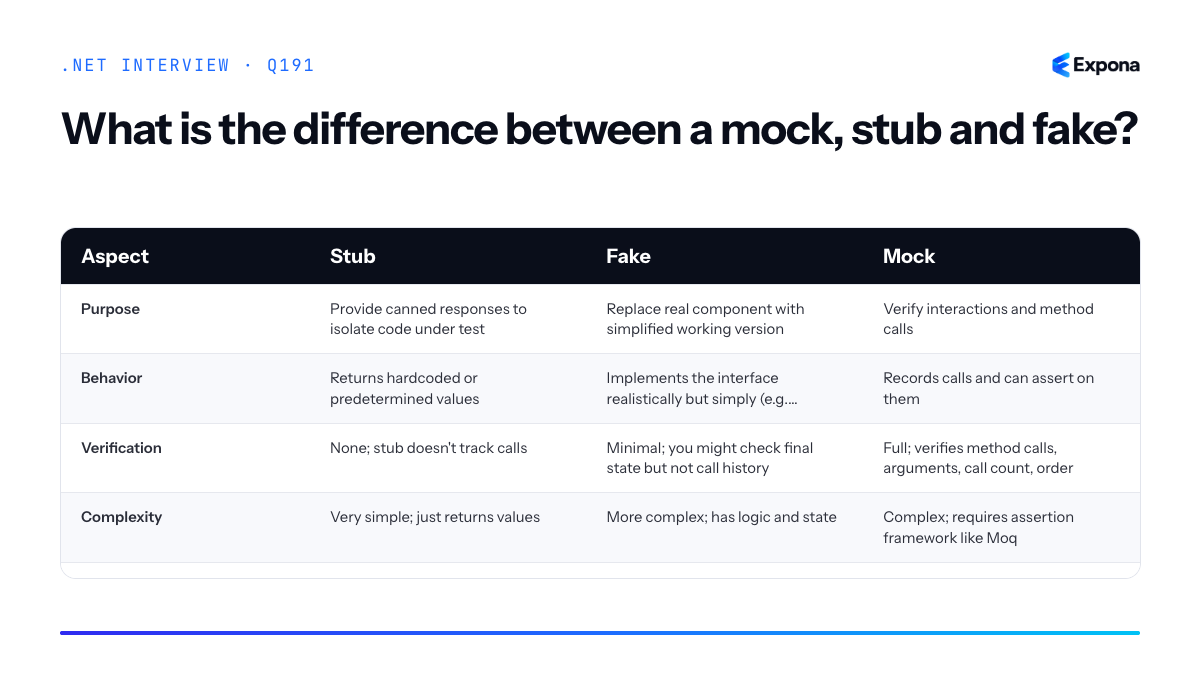
Key points to mention
- All three are test doubles: They replace real dependencies during testing to isolate the code under test and control its environment.
- Stubs are passive: They respond but don't verify. Use them when you only care about what a dependency returns.
- Mocks are active verifiers: They record and assert on interactions. Use them when behavior (how code interacts) matters as much as state.
- Fakes are functional: They're real implementations that work correctly but in a simplified way. In-memory repositories and test email services are common examples.
- Moq and NSubstitute are common frameworks: They make creating mocks easy in .NET by allowing setup, verification, and argument matching through fluent APIs.
Common follow-up questions
- Should I always use mocks? No. Over-mocking leads to brittle tests that verify implementation details rather than behavior. Use stubs for simple isolation and fakes for realistic behavior. Reserve mocks for critical interactions you genuinely need to verify.
- What's the difference between a mock and a spy? A spy is like a mock but wraps the real object, recording calls while still executing the real behavior. Mocks are pure test doubles; spies are partial test doubles.
- How do fakes relate to integration tests? Fakes are ideal for unit tests because they're fast and deterministic. For integration tests, you might use real implementations or a containerized database. Fakes bridge the gap—more realistic than stubs, faster than real integration.
Related interview questions
.NETCsharpTesting192How do you secure configuration and data in transit?
ExperiencedSecuring configuration and data in transit involves enforcing HTTPS with HSTS headers, using TLS for all database and service-to-service connections, and encrypting sensitive data at rest using the Data Protection API (DAPI) or database-native encryption. This multi-layered approach ensures that credentials, API keys, and personally identifiable information remain protected whether in motion over the network or stored on disk.
How it works
Data security operates across three vectors: in transit, at rest, and in use. For transit security, HTTPS with TLS 1.2+ encrypts all HTTP communication between clients and servers, preventing man-in-the-middle attacks. HSTS (HTTP Strict-Transport-Security) headers instruct browsers and clients to always use HTTPS, eliminating downgrade attacks. Database connections must also use encrypted protocols—SQL Server supports TLS connections via connection string encryption, and cloud databases like Azure SQL Database enforce encryption by default.
For data at rest, the Data Protection API provides symmetric encryption at the operating system level, binding encrypted data to the machine or user account. This prevents decryption if the encrypted key material is stolen. Alternatively, database-level encryption (Transparent Data Encryption in SQL Server, or column-level encryption) ensures sensitive data is unreadable at the storage layer.
Configuration containing secrets (connection strings, API keys, tokens) should never be hardcoded or stored in source control. Use Azure Key Vault, AWS Secrets Manager, or .NET User Secrets in development to externalize and rotate secrets safely. Environment variables can bridge configuration management systems with your application runtime.
Example
csharp// Program.cs - ASP.NET Core 8 with secrets and encrypted connection strings var builder = WebApplication.CreateBuilder(args); // Load secrets from Azure Key Vault var keyVaultUrl = "https://myvault.vault.azure.net/"; builder.Configuration.AddAzureKeyVault( new Uri(keyVaultUrl), new DefaultAzureCredential()); // Configure HSTS and HTTPS builder.Services.AddHsts(options => { options.MaxAge = TimeSpan.FromDays(365); options.IncludeSubDomains = true; options.Preload = true; }); // Add DbContext with encrypted connection string from Key Vault var connString = builder.Configuration["ConnectionStrings:Default"]; builder.Services.AddDbContext<AppDbContext>(options => options.UseSqlServer(connString)); // Data Protection API for encrypting sensitive fields in database builder.Services.AddDataProtection() .PersistKeysToFileSystem(new DirectoryInfo("/secure/keys")) .ProtectKeysWithCertificate(new X509Certificate2("cert.pfx", "password")); var app = builder.Build(); // Enforce HTTPS redirect and HSTS middleware app.UseHttpsRedirection(); app.UseHsts(); app.MapGet("/api/data", (IDataProtectionProvider provider) => { var protector = provider.CreateProtector("MyApp.API"); var sensitiveData = "credit-card-4111111111111111"; var encrypted = protector.Protect(sensitiveData); return Results.Ok(new { encrypted }); }); app.Run();This example demonstrates loading secrets from Azure Key Vault, enforcing HTTPS with HSTS, configuring Data Protection API with persistent key storage, and encrypting sensitive data before storage.
Key points to mention
- HTTPS + HSTS: Always enforce TLS 1.2+ and set HSTS headers to prevent downgrade attacks and ensure browsers never fall back to HTTP.
- Secrets management: Use external vaults (Azure Key Vault, AWS Secrets Manager) instead of hardcoding or embedding in appsettings.json; rotate secrets regularly.
- Database encryption: Enable TLS for database connections and use Transparent Data Encryption (TDE) or column-level encryption for sensitive data at rest.
- Data Protection API: Use DAPI for symmetric encryption of sensitive data, with keys managed securely and optionally persisted to a certificate store.
- End-to-end security: Apply security consistently across API layers—see how to secure a .NET API end to end for comprehensive strategies.
Common follow-up questions
- How do you handle certificate pinning for API clients? Use HttpClientHandler with ServerCertificateCustomValidationCallback to validate specific certificate thumbprints, preventing man-in-the-middle attacks even if a CA is compromised.
- What's the difference between encryption at rest and encryption in transit? In-transit encryption protects data as it travels over networks; at-rest encryption protects stored data on disk or in databases. Both are essential for defense in depth.
- How do you encrypt database columns selectively? SQL Server supports Always Encrypted, which encrypts data client-side before sending to the database, so the server never sees plaintext sensitive columns.
Related interview questions
Further reading
.NETCsharpSecurity193What is the Data Protection API?
ExperiencedThe Data Protection API (DPAPI) is a .NET framework for encrypting sensitive data at rest using automatic key management and machine-specific credentials. It transparently encrypts cookies, authentication tokens, connection strings, and other payloads without requiring you to manage encryption keys directly. In distributed applications, keys must be persisted to shared storage like Azure Key Vault or a database so multiple instances can decrypt data encrypted by their peers.
How it works
DPAPI encrypts data using a key hierarchy rooted in the machine or user context. When you call
IDataProtectionProvider.CreateProtector(), the framework generates a unique encryption key tied to your application's identity and purpose. The same protector can decrypt data it encrypted, but different purposes create different keys—preventing misuse even if one key is compromised.By default, DPAPI stores keys in the local file system. On a single machine, this works seamlessly: the OS protects keys using the machine's Data Protection API. However, in horizontally scaled applications, each instance has a different file system. If Instance A encrypts a cookie and Instance B receives it, Instance B cannot decrypt it without access to A's keys. The solution is to configure a shared key storage provider (Azure Key Vault, SQL Server, Redis, or file shares) so all instances access the same key ring.
The framework also supports automatic key rotation, expiration, and revocation—critical for compliance and security hygiene in long-running applications.
Example
csharp// In Program.cs - single instance (default file storage) builder.Services.AddDataProtection(); // In Program.cs - distributed apps (using Azure Key Vault) builder.Services.AddDataProtection() .PersistKeysToAzureBlobStorage(new Uri("https://mystg.blob.core.windows.net/keys")) .ProtectKeysWithAzureKeyVault( new Uri("https://mykeyvault.vault.azure.net/keys/my-key/version"), new DefaultAzureCredential()); // In a service - encrypt and decrypt public class UserService { private readonly IDataProtectionProvider _provider; public UserService(IDataProtectionProvider provider) => _provider = provider; public string EncryptUserId(string userId) { var protector = _provider.CreateProtector("UserService.UserId"); return protector.Protect(userId); // Returns encrypted string } public string DecryptUserId(string encrypted) { var protector = _provider.CreateProtector("UserService.UserId"); return protector.Unprotect(encrypted); // Recovers original } }This example shows how DPAPI transparently encrypts a user ID on one instance and decrypts it on another because both access the shared key storage in Azure.
Key points to mention
- Automatic key management: DPAPI generates, rotates, and stores encryption keys without manual intervention, reducing human error.
- Purpose-based isolation: Each call to
CreateProtector()with a different purpose creates a separate key, so leaking one key does not compromise others. - Shared storage requirement: Multi-instance apps must configure a backing store (Azure Key Vault, SQL, Redis) so keys are accessible across servers; local file storage only works on a single machine.
- Automatic expiration and revocation: Keys can be marked as revoked, forcing re-encryption or re-authentication without code changes.
- ASP.NET Core integration: Cookie middleware and authentication handlers use DPAPI automatically when configured; you rarely call it directly unless encrypting custom payloads.
Common follow-up questions
- What happens if I don't configure shared key storage in a load-balanced environment? Each instance will have its own key ring. Cookies encrypted by Instance A will fail to decrypt on Instance B, causing users to lose session state or authentication unexpectedly.
- Can I rotate keys without downtime? Yes—DPAPI supports graceful key rollover. New encryptions use the latest key, but old keys remain valid for decryption, allowing existing tokens to survive the rotation window.
- Is DPAPI sufficient for password storage? No; DPAPI is for encryption at rest, not password hashing. Passwords must use bcrypt, Argon2, or PBKDF2 with a salt. Learn more about securing configuration and data in transit.
Related interview questions
- How do you secure configuration and data in transit?
- What is the difference between AddTransient services that hold state and stateless services?
- How do you design for horizontal scaling in ASP.NET Core?
Further reading
.NETCsharpSecurity194How do you prevent SQL injection in .NET?
ExperiencedUse parameterized queries (prepared statements) to separate SQL code from user input, ensuring that user-supplied values are never interpreted as executable SQL. This is the primary defense against SQL injection. In .NET, achieve this through Entity Framework Core, Dapper parameter bindings, or safe interpolation in raw SQL queries. Additionally, apply input validation and use database accounts with minimal privileges.
How it works
SQL injection occurs when untrusted user input is concatenated directly into SQL queries, allowing attackers to inject malicious SQL commands. Parameterized queries prevent this by using placeholders (parameters) for values, which are transmitted to the database separately from the SQL structure itself. The database driver ensures that parameter values are treated as data, never as executable code, regardless of their content.
When you use parameterized queries, the SQL statement is compiled once on the database server, and parameters are bound to that compiled plan. This means even if a user enters a string like
' OR '1'='1, it is stored as a literal string value, not as SQL logic. The database engine never reinterprets parameters as commands.Defense-in-depth also involves validating input types and lengths before they reach the database, using least-privilege database accounts that limit what operations are possible if a breach occurs, and escaping data appropriately when parameterized queries are not feasible (though this is rare in modern .NET).
Example
csharp// ❌ VULNERABLE: String concatenation string userId = userInput; // Untrusted input string query = $"SELECT * FROM Users WHERE Id = {userId}"; // DANGER var users = dbContext.Users.FromSqlRaw(query).ToList(); // ✅ SAFE: Parameterized query with EF Core var userId = userInput; var users = dbContext.Users .FromSqlInterpolated($"SELECT * FROM Users WHERE Id = {userId}") .ToList(); // ✅ SAFE: Dapper with parameters using var connection = new SqlConnection(connectionString); var userId = userInput; var users = connection.Query<User>( "SELECT * FROM Users WHERE Id = @UserId", new { UserId = userId } ).ToList(); // ✅ SAFE: EF Core DbSet query (highest level) var userId = int.Parse(userInput); // Type validation var users = dbContext.Users .Where(u => u.Id == userId) .ToList();The first example is vulnerable because the query string is built by concatenating user input. The remaining examples are safe:
FromSqlInterpolateddetects interpolated values and converts them to parameters automatically, Dapper explicitly binds named parameters, and LINQ-to-Entities generates parameterized queries automatically.Key points to mention
- Parameterized queries are the gold standard. They separate SQL structure from data and are supported natively by EF Core, Dapper, and ADO.NET.
- Use
FromSqlInterpolatedin EF Core, notFromSqlRaw. Interpolated queries are automatically converted to parameterized queries; raw queries require manual parameter management and are error-prone. - Input validation is a secondary control. Validate data types, lengths, and formats before use, but do not rely on validation alone to prevent injection—parameterized queries are essential.
- Principle of least privilege: Create database users with only the permissions required for their operations (e.g., read-only accounts for reporting, limited insert/update for application writes).
- Avoid dynamic SQL construction. If you must build queries dynamically, use an ORM or a library that handles parameterization automatically rather than string concatenation.
Common follow-up questions
- What if I need to write raw SQL safely in EF Core? Use
FromSqlInterpolatedinstead ofFromSqlRaw, which automatically detects interpolated values and converts them to parameters. - What is the difference between parameterized queries and stored procedures? Stored procedures can be parameterized, but they are not inherently safer than parameterized queries. Both prevent injection when parameters are used correctly; stored procedures add an extra layer of encapsulation but add complexity.
- Does LINQ-to-Entities prevent SQL injection? Yes. LINQ queries are translated to parameterized SQL at the database layer. However, if you use string concatenation within LINQ (e.g.,
.Where(u => EF.Functions.Like(u.Name, userInput))with raw strings), you can still introduce vulnerabilities.
Related interview questions
- How do you write raw SQL safely in EF Core?
- What is Dapper and when would you use it?
- What is a primary constructor in C# 12?
Further reading
.NETCsharpefcoreSecurityArchitecture195How do you prevent XSS in ASP.NET Core?
ExperiencedASP.NET Core prevents XSS (Cross-Site Scripting) primarily through automatic HTML encoding in Razor views, strict avoidance of Html.Raw() with untrusted content, sanitization of rich text input, and implementation of Content Security Policy (CSP) headers. These layered defenses ensure that user-supplied data cannot be interpreted as executable code in the browser.
How it works
XSS attacks occur when malicious scripts are injected into web pages and executed in users' browsers. ASP.NET Core mitigates this through multiple defense mechanisms:
Automatic HTML Encoding: Razor's default behavior encodes output by converting special characters (
<,>,&,",') into HTML entities. When you write@Model.UserInput, the runtime automatically encodes any HTML tags, rendering them as harmless text rather than executable markup.Avoiding Html.Raw(): The
Html.Raw()method bypasses encoding entirely. It should never be used with user-supplied data, only with content you completely control—such as hardcoded markup or database content you've explicitly validated.Rich Text Sanitization: If your application accepts rich HTML (like in a WYSIWYG editor), you must use a library like HtmlSanitizer to strip dangerous tags and attributes while preserving safe formatting. This is separate from encoding because users legitimately need to input some HTML.
Content Security Policy: CSP headers tell the browser which resources are trusted and prevent inline scripts from executing. A policy like
script-src 'self'blocks all external scripts and inline<script>tags unless explicitly allowed.Example
csharp// Program.cs var builder = WebApplication.CreateBuilder(args); builder.Services.AddScoped<IHtmlSanitizer, HtmlSanitizer>(); builder.Services.AddControllersWithViews(); var app = builder.Build(); app.Use(async (context, next) => { context.Response.Headers.Add("Content-Security-Policy", "default-src 'self'; script-src 'self'; style-src 'self' 'unsafe-inline'"); await next(); }); app.MapControllerRoute("default", "{controller=Home}/{action=Index}/{id?}"); app.Run(); // Controller.cs public class CommentController : Controller { private readonly IHtmlSanitizer _sanitizer; public CommentController(IHtmlSanitizer sanitizer) { _sanitizer = sanitizer; } [HttpPost] public IActionResult Post(string content) { // Sanitize rich HTML string safe = _sanitizer.Sanitize(content); // Store safe content return Ok(); } } // View.cshtml - Automatic encoding <p>@Model.UserComment</p> <!-- Encoded automatically --> <div>@Html.Raw(Model.AdminNote)</div> <!-- Only for trusted content -->The example demonstrates CSP headers, HtmlSanitizer integration, automatic Razor encoding in views, and controlled use of Html.Raw() only for trusted admin content.
Key points to mention
- Razor encodes by default: You don't need to do anything special—@Model.property is safe.
- Html.Raw() is a footgun: Never use it with user input; reserve it for hardcoded or pre-validated content only.
- Use HtmlSanitizer for rich text: Libraries like HtmlSanitizer (NuGet package) allow safe HTML while removing dangerous tags and event handlers.
- Content Security Policy adds defense-in-depth: Even if encoding fails, CSP prevents inline scripts from running.
- Validate on the server, not the client: Browser-side validation is easily bypassed; always sanitize and validate server-side.
Common follow-up questions
- What's the difference between encoding and sanitization? Encoding converts all HTML to entities (making it safe but unreadable as markup); sanitization strips dangerous tags while preserving safe HTML structure.
- Can you use ViewData or TempData safely? Yes—they're encoded like any Razor output unless explicitly marked with Html.Raw(). Be equally cautious with both.
- How do you handle JavaScript event attributes in user input? Don't allow them at all. Use HtmlSanitizer to remove onclick, onerror, onload, etc., or use a whitelist-based approach that only permits specific tags and attributes.
Related interview questions
.NETCsharpaspnetcoreSecurityArchitecture196What is SignalR?
ExperiencedSignalR is a .NET library that enables real-time, bidirectional communication between server and client. It uses WebSockets when available, with automatic fallback to Server-Sent Events or long polling on older browsers. The core abstraction is the Hub—a server-side class that broadcasts messages to connected clients, either individually, in groups, or to all users.
How it works
SignalR maintains a persistent connection between client and server. When you call a hub method from the server, it's instantly pushed to connected clients without polling. The connection is established when a client connects to a hub endpoint; the server assigns it a unique connection ID. You can then target that client directly, add it to named groups, or broadcast to everyone.
The transport layer automatically selects the best protocol: WebSocket (full duplex, lowest latency), Server-Sent Events, or long polling. This makes SignalR work across different network topologies and corporate proxies. On the client side, you typically use the JavaScript client to listen for server-invoked methods and invoke server methods. For scaling across multiple servers, you use a backplane like Redis or Azure SignalR Service to relay messages between server instances.
Example
csharp// Server Hub public class ChatHub : Hub { public async Task SendMessage(string user, string message) { // Broadcast to all connected clients await Clients.All.SendAsync("ReceiveMessage", user, message); } public async Task SendToGroup(string groupName, string message) { await Clients.Group(groupName).SendAsync("ReceiveMessage", message); } public override async Task OnConnectedAsync() { await Groups.AddToGroupAsync(Context.ConnectionId, "Users"); await base.OnConnectedAsync(); } } // Program.cs var builder = WebApplication.CreateBuilder(args); builder.Services.AddSignalR(); var app = builder.Build(); app.MapHub<ChatHub>("/chatHub"); app.Run(); // Client (JavaScript) const connection = new signalR.HubConnectionBuilder() .withUrl("/chatHub") .withAutomaticReconnect() .build(); connection.on("ReceiveMessage", (user, message) => { console.log(`${user}: ${message}`); }); connection.start().catch(err => console.error(err));This example shows a chat hub that broadcasts messages to all clients, demonstrates group messaging, and shows how to automatically add clients to a group on connection. The JavaScript client listens for the
ReceiveMessagemethod and displays incoming messages.Key points to mention
- Hub-based architecture—servers invoke methods on clients; clients invoke methods on the server, enabling true request–response patterns
- Automatic reconnection—the client library handles disconnections and attempts to reconnect, with configurable retry policies
- Groups and users—broadcast to subsets of clients using named groups or target specific users by connection ID or user ID
- Transport fallback—WebSocket is preferred but automatically falls back to SSE or long polling if needed, ensuring broad browser support
- Scaling requires a backplane—single-server deployments work out of the box, but distributed systems need Redis or Azure SignalR Service to synchronize messages across instances
Common follow-up questions
- How do you handle authentication and authorization in SignalR, and can you restrict which clients see which messages?
- What's the difference between
Clients.All,Clients.Caller, andClients.Others? - How do you implement eventual consistency when messages may not arrive in order or at all?
Related interview questions
- How do you scale SignalR across servers?
- What are generics?
- How do you handle eventual consistency in user-facing features?
Further reading
.NETCsharpReal-time197How do you scale SignalR across servers?
ExperiencedSignalR scales across multiple servers by using a backplane (such as Redis, Azure Service Bus, or Azure SignalR Service) that acts as a central message broker, ensuring messages sent by any client reach all connected clients regardless of which server instance they connect to. Without a backplane, each server only knows about its own connections, so cross-server messaging fails in a scaled environment.
How it works
In a single-server SignalR deployment, the hub maintains an in-memory collection of all connected clients. When you call a method like
Clients.All.SendMessage(), it broadcasts to every connection on that instance. However, in a load-balanced, multi-server environment, this breaks down: Server A doesn't know about clients connected to Server B.A backplane solves this by intercepting all hub method invocations and connection/disconnection events, routing them through a shared communication channel. When a client on Server A sends a message, the hub publishes it to the backplane, which then distributes it to all server instances. Each instance receives the message and delivers it to its locally connected clients.
For maximum performance, use sticky sessions (session affinity) at the load balancer level so clients reconnect to the same server, reducing unnecessary backplane traffic. However, the backplane handles failover gracefully—if a server goes down, clients will reconnect to another instance and continue receiving messages.
Common backplane choices include Redis (fast, cost-effective on-premises), Azure Service Bus (for enterprise messaging), and Azure SignalR Service (fully managed, serverless option that eliminates the backplane entirely by managing scale internally).
Example
csharp// Startup configuration with Redis backplane public void ConfigureServices(IServiceCollection services) { services .AddSignalR() .AddStackExchangeRedis("localhost:6379", options => { options.Configuration.ChannelPrefix = "SignalR_"; }); services.AddCors(options => { options.AddDefaultPolicy(builder => builder.WithOrigins("https://client.example.com") .AllowAnyMethod() .AllowAnyHeader() .AllowCredentials()); }); } public void Configure(IApplicationBuilder app) { app.UseRouting(); app.UseCors(); app.UseEndpoints(endpoints => { endpoints.MapHub<ChatHub>("/chatHub"); }); } // Hub implementation public class ChatHub : Hub { public async Task SendMessage(string user, string message) { // This automatically goes through Redis to all servers await Clients.All.SendAsync("ReceiveMessage", user, message); } }This configuration registers Redis as the SignalR backplane; all hub broadcasts automatically flow through Redis to reach clients on any server instance.
Key points to mention
- Backplane is transparent: Your hub code doesn't change; the backplane intercepts
Clients.All,Clients.Others,Clients.User(), etc., and routes through the broker. - Sticky sessions improve efficiency: Configure your load balancer to route a client to the same server, reducing backplane traffic, though failover still works without it.
- Consider managed options: Azure SignalR Service eliminates backplane complexity by handling scale internally and offering better cost predictability at scale.
- Message ordering and delivery: Backplanes guarantee ordering within a connection but may not guarantee delivery if a server crashes before forwarding; use acknowledgments for critical messages.
- Groups and users still work: Sending to a group (e.g.,
Clients.Group("room1")) automatically broadcasts through the backplane to all users in that group across all servers.
Common follow-up questions
- What happens if Redis goes down? — Clients on all servers lose the ability to send cross-server messages; they can still communicate within their own server. Use Redis Sentinel or a managed Redis service for high availability.
- How do you handle user-specific broadcasts across servers? — SignalR tracks user IDs via authentication (cookie or JWT); calling
Clients.User(userId)queries the backplane for all connections linked to that user. - What's the latency impact of a backplane? — Redis backplanes add milliseconds of latency; for most real-time applications this is negligible, but high-frequency trading or gaming may need local-only broadcasts with client-side synchronization.
Related interview questions
- What is SignalR?
- What are the service lifetimes in ASP.NET Core?
- What is the difference between cookie and JWT authentication?
Further reading
.NETCsharpReal-time- Backplane is transparent: Your hub code doesn't change; the backplane intercepts
198What is gRPC in .NET?
ExperiencedgRPC is a high-performance, open-source RPC framework built on HTTP/2 and Protocol Buffers (protobuf) that enables fast, strongly-typed communication between services with native streaming support. ASP.NET Core provides first-class hosting for gRPC services through Kestrel, making it straightforward to build microservice architectures that demand low latency and high throughput.
How it works
gRPC operates by defining service contracts in
.protofiles using Protocol Buffer syntax. These definitions describe RPC methods and message types in a language-agnostic way. The protobuf compiler generates strongly-typed client and server code in C#, eliminating the ambiguity of loosely-typed REST APIs.Communication happens over HTTP/2, which provides multiplexing—multiple requests can travel on a single TCP connection without head-of-line blocking. Protocol Buffers serialize data into compact binary format, reducing payload size and parsing overhead compared to JSON. This combination delivers exceptional performance: lower latency, reduced bandwidth, and faster serialization.
gRPC supports four communication patterns: unary (request-response), server streaming, client streaming, and bidirectional streaming. This makes it ideal for scenarios requiring real-time data flows, such as chat applications, live notifications, or sensor data collection.
ASP.NET Core hosts gRPC services natively through Kestrel. You configure gRPC endpoints in your startup and implement generated service interfaces, allowing you to leverage the full ASP.NET Core ecosystem including middleware, dependency injection, and logging.
Example
csharp// Greeter.proto syntax = "proto3"; package greet; service Greeter { rpc SayHello (HelloRequest) returns (HelloReply); } message HelloRequest { string name = 1; } message HelloReply { string message = 1; } // GreeterService.cs - Server implementation public class GreeterService : Greeter.GreeterBase { public override Task<HelloReply> SayHello(HelloRequest request, ServerCallContext context) { return Task.FromResult(new HelloReply { Message = $"Hello {request.Name}" }); } } // Program.cs var builder = WebApplication.CreateBuilder(args); builder.Services.AddGrpc(); var app = builder.Build(); app.MapGrpcService<GreeterService>(); app.Run(); // Client usage var channel = GrpcChannel.ForAddress("https://localhost:5001"); var client = new Greeter.GreeterClient(channel); var reply = await client.SayHelloAsync(new HelloRequest { Name = "World" }); Console.WriteLine(reply.Message);This example defines a simple Greeter service that accepts a name and returns a greeting; the proto file auto-generates type-safe client and server classes.
Key points to mention
- Protocol Buffers: Compact binary serialization format; smaller than JSON, faster to parse, and versioning-friendly through field numbering.
- HTTP/2 multiplexing: Multiple requests share one TCP connection, eliminating head-of-line blocking and improving throughput compared to HTTP/1.1 (REST).
- Four communication patterns: Unary, server streaming, client streaming, and bidirectional streaming enable flexible service interactions.
- Native ASP.NET Core integration: Kestrel hosts gRPC services with middleware support, dependency injection, and unified configuration.
- Language interoperability: Proto definitions generate clients and servers in multiple languages (C#, Go, Java, Python, etc.), simplifying polyglot architectures.
Common follow-up questions
- When should I choose gRPC over REST? Use gRPC for internal service-to-service communication, real-time streaming, or low-latency systems where bandwidth and speed matter. See detailed comparison.
- How do I secure gRPC calls? Use TLS/SSL for transport security, implement authentication (JWT, OAuth) via interceptors, and apply authorization policies just like HTTP services. Learn more about service-to-service security.
- Can gRPC and REST coexist? Yes; ASP.NET Core can host both on different ports or share Kestrel with protocol negotiation, letting you adopt gRPC incrementally.
Related interview questions
- When would you choose gRPC over REST?
- How does the Kestrel request pipeline achieve high performance?
- How do you secure service-to-service calls?
Further reading
.NETCsharpReal-time199When would you choose gRPC over REST?
ExperiencedChoose gRPC for internal, high-performance, low-latency communication with strict contract requirements and bidirectional streaming needs. Choose REST for public-facing APIs, browser compatibility, and scenarios where simplicity and discoverability matter more than raw performance. gRPC excels in microservice architectures where you control both client and server; REST remains the standard for open ecosystems and when HTTP semantics and caching are valuable.
How it works
gRPC uses HTTP/2 and Protocol Buffers (protobuf) to deliver high-performance, strongly-typed communication with built-in streaming capabilities. REST relies on HTTP/1.1, JSON or XML, and standard request-response patterns. gRPC's binary serialization is faster and more compact than JSON, and HTTP/2 multiplexing allows multiple concurrent streams over a single connection. However, this performance comes at a cost: gRPC requires client libraries and tooling to generate code from
.protofiles, whereas REST works with any HTTP client, including browsers. gRPC also doesn't naturally fit browser scenarios—browsers cannot easily make gRPC calls without a proxy or gRPC-Web. REST's text-based format is human-readable, easier to debug, and integrates seamlessly with caching proxies, CDNs, and standard HTTP infrastructure.Example
Define a gRPC service for internal order processing:
csharp// order.proto syntax = "proto3"; service OrderService { rpc ProcessOrder(OrderRequest) returns (OrderResponse); rpc StreamOrderUpdates(OrderId) returns (stream OrderUpdate); } message OrderRequest { string customer_id = 1; repeated LineItem items = 2; } message OrderResponse { string order_id = 1; string status = 2; } message OrderUpdate { string order_id = 1; string event = 2; int64 timestamp = 3; } // Server implementation public class OrderServiceImpl : OrderService.OrderServiceBase { public override async Task ProcessOrder( OrderRequest request, ServerCallContext context) { // Process order return new OrderResponse { OrderId = "ORD123", Status = "Confirmed" }; } public override async Task StreamOrderUpdates( OrderId request, IServerStreamWriter<OrderUpdate> responseStream, ServerCallContext context) { for (int i = 0; i < 5; i++) { await responseStream.WriteAsync(new OrderUpdate { OrderId = request.Id, Event = $"Update {i}", Timestamp = DateTimeOffset.UtcNow.ToUnixTimeSeconds() }); await Task.Delay(500); } } } // Client call var channel = GrpcChannel.ForAddress("https://localhost:7000"); var client = new OrderService.OrderServiceClient(channel); var response = await client.ProcessOrderAsync(new OrderRequest { CustomerId = "CUST001" });This example shows gRPC's ability to define strict schemas, handle server-side streaming naturally, and leverage code generation for type safety and performance in internal microservice communication.
Key points to mention
- Performance: gRPC uses HTTP/2 multiplexing and binary protobuf serialization for lower latency and bandwidth; REST uses HTTP/1.1 and text-based JSON.
- Streaming: gRPC natively supports bidirectional and server-side streaming; REST requires workarounds like Server-Sent Events or WebSockets.
-
Contract strength: gRPC enforces strict
.protocontracts with code generation; REST relies on documentation and conventions. - Browser and public APIs: REST integrates seamlessly with browsers and public ecosystems; gRPC requires special handling (gRPC-Web) and is best for internal systems.
- Debugging and tooling: REST is human-readable and works with curl and standard proxies; gRPC requires specialized tools like grpcurl or Postman extensions.
Common follow-up questions
- Can you use gRPC with browsers? Not directly—you need gRPC-Web, which translates browser HTTP requests to gRPC calls via a proxy.
-
How do you version gRPC APIs? Proto versioning uses field numbering and the
reservedkeyword to maintain backward compatibility without version numbers in the URL path. - Should you use gRPC for all internal APIs? No—use gRPC only where latency, throughput, or streaming justify the complexity. Simple internal REST APIs may offer better maintainability.
Related interview questions
- What is gRPC in .NET?
- What are the access modifiers in C#?
- What are the common HTTP status codes for APIs?
Further reading
.NETCsharpReal-time200How do you consume messages from a queue in .NET?
ExperiencedTo consume messages from a queue in .NET, implement a BackgroundService that continuously polls or subscribes to a message broker (Azure Service Bus, RabbitMQ, AWS SQS), deserializes each message, processes it idempotently, and acknowledges successful completion—routing failures to a dead-letter queue for later investigation. Libraries like MassTransit or NServiceBus abstract away broker complexity, while raw SDKs offer more control.
How it works
Message consumption follows a pull or push model depending on the broker. In a pull model, your consumer actively polls the queue at intervals; in a push model, the broker delivers messages as they arrive. Either way, the pattern is: receive → deserialize → process → acknowledge → move to DLQ on failure.
A BackgroundService runs indefinitely in the application lifetime, making it ideal for this task. It runs on a thread pool thread and respects graceful shutdown signals. The service should be registered in dependency injection so the host manages its lifetime. When processing, idempotency is critical—if a message is redelivered (due to network failure or crash), processing it again should produce the same result, not duplicate side effects.
Modern brokers support automatic dead-lettering: if processing fails after a configurable number of retries, the message moves to a separate queue for manual review or fallback logic. This prevents message loss and supports operational debugging.
Example
csharppublic class QueueConsumerService : BackgroundService { private readonly IServiceProvider _serviceProvider; private readonly ILogger<QueueConsumerService> _logger; public QueueConsumerService(IServiceProvider serviceProvider, ILogger<QueueConsumerService> logger) { _serviceProvider = serviceProvider; _logger = logger; } protected override async Task ExecuteAsync(CancellationToken stoppingToken) { while (!stoppingToken.IsCancellationRequested) { try { using var scope = _serviceProvider.CreateScope(); var queueClient = scope.ServiceProvider.GetRequiredService<IQueueClient>(); var message = await queueClient.ReceiveMessageAsync(stoppingToken); if (message != null) { var payload = JsonSerializer.Deserialize<OrderMessage>(message.Body); var processor = scope.ServiceProvider.GetRequiredService<IOrderProcessor>(); await processor.ProcessAsync(payload, stoppingToken); await queueClient.CompleteAsync(message); _logger.LogInformation("Message processed: {MessageId}", message.MessageId); } } catch (Exception ex) { _logger.LogError(ex, "Error processing message"); await Task.Delay(TimeSpan.FromSeconds(5), stoppingToken); } } } } // In Program.cs: services.AddSingleton<IQueueClient, AzureServiceBusClient>(); services.AddScoped<IOrderProcessor, OrderProcessor>(); services.AddHostedService<QueueConsumerService>();This BackgroundService polls an Azure Service Bus queue, deserializes an OrderMessage, processes it via a scoped IOrderProcessor, and acknowledges the message on success; failures log and trigger a retry delay.
Key points to mention
- Idempotency: Ensure processing the same message twice yields identical results—use unique message IDs as deduplication keys in your persistence layer.
- Dead-Letter Queues: Route messages that exceed retry limits to a DLQ for manual remediation, preventing poison messages from blocking the main queue.
- Graceful Shutdown: BackgroundService respects CancellationToken; await ongoing work and release resources cleanly to avoid message loss during deployment.
- Scope Management: Create a new DI scope per message to avoid scoped service reuse across messages; use
IServiceProvider.CreateScope(). - Serialization: Always validate and version your message contracts; handle deserialization failures separately from business logic failures.
Common follow-up questions
- How do you ensure exactly-once delivery semantics? — Combine idempotent processing with distributed transactions or saga patterns; some brokers offer transactional guarantees, but application-level deduplication is safer.
- What's the difference between BackgroundService and a raw while-loop in a hosted service? — BackgroundService provides lifecycle hooks (StartAsync, StopAsync) and integrates cleanly with health checks, whereas a raw loop requires manual cancellation token handling.
- How would you scale this to multiple consumer instances? — Modern brokers partition queues and balance load; ensure your consumer group name is consistent across replicas so the broker distributes messages fairly.
Related interview questions
- How do you use the Channel-based background queue pattern?
- How do you design a reliable event-driven system with .NET?
- What is .NET?
Further reading
.NETCsharp201What is the outbox pattern?
ExperiencedThe outbox pattern is a technique for ensuring reliable message publishing in distributed systems by writing both the business state change and the outgoing message to the same database transaction, then publishing from an outbox table asynchronously. This eliminates the risk of publishing messages without persisting the business change, or vice versa, solving the dual-write problem in event-driven architectures.
How it works
The outbox pattern works by treating message publishing as part of your transactional boundary rather than as a separate operation. When a business event occurs—such as an order being placed—you write two things atomically to your database:
- The primary business entity (e.g., the Order record)
- One or more rows in an
Outboxtable containing the message to be published
Since both writes happen in the same database transaction, you get ACID guarantees: either both succeed or both roll back. No partial states exist.
Separately, a background process (or polling mechanism) continuously reads unpublished rows from the
Outboxtable, publishes them to your message broker (RabbitMQ, Azure Service Bus, Kafka, etc.), and marks them as published. If publishing fails, the message remains in the outbox for retry. If the background process crashes, the message is never lost because it's already persisted.This decouples the speed and reliability of your business logic from the speed and reliability of your messaging infrastructure. Your transactional operation completes quickly (just a database write), while message delivery happens independently.
Example
csharp// Domain model and outbox entry public class Order { public int Id { get; set; } public string CustomerId { get; set; } public decimal TotalAmount { get; set; } } public class OutboxMessage { public int Id { get; set; } public string AggregateId { get; set; } public string MessageType { get; set; } public string Payload { get; set; } public DateTime CreatedAt { get; set; } public DateTime? PublishedAt { get; set; } } // Service that creates an order and writes to outbox public class OrderService { private readonly DbContext _dbContext; public async Task CreateOrderAsync(CreateOrderRequest request) { var order = new Order { CustomerId = request.CustomerId, TotalAmount = request.TotalAmount }; _dbContext.Orders.Add(order); // Write outbox message in same transaction var outboxMessage = new OutboxMessage { AggregateId = order.Id.ToString(), MessageType = "OrderCreated", Payload = JsonSerializer.Serialize(new { order.Id, order.CustomerId, order.TotalAmount }), CreatedAt = DateTime.UtcNow, PublishedAt = null }; _dbContext.OutboxMessages.Add(outboxMessage); // Single atomic transaction await _dbContext.SaveChangesAsync(); } } // Background publisher that polls and publishes public class OutboxPublisher { private readonly DbContext _dbContext; private readonly IMessagePublisher _publisher; public async Task PublishPendingMessagesAsync() { var unpublishedMessages = await _dbContext.OutboxMessages .Where(m => m.PublishedAt == null) .ToListAsync(); foreach (var message in unpublishedMessages) { try { await _publisher.PublishAsync(message.MessageType, message.Payload); message.PublishedAt = DateTime.UtcNow; await _dbContext.SaveChangesAsync(); } catch { // Retry on next poll } } } }This example shows how an order and its corresponding outbox message are saved together, then published asynchronously by a background service that marks them as published only after successful delivery.
Key points to mention
- Atomicity: Business state and message are written in the same transaction, guaranteeing consistency; if one fails, both roll back.
- Reliability: Messages are never lost; if publishing fails, they remain in the outbox for retry. The background publisher can crash and restart without losing data.
- Decoupling: Your business logic doesn't block waiting for message broker acknowledgment; it completes as soon as the database write completes.
- Idempotency: Works best when consumers implement idempotent handlers (see how to design idempotent message consumers) because messages may be delivered multiple times during retries.
- Polling overhead: Requires a background process that polls the outbox table regularly, creating a small delay between when the business change occurs and when consumers see the message.
Common follow-up questions
- How do you handle outbox messages that fail to publish repeatedly? Implement a dead-letter table after a maximum retry count, log the failure, and alert operators so they can investigate and replay manually if needed.
- What's the relationship between the outbox pattern and the Unit of Work pattern? Unit of Work manages the transaction boundary, while the outbox pattern ensures both the business change and the message are included within that boundary.
- Can you use the outbox pattern with Channel-based background queue pattern instead of polling? You could, but polling is safer for production because it survives application restarts and naturally provides backpressure.
Related interview questions
- How do you design idempotent message consumers?
- What is the Unit of Work pattern?
- How do you use the Channel-based background queue pattern?
Further reading
.NETCsharpArchitecture202What is idempotency and how do you implement it in APIs?
ExperiencedIdempotency ensures that an operation produces the same result regardless of how many times it is executed. In APIs, you implement it by accepting an
Idempotency-Keyheader from the client, storing the response associated with that key, and returning the cached response on subsequent requests with the same key. This prevents duplicate side effects (like double charges) when clients retry requests due to timeouts or network failures.How it works
Idempotent APIs solve a real problem: when a client sends a request and doesn't receive a response (due to network failure, timeout, or server crash), it cannot know whether the operation succeeded. The safe approach is to retry, but without idempotency, the second request repeats the side effect. A bank transfer might charge twice, or an order might be placed twice.
The idempotency pattern works by assigning each client request a unique key (typically a UUID). The server stores this key along with the response. When the same key arrives again, the server returns the stored response without re-executing the business logic. The key is usually passed in an
Idempotency-Keyheader, and the storage backend is typically a cache (Redis) or database. Keys should expire after a reasonable period (e.g., 24 hours) to prevent unbounded storage growth.This approach is especially important for message-driven systems and event-driven architectures, where exactly-once semantics are critical.
Example
csharppublic class IdempotencyMiddleware { private readonly RequestDelegate _next; private readonly IDistributedCache _cache; public IdempotencyMiddleware(RequestDelegate next, IDistributedCache cache) { _next = next; _cache = cache; } public async Task InvokeAsync(HttpContext context) { if (!context.Request.Headers.TryGetValue("Idempotency-Key", out var idempotencyKey)) { await _next(context); return; } var cacheKey = $"idempotency:{idempotencyKey}"; var cachedResponse = await _cache.GetStringAsync(cacheKey); if (cachedResponse != null) { context.Response.StatusCode = StatusCodes.Status200OK; context.Response.ContentType = "application/json"; await context.Response.WriteAsync(cachedResponse); return; } var originalBody = context.Response.Body; using var memoryStream = new MemoryStream(); context.Response.Body = memoryStream; await _next(context); memoryStream.Seek(0, SeekOrigin.Begin); var responseBody = await new StreamReader(memoryStream).ReadToEndAsync(); if (context.Response.IsSuccessStatusCode()) { await _cache.SetStringAsync(cacheKey, responseBody, new DistributedCacheEntryOptions { AbsoluteExpirationRelativeToNow = TimeSpan.FromHours(24) }); } memoryStream.Seek(0, SeekOrigin.Begin); await memoryStream.CopyToAsync(originalBody); } }This middleware intercepts requests with an
Idempotency-Keyheader, checks a distributed cache for a prior response, returns it if found, and stores successful responses for future retries.Key points to mention
- Unique key per request: Use UUID or a client-generated token; never reuse keys across different logical operations.
- Storage backend: Redis or in-memory caching for high-performance lookups; database for durability and cross-service consistency.
- Expiration strategy: Cache keys should expire (24 hours is common) to prevent unlimited memory growth and allow clients to reuse keys safely after the window.
- Safe for POST, PUT, DELETE: Idempotency protects any mutation; GET requests are already idempotent by definition.
- Status code considerations: Return the same HTTP status code (200, 201, etc.) on replayed responses to maintain client consistency.
Common follow-up questions
- What happens if the idempotency key expires but the client retries? Should you reject the retry or treat it as a new request?
- How do you handle idempotency across microservices or distributed systems where the cache is not shared?
- Can you combine idempotency with optimistic locking or version control to prevent race conditions?
Related interview questions
- How do you store secrets safely in .NET apps?
- How would you build a multi-tenant SaaS on ASP.NET Core?
- How do you design idempotent message consumers?
Further reading
.NETCsharp203How do you implement pagination efficiently?
ExperiencedEfficient pagination depends on your data volume and access patterns. Offset pagination (SKIP/TAKE) is simple but becomes slow on deep pages because the database must scan and discard millions of rows. Keyset pagination (also called cursor or seek-based pagination) filters rows using an indexed column and scales linearly regardless of page depth, making it the preferred approach for large datasets.
How it works
Offset pagination uses
SKIP(pageNumber * pageSize).TAKE(pageSize). The database retrieves and discards the first N rows every request, causing O(n) performance degradation as you move through pages. This is acceptable for small datasets or when users rarely navigate beyond page 2–3.Keyset pagination instead tracks the last row's identifier and queries
WHERE id > lastId ORDER BY id LIMIT pageSize. Since the filter uses an indexed column, the database jumps directly to the continuation point—O(1) seek time. You return a cursor (typically the last row's ID) alongside results, and the client uses it to fetch the next page. This approach works best with natural, immutable sort keys (primary keys or timestamps).When to use each: Offset is fine for admin panels with small tables or when users need random access (page 47 of 100). Keyset suits public APIs, infinite scrolls, and datasets with millions of rows. Hybrid approaches exist: databases like PostgreSQL support
LIMIT ... OFFSET ... FETCHoptimizations, and some teams use offset for small pages with server-side caching.Example
csharp// Keyset pagination with Entity Framework Core public async Task<(List<Product> items, int? nextCursor)> GetProductsAsync( int? afterId, int pageSize = 20) { var query = _context.Products.AsQueryable(); if (afterId.HasValue) { query = query.Where(p => p.Id > afterId.Value); } // Fetch one extra to determine if there's a next page var items = await query .OrderBy(p => p.Id) .Take(pageSize + 1) .ToListAsync(); int? nextCursor = null; if (items.Count > pageSize) { items = items.Take(pageSize).ToList(); nextCursor = items.Last().Id; } return (items, nextCursor); } // Usage: var (products, cursor) = await GetProductsAsync(afterId: 150); // Next request: var (nextBatch, nextCursor) = await GetProductsAsync(afterId: cursor);This example uses the product ID as a cursor, fetching one extra row to detect end-of-results, then returns the last ID for the next request. The
WHERE id > lastIdclause ensures O(1) performance regardless of dataset size.Key points to mention
- Index requirement: Keyset pagination must filter on an indexed column; otherwise, performance degrades. Ensure your cursor column has a database index.
- Sort stability: Always use immutable, unique columns (primary key or unique timestamp). Mutable data can cause rows to appear twice or be skipped across page transitions.
- Backward navigation: Keyset pagination naturally supports forward-only navigation. Backward requires reversing the sort order and different client logic; offset is simpler if bidirectional paging is required.
- Cursor encoding: In production, base64-encode cursors to hide implementation details and allow future schema changes without breaking clients.
- Page size validation: Always cap
pageSizeserver-side (e.g., max 100) to prevent DOS attacks or accidental large queries.
Common follow-up questions
- How do you handle deleted rows between requests? Keyset pagination may skip rows if a row with ID between the cursor and next page is deleted. Document this behavior or implement soft deletes; offset has the same issue at scale.
- Can you paginate by multiple columns? Yes, extend the WHERE clause:
WHERE (column1 > value1) OR (column1 = value1 AND column2 > value2). This requires careful cursor encoding. - What about total count? Keyset pagination doesn't easily provide total row count without a separate query. If you need it, run a cached
COUNT(*)separately; never forceCOUNT(*)on every paginated request.
Related interview questions
Further reading
.NETCsharp204How do you handle file uploads in ASP.NET Core?
ExperiencedFile uploads in ASP.NET Core are handled using IFormFile for small files or streaming APIs for large files, with mandatory validation of file size, type, and content. Always sanitize filenames, store uploads in blob storage (never the web root for security), and implement rate limiting and virus scanning for production systems.
How it works
ASP.NET Core provides multiple approaches depending on file size and performance requirements. The
IFormFileinterface represents an uploaded file from the request, buffering the entire file in memory or disk. This works well for files under 100 MB but becomes problematic for larger uploads due to memory pressure.For large files, use
IFormFileCollectionwith streaming or access the raw request body viaHttpContext.Request.Bodyto process data incrementally. Streaming prevents memory exhaustion and enables progress tracking.Validation must occur at multiple layers: check file size against configured limits (set via
FormOptions.MultipartBodyLengthLimit), verify MIME type by examining file extension and magic bytes (never trust the client's Content-Type header), and optionally scan for malware. Store files in blob storage services like Azure Blob Storage or AWS S3, never in the web application directory, to separate concerns and enable scaling.Sanitize and validate filenames because user input is untrusted—reject path traversal attempts like
../../../etc/passwdand generate safe identifiers. Implement quotas and rate limiting to prevent abuse.Example
csharp[HttpPost("upload")] public async Task<IActionResult> UploadFile(IFormFile file) { if (file == null || file.Length == 0) return BadRequest("No file provided"); var maxFileSize = 10 * 1024 * 1024; // 10 MB if (file.Length > maxFileSize) return BadRequest($"File exceeds {maxFileSize} bytes"); var allowedExtensions = new[] { ".pdf", ".docx", ".txt" }; var fileExtension = Path.GetExtension(file.FileName).ToLower(); if (!allowedExtensions.Contains(fileExtension)) return BadRequest("File type not allowed"); var fileName = $"{Guid.NewGuid()}{fileExtension}"; var filePath = Path.Combine("/uploads", fileName); using (var stream = new FileStream(filePath, FileMode.Create)) { await file.CopyToAsync(stream); } return Ok(new { fileName, size = file.Length }); }This controller action validates file presence and size, checks the extension against a whitelist, generates a safe filename using a GUID, and saves it to disk—in production, replace the file system with blob storage.
Key points to mention
- Never trust client filenames: Always sanitize and regenerate identifiers to prevent directory traversal and overwrite attacks.
- Validate at multiple levels: Check size limits, file extension, MIME type, and file magic bytes to detect disguised executables.
- Use blob storage, not web root: Store files in Azure Blob Storage, AWS S3, or similar services to decouple storage from your application and enable secure access control.
- Stream large files: For uploads exceeding 100 MB, use streaming APIs instead of IFormFile to avoid memory exhaustion and timeout issues.
- Implement rate limiting and quotas: Prevent abuse by limiting upload frequency per user and enforcing total storage quotas.
Common follow-up questions
- How do you handle file uploads securely? Combine size limits, whitelist-based type validation, virus scanning, storing files outside the web root, and generating randomized filenames. Consider how you store secrets safely if using external storage credentials.
- How do you handle very large file uploads (gigabytes)? Use chunked uploads with resumable transfer protocols, stream directly to blob storage without buffering, and implement client-side hashing for integrity verification.
- How do you download files securely? Serve files from blob storage with time-limited SAS tokens, validate user permissions before returning the file, and set appropriate cache headers and Content-Disposition to prevent caching of sensitive files.
Related interview questions
- How do you store secrets safely in .NET apps?
- How do you handle time zones correctly?
- How would you build a multi-tenant SaaS on ASP.NET Core?
Further reading
.NETCsharpaspnetcore205How do you containerize an ASP.NET Core app?
ExperiencedContainerize an ASP.NET Core app by creating a multi-stage Dockerfile that uses the official .NET SDK image for compilation and a smaller runtime or chiseled image for execution, or by using the built-in
dotnet publish /t:PublishContainercommand in .NET 8+. Both approaches produce lightweight, secure container images suitable for production deployment.How it works
Containerization packages your ASP.NET Core application with its runtime dependencies into a standardized image that runs consistently across environments. A multi-stage Dockerfile separates the build phase from the runtime phase, dramatically reducing final image size by excluding the .NET SDK, which is only needed during compilation.
In the first stage, you use the
mcr.microsoft.com/dotnet/sdkimage to restore NuGet packages and publish the application. In the second stage, you use a leaner image likemcr.microsoft.com/dotnet/aspnetor the new chiseled image (based on Ubuntu Chiseled, with minimal OS footprint) to only include the runtime. This two-stage approach typically reduces image size from 800+ MB to 200–400 MB.Alternatively, .NET 8 introduced the
PublishContainertarget, which automates Dockerfile generation and build internally using the dotnet CLI. You configure container settings in your project file, and a single command builds and (optionally) pushes the image.Example
csharp# Dockerfile – Multi-stage approach FROM mcr.microsoft.com/dotnet/sdk:8.0 AS build WORKDIR /src COPY ["MyApp.csproj", "."] RUN dotnet restore "MyApp.csproj" COPY . . RUN dotnet publish "MyApp.csproj" -c Release -o /app/publish FROM mcr.microsoft.com/dotnet/aspnet:8.0-chiseled WORKDIR /app COPY --from=build /app/publish . EXPOSE 8080 ENTRYPOINT ["dotnet", "MyApp.dll"]This Dockerfile builds your app in a heavy SDK container and then copies only the published binaries into a minimal chiseled runtime container, keeping the final image lean and secure.
Alternatively, add this to your project file for automated containerization:
csharp<PropertyGroup> <ContainerImageName>myapp</ContainerImageName> <ContainerImageTag>latest</ContainerImageTag> <ContainerRegistry>myregistry.azurecr.io</ContainerRegistry> </PropertyGroup>Then run
dotnet publish /t:PublishContainer, and the CLI handles the build and image creation automatically.Key points to mention
- Multi-stage builds – Separate compilation (SDK) from runtime (aspnet) to minimize final image size and attack surface.
- Chiseled images – Use Ubuntu Chiseled base images for the smallest, most secure runtime footprint without a shell.
- PublishContainer target – .NET 8+ simplifies containerization by generating Dockerfile automatically and supporting registry login integration.
- Port exposure and health checks – Configure EXPOSE, HEALTHCHECK, and environment variables (e.g., ASPNETCORE_URLS) for orchestration compatibility.
- Layer caching optimization – Order Dockerfile commands (restore before COPY source) to maximize Docker build cache hits during CI/CD.
Common follow-up questions
- How do you handle secrets in a containerized ASP.NET Core app? – Use Docker secrets, environment variables injected at runtime, or orchestration platform secrets (Kubernetes Secrets, Azure Key Vault) rather than baking them into the image.
- What's the difference between the aspnet and chiseled images? – The chiseled image removes the OS shell and unnecessary utilities, reducing attack surface and image size by ~50%, at the cost of limited debugging capability.
- How do you optimize Dockerfile layers for faster builds? – Order commands by change frequency (stable dependencies first, volatile source code last), use .dockerignore to exclude unnecessary files, and leverage multi-stage builds to discard build tools.
Related interview questions
- What is the .NET SDK vs the .NET runtime?
- What does the dotnet CLI do?
- How would you build a multi-tenant SaaS on ASP.NET Core?
Further reading
.NETCsharpaspnetcoreDevOps206What is the difference between framework-dependent and self-contained deployment?
ExperiencedFramework-dependent deployment (FDD) publishes only your application code, assuming the .NET runtime is already installed on the target machine. Self-contained deployment (SCD) bundles the entire .NET runtime with your application, allowing it to run on systems without .NET pre-installed. The choice affects package size, deployment complexity, and portability.
How it works
In a framework-dependent deployment, the publish output contains only your compiled assemblies, configuration files, and dependencies. When the application runs, it requires the .NET runtime (matching or compatible version) to be present on the system. The operating system's PATH or global installation locations are searched for the runtime. This model is lighter and faster to publish, but creates a runtime dependency.
In a self-contained deployment, the publish output includes your code and the complete .NET runtime tailored for the target platform (Windows x64, Linux ARM64, macOS, etc.). The application launches with its bundled runtime, requiring no external .NET installation. This guarantees consistency across environments but increases package size significantly—often 60–100+ MB depending on trimming and platform.
Both deployment models are supported in modern .NET (6.0+). The choice is controlled in your project file via the
<SelfContained>property and specified duringdotnet publish.Example
csharp// .csproj configuration // Framework-dependent (default for many scenarios) <Project Sdk="Microsoft.NET.Sdk"> <PropertyGroup> <OutputType>Exe</OutputType> <TargetFramework>net8.0</TargetFramework> <SelfContained>false</SelfContained> </PropertyGroup> </Project> // Self-contained (includes runtime for Linux x64) <Project Sdk="Microsoft.NET.Sdk"> <PropertyGroup> <OutputType>Exe</OutputType> <TargetFramework>net8.0</TargetFramework> <SelfContained>true</SelfContained> <RuntimeIdentifier>linux-x64</RuntimeIdentifier> </PropertyGroup> </Project>The first configuration publishes a smaller package that requires .NET 8 on the target machine; the second embeds the entire .NET runtime for Linux x64, enabling standalone execution.
Comparison
Aspect Framework-Dependent (FDD) Self-Contained (SCD) Package Size Small (5–50 MB typically) Large (60–200+ MB with runtime) Runtime Requirement Must be pre-installed Bundled; no pre-installation needed Platform Specificity Single build for compatible runtimes Requires separate build per target OS/architecture Deployment Speed Fast (smaller transfer) Slower (larger package to transfer) Runtime Updates Updated centrally on the machine Each app must be republished to update runtime Use Case Internal servers, containers with .NET base images Customer machines, isolated environments, offline deployment 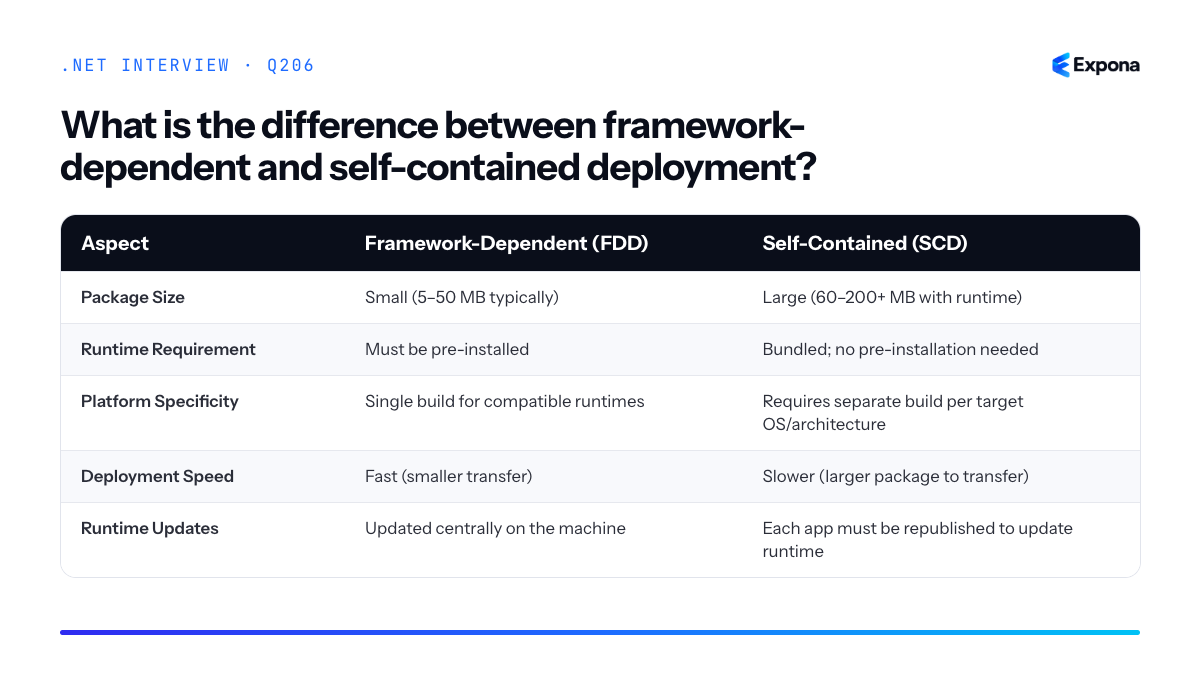
Key points to mention
- Framework-dependent is the default for many projects and assumes the target environment has .NET installed; ideal for controlled corporate environments and containerized deployments.
- Self-contained guarantees portability but requires specifying a
RuntimeIdentifier(e.g.,win-x64,linux-arm64) and creates larger distributions. - Trimming and Ready-to-Run (R2R) compilation can reduce self-contained package size, though they introduce complexity and potential runtime behavior changes.
- Security updates differ: framework-dependent apps benefit from centralized runtime patches; self-contained apps require redeployment for security fixes.
- Containers typically use framework-dependent deployment layered on official .NET base images, keeping images lean and leveraging the host image's runtime.
Common follow-up questions
- How does trimming reduce self-contained package size, and what are the risks?
- When would you choose framework-dependent over self-contained, and why?
- How do runtime identifiers (RIDs) affect multi-platform self-contained deployment?
Related interview questions
.NETCsharpDevOps207What is trimming?
ExperiencedTrimming is an IL-level optimization that removes unused code from self-contained .NET applications before deployment, significantly reducing binary size. It analyzes your application's entry point, follows all reachable code paths, and discards anything unreachable. This is especially valuable for Native AOT and serverless scenarios where startup time and deployment package size are critical.
How it works
Trimming performs static analysis of your IL code to build a dependency graph. Starting from your application's entry point (typically
Main()), it marks every method, type, and field that can be reached through normal execution paths as "live." Everything else—unused NuGet packages, unreferenced classes, dead code branches—is removed during the build phase.The challenge arises with reflection. When code uses reflection to dynamically load types (e.g.,
Type.GetType("FullName")or deserializers), the trimmer cannot statically determine what will be accessed at runtime. By default, trimmed types are removed, causingnullreturns or runtime exceptions. To preserve them, you must add trim annotations using[DynamicallyAccessedMembers]attributes or TrimmerRootAssembly settings to tell the trimmer "keep this code—it's accessed dynamically."When publishing with
<PublishTrimmed>true</PublishTrimmed>, the .NET build pipeline applies trimming to both your code and framework libraries. Warning level can be controlled with<TrimmerSingleWarn>and<EnableTrimAnalyzer>to surface issues during development rather than at runtime.Example
csharpusing System.Reflection; public class ConfigLoader { // Without trim annotations, this might fail after trimming public static object? LoadConfig(string typeName) { var type = Type.GetType(typeName); return type != null ? Activator.CreateInstance(type) : null; } } public class Program { static void Main() { // This works—direct reference keeps ConfigOptions alive var config = new ConfigOptions(); // This might fail after trimming because typeName is dynamic var loaded = ConfigLoader.LoadConfig("MyApp.ConfigOptions"); } } public class ConfigOptions { }Without trim annotations,
ConfigOptionscould be trimmed away because the trimmer cannot see thatLoadConfig()uses it dynamically via string name.Key points to mention
- Size reduction: Trimmed apps are dramatically smaller (often 50–80% reduction), improving deployment and cold-start performance.
- Reflection-safe code requires annotations: Use
[DynamicallyAccessedMembers],[RequiresUnreferencedCode], orTrimmerRootAssemblymetadata to preserve reflection targets. - Framework-aware: Many .NET libraries are trim-ready; check trimming warnings early in development using
<EnableTrimAnalyzer>true</EnableTrimAnalyzer>. - Incompatible with framework-dependent deployment: Trimming only applies to self-contained apps because the framework is already shared.
- Testing is essential: Always test trimmed binaries end-to-end; reflection bugs often surface only after deployment.
Common follow-up questions
- Can I trim framework-dependent apps? No—trimming removes code permanently. Framework-dependent apps rely on the shared runtime, so it's not applicable.
- How do I debug trimming issues? Enable
<EnableTrimAnalyzer>in your project file to get compiler warnings during development, and review the trimmer's warning log. - Does trimming work with reflection-heavy frameworks like EF Core or Newtonsoft.Json? Only if the library is trim-ready (e.g., newer EF Core versions). Older or heavily reflection-based libraries may require source generators or explicit annotations.
Related interview questions
.NETCsharpDevOps208What is the difference between Task.WhenAll and Parallel.ForEach?
ExperiencedTask.WhenAll awaits multiple async operations concurrently and returns when all complete, while Parallel.ForEach runs synchronous, CPU-bound work across multiple threads in a loop. Task.WhenAll is for I/O-bound async scenarios; Parallel.ForEach is for CPU-bound work. For async loops, use Parallel.ForEachAsync (.NET 6+) to get the best of both worlds with bounded concurrency.
How it works
Task.WhenAll accepts a collection of tasks and returns a single task that completes when all input tasks finish. It doesn't spawn new threads—it coordinates already-running async operations. If one task faults, the returned task faults with an AggregateException. It's ideal for I/O-bound work (HTTP requests, database calls) where threads are not blocked.
Parallel.ForEach is a thread-based parallelism construct that divides work across a thread pool. It blocks the calling thread until all iterations complete. The Parallel class uses work-stealing queues to balance load. It's designed for CPU-bound operations where you want true parallel execution on multiple cores.
Parallel.ForEachAsync (introduced in .NET 6) bridges the gap: it runs async work in a loop with bounded concurrency, respecting a MaxDegreeOfParallelism limit. This prevents thread starvation and resource exhaustion when awaiting thousands of I/O operations.
Example
csharp// Task.WhenAll - for async I/O-bound operations async Task FetchMultipleUrls(string[] urls) { var httpClient = new HttpClient(); var tasks = urls.Select(url => httpClient.GetAsync(url)); var results = await Task.WhenAll(tasks); Console.WriteLine($"Fetched {results.Length} responses"); } // Parallel.ForEach - for CPU-bound synchronous work void ProcessLargeDataset(int[] data) { Parallel.ForEach(data, item => { var result = ExpensiveCalculation(item); Console.WriteLine(result); }); } // Parallel.ForEachAsync - for async I/O in a loop with bounded concurrency async Task FetchWithBoundedConcurrency(string[] urls) { var httpClient = new HttpClient(); await Parallel.ForEachAsync(urls, new ParallelOptions { MaxDegreeOfParallelism = 5 }, async (url, ct) => { var response = await httpClient.GetAsync(url, ct); Console.WriteLine($"Fetched {url}: {response.StatusCode}"); }); }The first example fires many HTTP requests concurrently without blocking threads. The second uses all cores for intensive CPU calculations. The third limits concurrent HTTP requests to 5, preventing resource exhaustion.
Comparison table
Aspect Task.WhenAll Parallel.ForEach Parallel.ForEachAsync Use case Awaiting multiple async operations CPU-bound synchronous loops Async loops with bounded concurrency Threading No new threads; coordinates existing tasks Creates/reuses thread pool threads Uses async/await; limited degree of parallelism Blocks caller No (async method awaits) Yes (blocks until all iterations done) No (async method awaits) Concurrency limit No built-in limit (starts all tasks immediately) MaxDegreeOfParallelism controls thread count MaxDegreeOfParallelism controls concurrent operations Exception handling AggregateException on any task fault OperationCanceledException or AggregateException AggregateException if any operation fails Introduced .NET 4.0 .NET 4.0 .NET 6.0 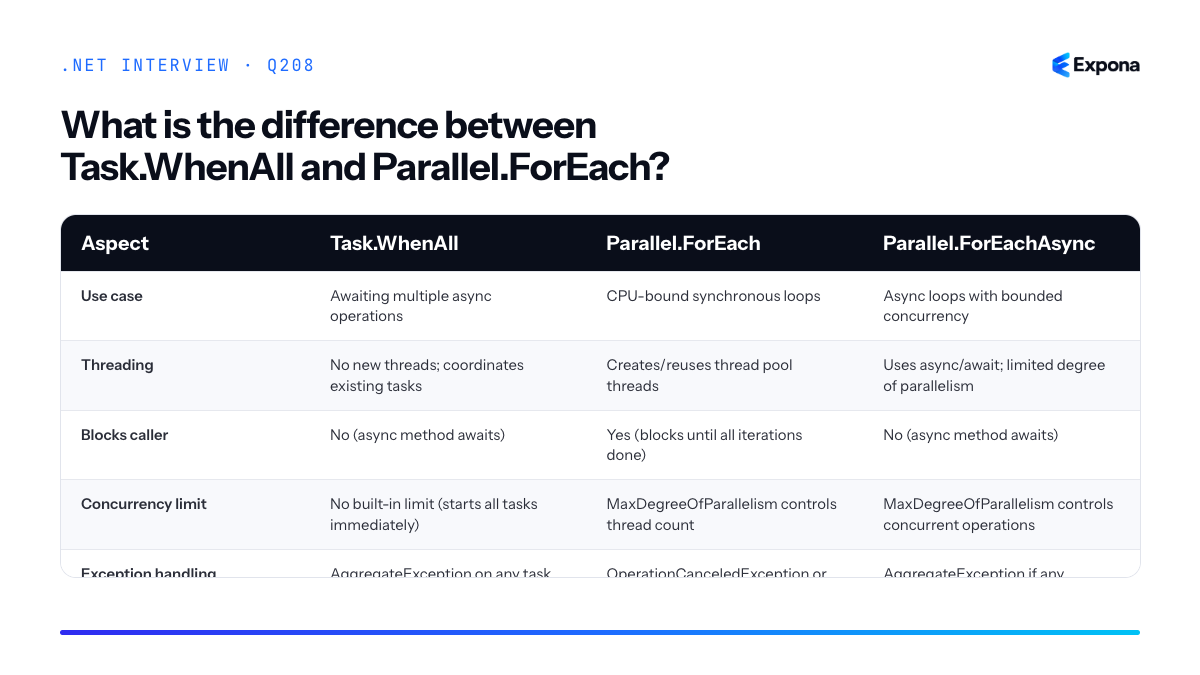
Key points to mention
- Task.WhenAll is not blocking; it's an async coordination mechanism. The calling thread is released to handle other work while tasks run.
- Parallel.ForEach is thread-based parallelism for compute-intensive work; using it for I/O-bound operations wastes threads and reduces scalability.
- Parallel.ForEachAsync respects CancellationToken and allows graceful shutdown. Use it when you have 100+ async operations and need backpressure.
- Task.WhenAll starts all tasks eagerly, which can overwhelm servers; consider semaphore-based throttling or Parallel.ForEachAsync for large batches.
- Parallel.ForEach uses Environment.ProcessorCount by default; Parallel.ForEachAsync defaults to MaxDegreeOfParallelism = -1 (unlimited, but with async fairness).
Common follow-up questions
- How do you handle exceptions from Task.WhenAll? – Wrap in try-catch; WhenAll throws AggregateException (or its inner exceptions in .NET 5+ with proper awaiting). Use Task.WhenAll(...).ConfigureAwait(false) in libraries to avoid deadlocks.
- What is MaxDegreeOfParallelism = -1? – It means unlimited parallelism, but the scheduler respects async fairness; tasks don't actually run more concurrently than the thread pool allows. Set it to Environment.ProcessorCount for CPU-bound work or a smaller number (e.g., 5–10) for I/O-bound async to avoid thread starvation.
- Should I use Task.Run with Task.WhenAll? – Only if you have synchronous CPU work that you want to parallelize; otherwise, you're wasting threads. Read more on Task.Run vs async/await patterns.
Related interview questions
.NETCsharpasync209What are IAsyncEnumerable and await foreach?
ExperiencedIAsyncEnumerable<T> is an asynchronous counterpart to IEnumerable<T> that allows you to stream data asynchronously, one item at a time. await foreach is the syntax that consumes it, automatically awaiting each item as it arrives. This pattern is essential for scenarios where data arrives over time—such as reading database rows in batches, consuming API paginated responses, or processing real-time event streams—without blocking threads or loading everything into memory at once.
How it works
IAsyncEnumerable<T> defines a single method, GetAsyncEnumerator(), which returns an IAsyncEnumerator<T>. The enumerator has two key members:
- MoveNextAsync() – returns a ValueTask<bool> that asynchronously advances to the next item and signals when the sequence ends
- Current – a property returning the current item
When you write await foreach (var item in source), the compiler generates code that calls MoveNextAsync() repeatedly, awaiting each call. Each iteration is asynchronous—work can happen between items, such as network I/O or database queries. This is fundamentally different from regular foreach, which blocks and fetches everything upfront.
You typically create async enumerables using an async iterator method with the yield return keyword combined with await. When you yield return in an async method, the compiler transforms it into a state machine that produces an IAsyncEnumerable<T>.
Example
csharp// Async iterator method that yields items asynchronously async IAsyncEnumerable<int> FetchDataFromDatabase() { for (int pageNum = 1; pageNum <= 5; pageNum++) { await Task.Delay(500); // Simulate database query delay Console.WriteLine($"Fetching page {pageNum}..."); yield return pageNum * 100; } } // Consume with await foreach async Task Main() { await foreach (var result in FetchDataFromDatabase()) { Console.WriteLine($"Received: {result}"); } }This example fetches data in pages asynchronously; each page arrives after a 500ms delay, and the consumer processes each one immediately rather than waiting for all pages to load first.
Key points to mention
- Memory efficient – only one item is held in memory at a time; ideal for large or unbounded sequences
- Naturally composes with async/await – no manual Task wrapping or thread juggling needed
- Supports cancellation – pass a CancellationToken via WithCancellation() to cleanly stop iteration
- Implements IAsyncDisposable – the enumerator should dispose resources asynchronously when iteration completes or is canceled (use IAsyncDisposable for cleanup)
- ValueTask optimization – MoveNextAsync() returns ValueTask<bool>, not Task<bool>, to avoid allocations when already complete (see ValueTask and when to use it)
Common follow-up questions
- How do you cancel an async enumerable? – Call WithCancellation(cancellationToken) on the enumerable, or implement CancellationToken as a parameter in your async iterator method and check token.ThrowIfCancellationRequested()
- When should you use IAsyncEnumerable vs. Task<List<T>>? – Use IAsyncEnumerable for large datasets or event streams where you process items as they arrive; use Task<List<T>> when you need all data before processing
- Can you use LINQ with async enumerables? – Yes, but only with System.Linq.Async NuGet package, since LINQ-to-Objects doesn't natively support async operations
Related interview questions
- What is ValueTask and when should you use it?
- How do you use the Channel-based background queue pattern?
- What is IAsyncDisposable?
Further reading
.NETCsharpasync210What is pattern matching in C#?
ExperiencedPattern matching in C# is a feature that tests whether a value matches a specific shape or condition using declarative syntax. It enables you to extract data and branch logic concisely using
isexpressions andswitchexpressions, supporting type patterns, property patterns, relational patterns, list patterns, and logical combinations. This reduces boilerplate and makes intent clearer than traditional if-else chains.How it works
Pattern matching allows you to destructure and test values against patterns in a single expression. When you use the
isoperator or aswitchexpression, the runtime evaluates whether the value conforms to the pattern. If it does, you can extract nested values or properties without additional casting or null checks.The key patterns you'll encounter are:
- Type patterns: Test if a value is of a specific type (e.g.,
is string). - Property patterns: Test nested properties (e.g.,
is Person { Age: > 18 }). - Relational patterns: Use comparison operators like
>,<,>=,==. - List patterns: Match array or list elements (e.g.,
is [1, 2, ..]). - Logical patterns: Combine patterns with
and,or, andnot.
Pattern matching works with both
isexpressions for boolean checks andswitchexpressions for multi-branch logic. Unlike traditionalswitchstatements, switch expressions are expressions (they return a value) and support patterns directly.Example
csharppublic record Person(string Name, int Age); public record Product(string Name, decimal Price); public string GetDiscount(object obj) => obj switch { Person { Age: >= 65 } p => $"{p.Name} gets senior discount", Person { Age: < 18 } p => $"{p.Name} gets youth discount", Product { Price: > 1000 } pr => $"{pr.Name} gets bulk discount", Product { Price: >= 100 and < 1000 } pr => $"{pr.Name} gets standard discount", string s => $"String value: {s}", [] => "Empty collection", [1, 2, ..] => "List starts with 1, 2", null => "Value is null", _ => "No discount" }; // Usage Console.WriteLine(GetDiscount(new Person("Alice", 70))); // Alice gets senior discount Console.WriteLine(GetDiscount(new Product("Laptop", 1500m))); // Laptop gets bulk discount Console.WriteLine(GetDiscount(new int[] { 1, 2, 3, 4 })); // List starts with 1, 2This example demonstrates property patterns with relational operators, logical patterns combining conditions, list patterns with the range operator
.., and null checking—all in a single, readable switch expression.Key points to mention
- Pattern matching reduces null checks and casting boilerplate, improving code readability and safety.
- Switch expressions (introduced in C# 8) are preferred over switch statements because they return values and support all pattern types.
- Property patterns work seamlessly with records and properties, making destructuring natural and concise.
- Patterns can be combined with logical operators (
and,or,not) for complex conditions without nested if statements. - List patterns (C# 11+) enable powerful array and collection matching, including element extraction and range patterns.
Common follow-up questions
- What's the difference between switch expressions and switch statements? Switch expressions return values and support all pattern types directly; switch statements use
case:labels and requirebreakstatements. - Can pattern matching be used with custom types? Yes, especially records and types with accessible properties. You can also implement custom patterns or use deconstruction.
- How does pattern matching improve performance? It doesn't inherently improve runtime performance, but it reduces allocations from unnecessary boxing, casting, and intermediate variables, and makes intent clearer for compiler optimization.
Related interview questions
- What is the Options pattern?
- What is the Result pattern?
- What is the difference between a field and a property?
Further reading
.NETCsharpArchitecture- Type patterns: Test if a value is of a specific type (e.g.,
211What are spans used for in everyday code?
ExperiencedSpan<T> and ReadOnlySpan<T> are lightweight stack-allocated types that provide views into contiguous memory—arrays, strings, or unmanaged buffers—without copying data. They enable zero-allocation slicing and substring operations, making them essential for high-performance parsing, formatting, and string processing where allocation overhead is unacceptable. Unlike traditional substring operations that allocate new strings, spans reference the original memory, keeping the garbage collector uninvolved.
How it works
A span is a value type (struct) that internally stores a pointer to memory and a length. It acts as a window or view into existing data rather than owning or copying that data. ReadOnlySpan<T> adds immutability—you cannot modify the underlying data through it. Both types are stack-allocated, so they have zero heap pressure.
Spans work with arrays, managed strings (via unsafe pinning), managed object fields, and unmanaged memory. The key advantage is that operations like slicing, parsing, and substring extraction produce new spans pointing to the same memory—no allocations occur. This is transformative for hot paths: parsing CSV lines, extracting tokens from buffers, or processing telemetry data where allocation would cause GC pressure.
Spans are also stack-safe: because they're value types living on the stack, they cannot be stored in fields or returned from async methods directly (in C# 11+, you can use
ref structreturn types withSpan<T>in limited scenarios). This constraint protects against dangling pointers and memory safety.Example
csharp// Everyday string parsing with spans—no allocations string data = "Alice,30|Bob,25|Carol,28"; ReadOnlySpan<char> remaining = data.AsSpan(); while (remaining.Length > 0) { int pipeIndex = remaining.IndexOf('|'); ReadOnlySpan<char> line = pipeIndex == -1 ? remaining : remaining[..pipeIndex]; int commaIndex = line.IndexOf(','); ReadOnlySpan<char> name = line[..commaIndex]; ReadOnlySpan<char> ageStr = line[(commaIndex + 1)..]; if (int.TryParse(ageStr, out int age)) { Console.WriteLine($"{new string(name)}: {age}"); } remaining = pipeIndex == -1 ? ReadOnlySpan<char>.Empty : remaining[(pipeIndex + 1)..]; }This code parses CSV-like data by slicing the original string into spans for each record and field—zero string allocations, only stack memory.
Key points to mention
- Zero-allocation slicing: Creating a span slice (via indexer or
Slice()) produces a new span viewing the same memory, not a copy. - Stack-only safety: Spans are value types that cannot escape the stack in most scenarios, preventing dangling pointer bugs.
- Works with any contiguous memory: Arrays, strings (via
AsSpan()), unmanaged pointers, andSpan<T>fields in ref structs. - Parsing and formatting standard: Modern APIs like
int.TryParse(ReadOnlySpan<char>)andstring.Create(int, TState, SpanAction<char, TState>)accept spans to avoid temporary string allocation. - Not a replacement for collections: Spans view existing memory; they don't allocate or own it, so they're not suitable for storing data across async boundaries.
Common follow-up questions
- Why can't Span<T> be used in async methods or stored in fields? — Spans are managed by the compiler at compile-time; storing them across suspension points or in heap-allocated objects risks the span outliving the memory it references, causing memory safety violations.
- What's the difference between Span<T> and Memory<T>? —
Memory<T>is a heap-allocated wrapper that owns or manages a reference to memory and can be passed to async methods;Span<T>is stack-only and allocation-free but cannot cross await boundaries. - How do I use Span<T> in real parsing scenarios? — Use
ReadOnlySpan<char>withIndexOf(), slicing, and APIs likeint.TryParse(span)orGuid.TryParse(span)to extract and validate fields from input, keeping allocations off the hot path.
Related interview questions
- What is DbContext pooling?
- What is the difference between record class and record struct?
- What is high-performance logging with LoggerMessage?
Further reading
.NETCsharpPerformance- Zero-allocation slicing: Creating a span slice (via indexer or
212How do you design a good REST API in .NET?
ExperiencedA good REST API in .NET follows resource-oriented design principles: use nouns for resources in URLs, apply correct HTTP verbs (GET, POST, PUT, DELETE), return appropriate status codes, and provide clear error responses using ProblemDetails. Additionally, implement pagination for large datasets, API versioning, OpenAPI/Swagger documentation, and maintain consistent naming conventions across all endpoints.
How it works
REST API design in .NET is built on several interconnected principles. First, resource-oriented URLs mean your endpoints represent nouns (resources) rather than verbs—
/api/productsinstead of/api/getProducts. Second, HTTP verbs provide the action: GET retrieves, POST creates, PUT updates, DELETE removes, and PATCH partially updates. Third, status codes communicate outcomes: 200 OK, 201 Created, 204 No Content, 400 Bad Request, 401 Unauthorized, 404 Not Found, 500 Internal Server Error.Error handling should be standardized using ProblemDetails (RFC 7807), which returns structured error information instead of plain text. Pagination prevents overwhelming responses by implementing limit/offset or cursor-based pagination for collections. Versioning allows you to evolve your API without breaking clients—use URL paths (
/api/v1/) or headers. Finally, documentation via OpenAPI/Swagger keeps your API discoverable and testable, and consistent naming (camelCase properties, resource pluralization) improves developer experience.Example
csharp[ApiController] [Route("api/v1/[controller]")] public class ProductsController : ControllerBase { private readonly IProductService _service; public ProductsController(IProductService service) => _service = service; [HttpGet("{id}")] [ProduceResponseType(typeof(ProductDto), StatusCodes.Status200OK)] [ProduceResponseType(typeof(ProblemDetails), StatusCodes.Status404NotFound)] public async Task> GetProduct(int id) { var product = await _service.GetProductAsync(id); if (product is null) return NotFound(new ProblemDetails { Title = "Product not found", Status = StatusCodes.Status404NotFound }); return Ok(product); } [HttpPost] [ProduceResponseType(typeof(ProductDto), StatusCodes.Status201Created)] [ProduceResponseType(typeof(ProblemDetails), StatusCodes.Status400BadRequest)] public async Task> CreateProduct(CreateProductDto dto) { var product = await _service.CreateProductAsync(dto); return CreatedAtAction(nameof(GetProduct), new { id = product.Id }, product); } [HttpGet] public async Task>> ListProducts( [FromQuery] int page = 1, [FromQuery] int pageSize = 10) { var result = await _service.ListProductsAsync(page, pageSize); return Ok(result); } }This example demonstrates resource-oriented URLs (
/api/v1/products), correct HTTP verbs (GET for retrieval, POST for creation), appropriate status codes (200, 201, 404), ProblemDetails for errors, pagination parameters, and response type documentation for OpenAPI.Key points to mention
- Resource-oriented design: Use nouns for URLs and let HTTP verbs define actions; avoid RPC-style endpoints like
/api/getProduct - Standardized error responses: Always use ProblemDetails (RFC 7807) for consistency; include status, title, detail, and instance properties
- Status codes matter: Return 201 Created for POST, 204 No Content when appropriate, and avoid generic 500 responses—log detailed errors server-side
- Pagination and versioning: Implement pagination for collections and use URL-based versioning (
/v1/,/v2/) to maintain backward compatibility - Documentation as a contract: Generate OpenAPI specs automatically; your API documentation should be a single source of truth and kept in sync with code
Common follow-up questions
- How do you handle REST API versioning—URL path vs. headers vs. query parameters, and why?
- What's the difference between PUT and PATCH, and when should you use each?
- How do you implement pagination efficiently with large datasets, and what are cursor-based pagination's advantages?
Related interview questions
Further reading
.NETCsharp- Resource-oriented design: Use nouns for URLs and let HTTP verbs define actions; avoid RPC-style endpoints like
213How do you secure a .NET API end to end?
ExperiencedEnd-to-end API security requires a layered approach combining transport encryption (HTTPS), authentication (JWT or cookies), authorization policies, input validation, rate limiting, and secure secret management. Each layer protects against different attack vectors—no single mechanism is sufficient on its own.
How it works
Securing a .NET API involves multiple concentric layers. Transport security via HTTPS encrypts all data in motion using TLS certificates. Authentication verifies identity—JWT tokens are stateless and scalable, while cookies are convenient but require server state. Authorization enforces what authenticated users can do; policy-based authorization in .NET allows fine-grained control beyond simple role checks.
Input validation prevents injection attacks by sanitizing and validating all user inputs on the server side. Rate limiting protects against brute-force and DDoS attacks by throttling requests per user or IP. Secure headers like Content-Security-Policy, X-Frame-Options, and Strict-Transport-Security mitigate browser-based exploits.
Finally, secret management keeps API keys, connection strings, and certificates out of source code using Azure Key Vault or environment variables, and dependency scanning identifies vulnerable NuGet packages before deployment.
Example
csharp// Program.cs - Minimal .NET 8 API setup var builder = WebApplication.CreateBuilder(args); // Add authentication with JWT builder.Services.AddAuthentication(JwtBearerDefaults.AuthenticationScheme) .AddJwtBearer(options => { options.Authority = builder.Configuration["Auth:Authority"]; options.Audience = builder.Configuration["Auth:Audience"]; options.TokenValidationParameters = new() { ValidateIssuer = true, ValidateAudience = true, ValidateLifetime = true }; }); // Add authorization with policies builder.Services.AddAuthorization(options => { options.AddPolicy("Admin", p => p.RequireRole("Admin")); options.AddPolicy("ValidUser", p => p.RequireAuthenticatedUser()); }); // Add rate limiting middleware builder.Services.AddRateLimiter(options => { options.AddFixedWindowLimiter("fixed", config => { config.PermitLimit = 100; config.Window = TimeSpan.FromMinutes(1); }); }); var app = builder.Build(); // Apply middleware in correct order app.UseHttpsRedirection(); app.UseRateLimiter(); app.UseAuthentication(); app.UseAuthorization(); // Secure headers middleware app.Use(async (context, next) => { context.Response.Headers.Add("X-Content-Type-Options", "nosniff"); context.Response.Headers.Add("X-Frame-Options", "DENY"); context.Response.Headers.Add("Strict-Transport-Security", "max-age=31536000"); await next(); }); app.MapGet("/secure", () => "Protected data") .RequireAuthorization("ValidUser") .WithRateLimiting("fixed"); app.Run();This example demonstrates HTTPS redirection, JWT authentication, role-based policies, rate limiting, and security headers all working together to protect an API endpoint.
Key points to mention
- HTTPS is mandatory: Never transmit credentials or sensitive data over HTTP; use TLS 1.2+ and valid certificates.
- Defense in depth: No single mechanism is sufficient; layer authentication, authorization, validation, and rate limiting.
- Secrets management: Use Azure Key Vault, AWS Secrets Manager, or environment variables—never hardcode secrets in source code.
- Input validation on the server: Always validate and sanitize user input server-side to prevent injection attacks; client-side validation is for UX only.
- Monitor and scan: Use OWASP ZAP, Snyk, or GitHub Dependabot to identify vulnerabilities in dependencies and configurations.
Common follow-up questions
- How do you handle token refresh with JWT? Implement refresh tokens with longer expiry stored securely (HttpOnly cookies), and issue short-lived access tokens; rotate refresh tokens to limit exposure.
- What's the difference between authentication and authorization? Authentication verifies who you are (login); authorization determines what you can do (permissions)—always authenticate before authorizing.
- How do you secure configuration and data in transit? See this question for detailed secret management and encryption strategies.
Related interview questions
- How do you design an API gateway in .NET?
- What is policy-based authorization?
- How do you secure configuration and data in transit?
Further reading
.NETCsharpSecurity214What is the difference between AddScoped DbContext and a factory in Blazor Server?
ExperiencedIn Blazor Server, AddScoped DbContext lives for the entire circuit lifetime, which can cause stale data, memory leaks, and connection pooling issues. Use IDbContextFactory instead to create short-lived contexts per operation, ensuring fresh data and proper resource cleanup.
How it works
Blazor Server maintains a persistent WebSocket connection called a "circuit" for each connected user. When you register DbContext with AddScoped, the scope is tied to the circuit's lifetime—typically 30 minutes or longer. This means a single DbContext instance serves all database operations for that entire session.
The problem: DbContext maintains identity maps, change trackers, and connection state. A long-lived context accumulates stale entity instances, holds database connections longer than necessary, and can cause
DbUpdateConcurrencyExceptionwhen another user modifies the same data. Additionally, connection pooling becomes inefficient because connections aren't released promptly.IDbContextFactory solves this by creating a new DbContext instance on-demand for each operation. Each context is immediately disposed after use, releasing connections back to the pool and clearing all tracked state. This mirrors desktop application patterns where contexts are typically short-lived.
Example
csharp// Setup - AddScoped (problematic for Blazor Server) services.AddDbContext<AppDbContext>(options => options.UseSqlServer(connectionString)); // Setup - IDbContextFactory (recommended for Blazor Server) services.AddDbContextFactory<AppDbContext>(options => options.UseSqlServer(connectionString)); // Component usage with factory @inject IDbContextFactory<AppDbContext> ContextFactory @code { private List<Product> products = new(); protected override async Task OnInitializedAsync() { // Create context, use it, dispose it immediately using var context = await ContextFactory.CreateDbContextAsync(); products = await context.Products.ToListAsync(); } private async Task UpdateProduct(int id, string name) { // Fresh context for each operation using var context = await ContextFactory.CreateDbContextAsync(); var product = await context.Products.FindAsync(id); if (product != null) { product.Name = name; await context.SaveChangesAsync(); } } }This example shows how the factory creates a fresh context for page initialization and again for the update operation, with automatic disposal ensuring connections return to the pool.
Key points to mention
- Circuit lifetime vs. request lifetime: Blazor Server circuits persist across multiple user interactions, unlike HTTP request cycles. AddScoped binds to circuit scope, not request scope.
- Connection pooling impact: Long-lived contexts hold connections unnecessarily. Factories ensure connections are returned promptly, improving throughput for other users.
- Stale data risk: A retained DbContext caches entities in memory. If another user modifies data, your context won't see those changes without explicit refresh or
AsNoTracking. - Async-friendly:
CreateDbContextAsync()is available in EF Core 5+, allowing proper async initialization before use. - Consider DbContext pooling: Factories work well with pooling to reuse context instances efficiently without maintaining long-lived scopes.
Comparison: AddScoped vs. IDbContextFactory in Blazor Server
Aspect AddScoped DbContext IDbContextFactory Lifetime Circuit lifetime (30+ minutes) Single operation (milliseconds) Connection pooling Holds connections; reduces pool availability Releases connections immediately; better throughput Stale data High risk; cached entities not refreshed Low risk; fresh context per operation Memory usage Grows over time; retains all tracked entities Minimal; disposed after use Dependency injection Inject DbContext directly Inject IDbContextFactory<DbContext> Concurrency conflicts More common due to stale state Reduced; each operation starts fresh 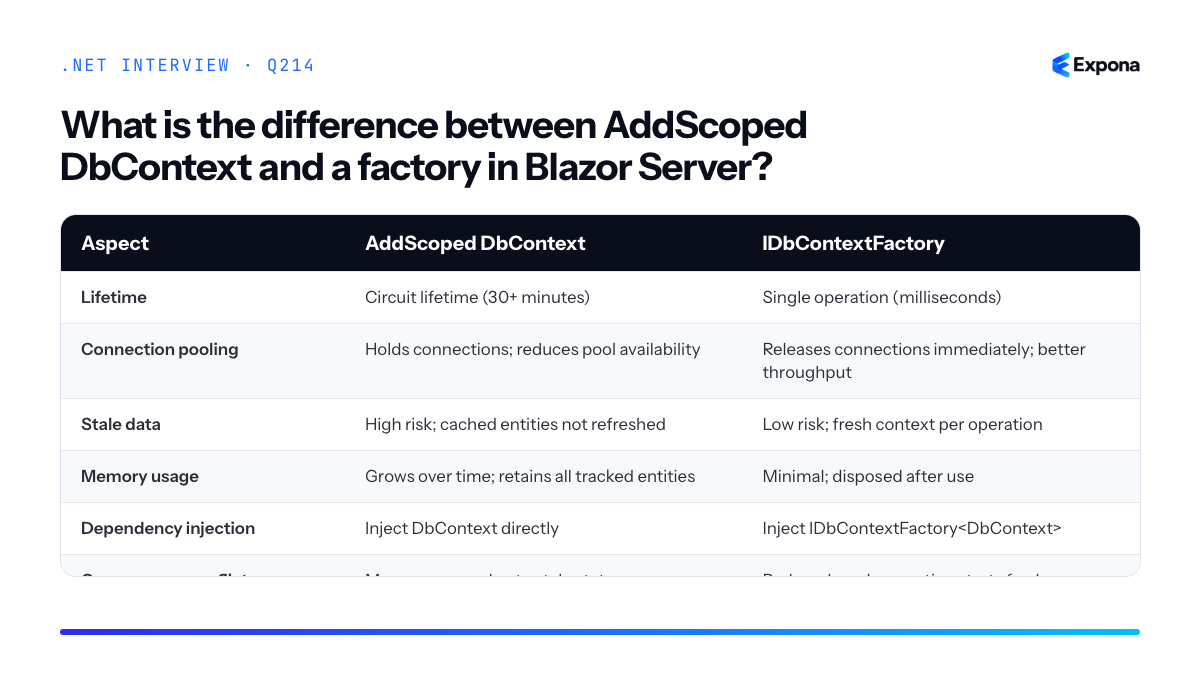
Common follow-up questions
- Can I use AddScoped in Blazor Server at all? – Yes, for stateless services or caching layers, but not for DbContext. The circuit scope is too long.
- How does DbContext lifetime management differ in Blazor WebAssembly? – WebAssembly runs client-side and doesn't connect directly to databases, so it uses APIs instead. This question is Blazor Server-specific.
- What about DbContext pooling? Can I use that with a factory? – Yes, AddDbContextFactory works with pooling via
UseDbContextPool(), combining the benefits of short-lived contexts with instance reuse.
Related interview questions
- How do you manage DbContext lifetime?
- How do you resolve scoped services in a background service?
- What is DbContext pooling?
Further reading
.NETCsharpaspnetcoreefcoredependency-injection215How do you profile a slow ASP.NET Core endpoint?
ExperiencedProfiling a slow ASP.NET Core endpoint involves a layered approach: start with instrumentation (logs, structured tracing, and application metrics), identify I/O bottlenecks (especially database queries), then use runtime profilers like dotnet-trace or Visual Studio to isolate CPU, memory allocation, or concurrency issues. The key is narrowing down whether the problem is application code, external services, or resource contention before running expensive profiling tools.
How it works
Profiling follows a cost-benefit hierarchy. Begin with lightweight instrumentation—add timestamps and structured logging around key operations using ILogger or diagnostic events. Check if the endpoint calls a database; if so, analyze EF Core queries in production by enabling query logging or capturing EF Core diagnostic events to spot N+1 queries or missing indexes.
Once you've ruled out obvious I/O waits, deploy dotnet-counters on production (or staging) to observe CPU%, GC heap size, thread pool queue depth, and HTTP request rates in real time. If CPU is spiking, use dotnet-trace to collect a CPU profile at application runtime—this captures call stacks and identifies which methods consume the most time. For memory-related slowness, collect allocation traces to spot excessive object creation. In development, Visual Studio's profiler offers GUI-based CPU and memory analysis with flamegraph visualization, though production profiling via command-line tools is preferred for minimal overhead.
Example
csharp// Middleware to measure endpoint latency and identify slow routes public class ProfilingMiddleware { private readonly RequestDelegate _next; private readonly ILogger<ProfilingMiddleware> _logger; public ProfilingMiddleware(RequestDelegate next, ILogger<ProfilingMiddleware> logger) { _next = next; _logger = logger; } public async Task InvokeAsync(HttpContext context) { var stopwatch = System.Diagnostics.Stopwatch.StartNew(); try { await _next(context); } finally { stopwatch.Stop(); var elapsedMs = stopwatch.ElapsedMilliseconds; // Log slow requests (>500ms) if (elapsedMs > 500) { _logger.LogWarning( "Slow endpoint: {Method} {Path} took {ElapsedMs}ms | StatusCode: {StatusCode}", context.Request.Method, context.Request.Path, elapsedMs, context.Response.StatusCode); } } } } // In Program.cs app.UseMiddleware<ProfilingMiddleware>();This middleware logs slow endpoints to structured logs, helping you quickly identify which routes need profiling without instrumenting every handler.
Key points to mention
- Start lightweight: Logs and
dotnet-counterscost little and reveal the root category (CPU, memory, I/O) before deeper profiling. - Check database first: Most ASP.NET Core slowness is external—database queries, APIs, or file I/O. Verify with query logging or EF Core diagnostics.
- Use dotnet-trace for CPU: Collect traces in production with minimal overhead (
dotnet-trace collect --process-id <pid>) and analyze call stacks to find hot methods. - Isolate memory allocations: If GC pressure is high, analyze allocations in the hot path using
dotnet-trace --profile gc-collector Visual Studio's memory profiler. - Consider concurrency: Investigate high CPU in production may reveal thread pool starvation or lock contention—check with
dotnet-counters threadpool.
Common follow-up questions
- What's the difference between dotnet-trace and Visual Studio Profiler? dotnet-trace is CLI-based and works remotely on production; Visual Studio Profiler is GUI-driven and best for local debugging. Both collect similar data, but dotnet-trace has lower overhead.
- How do you avoid profiler overhead masking the real issue? Keep sampling rates low, profile off-peak, and compare before/after metrics. Use event tracing (ETW) rather than per-instruction instrumentation in production.
- Can you profile async code effectively? Yes; dotnet-trace and Visual Studio both understand async/await. Look for
Task.Wait()calls,ConfigureAwait(false)misuse, or thread-pool starvation indicated by queued work items.
Related interview questions
.NETCsharpaspnetcore- Start lightweight: Logs and
216What is the difference between AddTransient services that hold state and stateless services?
ExperiencedTransient services that hold state create a new instance every time they are resolved, so each consumer gets its own isolated state—no sharing occurs. Stateless transient services do the same but avoid maintaining mutable fields, making them safe and predictable. The key difference is whether the service maintains instance-level data; stateless is preferred because it eliminates accidental state leaks and makes services thread-safe by design.
How it works
Transient services are instantiated fresh on every dependency injection resolution. If a transient service holds state (mutable fields or properties), each caller receives a new instance with its own copy of that state—no sharing between callers. However, this isolation does not protect you from other problems:
- If the transient holds a reference to a disposable resource (like a database connection or HttpClient) resolved from the root service provider, that resource may not be disposed properly because transient instances are not tracked by the container.
- State held in transient services can still cause confusion and bugs if the service is expected to be stateless by convention.
- Stateless transient services are inherently thread-safe and easier to reason about, making them the recommended pattern in most scenarios.
For proper state management in ASP.NET Core, use scoped services that hold state (one per HTTP request) or explicit state objects. Reserve transient for lightweight, stateless utilities.
Example
csharp// Stateful transient (problematic pattern) public class StatefulLogger { private List<string> _logs = new(); public void Log(string message) => _logs.Add(message); public int LogCount => _logs.Count; } // Stateless transient (preferred) public class StatelessLogger { public void Log(string message) => Console.WriteLine(message); } // Usage var services = new ServiceCollection(); services.AddTransient<StatefulLogger>(); services.AddTransient<StatelessLogger>(); var provider = services.BuildServiceProvider(); var logger1 = provider.GetRequiredService<StatefulLogger>(); var logger2 = provider.GetRequiredService<StatefulLogger>(); logger1.Log("First"); logger2.Log("Second"); Console.WriteLine(logger1.LogCount); // Outputs 1 (isolated state) Console.WriteLine(logger2.LogCount); // Outputs 1 (isolated state) var stateless1 = provider.GetRequiredService<StatelessLogger>(); var stateless2 = provider.GetRequiredService<StatelessLogger>(); // Both write to console; no state held anywhereEach transient call gets a new instance, so the stateful logger's counts are never shared between
logger1andlogger2. The stateless logger avoids the confusion entirely.Key points to mention
- Isolation by design: Transient state is never shared between consumers because each gets a new instance, but this does not make stateful transients a good practice.
- Disposal risk: Transient instances holding disposable resources (connections, clients) may leak if not explicitly disposed by the caller.
- Stateless is safer: Stateless transient services are thread-safe, predictable, and free from accidental state pollution—always prefer this pattern.
- State belongs in scoped services: If you need request-scoped state, use AddScoped instead; the container tracks and disposes scoped instances properly.
- Clarity over cleverness: A stateless transient service clearly communicates its intent and makes your dependency graph easier to understand and maintain.
Comparison table
Aspect Stateful Transient Stateless Transient Scoped (with state) Instance per resolution New instance every time New instance every time One per scope (e.g., HTTP request) State isolation Each caller has own state; no sharing No state to share Shared within scope; isolated across scopes Thread safety Safe only if state not accessed concurrently Always thread-safe Safe within single-threaded request context Disposal handling Not tracked; caller must dispose No resources to dispose Automatically disposed by container Best use case Rare; avoid if possible Utilities, helpers, loggers Request-specific data, entity tracking Recommended ❌ No ✅ Yes ✅ Yes (when state needed) 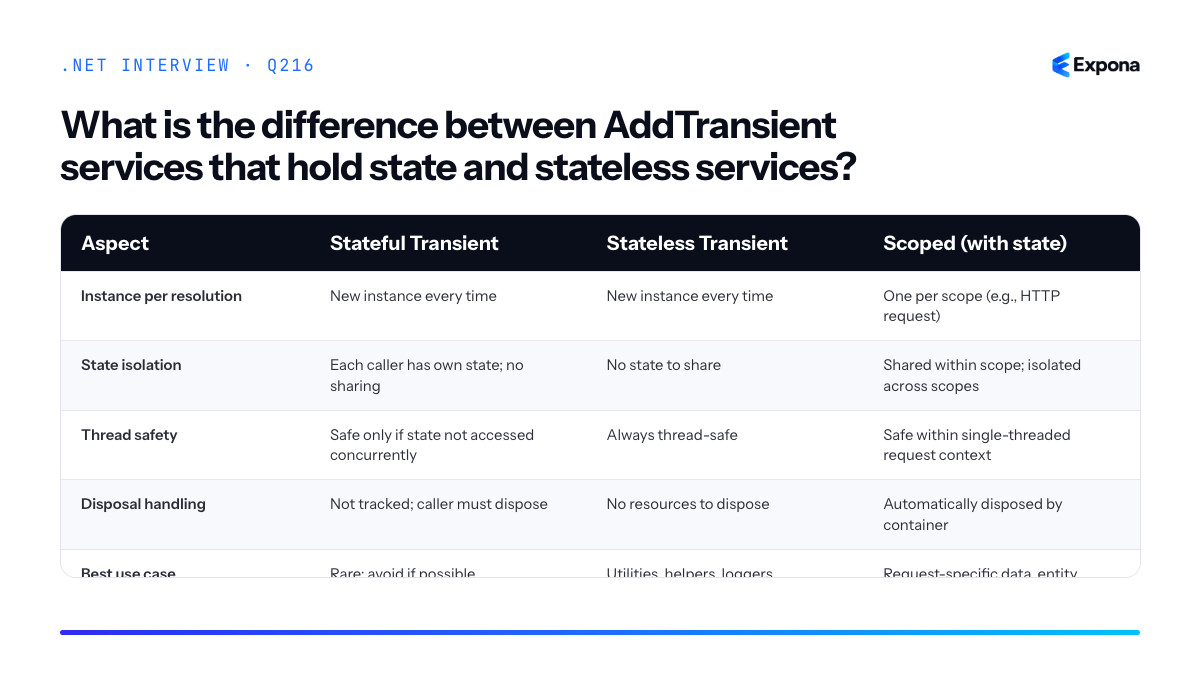
Common follow-up questions
- What happens if I inject a scoped service into a singleton? — See this question for a detailed explanation of the captive dependency problem.
- How do I ensure a transient service is disposed properly? — Have the immediate consumer own and dispose it, or consider using a scoped lifetime if the resource needs container-managed cleanup.
- Can I use a transient service to hold per-request state in ASP.NET Core? — No; use a scoped service instead, which is properly tracked and disposed by the container at the end of each HTTP request.
Related interview questions
- What are the service lifetimes in ASP.NET Core?
- What is the difference between an abstract class and an interface?
- What happens if you inject a scoped service into a singleton?
Further reading
.NETCsharpdependency-injection217How do you use the Channel-based background queue pattern?
ExperiencedThe Channel-based background queue pattern uses System.Threading.Channels to create a fast, bounded in-process queue for background work. You register a bounded Channel as a singleton, enqueue work items from HTTP endpoints, and process them in a BackgroundService that reads from the channel and creates a DI scope per item. This gives you asynchronous task processing with natural backpressure when the queue is full.
How it works
Channels are a lightweight, high-performance queuing primitive in .NET that sit between in-memory collections and message brokers. A bounded channel has a maximum capacity; when full, writers are suspended (backpressure) until space opens. This prevents unbounded memory growth during traffic spikes.
The pattern works in three steps:
- Register the channel: Create a bounded ChannelReader<T> and ChannelWriter<T> as singletons in DI.
- Enqueue from endpoints: Inject the ChannelWriter and write items asynchronously using TryWrite (non-blocking) or WriteAsync (async-waitable).
- Process in BackgroundService: A long-running service reads from the ChannelReader, creates a new DI scope per item, and executes handler logic. This isolates scoped services like DbContext.
Because channels are in-process and thread-safe, you get microsecond latency with no serialization overhead, making this ideal for high-throughput scenarios like email notifications, logging, or event processing within a single application.
Example
csharp// Register in Program.cs var channel = Channel.CreateBounded<QueueItem>(new BoundedChannelOptions(1000) { FullMode = BoundedChannelFullMode.Wait }); builder.Services.AddSingleton(channel.Reader); builder.Services.AddSingleton(channel.Writer); builder.Services.AddHostedService<QueueProcessor>(); // Queue item public record QueueItem(int Id, string Data); // Endpoint app.MapPost("/queue", async (ChannelWriter<QueueItem> writer, int id, string data) => { var item = new QueueItem(id, data); await writer.WriteAsync(item); return Results.Accepted(); }); // BackgroundService processor public class QueueProcessor : BackgroundService { private readonly ChannelReader<QueueItem> _reader; private readonly IServiceProvider _serviceProvider; public QueueProcessor(ChannelReader<QueueItem> reader, IServiceProvider serviceProvider) { _reader = reader; _serviceProvider = serviceProvider; } protected override async Task ExecuteAsync(CancellationToken stoppingToken) { await foreach (var item in _reader.ReadAllAsync(stoppingToken)) { using var scope = _serviceProvider.CreateScope(); var handler = scope.ServiceProvider.GetRequiredService<IQueueHandler>(); try { await handler.HandleAsync(item); } catch (Exception ex) { // Log and continue } } } }This example creates a bounded channel with 1000 capacity, enqueues items from an endpoint without blocking the request, and processes them serially in a BackgroundService that creates a new DI scope per item to safely use scoped services like DbContext.
Key points to mention
- Backpressure: Bounded channels apply natural backpressure—when full, WriteAsync waits for space, preventing memory exhaustion during traffic spikes.
- Scope per item: Always create a new IServiceScope in the BackgroundService for each work item to ensure scoped services (DbContext, unit-of-work) are properly isolated.
- Non-blocking fast path: Use TryWrite in hot paths for fire-and-forget scenarios; use WriteAsync when you need to wait for queue capacity.
- Channel disposal: Complete the channel writer with writer.TryComplete() on shutdown so the reader's ReadAllAsync loop exits gracefully.
- Error handling: Wrap item processing in try-catch so one failed item doesn't crash the entire background loop.
Common follow-up questions
- "What's the difference between TryWrite and WriteAsync?" — TryWrite returns bool immediately (fails if full); WriteAsync awaits until space is available. Use TryWrite for fire-and-forget, WriteAsync for guaranteed delivery with backpressure.
- "How do you handle errors in the background processor?" — Wrap the handler call in try-catch, log the exception, and continue the loop so one failure doesn't block the entire queue.
- "When should I use Channels instead of a message broker like RabbitMQ?" — Channels are best for in-process, single-machine queuing with tight latency requirements. Use brokers when you need persistence, multiple services, or scalability across machines.
Related interview questions
- How do you resolve scoped services in a background service?
- How do you manage DbContext lifetime?
- What are Channels in .NET?
Further reading
.NETCsharpasyncArchitecture218How do you handle partial failures when calling several services?
ExperiencedHandle partial failures by running service calls concurrently with timeouts, gracefully degrading non-critical responses, and returning composite results that distinguish between essential and optional data. This prevents a single slow or failing dependency from blocking the entire request, improves user experience, and maintains system resilience through strategic fallbacks and comprehensive logging with correlation IDs for debugging distributed issues.
How it works
When an application depends on multiple external services, any one can fail, timeout, or respond slowly. Rather than failing the entire request, you classify dependencies as critical or non-critical. Critical services must succeed; non-critical services can degrade. You execute calls concurrently to reduce latency, enforce timeouts to prevent indefinite blocking, and catch exceptions at the individual service level. For failed non-critical services, you return default or cached data. For critical services, you retry with exponential backoff or fail fast. All failures are logged with a correlation ID so you can trace the entire request flow across services. The response to the client includes both successful data and status indicators for degraded sections, allowing the UI to adapt.
This approach, sometimes called the bulkhead pattern combined with graceful degradation, prevents cascading failures and maintains partial availability. You might also use circuit breakers to stop hammering a failing service and caching to serve stale data when services are down.
Example
csharppublic class CompositeDataService { private readonly HttpClient _httpClient; private readonly ILogger<CompositeDataService> _logger; private readonly string _correlationId; public CompositeDataService(HttpClient httpClient, ILogger<CompositeDataService> logger) { _httpClient = httpClient; _logger = logger; _correlationId = Guid.NewGuid().ToString(); } public async Task<CompositeResponse> GetAggregatedDataAsync() { var response = new CompositeResponse { CorrelationId = _correlationId }; var cts = new CancellationTokenSource(TimeSpan.FromSeconds(5)); // Critical service – must succeed try { response.UserProfile = await FetchWithRetryAsync( "https://users-api/profile", maxRetries: 3, cts.Token); } catch (Exception ex) { _logger.LogError(ex, "Critical service failed. CorrelationId: {Id}", _correlationId); return response; // Early return for critical failure } // Non-critical services – run concurrently, tolerate failures var recommendationsTask = FetchWithTimeoutAsync( "https://recommendations-api/items", defaultValue: new List<string>(), cts.Token); var analyticsTask = FetchWithTimeoutAsync( "https://analytics-api/stats", defaultValue: new Analytics(), cts.Token); try { await Task.WhenAll(recommendationsTask, analyticsTask); response.Recommendations = recommendationsTask.Result; response.Analytics = analyticsTask.Result; } catch (OperationCanceledException ex) { _logger.LogWarning(ex, "Non-critical services timed out. CorrelationId: {Id}", _correlationId); response.Recommendations ??= new List<string>(); response.Analytics ??= new Analytics(); } return response; } private async Task<T> FetchWithRetryAsync<T>(string url, int maxRetries, CancellationToken ct) { for (int i = 0; i < maxRetries; i++) { try { var result = await _httpClient.GetAsync(url, ct); result.EnsureSuccessStatusCode(); return JsonSerializer.Deserialize<T>(await result.Content.ReadAsStringAsync(ct))!; } catch (Exception ex) when (i < maxRetries - 1) { _logger.LogWarning(ex, "Retry {Attempt} for {Url}. CorrelationId: {Id}", i + 1, url, _correlationId); await Task.Delay(TimeSpan.FromMilliseconds(Math.Pow(2, i) * 100), ct); } } throw new InvalidOperationException($"Failed after {maxRetries} retries: {url}"); } private async Task<T> FetchWithTimeoutAsync<T>(string url, T defaultValue, CancellationToken ct) { try { var result = await _httpClient.GetAsync(url, ct); result.EnsureSuccessStatusCode(); return JsonSerializer.Deserialize<T>(await result.Content.ReadAsStringAsync(ct))!; } catch (Exception ex) { _logger.LogWarning(ex, "Non-critical service failed, returning default. Url: {Url}, CorrelationId: {Id}", url, _correlationId); return defaultValue; } } } public class CompositeResponse { public string CorrelationId { get; set; } public UserProfile UserProfile { get; set; } public List<string> Recommendations { get; set; } public Analytics Analytics { get; set; } }This example separates critical (UserProfile) and non-critical (Recommendations, Analytics) calls, retries critical ones, tolerates timeouts on optional ones, and logs all failures with a correlation ID for tracing across the distributed system.
Key points to mention
- Classify dependencies: Distinguish between critical services (fail the request if they fail) and non-critical ones (degrade gracefully).
- Concurrency and timeouts: Run independent calls in parallel with aggressive timeouts to avoid blocking the main thread indefinitely.
- Correlation IDs: Attach a unique ID to every request so you can trace partial failures across multiple services in logs.
- Retry strategies: Use exponential backoff for critical services; avoid retrying non-critical ones if they time out.
- Caching and defaults: Return cached data or sensible defaults for non-critical failures rather than empty responses, improving perceived reliability.
Common follow-up questions
- How do you implement a circuit breaker to prevent calling a failing service? – Use Polly or similar libraries to track failure rates and stop requests after a threshold is exceeded, allowing the service time to recover.
- How does distributed tracing help with partial failures? – Distributed tracing captures request flows across all services, making it easy to see which dependency failed and when, correlating logs and metrics.
- What's the difference between timeout and cancellation? – A timeout is a duration-based limit; cancellation is a signal you send via CancellationToken to stop work immediately, which is more graceful and allows cleanup.
Related interview questions
Further reading
.NETCsharpasync219What is the difference between Results.Problem and throwing exceptions?
ExperiencedResults.Problem returns a ProblemDetails response directly, making expected failures explicit and performant, while exceptions should be reserved for unexpected errors handled globally via middleware. Using Results.Problem is the modern, idiomatic approach in ASP.NET Core for handling validation and business logic failures as part of normal control flow, whereas throwing exceptions incurs stack unwinding overhead and obscures intent.
How it works
Results.Problem (introduced in .NET 6+) is a typed endpoint result that directly constructs and returns a standardized ProblemDetails response. It's part of the Result pattern family and represents expected, handled failures. When you return Results.Problem from an endpoint, ASP.NET Core immediately serializes it to JSON and sends it with the appropriate HTTP status code—no exceptions are thrown.
Exceptions, by contrast, are thrown when an unexpected error occurs. An exception unwinds the call stack, performs stack trace generation, and must be caught by global exception handling middleware (like UseExceptionHandler) to produce a response. This process is orders of magnitude slower than returning a result directly.
The key distinction is intent: Results.Problem signals "this is an expected outcome I'm handling"; exceptions signal "something went wrong that I didn't anticipate." Mixing them confuses maintainers and creates performance issues.
Example
csharp// ❌ Anti-pattern: using exceptions for expected failures app.MapPost("/orders/{id}", (int id, OrderService service) => { if (id <= 0) throw new ArgumentException("Invalid order ID"); // Stack unwinding overhead var order = service.GetOrder(id); if (order == null) throw new KeyNotFoundException("Order not found"); // More overhead return Results.Ok(order); }); // ✅ Best practice: using Results.Problem for expected failures app.MapPost("/orders/{id}", (int id, OrderService service) => { if (id <= 0) return Results.Problem( detail: "Order ID must be greater than zero", statusCode: StatusCodes.Status400BadRequest, title: "Invalid Input" ); var order = service.GetOrder(id); if (order == null) return Results.Problem( detail: $"Order {id} not found", statusCode: StatusCodes.Status404NotFound, title: "Not Found" ); return Results.Ok(order); }); // Global exception handler for truly unexpected errors app.UseExceptionHandler(errorApp => { errorApp.Run(async context => { var exceptionHandlerPathFeature = context.Features.Get(); context.Response.StatusCode = StatusCodes.Status500InternalServerError; await context.Response.WriteAsJsonAsync(new ProblemDetails { Title = "Internal Server Error", Detail = "An unexpected error occurred", Status = StatusCodes.Status500InternalServerError }); }); });The first endpoint throws exceptions for predictable validation failures, which is inefficient and obscures the happy path. The second returns Results.Problem for validation and business logic failures, then relies on global exception handling only for truly unexpected errors like null reference exceptions or database connection failures.
Key points to mention
- Performance: Results.Problem avoids stack unwinding overhead; exceptions are 10–100× slower because they capture the entire call stack.
- Intent clarity: Results.Problem makes it explicit that a failure is expected and handled; exceptions suggest something went wrong unexpectedly.
- Standard compliance: Results.Problem produces standardized ProblemDetails (RFC 7807) responses consistently across your API.
- Separation of concerns: Expected failures (validation, not found, conflict) return Results.Problem; unexpected failures (bugs, null refs, database crashes) throw exceptions caught by middleware.
- Testability: Code that returns Results.Problem is easier to test—you check the result directly rather than catching exceptions.
Comparison table
Aspect Results.Problem Throwing Exceptions Use case Expected failures (validation, not found, conflict) Unexpected errors (bugs, null refs, system failures) Performance Fast—no stack unwinding Slow—captures full call stack Intent Clear: "I handled this" Unclear: "Something went wrong" Response format Consistent ProblemDetails (RFC 7807) Depends on global error handler Handling Returned directly from endpoint Caught by global middleware Testability Easy—assert result type and status Requires exception setup/assertions 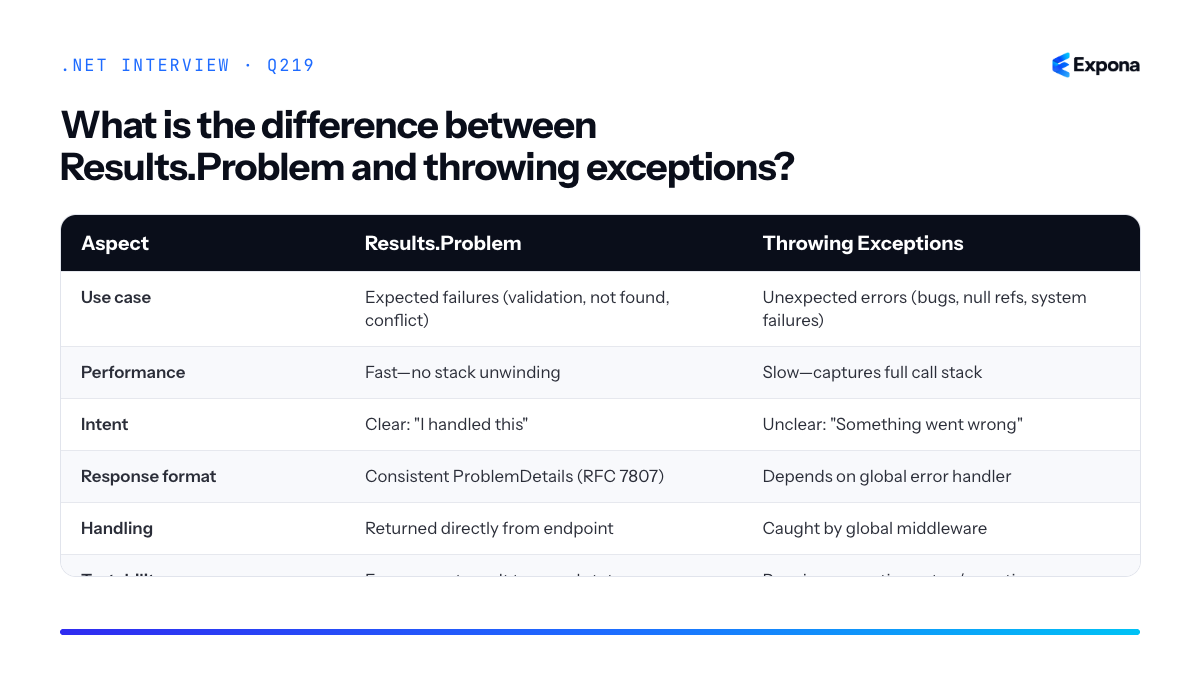
Common follow-up questions
- Should I ever throw exceptions in endpoints? No—throw only in service/domain logic for unexpected failures. Let middleware handle them globally to return a 500 ProblemDetails response.
- What's the relationship between Results.Problem and validation filters? Validation filters often return Results.Problem before your endpoint runs; use them together to keep endpoints clean and consistent.
- Can I customize ProblemDetails responses? Yes—use ProblemDetailsOptions in services.AddProblemDetails() to configure default titles, status codes, and custom mappers for exception types.
Related interview questions
Further reading
.NETCsharp220How do you test authorization rules in integration tests?
ExperiencedTo test authorization rules in integration tests, replace the default authentication scheme with a test authentication handler that issues claims based on test parameters, then make HTTP requests and assert the expected status codes (401 for unauthenticated, 403 for forbidden, 200 for authorized). This approach avoids token generation complexity while giving you full control over identity and claims per test scenario.
How it works
Integration tests need to verify that your [Authorize] attributes and policy-based authorization work correctly across different user roles and ownership scenarios. Rather than mocking the authentication layer, you configure a test authentication handler that runs within the test server pipeline. This handler intercepts authentication requests and issues a ClaimsPrincipal populated with whatever claims your test specifies—user ID, roles, permissions, or custom claims. Your authorization policies then evaluate these claims exactly as they would in production, but under your complete control.
The key advantage is that you're testing the real authorization middleware and policies, not a mock. Each test can establish different claims (admin vs. regular user, resource owner vs. stranger), make an HTTP request to your protected endpoint, and assert the response status code. This validates both authentication (401 Unauthorized) and authorization (403 Forbidden) boundaries.
Example
csharppublic class AuthorizationIntegrationTests : IAsyncLifetime { private WebApplicationFactory<Program> _factory; private HttpClient _client; public async Task InitializeAsync() { _factory = new WebApplicationFactory<Program>() .WithWebHostBuilder(builder => { builder.ConfigureTestServices(services => { services.AddAuthentication("TestScheme") .AddScheme<AuthenticationSchemeOptions, TestAuthHandler>( "TestScheme", _ => { }); }); }); _client = _factory.CreateClient(); } [Fact] public async Task Get_ProtectedEndpoint_WithoutAuth_Returns401() { var response = await _client.GetAsync("/api/protected"); Assert.Equal(System.Net.HttpStatusCode.Unauthorized, response.StatusCode); } [Fact] public async Task Get_ProtectedEndpoint_WithAdminRole_Returns200() { _client.DefaultRequestHeaders.Add("X-Test-User-Id", "123"); _client.DefaultRequestHeaders.Add("X-Test-Role", "Admin"); var response = await _client.GetAsync("/api/protected"); Assert.Equal(System.Net.HttpStatusCode.OK, response.StatusCode); } [Fact] public async Task Get_AdminOnlyEndpoint_WithUserRole_Returns403() { _client.DefaultRequestHeaders.Add("X-Test-User-Id", "456"); _client.DefaultRequestHeaders.Add("X-Test-Role", "User"); var response = await _client.GetAsync("/api/admin-only"); Assert.Equal(System.Net.HttpStatusCode.Forbidden, response.StatusCode); } public async Task DisposeAsync() => await _factory.DisposeAsync(); } public class TestAuthHandler : AuthenticationHandler<AuthenticationSchemeOptions> { public TestAuthHandler(IOptionsMonitor<AuthenticationSchemeOptions> options, ILoggerFactory logger, UrlEncoder encoder) : base(options, logger, encoder) { } protected override Task<AuthenticateResult> HandleAuthenticateAsync() { if (!Request.Headers.TryGetValue("X-Test-User-Id", out var userId)) return Task.FromResult(AuthenticateResult.NoResult()); var claims = new List<Claim> { new Claim(ClaimTypes.NameIdentifier, userId.ToString()), }; if (Request.Headers.TryGetValue("X-Test-Role", out var role)) claims.Add(new Claim(ClaimTypes.Role, role.ToString())); var identity = new ClaimsIdentity(claims, "TestScheme"); var principal = new ClaimsPrincipal(identity); var ticket = new AuthenticationTicket(principal, "TestScheme"); return Task.FromResult(AuthenticateResult.Success(ticket)); } }This code registers a test authentication handler that reads claim information from request headers, constructs a ClaimsPrincipal, and returns it to the authorization middleware, allowing tests to control identity and roles on a per-request basis.
Key points to mention
- WebApplicationFactory with ConfigureTestServices lets you register a test auth handler that runs within the actual request pipeline, ensuring real policy evaluation.
- No token generation needed—pass claims via headers or request context; the handler builds the principal for you.
- Test three scenarios per endpoint: unauthenticated (no headers), authorized (correct role/claims), and forbidden (wrong role/claims) to cover authentication and authorization boundaries.
- Use custom claims to test resource ownership rules (e.g., claiming a UserId that does not own the requested resource should return 403).
- This approach is faster than spinning up a real identity provider and keeps tests focused on your application's authorization logic, not external services.
Common follow-up questions
- How do you test resource-level authorization (ownership)? — Add a claim for the resource owner ID and modify your policy to compare it against the requested resource; your test then sends a request for a resource owned by a different user and asserts 403.
- Can you test policy-based authorization this way? — Yes; the test handler issues whatever claims your AuthorizationPolicy evaluates. If your policy checks a "CanEdit" claim, have the handler include or exclude it based on headers.
- How does this relate to unit testing policies separately? — Unit tests validate the policy logic in isolation; integration tests verify the policy runs in the full pipeline with real middleware ordering and endpoint routing. See integration tests for ASP.NET Core for more context.
Related interview questions
- How does JWT authentication work in ASP.NET Core?
- How do you write integration tests for ASP.NET Core?
- What is the request pipeline order?
Further reading
.NETCsharpSecurityTesting221How does the .NET garbage collector decide when to run?
ExpertThe .NET garbage collector automatically runs when a generation's allocation budget is exceeded, when the system reports low memory pressure, or when
GC.Collect()is explicitly called. The runtime maintains dynamic budgets per generation that adjust based on survival rates—generations that retain more objects get larger budgets to reduce collection frequency, while generations with high death rates trigger more often to reclaim space efficiently.How it works
The .NET GC uses a generational model with three generations (0, 1, 2) plus a large object heap (LOH). Each generation has an allocation budget—a threshold of bytes that can be allocated before a collection is triggered. When allocations in a generation exceed its budget, the GC pauses managed threads and performs a collection.
The runtime tracks survival rates: the percentage of objects that survive each collection. If Gen 0 has a high survival rate, the runtime increases its budget for the next cycle, reducing collection frequency. Conversely, if most Gen 0 objects die quickly, the budget stays small, triggering collections more often since they're cheap to run. This adaptive tuning balances throughput and latency.
Memory pressure from the operating system also triggers collections. When the system signals low available memory, the runtime may force a full GC (Gen 0, 1, and 2) to reclaim as much heap space as possible, even if budgets haven't been exceeded.
In .NET 6+, the GC heap commit model and segment management further optimize decisions. The runtime can also trigger collections based on heap fragmentation thresholds and, in server GC mode, heap-per-core strategies influence when and how collections proceed.
Example
csharpusing System; using System.Diagnostics; class GCTriggerExample { static void Main() { var gcStats = GC.GetGCMemoryInfo(); Console.WriteLine($"Initial heap: {gcStats.HeapSizeBytes / 1024} KB"); // Allocate objects aggressively to exceed Gen 0 budget var objects = new object[1_000_000]; for (int i = 0; i < 1_000_000; i++) { objects[i] = new byte[100]; } var statsAfter = GC.GetGCMemoryInfo(); Console.WriteLine($"After allocation: {statsAfter.HeapSizeBytes / 1024} KB"); Console.WriteLine($"Collections triggered: Gen0={GC.GetTotalCollectionCount(0)}"); // Clear to free memory and allow Gen 2 collection Array.Clear(objects); GC.Collect(2, GCCollectionMode.Optimized); Console.WriteLine($"After explicit collect: Gen0={GC.GetTotalCollectionCount(0)}"); } }This example shows how rapid allocation of small objects triggers Gen 0 collections automatically, and demonstrates calling
GC.Collect()to force a Gen 2 collection when needed.Key points to mention
- Allocation budgets per generation: Each generation has a threshold; exceeding it triggers a collection of that generation and lower ones.
- Adaptive tuning: Survival rates determine future budgets—high survival means larger budget, reducing GC frequency for stable workloads.
- Memory pressure signals: OS-level memory pressure can force full collections regardless of budget state.
- Explicit control:
GC.Collect()forces immediate collection, but is rarely recommended for production code. - Generational hypothesis: Most objects die young (Gen 0), so collecting Gen 0 frequently is cheap; older objects rarely need collection, reducing pause times.
Common follow-up questions
- What's the difference between GC.Collect() and letting the GC run naturally? —
GC.Collect()forces an immediate, blocking collection; natural GC runs based on budgets and triggers, offering better throughput and latency. Explicit collection hides tuning problems and often hurts performance. - How does the heap structure influence GC decisions? — The runtime segments the managed heap into small object heap (SOH) and large object heap (LOH) with separate budgets. LOH collections are more expensive, so they're triggered less frequently but can cause longer pauses.
- Can I tune GC behavior for my workload? — Yes, via
GCHeapCount,GCHeapHardLimit, and GCLatencyMode (Batch, Interactive, SustainedLowLatency), allowing optimization for throughput or low-latency scenarios.
Related interview questions
.NETCsharpPerformance222What is the difference between workstation and server GC?
ExpertWorkstation GC and Server GC are two distinct garbage collection modes in .NET. Workstation GC uses a single heap and is optimized for low-latency client applications, performing collections on the same thread that triggered allocation. Server GC creates one heap and dedicated GC thread per logical processor core, maximizing throughput for server workloads at the cost of higher memory consumption and latency variability.
How it works
In Workstation GC, there is one managed heap shared across all threads. When a collection is triggered, the application thread performing the allocation blocks until the GC completes, then resumes. This simplicity makes pause times predictable and memory overhead minimal—ideal for desktop and client apps where responsiveness matters more than raw throughput.
In Server GC, .NET allocates one heap per logical processor and assigns one GC thread per heap. Each thread allocates from its own heap without lock contention. When a collection is needed, dedicated GC threads work in parallel on their respective heaps, allowing application threads to continue running (mostly unblocked). This parallelism significantly increases throughput but introduces:
- Higher memory footprint (more heaps = more metadata and reserved space)
- Longer maximum GC pause times (coordinating across cores takes time)
- Increased CPU usage during collections
You select the mode via the project file or runtime configuration. By default, .NET Framework uses Workstation GC, while .NET Core uses Server GC on multi-core systems. You can override with
<ServerGarbageCollection>true</ServerGarbageCollection>in your .csproj.Example
csharp// Check which GC mode is active at runtime using System; using System.Runtime; class Program { static void Main() { bool isServerGC = GCSettings.IsServerGC; Console.WriteLine($"Server GC enabled: {isServerGC}"); Console.WriteLine($"GC Latency Mode: {GCSettings.LatencyMode}"); Console.WriteLine($"Processor count: {Environment.ProcessorCount}"); // Trigger a collection and observe behavior GC.Collect(); GC.WaitForPendingFinalizers(); } } // Output on a 4-core machine with Server GC: // Server GC enabled: True // GC Latency Mode: Interactive // Processor count: 4This demonstrates how to detect which GC mode is active and check system configuration—essential for diagnosing performance issues in production.
Comparison Table
Aspect Workstation GC Server GC Heap Count One shared heap One heap per logical core GC Threads Concurrent with application thread Dedicated parallel threads (one per core) Latency Lower, more predictable pauses Higher peak pause times, variable Throughput Lower (single-threaded collections) Higher (parallel collections across cores) Memory Usage Minimal overhead Higher (multiple heaps & metadata) Best For Client apps, UI, single/few cores Server workloads, high-throughput services 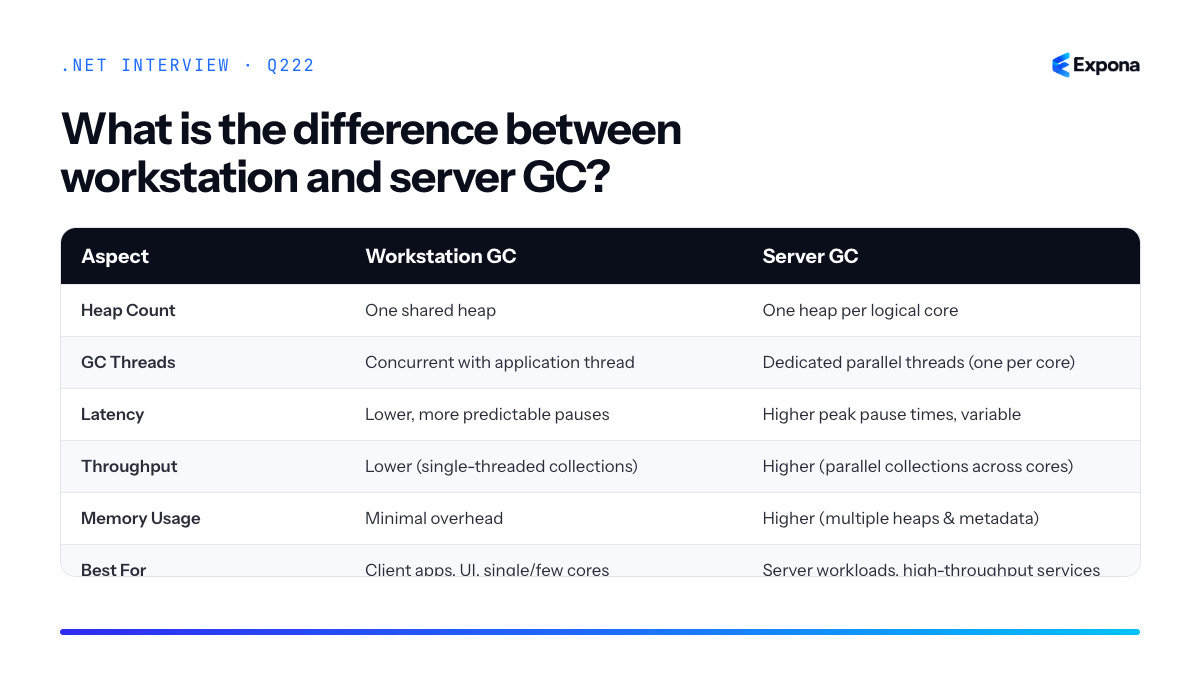
Key points to mention
- Trade-off: Workstation prioritizes latency; Server prioritizes throughput. Choose based on your workload's sensitivity to pauses.
- Default behavior: .NET Core automatically selects Server GC on multi-core machines unless explicitly disabled—you should verify this in production.
- Allocation affinity: Server GC reduces lock contention by having threads allocate from their own heap, improving concurrent performance.
- Memory overhead: Server GC typically consumes 20–40% more memory than Workstation GC due to per-core heap duplication and alignment.
- Monitoring: Use GC metrics like Gen 2 collection frequency and pause time to validate your choice in production.
Common follow-up questions
- "Can you mix Workstation and Server GC?" No—it is a process-wide setting. However, you can use object pooling and region-based allocation to reduce GC pressure regardless of mode.
- "How does Server GC interact with CPU affinity?" Each GC thread is typically affinitized to a specific core for better cache locality, which is why it scales well on NUMA systems.
- "What happens on a single-core machine with Server GC enabled?" Server GC will still create the infrastructure but will behave similarly to Workstation GC since there is only one core.
Related interview questions
- What metrics would you alert on for a .NET service?
- What is DbContext pooling?
- What is thread pool starvation and how do you detect it?
Further reading
.NETCsharpPerformance223What is DATAS in .NET 8 and 9?
ExpertDATAS (Dynamic Adaptation To Application Sizes) is a Server GC feature introduced in .NET 8 and enabled by default in .NET 9 that automatically grows and shrinks the number of garbage collection heaps based on application load, significantly reducing memory consumption in containerized environments with variable traffic patterns.
How it works
DATAS operates by monitoring CPU usage and heap fragmentation during garbage collection. When an application experiences sustained high CPU load during GC, the Server GC adds additional heaps to distribute the GC work across more threads, reducing pause times and improving throughput. Conversely, when load decreases and CPU usage during GC drops, DATAS removes unused heaps, allowing the runtime to reclaim memory.
This is particularly valuable in cloud-native scenarios where containers face unpredictable traffic patterns. A service might experience a traffic spike requiring 8 GC heaps, then drop back to baseline requiring only 4. Traditional Server GC would maintain all 8 heaps permanently; DATAS adapts dynamically. The feature works within the bounds set by
GCHeapCount(maximum heaps) and respects the heap memory budget to prevent over-allocation.The adaptation algorithm runs during GC collection events and considers historical metrics. It does not add or remove heaps on every collection—changes are deliberate and measured to avoid thrashing. This makes it safe for production workloads while delivering real memory savings for containerized applications where resource allocation is metered and cost-sensitive.
Example
csharp// Program.cs - .NET 9 Console app using System; using System.Collections.Generic; Console.WriteLine($"Processor count: {Environment.ProcessorCount}"); Console.WriteLine($"GC Heap Count: {GC.GetTotalMemory(false) / 1024 / 1024} MB"); // Simulate variable load patterns var tasks = new List(); for (int i = 0; i < 5; i++) { tasks.Add(Task.Run(() => { var data = new List(); for (int j = 0; j < 1000; j++) { data.Add(new byte[10240]); // 10 KB allocations if (j % 100 == 0) GC.Collect(2, GCCollectionMode.Optimized); } // Simulate work, then release memory—DATAS shrinks heaps when load drops })); } await Task.WhenAll(tasks); Console.WriteLine("Tasks completed. DATAS has adapted heap count to lower load.");This example shows a workload that peaks under concurrent load then subsides; DATAS will add heaps during the load spike and remove them afterward, keeping memory usage minimal during idle or low-traffic periods.
Key points to mention
- Enabled by default in .NET 9—opt-in via
DOTNET_gcDynamic=1in .NET 8; no configuration needed in .NET 9. - Container-optimized—solves the problem of fixed heap allocation in Kubernetes pods; see how to size memory for .NET in Kubernetes for related guidance.
- Works only with Server GC—workstation GC uses a single heap and does not participate in DATAS adaptation.
- Reduces memory fragmentation—fewer active heaps during low-load periods means less wasted memory; complements GC decision logic.
- Respects GCHeapCount limits—will not exceed the configured maximum heap count; balances adaptation with resource safety.
Common follow-up questions
- Can DATAS be disabled? Yes—set
DOTNET_gcDynamic=0to revert to fixed heap allocation, useful for performance-sensitive workloads where predictability matters more than memory efficiency. - What metrics trigger heap adjustment? CPU usage during GC collection, heap fragmentation, and historical allocation patterns; the runtime uses adaptive heuristics rather than fixed thresholds.
- Does DATAS work with Native AOT? DATAS is a runtime feature; see trade-offs of Native AOT for GC differences in ahead-of-time compiled applications.
Related interview questions
.NETCsharpPerformanceDevOps- Enabled by default in .NET 9—opt-in via
224What is the Large Object Heap?
ExpertThe Large Object Heap (LOH) is a separate memory region in the .NET garbage collector dedicated to objects 85,000 bytes or larger. Unlike the Gen 0 and Gen 1 heaps, LOH is collected together with Gen 2 and is not compacted by default, meaning freed memory fragments over time and can lead to allocation failures and expensive full GC collections.
How it works
The .NET garbage collector maintains separate heaps for different object sizes. Objects under 85,000 bytes go to the standard generational heap (Gen 0, Gen 1, Gen 2). Objects 85,000 bytes and larger are automatically allocated on the LOH. This threshold exists because compacting very large objects is computationally expensive—moving megabytes of memory around during collection creates significant pause times.
When LOH fills up, the garbage collector performs a Gen 2 collection, which scans the entire LOH and reclaims unreferenced objects. However, it does not move the remaining objects together by default, leaving gaps (fragmentation) between live objects. Over many allocations and deallocations, the LOH becomes increasingly fragmented. Eventually, even though total free memory exists, there may not be a contiguous block large enough for a new allocation, triggering an OutOfMemoryException or forcing a full compacting collection.
.NET 4.5.1+ introduced
GCSettings.IsServerGCand LOH compaction options, and .NET 5+ added the ability to explicitly compact LOH usingGCCollectionMode.Optimized. In .NET 6+, you can enable automatic LOH compaction via runtime configuration.Example
csharp// Demonstrating LOH allocation class LargeDataBuffer { public byte[] Data { get; set; } public LargeDataBuffer(int sizeInBytes) { // Allocate ~100 KB (above 85 KB threshold → goes to LOH) Data = new byte[sizeInBytes]; } } class Program { static void Main() { var buffers = new List<LargeDataBuffer>(); // Allocate and deallocate large objects repeatedly for (int i = 0; i < 1000; i++) { var buffer = new LargeDataBuffer(100_000); buffers.Add(buffer); if (i % 100 == 0) { buffers.Clear(); // Deallocate → fragments LOH GC.Collect(2, GCCollectionMode.Optimized); } } } }This example repeatedly allocates and deallocates 100 KB buffers on the LOH. Without compaction, freed gaps accumulate, and
GC.Collect(2, GCCollectionMode.Optimized)is used to trigger explicit LOH compaction (available in .NET 5+).Key points to mention
- 85,000 byte threshold: Objects 85,000 bytes or larger allocate directly to LOH, bypassing generational collection.
- No automatic compaction: LOH is collected with Gen 2 but not compacted by default, leading to fragmentation over time.
- Performance impact: Fragmentation forces expensive full compacting collections, causing long GC pauses in latency-sensitive applications.
- Compaction options: .NET 5+ allows explicit compaction via
GCCollectionMode.Optimized, and .NET 6+ can enable automatic LOH compaction via configuration. - Monitoring and design: Use tools like PerfView to detect excessive LOH allocation; consider object pooling,
ArrayPool<T>, or redesigning to avoid large allocations.
Common follow-up questions
- How do you detect LOH fragmentation? Use ETW events (Event Tracing for Windows),
GC.GetTotalMemory(), or profilers like dotTrace to observe GC pause times and heap structure. - When should you use
ArrayPool<T>instead of allocating large arrays directly? ArrayPool reuses pre-allocated buffers, avoiding repeated LOH allocations and reducing GC pressure—ideal for temporary large buffers in high-throughput scenarios. - How does reducing GC pauses in latency-sensitive services relate to LOH management? Avoiding large allocations, pooling buffers, and enabling LOH compaction all minimize Gen 2 collection frequency and duration.
Related interview questions
- What is boxing and unboxing?
- What is the Pinned Object Heap?
- How do you reduce GC pauses in latency-sensitive services?
Further reading
.NETCsharpPerformance225What is the Pinned Object Heap?
ExpertThe Pinned Object Heap (POH) is a dedicated memory region introduced in .NET 5 to store objects that are pinned in memory, preventing GC fragmentation. When you pin an object, the garbage collector cannot move it, which previously fragmented the regular managed heap; POH solves this by isolating pinned objects in their own heap. You allocate to POH using
GC.AllocateArray<T>(length, pinned: true).How it works
Normally, when you call
GCHandle.Alloc(obj, GCHandleType.Pinned), the garbage collector marks that object as pinned. During compaction, the GC cannot move pinned objects, leaving holes in the heap that fragment memory over time. This fragmentation increases allocation latency and worsens memory usage.The Pinned Object Heap works around this by maintaining a separate, dedicated heap space specifically for objects you know will be pinned. Objects allocated with
GC.AllocateArray<T>(length, pinned: true)go directly into POH, bypassing the standard Gen0/Gen1/Gen2 structure. The POH is never compacted—objects remain at fixed addresses throughout their lifetime. This means:- No fragmentation from pinned objects contaminating the regular heap
- Pinned objects can be accessed via fixed pointers without
GCHandleoverhead - The regular heap stays more compact and cache-friendly
- POH objects are collected when they become unreachable, but the POH itself is not compacted
Example
csharp// Before .NET 5: pinning fragmented the regular heap byte[] buffer1 = new byte[1024]; GCHandle handle1 = GCHandle.Alloc(buffer1, GCHandleType.Pinned); IntPtr ptr1 = handle1.AddrOfPinnedObject(); // .NET 5+: allocate directly to Pinned Object Heap byte[] buffer2 = GC.AllocateArray<byte>(1024, pinned: true); GCHandle handle2 = GCHandle.Alloc(buffer2, GCHandleType.Pinned); IntPtr ptr2 = handle2.AddrOfPinnedObject(); // For interop scenarios (P/Invoke, COM), this is much cleaner // Buffer2 won't fragment the regular heap Console.WriteLine($"Buffer1 pinned via GCHandle (regular heap)"); Console.WriteLine($"Buffer2 pinned via POH (dedicated heap)"); handle1.Free(); handle2.Free();This example demonstrates allocating an array directly to the Pinned Object Heap, ensuring it never moves and avoiding fragmentation of the regular managed heap.
Key points to mention
- No compaction: POH objects stay at their allocated address forever; they are not relocated during GC collection cycles.
- Interop scenario: Particularly useful for P/Invoke and COM scenarios where you need a stable pointer to pass to unmanaged code.
- Allocation only: You can only allocate arrays to POH via
GC.AllocateArray<T>(); regular objects cannot be directly allocated there. - Gen2-like collection: POH objects are collected as Gen2, meaning they survive many collection cycles before being reclaimed.
- Memory trade-off: POH reduces fragmentation of the regular heap but uses additional memory; use it only when you actually need pinned objects.
Common follow-up questions
- How does the Pinned Object Heap differ from the Large Object Heap? (LOH holds objects >85KB and is collected less frequently; POH is specifically for pinned objects regardless of size.)
- What is the performance impact of pinning objects before POH existed? (Pinned objects block GC compaction, causing the heap to fragment and increasing allocation time for all objects.)
- Can you manually deallocate POH memory? (No; POH objects are released only when they become unreachable and the GC collects them.)
Related interview questions
Further reading
.NETCsharpPerformance226What are GC regions?
ExpertGC regions are a memory management model introduced in .NET 7 where the garbage collector organizes heap memory into small, variable-sized regions instead of fixed-size segments. This allows generations to grow dynamically, improves memory fragmentation handling, and enables more efficient memory return to the operating system.
How it works
Prior to .NET 7, the GC managed memory in fixed segments: generation 0, generation 1, and generation 2 each had predetermined sizes. When a generation filled up, the GC would promote objects to the next generation or allocate a new segment. This approach was inflexible—segments couldn't shrink easily, and memory often remained committed to the process even when no longer needed.
With GC regions, the heap is divided into many small, uniform regions (typically 4 MB each in 64-bit processes). Objects are allocated into regions based on their generation. When a garbage collection cycle runs, entire regions can be reclaimed if they contain only dead objects, or compacted if they're partially occupied. This granular approach means:
- Generations can grow or shrink by adding or removing individual regions rather than allocating massive fixed segments
- Memory fragmentation is reduced because the GC can reclaim a complete region rather than leaving gaps within a large segment
- Unused regions are more easily returned to the OS, reducing the process's overall memory footprint
- The GC can be more selective about which regions to collect, improving GC efficiency
Regions also enable features like heap count scaling, where multiple independent heaps (one per logical processor) can manage their own regions, reducing contention in multi-threaded scenarios.
Example
csharpusing System; using System.Diagnostics; class RegionGCDemo { static void Main() { Console.WriteLine($"GC is server mode: {GCSettings.IsServerGC}"); Console.WriteLine($"Heap count: {GC.GetTotalMemory(false)}"); // Allocate objects that will span multiple regions var largeObjects = new byte[10_000_000][]; for (int i = 0; i < largeObjects.Length; i++) { largeObjects[i] = new byte[100]; } Console.WriteLine($"After allocation: {GC.GetTotalMemory(false) / 1_000_000} MB"); // Clear references - regions containing these objects can be returned Array.Clear(largeObjects, 0, largeObjects.Length); largeObjects = null; GC.Collect(); GC.WaitForPendingFinalizers(); GC.Collect(); Console.WriteLine($"After GC: {GC.GetTotalMemory(false) / 1_000_000} MB"); } }This example demonstrates how under the region-based GC, when large allocations are released and collected, entire regions are returned to the OS more efficiently than in the old segment model.
Key points to mention
- Region size is fixed per platform (e.g., 4 MB for 64-bit) but is transparent to the developer—the GC manages regions automatically
- Memory efficiency is improved because regions allow finer-grained control over what memory is committed to the process
- Backward compatibility is maintained; existing .NET code runs without modification, and the region model is a transparent implementation detail
- Performance implications can be positive in scenarios with high memory churn or large heaps, though the impact varies by workload
- Configurability is limited; you cannot directly tune region size, but GC modes (workstation vs. server) still apply
Common follow-up questions
- How does the region model affect GC pause times? — Regions enable the GC to target smaller portions of the heap, potentially reducing pause times, especially with background GC enabled.
- Can I disable regions and use the old segment model? — No direct opt-out exists; regions are the default in .NET 7+. You can tune GC behavior via environment variables or
GCSettings, but not revert to segments. - How do regions interact with GC triggers? — The GC may be triggered when regions fill up, similar to old segments, but the finer granularity allows more responsive collection decisions.
Related interview questions
.NETCsharpPerformance227How do you diagnose a memory leak in .NET?
ExpertA memory leak in .NET occurs when objects remain reachable from the garbage collector's roots even after they're no longer needed by your application, preventing them from being collected. Diagnosis involves monitoring heap growth with
dotnet-counters, capturing heap snapshots usingdotnet-gcdumpordotnet-dump, comparing snapshots over time to identify which objects are accumulating, and tracing their reference chains to find what's holding them alive—typically static caches, event subscriptions, or timer callbacks.How it works
.NET memory leak diagnosis is a multi-step process. First, establish a baseline by monitoring garbage collection metrics in real time.
dotnet-countersshows heap size, collection counts, and allocation rates; sustained heap growth despite garbage collections indicates leaked memory. Second, capture heap dumps at different points in time—typically at application start and after sustained operation—usingdotnet-gcdumpfor managed-only snapshots ordotnet-dump collectfor full memory captures. Third, compare the two snapshots using tools like Visual Studio's memory analyzer, WinDbg, or dotMemory to identify which object types have grown. Finally, use the heap analyzer's roots viewer to walk the reference chain backward from accumulated objects to their GC roots, which reveals the chain of references keeping them alive.Common culprits are static collections that grow without bounds, event handlers not unsubscribed when subscribers are disposed, objects held by timers or background tasks, and circular references involving finalizers. The key insight is that managed memory leaks are almost always due to strong references, not circular references—the GC handles cycles fine as long as no root references them.
Example
csharppublic class LeakDemo { // Static cache that grows without bound—classic leak private static List<byte[]> _cache = new(); public void AddToCache(int size) { _cache.Add(new byte[size]); } // Event handler not unsubscribed—prevents subscriber cleanup public event EventHandler? MyEvent; public void SubscriberLeak() { var subscriber = new object(); MyEvent += (s, e) => Console.WriteLine(subscriber); // subscriber is captured in delegate but never unsubscribed // even if subscriber is no longer needed elsewhere } } // Diagnosis workflow: // 1. Run: dotnet-counters monitor -n YourApp // 2. Observe Gen2 heap size growing over time // 3. Run: dotnet-dump collect -n YourApp -o dump1.dmp // 4. After sustained operation: dotnet-dump collect -n YourApp -o dump2.dmp // 5. Compare dumps using Visual Studio → Debug → Open Dump File → Type/Instance view // 6. Sort by count; _cache and MyEvent subscribers will show massive growthThis example demonstrates two classic leak patterns: an unbounded static cache and captured references in event handlers that prevent garbage collection.
Key points to mention
- Use
dotnet-countersfor real-time monitoring anddotnet-gcdump/dotnet-dumpfor snapshot capture; compare heaps across time, not just absolute size - Always check for static collections, cached objects, unsubscribed events, and
GC.KeepAlivecalls that extend object lifetimes artificially - Use the heap analyzer's retention path or roots view to trace why an object is kept alive; the path from root to object reveals the leak chain
- Test under realistic load; memory leaks often only become obvious after hours of operation when objects accumulate; run automated load tests with memory monitoring
- Watch for finalizers holding references or pinned object handles; these prevent even unused objects from being collected
Common follow-up questions
- Can you give examples of common memory leak patterns in .NET? (Static caches, event handler subscriptions not cleaned up, timers holding delegates, circular event handlers)
- What causes memory leaks in managed code?
- How would you prevent memory leaks during code review or design? (Implement
IDisposable, use weak events, bound caches with eviction, unsubscribe in finalizer/dispose)
Related interview questions
.NETCsharpPerformance- Use
228What causes memory leaks in managed code?
ExpertMemory leaks in managed code occur when objects are no longer needed but remain reachable to the garbage collector due to lingering references. Unlike unmanaged code, .NET's garbage collector cannot free memory if an object is still referenced—even indirectly—which means developer mistakes in reference management are the primary cause. Common culprits include unsubscribed event handlers, static collections that grow unbounded, captured closures, and long-lived objects holding references to short-lived ones.
How it works
The garbage collector in .NET reclaims memory by determining which objects are reachable from root references (stack frames, static fields, GC handles). If an object has any incoming reference, it remains alive. Memory leaks happen when a chain of references keeps objects in memory longer than their intended lifetime.
The most common pattern is event handler subscriptions without unsubscription. When you subscribe to an event on a long-lived object from a short-lived object, the long-lived object holds a reference to the short-lived one. If you never unsubscribe, the short-lived object cannot be garbage collected. Static fields and caches that grow indefinitely create similar problems—they accumulate references indefinitely. Captured closures in lambdas and delegates can extend the lifetime of local variables beyond their scope. Finally, garbage collection cannot help if references remain reachable.
Example
csharppublic class LongLivedService { public event EventHandler DataChanged; public void TriggerChange() => DataChanged?.Invoke(this, EventArgs.Empty); } public class ShortLivedHandler { private byte[] _largeBuffer = new byte[1024 * 1024]; // 1 MB public ShortLivedHandler(LongLivedService service) { // Memory leak: service holds reference to this handler service.DataChanged += (s, e) => ProcessData(); } private void ProcessData() => Console.WriteLine("Processing..."); } // Usage var longLived = new LongLivedService(); for (int i = 0; i < 1000; i++) { var handler = new ShortLivedHandler(longLived); // handler goes out of scope, but longLived still holds a reference via the event } // longLived still holds 1000 handlers, preventing garbage collection of each 1 MB bufferThis code demonstrates a classic event handler leak: 1000 short-lived handlers with 1 MB buffers remain in memory because the long-lived service maintains event subscriptions even after the handlers are no longer referenced elsewhere.
Key points to mention
- Event handlers are the most common culprit—always unsubscribe when done, or use weak event patterns.
- Static fields and caches live for the application lifetime; unbounded growth causes memory leaks even without explicit references.
- Captured variables in closures extend the lifetime of objects; be cautious with lambdas capturing `this` or local variables in event handlers.
- Timers and background tasks that hold references to short-lived objects must be properly disposed to break reference chains.
- Dependency injection containers and long-lived service collections can inadvertently keep short-lived dependencies alive if not configured correctly.
Common follow-up questions
- How do you diagnose a memory leak in .NET? (See related question)
- What patterns or libraries help prevent event handler leaks (e.g., WeakEventManager, IDisposable)?
- Can you distinguish between a memory leak and simply high memory consumption in a healthy application?
Related interview questions
- What is garbage collection?
- How do you diagnose a memory leak in .NET?
- What is the difference between stack and heap memory?
Further reading
.NETCsharpPerformance229What is a finalizer and why avoid it?
ExpertA finalizer is a destructor-like method that runs on the finalizer thread before an object's memory is reclaimed by the garbage collector. Finalizers should be avoided in most cases because they promote objects to later GC generations, delay collection, create thread contention, and can introduce subtle bugs. Instead, use
IDisposablewith deterministic cleanup orSafeHandlefor unmanaged resources.How it works
When you define a finalizer (using the
~ClassName()syntax), the CLR does not immediately free the object's memory when it becomes unreachable. Instead:- The GC marks the object as unreachable and adds it to the finalization queue.
- A dedicated finalizer thread processes queued objects asynchronously, calling their finalizer methods.
- Only after the finalizer completes can the object actually be collected in the next GC pass.
- This promotion to a later generation increases memory pressure and delays reclamation.
Finalizers were designed for cleanup of unmanaged resources (native handles, file pointers, COM objects). However, the indirection through the finalizer thread creates unpredictable latency and GC pauses, especially in high-throughput or latency-sensitive applications (see reducing GC pauses).
Example
csharp// ❌ Avoid: Finalizer causes GC delays public class BadFileReader { private IntPtr _nativeHandle; public BadFileReader(string path) { _nativeHandle = NativeFileOpen(path); } ~BadFileReader() // Finalizer runs on finalizer thread—unpredictable { NativeFileClose(_nativeHandle); } private static extern IntPtr NativeFileOpen(string path); private static extern void NativeFileClose(IntPtr handle); } // ✅ Prefer: IDisposable + SafeHandle public class GoodFileReader : IDisposable { private SafeFileHandle _handle; public GoodFileReader(string path) { _handle = File.OpenHandle(path); } public void Dispose() { _handle?.Dispose(); GC.SuppressFinalize(this); // Tell GC finalizer is not needed } }The first example forces the finalizer thread to run cleanup, delaying GC and potentially blocking other finalization work. The second deterministically closes the handle when
Dispose()is called, andGC.SuppressFinalize()tells the GC the object needs no finalizer processing.Key points to mention
- Finalizer thread bottleneck: All finalizers run on a single thread; if one is slow, it backs up the entire queue.
- Generation promotion: Objects with finalizers survive Gen0 collections, promoting to Gen1/Gen2, increasing memory fragmentation.
- Non-deterministic timing: You cannot predict when a finalizer runs; it depends on GC cycles, making it unsuitable for critical cleanup.
- IDisposable is deterministic: Calling
Dispose()immediately frees resources; pair it withusingstatements orusingdeclarations for automatic cleanup. - SafeHandle advantage: Provides a finalizer internally, but the CLR optimizes its cleanup path, making it safer than custom finalizers.
Common follow-up questions
- When should you use a finalizer? Rarely. Only as a safety net for
SafeHandle-derived classes or when you absolutely must clean up unmanaged resources and cannot useIDisposable. Modern .NET guidance strongly discourages custom finalizers. - What is the difference between
~MyClass()andDispose()? A finalizer is non-deterministic and runs on the finalizer thread;Dispose()is deterministic and runs on the caller's thread. Always preferDispose(). - How do you prevent a finalizer from running? Call
GC.SuppressFinalize(this)after cleanup is complete, signaling the GC that no further finalization is needed.
Related interview questions
.NETCsharpasyncPerformance230What is the full Dispose pattern?
ExpertThe full Dispose pattern is a structured way to clean up both managed and unmanaged resources safely. It involves implementing
IDisposablewith aDispose(bool disposing)method that conditionally releases resources, callingGC.SuppressFinalize(this)inDispose()to prevent the finalizer from running unnecessarily, and adding a finalizer only if your class directly holds unmanaged resources. This pattern ensures deterministic cleanup and prevents resource leaks.How it works
The Dispose pattern uses two code paths: one for explicit cleanup via
Dispose(), and one for finalizer-based cleanup when the garbage collector runs. The protectedDispose(bool disposing)method is the heart of the pattern:- When
disposingistrue, the method was called explicitly (viaDispose()), so you can safely access other managed objects and release both managed and unmanaged resources. - When
disposingisfalse, the method was called from a finalizer, so you release only unmanaged resources because managed objects may already be finalized. - The public
Dispose()method callsDispose(true)and thenGC.SuppressFinalize(this)to prevent the finalizer from running, avoiding unnecessary overhead. - A finalizer (destructor) acts as a safety net for unmanaged resources if
Dispose()is never called, but it should only be present if you directly own unmanaged handles.
This approach prevents the common pitfall of finalizers running on objects that were properly disposed, and ensures cleanup happens at the right time without double-disposal errors.
Example
csharppublic class FileHandler : IDisposable { private IntPtr unmanagedHandle; private StreamWriter managedStream; private bool disposed = false; public FileHandler(string path) { managedStream = new StreamWriter(path); unmanagedHandle = Marshal.AllocHGlobal(1024); // Unmanaged resource } public void WriteData(string data) => managedStream?.Write(data); public void Dispose() { Dispose(true); GC.SuppressFinalize(this); } protected virtual void Dispose(bool disposing) { if (disposed) return; if (disposing) { // Release managed resources managedStream?.Dispose(); } // Release unmanaged resources (always) if (unmanagedHandle != IntPtr.Zero) { Marshal.FreeHGlobal(unmanagedHandle); unmanagedHandle = IntPtr.Zero; } disposed = true; } ~FileHandler() { Dispose(false); } }This example shows a class holding both a managed
StreamWriterand unmanaged memory;Dispose(true)releases both, while the finalizer only cleans up unmanaged resources.Key points to mention
Dispose(bool disposing)is the core method; whendisposingistrue, release managed and unmanaged resources; whenfalse, release only unmanaged resources.- Always call
GC.SuppressFinalize(this)in publicDispose()to prevent the finalizer from running unnecessarily and improve garbage collection performance. - Include a finalizer only if your class directly owns unmanaged resources (file handles, database connections, unmanaged memory); if you only use other
IDisposableobjects, skip the finalizer. - Use a
disposedflag to prevent double disposal and throwObjectDisposedExceptionif methods are called after disposal. - In modern C#, consider using
IAsyncDisposablefor async cleanup scenarios and theusingdeclaration for automatic disposal.
Common follow-up questions
- Why call
GC.SuppressFinalizein Dispose? Because finalizers have overhead and require a second garbage collection pass; suppressing it after explicit cleanup improves performance. - When should I use a finalizer? Only when your class directly owns unmanaged resources like Win32 handles or unmanaged memory; if you only compose
IDisposableobjects, you don't need one. - Should I throw in Dispose? Avoid throwing exceptions in
Dispose()` or finalizers; log errors instead, since disposal often happens in cleanup code paths where exceptions are unexpected.
Related interview questions
- What is IDisposable?
- What is the repository pattern and is it needed with EF Core?
- What is the saga pattern and how do you implement it in .NET?
Further reading
.NETCsharpArchitecture- When
231What is IAsyncDisposable?
ExpertIAsyncDisposable is an interface that defines a
DisposeAsync()method for gracefully releasing unmanaged or managed resources that require asynchronous operations. It mirrors IDisposable but is specifically designed for cleanup logic that must run asynchronously—such as flushing buffered data, completing pending I/O operations, or closing network connections. You consume it using theawait usingstatement.How it works
IAsyncDisposablewas introduced in .NET Core 3.0 to handle scenarios where synchronous disposal is insufficient. UnlikeIDisposable.Dispose(), which blocks the calling thread,DisposeAsync()returns aValueTaskthat can be awaited, allowing the runtime to perform other work while cleanup completes.The
await usingstatement (C# 8.0+) automatically invokesDisposeAsync()when the code exits the block, even if an exception occurs. This ensures that resources are cleaned up asynchronously without deadlocks. If a class implements bothIDisposableandIAsyncDisposable, the async version takes precedence in anawait usingblock.The method must handle the case where it is called multiple times, and it should suppress finalization if cleanup occurs successfully. For long-running or I/O-bound cleanup operations,
DisposeAsync()prevents thread pool starvation by not blocking synchronously.Example
csharppublic class AsyncDatabaseConnection : IAsyncDisposable { private readonly SqlConnection _connection; private bool _disposed = false; public AsyncDatabaseConnection(string connectionString) { _connection = new SqlConnection(connectionString); } public async Task OpenAsync() { await _connection.OpenAsync(); } public async ValueTask DisposeAsync() { if (_disposed) return; try { // Asynchronous cleanup: flush pending commands, close connection gracefully await _connection.CloseAsync(); } finally { _connection?.Dispose(); _disposed = true; } } } // Usage public async Task Demo() { await using var db = new AsyncDatabaseConnection("Server=localhost"); await db.OpenAsync(); // Use connection } // DisposeAsync() is awaited automatically hereThis example shows a database connection that uses
await usingto ensureCloseAsync()completes before exiting the scope, preventing connection leaks.Key points to mention
DisposeAsync()returns aValueTask, notTask, to minimize allocations for synchronous completions.- Use
await using(notusing) to properly invoke and awaitDisposeAsync(). - Implement idempotency: calling
DisposeAsync()multiple times should be safe and not throw exceptions. - Classes can implement both
IDisposableandIAsyncDisposable; prioritize async disposal in async contexts. - Common scenarios include closing network sockets, flushing streams, committing database transactions, and releasing cloud service connections.
Common follow-up questions
- Should I always implement both
IDisposableandIAsyncDisposable? When is each appropriate? - How does
await usingdiffer fromusing, and what happens if you forget theawaitkeyword? - What happens if
DisposeAsync()throws an exception, and how should error handling work?
Related interview questions
.NETCsharpasync232How does the thread pool work?
ExpertThe .NET thread pool is a managed collection of worker threads that execute queued work items on demand. It uses a hill-climbing algorithm to automatically adjust the number of active threads based on throughput, minimizing context switching while maximizing parallelism. When work items block (e.g., via synchronous I/O or lock contention), the thread pool injects new threads slowly, which can lead to starvation if many threads remain blocked.
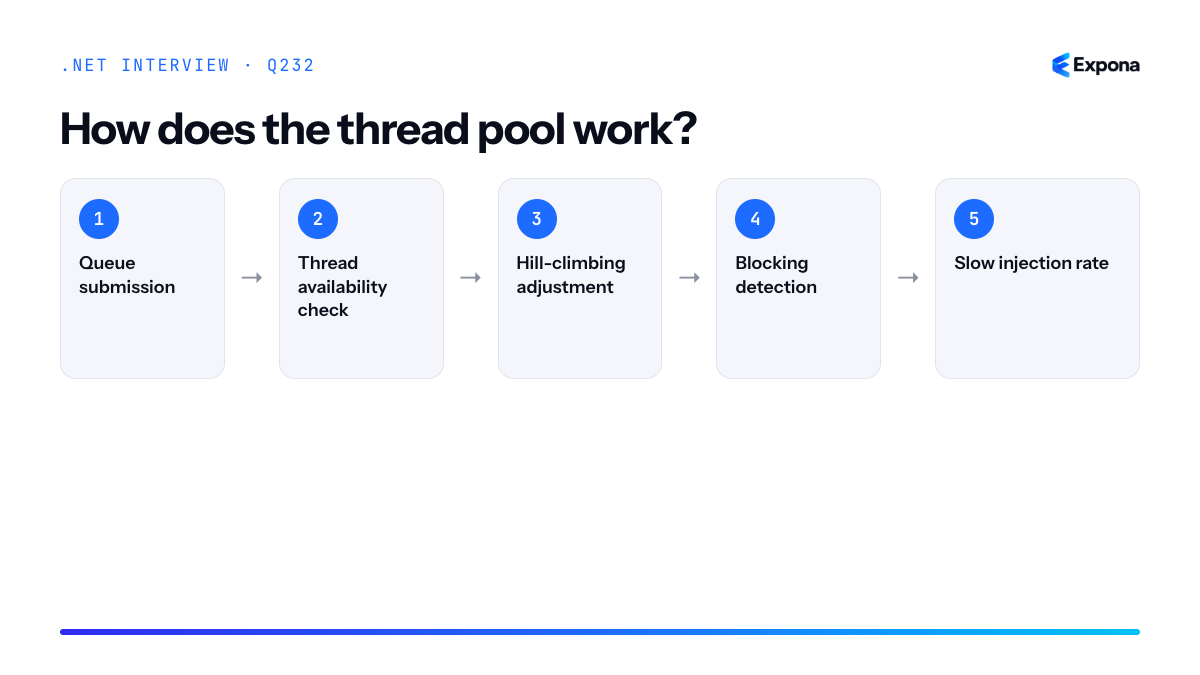
How it works
The thread pool maintains separate queues for work items and uses a sophisticated algorithm to decide when to create or retire threads. Here's the process:
- Queue submission: When you call
ThreadPool.QueueUserWorkItem()or useTask.Run(), the work item enters the global or local queue. - Thread availability check: If idle worker threads exist, one is woken to dequeue and execute the work.
- Hill-climbing adjustment: The thread pool measures throughput (completed work items per unit time). If throughput increases when adding a thread, it injects a new thread; if it decreases, it retires one.
- Blocking detection: If a thread blocks (synchronously waiting), the thread pool cannot assume it will return soon. Instead of waiting, it injects a new thread to keep the queue serviced.
- Slow injection rate: New threads are injected gradually (roughly one every 500ms), so if many threads block simultaneously, starvation occurs—queued work waits while the pool slowly adds capacity.
Example
csharpusing System; using System.Threading; using System.Threading.Tasks; class ThreadPoolDemo { static void Main() { // Get initial pool size ThreadPool.GetMinThreads(out int workerThreads, out int completionPortThreads); Console.WriteLine($"Initial: {workerThreads} worker threads"); // Queue multiple async-friendly tasks for (int i = 0; i < 10; i++) { int taskId = i; Task.Run(async () => { Console.WriteLine($"Task {taskId} started on thread {Thread.CurrentThread.ManagedThreadId}"); await Task.Delay(100); // Non-blocking async wait Console.WriteLine($"Task {taskId} completed"); }); } // Blocking example (DANGEROUS - can cause starvation) // for (int i = 0; i < 10; i++) // { // int taskId = i; // Task.Run(() => // { // Thread.Sleep(1000); // BLOCKS thread - pool injects slowly! // Console.WriteLine($"Task {taskId} done"); // }); // } Thread.Sleep(2000); ThreadPool.GetStats(out long completedWorkItems, out long currentQueueDepth); Console.WriteLine($"Completed: {completedWorkItems}, Queued: {currentQueueDepth}"); } }This example shows how async-friendly work scales efficiently—the thread pool can handle many concurrent operations without creating many threads. The commented blocking code illustrates the danger:
Thread.Sleepblocks the thread, forcing the pool to inject new ones slowly, wasting resources.Key points to mention
- Hill-climbing algorithm: The pool adapts thread count by measuring throughput, not by a fixed ratio or count.
- Slow thread injection: New threads are added gradually (around one per 500ms), so synchronous blocking calls can cause thread pool starvation.
- Async is preferred: Using
async/awaitinstead of blocking keeps threads available for other work and avoids starvation. - Minimum vs. maximum threads: The pool maintains a minimum threshold of threads and can grow up to the processor count times a heuristic factor, with a configurable maximum.
- Sync over async is dangerous: Wrapping async operations with
.Resultor.Wait()blocks the thread and can deadlock in high-contention scenarios.
Common follow-up questions
- How do you configure thread pool size? Use
ThreadPool.GetMinThreads()andThreadPool.SetMinThreads(), or environment variables likeDOTNET_ThreadPool_MinThreads. Setting too high wastes memory; too low causes starvation. - What is the difference between Task and ThreadPool.QueueUserWorkItem?
Taskis higher-level and integrates with async/await and continuation support;QueueUserWorkItemis lower-level and returns void, making it harder to track or chain operations. - How do you detect if the thread pool is saturated? Monitor queue depth using
ThreadPool.GetStats(), use performance counters, or enable ETW tracing to observe thread creation rates and work-item completion times.
Related interview questions
- What is thread pool starvation and how do you detect it?
- What is the danger of sync over async?
- What is the difference between Task.Run and async/await?
Further reading
.NETCsharpasyncPerformance- Queue submission: When you call
233What is thread pool starvation and how do you detect it?
ExpertThread pool starvation occurs when worker threads in the thread pool become blocked on long-running or I/O operations, causing queued work items to wait indefinitely for execution. The symptom is high latency and low CPU utilization—your application appears hung because available threads are exhausted. Detection involves monitoring queue depth, thread counts, and latency metrics via
dotnet-countersor ETW events.How it works
The .NET thread pool maintains a fixed number of worker threads and a queue of work items. When you call
ThreadPool.QueueUserWorkItem()or await on I/O via async/await, the work is either executed immediately by an available thread or queued. If all threads become blocked—for instance, on synchronous I/O, locks, or CPU-intensive calculations—new work sits in the queue while the pool struggles to create enough threads to handle it.The thread pool has injection logic that slowly adds new threads if work remains queued, but this injection is conservative by design to avoid resource explosion. On a server with 100 logical cores, you might start with 100 worker threads; if all are blocked, the pool may add only a few new threads per second. Meanwhile, requests pile up in the queue, and latency skyrockets despite available CPU.
Common causes include blocking operations inside async code (like
Task.Wait()or.Result), synchronous I/O calls, expensive lock contention, or running CPU-bound work on thread pool threads without yielding. Unlike async/await patterns that free threads during I/O, these patterns hold thread resources hostage.Example
csharpusing System.Diagnostics; // STARVATION SCENARIO var sw = Stopwatch.StartNew(); var tasks = new List<Task>(); // Queue 1000 work items that block on I/O for (int i = 0; i < 1000; i++) { tasks.Add(Task.Run(() => { // BLOCKING CALL - holds thread during I/O Thread.Sleep(500); // Simulates sync I/O })); } // Meanwhile, try to queue high-priority work var priority = Task.Run(() => { Console.WriteLine("I'm waiting..."); }); Task.WaitAll(tasks.Concat(new[] { priority }).ToArray()); sw.Stop(); Console.WriteLine($"Total time: {sw.ElapsedMilliseconds}ms"); // With starvation, this takes much longer than expected // because priority task waits for threads to free upThis code queues 1000 blocking operations. Each holds a thread for 500ms, so with ~100 threads available, only ~100 tasks run concurrently; the rest queue up. The priority task starves waiting for a free thread, and total time balloons to several seconds instead of 500ms.
Key points to mention
- Root cause: Blocking operations inside thread pool work prevent thread reuse; async/await frees threads during I/O, so prefer it over
Task.Run()wrapping synchronous calls. - Detection tools: Use
dotnet-counters monitor(watchThreadPool Work Item Queue Length), ETW tracing, or custom diagnostics to capture thread counts and queue depth over time. - Slow injection: The thread pool's conservative thread injection policy means starvation recovery is delayed; immediate symptom is latency spike with CPU underutilization.
- Prevention: Avoid
Task.Wait(),.Result, and synchronous I/O inside async contexts; use pure async paths and respect thread pool budgets.
Common follow-up questions
- How do you fix starvation if you inherit synchronous code? Wrap sync calls with
Task.Run(() => syncMethod())to offload them to a background thread, or use libraries like Nito.Async to bridge the gap. Never block the async call chain itself. - What is a safe queue depth threshold? It depends on your SLA, but generally a growing queue with stable thread count is a red flag. Monitor latency percentiles and queue depth together; alert if queue depth exceeds 10× the thread count or latency p99 exceeds your target.
- Can CompletionSource help?
TaskCompletionSourcedoesn't consume a thread, so it's useful for bridging callbacks to async code—but it doesn't fix blocking operations already on the thread pool.
Related interview questions
- How does the thread pool work?
- What metrics would you alert on for a .NET service?
- What is the difference between Task.Run and async/await?
Further reading
.NETCsharpasyncPerformance- Root cause: Blocking operations inside thread pool work prevent thread reuse; async/await frees threads during I/O, so prefer it over
234How does async/await compile under the hood?
ExpertWhen you write an async method, the C# compiler doesn't execute it as written. Instead, it rewrites the entire method into a state machine struct that implements
IAsyncStateMachine. Eachawaitpoint becomes a state transition; when an awaited task completes, the runtime callsMoveNext()on the state machine to resume execution from where it left off.How it works
The compiler performs several transformations on an async method:
- State machine creation: A private struct is generated inside the declaring type, implementing
IAsyncStateMachine. Local variables become fields on this struct so they persist across state transitions. - State field: The struct contains a
statefield (typically an int) tracking which await point we're at. State 0 might be "start," state 1 "after first await," state 2 "after second await," and so on. - MoveNext method: This is the core of the state machine. It contains a switch statement on the
statefield, executing different blocks of code for each state. After each await, it updates the state and either awaits the next task or returns. - SetStateMachine: This method is called by the runtime to inform the state machine of its own location (needed for proper disposal).
- Continuation wiring: The state machine sets itself as the continuation on each awaited task using
UnsafeOnCompletedorOnCompleted. When the task completes, the runtime invokesMoveNext()again. - Return value wrapping: If the async method returns
Task<T>, anAsyncTaskMethodBuilder<T>is used to construct and return the task that the caller awaits.
This approach allows the method to be paused and resumed without blocking threads, enabling efficient concurrent I/O operations.
Example
csharp// Original async method public async Task<string> FetchDataAsync(string url) { var response = await httpClient.GetAsync(url); var content = await response.Content.ReadAsStringAsync(); return content; } // Simplified compiled version (conceptual) public struct FetchDataAsync_StateMachine : IAsyncStateMachine { private int state = 0; private TaskAwaiter<HttpResponseMessage> awaiter1; private TaskAwaiter<string> awaiter2; private HttpResponseMessage response; private AsyncTaskMethodBuilder<string> builder; public void MoveNext() { try { if (state == 0) { awaiter1 = httpClient.GetAsync(url).GetAwaiter(); if (!awaiter1.IsCompleted) { state = 1; builder.AwaitUnsafeOnCompleted(ref awaiter1, ref this); return; } } if (state == 1) { response = awaiter1.GetResult(); awaiter2 = response.Content.ReadAsStringAsync().GetAwaiter(); if (!awaiter2.IsCompleted) { state = 2; builder.AwaitUnsafeOnCompleted(ref awaiter2, ref this); return; } } if (state == 2) { var result = awaiter2.GetResult(); builder.SetResult(result); } } catch (Exception ex) { builder.SetException(ex); } } public void SetStateMachine(IAsyncStateMachine stateMachine) { } }This demonstrates how the compiler unrolls two sequential await points into a state machine that can pause execution at each await, allowing threads to be freed while operations complete asynchronously.
Key points to mention
- Each
awaitbecomes a state in an auto-generated struct; local variables become struct fields to survive across state transitions. - The
MoveNext()method contains a switch on the state field, executing different code paths depending on which await point has just completed. AsyncTaskMethodBuildermanages theTaskobject returned to the caller and coordinates result/exception propagation.- The state machine registers itself as a continuation on awaited tasks; when those tasks complete, the runtime calls
MoveNext()again to resume. - This design enables efficient thread-pooling and prevents blocking—threads are freed while awaiting I/O, then reused when results arrive.
Common follow-up questions
- What is the performance cost of async/await? — Minimal at runtime; the state machine is typically stack-allocated. The cost is at compile time (larger IL). See What is async and await? for more context.
- Why can async methods deadlock? — If you block on an async method with
.Resultor.Wait()on a thread with a synchronization context, the continuation may not find a free thread, causing a deadlock. - How does ConfigureAwait affect the state machine? — It changes which continuation callback is used (whether the synchronization context is captured), but the overall state machine structure remains the same.
Related interview questions
Further reading
.NETCsharpasync- State machine creation: A private struct is generated inside the declaring type, implementing
235What is SynchronizationContext?
ExpertSynchronizationContext is a framework abstraction that defines which thread (or execution environment) continuations of asynchronous operations will run on. It captures the "current context" and allows code to post work back to that context via
PostorSendmethods. UI frameworks (WinForms, WPF) use it to marshal callbacks back to the UI thread; ASP.NET Core hasnullcontext, so continuations run on any available thread pool thread.How it works
SynchronizationContextis a thread-local or async-local value that represents the execution environment's scheduling rules. When you await a Task in a context-aware framework, the continuation (the code afterawait) is posted back to that context rather than running on whatever thread completes the Task.The mechanism works through
SynchronizationContext.Current, which you can read at any point. During async/await operations, ifCurrentis non-null, the async state machine callscontext.Post(continuation, state)to schedule the continuation back in that context. For UI frameworks,Postenqueues work on the UI thread's message pump. For ASP.NET Core, there is no context, so continuations run on a thread pool thread immediately.This creates a natural "stickiness" to the originating thread or context without explicit thread marshaling code. You write
await SomeAsync(), and the code after it automatically returns to the UI thread if you started on one.Example
csharp// WinForms example - SynchronizationContext captures UI thread public partial class Form1 : Form { public Form1() { InitializeComponent(); } private async void Button_Click(object sender, EventArgs e) { // SynchronizationContext.Current is the UI context here var context = SynchronizationContext.Current; Console.WriteLine($"Before: {Thread.CurrentThread.ManagedThreadId}"); // This runs on a thread pool thread await Task.Delay(1000); // Continuation automatically returns to UI thread (same as "Before") Console.WriteLine($"After: {Thread.CurrentThread.ManagedThreadId}"); MessageBox.Show("Back on UI thread!"); } } // ASP.NET Core example - no SynchronizationContext public class HomeController : Controller { public async Task Index() { // SynchronizationContext.Current is null in ASP.NET Core Console.WriteLine($"Before: {Thread.CurrentThread.ManagedThreadId}"); await Task.Delay(1000); // Continuation runs on any thread pool thread (not a specific "home" thread) Console.WriteLine($"After: {Thread.CurrentThread.ManagedThreadId}"); // Different thread return Ok("Done"); } }In the WinForms example, both "Before" and "After" print the same thread ID because the context marshals the continuation back. In ASP.NET Core, the thread IDs will likely differ because there is no context to return to.
Key points to mention
SynchronizationContext.Currentis captured by the async state machine; it is not passed through method parameters—it is implicit and context-aware.- UI frameworks (WinForms, WPF, UWP) install a SynchronizationContext that schedules work back onto the UI thread; ASP.NET Core deliberately has none to avoid thread stickiness and improve scalability.
- The danger is calling
.Resultor.Wait()on an async method while holding the context—it deadlocks if the continuation needs the same context and that thread is blocked. - You can disable context capture by calling
ConfigureAwait(false), which tells the state machine to run the continuation on any thread, improving performance in libraries. ExecutionContextis separate from SynchronizationContext; it flows logical call context (likeAsyncLocal<T>), while SynchronizationContext defines where code runs.
Common follow-up questions
- Why should I use
ConfigureAwait(false)in library code? — It tells the state machine not to post back to the captured context, avoiding unnecessary context switching and allowing the continuation to run on any thread pool thread, which is faster and prevents accidental UI dependencies. - Can I create a custom SynchronizationContext? — Yes; you subclass it and override
PostandSendto implement your own scheduling logic. This is used in testing frameworks and custom execution environments. - How does this relate to the thread pool? — When a Task completes on a thread pool thread, the async state machine checks the SynchronizationContext; if non-null, it posts the continuation back via
Post; otherwise, it runs inline or queues to the thread pool.
Related interview questions
.NETCsharpaspnetcoreasync236What is ExecutionContext?
ExpertExecutionContext is a .NET runtime object that flows ambient data—such as AsyncLocal<T> values, culture settings, and security context—across thread boundaries and asynchronous continuations. It is automatically captured and restored whenever you await, switch threads, or queue work to the thread pool, ensuring that contextual information remains consistent throughout the logical flow of execution.
How it works
When you enter an async method or queue a work item to the thread pool, the runtime captures the current ExecutionContext at that point. This context is then restored before the continuation executes on a potentially different thread. This process is called context flow.
The context includes:
- AsyncLocal<T> values — logical thread-local storage that flows across awaits.
- Culture and UI culture — CultureInfo settings for formatting and parsing.
- Security principal — Thread.CurrentPrincipal for authorization checks.
- Correlation IDs and tracing context — diagnostic and logging information.
By default, context flow is automatic and transparent. However, in performance-critical, low-level library code, you can suppress context flow using
ExecutionContext.SuppressFlow()to avoid the overhead of capturing and restoring context on every operation. This is a micro-optimization rarely needed in application code.Example
csharpusing System; using System.Threading.Tasks; var requestId = new AsyncLocal<string> { Value = "REQ-12345" }; Console.WriteLine($"Main: {requestId.Value}"); // REQ-12345 await Task.Run(async () => { // Context flows: requestId is still "REQ-12345" Console.WriteLine($"Task 1: {requestId.Value}"); // REQ-12345 await Task.Delay(10); Console.WriteLine($"After await: {requestId.Value}"); // REQ-12345 }); // Suppressing context flow (rare optimization) using (ExecutionContext.SuppressFlow()) { await Task.Run(() => { // Context does NOT flow; requestId is null Console.WriteLine($"Suppressed: {requestId.Value}"); // (null) }); }This example shows how AsyncLocal values automatically flow across awaits and thread switches, and how explicit suppression prevents that flow for performance reasons.
Key points to mention
- Automatic by default: You do not need to manually manage context flow; the runtime handles it transparently during awaits and thread pool callbacks.
- Logical vs. physical threads: ExecutionContext maintains "logical" thread identity across multiple physical threads, making async code feel like a single thread from a context perspective.
- Suppression is rare: Only suppress context flow in library code that must minimize overhead per operation (e.g., high-throughput logging, event dispatch). Application code should never suppress.
- Captures at await points: Context is captured when you await or queue a callback; restoration happens before the continuation runs, potentially on a different thread.
- Immutable and thread-safe: ExecutionContext snapshots are immutable and can be safely run on any thread via
ExecutionContext.Run().
Common follow-up questions
- How does ExecutionContext differ from ThreadLocal<T>? — ThreadLocal is tied to a physical thread and is NOT inherited; ExecutionContext flows logically across awaits and includes AsyncLocal values. ThreadLocal breaks with async.
- Why would you ever suppress context flow? — In extreme micro-optimization scenarios (e.g., millions of tiny tasks per second), capturing and restoring context adds overhead. Suppression is used in internal BCL code for performance, but application code almost never needs it.
- Can you manually create and run an ExecutionContext? — Yes, via
ExecutionContext.Capture()andExecutionContext.Run(). This is advanced and rarely needed except in framework or diagnostic code.
Related interview questions
- How does AsyncLocal<T> work?
- What is thread pool starvation and how do you detect it?
- What is the difference between Task.WhenAll and Parallel.ForEach?
Further reading
.NETCsharpasyncPerformance237How does AsyncLocal<T> work?
ExpertAsyncLocal<T> stores values in the ExecutionContext so they automatically flow to child async operations, but changes made by child tasks do not propagate back to the parent. This makes it ideal for maintaining request-scoped state like correlation IDs, tenant information, or user context across async call chains without explicit parameter passing.
How it works
AsyncLocal<T> is a container that holds a value per logical async execution flow. When you set a value on an AsyncLocal<T>, it is stored in the current ExecutionContext. When an async operation (via await) or a task continuation runs, the runtime captures and flows the ExecutionContext to the child operation, making the AsyncLocal value accessible there.
The key isolation mechanism is that each async task gets its own copy of the ExecutionContext. Changes to AsyncLocal values in child tasks do not affect the parent's value—this prevents child operations from corrupting shared state. This is different from thread-local storage, which is thread-specific and does not flow across await boundaries or thread pool threads.
AsyncLocal uses a value accessor function pattern: you can optionally provide a
ValueChangedHandlerdelegate that fires whenever the value changes within that execution context, enabling logging or cleanup logic.Example
csharpvar correlationId = new AsyncLocal<string>(); async Task ProcessRequest(string requestId) { correlationId.Value = requestId; Console.WriteLine($"Parent: {correlationId.Value}"); // Child task inherits the correlation ID await Task.Run(async () => { Console.WriteLine($"Child 1: {correlationId.Value}"); correlationId.Value = "modified-in-child"; }); // Parent still has original value Console.WriteLine($"Parent after child: {correlationId.Value}"); // Another child gets the original value await Task.Delay(10); Console.WriteLine($"Child 2 (after delay): {correlationId.Value}"); } await ProcessRequest("req-12345"); // Output: // Parent: req-12345 // Child 1: req-12345 // Parent after child: req-12345 // Child 2 (after delay): req-12345This example demonstrates how the correlation ID flows to child operations automatically, and how modifications in one child task do not affect the parent or sibling tasks.
Key points to mention
- ExecutionContext flow: AsyncLocal rides on ExecutionContext, which is automatically captured and restored across await points and task continuations.
- Copy-on-write semantics: Child async operations receive a snapshot of the parent's context; changes in children are isolated and do not leak back.
- No thread affinity: Unlike ThreadLocal<T>, AsyncLocal works correctly across thread pool switches and async/await boundaries, making it suitable for async-heavy applications.
- Value changed callbacks: You can register a ValueChangedHandler to react to value changes, useful for diagnostics or side effects (e.g., logging).
- Performance consideration: Excessive ExecutionContext flow can have overhead; use AsyncLocal for truly ambient values, not high-frequency state.
Common follow-up questions
- How does Task.Run vs. async/await affect ExecutionContext flow, and when does AsyncLocal become inaccessible?
- Can you use AsyncLocal inside Task.WhenAll or Parallel.ForEach, and what are the gotchas?
- How do you suppress ExecutionContext flow for performance, and what are the security implications?
Related interview questions
- What is ExecutionContext?
- What is the difference between Task.Run and async/await?
- What is the difference between Task.WhenAll and Parallel.ForEach?
Further reading
.NETCsharpasync238What are IValueTaskSource and pooled ValueTasks?
ExpertIValueTaskSource is a low-level interface that allows reusable objects to back
ValueTaskinstances, eliminating heap allocations in hot async paths. Pooled ValueTasks are created by implementingIValueTaskSourceon objects retrieved from object pools, enabling frameworks like sockets and channels to handle millions of concurrent operations without garbage collection pressure. This is advanced infrastructure code rarely needed in application code.How it works
ValueTask<T>is a discriminated union that wraps either aTresult, an exception, or anIValueTaskSource<T>reference. When you return aValueTaskfrom an async method, it may allocate a state machine on the heap. However, if you explicitly construct aValueTaskfrom anIValueTaskSource<T>, the runtime stores only the interface reference—no additional allocation occurs.The pattern works like this: a pooled object implements
IValueTaskSource<T>, stores completion state, and is returned to a pool when done. When a new operation begins, the object is retrieved from the pool, reinitialized, and handed to the caller as aValueTask. The caller awaits it without knowing it's pooled. Once the operation completes, the object must be explicitly returned to the pool—there is no automatic cleanup.This approach trades complexity for allocation elimination. It's only worthwhile in extreme scenarios: millions of short-lived async operations per second, where even tiny allocations cause measurable GC pressure. Socket I/O and channel operations are prime examples because they process request/response pairs at machine scale.
Example
csharppublic class PooledValueTaskSource : IValueTaskSource<int> { private int _result; private Exception _exception; private ManualResetValueTaskSourceCore<int> _core; public ValueTask<int> GetValueTask() => new ValueTask<int>(this, _core.Version); public int GetResult(short token) { if (_exception != null) throw _exception; return _result; } public ValueTaskSourceStatus GetStatus(short token) => _core.GetStatus(token); public void OnCompleted(Action<object> continuation, object state, short token, ValueTaskSourceOnCompletedFlags flags) => _core.OnCompleted(continuation, state, token, flags); public void SetResult(int result) { _result = result; _core.SetResult(result); } public void SetException(Exception ex) { _exception = ex; _core.SetException(ex); } public void Reset() { _exception = null; _core.Reset(); } }This pooled source wraps
ManualResetValueTaskSourceCore<T>, which handles the state machine legwork. Callers await the returnedValueTaskwhile the source is reset and reused from a pool.Key points to mention
IValueTaskSource<T>avoids heap allocation of the state machine; only the interface reference is stored in theValueTaskstruct.- Pooled ValueTasks require manual lifecycle management—you must return the object to the pool after completion; the runtime provides no automatic cleanup.
ManualResetValueTaskSourceCore<T>provides most of the boilerplate; you implementGetResult()and manage your custom state.- Misuse is common: forgetting to reset state, double-awaiting, or pool corruption lead to subtle, hard-to-debug bugs.
- This pattern appears in Kestrel, sockets, and channels; application code almost never needs it.
Common follow-up questions
- Why not use
Task<T>pooling instead? Tasks don't implementIValueTaskSource; onlyValueTask<T>can be backed by a pooled source. Tasks always allocate. - How do you debug pooled ValueTask corruption? Use versioning tokens to detect misuse, log lifecycle events, and use memory profilers to detect unexpected heap growth.
- When should I use this in my application? Almost never. Measure GC impact first. If GC is truly a bottleneck after profiling, consider using libraries that already pool (e.g., System.IO.Pipelines) rather than implementing your own.
Related interview questions
- What is boxing and unboxing?
- What is high-performance logging with LoggerMessage?
- How does the Kestrel request pipeline achieve high performance?
Further reading
.NETCsharpasyncPerformance239How do you write a custom awaiter?
ExpertTo write a custom awaiter, implement a public
GetAwaiter()method on your type that returns an object implementing the awaiter pattern: a type withIsCompletedproperty,OnCompleted(Action)orUnsafeOnCompleted(Action)method, andGetResult()method. This allows you to await custom primitives and async workflows that don't inherit fromTaskorValueTask.How it works
When you write
await x, the C# compiler looks for aGetAwaiter()method on typex. This method returns an awaiter object that controls the await semantics. The awaiter pattern is a compile-time protocol—not an interface—so you define the methods directly on your type.The compiler checks four things on the awaiter:
- IsCompleted property: A bool indicating whether the operation finished synchronously. If true,
GetResult()is called immediately without suspending. - OnCompleted or UnsafeOnCompleted: A method accepting an
Actioncallback. Called ifIsCompletedis false; the callback resumes the async method when the operation completes. - GetResult(): Returns the result (or void) and propagates exceptions. Called after completion.
This protocol decouples the await keyword from
Task, enabling awaiting any custom computation pattern—timers, IO completions, manual state machines, or game loop frames.Example
csharppublic class DelayAwaiter { private readonly int _milliseconds; private bool _isCompleted; public DelayAwaiter(int milliseconds) => _milliseconds = milliseconds; public DelayAwaiter GetAwaiter() => this; public bool IsCompleted { get => _isCompleted; private set => _isCompleted = value; } public void OnCompleted(Action continuation) { var timer = new System.Timers.Timer(_milliseconds); timer.Elapsed += (_, _) => { IsCompleted = true; continuation(); }; timer.Start(); } public void GetResult() { } } // Usage async Task Example() { var delayer = new DelayAwaiter(1000); await delayer; Console.WriteLine("Done!"); }This custom awaiter wraps a timer and allows awaiting its completion without using
TaskorThread.Sleep.Key points to mention
- Protocol, not interface: The awaiter pattern is structural (duck-typing); you don't implement an interface. This allows inline methods and struct awaiters for zero-allocation patterns.
- UnsafeOnCompleted is preferable in libraries: It skips ExecutionContext flow for better performance, but
OnCompletedis safer for user code. Both must be supported. - Return type flexibility:
GetResult()can return any type—void,T, or a custom struct—allowingawaitto produce values withoutTask<T>. - Rarely needed in application code: Custom awaiters are mostly used in frameworks (async libraries, game engines, UI systems) and low-level performance optimization. Most apps use
TaskorValueTask. - ConfigureAwait affects continuation: The compiler recognizes
ConfigureAwait(bool)calls on awaiters; implement it to controlExecutionContextflow.
Common follow-up questions
- How does
ValueTaskdiffer from a custom awaiter?ValueTask<T>is a struct wrapper overTask<T>or a customIValueTaskSource<T>that reduces allocations. It's the standard way to optimize Task overhead without writing raw awaiters. - Why not just use
Task.RunorTask.Delay? Custom awaiters enable zero-allocation paths (struct awaiters), integration with non-Task async primitives (OS handles, event loops), and fine-grained control over continuation behavior—critical for high-performance libraries. - How do you handle exceptions in GetResult? Simply throw the exception from
GetResult(); the await machinery propagates it to the async method's try-catch handlers automatically.
Related interview questions
- How do you write custom middleware?
- How do you implement rate limiting in .NET 8?
- What is an interface?
Further reading
.NETCsharpasync- IsCompleted property: A bool indicating whether the operation finished synchronously. If true,
240What are the memory model guarantees in .NET?
ExpertThe .NET memory model guarantees that volatile reads/writes and locks establish acquire-release semantics, preventing the JIT and CPU from reordering memory operations across these barriers. Without synchronization, both the compiler and processor may reorder reads and writes to shared state, leading to visibility and ordering bugs in multi-threaded code.
How it works
The .NET memory model is built on two key concepts: visibility and ordering. Visibility ensures that changes made by one thread become visible to other threads; ordering ensures that operations happen in a predictable sequence relative to synchronization points.
By default, the JIT compiler and modern CPUs use aggressive optimizations that reorder operations for performance. For example, a write to a non-volatile field might be delayed, or a read might be speculated before an earlier write completes. This is legal within a single thread (respecting data dependencies), but it breaks correctness in multi-threaded scenarios.
The CLR provides two primary synchronization mechanisms:
1. Volatile reads and writes: The
volatilekeyword creates an acquire barrier on reads and a release barrier on writes. A volatile read acts as an acquire fence (preventing subsequent operations from moving before it), and a volatile write acts as a release fence (preventing prior operations from moving after it).2. Locks (Monitor.Enter/Exit): Entering a lock acts as an acquire fence, and exiting acts as a release fence. This provides mutual exclusion plus memory ordering guarantees.
The
Interlockedclass provides atomic operations with implicit memory barriers.Thread.MemoryBarrier()andVolatile.Read/Writeoffer explicit fine-grained control. The memory model guarantees that these operations will emit the appropriate CPU instructions (memory fences) to prevent harmful reordering.Example
csharppublic class MemoryModelDemo { private int _x = 0; private int _y = 0; private volatile bool _ready = false; public void Writer() { _x = 1; _y = 2; _ready = true; // volatile write = release barrier } public void Reader() { if (_ready) // volatile read = acquire barrier { // Guaranteed to see _x == 1 and _y == 2 Console.WriteLine($"x={_x}, y={_y}"); } } }The volatile write to
_readycreates a release barrier, ensuring writes to_xand_yhappen before the flag is set. The volatile read creates an acquire barrier, ensuring the check of_readyhappens before reading_xand_y, guaranteeing visibility.Key points to mention
- Volatility creates acquire-release semantics, not full barriers; subsequent operations can still reorder before a volatile read, and prior operations can reorder after a volatile write, as long as they don't violate data dependencies.
- Locks provide the strongest guarantee: entering/exiting a lock is both an acquire and release operation, preventing all reordering across the critical section.
- The memory model is platform-agnostic; it abstracts away CPU differences (x86, ARM, etc.) so code works correctly on any architecture.
Interlockedoperations are faster than locks for simple state changes and provide full barriers by default.- Without synchronization, race conditions and memory visibility issues are undefined behavior; the JIT can make arbitrary assumptions.
Common follow-up questions
- What's the difference between a volatile read and a volatile write? A volatile read is an acquire operation (no subsequent ops reorder before it); a volatile write is a release operation (no prior ops reorder after it).
- Why not just use volatile everywhere? Volatility has CPU overhead (memory fences). Use it only where needed; locks are clearer for protecting critical sections.
- Does
lockguarantee atomicity? No;lockprevents concurrent access, but operations inside are still individual. Combine withInterlockedfor atomic operations like compare-and-swap.
Related interview questions
Further reading
.NETCsharpPerformance241When would you use Interlocked over lock?
ExpertUse Interlocked for lock-free atomic operations on single variables like counters or flags; use lock when you need to protect multiple fields that must change together as a logical unit. Interlocked avoids blocking and context switches, making it faster for simple operations, while lock provides mutual exclusion for complex critical sections.
How it works
Interlocked operations are atomic at the CPU level—they complete without interruption and don't require acquiring a monitor lock. The CPU's atomic instructions ensure that the operation is indivisible, and all threads see a consistent view of the value immediately after the operation completes. This eliminates the overhead of lock acquisition, waiter queues, and context switching.
Lock, by contrast, serializes access to a code block by acquiring a monitor. When a thread holds a lock, others must wait in a queue, potentially triggering expensive context switches. Lock is necessary when your critical section involves multiple state changes that must appear atomic as a group—for example, updating both a balance and a transaction count must happen together, or neither at all.
Interlocked methods work only on single reference or numeric types (int, long, double, object references). You cannot atomically update two fields with a single Interlocked call, which is why lock remains essential for complex multi-field invariants.
Example
csharp// Interlocked for simple counter – no lock needed public class RequestCounter { private long _count = 0; public void IncrementRequest() { Interlocked.Increment(ref _count); } public long GetCount() => Interlocked.Read(ref _count); } // Lock for multi-field invariant public class BankAccount { private decimal _balance = 1000m; private int _transactionCount = 0; private readonly object _syncLock = new(); public void Transfer(decimal amount) { lock (_syncLock) { // Both fields must change together _balance -= amount; _transactionCount++; } } }The first example uses Interlocked.Increment on a single counter—fast and safe without lock overhead. The second requires lock because decrementing the balance and incrementing the transaction count must be atomic together; if only one succeeded, the account state would be corrupt.
Key points to mention
- Performance: Interlocked is significantly faster for simple operations because it avoids lock acquisition, waiter queue management, and context switches.
- Scope: Interlocked works only on single variables (int, long, double, object refs); lock works on arbitrary critical sections with multiple fields.
- Lock-free programming: Interlocked is part of a lock-free concurrency strategy, useful in high-contention scenarios where many threads compete for updates.
- Use lock for invariants: When multiple fields must change atomically to maintain a valid state, lock is the right tool; Interlocked cannot enforce multi-field atomicity.
- CPU atomicity: Interlocked leverages CPU-level atomic instructions (Compare-and-Swap, memory barriers); lock is a managed construct relying on the OS monitor.
Common follow-up questions
- Can Interlocked guarantee visibility across all threads? Yes; Interlocked operations include implicit memory barriers (acquire/release semantics) to ensure all threads see changes consistently.
- What about Interlocked.CompareExchange for more complex updates? CompareExchange enables optimistic concurrency—retry logic—for single-field updates, but it still cannot atomically update multiple fields; for multi-field invariants, use lock or Monitor.
- When would I use Interlocked over ReaderWriterLockSlim? Interlocked is for very simple, frequent updates; ReaderWriterLockSlim is for read-heavy workloads with occasional writes. If you only need a single counter, Interlocked is always faster.
Related interview questions
- What are concurrent collections?
- What is the difference between lock and Monitor?
- What is the difference between Task.WhenAll and Parallel.ForEach?
Further reading
.NETCsharpasync242What is false sharing?
ExpertFalse sharing occurs when multiple threads write to different variables that reside on the same CPU cache line, causing repeated cache invalidation and unnecessary coherency traffic. Even though the threads are working on logically independent data, the hardware cache system treats the entire line as a single unit, forcing expensive synchronization. This dramatically reduces performance despite zero logical contention.
How it works
Modern CPUs organize memory into cache lines (typically 64 bytes on x86-64). When a thread modifies a value, the entire cache line containing that value is invalidated across all other CPU caches. If two threads on different cores write to different variables within the same cache line, each write triggers a cache miss on the other core, forcing it to reload the line from L3 or main memory. This creates a false dependency that serializes access even though the data is unrelated.
The effect is insidious: the code looks fine, has no locks or explicit synchronization, but exhibits pathological performance degradation under concurrent load. As you add more threads, performance often gets worse, not better.
Example
csharp// False sharing: two fields fit in one cache line public class BadCounter { public long Count1 = 0; public long Count2 = 0; } // Good: padding ensures each field is on its own cache line public class GoodCounter { public long Count1 = 0; [System.Runtime.InteropServices.FieldOffset(64)] public long Count2 = 0; } // Modern .NET approach: Interlocked or atomic operations public class ModernCounter { private long _count1; private long _count2; public void IncrementCount1() => Interlocked.Increment(ref _count1); public void IncrementCount2() => Interlocked.Increment(ref _count2); } // Benchmark var bad = new BadCounter(); var cts = new CancellationTokenSource(TimeSpan.FromSeconds(5)); var t1 = Task.Run(() => { while (!cts.Token.IsCancellationRequested) bad.Count1++; }); var t2 = Task.Run(() => { while (!cts.Token.IsCancellationRequested) bad.Count2++; }); Task.WaitAll(t1, t2); // Results: millions of increments (false sharing kills perf)This example shows how two independent long fields can sit on the same 64-byte cache line. When thread 1 increments Count1 and thread 2 increments Count2, each write invalidates the other's cached copy, even though they never touch the same logical data.
Key points to mention
- Cache line size matters: x86-64 typically uses 64-byte lines; ARM may differ. Know your target platform.
- Padding solutions: Add dummy fields or use
FieldOffsetto separate hot data, though this wastes memory. - Modern alternatives: Use
Interlockedoperations,lock, or lock-free data structures that account for cache layout (e.g.,System.Collections.Concurrent). - Profiler detection: Cache-miss counters (perf, VTune, ETW) reveal false sharing; raw performance cliffs are often the first sign.
- Trade-off: Padding wastes memory; synchronization adds latency. Choose based on contention level and workload.
Common follow-up questions
- How do you detect false sharing in production? Use performance counters (cache misses, L3 misses), profile with ETW or perf, and observe if throughput drops as thread count increases despite low lock contention.
- What's the relationship between false sharing and lock contention? False sharing is not lock contention—there are no locks. It's a hardware artifact. However, both degrade concurrent performance, and thread pool starvation can mask the real cause in some scenarios.
- Should I always pad my fields? Only if profiling shows cache-line contention. Padding wastes memory; modern workloads often benefit more from better algorithms or reducing lock time.
Related interview questions
- What is thread pool starvation and how do you detect it?
- What metrics would you alert on for a .NET service?
- What is the difference between Task.Run and async/await?
Further reading
.NETCsharpasync243What is Span<T> and why can't it be stored on the heap?
ExpertSpan<T> is a ref struct that provides a type-safe view over a contiguous block of memory—whether on the stack, heap, or unmanaged memory. It cannot be stored on the heap because it may reference stack memory, and allowing a heap reference to point to stack memory would violate memory safety: the stack frame could be deallocated while the heap object still holds a reference to it.
How it works
Span<T> is declared as a
ref struct, a C# language feature that restricts it to stack-only storage. When you declare a Span<T> variable, it lives on the stack and holds two pieces of data: a reference (pointer) to the first element and a length. This allows it to represent memory ranges without allocating additional objects on the heap.The compiler enforces strict rules: a ref struct cannot be a field of a normal class, cannot be boxed, cannot be used as a generic type argument, and cannot be captured by lambdas or async methods. These restrictions exist because the .NET runtime cannot track when a ref struct's referenced memory becomes invalid. If you stored a Span<T> on the heap as a field, the heap object would outlive the stack frame containing the memory the Span points to, creating a use-after-free vulnerability.
Consider the difference between stack and heap memory: stack memory is automatically freed when a method returns, but heap objects persist until garbage collection. A heap-resident Span<T> referencing stack memory could be accessed after that stack memory is reused or deallocated, leading to memory corruption.
Example
csharppublic class Demo { // ❌ Compiler error: ref struct cannot be a field // private Span<int> _data; // ✅ Valid: Span used in a method (stack-only) public void ProcessData() { Span<int> buffer = stackalloc int[10]; buffer[0] = 42; Console.WriteLine(buffer[0]); // 42 } // ❌ Compiler error: ref struct cannot be returned // public Span<int> GetSpan() // { // Span<int> temp = stackalloc int[5]; // return temp; // temp memory is freed when method returns // } // ✅ Valid: pass Span by reference public void FillBuffer(Span<int> buffer) { for (int i = 0; i < buffer.Length; i++) { buffer[i] = i * 2; } } }This code demonstrates that Span<T> works perfectly within method scope but cannot escape to the heap—the compiler prevents you from returning it or storing it as a class field.
Key points to mention
- ref struct restriction: Span<T> is declared
ref struct, which means it can only live on the stack, never on the heap. - Memory safety: Stack memory is freed when its frame exits; if a heap object held a reference to it, the reference would dangle and cause crashes or security vulnerabilities.
- Compiler enforcement: The C# compiler prevents Span<T> from being a class field, being boxed, or being captured in closures.
- Performance benefit: Since Span<T> avoids heap allocation and GC pressure, it is ideal for performance-critical code like parsers and serializers.
- Heap alternative: If you need a heap-resident memory view, use Memory<T> instead, which wraps heap memory safely.
Common follow-up questions
- Why use Span<T> instead of arrays or List<T>? Span<T> avoids allocation overhead, reduces garbage collection pressure, and works uniformly over stack memory, heap memory, and unmanaged buffers.
- Can Span<T> reference heap memory? Yes, Span<T> can wrap array or managed heap data, but it still cannot itself be stored on the heap—it remains stack-only.
- What about
stackalloc? stackalloc allocates memory on the stack and returns a Span<T> pointing to it; this is safe only within the method scope because the stack memory is freed on method exit.
Related interview questions
.NETCsharpPerformance- ref struct restriction: Span<T> is declared
244What is the difference between Span<T> and Memory<T>?
ExpertMemory<T> is a heap-allocated, reference-counted wrapper around contiguous memory that can be used across async/await boundaries and method returns, whereas Span<T> is a stack-only value type that provides zero-allocation access to contiguous memory but cannot cross await points or be stored in fields. In practice, Memory<T> produces a Span<T> via
.Spanproperty when you need the performance benefits within a synchronous context.How it works
Span<T> is a
ref struct—a stack-only type that holds a pointer and length. Because it lives only on the stack and cannot be boxed or stored in heap objects, it enables the JIT to make aggressive inlining and bounds-check elimination optimizations. This makes Span incredibly fast for synchronous scenarios like parsing or array slicing.Memory<T> is a regular struct that wraps an
MemoryManager<T>(or ArrayPool-backed array) on the heap. Because it's heap-allocated, it can be stored in fields, passed across async boundaries, and used in collections. When you need the speed of Span within a synchronous block, you callmemory.Spanto get a Span view of that memory.Think of it this way: Memory<T> is the owner of memory (with a defined lifetime), and Span<T> is a temporary view into that memory. You can create many Spans from one Memory, but only within the scope where the Memory is alive.
Example
csharp// Memory<T> can be stored and used across async boundaries async Task ProcessDataAsync(Memory<byte> buffer) { // Within a synchronous context, convert to Span for performance Span<byte> span = buffer.Span; // Use span for fast, zero-allocation operations for (int i = 0; i < span.Length; i++) { span[i] = (byte)(span[i] * 2); } // Can await without Span (Memory is safe across await) await Task.Delay(100); // After await, can get a new Span view if needed span = buffer.Span; } // Span<T> cannot be stored in fields or used across await // This does NOT compile: // class BadDesign { Span<byte> field; } // async Task BadAsync(Span<byte> span) { await Task.Delay(100); }This example shows how
ProcessDataAsyncaccepts aMemory<byte>(safe to pass to async), extracts aSpan<byte>for efficient in-place operations, then awaits without the Span, and re-obtains a Span afterward if needed.Aspect Span<T> Memory<T> Storage Stack only (ref struct) Heap-allocated, reference counted Can cross async/await No—compiler error Yes—safe across awaits Can store in fields No—ref struct restriction Yes—regular struct Performance Highest—aggressive JIT optimizations Good—one extra indirection to Span Typical use Synchronous parsing, slicing, tight loops API boundaries, async methods, collections Access pattern Direct pointer + length Call .Spanto get Span view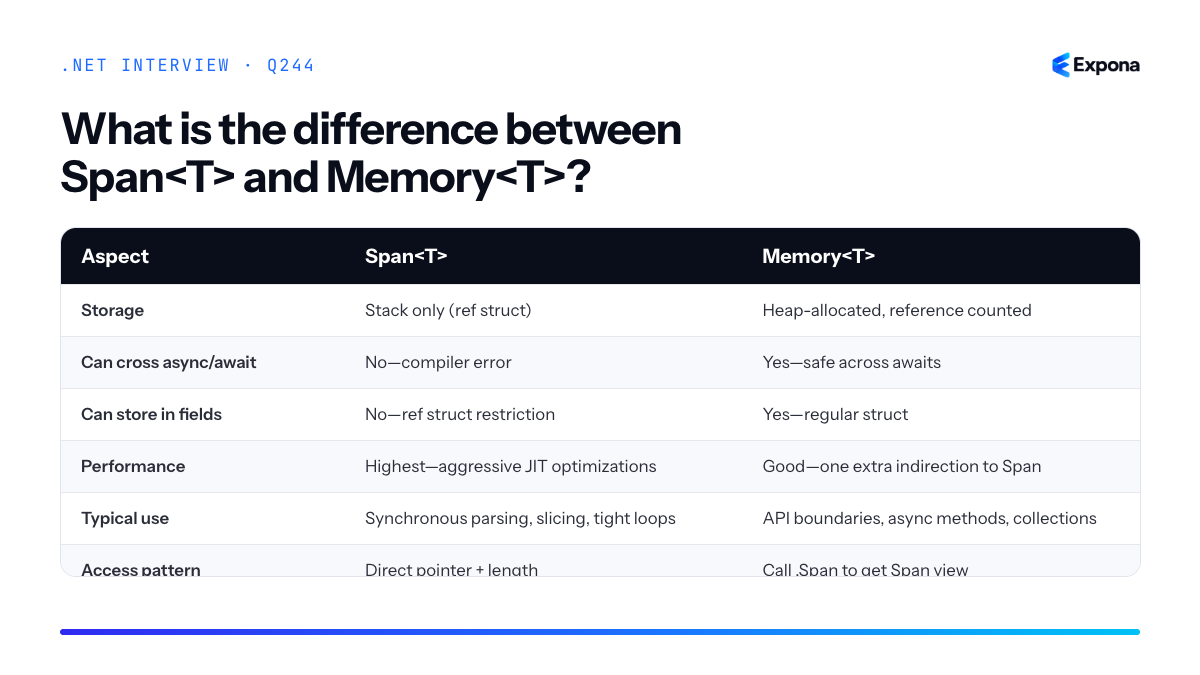
Key points to mention
- ref struct restriction: Span cannot be boxed, stored in object fields, or captured by closures. This is by design to enable JIT optimizations.
- Memory is the bridge: Use Memory<T> at API boundaries and async methods; convert to Span internally for performance.
- Zero allocation: Span itself is zero-cost (just a pointer + length on the stack), but Memory may allocate or use pooled arrays underneath.
- Lifetime safety: Memory has a well-defined lifetime; Span is a temporary view that must not outlive the underlying buffer.
- ArrayPool integration: Memory<T> works seamlessly with
MemoryPool<T>and ArrayPool for efficient buffer reuse.
Common follow-up questions
- Can you pass Span<T> to an async method? Why or why not?
- How do you safely use Memory<T> with
ArrayPool<T>to avoid buffer lifetime issues? - When would you choose Memory<T> over a simple array return type in an API?
Related interview questions
.NETCsharpPerformance245What is ArrayPool<T>?
ExpertArrayPool<T> is a memory pooling mechanism in .NET that allows you to rent and return temporary arrays from a shared pool instead of allocating new arrays on the heap. This reduces garbage collection pressure and improves performance in scenarios where you frequently allocate short-lived arrays, particularly in high-throughput or latency-sensitive workloads.
How it works
ArrayPool<T> maintains a collection of pre-allocated arrays organized by size. When you call
Rent(int minimumLength), the pool returns an array that is at least as large as requested—it may be larger. The pool reuses these arrays across multiple operations, avoiding repeated heap allocations. When you finish using an array, you callReturn()to release it back to the pool for future use.Internally, ArrayPool uses a bucketing strategy where arrays are grouped by size ranges. If no suitable array exists in the pool, a new one is allocated and added. The pool is thread-safe and uses lock-free or lightweight synchronization to minimize contention. Importantly, returned arrays are not automatically cleared—the pool may retain them with their previous contents to avoid the cost of zeroing memory. This is a critical constraint for security-sensitive scenarios.
There are two static instances:
ArrayPool<T>.Shared(the default global pool) and custom pools created viaCreate(). The Shared pool is optimized for general-purpose use and is the recommended choice for most scenarios.Example
csharpusing System; using System.Buffers; class ArrayPoolDemo { static void Main() { // Rent an array from the shared pool byte[] buffer = ArrayPool<byte>.Shared.Rent(256); try { // Use the buffer Console.WriteLine($"Rented array length: {buffer.Length}"); // Process data (e.g., read from a network stream) Array.Clear(buffer, 0, Math.Min(256, buffer.Length)); ProcessData(buffer); } finally { // Always return to the pool, even if an exception occurs ArrayPool<byte>.Shared.Return(buffer, clearBuffer: true); } } static void ProcessData(byte[] data) { // Simulate work with the buffer } }This example rents a byte array from the shared pool, uses it for temporary work, and returns it in a try-finally block to ensure cleanup. The
clearBuffer: trueparameter overwrites the contents before returning to reduce information leakage.Key points to mention
- Always return rented arrays: Use try-finally to guarantee
Return()is called, or employ using statements withMemoryPool<T>for automatic cleanup. - Rented arrays may be larger than requested: Do not assume exact length; track the original length separately if needed.
- Contents are not guaranteed to be cleared: Initialize or clear the buffer yourself before use if you require clean data, or pass
clearBuffer: trueon return for sensitive data. - Thread-safe but not array-thread-safe: The pool itself is thread-safe, but individual rented arrays must not be used by multiple threads simultaneously without synchronization.
- Reduces GC pressure: Particularly valuable in latency-sensitive services where frequent allocations trigger full garbage collections.
Common follow-up questions
- When should I clear the buffer before returning? Always clear if the array contains sensitive data (passwords, encryption keys, PII). Use
clearBuffer: trueon Return() or manually callArray.Clear()beforehand. - How does ArrayPool differ from MemoryPool<T>? MemoryPool<T> is more abstraction-focused and returns Memory<T> handles that support automatic cleanup via IDisposable. ArrayPool is lower-level and more direct but requires manual lifetime management.
- What is the performance overhead? Pooling is nearly free for the happy path (rent and return); the cost is proportional to how often pools must allocate new arrays and the size variance in your workload.
Related interview questions
.NETCsharpPerformance- Always return rented arrays: Use try-finally to guarantee
246What is System.IO.Pipelines?
ExpertSystem.IO.Pipelines is a high-performance, low-allocation API for buffered I/O that manages memory pooling, backpressure, and graceful coordination between producers and consumers of data. It is the foundation that powers Kestrel's request pipeline and enables minimal-copy, efficient network stream parsing in ASP.NET Core.
How it works
System.IO.Pipelines abstracts the complexity of coordinating I/O producers and consumers through two primary types: PipeWriter and PipeReader. The writer produces data (e.g., from a socket), and the reader consumes it. Between them sits a Pipe—an internal ring buffer that automatically grows and shrinks, pooling memory from ArrayPool<byte> to eliminate allocation overhead.
The key innovation is backpressure handling: if a consumer is slow, the pipe buffer fills up and signals the producer to pause. Similarly, a reader can request data in chunks and tell the pipe how much it has consumed, allowing the buffer to recycle memory. This coordinated flow prevents unbounded memory growth and allows both sides to work at their own pace without blocking or busy-waiting.
Internally, the pipe uses a linked list of memory segments. When you call
GetMemory(), you receive a slice of pooled memory; when you advance, that memory is marked as filled. The reader callsReadAsync(), which waits until data is available, then provides access to filled segments without copying them. After reading,AdvanceTo()marks those bytes as consumed, enabling the pool to recycle the segment.Example
csharpusing System.IO.Pipelines; using System.Text; var pipe = new Pipe(); // Producer: write data to the pipe _ = Task.Run(async () => { var writer = pipe.Writer; var data = "Hello, Pipelines!"u8; await writer.WriteAsync(data); await writer.CompleteAsync(); }); // Consumer: read data from the pipe var reader = pipe.Reader; while (true) { var result = await reader.ReadAsync(); var buffer = result.Buffer; if (buffer.Length > 0) { var text = Encoding.UTF8.GetString(buffer); Console.WriteLine(text); } reader.AdvanceTo(buffer.End); if (result.IsCompleted) break; }This example demonstrates a producer writing a string to a pipe and a consumer reading it without allocating intermediate buffers—the data moves directly from writer to reader via pooled memory segments.
Key points to mention
- Zero-copy efficiency: Data flows from producer to consumer without intermediate buffering or allocation; the reader directly accesses the writer's memory.
- Backpressure built-in: The pipe naturally throttles producers when buffers fill, preventing runaway memory consumption in high-throughput scenarios.
- ArrayPool integration: Memory is rented from and returned to ArrayPool<byte>, dramatically reducing GC pressure in long-running I/O workloads.
- Async-friendly: Both reader and writer are ValueTask-based, allowing efficient awaiting without heap allocations.
- Used by Kestrel: ASP.NET Core's HTTP server uses Pipelines for parsing HTTP headers and bodies, enabling thousands of concurrent connections.
Common follow-up questions
- How do you implement custom parsing logic with PipeReader (e.g., parsing HTTP headers frame-by-frame)?
- What is the difference between Pipelines and Channels for producer-consumer coordination?
- Why is
AdvanceTo()critical, and what happens if you forget to call it?
Related interview questions
.NETCsharpaspnetcorePerformance247What are ref returns and ref locals?
ExpertRef returns and ref locals are language features that allow you to return or store a reference to an existing variable instead of copying its value. This enables direct modification of the original storage location, which is especially valuable for performance-critical code working with large structs or array elements. A ref return declares that a method returns a reference; a ref local is a variable that holds that reference.
How it works
Normally, when you return a value from a method or assign a variable, the CLR copies the data. For small types this is fine, but for large value types, copying becomes expensive. Ref returns and ref locals bypass this copy by providing direct access to the original memory location.
A method declares a ref return by using the
refkeyword before the return type. The caller then usesrefwhen receiving the return value to create a ref local. The ref local acts as an alias to the original storage—any modification through the alias modifies the actual variable.This works with fields, array elements, and local variables, but the compiler enforces safety: you cannot return a ref to a local variable from a method (it would outlive the variable), and you cannot return a ref to a temporary or expression result. Scoping rules ensure the referenced storage outlives the ref local.
Example
csharppublic class RefExample { public struct Point { public int X; public int Y; } private Point[] points = new[] { new Point { X = 1, Y = 2 } }; // Returns a ref to an array element public ref Point GetPointRef(int index) { return ref points[index]; } public static void Main() { var example = new RefExample(); // Create a ref local that aliases the array element ref Point p = ref example.GetPointRef(0); // Modify through the ref—modifies the original array element p.X = 100; p.Y = 200; // Verify the original was changed Console.WriteLine($"Array[0]: X={example.points[0].X}, Y={example.points[0].Y}"); // Output: Array[0]: X=100, Y=200 } }This code returns a reference to an array element and uses a ref local to modify it directly, avoiding the cost of copying a struct.
Key points to mention
- Performance benefit: Eliminates copying of large structs; critical in high-throughput scenarios like graphics, game engines, or numerical computing.
- Scoping safety: The compiler prevents returning refs to locals or temporaries; the referenced storage must outlive the ref local.
- Works with arrays and fields: You can return refs to array elements, struct fields, or instance fields—not just local variables.
- Mutability: The ref itself is immutable (you cannot rebind it once assigned), but the storage it points to is mutable unless marked
readonlyor in a readonly struct. - Added in C# 7.0: Ref returns and locals require explicit opt-in and are less commonly used than regular returns, so code clarity is important.
Common follow-up questions
- Can you return a ref to a local variable? No. The compiler prevents it because the local is destroyed when the method returns, making the ref invalid (dangling reference).
- What is the difference between
refandout? Both pass references, butoutmust be assigned before the method returns, whilerefrequires initialization by the caller and may or may not be reassigned. - Can you use ref with properties? Not directly in the traditional sense, but modern C# allows returning refs from property getters using expression-bodied members or ref-returning indexers.
Related interview questions
.NETCsharpPerformance248What is stackalloc?
Expertstackalloc is a C# keyword that allocates a fixed-size buffer directly on the stack rather than the heap, typically used with
Span<T>to create temporary, high-performance data structures without triggering garbage collection. It's ideal for small, short-lived buffers in performance-critical code paths.How it works
stackallocreserves memory on the call stack at compile time for a fixed number of elements. Because the stack is contiguous, linear memory with automatic cleanup when the method returns, allocation is nearly free—just a pointer increment. This eliminates heap pressure and GC overhead entirely.The allocated memory is only valid within the current stack frame. Once the method exits, the memory is reclaimed automatically. This makes
stackallocunsuitable for data that must outlive the current function. The buffer size must be known at compile time (a constant), and in practice should remain very small—typically under 1 KB—to avoid stack overflow.stackallocworks seamlessly withSpan<T>, which is a stack-safe wrapper around the allocated memory. The span can be passed to methods without boxing or additional allocation, maintaining the zero-heap-copy performance advantage throughout a call chain.Example
csharppublic void ProcessNumbers() { // Allocate space for 10 integers on the stack Span<int> buffer = stackalloc int[10]; // Fill the buffer for (int i = 0; i < buffer.Length; i++) { buffer[i] = i * 2; } // Use the buffer—no heap allocation int sum = buffer.Sum(); Console.WriteLine(sum); // Output: 90 } // Example with a loop-local buffer for temporary work public string[] ParseData(string[] lines) { // Small scratch space for parsing Span<char> scratch = stackalloc char[256]; var results = new List<string>(); foreach (var line in lines) { // Parse using the stack buffer ProcessLine(line, scratch); results.Add(line.ToUpper()); } return results.ToArray(); }This example demonstrates allocating a 10-element integer buffer on the stack and using it directly without any heap allocation. The span wraps the stack memory safely and can be passed to LINQ methods or other functions.
Key points to mention
- Stack-only: Memory is freed automatically when the method returns; you cannot return a span pointing to
stackallocmemory. - Fixed size: The array size must be a compile-time constant; you cannot use variables or dynamic sizes.
- Zero allocation overhead: No GC pressure, extremely fast for temporary buffers in hot code paths.
- Size discipline required: Stack space is limited (typically 1 MB per thread). Allocating too much causes a
StackOverflowException. - Best paired with Span<T>: Using
stackallocdirectly with arrays is allowed but less idiomatic; spans are safer and more flexible.
Common follow-up questions
- Can I return a Span<T> pointing to stackalloc memory? — No, this is a compiler error. The span would reference freed stack memory (use
Memory<T>if you need heap persistence). - How do I know if my stackalloc size is safe? — Keep it under 1 KB as a rule of thumb; use
sizeof(T) * countto calculate bytes. Profile in your environment or useRuntimeHelpers.IsKnownConstant()for conditional logic. - What's the difference between stackalloc int[10] and new int[10]? —
stackallocallocates on the stack (no GC, automatic cleanup);newallocates on the heap (managed by GC, requires cleanup).
Related interview questions
.NETCsharpPerformance- Stack-only: Memory is freed automatically when the method returns; you cannot return a span pointing to
249What is the in parameter modifier?
ExpertThe
inparameter modifier passes arguments by readonly reference, avoiding unnecessary copying of large structs while guaranteeing immutability within the method. It combines the performance benefits of passing by reference with safety guarantees, making it essential for high-performance code working with value types.How it works
When you declare a parameter with the
inmodifier, the argument is passed by reference rather than by value. For value types, this eliminates the stack allocation and copying overhead that occurs with large structs. The key distinction fromrefis thatinenforces readonly semantics—you cannot modify the parameter inside the method, and the compiler prevents any defensive copies.The compiler treats
inparameters as readonly from the caller's perspective and the method's perspective. This allows aggressive optimization because both sides know the value won't change. When combined with readonly structs, the runtime can pass the reference directly without creating defensive copies when accessing fields or calling methods.Without
in, passing a large struct creates a copy on the stack. Within, only a reference is passed, reducing memory pressure and improving cache locality in performance-critical paths.Example
csharp// Large readonly struct public readonly struct Vector3 { public readonly double X, Y, Z; public Vector3(double x, double y, double z) { X = x; Y = y; Z = z; } public double Magnitude() => Math.Sqrt(X * X + Y * Y + Z * Z); } // Using in parameter public class Calculator { // Without in: struct copied to method stack public double LengthSlow(Vector3 v) { return v.Magnitude(); } // With in: only reference passed, no copy public double LengthFast(in Vector3 v) { return v.Magnitude(); // No defensive copy } } // Usage var vec = new Vector3(3, 4, 0); var calc = new Calculator(); var result = calc.LengthFast(in vec); // Explicitly pass by referenceThe
inkeyword prevents the 24-byteVector3struct from being copied onto the stack. The method receives only an 8-byte reference, improving performance significantly when called millions of times.Key points to mention
- Performance optimization:
ineliminates struct copying for value types, reducing memory allocation and GC pressure in tight loops. - Readonly guarantee: The compiler prevents modifications inside the method and at the call site, enabling aggressive inlining and optimization.
- Defensive copy prevention: Used with readonly structs,
inguarantees the runtime won't create hidden copies when accessing fields or calling methods. - Explicit at call site: Callers can use the
inkeyword explicitly at the call site (though it's often optional), making intent clear. - Interop limitations:
inparameters require special marshaling support and may not work seamlessly with some P/Invoke or COM scenarios.
Common follow-up questions
- What's the difference between
inandref?inis readonly and prevents reassignment;refallows modification. Useinfor performance-critical reads; userefwhen the method must modify the argument. - Should I always use
infor large structs? Useinonly if the struct is large enough that copying costs more than dereferencing (typically 16+ bytes), and pair it with readonly structs to avoid defensive copies. - Does
inwork with nullable reference types?inonly applies to value types and ref structs; reference types are already passed by reference, makinginredundant.
Related interview questions
.NETCsharpArchitecture- Performance optimization:
250What are readonly structs and why do they matter?
ExpertReadonly structs are value types declared with the
readonlykeyword, guaranteeing that all fields are immutable after construction. This allows the compiler to eliminate defensive copies when passing instances throughinparameters or storing them in readonly fields, improving performance and reducing memory pressure.How it works
When you declare a struct as
readonly, the compiler enforces that every field is immutable. This is stronger than simply marking individual fields asreadonly—the entire struct becomes immutable by contract.The performance benefit comes from how structs interact with
inparameters. Normally, when you pass a struct byin, the runtime must create a defensive copy if the method might modify it or if the struct is passed to another method expecting a non-readonly reference. With a readonly struct, the compiler knows the struct cannot be modified, so it can pass the reference directly without the defensive copy overhead. This is especially valuable for large structs or hot paths called millions of times.Readonly structs also integrate with
readonlyfields and properties declared withinitaccessors, enabling functional programming patterns and thread-safe value semantics without synchronization.Example
csharppublic readonly struct Point { public int X { get; } public int Y { get; } public Point(int x, int y) { X = x; Y = y; } public readonly double DistanceFromOrigin() => Math.Sqrt(X * X + Y * Y); } // Usage Point p = new(10, 20); Console.WriteLine(DistanceHelper(in p)); // No defensive copy static double DistanceHelper(in Point pt) => pt.DistanceFromOrigin();The
Pointstruct is declared readonly, so the compiler passes it by reference through theinparameter without creating a copy, even though the method returns a computed value.Key points to mention
- Compiler-enforced immutability: All fields and auto-properties must be readonly; you cannot have mutable fields in a readonly struct.
- Eliminates defensive copies: Combined with
inparameters, readonly structs avoid the hidden copies the runtime inserts for mutable structs, reducing allocation and GC pressure. - Thread-safe by design: Immutability means instances are inherently thread-safe; no synchronization is needed.
- Performance impact: The benefit is most pronounced for large structs (larger than a few pointer-sized values) passed frequently through
inparameters or stored in readonly fields. - Requires discipline: You must design the struct to be meaningfully immutable; a readonly struct containing a mutable reference (like a List) is not truly safe.
Common follow-up questions
- What's the difference between readonly struct and a struct with all readonly fields? A readonly struct also forces methods to be implicitly readonly (cannot modify
this), and it signals intent more clearly. A struct with all readonly fields can still have mutable methods that appear to modifythis. - Can a readonly struct contain a mutable reference like a List? Yes, technically—but the struct itself doesn't enforce that the List isn't mutated. This breaks immutability semantics, so it's a code-smell and should be avoided.
- How does
readonly structinteract with readonly fields? Readonly fields complement readonly structs—usereadonlyon struct fields orreadonlyon the struct declaration itself to disable defensive copies.
Related interview questions
- What is the in parameter modifier?
- What are ref returns and ref locals?
- What is the difference between const and readonly?
Further reading
.NETCsharp251What is tiered compilation?
ExpertTiered compilation is a JIT optimization strategy introduced in .NET Core that compiles methods in two tiers: Tier 0 (quick, unoptimized) for fast startup, and Tier 1 (full optimizations) for frequently executed "hot" methods, balancing application startup time with steady-state performance.
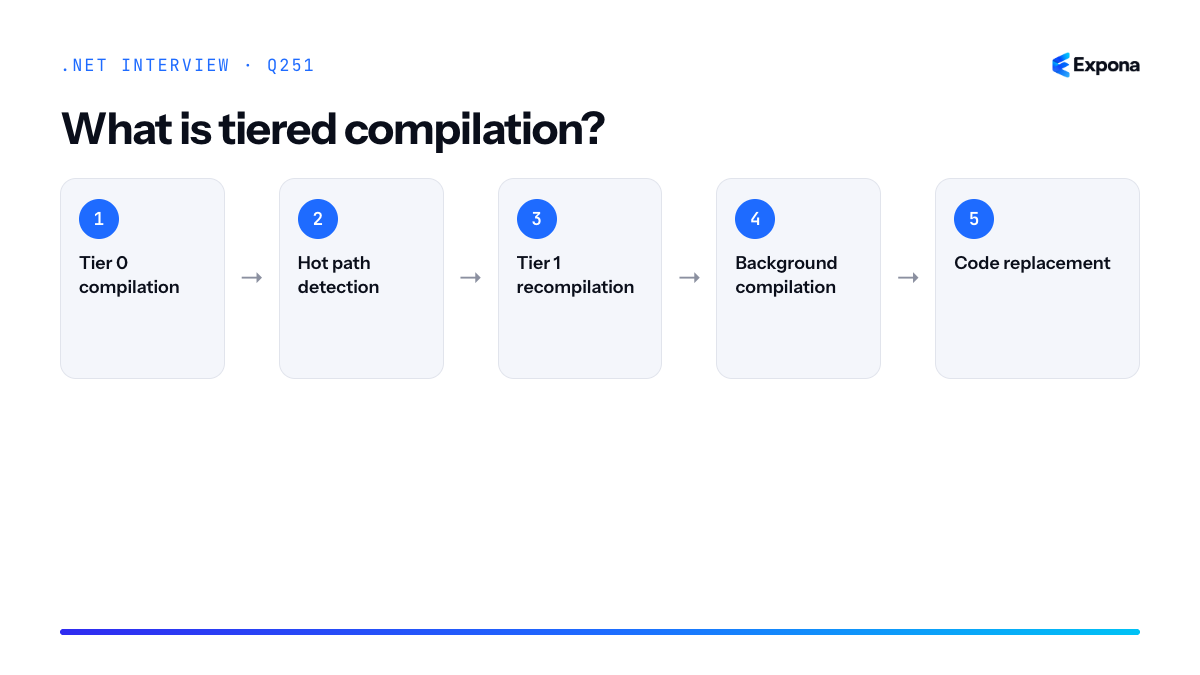
How it works
Tiered compilation addresses a fundamental trade-off in JIT compilation: spending time optimizing code improves runtime performance, but delays startup. The runtime tracks method call frequencies and recompiles hot methods with aggressive optimizations after they cross an invocation threshold.
- Tier 0 compilation: When a method is first called, the JIT compiles it quickly with minimal optimizations—just enough to be correct. This prioritizes startup speed over peak performance.
- Hot path detection: The runtime monitors method invocation counts. Methods called frequently are flagged as "hot."
- Tier 1 recompilation: Once a hot method reaches the threshold (typically thousands of calls), it is recompiled at Tier 1 with full optimizations: inlining, loop unrolling, SIMD vectorization, and other advanced techniques.
- Background compilation: Tier 1 recompilation happens on a background thread, so it doesn't block the application. The old Tier 0 code continues running until the optimized version is ready.
- Code replacement: When Tier 1 compilation completes, the runtime swaps the optimized code in place, and subsequent calls use the faster version.
This two-stage approach allows applications to start quickly while still achieving near-peak performance in steady state—something that full upfront optimization cannot do.
Example
csharppublic class TieredCompilationDemo { public static long ComputeSum(int iterations) { long sum = 0; // This method is called millions of times in the loop below // On first call: compiled at Tier 0 (quick, minimal optimization) // After ~30k calls: recompiled at Tier 1 (full optimization with inlining, loop unrolling, etc.) for (int i = 0; i < iterations; i++) { sum += Helper(i); } return sum; } private static long Helper(int value) => (long)value * value; static void Main() { var sw = System.Diagnostics.Stopwatch.StartNew(); long result = 0; // Early calls use Tier 0; later calls use Tier 1 after recompilation for (int run = 0; run < 100; run++) { result = ComputeSum(10000); } sw.Stop(); Console.WriteLine($"Result: {result}, Time: {sw.ElapsedMilliseconds}ms"); } }This demo shows a tight loop where
ComputeSumis invoked repeatedly; early runs execute Tier 0 code, and after the call count threshold is reached, the runtime recompiles with optimizations, causing later runs to execute noticeably faster.Key points to mention
- Startup vs. throughput balance: Tier 0 gets the app running fast; Tier 1 ensures steady-state performance is excellent.
- Threshold-based activation: Methods aren't recompiled automatically; only those called frequently enough cross the tier promotion threshold.
- Background compilation: Tier 1 recompilation happens asynchronously, preventing startup stalls and ensuring responsiveness during optimization.
- Configurable behavior: The tiered compilation strategy can be tuned via runtime configuration flags like
TIERED_COMPILATIONandTIER0_JITCOUNT_THRESHOLD. - Complementary to Native AOT: While tiered compilation optimizes JIT scenarios, Native AOT eliminates JIT altogether for maximum predictability and startup.
Common follow-up questions
- How does tiered compilation affect memory consumption? — The runtime keeps both Tier 0 and Tier 1 compiled versions in memory temporarily, increasing footprint slightly during recompilation, though the old code is eventually freed.
- Can you disable tiered compilation? — Yes, set the environment variable
TIERED_COMPILATION=0to fall back to single-tier JIT, useful for debugging or when predictable performance is more important than throughput gains. - Does tiered compilation apply to all methods? — No; only methods meeting call-frequency thresholds are promoted to Tier 1. Rarely called methods stay at Tier 0 indefinitely to conserve CPU and memory.
Related interview questions
.NETCsharpPerformance252What is Dynamic PGO?
ExpertDynamic PGO (Profile-Guided Optimization) is a runtime optimization technique that instruments Tier 0 JIT-compiled code to collect execution statistics, then uses that profiling data during Tier 1 compilation to apply aggressive optimizations like devirtualization, inlining, and code layout decisions. It has been enabled by default since .NET 8, significantly improving real-world application performance without requiring manual tuning.
How it works
Dynamic PGO operates within the .NET tiered compilation model. When code first runs, the Tier 0 JIT compiler generates quick, unoptimized code while instrumenting it to record runtime behavior—specifically which virtual method calls resolve to which concrete implementations, which branches execute frequently, and which functions are hot or cold. This profiling overhead is minimal and transparent to the application.
As the same method executes repeatedly and reaches a configurable threshold (typically 10,000–30,000 calls), the runtime re-JITs it at Tier 1. During Tier 1 compilation, the JIT compiler consults the collected profile data and makes informed optimization decisions:
- Devirtualization: If profiling shows a virtual call always resolves to one concrete type, the JIT generates a direct call with a guard, eliminating the virtual dispatch overhead.
- Inlining: The JIT uses call frequency data to inline hot methods more aggressively.
- Code layout: Hot and cold paths are organized in memory to improve CPU cache efficiency and branch prediction.
- Speculative optimization: The JIT can generate code paths optimized for the most common observed case, with fallback paths for rare scenarios.
This is "dynamic" because the profiling happens at runtime in production—no separate profiling run is needed, unlike traditional PGO in C++ with offline instrumentation.
Example
csharppublic abstract class Animal { public abstract void Speak(); } public class Dog : Animal { public override void Speak() => Console.WriteLine("Woof"); } public class Cat : Animal { public override void Speak() => Console.WriteLine("Meow"); } public class AnimalSpeaker { public void MakeSound(Animal animal) { // Virtual call—without PGO, always goes through dispatch // With Dynamic PGO: after profiling shows 99% are Dogs, // Tier 1 JIT devirtualizes this to a direct call with guard animal.Speak(); } } // Usage var speaker = new AnimalSpeaker(); for (int i = 0; i < 100000; i++) { speaker.MakeSound(new Dog()); // Hot path } // After 10k+ calls, Tier 1 re-JITs MakeSound with devirtualizationThis example shows a virtual method call that, when profiled, reveals it always (or almost always) calls
Dog.Speak(). Dynamic PGO allows the Tier 1 JIT to emit direct code for the common case, with a type check to handle unexpected polymorphism.Key points to mention
- Dynamic PGO is built into tiered compilation and requires no manual configuration or profiling runs—it profiles organically during normal execution.
- It is enabled by default in .NET 8+ and can be disabled via
TieredPGOruntime config property if needed for debugging. - The overhead of instrumentation is very low (<1–3% in most cases), making it practical for production code.
- Polymorphism-heavy code (especially virtual calls and interface dispatch) sees the largest performance gains, often 5–20% improvements in throughput.
- Works transparently with DATAS and other .NET 8+ optimization techniques to compound gains.
Common follow-up questions
- Can Dynamic PGO deoptimize if runtime behavior changes? Yes—if a previously monomorphic callsite suddenly receives a different type, the JIT may revert to the slower virtual dispatch path or invalidate and recompile.
- How does this differ from traditional static PGO? Static PGO requires a separate instrumented build and training run; Dynamic PGO profiles organically in production with no build-time overhead.
- Can you inspect PGO data or force Tier 1 promotion? The runtime collects this data internally; there is no public API to inspect or override it directly, but you can use ETW events and PerfView to observe JIT decisions.
Related interview questions
.NETCsharp253What is ReadyToRun?
ExpertReadyToRun (R2R) is a precompilation feature that converts .NET assemblies from IL (Intermediate Language) to native machine code at build time, dramatically improving cold startup performance. The runtime still uses JIT compilation for further optimization during execution. This makes R2R particularly valuable for containerized and serverless workloads where startup latency is critical.
How it works
ReadyToRun uses the .NET ahead-of-time (AOT) compiler, typically crossgen2, to precompile managed code into native code during the build process. The resulting assembly contains both the precompiled native code and the original IL as a fallback. When the application starts, the runtime loads the native code directly without waiting for JIT compilation, eliminating warm-up time. However, the JIT compiler still monitors execution and can optimize hot paths further based on runtime profiling data.
The native code is platform-specific, so R2R binaries must be built for the target platform (Windows x64, Linux ARM64, etc.). The precompiled code includes metadata and relocation information to handle dynamically loaded assemblies and reflection scenarios. This hybrid approach balances startup speed with runtime optimization—you get instant code execution without sacrificing long-term performance tuning.
Example
csharp// Program.cs - a simple .NET 8 console app var sw = System.Diagnostics.Stopwatch.StartNew(); // Simulate real work var result = Fibonacci(35); sw.Stop(); Console.WriteLine($"Result: {result}, Time: {sw.ElapsedMilliseconds}ms"); static int Fibonacci(int n) => n <= 1 ? n : Fibonacci(n - 1) + Fibonacci(n - 2);To publish with ReadyToRun enabled, use:
dotnet publish -c Release -p:PublishReadyToRun=true. This creates a larger binary with precompiled native code, but the first run experiences minimal JIT delay since hot methods are already compiled.Key points to mention
- Platform-specific: R2R binaries are compiled for a specific OS and architecture and cannot be ported directly between platforms.
- Larger binary size: Precompiled native code increases assembly size (typically 20-40% larger), a trade-off for faster startup.
- Hybrid compilation: Native precompiled code coexists with IL; the JIT still optimizes hot code at runtime for best long-term performance.
- Build-time cost: Crossgen2 adds compilation overhead during the build process, increasing build times.
- Fallback mechanism: If precompiled code cannot be used (e.g., unsupported scenarios), the runtime falls back to JIT, ensuring compatibility.
Common follow-up questions
- When should you use ReadyToRun vs. full AOT? Use R2R for general applications requiring fast startup without sacrificing JIT optimization; use full AOT only when startup is critical and binary size matters more than runtime performance.
- Does ReadyToRun work with reflection and dynamic code? Most reflection is supported via IL fallback, but advanced dynamic scenarios may not benefit from precompilation and will revert to JIT.
- What's the performance impact on container cold starts? R2R can reduce cold start by 30-50% depending on workload; this makes it ideal for serverless and Kubernetes environments where containers start frequently.
Related interview questions
- What is JIT compilation?
- How do you reduce cold start for .NET in containers and serverless?
- What is IL (Intermediate Language)?
Further reading
.NETCsharpPerformance254What is Native AOT?
ExpertNative AOT (Ahead-of-Time) compilation compiles your entire .NET application to a native executable at build time, eliminating the JIT (Just-In-Time) compiler and runtime. This produces a single, self-contained binary with dramatically faster startup time, lower memory footprint, and no dependency on the .NET runtime being installed.
How it works
Native AOT uses the CoreRT technology (evolved into the official Native AOT toolchain) to analyze your entire application at compile time. The process performs static analysis to determine which code paths are reachable, then compiles all necessary IL to native machine code. Unreachable code is trimmed away, resulting in a smaller executable. Because compilation happens before deployment, there's no warmup phase—the app runs at full performance immediately.
The runtime is embedded into the binary, but only the portions your code actually needs. This is why IL (Intermediate Language) never executes; everything is pre-compiled to native CPU instructions. The trade-off is that dynamic features—reflection without metadata, late binding, and runtime code generation—become impossible or require explicit configuration through RootDescriptor XML files.
Native AOT is particularly valuable for reducing cold start in containers and serverless scenarios, where startup latency and memory consumption directly impact cost and user experience.
Example
csharp// .csproj configuration for Native AOT <Project Sdk="Microsoft.NET.Sdk"> <PropertyGroup> <OutputType>Exe</OutputType> <TargetFramework>net8.0</TargetFramework> <PublishAot>true</PublishAot> </PropertyGroup> </Project> // Program.cs using System; class Program { static void Main() { Console.WriteLine("Hello from Native AOT!"); var message = GetMessage("World"); Console.WriteLine(message); } static string GetMessage(string name) => $"Hello, {name}!"; } // Build with: dotnet publish -c Release -r win-x64 // Produces: Program.exe (~10-20 MB, ~50 ms startup)This example shows the minimal configuration needed. When published with
PublishAot=true, the entire application—including the trimmed runtime—becomes a standalone executable that starts in milliseconds.Key points to mention
- No JIT overhead: Code is fully compiled before execution; no interpretation or runtime compilation delays.
- Trim-safe code required: You must avoid dynamic reflection,
Type.GetType()by string, and dynamic method invocation unless explicitly preserved via RootDescriptor. - Deployment flexibility: Single binary with embedded runtime; no .NET installation required on the target machine.
- Framework support: ASP.NET Core, Console apps, and MAUI are officially supported; WinForms and WPF have limitations.
- Build-time analysis constraints: The AOT compiler must conservatively assume which code might execute, which can lead to larger binaries if reflection usage is broad.
Common follow-up questions
- What are the trade-offs of Native AOT for ASP.NET Core?
- How do you handle reflection and serialization in a Native AOT application? (Answer: Use source generators like System.Text.Json's JsonSourceGenerator, and mark reflective APIs with
[DynamicallyAccessedMembers].) - Can you debug a Native AOT executable? (Answer: Limited debugging is possible with debug symbols, but the experience is not as rich as JIT debugging.)
Related interview questions
- What are the trade-offs of Native AOT for ASP.NET Core?
- How do you reduce cold start for .NET in containers and serverless?
- What is IL (Intermediate Language)?
Further reading
.NETCsharpPerformance255What are the trade-offs of Native AOT for ASP.NET Core?
ExpertNative AOT for ASP.NET Core trades startup speed, low memory footprint, and smaller container images for the loss of runtime code generation, severely restricted reflection, and limited compatibility with libraries that depend on dynamic behavior. You gain predictability and containerization efficiency at the cost of flexibility and some ecosystem compatibility.
How it works
Native AOT compilation ahead-of-time converts your entire application—including the .NET runtime—into a single native executable at build time. The JIT compiler is eliminated entirely. For ASP.NET Core, this means your HTTP handlers, middleware, and service dependencies are all resolved and compiled before deployment. The runtime cannot emit IL or create types dynamically, so reflection-based registration and plugin systems must either be eliminated or use source-generated metadata.
The process uses a trimmer to remove unused code and a static analyzer to warn about potential reflection failures. You lose features like
MethodInfo.Invoke()on arbitrary types,Activator.CreateInstance()with runtime-determined types, and any library that introspects assemblies at startup. This is why System.Text.Json source generation becomes critical—serializers must know target types at compile time.Example
csharp// Program.cs - Native AOT compatible var builder = WebApplication.CreateSlimBuilder(args); // ✓ This works: explicit registration builder.Services.AddSingleton<MyService>(); builder.Services.ConfigureHttpJsonOptions(opts => { opts.SerializerOptions.AddContext<JsonSerializerContext>(); }); var app = builder.Build(); app.MapGet("/data", async (MyService svc) => await svc.GetDataAsync()); app.Run(); // ✗ This FAILS with Native AOT: // var type = Type.GetType("Fully.Qualified.TypeName"); // var instance = Activator.CreateInstance(type); [JsonSourceGenerationOptions(WriteIndented = true)] [JsonSerializable(typeof(DataModel))] internal partial class JsonSerializerContext : JsonSerializerContext { }This example shows explicit service registration and source-generated JSON serialization—the patterns required for Native AOT. Removing the
Activator.CreateInstancecall is mandatory because the runtime cannot discover and instantiate types by name.Key points to mention
- Startup and memory wins are substantial: Cold start can drop from 500ms to 50ms; memory footprint shrinks by 80%+. Ideal for serverless and microservices.
- Reflection is severely constrained: You must explicitly declare what can be reflected on using
DynamicallyAccessedMembersattributes and run static analysis warnings as errors during CI/CD. - Entity Framework Core has limited support: Only compiled queries and
SqlQuery<T>work reliably; LINQ-to-Entities with dynamic predicates requires trimming annotations or switching to raw SQL. - Third-party library compatibility is uneven: Many DI containers, ORMs, and reflection-heavy libraries fail. You must test your entire dependency tree or maintain compatibility matrices.
- Deployment is simpler but less flexible: A single self-contained binary is easier to containerize, but you cannot hotpatch or load plugins at runtime.
Common follow-up questions
- How do you handle configuration and environment-specific logic if reflection is blocked?
- Can you use Entity Framework Core with Native AOT, and what are the limitations?
- How do you diagnose and fix trim warnings in a large legacy codebase?
Related interview questions
- What is Native AOT?
- How do you reduce cold start for .NET in containers and serverless?
- How does System.Text.Json source generation help?
Further reading
.NETCsharpaspnetcorePerformance256How does the JIT devirtualize calls?
ExpertJIT devirtualization is an optimization where the JIT compiler converts a virtual method call into a direct (non-virtual) call when it can prove or reliably predict the concrete type at runtime. This enables further optimizations like inlining, reducing dispatch overhead and improving performance significantly.
How it works
Virtual method calls normally require a runtime type check and indirection through a virtual method table (v-table) to locate the correct implementation. Devirtualization bypasses this by replacing the virtual dispatch with a direct call when the JIT has high confidence about which method will execute.
The JIT uses several strategies to determine when devirtualization is safe:
- Sealed types: If a class is sealed, it cannot be subclassed, so any virtual call on a sealed type's instance can be devirtualized immediately.
- Profile-guided optimization (PGO): The runtime collects profiling data during execution showing which concrete types were observed at each call site. If one type dominates (e.g., 99% of calls), the JIT can devirtualize speculatively and add a guard that falls back if a different type appears.
- Single concrete implementation: If the JIT can prove through static analysis that only one derived class implements a virtual method, it can devirtualize safely.
- Readonly fields: If a field holding a polymorphic reference is readonly and initialized with a concrete type, the JIT knows its type never changes.
Once devirtualized, the method becomes eligible for inlining, which is where the real performance gain occurs. Inlining eliminates the method call overhead entirely, allowing the JIT to optimize across method boundaries.
Example
csharpabstract class Animal { public abstract void Speak(); } sealed class Dog : Animal { public override void Speak() => Console.WriteLine("Woof"); } class Program { static void Main() { Animal dog = new Dog(); for (int i = 0; i < 1_000_000; i++) { dog.Speak(); // JIT devirtualizes this to direct call } } }Because
Dogis sealed, the JIT knows thatdog.Speak()can only callDog.Speak(), so it devirtualizes the call to a direct method invocation and likely inlines it, making the loop extremely fast.Key points to mention
- Devirtualization requires the JIT to prove or guess the concrete type; sealed classes guarantee this statically.
- PGO enables speculative devirtualization with guards—if the guard fails at runtime, execution falls back to a slower virtual dispatch path.
- Devirtualization's main benefit is enabling inlining, not the elimination of the v-table lookup itself.
- This optimization is particularly effective in loops and hot paths where method calls are frequent.
- The JIT re-JITs code if profiling data changes, so a devirtualized call can be undone if new types appear at runtime.
Common follow-up questions
- How does PGO differ from static devirtualization, and when does the fallback guard execute?
- Can you force or disable devirtualization, or does it happen automatically?
- What's the relationship between devirtualization and CLR code generation—does it happen at JIT time or before?
Related interview questions
Further reading
.NETCsharpPerformance257What is inlining and how do you influence it?
ExpertInlining is a JIT compilation optimization that replaces a method call with the method's body directly in the calling code, eliminating call overhead. You can hint at inlining using
MethodImplOptions.AggressiveInlining, but the JIT compiler makes the final decision based on method size, complexity, and runtime conditions. It's most effective for small, frequently-called methods in hot paths.How it works
When the JIT compiler encounters a method call, it evaluates whether inlining would be beneficial. Inlining removes the cost of a method invocation (pushing arguments, jumping to code, returning) by replacing the call with the actual method body. This is especially valuable in high-performance code where microseconds matter.
The JIT uses heuristics to decide: methods must be reasonably small (typically under 32 IL instructions by default), not too complex, and called frequently enough to justify the code bloat. You cannot force inlining—the
MethodImplOptions.AggressiveInliningattribute is only a hint that says "consider inlining even if this seems slightly larger than usual." Virtual methods, abstract methods, and methods with complex control flow are rarely inlined.Since JIT compilation happens at runtime, the JIT can inline based on actual runtime behavior, not just static analysis. This allows tiered compilation (.NET 5+) to make better inlining decisions as code executes.
Example
csharpusing System.Runtime.CompilerServices; public class InliningDemo { // Without hint: JIT may inline (method is tiny) public int Add(int a, int b) => a + b; // With aggressive inlining hint: JIT is encouraged to inline [MethodImpl(MethodImplOptions.AggressiveInlining)] public double Multiply(double a, double b) => a * b; // Will NOT inline: too complex, contains loops [MethodImpl(MethodImplOptions.AggressiveInlining)] public int Sum(int[] numbers) { int total = 0; foreach (var n in numbers) total += n; return total; } public void Test() { // Hot path: called millions of times for (int i = 0; i < 1_000_000; i++) { var result = Add(i, 10); // Likely inlined var scaled = Multiply(result, 2.5); // Encouraged to inline } } }The
AddandMultiplymethods are likely inlined by the JIT because they're simple arithmetic operations;Sumwill not be inlined despite the hint because it contains a loop and is too complex.Key points to mention
MethodImplOptions.AggressiveInliningis a hint, not a guarantee—the JIT makes the final call based on heuristics.- Inlining trades code size (bloat) for speed; excessive inlining can hurt cache locality and actually slow down code.
- Small, hot-path methods (like getters, simple calculations) are best candidates; large or rarely-called methods should not be marked for aggressive inlining.
- Virtual methods and interface calls are almost never inlined (except in tiered compilation with devirtualization).
- Profiling and benchmarking with tools like BenchmarkDotNet are essential to verify inlining helps your scenario; never assume.
Common follow-up questions
- Can you force a method NOT to inline? Yes, use
MethodImplOptions.NoInliningto prevent the JIT from inlining a method (useful for debugging or when inlining hurts performance). - Does AggressiveInlining work in Debug builds? No; optimizations including inlining are disabled in Debug. You must test in Release mode.
- How does tiered compilation affect inlining? Tiered JIT (Tier 0 → Tier 1) allows the Tier 1 compiler to re-JIT hot methods with better inlining decisions based on runtime data.
Related interview questions
.NETCsharpPerformance258How do you benchmark correctly in .NET?
ExpertCorrect benchmarking in .NET requires BenchmarkDotNet, which automatically handles JIT warmup, tiered compilation, garbage collection, and statistical analysis across multiple iterations. Avoid naive Stopwatch-based measurements, which produce misleading results due to JIT compilation overhead, CPU throttling, and noise. Use realistic data, control variables, and isolate the code you're actually measuring.
How it works
BenchmarkDotNet runs your code multiple times in a dedicated process, discarding initial "warmup" iterations while the CLR JIT-compiles and optimizes. It then collects many measurements, removes outliers, and reports mean, median, and standard deviation—giving you statistically valid conclusions rather than single-run noise.
Key mechanisms include:
- Warmup iterations: The first runs are thrown away because JIT compilation and tiered compilation add overhead that doesn't reflect steady-state performance.
- Multiple target runtimes: Run against .NET 6, 8, Framework simultaneously to compare behavior across platforms.
- Garbage collection control: Force full GC between runs to measure cold-start performance, or disable it to measure steady-state.
- Memory profiling: Automatically tracks allocations and Gen0/Gen1/Gen2 collections—critical for GC pressure analysis.
- Statistical rigor: BenchmarkDotNet uses outlier detection and confidence intervals, not single measurements.
Example
csharpusing BenchmarkDotNet.Attributes; using BenchmarkDotNet.Running; [MemoryDiagnoser] [SimpleJob(warmupCount: 3, targetCount: 5)] public class StringConcatBenchmark { private readonly string[] _words = { "Hello", "World", "From", "Benchmark" }; [Benchmark(Baseline = true)] public string StringConcat() { string result = ""; foreach (var word in _words) result += word; return result; } [Benchmark] public string StringBuilder() { var sb = new System.Text.StringBuilder(); foreach (var word in _words) sb.Append(word); return sb.ToString(); } [Benchmark] public string StringJoin() { return string.Join("", _words); } } class Program { static void Main(string[] args) => BenchmarkRunner.Run(); }This compares three string concatenation approaches, automatically measuring execution time and allocations;
[MemoryDiagnoser]shows heap pressure differences, and the baseline variant makes relative comparison clear.Key points to mention
- Never use Stopwatch alone: A few milliseconds of measurement contains JIT overhead, context switches, and GC pauses—you need hundreds of samples to see the signal.
- Test with realistic data: Benchmarking empty arrays or trivial inputs produces meaningless results; use data shapes your code actually encounters.
- Beware of dead-code elimination: The JIT may optimize away your entire benchmark if results aren't used. BenchmarkDotNet prevents this; use
Consume()or return values explicitly. - Run in Release mode only: Debug builds have different inlining, range checks, and optimizations that hide real performance.
- Use
[MemoryDiagnoser]to measure allocations: Throughput improvements mean little if you're triggering Gen2 collections; heap pressure often matters more than raw speed.
Common follow-up questions
- What's the difference between micro-benchmarks and macro-benchmarks? Micro-benchmarks isolate one operation in a tight loop (BenchmarkDotNet's domain); macro-benchmarks test end-to-end workflows and reveal real-world contention, memory fragmentation, and GC impact that micros hide.
- How do you prevent the JIT from optimizing your benchmark away? Consume or return benchmark results, use
Volatile.Read()for state, or declare variablesvolatile—BenchmarkDotNet handles this, but custom harnesses must be careful. - Why do results vary between runs even with BenchmarkDotNet? CPU frequency scaling, OS scheduling, thermal throttling, and NUMA effects still add noise; run on isolated machines in production environments for critical decisions.
Related interview questions
Further reading
.NETCsharpPerformance259How do you analyze allocations in a hot path?
ExpertTo analyze allocations in a hot path, use BenchmarkDotNet with MemoryDiagnoser to measure heap allocations per iteration, dotnet-trace with allocation profiling events to capture real-world allocation patterns, or Visual Studio's memory profiler to inspect object retention and GC pressure. These tools pinpoint boxing, closures, LINQ materializations, and string concatenations that occur frequently in performance-critical code.
How it works
A hot path is code executed frequently—often in loops or per-request handlers. Even small allocations multiply: 1 KB per call × 1 million calls = 1 GB of garbage. Allocation analysis works by instrumenting the runtime to track heap object creation, then correlating allocations back to source code locations.
BenchmarkDotNet's MemoryDiagnoser runs your code thousands of times in a controlled environment, collecting GC statistics and reporting Gen0, Gen1, Gen2 collections and total allocated bytes per operation. This reveals if a method allocates unexpectedly.
dotnet-trace (command-line profiling) captures AllocationTick events at runtime, showing which call stacks allocate most frequently. You then load the trace in PerfView or Visual Studio to see allocation sources without modifying code.
Visual Studio Profiler offers interactive memory snapshots: take a baseline, run your hot path, take another snapshot, and compare to see new objects created and their retention chains. This is useful for finding unintended object graphs.
Common culprits in hot paths: boxing value types into collections, capturing loop variables in closures (creating new delegate instances), LINQ `.ToList()` or `.Where().Select()` chains that materialize intermediate collections, string interpolation, and implicit array allocations in params methods.
Example
csharpusing BenchmarkDotNet.Attributes; using BenchmarkDotNet.Running; [MemoryDiagnoser] public class AllocationAnalysisBenchmark { private int[] _numbers = Enumerable.Range(1, 1000).ToArray(); [Benchmark] public int BadAllocation() { // Allocates: new List (2x), closures for lambda captures return _numbers .Where(x => x > 500) .Select(x => x * 2) .Sum(); } [Benchmark] public int GoodAllocation() { // No intermediate allocations; efficient loop int sum = 0; for (int i = 0; i < _numbers.Length; i++) { if (_numbers[i] > 500) sum += _numbers[i] * 2; } return sum; } } // Output shows: BadAllocation ~5 KB allocated, GoodAllocation ~0 bytes.This benchmark reveals that LINQ chains allocate temporary enumerators and collections, while a manual loop avoids all allocations—critical knowledge for hot-path optimization.
Key points to mention
- BenchmarkDotNet is the gold standard for microbenchmarking allocations; MemoryDiagnoser integrates GC profiling directly into results.
- dotnet-trace is production-friendly; capture allocation events from live servers with minimal overhead using `dotnet trace collect --providers Microsoft-DotNETRuntime:0x4000000000000014`.
- Look for patterns: LINQ materializations, string building in loops, delegate/closure allocations, and hidden allocations like DateTime.Now or Guid.NewGuid().
- Use struct enumerators and stackalloc to reduce heap pressure; `foreach` on arrays is allocation-free, but `.ToList().ForEach()` is not.
- Measure before and after optimization; allocation reduction must correlate with actual performance gain (CPU time, throughput, GC pause duration).
Common follow-up questions
- "How do you identify which allocations matter most?" – Sort BenchmarkDotNet results by bytes allocated per iteration; focus on hot paths contributing >10% of total allocations. Use
dotnet-tracecall-stack analysis to weight by call frequency. - "Can you eliminate all allocations in a hot path?" – No; you'll always allocate method frames and return values. The goal is eliminating *intermediate* allocations (temporary lists, boxed values, delegate closures) that don't contribute to the output.
- "What trade-offs exist between allocation reduction and code readability?" – A clean LINQ chain is more maintainable than hand-unrolled loops, but if profiling proves it's a bottleneck, refactor. Use `readonly struct` enumerators and
refparameters to balance both.
Related interview questions
- What are hidden allocations in C#?
- How do you profile a slow ASP.NET Core endpoint?
- What is boxing and unboxing?
Further reading
.NETCsharpPerformance260What are hidden allocations in C#?
ExpertHidden allocations are unintended heap allocations that occur implicitly through language constructs, bypassing obvious memory cost. They commonly arise from closures capturing variables, boxing through interfaces, params arrays, LINQ iterators, string operations, and async state machines. Developers often miss these because they don't write explicit
newkeywords, making them invisible in code review but visible in profiler traces.How it works
Hidden allocations occur because the C# compiler transforms certain language features into heap allocations to maintain closure semantics, type safety, or state management. When you use a local variable inside a nested function or lambda, the compiler creates a closure class on the heap to preserve that variable's lifetime beyond the method's stack frame. Similarly, boxing occurs when a struct is passed through an interface reference, forcing the value onto the heap. Params arrays create an array allocation for each call unless the compiler can optimize it away. LINQ query expressions generate iterator state machines that allocate when enumerated. String concatenation, especially in loops, creates intermediate string objects. Async state machines allocate heap memory to store local variables and continuation state when the method yields or awaits.
These allocations are "hidden" because they're compiler-generated—the source code doesn't explicitly show memory allocation, yet the IL and resulting machine code performs heap work that triggers garbage collection pressure.
Example
csharp// Hidden allocation #1: Closure int value = 10; Func<int> closure = () => value + 5; // Allocates closure class // Hidden allocation #2: Boxing interface IValue { int Get(); } struct Point : IValue { public int Get() => 42; } IValue boxed = new Point(); // Boxes Point to heap // Hidden allocation #3: Params array void Log(params string[] messages) { } Log("a", "b", "c"); // Allocates string[] array // Hidden allocation #4: LINQ iterator var query = Enumerable.Range(1, 1000000).Where(x => x % 2 == 0); foreach (var item in query) { } // Iterator state machine allocated per enumeration // Hidden allocation #5: String concatenation string result = ""; for (int i = 0; i < 100; i++) result += i.ToString(); // Allocates 100 intermediate stringsEach line shows a common hidden allocation: closures capture variables by allocating a container class; boxing wraps structs in objects; params creates arrays; LINQ generates iterator state machines; and string concatenation creates temporary strings instead of a single result.
Key points to mention
- Closures allocate a compiler-generated class to hold captured variables, keeping them alive on the heap.
- Boxing wraps value types in heap-allocated objects when cast to interfaces or
object, violating value semantics. - Params arrays allocate an array for each call unless the compiler optimizes to a single literal argument.
- LINQ iterators allocate state machines per enumeration; materializing with
.ToList()or.ToArray()is often necessary. - String operations and async state machines silently allocate intermediate objects; use
StringBuilderandValueTaskto reduce allocation pressure.
Common follow-up questions
- How do you analyze allocations in a hot path to find and eliminate hidden allocations?
- When should you use
ValueTaskinstead ofTaskto avoid async state machine allocations? - How can Spans be used in everyday code to avoid allocations in LINQ alternatives?
Related interview questions
- How do you analyze allocations in a hot path?
- What is boxing and unboxing?
- What are spans used for in everyday code?
Further reading
.NETCsharpPerformance261What is frozen collections in .NET 8?
ExpertFrozen collections in .NET 8 are immutable, thread-safe data structures optimized for read-heavy scenarios. FrozenDictionary and FrozenSet are built using specialized internal data structures that trade construction time for dramatically faster lookups, making them ideal when you create a collection once and read it many times. They're part of the System.Collections.Frozen namespace and represent a strategic choice for performance-critical read paths.
How it works
Frozen collections use a two-phase optimization strategy. During construction, they spend extra CPU cycles analyzing the data—computing optimal hash distributions, building specialized index structures, and organizing elements in memory-friendly layouts. This upfront investment pays dividends during the read phase, where lookups benefit from better cache locality, fewer hash collisions, and optimized branching paths.
Unlike regular Dictionary, which uses a dynamic hash table that can resize, frozen collections are immutable after creation. This immutability enables aggressive optimizations: the runtime knows the data will never change, so it can precompute optimal memory layouts, remove bounds-checking overhead in hot paths, and make aggressive JIT inlining decisions.
FrozenDictionary uses a specialized hash algorithm and memory layout designed to minimize cache misses during lookups. FrozenSet similarly optimizes for O(1) membership testing. Both collections are fully thread-safe without locks because their contents never change.
Example
csharpusing System.Collections.Frozen; // Regular dictionary - flexible, mutable var regularDict = new Dictionary { { "apple", 10 }, { "banana", 20 }, { "cherry", 30 } }; // Frozen dictionary - immutable, optimized for reads var frozenDict = regularDict.ToFrozenDictionary(); // Or create directly var frozenSet = new[] { "admin", "user", "guest" } .ToFrozenSet(); // Lookups are faster than regular collections if (frozenSet.Contains("admin")) { Console.WriteLine("Permission granted"); } // This throws - frozen collections are immutable // frozenDict["orange"] = 40; // Compile errorThis example shows converting a regular dictionary to frozen form, then demonstrates the immutable nature and O(1) lookup performance frozen collections provide for permission checks and configuration lookups.
Key points to mention
- Immutable and thread-safe: No locks needed; perfect for shared configuration or permission sets accessed by multiple threads
- Construction vs. lookup trade-off: Slower creation time is offset by significantly faster reads, especially beneficial when the ratio of reads to writes is very high
- Memory optimized: Frozen collections use specialized data structures with better cache locality and reduced allocations during lookups
- No LINQ mutations: Operations like .Where() or .OrderBy() return regular collections, not frozen ones, maintaining predictable performance characteristics
- Ideal for configuration, permissions, and lookup tables: Common use cases where you load data once at startup and read it throughout the application lifetime
Common follow-up questions
- When should I use frozen collections vs. regular Dictionary? Use frozen collections when your read-to-write ratio is high (10:1 or greater) and the collection is shared across multiple threads or hot paths. For mutable collections, stick with Dictionary.
- Do frozen collections support LINQ? Yes, but LINQ operations return new regular collections. If you need filtered results, consider whether you should freeze the filtered result separately or use a smaller frozen collection for that subset.
- How do frozen collections compare to concurrent dictionaries? ConcurrentDictionary handles concurrent mutations safely; frozen collections optimize read throughput by eliminating locking entirely. Choose based on whether your data changes—if it doesn't, frozen is faster.
Related interview questions
.NETCsharp262What is SearchValues<T>?
ExpertSearchValues<T> is a .NET 8+ type that precomputes an optimized, vectorized search structure for a set of characters or bytes, dramatically accelerating
IndexOfAny-style queries. Instead of checking each search character one-by-one, it uses SIMD operations and specialized algorithms to find any member of the set in O(n) time with minimal per-character overhead.How it works
SearchValues<T>is a readonly struct that accepts eithercharorbyteand pre-analyzes the search set at construction time. Depending on the set size and characteristics, it selects an optimal strategy:- Bitmap/lookup table: For small sets (typically ≤ 16 members), it may use a compact bit array or jump table.
- SIMD vectorization: For larger or diverse sets, it leverages SIMD and Vector<T> to compare multiple characters or bytes in parallel across 128-bit or 256-bit registers.
- Probabilistic filters: It may combine techniques like Bloom filters or specialized bit patterns to reduce false positives and branch mispredictions.
Once created, you call instance methods like
Contains(),IndexOfAny(), orLastIndexOfAny()on your span/string, passing theSearchValues<T>object. The runtime then executes the precomputed vectorized logic, avoiding repeated branching and character-by-character comparisons.Example
csharpusing System; using System.Buffers; class Program { static void Main() { // Create a SearchValues instance for vowels (precomputed once) var vowels = SearchValues.Create("aeiouAEIOU"); string text = "The quick brown fox jumps over the lazy dog"; Span<char> span = text.AsSpan(); // Vectorized search finds first vowel efficiently int index = span.IndexOfAny(vowels); Console.WriteLine($"First vowel at index: {index} = '{text[index]}'"); // 2, 'e' // Also works with bytes for low-level parsing var delimiters = SearchValues.Create(stackalloc byte[] { (byte)',', (byte);, (byte)':' }); ReadOnlySpan<byte> data = "foo,bar;baz:qux"u8; int delimIndex = data.IndexOfAny(delimiters); Console.WriteLine($"First delimiter at: {delimIndex}"); // 3 } }This example creates a reusable
SearchValues<char>for vowels, then uses it to search a string span using optimized SIMD logic, returning the index of the first match far faster than a naive loop.Key points to mention
SearchValues<T>is immutable and thread-safe, so you should create it once and reuse it across many searches.- It only accepts
charorbyte; you cannot use it for arbitrary types. - Performance gains are most pronounced on longer strings or repeated searches; for tiny strings or single-use lookups, overhead may diminish the benefit.
- It integrates seamlessly with
Span<T>andReadOnlySpan<T>, making it ideal for high-performance parsers, tokenizers, and validators. - Under the hood, it may use different strategies (bitmap, SIMD, or hybrid) depending on the set size and CPU capabilities at runtime.
Common follow-up questions
- When should I use SearchValues vs. a HashSet<char>?
SearchValues<T>is optimized for sequential searching in spans;HashSet<char>is for membership tests. For string parsing,SearchValuesis faster and more cache-friendly. - Can I use SearchValues with custom types?
No, it only supportscharandbyte. For other types, you'd use alternative patterns likeHashSet<T>or a custom trie structure. - Is SearchValues replacement for string.IndexOfAny(params char[])?
Yes, it's the modern, optimized successor.string.IndexOfAny(params char[])creates a temporary array;SearchValuesprecomputes once and reuses, eliminating allocation overhead.
Related interview questions
.NETCsharp263What is SIMD and Vector<T>?
ExpertSIMD (Single Instruction Multiple Data) is a CPU feature that processes multiple values simultaneously in a single instruction. Vector<T> and the newer Vector128/256/512 types provide .NET APIs to leverage this hardware acceleration for high-performance numeric and text operations. When properly used, SIMD can deliver 2–16x speedups for data-parallel workloads without explicit parallelization.
How it works
Traditional scalar operations process one value per CPU cycle. SIMD widens the data path: a single instruction operates on a vector of values packed into a wide register (128, 256, or 512 bits). For example, adding two Vector256<int> instances adds eight 32-bit integers in one instruction.
The
Vector<T>type is a cross-platform abstraction that maps to the widest SIMD register available on the host CPU at runtime—typically 128 bits on older hardware, 256 bits on modern x86-64, and 128 bits on ARM. The concrete typesVector128<T>,Vector256<T>, andVector512<T>(added in .NET 8) give fine-grained control when you need predictable vector widths or advanced CPU features (AVX-512).SIMD benefits are greatest for:
- Dense numeric computations: summing arrays, matrix operations, image processing.
- Vectorizable loops with no data dependencies between iterations.
- Bulk text or byte operations: UTF-8 validation, compression, encryption.
Performance gains diminish or vanish if the JIT cannot vectorize your loop, if cache misses dominate, or if overhead from setting up vectors exceeds the savings.
Example
csharpusing System.Numerics; // Sum an array of integers using Vector<int> public static int VectorSum(int[] data) { var vectorSize = Vector<int>.Count; // e.g., 8 on AVX2 var sum = Vector<int>.Zero; // Process multiple elements per iteration int i; for (i = 0; i <= data.Length - vectorSize; i += vectorSize) { var chunk = new Vector<int>(data, i); sum += chunk; } // Horizontal sum: add all elements in the vector int result = 0; for (int j = 0; j < vectorSize; j++) result += sum[j]; // Handle remainder for (; i < data.Length; i++) result += data[i]; return result; }This loop processes
Vector<int>.Countelements (typically 8 on x64) per iteration, then horizontally reduces the vector to a scalar sum. The same scalar loop must clean up any remainder that doesn't fit evenly into vector width.Key points to mention
- Hardware abstraction: Vector<T> adapts to the CPU's capabilities; Vector128/256/512 give you explicit control for portable or intrinsic-heavy code.
- JIT support: The RyuJIT compiler can auto-vectorize simple loops, but explicit Vector<T> usage is more reliable and predictable.
- Alignment and memory: SIMD performance depends on aligned memory access; unaligned loads incur penalties.
- Not a silver bullet: Overhead, cache effects, and loop structure determine whether SIMD actually helps. Always profile.
- Use cases: Image processing, DSP, ML inference, UTF-8 validation, and crypto are common beneficiaries; compare with Parallel.ForEach for coarser parallelism.
Common follow-up questions
- How do you check if SIMD is available on the runtime, and what fallbacks do you use?
- What is the difference between Vector<T> and Vector128/256/512, and when would you use each?
- How do you measure SIMD performance gains, and what gotchas lead to slower code?
Related interview questions
.NETCsharpPerformance264How does the Kestrel request pipeline achieve high performance?
ExpertKestrel achieves high performance through System.IO.Pipelines for zero-copy streaming, memory pooling to eliminate GC pressure, and hand-optimized HTTP parsing that minimizes allocations. By using transport abstractions over raw sockets and processing requests in a non-blocking, asynchronous pipeline, Kestrel can handle hundreds of thousands of concurrent connections efficiently.
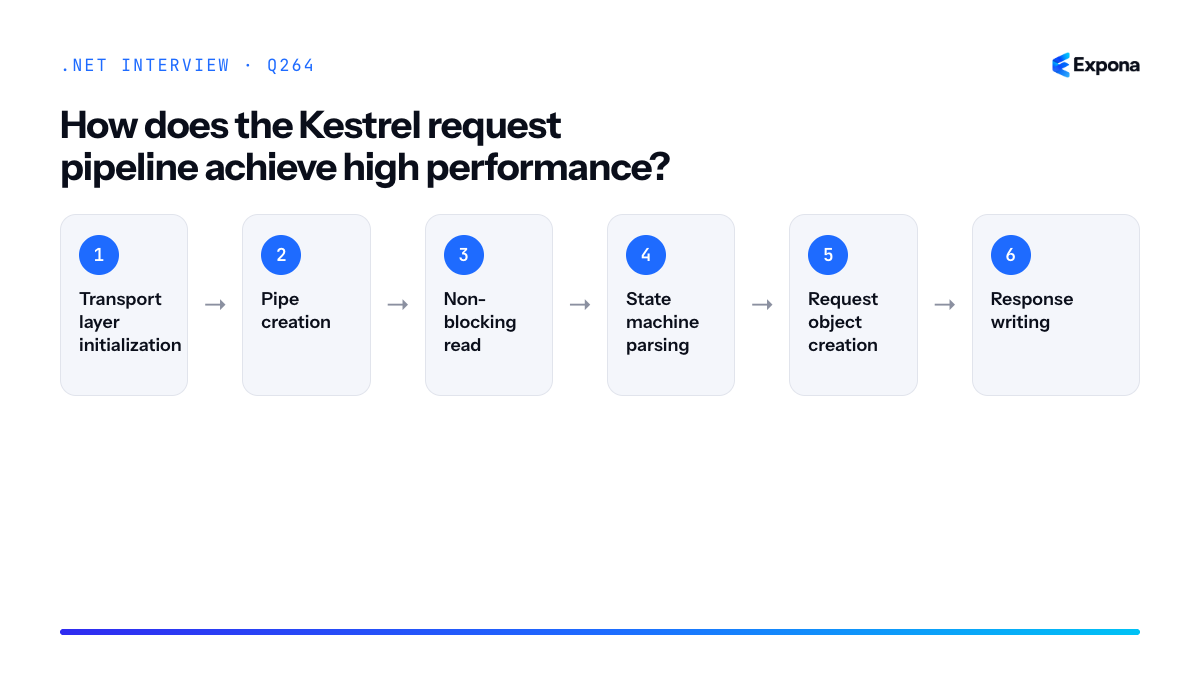
How it works
Kestrel's request pipeline is built on System.IO.Pipelines, which provides a structured way to read, parse, and buffer data without copying bytes multiple times. Instead of allocating new buffers for each request, Kestrel uses
ArrayPool<byte>to rent and return buffers, dramatically reducing garbage collection overhead. The transport layer abstracts away socket I/O details, allowing Kestrel to work with sockets, Unix domain sockets, or even in-memory pipes uniformly.The pipeline flow works like this: incoming bytes are read into pooled buffers, the parser examines them without copying, identifying headers and body boundaries. Request objects are created with references (not copies) to the buffer data. Only when the application explicitly reads headers or body content are those portions extracted. This lazy-evaluation approach, combined with span-based APIs (
Span<T>,Memory<T>), ensures minimal allocations during normal operation.Kestrel also employs several micro-optimizations: HTTP header parsing uses state machines to avoid regex or substring operations; pipelined requests are handled in batches; and connection keep-alive is efficiently managed through scalable I/O completion ports (Windows) or epoll/kqueue (Linux). The transport layer is fully asynchronous, allowing a single thread to service thousands of sockets via OS-level event notifications rather than blocking threads.
Example
csharp// Simplified view of Kestrel's pipeline approach public class PipelineProcessor { private readonly PipeReader _pipeReader; private readonly ArrayPool<byte> _pool = ArrayPool<byte>.Shared; public async Task ProcessRequestsAsync() { while (true) { // Read without allocating new buffers ReadResult result = await _pipeReader.ReadAsync(); ReadOnlySequence<byte> buffer = result.Buffer; // Parse HTTP headers using Span<T> (zero-copy) if (TryParseHttpRequest(buffer, out var headers, out var consumed)) { // Process headers without copying foreach (var header in headers) { Console.WriteLine($"{header.Name}: {header.Value}"); } _pipeReader.AdvanceTo(consumed); } if (result.IsCompleted) break; } await _pipeReader.CompleteAsync(); } private bool TryParseHttpRequest(ReadOnlySequence<byte> buffer, out List<(string Name, string Value)> headers, out SequencePosition consumed) { headers = new(); consumed = buffer.Start; // State machine-based parsing (simplified) return true; } }This demonstrates how Kestrel uses
PipeReaderand span-based APIs to parse HTTP requests without allocating intermediate buffers or copying data.Key points to mention
- System.IO.Pipelines: Provides a producer/consumer pattern optimized for I/O, eliminating the need to copy data between buffers.
- ArrayPool<byte>: Pooled buffers are rented and returned, keeping allocation rates low and reducing GC pause times.
- Span<T> and Memory<T>: Stack-allocated references enable parsing and header access without heap allocations.
- Async/await throughout: Non-blocking I/O means threads are not consumed by individual connections; completion ports or epoll handle thousands per thread.
- Transport abstraction: Sockets, Unix sockets, and in-memory pipes are handled uniformly, allowing optimization at the lowest level.
Common follow-up questions
- How does Kestrel handle backpressure when requests arrive faster than the application can process them? — The
PipeReaderpauses reading from the socket and buffers data in memory up to a configured limit; beyond that, OS-level backpressure kicks in. - What happens if the application doesn't read request body content promptly? — Kestrel keeps the buffer alive and may slow down further socket reads; explicit consumption is required to free pooled buffers.
- How does Kestrel compare to libuv-based servers? — Kestrel removed libuv as a transport and now uses platform-native APIs (IOCP, epoll/kqueue), simplifying the stack and reducing latency.
Main implementation steps
- Transport layer initialization: Kestrel accepts incoming connections via OS-level asynchronous I/O (IOCP on Windows, epoll/kqueue on Linux).
- Pipe creation: For each connection, a
PipeReaderandPipeWriterare created backed by pooled buffers fromArrayPool<byte>. - Non-blocking read: Data is read into the pipe without blocking threads; thousands of connections can be serviced by a thread pool.
- State machine parsing: The HTTP parser uses a hand-optimized finite state machine to identify request lines, headers, and body boundaries using
Span<T>without copying. - Request object creation: A lightweight
HttpRequestis created with references to buffer regions; body reading is deferred until the application accesses it. - Response writing: The application writes to
PipeWriter, which batches writes and flushes efficiently to the socket. - Buffer recycling: After the response is sent, all pooled buffers are returned to the pool for reuse, minimizing allocations over time.
Related interview questions
Further reading
.NETCsharpaspnetcorePerformance265How do you tune Kestrel for production?
ExpertKestrel tuning for production involves configuring connection limits, request body/header size thresholds, enabling HTTP/2 and HTTP/3 protocols, and deploying behind a reverse proxy (like Nginx or IIS) for TLS termination and load balancing. The goal is to maximize throughput, prevent resource exhaustion, and ensure security without sacrificing performance.
How it works
Kestrel is ASP.NET Core's high-performance web server, but it ships with conservative defaults to prevent abuse. Production tuning requires understanding the trade-offs between resource consumption, connection handling, and protocol features.
Connection limits control how many simultaneous TCP connections Kestrel will accept. Too low and you reject valid clients; too high and the server exhausts memory and file descriptors. Request body and header size limits protect against malicious or misconfigured clients sending massive payloads that could cause denial-of-service.
Protocol optimization involves enabling HTTP/2 (multiplexing over a single connection, reducing overhead) and HTTP/3 (QUIC protocol for faster handshakes and better mobile performance). TLS offloading to a reverse proxy removes CPU-intensive encryption work from Kestrel, allowing it to focus on business logic. This is especially important under high load.
You also configure Kestrel's buffering behavior, thread pool sizes, and keep-alive timeouts to match your infrastructure and expected traffic patterns. Monitoring connection counts, request queues, and memory usage ensures your settings remain appropriate as load changes.
Example
csharpvar builder = WebApplication.CreateBuilder(args); builder.WebHost.ConfigureKestrel(options => { // Set global connection limits options.Limits.MaxConcurrentConnections = 5000; options.Limits.MaxConcurrentUpgradedConnections = 1000; // Request body and header limits options.Limits.MaxRequestBodySize = 50 * 1024 * 1024; // 50 MB options.Limits.MaxRequestHeadersTotalSize = 32 * 1024; // 32 KB // HTTP/2 settings options.Limits.Http2.MaxStreamsPerConnection = 100; options.Limits.Http2.InitialConnectionWindowSize = 65535; // Keep-alive timeout options.Limits.KeepAliveTimeout = TimeSpan.FromSeconds(30); // Listen on HTTPS with HTTP/2 and HTTP/3 options.ListenAnyIP(5000, listenOptions => { listenOptions.Protocols = HttpProtocols.Http1AndHttp2AndHttp3; listenOptions.UseHttps("path/to/cert.pfx", "password"); }); }); var app = builder.Build(); app.Run();This configuration sets connection limits to prevent resource exhaustion, restricts request sizes to block large payloads, enables HTTP/2 and HTTP/3 for modern clients, and enforces reasonable keep-alive timeouts.
Key points to mention
- Always deploy Kestrel behind a reverse proxy (Nginx, Apache, IIS) in production—it provides TLS termination, load balancing, and a security boundary.
- Set
MaxConcurrentConnectionsbased on your infrastructure's file descriptor limits and available memory; typical values are 1000–10,000 depending on traffic. - Monitor connection metrics via
IConnectionStatisticsFeatureand application insights to catch bottlenecks before they impact users. HTTP/2is almost always beneficial; enableHTTP/3if your infrastructure and clients support it (it requires QUIC support on your network).- Set
KeepAliveTimeoutconservatively (20–30 seconds) to avoid resource leaks from hung connections; useRequestHeadersTimeoutto detect slow clients early.
Common follow-up questions
- How do you size and limit memory for .NET in Kubernetes? — Tuning Kestrel works hand-in-hand with container memory limits and GC settings.
- What's the difference between HTTP/1.1, HTTP/2, and HTTP/3, and when should you use each? — HTTP/2 is default for most modern systems; HTTP/3 is newer and requires QUIC support; HTTP/1.1 is kept for legacy clients.
- How do you diagnose a Kestrel performance bottleneck? — Use ETW tracing, perf counters, and connection statistics to identify whether the issue is CPU, memory, connection limits, or application code.
Related interview questions
.NETCsharpaspnetcore266How does routing match endpoints efficiently?
ExpertEndpoint routing in ASP.NET Core uses a Deterministic Finite Automaton (DFA) matcher built at startup from all route templates to efficiently match URLs to endpoints before middleware executes. This matcher runs constraints and selectors in a single pass, eliminating redundant comparisons and enabling features like authorization to run with full endpoint knowledge.
How it works
When you configure endpoints—whether via MapGet, MapPost, or attribute routing—ASP.NET Core compiles all route templates into a single DFA-based state machine during app startup. This matcher is deterministic and fast because it pre-processes all possible routes into an optimized graph structure.
During request handling, the routing system takes the incoming URL path and segments it, then traverses the DFA tree by matching literal segments and parameters. Constraints (like regex patterns, HTTP methods, or custom validators) are evaluated during traversal, not after. Once an endpoint is matched, it is attached to the HttpContext as
HttpContext.GetEndpoint(), making it available to downstream middleware before the endpoint handler runs. This is crucial: the request pipeline order ensures routing executes early so authorization and other middleware can inspect the endpoint.The DFA approach is more efficient than regex-based matching because it avoids backtracking and evaluates routes in a single linear pass. If multiple routes could match, the system applies tie-breaking rules based on specificity: more segments, literal segments over parameters, and parameter constraints all increase priority.
Example
csharpvar builder = WebApplication.CreateBuilder(); var app = builder.Build(); // Routes are compiled into a DFA at startup app.MapGet("/users/{id:int}", (int id) => $"User {id}"); app.MapGet("/users/{id:guid}", (Guid id) => $"User {id}"); app.MapPost("/users", () => "Create user"); app.MapGet("/users/me", () => "Current user"); app.Run();The matcher resolves
/users/123to the first endpoint (int constraint),/users/meto the fourth (literal match takes precedence), andPOST /usersto the third endpoint (HTTP method matching), all in a single DFA traversal without regex evaluation or backtracking.Key points to mention
- Startup compilation: The DFA is built once at app startup, not per request, making matching extremely fast in production.
- Constraint evaluation during traversal: Route constraints (int, guid, regex, custom) are evaluated during matching, not after, reducing wasted comparisons.
- Endpoint availability to middleware: Matched endpoints are available via
HttpContext.GetEndpoint()before the handler executes, enabling authorization and logging middleware to make decisions. - Specificity tie-breaking: Literal segments and constrained parameters have higher priority than generic catch-all routes, ensuring predictable matching.
- No backtracking: Unlike regex-based matching, the DFA guarantees linear-time performance regardless of route complexity.
Common follow-up questions
- How do you debug which route was matched for a request? (Use
HttpContext.GetEndpoint()andapp.UseRouting()middleware to log the matched endpoint.) - What happens if multiple routes have the same pattern but different constraints? (The router applies tie-breaking rules; if ambiguous, an exception is thrown at startup.)
- How does routing in ASP.NET Core differ from the old routing system? (Endpoint routing is attribute and method-based, compiles to a DFA at startup, and runs before middleware; the legacy system was regex-based and ran inside middleware.)
Related interview questions
- What is the request pipeline order?
- What is routing in ASP.NET Core?
- What is Program.cs in ASP.NET Core?
Further reading
.NETCsharpaspnetcore267What is the role of EndpointDataSource?
ExpertEndpointDataSource is an abstraction that provides the collection of endpoints available to the routing system in ASP.NET Core. It decouples endpoint registration from routing, enabling dynamic endpoint discovery and modification at runtime. Custom implementations allow frameworks, plugins, or applications to add, remove, or transform endpoints without modifying core routing code.
How it works
EndpointDataSource is part of the routing middleware pipeline. When the application starts, the routing system queries all registered EndpointDataSource instances to build its route table. The data source returns a collection of Endpoint objects, each containing metadata, route patterns, handlers, and filters.
EndpointDataSource supports both static and dynamic scenarios. Static sources (like conventional routing or MapGet) provide endpoints once at startup. Dynamic sources can re-evaluate endpoints on demand, enabling scenarios where endpoints change based on configuration, loaded plugins, or database state. This is achieved through the GetChangeToken() method, which signals when the endpoint collection has changed.
The routing middleware uses these endpoints to match incoming requests. When a request arrives, the matcher finds the best endpoint and executes its associated handler. By centralizing endpoint discovery through EndpointDataSource, ASP.NET Core allows multiple registration mechanisms (conventional, attribute-based, minimal APIs, custom) to coexist seamlessly.
Example
csharppublic class PluginEndpointDataSource : EndpointDataSource { private readonly List<Endpoint> _endpoints = new(); private readonly CancellationTokenSource _changeToken = new(); public override IReadOnlyList<Endpoint> Endpoints => _endpoints.AsReadOnly(); public override IChangeToken GetChangeToken() => new CancellationChangeToken(_changeToken.Token); public void RegisterPluginEndpoint(string pattern, RequestDelegate handler, string displayName) { var metadata = new List<object> { new HttpMethodMetadata(new[] { "GET" }) }; var endpoint = new RouteEndpoint(handler, RoutePatternFactory.Parse(pattern), 0, new EndpointMetadataCollection(metadata), displayName); _endpoints.Add(endpoint); // Signal that endpoints have changed _changeToken.Cancel(); } } // In Program.cs var dataSource = new PluginEndpointDataSource(); builder.Services.AddSingleton<EndpointDataSource>(dataSource); app.MapGet("/api/register-plugin", (HttpContext ctx, PluginEndpointDataSource source) => { source.RegisterPluginEndpoint("/plugin/hello", ctx => ctx.Response.WriteAsJsonAsync(new { message = "Hello from plugin" }), "Plugin Endpoint"); return Results.Ok("Plugin registered"); }); app.UseRouting();This example demonstrates a custom EndpointDataSource that allows plugins to register endpoints dynamically. When RegisterPluginEndpoint is called, it adds an endpoint and signals the change token to notify the routing system to re-evaluate available endpoints.
Key points to mention
- EndpointDataSource provides a pluggable mechanism for registering endpoints, supporting multiple registration strategies (conventional routing, attribute routing, minimal APIs, and custom sources).
- It implements IChangeToken to notify the routing system when the endpoint collection changes, enabling dynamic endpoint discovery without application restart.
- The abstraction separates endpoint registration from endpoint execution, making the routing system flexible and extensible.
- Custom implementations are essential for advanced scenarios like plugin systems, multi-tenant applications, and framework-specific routing requirements.
- The routing middleware queries all EndpointDataSource instances during startup (or when change tokens fire) to build an efficient route matcher.
Common follow-up questions
- How does the change token mechanism work, and when should you signal a change in a custom EndpointDataSource?
- What is the difference between EndpointDataSource and conventional IRouter implementations in older ASP.NET Core versions?
- How would you implement a multi-tenant EndpointDataSource that registers different endpoints based on the current tenant?
Related interview questions
- What is the request pipeline order?
- What is routing in ASP.NET Core?
- How does routing match endpoints efficiently?
Further reading
.NETCsharpaspnetcore268How would you build a multi-tenant SaaS on ASP.NET Core?
ExpertA multi-tenant SaaS architecture on ASP.NET Core resolves the tenant identity early (from subdomain, host header, or JWT claim), stores it in a scoped service, and applies tenant isolation at the database and cache layers using Entity Framework Core global query filters or separate databases. This ensures data isolation, performance, and security while keeping your application stateless and horizontally scalable.
How it works
Multi-tenancy requires four core components: tenant resolution, scoped context, data isolation, and resource isolation.
Tenant Resolution occurs in middleware or a custom authentication handler, extracting the tenant identifier from the request—typically via subdomain (acme.saas.com), a header (X-Tenant-Id), a URL segment (/api/acme/...), or a JWT claim. This must happen early, before service resolution.
Scoped Context stores the resolved tenant ID in an
ITenantContextservice registered with scoped lifetime. Each request gets its own isolated instance, safe for concurrent requests.Data Isolation can use two strategies: global query filters on a shared database (cheaper) or separate databases per tenant (stronger isolation, higher cost). Global query filters automatically append
WHERE TenantId == currentTenantto all queries, while per-tenant databases use a connection string resolver.Resource Isolation extends beyond the database: cache keys must include the tenant ID, file storage must be partitioned by tenant (separate blob containers or folders), and configuration (feature flags, settings) must be tenant-aware.
Example
csharp// Scoped tenant context public interface ITenantContext { string TenantId { get; } } public class TenantContext : ITenantContext { public string TenantId { get; set; } } // Tenant resolution middleware public class TenantResolutionMiddleware { private readonly RequestDelegate _next; public TenantResolutionMiddleware(RequestDelegate next) => _next = next; public async Task InvokeAsync(HttpContext context, ITenantContext tenantContext) { var tenantId = context.Request.Host.Host.Split('.')[0]; // Extract from subdomain if (tenantId == "www" || tenantId == "api") tenantId = context.Request.Headers["X-Tenant-Id"].ToString(); if (string.IsNullOrEmpty(tenantId)) throw new InvalidOperationException("Tenant not resolved"); ((TenantContext)tenantContext).TenantId = tenantId; await _next(context); } } // DbContext with global query filter public class SaasDbContext : DbContext { private readonly ITenantContext _tenantContext; public SaasDbContext(DbContextOptions options, ITenantContext tenantContext) : base(options) => _tenantContext = tenantContext; public DbSet Customers { get; set; } protected override void OnModelCreating(ModelBuilder modelBuilder) { // Global query filter: all Customer queries automatically filter by TenantId modelBuilder.Entity() .HasQueryFilter(c => c.TenantId == _tenantContext.TenantId); } } // Startup services.AddScoped(); services.AddDbContext(); app.UseMiddleware();This example resolves the tenant from the subdomain, stores it in a scoped
TenantContext, and applies a global query filter to ensure every query automatically filters by the current tenant—preventing accidental cross-tenant data leaks.Key points to mention
- Tenant resolution timing: Resolve tenant in middleware before service resolution; use claims-based resolution for stateless APIs.
- Scoped lifetime is critical: The tenant context must be scoped to the request, not singleton, to avoid tenant leakage across concurrent requests.
- Global query filters provide safety: They catch bugs early by automatically isolating queries; per-tenant databases offer stronger isolation but add complexity and cost.
- Cache and blob storage isolation: Include TenantId in cache keys and use separate blob containers; a leaked cache key can expose another tenant's data.
- Consider hybrid approaches: Use a shared database for small tenants and separate databases for large or high-security tenants (siloed model).
Common follow-up questions
- How do you handle background jobs in a multi-tenant system? See how to resolve scoped services in a background service—you must explicitly pass the TenantId to the job and resolve TenantContext manually, as jobs run outside the HTTP request context.
- What happens if a tenant ID is missing or invalid? Always fail-fast with a 400 or 401 response in middleware; never default to a tenant or skip filtering.
- How do you migrate a single-tenant app to multi-tenant? Add a TenantId column to existing tables (nullable initially), backfill with a default tenant, then make non-nullable; update queries incrementally with global filters.
Related interview questions
- What are global query filters?
- How do you implement soft delete?
- How do you resolve scoped services in a background service?
Further reading
.NETCsharpaspnetcore269Compare database-per-tenant and shared-schema multi-tenancy.
ExpertDatabase-per-tenant allocates a separate database instance to each tenant, providing complete isolation, independent scaling, and simplified compliance auditing. Shared-schema multi-tenancy stores all tenants in a single database with a TenantId column filtering data at the query level, reducing infrastructure costs and operational overhead. The choice depends on tenant count, data isolation requirements, and budget constraints.
How it works
Database-per-tenant architecture provisions a dedicated database for each customer. The application resolves the correct connection string based on tenant context (subdomain, header, claims) and connects to that tenant's database. Schema migrations, backups, and scaling decisions can be made per-tenant independently. This model excels when you need strict data isolation, regulatory compliance (HIPAA, GDPR per-tenant audit trails), or expect highly variable workloads across tenants.
Shared-schema multi-tenancy uses a single database where all tables include a TenantId column or discriminator. A middleware or query filter intercepts all queries to automatically append
WHERE TenantId = currentTenantId, preventing cross-tenant data leakage. This approach concentrates infrastructure but requires disciplined tenant filtering logic—a missing filter in any query can expose sensitive data to the wrong tenant.Example
csharp// Shared-schema: Query filtering via EF Core public class TenantContext : DbContext { private readonly string _tenantId; public TenantContext(string tenantId) => _tenantId = tenantId; public DbSet<Invoice> Invoices { get; set; } protected override void OnModelCreating(ModelBuilder modelBuilder) { // Automatically filter all Invoice queries by TenantId modelBuilder.Entity<Invoice>() .HasQueryFilter(i => i.TenantId == _tenantId); } } // Database-per-tenant: Connection resolution public class TenantConnectionProvider { private readonly IHttpContextAccessor _httpContextAccessor; private readonly Dictionary<string, string> _tenantConnections; public string GetConnectionString() { var tenantId = _httpContextAccessor.HttpContext?.User .FindFirst("tenant_id")?.Value; return _tenantConnections.TryGetValue(tenantId, out var conn) ? conn : throw new InvalidOperationException("Tenant not found"); } }The first example uses EF Core's
HasQueryFilterto enforce tenant isolation at the query level; the second resolves the correct database connection based on tenant claims in the JWT token.Key points to mention
- Isolation & compliance: Database-per-tenant guarantees physical separation, easing regulatory audits and customer concerns; shared-schema relies on application logic that must be bulletproof.
- Cost & operations: Database-per-tenant requires more infrastructure, backup solutions, and migration management; shared-schema scales economically but concentrates "noisy-neighbor" risk (one tenant's heavy query impacts all others).
- Migration complexity: EF Core migrations on database-per-tenant require orchestrating schema changes across many databases; shared-schema applies one migration to all tenants at once.
- Query safety: Shared-schema demands tenant-filtering middleware or query filters on every DbSet; a single oversight (raw SQL, forgot
HasQueryFilter) leaks data between tenants. - Tenant onboarding: Database-per-tenant requires provisioning a new database; shared-schema only needs inserting a row, enabling faster, cheaper tenant signup.
Comparison table
Criterion Database-per-Tenant Shared-Schema Multi-Tenancy Data Isolation Complete physical separation; no cross-tenant risk Logical (query filters); vulnerable to implementation bugs Infrastructure Cost High; scales linearly with tenant count Low; single database serves many tenants Migration Management Complex; must coordinate updates across multiple databases Simple; one migration applies to all data Tenant Onboarding Slow; requires database provisioning and seeding Fast; insert row and configure in seconds Noisy-Neighbor Impact Minimal; tenants have dedicated resources High; one tenant's heavy queries affect all others Compliance & Auditing Per-tenant backups and audit logs; easier to prove isolation Requires careful design; harder to demonstrate separation to auditors 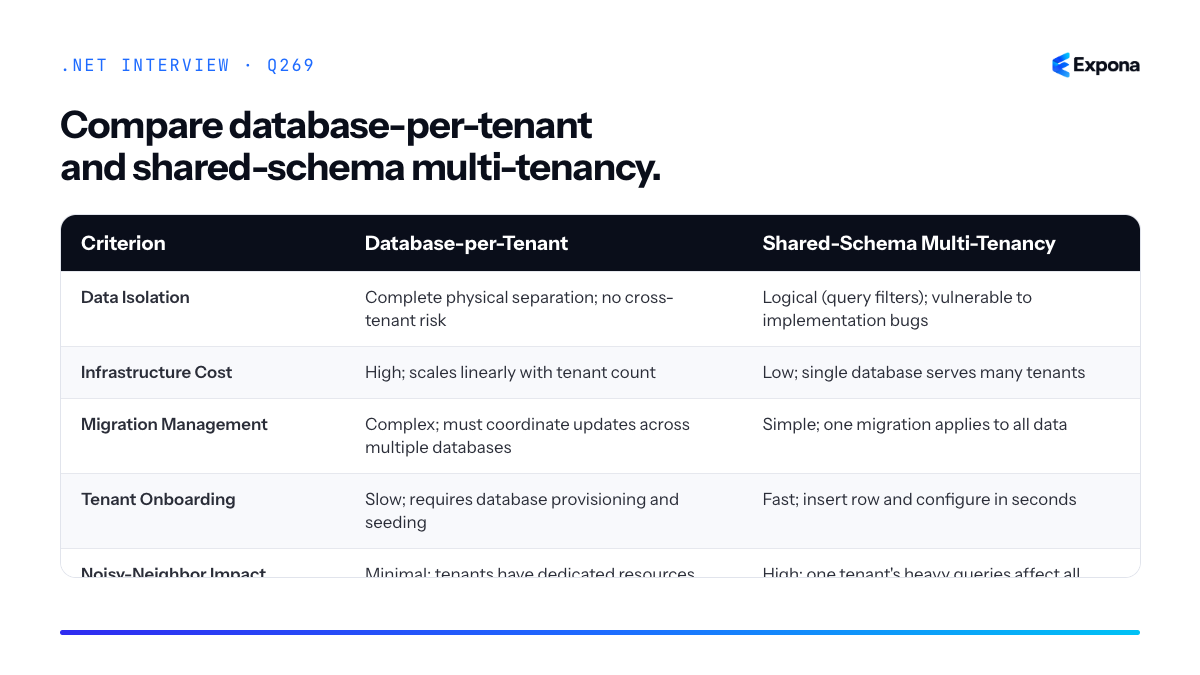
Common follow-up questions
- "How do you prevent query-filter bypasses in shared-schema?" — Use middleware to inject tenant context, enforce
HasQueryFilteron all entities, audit raw SQL queries, and consider read-only contexts that reject unsupported operations. - "What hybrid approach exists?" — Many enterprises use database-per-region or per-tier: free/trial tenants share a database; enterprise customers get dedicated databases for compliance and performance guarantees.
- "How do you handle reporting across all tenants?" — Database-per-tenant requires aggregating data from many sources; shared-schema can run a single query but must handle performance and cross-tenant security scans carefully.
Related interview questions
- What are EF Core migrations?
- What is the difference between AddTransient services that hold state and stateless services?
- How would you build a multi-tenant SaaS on ASP.NET Core?
Further reading
.NETCsharpefcore270How do you design an API gateway in .NET?
ExpertAn API gateway in .NET is a reverse proxy built with YARP that routes client requests to backend microservices while handling cross-cutting concerns like authentication, rate limiting, request/response transformation, and load balancing. It acts as a single entry point, decoupling clients from internal service topology and keeping business logic centralized rather than scattered across services.
How it works
An API gateway sits between clients and your microservices, intercepting all incoming requests. It inspects the request path, headers, and query parameters to route traffic to the appropriate backend service. Beyond routing, it handles concerns that shouldn't live in every microservice: validating JWT tokens, enforcing rate limits, transforming headers, logging, and load balancing across service instances.
YARP (Yet Another Reverse Proxy) is Microsoft's modern solution for building gateways. It's lightweight, high-performance, and integrates seamlessly with .NET's dependency injection and middleware pipeline. You configure routes and policies in code or configuration files, then YARP handles the heavy lifting of proxying requests with minimal overhead. You can also chain custom middleware to intercept requests before they reach the backend.
This pattern provides API versioning at the gateway level, shields internal service details from clients, and allows you to modify backend topology without changing client code. It's particularly valuable in microservices architectures where you want a single, versioned API contract for external consumers.
Example
csharpusing Yarp.ReverseProxy.Configuration; var builder = WebApplicationBuilder.CreateBuilder(args); builder.Services.AddReverseProxy() .LoadFromConfig(builder.Configuration.GetSection("ReverseProxy")); builder.Services.AddAuthentication("Bearer") .AddJwtBearer(options => { options.Authority = "https://your-auth-server"; options.Audience = "your-api"; }); builder.Services.AddAuthorization(); var app = builder.Build(); app.UseAuthentication(); app.UseAuthorization(); app.MapReverseProxy(pipeline => { pipeline.UseSessionAffinity(); pipeline.UseLoadBalancing(); }); app.Run();This configures YARP as a gateway that enforces JWT authentication before routing requests to backend services defined in appsettings.json, with session affinity and load balancing built in.
Key points to mention
- YARP over alternatives: YARP is lightweight, cloud-native, and integrates with .NET ecosystem better than external proxies like nginx for managed environments. It also runs as a standard ASP.NET Core app on Kestrel.
- Configuration-driven routing: Define routes and cluster destinations in appsettings.json or code; YARP handles dynamic discovery, failover, and health checks without custom logic.
- Cross-cutting concerns: Move authentication, rate limiting, logging, and header transformation to the gateway to avoid duplication and ensure consistency across all services.
- Security at the perimeter: The gateway enforces end-to-end API security by validating tokens and sanitizing requests before they reach business logic.
- No business logic: The gateway routes and transforms; backends handle domain logic. This keeps the gateway fast and stateless, enabling horizontal scaling.
Common follow-up questions
- How do you handle request/response transformation? Use YARP's transform delegates or custom middleware to modify headers, query strings, or request bodies before forwarding to or returning from backends.
- What about caching and rate limiting? Implement caching policies and rate-limiting middleware in the gateway pipeline; libraries like AspNetCoreRateLimit or StackExchange.Redis integrate cleanly.
- How do you version APIs at the gateway? Route based on URL path prefix (e.g., /v1/, /v2/) or headers, mapping each version to different backend clusters, allowing independent service evolution.
Related interview questions
Further reading
.NETCsharpaspnetcoreSecurity271What is YARP?
ExpertYARP (Yet Another Reverse Proxy) is Microsoft's open-source, high-performance reverse proxy library built on ASP.NET Core. It enables you to route incoming HTTP requests to backend services while handling concerns like load balancing, SSL termination, and request transformation—all configured programmatically in C# or through JSON configuration files.
How it works
YARP operates as middleware within an ASP.NET Core application, intercepting incoming requests and forwarding them to configured backend services (clusters). It uses System.IO.Pipelines under the hood for efficient, low-allocation streaming of request and response bodies, making it capable of handling high throughput scenarios.
The core workflow involves three steps: (1) the incoming request matches a route configuration, (2) the request is transformed if needed, and (3) it is forwarded to the appropriate backend service in a configured cluster. Responses flow back through YARP with optional transformations before being sent to the client.
Unlike traditional reverse proxies (nginx, HAProxy), YARP is a .NET library, not a separate process. This allows you to integrate proxy logic directly into your application, customize behavior in C# code, and leverage the entire ASP.NET Core ecosystem. It's lightweight enough to embed in microservices yet powerful enough to serve as a dedicated API gateway.
Example
csharp// Program.cs - .NET 8+ var builder = WebApplication.CreateBuilder(args); // Add YARP with configuration from appsettings.json builder.Services.AddReverseProxy() .LoadFromConfig(builder.Configuration.GetSection("ReverseProxy")) .AddTransforms<CustomTransformer>(); var app = builder.Build(); app.MapReverseProxy(); app.Run(); // appsettings.json { "ReverseProxy": { "Routes": [ { "RouteId": "api-route", "ClusterId": "api-cluster", "Match": { "Path": "/api/{**catch-all}" }, "Transforms": [ { "PathPattern": "/backend/{**catch-all}" } ] } ], "Clusters": [ { "ClusterId": "api-cluster", "Destinations": { "dest1": { "Address": "http://backend1:5000" }, "dest2": { "Address": "http://backend2:5000" } } } ] } } // Custom transformer for advanced behavior public class CustomTransformer : HttpTransformer { public override ValueTask TransformRequestAsync( HttpContext httpContext, HttpRequestMessage proxyRequest, string destinationPrefix) { proxyRequest.Headers.Add("X-Forwarded-By", "YARP"); return base.TransformRequestAsync(httpContext, proxyRequest, destinationPrefix); } }This configuration routes requests matching
/api/**to a cluster of two backend services, rewrites the path, and injects a custom header via a transformer.Key points to mention
- Performance: Built on Kestrel with efficient streaming using System.IO.Pipelines—handles thousands of requests per second with low memory overhead.
- Configuration flexibility: Combine JSON-based configuration with programmatic customization in C# for dynamic routing, authentication, and request/response transformation.
- Extensibility: Transform requests/responses, implement custom load balancing policies, add middleware for logging, rate limiting, or request enrichment.
- Use cases: API gateways (see designing an API gateway), service mesh ingress, microservice aggregation, and legacy system integration.
- Zero-copy proxying: Streams request/response bodies directly without buffering, ideal for large payloads and WebSocket upgrades.
Common follow-up questions
- How does YARP compare to traditional reverse proxies like nginx? — YARP runs in-process within .NET, offering tighter integration and dynamic configuration in C#, while nginx is a separate, battle-tested process. Choose YARP for embedded gateways; nginx for standalone infrastructure.
- Can YARP handle WebSocket and gRPC traffic? — Yes, YARP supports both WebSocket upgrades and HTTP/2 gRPC forwarding through transparent protocol pass-through.
- How do you implement circuit breaking or retry logic in YARP? — Use custom transformers, middleware, or integrate libraries like Polly for resilience patterns within your proxy configuration.
Related interview questions
.NETCsharpaspnetcorePerformance272How do you design for horizontal scaling in ASP.NET Core?
ExpertHorizontal scaling in ASP.NET Core requires designing applications to be stateless, externalizing session and cache storage, persisting Data Protection keys securely, and ensuring all background jobs are idempotent and safe to run on multiple instances simultaneously. The core principle is that any instance must be able to handle any request without relying on local state, and all shared resources must live outside the application process.
How it works
When you scale horizontally, you run multiple identical instances of your ASP.NET Core application behind a load balancer. Each request can be routed to any instance, so no instance can store user state, session data, or cache locally. Instead, you externalize these concerns to shared infrastructure.
Session data belongs in a distributed cache like Redis or a SQL database, not in memory. Similarly, authentication tokens, user preferences, and temporary data must be accessible from any instance. The Data Protection API requires that encryption keys be persisted to a shared location—typically a configuration store or database—so all instances can decrypt the same data.
Background jobs present another challenge: if you schedule a job on one instance, other instances won't know about it. Use a centralized job queue (Hangfire, Azure Service Bus, or similar) so jobs are processed reliably across instances. Additionally, ensure jobs are idempotent—if a job runs twice, it should produce the same result as running once.
Example
csharp// Startup configuration for horizontal scaling public class Program { public static void Main(string[] args) { var builder = WebApplication.CreateBuilder(args); // Store session in Redis, not in-memory builder.Services.AddStackExchangeRedisCache(options => { options.Configuration = builder.Configuration.GetConnectionString("Redis"); }); builder.Services.AddSession(options => { options.IdleTimeout = TimeSpan.FromMinutes(30); options.Cookie.IsEssential = true; }); // Persist Data Protection keys to a shared location builder.Services.AddDataProtection() .PersistKeysToStackExchangeRedis( ConnectionMultiplexer.Connect( builder.Configuration.GetConnectionString("Redis")), "DataProtection-Keys"); // Use distributed cache for application caching builder.Services.AddScoped(sp => sp.GetRequiredService()); // Register Hangfire for distributed background jobs builder.Services.AddHangfire(config => config.UseRedisStorage(builder.Configuration.GetConnectionString("Redis"))); builder.Services.AddHangfireServer(); var app = builder.Build(); app.UseSession(); app.MapControllers(); app.Run(); } } // Controller example: don't store state locally [ApiController] [Route("api/[controller]")] public class UserController : ControllerBase { private readonly IDistributedCache _cache; private readonly IBackgroundJobClient _backgroundJobs; public UserController(IDistributedCache cache, IBackgroundJobClient backgroundJobs) { _cache = cache; _backgroundJobs = backgroundJobs; } [HttpGet("{id}")] public async Task GetUser(int id) { var cacheKey = $"user:{id}"; var cached = await _cache.GetStringAsync(cacheKey); if (!string.IsNullOrEmpty(cached)) return Ok(JsonSerializer.Deserialize(cached)); // Fetch from database, store in distributed cache var user = new UserDto { Id = id, Name = "John Doe" }; await _cache.SetStringAsync(cacheKey, JsonSerializer.Serialize(user), new DistributedCacheEntryOptions { AbsoluteExpirationRelativeToNow = TimeSpan.FromMinutes(10) }); return Ok(user); } [HttpPost("{id}/process")] public IActionResult EnqueueUserProcessing(int id) { // Queue job across all instances via Hangfire BackgroundJob.Enqueue(() => ProcessUserAsync(id)); return Accepted(); } public async Task ProcessUserAsync(int id) { // This job is idempotent: safe to run on any instance await Task.Delay(100); // Simulate work } }This example configures Redis for distributed session storage and caching, persists Data Protection keys to shared Redis, and uses Hangfire to queue background jobs that can run on any instance safely.
Key points to mention
- Stateless instances: No local memory state—all data must be retrievable from any instance, enabling load balancer flexibility.
- Distributed caching: Use Redis, Azure Cache for Redis, or SQL Server instead of in-memory caches; configure session providers to use external stores.
- Data Protection key persistence: Configure Data Protection API to persist keys to shared infrastructure so all instances can decrypt the same data.
- Idempotent background jobs: Design background jobs to be idempotent and queue them centrally (Hangfire, Service Bus) rather than on individual instances.
- Sticky sessions or distributed state: Avoid session affinity if possible; if necessary, use a distributed session backend rather than in-memory storage.
Common follow-up questions
- How do you handle distributed locks in a scaled environment? Use Redis Locks or a centralized coordination service sparingly—locks can become bottlenecks. Prefer optimistic concurrency (versioning) or eventual consistency patterns.
- What happens if Redis goes down in a horizontally scaled setup? Implement failover strategies (Redis Sentinel, cluster mode), circuit breakers, and graceful degradation to fall back to database queries or cache misses.
- How do you ensure idempotency in background jobs? Use unique identifiers, record job execution with timestamps, check for duplicates before processing, and design jobs so re-running them produces the same state.
Related interview questions
- How do you design a robust background job system?
- What are concurrent collections?
- What is the Data Protection API?
Further reading
.NETCsharpaspnetcore273How do you implement distributed locking?
ExpertDistributed locking ensures mutual exclusion across multiple processes or nodes in a distributed system. The most reliable approaches use Redis (with RedLock), database advisory locks, or cloud blob leases. Always set expiry times, assume locks can be lost, and design your critical sections to be idempotent so failures don't corrupt state.
How it works
Distributed locks solve the problem of coordinating access to shared resources when your application runs on multiple servers. Unlike local locks (which only work within one process), distributed locks must be held by an external service that all nodes can trust.
The three main strategies differ in failure modes and latency. Redis-based locks (via StackExchange.Redis or Redlock libraries) are fast and simple but require Redis availability and careful timeout tuning—a process holding the lock can crash, so you must set a TTL (time-to-live) to auto-release it. Database advisory locks (PostgreSQL's
pg_advisory_lockor SQL Server'ssp_getapplock) are durable and integrated with your data store, making them safer for critical operations. Azure Blob Leases or similar cloud primitives offer strong semantics but add cloud provider coupling.The core challenge: if a process acquires a lock, then crashes, the lock must expire automatically. But if the TTL is too short, legitimate work might get preempted; if too long, recovery is slow. The solution is to design work as idempotent operations—if a lock expires mid-operation and another process repeats the work, the final state is correct anyway. Additionally, consider a heartbeat mechanism where the lock holder periodically renews the lock during long operations.
Example
csharpusing StackExchange.Redis; public class DistributedLockService { private readonly IDatabase _redis; private readonly string _lockKeyPrefix = "lock:"; public DistributedLockService(IConnectionMultiplexer redis) { _redis = redis.GetDatabase(); } public async Task AcquireLockAsync(string resourceId, TimeSpan lockDuration) { var lockKey = $"{_lockKeyPrefix}{resourceId}"; var lockValue = Guid.NewGuid().ToString(); // SET NX (only set if not exists) with expiry var acquired = await _redis.StringSetAsync( lockKey, lockValue, lockDuration, When.NotExists ); return acquired; } public async Task ReleaseLockAsync(string resourceId, string lockValue) { var lockKey = $"{_lockKeyPrefix}{resourceId}"; // Use Lua script to ensure we only delete our own lock var script = @" if redis.call('get', KEYS[1]) == ARGV[1] then return redis.call('del', KEYS[1]) else return 0 end"; await _redis.ScriptEvaluateAsync( script, new RedisKey[] { lockKey }, new RedisValue[] { lockValue } ); } public async Task DoLockedWorkAsync(string resourceId) { const int lockDurationSeconds = 30; var lockDuration = TimeSpan.FromSeconds(lockDurationSeconds); var lockValue = Guid.NewGuid().ToString(); if (!await AcquireLockAsync(resourceId, lockDuration)) { throw new InvalidOperationException("Could not acquire lock"); } try { // Idempotent operation (e.g., update account balance, reconcile data) await PerformCriticalWorkAsync(); } finally { await ReleaseLockAsync(resourceId, lockValue); } } private async Task PerformCriticalWorkAsync() => await Task.Delay(100); }This example uses Redis
SET NXwith an expiry to acquire a lock atomically, stores a unique value to prevent accidental cross-process deletion, and uses a Lua script for safe release.Key points to mention
- Always set an expiry/TTL—without it, a crashed process holds the lock forever and deadlocks the system.
- Use a unique token per lock holder (like a GUID) so only the true owner can release the lock, preventing accidental conflicts.
- Design critical sections as idempotent—assume the lock can expire or be lost; the operation should be safe if executed twice.
- Consider heartbeat renewal for long operations—extend the lock TTL periodically if work is still ongoing, preventing premature timeout.
- Choose the right backend—Redis is fast and sufficient for most use cases, but databases offer durability and cloud blob leases offer strong semantics for cloud-native apps.
Common follow-up questions
- What happens if the lock expires while work is still running? This is why idempotency is critical. If another process acquires the lock and repeats the operation, both processes' changes should result in a consistent final state. For example, incrementing a counter is not idempotent, but setting a field to a specific value is.
- How do you handle Redis failure in a lock-based system? Use a Redis cluster or Sentinel for high availability. Alternatively, fall back to a database-backed lock or implement a circuit breaker to degrade gracefully.
- What's the difference between this and a semaphore? A semaphore allows multiple concurrent accessors (count > 1); a lock typically allows only one. For rate-limiting across nodes, you might use a distributed semaphore backed by Redis or a database counter.
Related interview questions
- How do you design a robust background job system?
- How do you design for horizontal scaling in ASP.NET Core?
- How do you design a system to handle 10x traffic growth?
Further reading
.NETCsharpasync274How do you design a reliable event-driven system with .NET?
ExpertA reliable event-driven system in .NET requires the outbox pattern for transactional event publishing, idempotent message consumers with inbox tables to prevent duplicate processing, exponential backoff retries, dead-letter queues for failed messages, schema versioning for backward compatibility, and distributed tracing to correlate events across services. This combination ensures exactly-once processing semantics, resilience to failures, and observability.
How it works
The outbox pattern solves the dual-write problem: instead of publishing an event to a message broker and updating your database in separate transactions, you write both the domain event and the event record to your database in a single transaction. A background worker then polls the outbox table and publishes events to the broker, ensuring no events are lost if the application crashes.
On the consumer side, an inbox table tracks processed message IDs. Before handling a message, you check if it already exists in the inbox—if it does, you skip processing (idempotency). After successful processing, you insert the message ID into the inbox within the same transaction as your business logic, guaranteeing exactly-once semantics even if a consumer crashes mid-processing.
Exponential backoff retries (e.g., 1s, 2s, 4s, 8s) prevent overwhelming downstream systems during transient failures. Messages that exhaust retries move to dead-letter queues for manual investigation. Schema versioning (versioning event payloads or using discriminated unions) allows services to evolve independently. Distributed tracing with correlation IDs ties all related events together across services, simplifying debugging.
Example
csharp// Outbox pattern with Entity Framework Core public class OrderCreatedEvent { public Guid OrderId { get; set; } public decimal Amount { get; set; } public int Version { get; set; } = 1; } public class OutboxEvent { public Guid Id { get; set; } public string EventType { get; set; } public string Payload { get; set; } public DateTime CreatedAt { get; set; } public bool Published { get; set; } } public class OrderService { private readonly ApplicationDbContext _db; private readonly ILogger _logger; public async Task CreateOrderAsync(Order order) { using var transaction = _db.Database.BeginTransaction(); // Update domain state _db.Orders.Add(order); // Write event to outbox (same transaction) var outboxEvent = new OutboxEvent { Id = Guid.NewGuid(), EventType = nameof(OrderCreatedEvent), Payload = JsonSerializer.Serialize(new OrderCreatedEvent { OrderId = order.Id, Amount = order.Amount }), CreatedAt = DateTime.UtcNow, Published = false }; _db.OutboxEvents.Add(outboxEvent); await _db.SaveChangesAsync(); await transaction.CommitAsync(); } } // Outbox publisher (background worker) public class OutboxPublisher : BackgroundService { protected override async Task ExecuteAsync(CancellationToken stoppingToken) { while (!stoppingToken.IsCancellationRequested) { var unpublished = await _db.OutboxEvents .Where(e => !e.Published) .ToListAsync(stoppingToken); foreach (var evt in unpublished) { try { await _messageBroker.PublishAsync(evt.EventType, evt.Payload); evt.Published = true; await _db.SaveChangesAsync(stoppingToken); } catch (Exception ex) { _logger.LogError(ex, "Failed to publish event {EventId}", evt.Id); } } await Task.Delay(TimeSpan.FromSeconds(5), stoppingToken); } } } // Idempotent consumer with inbox public class OrderProcessedEventHandler { public async Task HandleAsync(OrderCreatedEvent evt) { if (await _db.InboxEvents.AnyAsync(e => e.MessageId == evt.OrderId)) return; // Already processed using var transaction = _db.Database.BeginTransaction(); // Process event var notification = new Notification { OrderId = evt.OrderId }; _db.Notifications.Add(notification); // Record in inbox (atomically) _db.InboxEvents.Add(new InboxEvent { MessageId = evt.OrderId, ProcessedAt = DateTime.UtcNow }); await _db.SaveChangesAsync(); await transaction.CommitAsync(); } }This code demonstrates the outbox pattern writing events and orders atomically, a background publisher moving events to the broker, and an idempotent handler using an inbox table to prevent duplicate processing.
Key points to mention
- Outbox + Inbox: Guarantees exactly-once delivery and processing semantics, eliminating data loss and duplicate handling
- Transactional consistency: Use database transactions to couple domain changes with event writes, preventing partial failures
- Idempotent operations: Design consumers so replaying the same message produces the same result (same inbox record, no side effects)
- Retry strategy with backoff and DLQ: Use exponential backoff for transient failures; move messages to dead-letter queues after max retries for manual intervention
- Schema versioning and tracing: Version events in payloads; include correlation IDs in message headers to track causality across services
Common follow-up questions
- How do you handle event schema evolution without breaking consumers? (Discriminated unions, versioned fields, or adapter patterns)
- What's the difference between the outbox pattern and consuming directly from a queue, and when would you use each?
- How do you implement distributed tracing and correlation IDs across async event chains? (OpenTelemetry, activity IDs in headers)
Related interview questions
- How do you design a robust background job system?
- How do you consume messages from a queue in .NET?
- How do you design idempotent message consumers?
Further reading
.NETCsharpArchitecture275What is the saga pattern and how do you implement it in .NET?
ExpertThe saga pattern is a distributed transaction pattern that coordinates long-running business processes across multiple microservices by maintaining state and executing compensating actions on failure. Instead of a traditional two-phase commit, a saga breaks a transaction into a series of local transactions, each with a corresponding compensating action to handle rollbacks. In .NET, frameworks like MassTransit and NServiceBus provide built-in saga support with state machine definitions, persistence, and automatic compensation handling.
How it works
A saga maintains state across service boundaries by orchestrating a sequence of steps. When a step fails, the saga executes compensating actions in reverse order to undo previous changes. There are two primary implementation approaches:
Choreography: Services publish events and react to them directly, with each service knowing which events trigger its actions. This is decoupled but can become difficult to follow as complexity grows.
Orchestration: A central saga coordinator explicitly invokes each service step and handles compensation. This is more explicit and maintainable but introduces a central point of coordination.
The saga persists its state in a database, allowing it to resume after failures. When a compensating transaction is needed, the saga either publishes a compensation event or directly invokes a compensation endpoint on the service. The state machine defines valid transitions and ensures idempotency—critical in distributed systems where messages may be retried.
Example
csharppublic class OrderSagaState : SagaStateMachineInstance { public Guid CorrelationId { get; set; } public string State { get; set; } public Guid OrderId { get; set; } public decimal OrderAmount { get; set; } } public class OrderSaga : StateMachine<OrderSagaState> { public OrderSaga() { InstanceState(x => x.State); Event(() => OrderSubmitted, x => x.CorrelateById(m => m.OrderId)); Event(() => PaymentApproved, x => x.CorrelateById(m => m.OrderId)); Event(() => PaymentRejected, x => x.CorrelateById(m => m.OrderId)); Initially( When(OrderSubmitted) .Then(context => context.Saga.OrderAmount = context.Message.Amount) .Send(new Uri("rabbitmq://localhost/payment-service"), context => new ProcessPaymentCommand { OrderId = context.Saga.OrderId }) .TransitionTo(WaitingForPayment)); During(WaitingForPayment, When(PaymentApproved) .Send(new Uri("rabbitmq://localhost/fulfillment-service"), context => new FulfillOrderCommand { OrderId = context.Saga.OrderId }) .TransitionTo(Completed), When(PaymentRejected) .Send(new Uri("rabbitmq://localhost/order-service"), context => new CancelOrderCommand { OrderId = context.Saga.OrderId }) .TransitionTo(Failed)); } public State WaitingForPayment { get; private set; } public State Completed { get; private set; } public State Failed { get; private set; } public Event<OrderSubmittedEvent> OrderSubmitted { get; private set; } public Event<PaymentApprovedEvent> PaymentApproved { get; private set; } public Event<PaymentRejectedEvent> PaymentRejected { get; private set; } }This MassTransit saga orchestrates an order workflow: when an order is submitted, it sends a payment request; if approved, it triggers fulfillment; if rejected, it sends a cancellation command—all with automatic state persistence and retry semantics.
Key points to mention
- State machine definition: Sagas use explicit state machines to define valid transitions, making the workflow explicit and maintainable, unlike choreography-only approaches.
- Compensating actions: Each saga step has a corresponding compensation to undo work on failure, simulating transactional semantics without ACID guarantees.
- Idempotency: Sagas must be idempotent because distributed messaging guarantees at-least-once delivery; replay must produce the same outcome.
- Persistence: MassTransit and NServiceBus persist saga state to a database, enabling recovery after crashes and proper correlation of events.
- Correlation ID: Events are correlated back to saga instances using a correlation ID, ensuring messages reach the correct saga state machine instance.
Common follow-up questions
- How does saga state persistence work, and what storage backends are supported? MassTransit supports EF Core, MongoDB, DynamoDB, and more. State is stored after each transition, allowing resume on failure. You typically configure persistence in the container during configuration.
- What's the difference between orchestration and choreography sagas? Orchestration uses a central coordinator that explicitly invokes services and knows the flow; choreography has services react to events independently, making it looser but harder to visualize and test.
- How do you handle saga timeouts and long-running processes? Sagas can schedule timeout events using `Schedule()` in MassTransit. When a timeout fires and the saga is still in a waiting state, it can trigger compensation or escalation logic.
Related interview questions
- What is a BackgroundService?
- How do you implement graceful shutdown?
- What is the repository pattern and is it needed with EF Core?
Further reading
.NETCsharpArchitecture276How do you handle eventual consistency in user-facing features?
ExpertHandling eventual consistency in user-facing features means acknowledging that data won't be instantly available after a request, then masking that delay through optimistic UI updates, pending states, and asynchronous notifications. The key is returning a 202 Accepted response immediately, providing a status endpoint to poll or using SignalR for real-time updates, while displaying provisional UI changes that get confirmed or rolled back when the backend operation completes.
How it works
Eventual consistency occurs naturally in distributed systems, microservices, and event-driven architectures where operations complete asynchronously. Rather than forcing clients to wait for full consistency, you embrace the delay and provide excellent UX:
- Immediate acknowledgment: Accept the request with HTTP 202 Accepted, returning a resource identifier or status URL.
- Optimistic updates: Update the UI immediately with the expected state while the backend processes the change.
- Status tracking: Expose a status endpoint the client polls or subscribe to real-time updates via SignalR or WebSocket.
- Reconciliation: When the backend operation completes, notify the client. If it failed, rollback the optimistic UI and show an error.
- User communication: Display pending badges, skeleton loaders, or notifications so users understand something is in progress.
This pattern is common in modern applications: uploading files, processing payments, bulk operations, or syncing data across systems. The user perceives responsiveness, and the backend has time to ensure correctness.
Example
csharp// API controller accepting a command and returning 202 [ApiController] [Route("api/[controller]")] public class OrdersController : ControllerBase { private readonly IMediator _mediator; [HttpPost("process")] public async Task<IActionResult> ProcessOrder([FromBody] ProcessOrderCommand cmd) { // Generate unique operation ID var operationId = Guid.NewGuid().ToString(); // Queue the operation without waiting for completion _ = _mediator.Send(cmd with { OperationId = operationId }); // Return 202 Accepted with status URL return Accepted($"/api/orders/status/{operationId}", new { operationId, statusUrl = $"/api/orders/status/{operationId}" }); } // Status endpoint for polling [HttpGet("status/{operationId}")] public async Task<IActionResult> GetStatus(string operationId) { var status = await _mediator.Send(new GetOperationStatusQuery { OperationId = operationId }); return Ok(new { operationId, status = status.State, // "Pending", "Completed", "Failed" result = status.Result, error = status.ErrorMessage }); } } // SignalR hub for real-time notifications public class OrderProcessingHub : Hub { public async Task SubscribeToOrder(string operationId) { await Groups.AddToGroupAsync(Connection.ConnectionId, $"order-{operationId}"); } } // When operation completes, notify via hub public class OrderProcessedEventHandler : INotificationHandler<OrderProcessedEvent> { private readonly IHubContext<OrderProcessingHub> _hub; public async Task Handle(OrderProcessedEvent notification, CancellationToken ct) { await _hub.Clients .Group($"order-{notification.OperationId}") .SendAsync("OrderCompleted", new { operationId = notification.OperationId, status = "Completed", orderId = notification.OrderId }, ct); } }This example shows a POST that immediately returns 202 with an operation ID, a GET status endpoint for polling, and a SignalR hub that pushes updates when processing finishes, allowing the client to display pending state initially and update optimistically.
Key points to mention
- Use HTTP 202 Accepted to signal the request was received but processing is deferred, keeping the HTTP contract semantic.
- Provide both polling (status endpoint) and push (SignalR/WebSocket) options; polling is simpler, push is more efficient.
- Display pending UI states, checkmarks, or spinners so users never think the app is broken.
- Handle failure gracefully: if the backend operation fails, show an error message and offer retry or rollback options.
- Consider how you handle long-running requests separately—202 patterns are best for operations that naturally complete asynchronously (message queues, background jobs), not streaming responses.
Common follow-up questions
- How do you prevent duplicate processing? Use idempotency keys: store the operation ID and initial request hash, reject retries with the same key.
- What if the client never polls or reconnects? Set a TTL on the operation status cache; persist critical state in the database so users can check later.
- How does this relate to CQRS read models? The status endpoint queries a read model that lags behind the write model; this is expected and communicated to the user.
Related interview questions
.NETCsharpArchitecture277How do you design idempotent message consumers?
ExpertIdempotent message consumers ensure that processing the same message multiple times produces the same result as processing it once. This is achieved by storing processed message IDs in the same database transaction as business side effects, using natural idempotency patterns (like upserts), and designing handlers to tolerate duplicate and out-of-order delivery. The core principle is: deduplication at the consumer level combined with idempotent operations makes the system resilient to message broker failures and retries.
How it works
Idempotent message consumers rely on three complementary strategies:
1. Deduplication via processed message tracking: Before processing a message, check if its ID already exists in a
ProcessedMessagestable within the same transaction context as your business logic. If it exists, skip processing and return success (idempotent read). If not, process the message and insert the message ID atomically.2. Natural idempotency: Design your business operations to be inherently idempotent. Use database upserts instead of inserts, update operations instead of increments, or state-based commands instead of event-based deltas. For example, "set account balance to X" is idempotent; "add Y to account balance" is not.
3. Duplicate and out-of-order tolerance: Handlers must assume messages may arrive multiple times or in unexpected order. Use versioning, timestamps, or causality tokens to detect and reject stale or redundant messages. Treat message IDs as unique identifiers for deduplication, not sequence numbers for ordering guarantees.
The transaction boundary is critical: both the deduplication record and the business side effect must be committed or rolled back together, preventing "at-most-once" semantics from degrading into "lost updates."
Example
csharppublic class IdempotentOrderConsumer { private readonly IServiceScopeFactory _scopeFactory; private readonly ILogger<IdempotentOrderConsumer> _logger; public async Task HandleOrderCreatedAsync(OrderCreatedEvent @event) { using var scope = _scopeFactory.CreateScope(); var context = scope.ServiceProvider.GetRequiredService<OrderDbContext>(); using var transaction = await context.Database.BeginTransactionAsync(); try { // Check if already processed var alreadyProcessed = await context.ProcessedMessages .AnyAsync(pm => pm.MessageId == @event.MessageId); if (alreadyProcessed) { _logger.LogInformation("Message {MessageId} already processed, skipping.", @event.MessageId); return; // Idempotent: return success without re-processing } // Natural idempotency: upsert order var order = await context.Orders .FirstOrDefaultAsync(o => o.OrderId == @event.OrderId); if (order == null) { order = new Order { OrderId = @event.OrderId, CustomerId = @event.CustomerId, Total = @event.Total, Status = OrderStatus.Created, CreatedAt = DateTime.UtcNow }; context.Orders.Add(order); } else { // Tolerate replayed messages: only update if state is valid if (order.Status == OrderStatus.Pending) { order.Status = OrderStatus.Created; } } // Record deduplication in same transaction context.ProcessedMessages.Add(new ProcessedMessage { MessageId = @event.MessageId, MessageType = nameof(OrderCreatedEvent), ProcessedAt = DateTime.UtcNow }); await context.SaveChangesAsync(); await transaction.CommitAsync(); _logger.LogInformation("Order {OrderId} processed successfully.", @event.OrderId); } catch (Exception ex) { await transaction.RollbackAsync(); _logger.LogError(ex, "Failed to process message {MessageId}.", @event.MessageId); throw; } } }This consumer deduplicates by checking
ProcessedMessages, uses an upsert pattern for the order (idempotent by nature), and records the processed message ID in the same transaction, ensuring that retries are safe and side effects are never duplicated.Key points to mention
- Transaction atomicity: Deduplication state and business side effects must commit together. Use database transactions or event sourcing to guarantee consistency.
- Natural idempotency over deduplication: Whenever possible, design operations to be inherently idempotent (upserts, state-based commands) rather than relying solely on message tracking, which scales better and requires less infrastructure.
- Message ID as the deduplication key: Use a unique, stable message identifier (often a GUID or correlation ID from the message broker) rather than business keys, which may collide across different logical messages.
- Timeout and cleanup strategy: Define retention policies for the
ProcessedMessagestable. Older records can be archived or deleted after a TTL, balancing replay protection against storage costs. - Integration with the outbox pattern: Combine idempotent consumers with outbox-based message publishing to achieve end-to-end reliability in event-driven systems.
Common follow-up questions
- How do you handle out-of-order messages in an idempotent consumer? Use versioning or timestamps on the message and the persisted state; reject messages with older versions or earlier timestamps than what is already stored.
- What happens if the deduplication table grows too large? Implement a cleanup job to archive or purge old entries after a retention period (e.g., 30 days), or use a distributed cache (Redis) for temporary deduplication with automatic expiration.
- How is this different from API idempotency? API idempotency uses idempotency keys in HTTP headers and caches responses; message consumer idempotency stores message IDs in a database and replays state changes safely. Both ensure "at-most-once" semantics from the client's perspective.
Related interview questions
- What is the outbox pattern?
- What is idempotency and how do you implement it in APIs?
- How do you design a reliable event-driven system with .NET?
Further reading
.NETCsharp278What is Domain-Driven Design in .NET terms?
ExpertDomain-Driven Design (DDD) is an architectural approach that centers software development around the business domain, using a ubiquitous language shared between developers and domain experts. In .NET terms, it structures code into bounded contexts containing aggregates, entities, value objects, and domain events, all kept free from infrastructure concerns so the business logic remains testable and maintainable.
How it works
DDD starts by identifying the problem domain and dividing it into bounded contexts—logical boundaries where a particular domain language and model apply. Within each context lives a domain layer containing core business objects.
Entities are domain objects with a unique identity that persists over time (like a Customer or Order). Value Objects have no identity and are immutable, defined entirely by their attributes (like Money or Address). Aggregates are clusters of entities and value objects treated as a single unit of consistency; an aggregate root controls access to its internal members, ensuring invariants are maintained.
Domain Events represent something that happened in the business—when an aggregate's state changes significantly, it raises an event. These events decouple aggregates and enable communication across bounded contexts. How do you raise and dispatch domain events? is a natural extension here.
The domain layer depends only on other domain code, never on database frameworks or HTTP libraries. Infrastructure concerns (repositories, logging, API clients) live in separate layers and depend inward on the domain layer.
Example
csharp// Value Object - immutable, no identity public record Money(decimal Amount, string Currency) { public Money Add(Money other) => other.Currency != Currency ? throw new InvalidOperationException("Currency mismatch") : new Money(Amount + other.Amount, Currency); } // Domain Event public record OrderPlacedEvent(Guid OrderId, Guid CustomerId, Money Total, DateTime OccurredAt); // Aggregate Root - controls invariants public class Order { private List _items = new(); public Guid Id { get; private set; } public Guid CustomerId { get; private set; } public Money Total { get; private set; } public List DomainEvents { get; private set; } = new(); private Order() { } // For ORM public static Order Create(Guid customerId) => new() { Id = Guid.NewGuid(), CustomerId = customerId, Total = new Money(0, "USD") }; public void AddItem(OrderItem item) { _items.Add(item); Total = Total.Add(item.Price); } public void Place() { if (_items.Count == 0) throw new InvalidOperationException("Order cannot be empty"); DomainEvents.Add(new OrderPlacedEvent(Id, CustomerId, Total, DateTime.UtcNow)); } } // Entity with identity public class OrderItem { public Guid Id { get; set; } public string ProductName { get; set; } public Money Price { get; set; } }This example shows an Order aggregate root enforcing business rules, using immutable records for the Money value object, and raising a domain event when the order is placed.
Key points to mention
- DDD prioritizes business logic clarity over technical convenience; the domain layer has zero framework dependencies.
- Aggregates enforce consistency boundaries—only the aggregate root is modified externally; internal state changes only through root methods.
- Bounded contexts allow large systems to split into manageable pieces with independent domain models and anti-corruption layers between them.
- Value Objects using records or custom immutable classes reduce bugs by preventing accidental mutation.
- Domain Events decouple aggregates and enable event sourcing or eventual consistency patterns across contexts.
Common follow-up questions
- How do you implement repositories in a DDD architecture without leaking infrastructure details into the domain?
- What is the difference between a DTO and a domain entity, and when should each be used?
- How do bounded contexts communicate when they span multiple deployment units or teams?
Related interview questions
Further reading
.NETCsharpArchitecture279How do you enforce aggregate invariants?
ExpertEnforce aggregate invariants by encapsulating state within the aggregate root, exposing only behavior methods that validate business rules before state changes, ensuring all modifications happen through the root entity, and persisting the entire aggregate atomically in a single transaction. This prevents invalid state and maintains consistency according to domain rules.
How it works
An aggregate is a cluster of domain objects that must maintain consistency boundaries. Invariants are rules that must always be true—for example, an order's total cannot be negative, a user cannot have a negative account balance, or a shopping cart cannot exceed inventory limits.
Enforce invariants by making the aggregate root the sole entry point for changes. Internal state fields remain
private, and value modifications only occur through public behavior methods. These methods contain validation logic that throws exceptions if invariants would be violated. The aggregate refuses invalid operations at the boundary rather than allowing bad state to exist temporarily.Persistence is equally critical: save the entire aggregate as one atomic unit. If any part of the aggregate fails validation during save, the entire transaction rolls back. This ensures the database never contains a partially-invalid aggregate. Combined with optimistic or pessimistic locking, this prevents race conditions where two threads modify the same aggregate concurrently.
The pattern works hand-in-hand with encapsulation—clients cannot bypass behavior methods to set fields directly, and the aggregate never exposes mutable collections that external code could modify without triggering validation.
Example
csharppublic class ShoppingCart { private readonly List<CartItem> _items = new(); private const int MaxItemsPerCart = 100; public Guid Id { get; private set; } public IReadOnlyList<CartItem> Items => _items.AsReadOnly(); public void AddItem(Product product, int quantity) { if (quantity <= 0) throw new InvalidOperationException("Quantity must be positive."); if (_items.Count + quantity > MaxItemsPerCart) throw new InvalidOperationException("Cart exceeds maximum item limit."); var existing = _items.FirstOrDefault(i => i.ProductId == product.Id); if (existing != null) existing.IncreaseQuantity(quantity); else _items.Add(new CartItem(product.Id, product.Price, quantity)); } public void RemoveItem(Guid productId) { var item = _items.FirstOrDefault(i => i.ProductId == productId); if (item == null) throw new InvalidOperationException("Item not in cart."); _items.Remove(item); } public decimal CalculateTotal() { var total = _items.Sum(i => i.Price * i.Quantity); if (total < 0) // Defensive check throw new InvalidOperationException("Cart total is invalid."); return total; } } // Usage: all mutations go through the aggregate root var cart = new ShoppingCart(); cart.AddItem(product, 5); // Validates before adding cart.RemoveItem(productId); // Validates before removing // cart._items.Add(...) — compile error, private fieldThe aggregate root validates every operation (AddItem, RemoveItem) before allowing state changes, preventing negative quantities, oversized carts, and invalid totals.
Key points to mention
- Private mutable state: Keep collections and fields private; expose read-only views (
IReadOnlyList) so external code cannot circumvent validation. - Behavior-driven API: Design public methods around business actions (AddItem, RemoveItem, Checkout) rather than property setters that allow arbitrary state mutations.
- Fail fast with exceptions: Validate and throw immediately when an invariant would be violated; never allow the aggregate into an invalid state, even temporarily.
- Atomic persistence: Always save the entire aggregate in one database transaction; use unit-of-work or repository patterns to enforce this discipline.
- Constructor validation: Validate invariants in constructors too; a new aggregate must start in a valid state.
Common follow-up questions
- How do you handle invariant violations in an event-sourced system? — Apply the same rules when replaying events; reject events that would break invariants, and consider snapshots to avoid replaying all history.
- What if an invariant spans multiple aggregates? — Use a process manager or saga to coordinate actions across aggregate boundaries; each aggregate remains self-contained, and the orchestrator handles cross-aggregate consistency.
- How does this relate to the repository pattern? — The repository saves and loads entire aggregates; it enforces that you never partially persist an aggregate or load a stale version.
Related interview questions
- What is encapsulation?
- What are the four pillars of OOP?
- How do you validate requests with FluentValidation?
Further reading
.NETCsharpArchitecture- Private mutable state: Keep collections and fields private; expose read-only views (
280How do you raise and dispatch domain events?
ExpertDirect answer: Domain events are raised by aggregates and stored in a collection, then dispatched after a successful transaction commit—typically via a SaveChanges interceptor, unit of work, or outbox pattern. The dispatcher (often MediatR or a custom event bus) publishes them to handlers, decoupling the domain model from infrastructure concerns.
How it works
Domain events represent something that has happened in your business domain and are central to Domain-Driven Design. Aggregates collect these events internally without immediately publishing them. When SaveChanges commits, an interceptor or unit of work extracts and dispatches them.
The pattern ensures two critical properties: atomicity (events are published only if the transaction succeeds) and isolation (handlers run outside the domain model, preventing cascading side effects). Most implementations use an outbox table—events are persisted alongside domain data, then a background job picks them up and publishes them reliably, even if the message broker is temporarily unavailable.
Example
csharp// Domain event public abstract class DomainEvent { public DateTime OccurredAt { get; } = DateTime.UtcNow; public Guid AggregateId { get; protected set; } } public class OrderCreatedEvent : DomainEvent { public OrderCreatedEvent(Guid orderId, string customerName, decimal total) { AggregateId = orderId; CustomerName = customerName; Total = total; } public string CustomerName { get; } public decimal Total { get; } } // Aggregate public class Order { private List<DomainEvent> _domainEvents = new(); public Guid Id { get; private set; } public string CustomerName { get; private set; } public decimal Total { get; private set; } public static Order Create(Guid id, string customerName, decimal total) { var order = new Order { Id = id, CustomerName = customerName, Total = total }; order._domainEvents.Add(new OrderCreatedEvent(id, customerName, total)); return order; } public IReadOnlyList<DomainEvent> GetDomainEvents() => _domainEvents.AsReadOnly(); public void ClearDomainEvents() => _domainEvents.Clear(); } // SaveChanges interceptor (EF Core) public class DomainEventDispatcherInterceptor : SaveChangesInterceptor { private readonly IMediator _mediator; public DomainEventDispatcherInterceptor(IMediator mediator) => _mediator = mediator; public override async ValueTask<InterceptionResult<int>> SavingChangesAsync( DbContextEventData eventData, InterceptionResult<int> result, CancellationToken cancellationToken) { var aggregates = eventData.Context?.ChangeTracker .Entries() .Select(e => e.Entity) .OfType<Order>() .ToList() ?? new(); var events = aggregates .SelectMany(a => a.GetDomainEvents()) .ToList(); return await base.SavingChangesAsync(eventData, result, cancellationToken); } public override async ValueTask<int> SavedChangesAsync( SaveChangesCompletedEventData eventData, int result, CancellationToken cancellationToken) { var aggregates = eventData.Context?.ChangeTracker .Entries() .Select(e => e.Entity) .OfType<Order>() .ToList() ?? new(); var events = aggregates .SelectMany(a => a.GetDomainEvents()) .ToList(); aggregates.ForEach(a => a.ClearDomainEvents()); foreach (var @event in events) { await _mediator.Publish(@event, cancellationToken); } return await base.SavedChangesAsync(eventData, result, cancellationToken); } } // Dependency injection services.AddScoped<DomainEventDispatcherInterceptor>(); services.AddDbContext<OrderContext>((sp, options) => options.AddInterceptors(sp.GetRequiredService<DomainEventDispatcherInterceptor>()));This example shows an aggregate raising an event during creation, an interceptor collecting events after commit, and MediatR dispatching them to handlers—ensuring atomicity and clean separation of concerns.
Key points to mention
- Transactional safety: Events are published only after the transaction commits, preventing orphaned handlers if the save fails.
- Outbox pattern: For guaranteed delivery, persist events to an outbox table in the same transaction, then a background process publishes them—this survives application crashes.
- Event ordering and idempotency: Handlers must be idempotent and process events in a predictable order, especially in distributed systems.
- Decoupling: Aggregates don't reference handlers directly; MediatR or an event bus abstracts the dispatch, allowing handlers to be added or removed without changing the domain model.
- Clear state after dispatch: Always clear the events collection after publishing to prevent re-dispatching on subsequent SaveChanges calls.
Common follow-up questions
- How do you guarantee event delivery if the application crashes after commit but before dispatch? Use an outbox table in the same database transaction; a background job polls and publishes events reliably.
- Should domain events be persisted separately, or is the aggregate history enough? Domain events should be persisted (often in an outbox or event store) for reliable delivery and audit trails, separate from the current aggregate state.
- How do you handle eventual consistency when a handler fails? Implement retry logic in handlers, use a dead-letter queue, and ensure handlers are idempotent so replaying doesn't corrupt state.
Related interview questions
- What is the Unit of Work pattern?
- What is the repository pattern and is it needed with EF Core?
- What is Domain-Driven Design in .NET terms?
Further reading
.NETCsharpArchitecture281What are strongly typed IDs?
ExpertStrongly typed IDs are wrapper types around primitive identifiers (like GUIDs or integers) that prevent accidental mixing of different entity IDs at compile time. Instead of passing raw
Guidorintvalues, you wrap them in semantic types such asOrderIdorCustomerId, making invalid operations impossible and improving code clarity.How it works
The core idea is to replace domain-agnostic primitives with domain-specific types. A method expecting an
OrderIdwill reject aCustomerIdat compile time, eliminating an entire class of bugs. Modern C# makes this practical through records (or record structs) that provide value semantics, lightweight syntax, and built-in equality.In Entity Framework Core, you configure value converters to tell EF how to store and retrieve these wrapper types from the database. For JSON serialization, you add custom JSON converters so the ID serializes as its underlying value, not a nested object. This keeps the domain model strongly typed while maintaining clean data representations.
The workflow is: define a record struct wrapping your ID primitive, configure EF Core's
HasConversion()to handle database persistence, add a JSON converter for API contracts, and use the type throughout your domain logic. The compiler prevents mixing OrderId with CustomerId, while the infrastructure transparently converts to/from primitives at boundaries.Example
csharp// Define strongly typed ID as a record struct public readonly record struct OrderId(Guid Value); public readonly record struct CustomerId(Guid Value); // Domain model public class Order { public OrderId Id { get; set; } public CustomerId CustomerId { get; set; } public string Description { get; set; } } // EF Core configuration modelBuilder.Entity<Order>() .Property(o => o.Id) .HasConversion(id => id.Value, value => new OrderId(value)); modelBuilder.Entity<Order>() .Property(o => o.CustomerId) .HasConversion(id => id.Value, value => new CustomerId(value)); // JSON converter (System.Text.Json) public class OrderIdJsonConverter : JsonConverter<OrderId> { public override OrderId Read(ref Utf8JsonReader reader, Type typeToConvert, JsonSerializerOptions options) => new(reader.GetGuid()); public override void Write(Utf8JsonWriter writer, OrderId value, JsonSerializerOptions options) => writer.WriteStringValue(value.Value); } // Usage var orderId = new OrderId(Guid.NewGuid()); var customerId = new CustomerId(Guid.NewGuid()); // This compiles var order = new Order { Id = orderId, CustomerId = customerId }; // This does NOT compile – type mismatch // var badOrder = new Order { Id = customerId, CustomerId = orderId };The example shows how record structs wrap GUIDs, EF Core converts them for storage, and JSON converters serialize them cleanly—all while the compiler prevents accidental ID swapping.
Key points to mention
- Type safety at compile time: Mixing
OrderIdwithCustomerIdfails immediately, not at runtime. - Record structs vs. classes: Use
readonly record structfor minimal overhead; records provide value equality and immutability by default. - EF Core integration:
HasConversion()maps strongly typed IDs to their underlying primitives in the database without cluttering the schema. - JSON serialization: Custom JSON converters ensure IDs serialize as scalars (e.g.,
"550e8400-e29b-41d4-a716-446655440000") rather than nested objects, keeping APIs clean. - Performance: Struct-based IDs avoid heap allocations; the runtime cost is negligible compared to the safety and clarity gains.
Common follow-up questions
- Should I use a class or struct for strongly typed IDs? Prefer
readonly record structfor zero-copy semantics and immutability; classes add unnecessary heap pressure. - How do I handle EF Core queries with strongly typed IDs? Write
ordersDb.Orders.Where(o => o.Id == orderId); EF Core's value converter automatically translates the comparison to the underlying Guid. - Is this worth the boilerplate? Yes, especially in large codebases; preventing even one cross-entity bug justifies the small setup cost, and tooling (source generators, library patterns) can reduce it further.
Related interview questions
- What is the difference between class and struct in C#?
- What is a record in C#?
- What is the Options pattern?
Further reading
.NETCsharpefcoreArchitecture- Type safety at compile time: Mixing
282How do you design a read model in CQRS?
ExpertIn CQRS, a read model is a denormalized, query-optimized data store built specifically to serve read operations, separate from the write model. It's populated asynchronously from domain events or projections, allowing you to optimize schema and performance for queries while accepting eventual consistency with the authoritative write model.
How it works
The read model exists as a separate data store—often denormalized SQL tables, NoSQL documents, or Elasticsearch indices—shaped entirely around query access patterns, not normalization rules. When a write operation occurs on the command side, it generates domain events. Projections subscribe to these events and update the read model in the background, transforming event data into query-friendly formats.
This separation provides several advantages. First, you can optimize read schemas independently: flatten hierarchies, pre-aggregate data, duplicate information across tables, or index heavily without compromising write performance. Second, reads scale horizontally because they hit a dedicated store rather than competing with writes. Third, you can serve different read models for different clients—one optimized for dashboards, another for reports, another for mobile apps—all from the same event stream.
The trade-off is eventual consistency: after a write, reads may lag slightly while projections process events. This is acceptable in most business domains but must be designed intentionally and communicated to users.
Example
csharp// Domain event public record OrderPlacedEvent( string OrderId, string CustomerId, decimal Amount, DateTime Timestamp); // Read model (denormalized for query performance) public class OrderSummary { public string OrderId { get; set; } public string CustomerName { get; set; } public decimal Amount { get; set; } public string Status { get; set; } public DateTime PlacedAt { get; set; } } // Projection that builds the read model public class OrderSummaryProjection { private readonly IOrderSummaryRepository _repository; public async Task HandleOrderPlacedAsync(OrderPlacedEvent @event) { var customer = await _repository.GetCustomerAsync(@event.CustomerId); var summary = new OrderSummary { OrderId = @event.OrderId, CustomerName = customer.Name, Amount = @event.Amount, Status = "Pending", PlacedAt = @event.Timestamp }; await _repository.AddSummaryAsync(summary); } } // Query handler (no business logic, direct read) public class GetOrderSummaryQueryHandler { private readonly IOrderSummaryRepository _repository; public async Task HandleAsync(string orderId) { return await _repository.GetByIdAsync(orderId); } }This example shows how a projection listens to domain events, enriches them with reference data (customer name), and writes denormalized documents to a read model optimized for fast lookups.
Key points to mention
- Denormalization by design: Read models intentionally violate normalization to optimize query speed; data duplication is expected and managed through projections.
- Event-driven updates: Read models stay synchronized via subscriptions to domain events, not direct queries or shared database triggers, preserving architectural boundaries.
- Eventual consistency: Projections update asynchronously, so reads may briefly return stale data; design your UI and business logic accordingly (show timestamps, use refresh buttons).
- Technology flexibility: Read models can be SQL Server, PostgreSQL, MongoDB, Elasticsearch, or Redis depending on query patterns; write model and read model need not use the same database.
- Multiple read models: Build different projections for different audiences—reports, dashboards, mobile clients—all fed by the same event stream, maximizing reusability.
Common follow-up questions
- How do you handle eventual consistency in the UI? Show last-updated timestamps, disable features until projection completes, use optimistic locking, or implement WebSocket subscriptions that notify clients when data is ready.
- What if a projection fails mid-update? Use idempotent projections (safe to replay), implement outbox patterns to ensure events aren't lost, and build monitoring/replay logic to recover from failures.
- How does this relate to CQRS overall? Read models are the output side of CQRS; they physically separate read and write concerns, enabling independent scaling and schema optimization.
Related interview questions
- What is CQRS?
- When is event sourcing a good fit?
- How do you scale reads with EF Core and SQL Server or PostgreSQL?
Further reading
.NETCsharpArchitecture283When is event sourcing a good fit?
ExpertEvent sourcing is a good fit for domains requiring complete audit trails, temporal queries (asking "what was the state at time X?"), or complex workflows where understanding how you arrived at a state matters as much as the current state itself. It's less suitable for simple CRUD applications where the audit requirement is minimal and query complexity is low, since event sourcing introduces operational overhead in event versioning, projection management, and eventual consistency handling.
How it works
Event sourcing persists the complete history of state changes as a sequence of immutable events rather than storing only the current state. Instead of updating a record in place, you append events to an event store. The current state is reconstructed by replaying events from the beginning, or more efficiently, by building and maintaining projections—denormalized read models derived from events.
This design creates a natural audit log: you always know exactly what happened, when, and in what order. It enables temporal queries ("show me the account balance on March 15th"), supports complex domain logic that depends on history, and facilitates debugging by replaying events to any point in time. The trade-off is increased complexity: you must handle event versioning as your domain evolves, manage projection consistency (often eventual), and deal with event store deployment and maintenance.
Example
csharp// Domain events public abstract record DomainEvent(Guid AggregateId, DateTime OccurredAt); public record AccountCreated(Guid AggregateId, string Owner, DateTime OccurredAt) : DomainEvent(AggregateId, OccurredAt); public record MoneyDeposited(Guid AggregateId, decimal Amount, DateTime OccurredAt) : DomainEvent(AggregateId, OccurredAt); public record MoneyWithdrawn(Guid AggregateId, decimal Amount, DateTime OccurredAt) : DomainEvent(AggregateId, OccurredAt); // Aggregate that rebuilds state from events public class BankAccount { public Guid Id { get; private set; } public string Owner { get; private set; } public decimal Balance { get; private set; } private List _uncommittedEvents = []; public static BankAccount FromHistory(IEnumerable events) { var account = new BankAccount(); foreach (var evt in events) account.ApplyEvent(evt, isNew: false); return account; } public void CreateAccount(string owner) { var evt = new AccountCreated(Guid.NewGuid(), owner, DateTime.UtcNow); ApplyEvent(evt, isNew: true); } public void Deposit(decimal amount) { if (amount <= 0) throw new ArgumentException("Amount must be positive"); var evt = new MoneyDeposited(Id, amount, DateTime.UtcNow); ApplyEvent(evt, isNew: true); } public void Withdraw(decimal amount) { if (amount > Balance) throw new InvalidOperationException("Insufficient funds"); var evt = new MoneyWithdrawn(Id, amount, DateTime.UtcNow); ApplyEvent(evt, isNew: true); } private void ApplyEvent(DomainEvent evt, bool isNew) { switch (evt) { case AccountCreated ac: Id = ac.AggregateId; Owner = ac.Owner; Balance = 0; break; case MoneyDeposited md: Balance += md.Amount; break; case MoneyWithdrawn mw: Balance -= mw.Amount; break; } if (isNew) _uncommittedEvents.Add(evt); } public IReadOnlyList GetUncommittedEvents() => _uncommittedEvents.AsReadOnly(); }This example shows how an aggregate reconstructs its state by replaying events; persisting events instead of just the final balance provides complete history for auditing and temporal queries.
Key points to mention
- Audit and compliance: Event sourcing naturally satisfies regulatory requirements for immutable audit trails without separate logging infrastructure.
- Temporal queries: You can answer "what was the state at time T?" by replaying events up to that timestamp, impossible with traditional state-only storage.
- Event versioning: As your domain evolves, old events must still be interpretable; handle this with upcasting or event adapters to avoid replaying failure.
- Projection complexity: Building and maintaining read models (often following CQRS patterns) adds operational complexity; eventual consistency may impact user experience.
- Avoid for simple systems: If you have basic CRUD with minimal audit needs and no temporal queries, traditional databases are simpler and faster.
Common follow-up questions
- How do you handle event versioning when your domain model changes?
- What's the difference between event sourcing and event-driven systems, and when would you use each?
- How do you manage performance and storage when replaying thousands or millions of events?
Related interview questions
- How do you design a read model in CQRS?
- How do you design a reliable event-driven system with .NET?
- What is JIT compilation?
Further reading
.NETCsharpArchitecture284How do you version events safely?
ExpertEvent versioning requires adding new fields as optional, never redefining existing field meanings, maintaining a version or schema identifier, and using upcasters to transform old events into new formats during deserialization. This ensures that old events remain readable and valid as your event schema evolves, preventing data loss and maintaining event store integrity in event sourcing systems.
How it works
Event versioning is critical in event sourcing because once an event is written to the event store, you cannot modify it—you can only add to the store going forward. The challenge is that your application logic inevitably changes: new fields become necessary, business rules shift, and event structures need refinement. Versioning solves this by establishing a contract that allows both old and new consumers to coexist.
The core strategy involves three practices:
1. Add optional fields only: When you need to capture new information, add it as an optional field with a sensible default. Old events deserializing into the new schema simply receive the default value, ensuring no schema mismatch errors.
2. Never change field semantics: If a field exists and worked correctly in version 1, never reinterpret what it means. If the meaning needs to change fundamentally, create a new field instead. This prevents silent data corruption where old events are misinterpreted.
3. Use upcasters: An upcaster is a transformation function that converts an old event version into the new version before your domain logic processes it. During deserialization, the upcaster runs automatically, ensuring your application always works with current event shapes while respecting historical data.
4. Include version metadata: Store a version number or schema identifier with every event. This allows the event store and upcasters to identify which version they're dealing with and apply the correct transformation chain.
Example
csharp// Event base with versioning public abstract record Event { public int SchemaVersion { get; init; } = 1; } // Version 1: Original event public record OrderCreatedV1( Guid OrderId, string CustomerName, decimal Amount ) : Event; // Version 2: Added optional field for customer email public record OrderCreatedV2( Guid OrderId, string CustomerName, decimal Amount, string? CustomerEmail = null ) : Event { public override int SchemaVersion => 2; } // Upcaster to transform V1 → V2 public class OrderCreatedUpcaster { public Event Upcast(Event @event) => @event switch { OrderCreatedV1 v1 => new OrderCreatedV2( v1.OrderId, v1.CustomerName, v1.Amount, CustomerEmail: null // Default for missing field ), _ => @event }; } // Deserializer that applies upcasters public class EventDeserializer { private readonly OrderCreatedUpcaster _upcaster = new(); public Event Deserialize(string json, int schemaVersion) { var baseEvent = schemaVersion switch { 1 => JsonSerializer.Deserialize(json)!, 2 => JsonSerializer.Deserialize(json)!, _ => throw new InvalidOperationException($"Unknown version {schemaVersion}") }; return _upcaster.Upcast(baseEvent); } } // Usage var oldEventJson = """{"orderId":"...", "customerName":"Alice", "amount":100.50}"""; var deserializer = new EventDeserializer(); var upcastedEvent = deserializer.Deserialize(oldEventJson, schemaVersion: 1); // upcastedEvent is now OrderCreatedV2 with CustomerEmail = null Console.WriteLine(upcastedEvent); // OrderCreatedV2 { ..., CustomerEmail = null }This example demonstrates versioning a simple order event: old V1 events are automatically transformed into V2 shape during deserialization, adding the new optional email field while preserving all original data.
Key points to mention
- Immutability matters: Events in the store are immutable; versioning lets you evolve the schema without rewriting history.
- Upcasters form a pipeline: As versions accumulate (V1 → V2 → V3), chain upcasters to transform events through intermediate versions, ensuring each step is logical and testable.
- Default values are essential: Optional fields must have sensible defaults;
nullordefault(T)are typical choices for missing data in old events. - Document field semantics: Record what each field means in comments or documentation; this prevents future developers from accidentally changing field meaning.
- Version everything consistently: Use a single version number or timestamp per event; avoid separate versioning per field, which becomes unmanageable.
Common follow-up questions
- What if I need to remove a field? Never truly remove it; mark it as deprecated, stop populating it in new events, but keep upcasters honoring it for old events. This prevents breaking old data readers.
- How do you test upcasters? Write unit tests that serialize old event versions, run them through upcasters, and verify the output matches the expected new schema and retains all original data.
- How does this relate to API versioning? See How do you approach API backward compatibility? Event versioning is similar but applies to domain events in your store rather than HTTP contracts.
Related interview questions
.NETCsharpArchitecture285How do you scale reads with EF Core and SQL Server or PostgreSQL?
ExpertTo scale reads with EF Core, use read replicas with separate read-only DbContexts, implement compiled queries and projections to minimize data transfer, cache frequently accessed data, and ensure proper indexing on read replicas. Route all writes to the primary database while distributing read operations across replicas. This architecture separates read and write concerns, allowing independent scaling of each workload.
How it works
Read scaling with EF Core involves distributing query load across multiple database instances. Your primary database handles all writes (inserts, updates, deletes), while read replicas—exact copies of the primary—handle queries. EF Core connects to replicas through a separate, read-only DbContext configured with a replica connection string. To maximize efficiency, use compiled queries (EF.CompileAsyncQuery) which parse and cache the query plan, reducing per-execution overhead. Projections (using .Select()) limit data fetched to only required columns, reducing I/O and network bandwidth. Caching layers (in-memory or distributed like Redis) eliminate redundant database hits for hot data. Indexes on replicas are identical to the primary but can be tuned specifically for common read patterns. Connection pooling ensures efficient reuse of database connections.
Example
csharp// Read-only DbContext configured for replica public class ReadOnlyProductContext : DbContext { public DbSet<Product> Products { get; set; } protected override void OnConfiguring(DbContextOptionsBuilder options) { // Connection string points to read replica options.UseSqlServer("Server=replica.azure.com;Database=Shop;"); } } // Compiled query for fast repeated execution public class ProductQueries { private static readonly Func<ReadOnlyProductContext, int, Task<ProductDto>> GetProductByIdCompiled = EF.CompileAsyncQuery((ReadOnlyProductContext ctx, int id) => ctx.Products .Where(p => p.Id == id) .Select(p => new ProductDto { Id = p.Id, Name = p.Name, Price = p.Price }) .FirstOrDefault()); public static Task<ProductDto> GetProductById(ReadOnlyProductContext ctx, int id) { return GetProductByIdCompiled(ctx, id); } } // Usage in service public class ProductService { private readonly ReadOnlyProductContext _readContext; private readonly IDistributedCache _cache; public ProductService(ReadOnlyProductContext readContext, IDistributedCache cache) { _readContext = readContext; _cache = cache; } public async Task<ProductDto> GetProductAsync(int id) { // Check cache first var cached = await _cache.GetStringAsync($"product:{id}"); if (cached != null) return JsonSerializer.Deserialize<ProductDto>(cached); // Query replica using compiled query var product = await ProductQueries.GetProductById(_readContext, id); // Cache for 5 minutes await _cache.SetStringAsync($"product:{id}", JsonSerializer.Serialize(product), new DistributedCacheEntryOptions { AbsoluteExpirationRelativeToNow = TimeSpan.FromMinutes(5) }); return product; } }This example demonstrates a read-only DbContext pointing to a replica, a compiled query for efficient repeated execution with projections limiting columns, and caching to further reduce replica hits.
Key points to mention
- Separation of concerns: Write operations always use the primary; reads exclusively use replicas, preventing contention and enabling independent scaling of read workloads.
- Compiled queries: EF.CompileAsyncQuery pre-parses the LINQ expression into SQL, eliminating compilation overhead on every execution—critical for high-volume reads.
- Projections reduce data transfer: Using .Select() to return only required columns minimizes network bandwidth and memory pressure compared to materializing full entities.
- Replication lag awareness: Read replicas may lag behind the primary by milliseconds to seconds; critical reads requiring latest data may need to query the primary, necessitating read-write splitting logic.
- Connection pooling and indexing: Configure adequate connection pool size for replicas and create indexes tailored to read query patterns, not just mirroring primary indexes.
Common follow-up questions
- How do you handle eventual consistency when replicas lag? Implement read-write splitting: route transactional or strongly-consistent queries to the primary, cache-friendly reads to replicas. Use event-driven cache invalidation to sync replicas quickly.
- What's the difference between this and CQRS? Read replica scaling is an infrastructure pattern using separate database instances; CQRS is an architectural pattern separating command and query models, often with entirely different data stores optimized per concern.
- How do you monitor replica lag in production? SQL Server and PostgreSQL expose replication metrics; query sys.dm_database_replica_states or pg_stat_replication. Set alerts when lag exceeds acceptable thresholds and route queries to primary dynamically.
Related interview questions
- How do you troubleshoot slow EF Core queries in production?
- What is CQRS?
- How do you design a system to handle 10x traffic growth?
Further reading
.NETCsharpefcore286How do you troubleshoot slow EF Core queries in production?
ExpertTroubleshooting slow EF Core queries requires a multi-layered approach: enable query logging with durations, examine the generated SQL and execution plans, identify missing indexes, and audit tracking and lazy-loading overhead. In production, you must balance diagnostic detail with performance impact, often using Application Insights or SQL Server Extended Events to capture telemetry without degrading throughput.
How it works
EF Core query performance issues typically stem from one of several root causes. First, the ORM may generate inefficient SQL—N+1 queries, unnecessary JOINs, or SELECT * when only specific columns are needed. Second, the database itself may lack indexes or suffer from parameter sniffing and plan cache issues. Third, EF Core's change tracking and lazy loading can load far more data than needed into memory.
The diagnostic workflow starts with SQL logging: configure a logger to capture generated SQL and execution time. Next, inspect the SQL in SQL Server Management Studio or your database tool and run EXPLAIN ANALYZE to see the execution plan. Look for full table scans, missing indexes, or inefficient predicates. Then test with raw SQL to confirm the database can execute a better query efficiently. Finally, apply fixes: add explicit loading, use projections with Select, disable tracking for read-only queries, or refactor to raw SQL when the ORM overhead is unavoidable.
Example
csharp// Enable SQL logging with Serilog var optionsBuilder = new DbContextOptionsBuilder<MyDbContext>() .LogTo(Console.WriteLine, LogLevel.Information) .ConfigureWarnings(w => w.Throw(RelationalEventId.MultipleCollectionIncludeWarning)); // Slow: N+1 problem with lazy loading var orders = dbContext.Orders.ToList(); foreach (var order in orders) { Console.WriteLine(order.Customer.Name); // Lazy load per iteration } // Better: Explicit eager loading var ordersWithCustomers = dbContext.Orders .Include(o => o.Customer) .AsNoTracking() // Disable tracking for read-only queries .ToList(); // Best: Projection to load only needed columns var orderSummaries = dbContext.Orders .Select(o => new { o.Id, CustomerName = o.Customer.Name, o.Total }) .AsNoTracking() .ToList(); // Log query duration explicitly var sw = Stopwatch.StartNew(); var results = dbContext.Orders.Where(o => o.Total > 1000).ToList(); sw.Stop(); logger.LogWarning("Query took {Duration}ms", sw.ElapsedMilliseconds);This example demonstrates three escalating improvements: identifying the N+1 problem via logs, using Include and AsNoTracking, and finally switching to projections to minimize data transfer and memory allocation.
Key points to mention
- Enable SQL logging with LogTo or Application Insights to capture generated SQL and timing in production safely.
- Always examine the actual execution plan in the database; what looks inefficient in C# may compile to efficient SQL, and vice versa.
- Use AsNoTracking() for read-only queries to avoid change-tracking overhead, which can be significant with large result sets.
- Check for missing indexes on frequently filtered or joined columns; EF Core generates valid SQL but cannot optimize missing database statistics.
- Consider raw SQL or Dapper for complex queries where EF Core's abstraction adds measurable overhead; measure first, then decide.
Common follow-up questions
- How do you monitor EF Core query performance in production? – Use Application Insights, Azure Monitor, or Serilog with structured logging to track query duration and exception rates without blocking the request path.
- What is the difference between Include and explicit loading? – Include loads related data in a single query via JOIN or separate SELECT; explicit loading uses lazy-load triggers. Include is generally faster but requires more memory.
- How does AsNoTracking improve performance? – It disables the identity map and change detector, saving memory and CPU for read-only scenarios; use it whenever you don't need to update entities.
Related interview questions
- How do you scale reads with EF Core and SQL Server or PostgreSQL?
- Why use projections with Select in EF Core?
- What is parameter sniffing and how does it affect .NET apps?
Further reading
.NETCsharpefcore287What is parameter sniffing and how does it affect .NET apps?
ExpertParameter sniffing occurs when SQL Server caches an execution plan based on the parameter values submitted with the first query execution, then reuses that same plan for subsequent executions with different parameter values—often producing suboptimal performance. This is a form of query performance degradation that causes intermittent slowness in .NET applications and is particularly common when data distribution is skewed.
How it works
When SQL Server receives a parameterized query for the first time, the query optimizer analyzes the parameter values provided and generates an execution plan optimized for those specific values. This plan is then cached in the procedure cache. On subsequent executions, SQL Server reuses the cached plan without re-optimizing, even if the new parameter values have vastly different characteristics.
For example, if a column has highly skewed data (10% of rows match value A, 90% match value B), the first execution with value A might use an index seek, producing an efficient plan. But when the same query runs with value B, the cached plan still uses an index seek, which now scans most of the table—far less efficient than a table scan or different index strategy would be.
This reuse was designed for performance (avoiding repeated compilation), but it backfires when data distribution is uneven or query selectivity varies significantly across parameter values.
Example
csharp// EF Core query that demonstrates parameter sniffing risk using var context = new OrderContext(); // First execution: searches for a rare VIP status // SQL Server caches a plan optimized for low cardinality var vipOrders = context.Orders .Where(o => o.Status == "VIP") .ToList(); // Subsequent execution: searches for "Normal" status (90% of data) // Reuses the cached plan optimized for rare VIP, causing slowness var normalOrders = context.Orders .Where(o => o.Status == "Normal") .ToList();The first query caches an index seek plan; the second query uses the same cached plan and performs poorly because "Normal" should ideally use a table scan or different strategy.
Key points to mention
- Plan cache reuse: SQL Server caches compiled plans by query shape and query hash, reusing them for identical queries with different parameters to save compilation overhead.
- Skewed data is the culprit: Parameter sniffing only becomes a performance problem when data distribution is uneven or selectivity differs greatly between parameter values.
- Intermittent nature: Symptoms are unpredictable slowness that depends on which execution reached the server first and populated the cache, making it difficult to reproduce consistently.
- Mitigation strategies: Use query hints (
RECOMPILE,OPTIMIZE FOR), force plan guides, add filtered statistics on skewed columns, or redesign queries to be less sensitive to parameter values. - EF Core consideration: EF Core translates LINQ to SQL, so parameter sniffing issues occur at the SQL Server level; be aware when using
.FromSqlInterpolated()or raw SQL queries.
Common follow-up questions
- How do you detect parameter sniffing in production? Monitor query execution times with Extended Events or Query Store; look for high variance in Duration for the same query shape. Use
DBCC FREEPROCCACHEin a test environment to clear the plan cache and rerun—if performance improves on the second execution, sniffing is likely. - What is the difference between parameter sniffing and other EF Core performance issues? Parameter sniffing is a SQL Server plan-caching behavior; it differs from N+1 query problems, which are caused by application-level iteration patterns in LINQ.
- When should you use RECOMPILE vs. OPTIMIZE FOR hints? Use
RECOMPILEwhen you want a fresh plan every execution (costly but safe); useOPTIMIZE FOR (@param = value)to lock the plan to a specific parameter value that represents typical workload distribution.
Related interview questions
.NETCsharpefcore288How do you implement bulk operations efficiently?
ExpertBulk operations are performed efficiently by bypassing the change tracker (using ExecuteUpdate and ExecuteDelete), leveraging database-native bulk operations like SqlBulkCopy or PostgreSQL COPY, and batching changes to minimize round trips. For large-scale inserts, third-party libraries like EFCore.BulkExtensions provide optimized implementations that significantly outperform traditional DbContext.SaveChanges() loops.
How it works
Bulk operations work by operating directly on the database rather than loading entities into memory and tracking changes through the DbContext. Traditional EF Core patterns load every entity, attach it to the change tracker, and execute individual INSERT/UPDATE/DELETE statements—prohibitively slow for thousands of records. Bulk approaches instead:
1. Skip the change tracker: ExecuteUpdate and ExecuteDelete generate single SQL statements affecting multiple rows, avoiding entity materialization.
2. Use native database bulk loading: SqlBulkCopy streams data directly into SQL Server; PostgreSQL's COPY command bypasses transaction logging overhead.
3. Batch and pipeline: Send multiple operations in batches, reducing network latency and context overhead.
4. Leverage third-party optimizations: Libraries like EFCore.BulkExtensions wrap these techniques with automatic batching, indexing strategies, and identity management for inserts.
Example
csharp// Scenario: Insert 100,000 product records efficiently // Option 1: ExecuteUpdate/ExecuteDelete (EF Core 7+) for updates/deletes var affectedRows = await dbContext.Products .Where(p => p.Price < 10) .ExecuteUpdateAsync(s => s .SetProperty(p => p.Discount, p => p.Discount + 0.1m)); // Option 2: Bulk insert using SqlBulkCopy (SQL Server) var products = Enumerable.Range(1, 100000) .Select(i => new Product { Name = $"Product {i}", Price = i * 1.5m }) .ToList(); using (var bulkCopy = new SqlBulkCopy(dbContext.Database.GetDbConnection() as SqlConnection)) { bulkCopy.DestinationTableName = "Products"; bulkCopy.BatchSize = 5000; var table = new DataTable(); table.Columns.Add("Name"); table.Columns.Add("Price"); foreach (var p in products) table.Rows.Add(p.Name, p.Price); await bulkCopy.WriteToServerAsync(table); } // Option 3: EFCore.BulkExtensions (handles identity + auto-batching) await dbContext.BulkInsertAsync(products, options => { options.BatchSize = 5000; options.UseTransaction = true; });The first approach uses a single SQL UPDATE statement; the second streams raw data directly into SQL Server; the third abstracts complexity with automatic batching and identity management.
Key points to mention
- Change tracker overhead: Avoid loading large datasets into memory or the change tracker—use ExecuteUpdate/ExecuteDelete for direct database modifications.
- Database-native operations: SqlBulkCopy, PostgreSQL COPY, and MySQL LOAD DATA are orders of magnitude faster than parameterized inserts.
- Batching: Divide large operations into batches (typically 5,000–10,000 rows) to balance memory use and performance.
- Identity and concurrency: Libraries like EFCore.BulkExtensions handle identity column management and pessimistic locking automatically; manual SqlBulkCopy requires careful planning.
- Trade-offs: Bulk operations bypass validation, triggers, and change tracking—ensure business logic is enforced at the database level or before bulk execution.
Common follow-up questions
- How do you handle identity columns in bulk inserts? – Use SqlBulkCopy's SqlBulkCopyOptions.KeepIdentity to preserve source IDs, or rely on EFCore.BulkExtensions' automatic identity retrieval post-insert.
- What's the performance difference between ExecuteUpdate and a loop with SaveChanges()? – ExecuteUpdate generates a single SQL statement (typically 50–100x faster); SaveChanges() loops require one round trip per entity.
- How do you ensure data integrity during bulk operations? – Wrap operations in transactions, pre-validate data, use database constraints, and test rollback scenarios.
Related interview questions
- What is ExecuteUpdate and ExecuteDelete?
- How do you implement pagination efficiently?
- What is idempotency and how do you implement it in APIs?
Further reading
.NETCsharpefcore289How do you manage zero-downtime database migrations?
ExpertZero-downtime database migrations use the expand-and-contract pattern: add new schema elements, deploy code that writes to both old and new structures simultaneously, backfill historical data, switch reads to the new structure, then remove the old structure in a later release. This decouples schema changes from deployments, eliminating downtime.
How it works
The expand-and-contract pattern splits a breaking database change into three phases:
Phase 1 (Expand): Add the new column, table, or index without removing the old one. Deploy code that writes to both simultaneously. The application is unaware of the migration—it simply writes redundantly. At this point, reads still come from the old structure.
Phase 2 (Migrate): Backfill the new structure with historical data from the old one. For large tables, this may happen asynchronously or in batches to avoid locking. Once backfill completes, deploy a code change that reads from the new structure while still writing to both.
Phase 3 (Contract): After confirming correctness and allowing time for rollback if needed, remove the old structure in a subsequent release. By then, only the new structure is active.
This approach ensures the database schema is never incompatible with running code. You can roll back at any phase by reverting the code change, and no readers or writers are ever blocked.
Example
csharp// Phase 1: Expand – add new column, write to both public class UserService { private readonly DbContext _db; public async Task UpdateUserEmailAsync(int userId, string newEmail) { var user = await _db.Users.FindAsync(userId); user.Email = newEmail; user.EmailV2 = newEmail; // Write to both during transition await _db.SaveChangesAsync(); } } // Phase 2: Migrate & contract – read from new, write to both public class UserQueryService { private readonly DbContext _db; public async Task GetUserEmailAsync(int userId) { var user = await _db.Users.FindAsync(userId); return user.EmailV2 ?? user.Email; // Read from new with fallback } } // Backfill job (run once, offline-safe) public class EmailMigrationBackfillJob { private readonly DbContext _db; public async Task BackfillEmailV2Async() { await _db.Database.ExecuteSqlAsync( "UPDATE Users SET EmailV2 = Email WHERE EmailV2 IS NULL"); } } // Phase 3: Contract – remove EmailV2, rename Email (in next release) // No code changes needed if EmailV2 was already the read sourceThis example shows dual-write and fallback reads: the old Email column is still written but EmailV2 (the new structure) is read first, with a safe fallback for null values during backfill.
Key points to mention
- Decouples schema from code: Database schema changes and application deployments happen independently, so you avoid coordination windows and downtime.
- Safe rollback: If a deployed code change causes issues, revert the application code; the database schema remains backward-compatible.
- Backfill strategy matters: For large tables, batch updates or async jobs prevent locking production queries. Consider off-peak windows or gradual migration.
- Testing is critical: Validate data consistency between old and new structures during the migration phase to catch corruption early.
- Documentation and monitoring: Track which phase you're in and monitor both read and write paths to detect dual-write bugs or data divergence.
Common follow-up questions
- How do you handle dual-write bugs? – If the old and new paths diverge, use a consistency check job (compare counts, checksums) to detect issues before removing the old structure. Consider feature flags to disable new writes if problems arise.
- Does this work with ORM migrations? – EF Core migrations can generate the expand phase, but you must manually code the dual-write logic and backfill jobs. Some teams disable auto-migrations in production for this reason.
- What about foreign key changes or renames? – Renames are trickier; consider creating a new column/table and treating the old as deprecated. Foreign key constraints may require intermediate views or careful ordering of operations across related tables.
Related interview questions
.NETCsharpefcore290How do you design resilient service-to-service communication?
ExpertResilient service-to-service communication requires a multi-layered strategy combining timeouts, retries with exponential backoff and jitter, circuit breakers, bulkheads, fallbacks, and distributed deadline propagation. This ensures that transient failures don't cascade, that resources are protected, and that the overall system degrades gracefully under stress rather than failing catastrophically.
How it works
Service-to-service communication is vulnerable to network latency, temporary service unavailability, and resource exhaustion. A resilient design addresses each failure mode:
Timeouts prevent indefinite hangs by bounding how long a caller will wait. Retries with exponential backoff and jitter recover from transient failures without overwhelming a recovering service—jitter randomizes retry delays to prevent thundering herd problems. Circuit breakers stop sending requests to a failing service after a threshold, fast-failing instead and allowing the service time to recover. Bulkheads isolate thread pools or connection pools per dependency so one slow service doesn't starve others. Fallbacks provide degraded functionality when a service is unavailable, and deadline propagation ensures child calls respect parent timeouts, preventing resource waste on requests destined to timeout anyway.
Together, these patterns create a system where temporary blips don't trigger cascading failures, overloaded services get breathing room, and clients fail fast and predictably.
Example
csharpvar resilientPolicy = Policy .Handle<HttpRequestException>() .Or<OperationCanceledException>() .OrResult<HttpResponseMessage>(r => (int)r.StatusCode >= 500) .WaitAndRetryAsync( retryCount: 3, sleepDurationProvider: retryAttempt => TimeSpan.FromSeconds(Math.Pow(2, retryAttempt)) + TimeSpan.FromMilliseconds(Random.Shared.Next(0, 100)), onRetry: (outcome, timespan, attempt, context) => Console.WriteLine($"Retry {attempt} after {timespan.TotalSeconds}s")) .WrapAsync( Policy.CircuitBreakerAsync<HttpResponseMessage>( handledEventsAllowedBeforeBreaking: 5, durationOfBreak: TimeSpan.FromSeconds(30), onBreak: (outcome, duration) => Console.WriteLine($"Circuit broken for {duration.TotalSeconds}s"))) .WrapAsync( Policy.BulkheadAsync<HttpResponseMessage>( maxParallelization: 10, maxQueuingActions: 20)) .WrapAsync( Policy.TimeoutAsync<HttpResponseMessage>(TimeSpan.FromSeconds(5))); using var cts = CancellationTokenSource.CreateLinkedTokenSource(cancellationToken); cts.CancelAfter(TimeSpan.FromSeconds(5)); var response = await resilientPolicy.ExecuteAsync( ct => httpClient.GetAsync("https://service/api/data", ct), cts.Token);This uses Polly to stack timeout, bulkhead, circuit breaker, and retry policies with exponential backoff and jitter, with cancellation propagated through linked tokens to ensure deadlines are respected end-to-end.
Key points to mention
- Only retry idempotent operations; for non-idempotent calls, ensure the service is designed to be idempotent or use request deduplication.
- Jitter is critical—without it, all retrying clients hammer a recovering service at the same times, causing thundering herd.
- Circuit breakers should trip on both exceptions and application-level errors (5xx responses); configure break duration to give the service time to recover.
- Bulkheads prevent one slow dependency from consuming all thread pool threads, protecting other services.
- Propagate deadlines and cancellation tokens through the call stack so work is abandoned early if the parent timeout expires.
- Monitor circuit breaker state, retry counts, and timeout rates; these are early warning signs of systemic problems.
Common follow-up questions
- How do you decide between a fallback and letting the error propagate? (Fallbacks mask availability problems; use them only for non-critical features or cached data.)
- What's the difference between idempotent and non-idempotent operations in retry scenarios? (Idempotent ops can be safely retried; non-idempotent ones risk double-processing unless the service deduplicates by request ID.)
- How does deadline propagation work with async/await and CancellationToken? (Use CancellationTokenSource.CreateLinkedTokenSource to combine parent and local timeouts, and always pass the token to async operations.)
Related interview questions
- How do you add resilience to HttpClient calls?
- How do you design a reliable event-driven system with .NET?
- How do you design a robust background job system?
Further reading
.NETCsharpPerformance291What is a bulkhead?
ExpertA bulkhead is a resilience pattern that isolates critical resources—such as thread pools, connection pools, or concurrency limits—per dependency, preventing one failing or slow dependency from exhausting shared capacity and cascading failures across your entire system. Named after ship compartments that prevent flooding from spreading, bulkheads ensure fault isolation at the resource level.
How it works
In a distributed system, your application typically communicates with multiple external services: databases, payment gateways, third-party APIs, and internal microservices. Without isolation, if one dependency becomes slow or unresponsive, its requests accumulate and consume all available threads or connection pool slots, starving other dependencies and making your entire application unresponsive.
A bulkhead partitions resources so each dependency gets its own limited allocation. When the PaymentService bulkhead is exhausted, it only rejects or delays PaymentService requests—UserService requests continue flowing normally. This is achieved by maintaining separate thread pools, connection pools, or semaphores per dependency. When a bulkhead reaches capacity, new requests are rejected immediately (fail-fast) or queued with a timeout, preventing thread starvation.
Bulkheads work best paired with circuit breakers and retry policies. While a circuit breaker stops sending requests to a failing service, a bulkhead ensures that the attempt to send them doesn't starve other parts of your system. Together, they form a comprehensive fault-isolation strategy.
Example
csharp// Using Polly Bulkhead policy var bulkheadPolicy = Policy.BulkheadAsync( maxParallelization: 5, maxQuueueingActions: 10 ); var services = new ServiceCollection(); services.AddHttpClient("PaymentService") .ConfigureHttpClient(client => client.BaseAddress = new Uri("https://payment-api.com")) .AddPolicyHandler(bulkheadPolicy); services.AddHttpClient("UserService") .ConfigureHttpClient(client => client.BaseAddress = new Uri("https://user-api.com")) .AddPolicyHandler(Policy.BulkheadAsync(maxParallelization: 10, maxQuueueingActions: 20)); // In your application public class OrderService { private readonly HttpClient _paymentClient; private readonly HttpClient _userClient; public OrderService(IHttpClientFactory factory) { _paymentClient = factory.CreateClient("PaymentService"); _userClient = factory.CreateClient("UserService"); } public async Task ProcessOrderAsync(int orderId) { // PaymentService uses 5 max parallel; UserService uses 10 // If PaymentService is slow, it won't consume UserService capacity var payment = await _paymentClient.PostAsync("/charge", content); var user = await _userClient.GetAsync($"/users/{orderId}"); } }This code creates separate Polly bulkhead policies for PaymentService and UserService, each with its own max parallelization and queue limits, ensuring one service's overload doesn't starve the other.
Key points to mention
- Isolation scope: Bulkheads isolate by dependency (external service, database, queue), not globally—each gets its own resource partition.
- Fail-fast behavior: When a bulkhead is exhausted, requests are rejected immediately with a
BulkheadRejectedException, preventing thread buildup and enabling timeouts. - Thread pool vs. semaphore: Can be implemented as separate thread pools (isolation) or semaphores guarding a shared thread pool (simpler but less guaranteed).
- Combination with other patterns: Bulkheads complement circuit breakers, timeouts, and retries—they prevent cascading failure before it reaches the service boundary.
- Monitoring: Track bulkhead rejections and queue depth as key metrics to detect when dependencies are degrading or when your bulkhead limits need tuning.
Common follow-up questions
- How do you choose max parallelization and queue size? Start with baseline load testing; measure 95th percentile latency and throughput per dependency, then set bulkhead limits slightly above peak expected load with buffer for transient spikes.
- What's the difference between a bulkhead and a circuit breaker? A bulkhead isolates resource capacity per dependency; a circuit breaker stops sending requests when a service is failing. Use both: bulkhead prevents starvation, circuit breaker prevents cascading failures.
- Can you have nested bulkheads? Yes—you might have a bulkhead per HTTP client and another per database connection pool, creating layers of isolation for different resource types.
Related interview questions
- What metrics would you alert on for a .NET service?
- What is the difference between AddTransient services that hold state and stateless services?
- How do you tune Kestrel for production?
Further reading
.NETCsharpasyncPerformance292How do you implement observability for a microservices system in .NET?
ExpertMicroservices observability in .NET is implemented using OpenTelemetry to collect traces, metrics, and logs with consistent resource attributes, correlation IDs, and RED metrics (Rate, Errors, Duration) per service. Export these signals to a backend like Jaeger, Prometheus, or cloud providers, then build dashboards and alert on Service Level Objectives (SLOs) to catch issues before they impact users.
How it works
Observability comprises three pillars: traces show request flow across services, metrics track system health, and logs provide detailed events. In microservices, a single user request spans multiple services, making correlation IDs essential for tracking the full journey. OpenTelemetry provides a vendor-neutral SDK that instruments your code and exports to any backend.
Each service should expose RED metrics: Request Rate (requests/sec), Error Rate (errors/sec), and Duration (latency percentiles). Consistent resource attributes (service name, version, environment, pod ID) allow correlation across logs, metrics, and traces. A central observability platform ingests all signals, enables querying across them, and triggers alerts when SLOs are breached.
Example
csharpvar builder = WebApplication.CreateBuilder(args); // Configure OpenTelemetry var tracingOtlpEndpoint = builder.Configuration["Otel:TracingEndpoint"]; var metricsOtlpEndpoint = builder.Configuration["Otel:MetricsEndpoint"]; builder.Services .AddOpenTelemetry() .ConfigureResource(r => r .AddService( serviceName: "OrderService", serviceVersion: "1.0.0", serviceInstanceId: Environment.MachineName)) .WithTracing(tracing => tracing .AddAspNetCoreInstrumentation() .AddHttpClientInstrumentation() .AddEntityFrameworkCoreInstrumentation() .AddOtlpExporter(opt => opt.Endpoint = new Uri(tracingOtlpEndpoint))) .WithMetrics(metrics => metrics .AddAspNetCoreInstrumentation() .AddHttpClientInstrumentation() .AddRuntimeInstrumentation() .AddOtlpExporter(opt => opt.Endpoint = new Uri(metricsOtlpEndpoint))); builder.Logging.AddOpenTelemetry(logging => logging .AddOtlpExporter(opt => opt.Endpoint = new Uri(metricsOtlpEndpoint))); var app = builder.Build(); app.MapGet("/orders/{id}", async (int id, ILogger<Program> logger) => { logger.LogInformation("Fetching order {OrderId}", id); var order = await app.Services.GetRequiredService<OrderDbContext>() .Orders.FindAsync(id); return order; }); app.Run();This code configures OpenTelemetry to export traces, metrics, and logs to OTLP endpoints, automatically instruments ASP.NET Core, HTTP clients, and EF Core, and adds resource attributes for service identification across the observability backend.
Key points to mention
- Use OpenTelemetry as a vendor-neutral standard; it works with Jaeger, Prometheus, Datadog, Azure Monitor, and others without code changes.
- Propagate correlation IDs through the W3C Trace Context standard so requests are tracked across service boundaries automatically.
- Implement RED metrics (Rate, Errors, Duration) and SLO-based alerting rather than alerting on raw thresholds; alert when you breach 99.9% availability, not when CPU hits 75%.
- Tag all signals with consistent resource attributes (service name, version, environment, pod/instance ID) to enable fast root-cause analysis and correlation across logs, traces, and metrics.
- Use sampling in production to reduce storage costs; sample all error traces and a percentage of successful ones, and store all metrics.
Common follow-up questions
- How do you handle sampling in high-volume systems, and what trade-offs exist? (Head-based vs. tail-based sampling, balancing cost vs. visibility.)
- How do you correlate a customer complaint about slow orders with observability data? (Use correlation ID from trace to find all related logs, spans, and metrics; check service dependencies for bottlenecks.)
- What metrics would you alert on to avoid alert fatigue? (Alert on SLO violations and error budgets, not raw thresholds; tune alert thresholds based on baseline behavior.)
Related interview questions
.NETCsharpArchitecture293What is .NET Aspire?
Expert.NET Aspire is an opinionated, cloud-native stack for building and running distributed applications with built-in observability, service orchestration, and seamless integration with databases, messaging systems, and cloud platforms. It provides an App Host for local development orchestration, service defaults for cross-cutting concerns, and component integrations that reduce boilerplate while enabling production-ready telemetry from day one.
How it works
.NET Aspire consists of three core components working together:
App Host: A console application that orchestrates your entire distributed system locally. It discovers and manages service dependencies, assigns ports dynamically, and ensures services start in the correct order. The App Host mimics your production topology, allowing developers to test multi-service interactions without Docker or cloud infrastructure.
Service Defaults: A shared NuGet package that configures observability across all services. It sets up OpenTelemetry for traces, metrics, and logs, integrates structured logging, and configures resilience patterns. Every service gets consistent instrumentation without repetitive configuration.
Component Integrations: Pre-built connectors for databases (PostgreSQL, SQL Server, MongoDB), messaging (RabbitMQ, Azure Service Bus), caching (Redis), and other infrastructure. These handle connection strings, health checks, and container lifecycle management automatically.
The orchestration works through a resource-based model where you declare services, containers, and dependencies declaratively, and Aspire handles wiring them together—assigning connection strings, managing startup order, and exposing dashboards for monitoring.
Example
csharp// Program.cs - App Host var builder = DistributedApplication.CreateBuilder(args); var postgres = builder .AddPostgres("postgres") .AddDatabase("products-db"); var messaging = builder .AddRabbitMQ("messaging"); var api = builder .AddProject<Projects.ProductApi>("product-api") .WithReference(postgres) .WithReference(messaging); builder .AddProject<Projects.OrderService>("order-service") .WithReference(api) .WithReference(messaging); builder.Build().Run(); // ProductApi startup var builder = WebApplication.CreateBuilder(args); builder.AddServiceDefaults(); builder.Services.AddNpgsql<ProductContext>("products-db"); var app = builder.Build(); app.MapDefaultEndpoints(); app.Run();This example defines a distributed system with PostgreSQL and RabbitMQ; the App Host orchestrates both services, injects connection strings, and enables local debugging of the entire topology.
Key points to mention
- Local-first development: Run and debug multi-service architectures without containers or cloud deployments, dramatically speeding up the inner loop.
- Built-in observability: OpenTelemetry, structured logging, and health checks are configured automatically; the Aspire dashboard provides real-time metrics and trace inspection.
- Infrastructure as code: Declarative resource management removes manual connection-string wrangling and environment-specific configuration logic.
- Production parity: The same resource definitions and service defaults that work locally translate to cloud deployments (Azure Container Apps, Kubernetes) with minimal changes.
- Reduced boilerplate: Component integrations eliminate repetitive setup for databases, messaging, and logging across services.
Common follow-up questions
- How does .NET Aspire differ from Docker Compose? Aspire is tightly integrated with .NET and provides service discovery, dynamic port allocation, and observability dashboards out of the box. Docker Compose is more general-purpose but requires manual configuration for networking and logging.
- Can I use Aspire in production? The App Host is for local development only; Aspire integrates with cloud platforms (Azure Container Apps, Kubernetes) via deployment extensions. Orchestration logic is expressed once and deployed to multiple targets.
- Does Aspire replace Helm or Terraform? No—Aspire handles application-level orchestration and observability. You still use Helm or Terraform for infrastructure provisioning, but Aspire eliminates boilerplate service configuration and provides a unified development experience.
Related interview questions
Further reading
.NETCsharpefcore294How do you secure service-to-service calls?
ExpertService-to-service security requires mutual authentication (mTLS) or OAuth 2.0 client credentials flow with short-lived tokens, combined with audience validation, network isolation, and careful token handling to prevent unauthorized access across service boundaries. Never reuse user tokens for inter-service calls, and always validate that tokens are intended for your specific service.
How it works
Service-to-service (S2S) authentication differs fundamentally from user authentication because there is no human involved and calls happen automatically at scale. Two primary patterns dominate:
mTLS (Mutual TLS): Both client and server present X.509 certificates to each other. The operating system or service mesh (Kubernetes, Consul) validates these certificates before the TCP connection is established. This works at the transport layer and is transparent to application code. It's ideal for microservices in controlled environments where certificate infrastructure exists.
OAuth 2.0 Client Credentials: Service A requests a token from an authorization server by presenting its client ID and client secret. The token (JWT) is short-lived (5–15 minutes) and includes an audience claim specifying the intended recipient service. Service B validates the token's signature, expiration, and audience before processing the request. This is more portable across cloud boundaries and doesn't require shared PKI.
Both patterns should be combined with network segmentation (services communicate only over private networks) and audience validation (Service B must verify the token claims it as the target, preventing token reuse across services).
Example
csharp// Service A: Acquire and use a client credentials token public class ServiceAClient { private readonly HttpClient _httpClient; private readonly ITokenProvider _tokenProvider; public ServiceAClient(HttpClient httpClient, ITokenProvider tokenProvider) { _httpClient = httpClient; _tokenProvider = tokenProvider; } public async Task CallServiceBAsync() { // Get a fresh token for Service B var token = await _tokenProvider.GetTokenAsync("service-b"); var request = new HttpRequestMessage(HttpMethod.Get, "https://service-b-internal/api/data"); request.Headers.Authorization = new AuthenticationHeaderValue("Bearer", token); var response = await _httpClient.SendAsync(request); return await response.Content.ReadAsStringAsync(); } } // ITokenProvider caches tokens and refreshes before expiry public interface ITokenProvider { Task GetTokenAsync(string audience); } // Service B: Validate incoming token builder.Services.AddAuthentication("Bearer") .AddJwtBearer("Bearer", options => { options.Authority = "https://auth-server"; options.Audience = "service-b"; // Validate this service is the intended recipient options.TokenValidationParameters.ValidateAudience = true; options.TokenValidationParameters.ValidateLifetime = true; }); builder.Services.AddAuthorization(policy => policy.AddPolicy("ServiceToService", p => p.RequireAuthenticatedUser())); app.MapGet("/api/data", () => "Sensitive data") .RequireAuthorization("ServiceToService");This example shows Service A acquiring a short-lived token scoped to Service B, then Service B validating both the token signature and the audience claim before responding.
Key points to mention
- Short-lived tokens: Client credentials tokens should expire in 5–15 minutes; cache and refresh transparently via
ITokenProvider. - Audience validation: Always validate the
audclaim; prevents a compromised token for one service being used against another. - Network isolation: Use private networks, service meshes (Istio), or VPCs; S2S calls should never traverse the public internet.
- Never share user tokens: User access tokens are for the user's session; create separate service credentials for backend calls. Sharing violates the principle of least privilege and auditing.
- Rotate credentials: Client secrets and certificates must be rotated regularly; use secrets vaults (Azure Key Vault, HashiCorp Vault) and automated rotation policies.
Common follow-up questions
- "Should we use mTLS or OAuth for our microservices?" mTLS is simpler and more transparent if you have PKI infrastructure and operate in a single cluster; OAuth is more flexible for multi-cloud, multi-organization scenarios. Many teams use both—OAuth for authentication at ingress, mTLS for internal mesh communication.
- "How do we handle token revocation if a service is compromised?" Short token lifetimes (5–15 min) naturally limit exposure. For immediate revocation, implement a token blacklist or use refresh token revocation on the auth server side; compromised services won't be able to obtain new tokens.
- "What about rate limiting and distributed tracing across S2S calls?" Add correlation IDs to every S2S request header and propagate them through logs; use API gateways or service meshes to enforce per-service rate limits and quotas based on client identity.
Related interview questions
- How do refresh tokens work?
- What is gRPC in .NET?
- How do you handle partial failures when calling several services?
Further reading
.NETCsharpSecurity- Short-lived tokens: Client credentials tokens should expire in 5–15 minutes; cache and refresh transparently via
295How do you implement token exchange or on-behalf-of flows?
ExpertToken exchange (OBO—on-behalf-of flow) allows a middle-tier service to exchange a user's incoming token for a new token scoped to a downstream API, preserving the user's identity while applying least-privilege access. This is implemented via OAuth 2.0 on-behalf-of grant type at your identity provider (Azure AD, Auth0, etc.). The middle service never sees the user's password and acts as a trusted client while maintaining an audit trail of the original user.
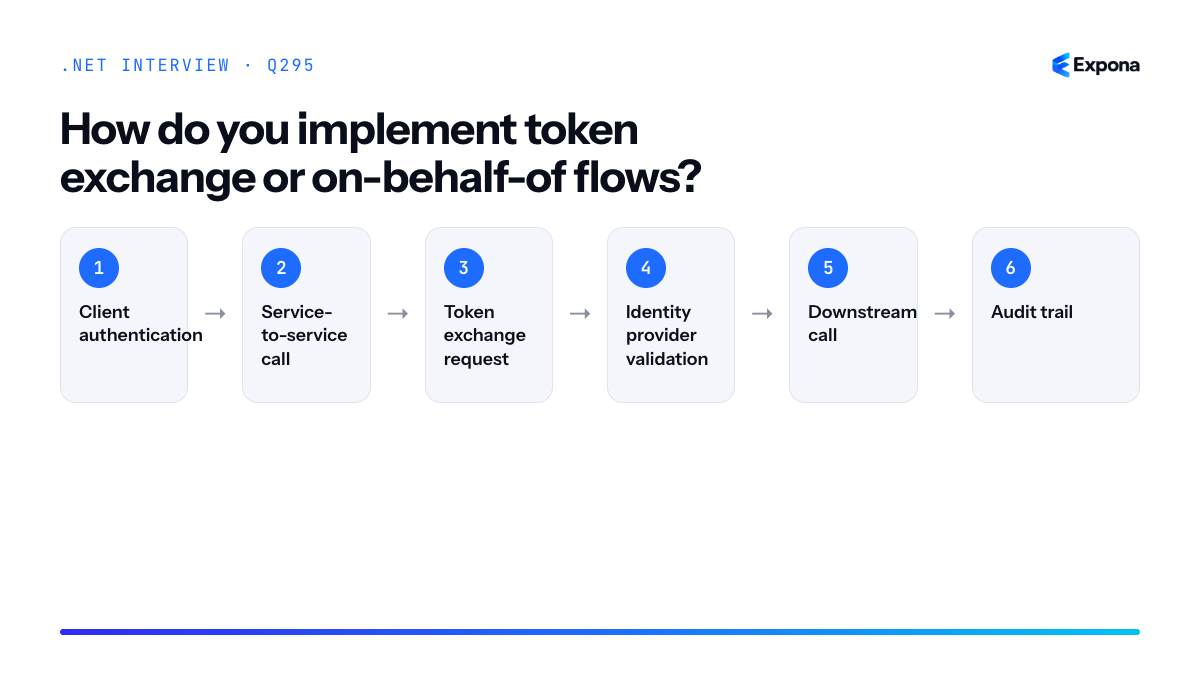
How it works
In a typical three-tier architecture, a client authenticates to Service A with a user token. Service A needs to call Service B on behalf of that user. Rather than passing the original token (which may have scopes for Service A only), Service A exchanges that token with the identity provider using the on-behalf-of grant. The identity provider validates the incoming token, confirms Service A is a trusted client, and issues a new token scoped only for Service B. This preserves the user context while enforcing granular permissions at each layer.
The flow involves:
- Client authentication: User authenticates to Service A and receives a token with Service A scopes.
- Service-to-service call: Service A receives a request and must call Service B on behalf of the user.
- Token exchange request: Service A sends the user's token to the identity provider along with Service A's client credentials and requests a token for Service B.
- Identity provider validation: The IdP validates both the user token and Service A's client identity, then issues a new token for Service B with appropriate scopes.
- Downstream call: Service A calls Service B using the new token; Service B sees the original user's identity in the token claims.
- Audit trail: All exchanges are logged at the identity provider, creating a complete audit trail.
Example
csharppublic class TokenExchangeService { private readonly IConfidentialClientApplication _app; private readonly string _scopes; public TokenExchangeService(IConfidentialClientApplication app, string scopes) { _app = app; _scopes = scopes; } public async Task<string> ExchangeTokenAsync(string userAssertionToken) { try { var result = await _app.AcquireTokenOnBehalfOf( scopes: new[] { _scopes }, userAssertion: userAssertionToken) .ExecuteAsync(); return result.AccessToken; } catch (MsalServiceException ex) { throw new InvalidOperationException("Token exchange failed.", ex); } } } // Usage in a controller [ApiController] [Route("api/[controller]")] public class ProxyController : ControllerBase { private readonly TokenExchangeService _exchangeService; private readonly HttpClient _httpClient; [Authorize] [HttpGet("downstream")] public async Task<IActionResult> GetDownstreamData() { var incomingToken = User.FindFirst("token_value")?.Value; var newToken = await _exchangeService.ExchangeTokenAsync(incomingToken); _httpClient.DefaultRequestHeaders.Authorization = new AuthenticationHeaderValue("Bearer", newToken); var response = await _httpClient.GetAsync("https://downstream-api/data"); return Ok(await response.Content.ReadAsStringAsync()); } }This example uses MSAL's
AcquireTokenOnBehalfOfto exchange an incoming user token for a new token scoped to a downstream service, then includes it in the authorization header.Key points to mention
- Least privilege: Each service receives only the scopes it needs, not all scopes from the original user token.
- Client credentials required: The middle service must be registered as a confidential client (with client secret or certificate) to perform the exchange; you'll store these securely using configuration or Azure Key Vault.
- Token caching: Cache exchanged tokens with appropriate expiry to avoid excessive IdP calls and improve performance.
- Error handling: Distinguish between transient failures (retry) and permanent auth failures (return 401);
MsalServiceExceptionprovides detailed error codes. - Audit trail: The identity provider logs the original user, the requesting service, and the target service—critical for compliance and security investigations.
Common follow-up questions
- How do you handle token refresh in OBO flows? The exchanged token is typically short-lived; cache it and re-exchange only when expired, using the original user token (which may also need refresh via a refresh token).
- What if the identity provider doesn't support on-behalf-of? Some providers use assertion grants or custom flows; alternatively, use service-to-service (client credentials) flow if user context isn't strictly necessary, or implement a custom token proxy.
- How do you prevent token replay or misuse? Configure token binding, IP restrictions, and mutual TLS (mTLS) at the identity provider and enforce strict certificate validation on client credentials.
Related interview questions
- How do you implement rate limiting in .NET 8?
- How do you implement feature flags in .NET?
- How do you store secrets safely in .NET apps?
Further reading
.NETCsharpSecurity296How do you protect against mass assignment in APIs?
ExpertMass assignment protection requires binding user input to explicit, narrowly-scoped DTOs rather than directly to entity models, whitelisting only the fields clients are permitted to modify, and validating ownership and authorization before applying any changes. This prevents attackers from injecting unexpected properties—such as admin flags or role assignments—that the API developer never intended to be updatable.
How it works
Mass assignment vulnerabilities occur when an API accepts raw request payloads and automatically maps all submitted properties onto database entities. An attacker can then submit extra fields (like
isAdmin: trueorroleId: 999) that were never meant to be client-controllable, potentially escalating their privileges or corrupting data.The core defense is explicit input validation through DTOs. Instead of accepting a user entity directly, you define a focused
UpdateUserDtocontaining only the fields clients should modify. Model binding will only populate these declared properties; anything else is ignored. Combine this with ownership verification—ensure the authenticated user owns or has permission to modify the resource—before persisting changes. Finally, use attribute-based whitelisting (like[Bindable]in .NET) or explicit property mapping to make your intent crystal clear.Example
csharp// ❌ VULNERABLE: Direct entity binding [HttpPut("{id}")] public async Task<IActionResult> UpdateUser(int id, [FromBody] User user) { var existing = await _db.Users.FindAsync(id); existing.Email = user.Email; existing.IsAdmin = user.IsAdmin; // Attacker can set this! existing.RoleId = user.RoleId; // Attacker can set this! await _db.SaveChangesAsync(); return Ok(existing); } // ✅ SECURE: Explicit DTO with ownership check public class UpdateUserDto { public string Email { get; set; } public string FirstName { get; set; } } [HttpPut("{id}")] [Authorize] public async Task<IActionResult> UpdateUser(int id, [FromBody] UpdateUserDto dto) { var userId = int.Parse(User.FindFirst(ClaimTypes.NameIdentifier)?.Value); // Ownership check: user can only modify their own profile if (id != userId) return Forbid(); var existing = await _db.Users.FindAsync(id); if (existing == null) return NotFound(); existing.Email = dto.Email; existing.FirstName = dto.FirstName; // IsAdmin, RoleId, CreatedAt, etc. are never touched await _db.SaveChangesAsync(); return Ok(new { existing.Id, existing.Email, existing.FirstName }); }The secure version uses a dedicated DTO that declares exactly which fields are updateable, verifies the requester owns the resource, and never exposes sensitive properties like
IsAdminto client manipulation.Key points to mention
- Use DTOs as a whitelist: Define separate
CreateDtoandUpdateDtoclasses; only include properties clients should control. Entity models should never be request payloads. - Always validate ownership: Before applying changes, confirm the authenticated user has permission to modify that specific resource—check user ID, tenant ID, or role-based access.
- Separate read and write models: A response DTO may include read-only fields (like
CreatedAt,LastModified) that are excluded from input DTOs, making your API contract explicit. - Validate and sanitize input: Use FluentValidation or Data Annotations to ensure DTO properties meet business rules before persisting, catching both malformed and malicious payloads.
- Log and audit changes: Track who modified what and when; this helps detect and investigate suspicious bulk updates that might indicate an attack.
Common follow-up questions
- What if you need to support multiple update scenarios (e.g., user self-edit vs. admin override)? Create separate endpoints or DTOs:
UpdateOwnProfileDto(user-scoped) andAdminUpdateUserDto(admin-scoped). Apply stricter authorization checks to the admin endpoint. - How do you handle nested objects or related entities? Only expose IDs in input DTOs; never accept full nested entities. Validate that referenced IDs exist and belong to the correct context (e.g., user's organization) before linking.
- What's the difference between mass assignment and SQL injection? Mass assignment is about unauthorized field modification through the API layer; SQL injection is code-level exploitation of parameterized queries. Both are serious, but mass assignment happens at the business logic level.
Related interview questions
.NETCsharpSecurity- Use DTOs as a whitelist: Define separate
297How do you implement auditing across an application?
ExpertImplement auditing by leveraging EF Core interceptors to capture entity changes at the database layer, storing immutable audit records with timestamps and user context, and correlating changes across distributed operations using correlation IDs. This approach provides a complete historical trail of who changed what and when, essential for compliance, debugging, and forensics.
How it works
Auditing captures state changes systematically by intercepting Entity Framework Core's SaveChanges pipeline. Using EF Core interceptors, you detect added, modified, and deleted entities before they commit to the database. For each change, you create an audit record containing the entity type, primary key, property names, old and new values, timestamp, user identity, and a correlation ID for distributed tracing.
The audit records themselves are stored in an append-only table—immutable by design—preventing accidental or malicious modification of the audit trail. This separation ensures auditing logic doesn't interfere with the main application flow. Correlation IDs, propagated via ambient context or dependency injection, link related changes across service boundaries, enabling investigation of cascading updates or saga-like workflows.
Authentication context (obtained from HttpContext.User or ambient claims) captures who performed the action. For batch operations or background jobs, you inject the user context explicitly. Filtering and querying audit records allows you to reconstruct historical state, identify data anomalies, and generate compliance reports.
Example
csharp// Audit record entity public class AuditEntry { public int Id { get; set; } public string EntityName { get; set; } public string Operation { get; set; } // Create, Update, Delete public object EntityId { get; set; } public string ChangedProperties { get; set; } // JSON public string OldValues { get; set; } // JSON public string NewValues { get; set; } // JSON public string UserId { get; set; } public string CorrelationId { get; set; } public DateTime Timestamp { get; set; } } // Interceptor public class AuditingInterceptor : SaveChangesInterceptor { private readonly IHttpContextAccessor _contextAccessor; private readonly ICorrelationIdProvider _correlationIdProvider; public AuditingInterceptor(IHttpContextAccessor contextAccessor, ICorrelationIdProvider correlationIdProvider) { _contextAccessor = contextAccessor; _correlationIdProvider = correlationIdProvider; } public override ValueTask> SavingChangesAsync( DbContextEventData eventData, InterceptionResult result, CancellationToken cancellationToken = default) { var dbContext = eventData.Context; var auditEntries = new List(); var userId = _contextAccessor.HttpContext?.User?.FindFirst(ClaimTypes.NameIdentifier)?.Value ?? "System"; var correlationId = _correlationIdProvider.GetCorrelationId(); foreach (var entry in dbContext.ChangeTracker.Entries()) { if (entry.State == EntityState.Unchanged) continue; var auditEntry = new AuditEntry { EntityName = entry.Entity.GetType().Name, Operation = entry.State.ToString(), EntityId = entry.Entity.GetType().GetProperty("Id")?.GetValue(entry.Entity), UserId = userId, CorrelationId = correlationId, Timestamp = DateTime.UtcNow, OldValues = JsonSerializer.Serialize(entry.OriginalValues.ToDictionary(p => p.Metadata.Name, p => p.CurrentValue)), NewValues = JsonSerializer.Serialize(entry.CurrentValues.ToDictionary(p => p.Metadata.Name, p => p.CurrentValue)) }; auditEntries.Add(auditEntry); } if (auditEntries.Any()) { dbContext.Set().AddRange(auditEntries); } return base.SavingChangesAsync(eventData, result, cancellationToken); } } // Registration services.AddScoped(); services.AddDbContext((sp, options) => options.UseSqlServer(connectionString) .AddInterceptors(sp.GetRequiredService()));This interceptor captures entity changes before SaveChanges executes, automatically populating audit records with user and correlation context, then adds them to the same transaction.
Key points to mention
- Interceptors operate at the DbContext level, capturing all changes regardless of data access pattern (direct SaveChanges, change tracking, migrations).
- Store audit records in an append-only table and consider archiving old records to prevent unbounded growth in high-volume systems.
- Use correlation IDs (trace IDs from distributed tracing or request identifiers) to link audit entries across multiple operations and services.
- Serialize old and new values as JSON to handle complex types and enable efficient querying and reporting of specific property changes.
- Exclude sensitive fields (passwords, credit cards) from audit records using data annotations or interceptor logic to comply with security policies.
Common follow-up questions
- How do you handle performance impact of auditing in high-throughput systems? — Consider async audit persistence to a separate database or message queue, batch writes, or sampling strategies for non-critical entities.
- How do you ensure audit records themselves cannot be tampered with? — Use database permissions to restrict audit table updates, implement digital signatures or checksums on audit entries, and consider immutable storage solutions like event stores.
- How do you query and report on audit data efficiently? — Index on UserId, Timestamp, and EntityId; partition large audit tables by date; use materialized views for common queries; or denormalize to a dedicated audit data warehouse.
Related interview questions
.NETCsharp298How do you design for GDPR data deletion?
ExpertDesigning for GDPR data deletion requires creating a comprehensive data map, implementing both hard deletion and reversible anonymization strategies, and ensuring cascading removal across primary databases, backups, caches, and audit logs within defined retention windows. The core principle is making it technically feasible to locate and eliminate personal data on demand while maintaining system integrity and compliance evidence.
How it works
GDPR data deletion (the right to be forgotten) demands a multi-layered approach because personal data doesn't exist in a single location. You must:
1. Map personal data across systems: Document where personally identifiable information (PII) lives—primary databases, caches, search indexes, backups, data warehouses, third-party APIs, and logs. Create a data inventory with sensitivity levels and retention justifications.
2. Choose deletion strategy: Hard deletion physically removes records; anonymization irreversibly strips identifiers so data becomes non-personal. Use hard deletion for direct PII, anonymization for analytics and backups where deletion is impractical.
3. Implement cascading deletion: When a user requests deletion, trigger a workflow that removes data from the primary data store, then propagates to dependent systems—caches (Redis), search engines (Elasticsearch), read replicas, and data lakes.
4. Handle backups and retention: Backups cannot be immediately deleted (disaster recovery), but you must document their retention period and ensure deletion occurs when backups expire. Implement immutable backup deletion windows.
5. Audit and compliance logging: Log all deletion requests with timestamps and outcomes, but exclude the deleted data itself from logs to prevent re-identification.
Example
csharppublic class GdprDataDeletionService { private readonly DbContext _db; private readonly IDistributedCache _cache; private readonly ILogger<GdprDataDeletionService> _logger; private readonly IEnumerable<IDataDeletionHandler> _deletionHandlers; public async Task DeleteUserDataAsync(int userId) { var deletionId = Guid.NewGuid(); var timestamp = DateTime.UtcNow; try { // Log deletion request (without PII) _logger.LogInformation("Deletion request {DeletionId} initiated for user {UserId}", deletionId, userId); // 1. Delete from primary database var user = await _db.Users.FindAsync(userId); if (user != null) { _db.Users.Remove(user); await _db.SaveChangesAsync(); } // 2. Delete related data with cascade var userOrders = _db.Orders.Where(o => o.UserId == userId); _db.Orders.RemoveRange(userOrders); await _db.SaveChangesAsync(); // 3. Invalidate caches await _cache.RemoveAsync($"user:{userId}"); await _cache.RemoveAsync($"user:{userId}:preferences"); // 4. Trigger deletion handlers for external systems foreach (var handler in _deletionHandlers) { await handler.DeleteAsync(userId); } // 5. Log successful completion _logger.LogInformation( "Deletion request {DeletionId} completed at {Timestamp}", deletionId, timestamp); } catch (Exception ex) { _logger.LogError(ex, "Deletion failed for {DeletionId}", deletionId); throw; } } } public interface IDataDeletionHandler { Task DeleteAsync(int userId); } public class SearchIndexDeletionHandler : IDataDeletionHandler { private readonly IElasticsearchClient _elasticsearch; public async Task DeleteAsync(int userId) { await _elasticsearch.DeleteAsync(new DeleteRequest("users", userId.ToString())); } }This example demonstrates a deletion workflow that removes data from the primary database, cascades to related entities, clears caches, invokes external handlers for search indexes and third-party systems, and logs the entire operation for audit compliance.
Key points to mention
- Data inventory is foundational: You cannot delete what you don't know exists. Create and maintain a comprehensive data map including sensitivity classifications and retention justifications.
- Backup retention vs. deletion: Communicate backup retention windows to users; deletion cannot be immediate if active backups exist, but must be guaranteed when retention expires.
- Anonymization as a middle ground: For historical or analytical data, irreversible anonymization often satisfies GDPR while preserving data utility for business intelligence.
- Audit trails without PII: Log deletion requests and outcomes using non-identifiable markers (user ID or request UUID) so compliance records don't reintroduce personal data.
- Handler pattern for extensibility: Use interfaces like
IDataDeletionHandlerto decouple deletion logic across databases, caches, and external services, enabling independent scaling and horizontal scaling.
Common follow-up questions
- How do you verify deletion was successful across distributed systems? — Implement a reconciliation job that queries each system (database, cache, search index) using a non-PII identifier and reports gaps. Use idempotent handlers to safely retry failed deletions.
- What if a backup contains the deleted user's data? — Document the backup retention policy in your privacy notice; schedule automated deletion jobs when backups reach end-of-life, or implement selective restoration without the user's records.
- How do you handle soft deletes that leave audit trails? — Soft deletes don't satisfy GDPR unless you also anonymize identifiers. Hard delete user records but retain anonymized transaction logs for compliance audits, clearly separating personal from non-personal data.
Related interview questions
.NETCsharp299How do you implement feature flags in .NET?
ExpertFeature flags in .NET are implemented using Microsoft.FeatureManagement, which evaluates conditional behavior at runtime based on configuration or a feature provider. You configure flags declaratively, evaluate them per request or user, and remove them after full rollout. Third-party providers like LaunchDarkly, Split, or Unleash offer more advanced targeting, analytics, and real-time updates without redeploying.
How it works
Feature flags are configuration-driven switches that enable or disable functionality without code changes. Microsoft.FeatureManagement is the standard .NET library that integrates with appsettings.json, Azure App Configuration, or custom providers. You register the service in dependency injection, inject
IFeatureManager, and evaluate flags at decision points in your code. Flags can be static (on/off) or dynamic (evaluated per user, context, or tenant). Advanced implementations use feature filters—predicates that determine if a flag is active for a specific request, user, or environment. This enables gradual rollouts (canary deployments), A/B testing, and instant kill switches without redeployment.Example
csharp// appsettings.json { "FeatureManagement": { "NewCheckoutFlow": true, "BetaAnalytics": { "EnabledFor": [ { "Name": "PercentageFilter", "Parameters": { "Value": 50 } } ] } } } // Startup services.AddFeatureManagement(); // Controller or service public class CheckoutController { private readonly IFeatureManager _featureManager; public CheckoutController(IFeatureManager featureManager) => _featureManager = featureManager; public async Task Checkout() { if (await _featureManager.IsEnabledAsync("NewCheckoutFlow")) { return Ok("Using new checkout experience"); } return Ok("Using legacy checkout"); } }This example checks if the NewCheckoutFlow flag is enabled; if so, it uses the new experience, otherwise falls back to legacy code. The PercentageFilter on BetaAnalytics enables the flag for 50% of requests, useful for canary testing.
Key points to mention
- Integration with configuration: Works with appsettings.json, environment-specific settings, and Azure App Configuration for centralized management across deployments.
- Feature filters: Custom filters (e.g., percentage, time-based, user-targeting) enable targeted rollouts without code changes; implement
IFeatureFilterMetadatafor custom logic. - Dependency injection: Inject
IFeatureManagerinto controllers, services, or middleware; async evaluation ensures non-blocking checks. - Lifecycle management: Flags should be removed after full rollout; track usage with feature telemetry to identify stale flags.
- Third-party providers: LaunchDarkly and Unleash offer real-time updates, detailed analytics, and user-segment targeting without code redeploy; useful for high-scale operations.
Common follow-up questions
- How do you handle feature flag secrets or sensitive configurations? Store flag configuration in secure vaults like Azure Key Vault or use feature providers that support encrypted values.
- How do you test code with feature flags? Mock
IFeatureManagerin unit tests, or useFeatureManagementTestHelperto set flag values per test; for integration tests, override appsettings via test configuration. - Can you use feature flags in middleware or at the routing level? Yes; evaluate flags early in the pipeline (middleware) to redirect requests, short-circuit expensive operations, or enable feature-specific routes conditionally.
Related interview questions
- How do you store secrets safely in .NET apps?
- How do you implement token exchange or on-behalf-of flows?
- What are environments in ASP.NET Core?
Further reading
.NETCsharp300How do you design plugin architectures in .NET?
ExpertPlugin architectures in .NET are built by isolating plugin code using AssemblyLoadContext, defining shared interfaces or abstract classes as contracts, and discovering/registering plugins dynamically at application startup through dependency injection. This approach enables runtime extensibility without recompiling the host application.
How it works
A plugin architecture separates the host application from independently developed plugins through three key layers:
Contract Layer: A shared assembly defines interfaces or abstract classes that plugins must implement. This assembly is referenced by both the host and all plugins, creating a common language for interaction.
Plugin Discovery: The host application scans a designated directory (or uses configuration) to find plugin assemblies. Each plugin assembly is loaded into its own AssemblyLoadContext rather than the default context, providing memory isolation and version conflict prevention. This prevents a plugin's dependencies from polluting the host's dependency chain.
Initialization & Registration: Once loaded, plugins are instantiated and their services are registered with the host's dependency injection container, typically through a bootstrap interface that each plugin exposes. This allows the host application to resolve plugin functionality at runtime.
This design provides flexibility, fault isolation, and the ability to enable/disable plugins without restarting the entire application in production scenarios.
Example
csharp// Contract assembly (shared by host and plugins) public interface IPlugin { string Name { get; } void Execute(); } public interface IPluginInitializer { void RegisterServices(IServiceCollection services); } // Host application plugin loader public class PluginLoader { public static List<IPlugin> LoadPlugins(string pluginDirectory) { var plugins = new List<IPlugin>(); foreach (var dllPath in Directory.GetFiles(pluginDirectory, "*.dll")) { try { var alc = new AssemblyLoadContext(Path.GetFileNameWithoutExtension(dllPath), isCollectible: true); var assembly = alc.LoadFromAssemblyPath(dllPath); var initializerType = assembly.GetTypes() .FirstOrDefault(t => typeof(IPluginInitializer).IsAssignableFrom(t)); if (initializerType != null) { var initializer = (IPluginInitializer)Activator.CreateInstance(initializerType)!; // Plugin is now discoverable and can be initialized var pluginTypes = assembly.GetTypes() .Where(t => typeof(IPlugin).IsAssignableFrom(t) && !t.IsInterface); foreach (var pluginType in pluginTypes) { if (Activator.CreateInstance(pluginType) is IPlugin plugin) plugins.Add(plugin); } } } catch (Exception ex) { Console.WriteLine($"Failed to load plugin {dllPath}: {ex.Message}"); } } return plugins; } } // Example plugin implementation public class SamplePlugin : IPlugin, IPluginInitializer { public string Name => "SamplePlugin"; public void Execute() => Console.WriteLine("Plugin executing!"); public void RegisterServices(IServiceCollection services) { services.AddScoped<ISampleService, SampleService>(); } }This code loads each plugin into an isolated AssemblyLoadContext, discovers implementations of IPluginInitializer, instantiates them, and makes them available to the host application.
Key points to mention
- AssemblyLoadContext isolation prevents version conflicts and allows unloading collapsible contexts for memory management
- Shared contract assembly is the only coupling between host and plugins; use keyed services or named registrations if multiple plugin instances serve different purposes
- Error handling is critical—a faulty plugin should not crash the host; wrap discovery and initialization in try-catch blocks
- Reflection-based discovery is powerful but carry performance cost; consider metadata-driven approaches (attributes or configuration) for large plugin ecosystems
- Unloading strategy—use collectible AssemblyLoadContext to allow plugins to be unloaded from memory at runtime
Common follow-up questions
- How do you handle version conflicts between a plugin's dependencies and the host application?
- What are the security implications of dynamically loading untrusted plugin code, and how would you mitigate them?
- How would you implement hot-reload for plugins without restarting the application?
Related interview questions
- What is the difference between an abstract class and an interface?
- What are the four pillars of OOP?
- What are keyed services in .NET 8?
Further reading
.NETCsharpArchitecture301What is AssemblyLoadContext?
ExpertAssemblyLoadContext (ALC) is a .NET Core and modern .NET feature that isolates loaded assemblies into separate contexts, allowing multiple versions of the same dependency to coexist in a single application process and enabling assemblies to be unloaded when marked as collectible. It replaces the AppDomain isolation mechanism from .NET Framework and is essential for building plugin systems and dynamic module loading scenarios.
How it works
Each AssemblyLoadContext acts as a namespace for assembly resolution and binding. When you load an assembly into an ALC, it and its dependencies are resolved within that context's scope. By default, all assemblies load into the
AssemblyLoadContext.Defaultcontext. However, you can create custom contexts to isolate plugins or dynamically loaded modules.The key innovation is collectibility. Traditional AppDomains required a full process restart to unload code; with ALCs, you can create a collectible ALC, load assemblies into it, use them, then unload the entire context when no longer needed. This allows plugins to be updated, hot-reloaded, or removed without restarting the application. The .NET runtime's garbage collector can then reclaim memory used by those assemblies.
Assembly resolution within an ALC is customizable through the
Resolvingevent, giving you fine-grained control over how dependencies are located—critical when a plugin needs a different version of a shared library than the host application.Example
csharpusing System; using System.IO; using System.Reflection; using System.Runtime.Loader; // Create an isolated, collectible context for a plugin var alc = new AssemblyLoadContext("PluginContext", isCollectible: true); // Custom resolution: look in a plugin directory alc.Resolving += (context, name) => { string pluginPath = Path.Combine("/plugins", name.Name + ".dll"); return File.Exists(pluginPath) ? context.LoadFromAssemblyPath(pluginPath) : null; }; // Load plugin assembly into the custom context string pluginDll = "/plugins/MyPlugin.dll"; Assembly pluginAssembly = alc.LoadFromAssemblyPath(pluginDll); // Use the plugin (instantiate types, call methods) var pluginType = pluginAssembly.GetType("MyPlugin.PluginClass"); dynamic plugin = Activator.CreateInstance(pluginType); plugin.Execute(); // Unload when done alc.Unload(); // Assemblies and memory are eligible for garbage collectionThis creates an isolated context for a plugin, customizes how its dependencies are resolved, loads and executes the plugin, then cleanly unloads it—all without affecting the host application or other plugins.
Key points to mention
- Replaces AppDomains: AppDomains were heavy and process-wide; ALCs are lightweight and scoped, offering better performance and finer control.
- Collectible contexts enable unloading: Mark
isCollectible: trueto allow garbage collection of the entire context and its assemblies afterUnload(). - Dependency version isolation: Different contexts can load different versions of the same assembly—essential for plugin architectures where the host and plugins may depend on incompatible library versions.
- Custom resolution logic: Hook the
Resolvingevent to control assembly binding, enabling scenarios like shadowing or directory-based plugin discovery. - Careful with static state: Static fields and singletons in a plugin may persist across reloads if they reference shared libraries; design plugins to be stateless where possible.
Common follow-up questions
- "How do you handle shared state between a plugin and host?" — Use interfaces defined in a shared assembly loaded in the Default context; plugins implement these interfaces within their own ALC, avoiding type conflicts.
- "What happens if you try to unload a non-collectible ALC?" — The call to
Unload()completes, but assemblies remain in memory because the runtime cannot collect non-collectible contexts. - "How does this relate to plugin architecture design?" — ALCs are the fundamental mechanism enabling safe, isolated plugin loading; they provide the isolation layer necessary for robust plugin systems.
Related interview questions
.NETCsharp302How do you build a high-throughput API?
ExpertBuilding a high-throughput API requires minimizing allocations, using async I/O throughout, pooling expensive resources like database connections, and leveraging source-generated JSON serialization. Deploy behind a load balancer with horizontal scaling, use Minimal APIs to reduce reflection overhead, and implement caching at multiple layers. These practices allow you to handle thousands of concurrent requests efficiently on modern hardware.
How it works
High throughput is achieved by reducing waste at every layer. Allocations cause garbage collection pauses that block threads; using
ArrayPool<T>, value types, and avoiding LINQ in hot paths keeps memory pressure low. Async I/O (database, HTTP calls, file I/O) frees threads to handle other requests instead of blocking, multiplying effective concurrency. Connection pooling reuses expensive resources rather than creating new ones per request.Caching at multiple levels—HTTP caching headers, in-memory caching for frequently accessed data, distributed caching for shared state—reduces database load dramatically. Kestrel's request pipeline is already optimized; Minimal APIs skip controller reflection overhead, and source-generated JSON (System.Text.Json with source generators in .NET 8+) eliminates runtime reflection. Finally, horizontal scaling behind a load balancer distributes traffic across multiple instances, preventing any single server from becoming a bottleneck.
Example
csharpvar builder = WebApplication.CreateBuilder(); builder.Services.AddSingleton<IMemoryCache>(new MemoryCache(new MemoryCacheOptions())); builder.Services.AddHttpClient<ExternalApiClient>() .ConfigureHttpClient(c => c.Timeout = TimeSpan.FromSeconds(5)); builder.Services.AddDataProtection(); // for distributed caching if needed var app = builder.Build(); app.MapGet("/users/{id}", async (int id, IMemoryCache cache, ExternalApiClient client) => { var cacheKey = $"user_{id}"; if (!cache.TryGetValue(cacheKey, out var user)) { user = await client.GetUserAsync(id); // async I/O, no blocking cache.Set(cacheKey, user, TimeSpan.FromMinutes(5)); } return Results.Ok(user); }) .WithName("GetUser") .WithOpenApi() .Produces<User>(StatusCodes.Status200OK); app.Run(); // User is trimmed and source-generated by System.Text.Json [System.Text.Json.Serialization.JsonSerializable] public partial class User { public int Id { get; set; } public string Name { get; set; } }This Minimal API endpoint uses caching to avoid redundant external calls, async/await to keep threads free, and omits reflection overhead from controller routing. The
JsonSerializableattribute enables source generation, eliminating JSON serialization bottlenecks.Key points to mention
- Async all the way: Use
async Taskfor all I/O-bound operations; blocking threads destroys throughput. - Allocation hygiene: Reuse buffers via
ArrayPool<T>, avoid string concatenation and LINQ in hot paths, use structs judiciously, and tune GC settings if needed. - Connection pooling: Let connection pools (DbConnection, HttpClientFactory) manage resource lifecycle automatically; avoid creating new connections per request.
- Caching strategy: Cache at HTTP layer (headers), application layer (IMemoryCache), and distributed layer (Redis) to avoid redundant computation.
- Horizontal scaling: A single server has limits; add load balancing (nginx, Azure Application Gateway) and run multiple instances to multiply throughput linearly.
Common follow-up questions
- How do you measure and monitor throughput? Use tools like k6, Apache JMeter, or wrk for load testing; monitor CPU, memory, and request latency with Application Insights or Prometheus. Profile hot paths with BenchmarkDotNet.
- What about database bottlenecks? Query optimization, indexing, and read replicas help; caching reduces database load. Consider CQRS for read-heavy workloads and async database drivers (EF Core with async methods).
- When should you use Minimal APIs vs. controllers? For high-throughput APIs, Minimal APIs reduce reflection overhead, making them ideal for greenfield projects prioritizing performance.
Related interview questions
- What is the danger of sync over async?
- How does the Kestrel request pipeline achieve high performance?
- How do you choose between Minimal APIs and controllers for large systems?
Further reading
.NETCsharpaspnetcoreasync- Async all the way: Use
303How do you choose between Minimal APIs and controllers for large systems?
ExpertFor large systems, choose Minimal APIs if your team prioritizes performance, rapid iteration, and explicit endpoint control; choose Controllers if you need established architectural conventions, broad filter ecosystems, and team familiarity. Both scale equally well—the decision hinges on team expertise, codebase consistency, and whether you're building greenfield or maintaining legacy systems.
How it works
Minimal APIs and Controllers represent two architectural philosophies for handling HTTP requests in ASP.NET Core. Controllers inherit from a base class, use attributes for routing and filters, and follow MVC conventions—making them well-suited to teams with established patterns and complex middleware needs. Minimal APIs are lightweight, delegate-based, and configured entirely in Program.cs or via route groups, offering less abstraction overhead and clearer request-to-handler mapping.
For large systems, "large" typically means multiple teams, hundreds of endpoints, long-term maintenance, and onboarding of new developers. Controllers excel because their convention-based approach reduces decision-making fatigue: developers know where validation logic goes (filters), where routing is declared (attributes), and how dependency injection flows. Minimal APIs demand more discipline: without conventions, route organization can become chaotic across multiple files unless you enforce strict patterns via route groups and extensions.
However, Minimal APIs shine in high-performance scenarios, microservices, or when your team is motivated by explicit, localized endpoint logic. They compile faster, have lower memory overhead, and eliminate reflection-heavy attribute scanning at startup—meaningful gains when you have thousands of endpoints.
Example
csharp// Controllers approach—conventional, familiar [ApiController] [Route("api/[controller]")] public class OrdersController : ControllerBase { private readonly IOrderService _service; public OrdersController(IOrderService service) => _service = service; [HttpGet("{id}")] [Authorize] public async Task<ActionResult<OrderDto>> GetOrder(int id) => Ok(await _service.GetOrderAsync(id)); } // Minimal API approach—explicit, localized var orders = app.MapGroup("/api/orders") .RequireAuthorization() .WithName("Orders") .WithOpenApi(); orders.MapGet("{id}", GetOrderAsync) .WithName("GetOrder") .Produces<OrderDto>(); async Task<OrderDto> GetOrderAsync(int id, IOrderService service) => await service.GetOrderAsync(id);The Controller approach uses inheritance and attributes; the Minimal API groups related endpoints declaratively with fluent configuration, making the entire pipeline visible at one glance.
Key points to mention
- Consistency over features: In large systems, the choice that your entire team can follow consistently matters more than marginal performance gains. Pick one and standardize.
- Controllers = better for complex filters: If you need authorization filters, exception filters, and action filters across dozens of endpoints, Controllers provide a proven, attribute-based pattern that scales.
- Minimal APIs = better for transparency: Each endpoint's dependencies, middleware, and authorization are explicit in Program.cs or route-group extensions, reducing hidden magic and simplifying debugging.
- Hybrid approach is valid: Many large systems use Controllers for CRUD/traditional endpoints and Minimal APIs for performance-critical or event-driven paths (e.g., webhooks, real-time APIs).
- Onboarding and documentation matter: Controllers require less documentation because conventions are universal; Minimal APIs require clear guidelines on folder structure, naming, and route-group organization.
Common follow-up questions
- How do you organize Minimal APIs across multiple files in a large project without chaos?
- Can you mix Controllers and Minimal APIs in the same application? What are the trade-offs?
- How does performance actually differ between Controllers and Minimal APIs at scale, and is it a realistic concern?
Related interview questions
Further reading
.NETCsharpaspnetcore304How do you handle long-running requests in ASP.NET Core?
ExpertLong-running requests in ASP.NET Core should return 202 Accepted immediately, moving the actual work to a background processor like a queue or BackgroundService. The client then polls a status endpoint or receives updates via SignalR/webhooks rather than blocking the HTTP connection. This pattern prevents timeout issues, improves responsiveness, and allows horizontal scaling of work processing.
How it works
When a client submits a long-running operation (file processing, report generation, complex calculations), the endpoint immediately validates the request, creates a work item with a unique identifier, enqueues it to a durable queue or in-memory channel, and returns 202 Accepted with a Location header pointing to a status endpoint. A background worker processes items from the queue asynchronously, updating a persistent store (database, cache) with progress or completion status. The client can then poll the status endpoint or receive real-time updates through SignalR when work completes.
Key to this pattern is separation of concerns: the HTTP layer handles request validation and queueing, while workers handle computation. This enables independent scaling—adding more worker instances doesn't affect your API layer. Using durable queues (Azure Service Bus, RabbitMQ, or even a database-backed queue) ensures work isn't lost if the application restarts.
Example
csharp// Minimal API endpoint that accepts a long-running request app.Post("/process-report", async (ReportRequest req, IBackgroundJobClient jobClient) => { var jobId = Guid.NewGuid().ToString(); // Enqueue work immediately jobClient.Enqueue(() => ProcessReportJob(jobId, req.DataSource, req.Format)); return Results.Accepted($"/status/{jobId}", new { jobId }); }); // Status endpoint to check progress app.Get("/status/{jobId}", async (string jobId, IJobStatusRepository statusRepo) => { var status = await statusRepo.GetJobStatusAsync(jobId); return status switch { null => Results.NotFound(), { IsComplete: true } => Results.Ok(new { status = "completed", result = status.Result }), _ => Results.Ok(new { status = "processing", progress = status.Progress }) }; }); // Background job (runs in a worker/background service) public static async Task ProcessReportJob(string jobId, string dataSource, string format, IJobStatusRepository statusRepo, IReportService reportService) { try { await statusRepo.UpdateProgressAsync(jobId, 0); var data = await reportService.FetchDataAsync(dataSource); await statusRepo.UpdateProgressAsync(jobId, 50); var report = await reportService.GenerateReportAsync(data, format); await statusRepo.CompleteAsync(jobId, report); } catch (Exception ex) { await statusRepo.FailAsync(jobId, ex.Message); } }This example uses Hangfire (or you can use Channel<T> for simpler scenarios) to enqueue the report generation job, immediately returning 202 with a job ID so the client can poll
/status/{jobId}for progress.Key points to mention
- 202 Accepted is the correct HTTP status for fire-and-forget operations; it signals the server accepted the request but hasn't completed it yet.
- Use durable queues (Service Bus, RabbitMQ) or BackgroundService implementations to ensure work survives restarts and can be retried on failure.
- Polling vs. Push: Status endpoints work well for single clients; for real-time updates to many clients, SignalR or webhooks are more efficient.
- Store job state in a persistent medium (database, Redis) so status can be queried across application instances and after restarts.
- Idempotency keys help prevent duplicate processing if the client retries the initial request.
Common follow-up questions
- How do you handle eventual consistency in user-facing features when background jobs complete asynchronously?
- What's the difference between using Channel<T> versus a message queue like Azure Service Bus for background work?
- How do you implement retry logic and deadletter handling for failed background jobs?
Related interview questions
- How do you handle eventual consistency in user-facing features?
- What is a BackgroundService?
- How do endpoint filters work in Minimal APIs?
Further reading
.NETCsharpaspnetcore305How do you design a robust background job system?
ExpertA robust background job system requires durable persistence (queue or database), idempotent job handlers, automatic retries with exponential backoff, distributed locking for singleton jobs, and comprehensive monitoring. Use established libraries like Hangfire or Quartz.NET rather than building from scratch, ensuring jobs survive application restarts and failures.
How it works
A robust background job system decouples long-running or resource-intensive work from your main request flow. Jobs are stored durably in a queue or database, allowing them to persist across application restarts. A worker process (or multiple workers in a distributed setup) polls for pending jobs and executes them. Failures trigger automatic retries with exponential backoff to handle transient errors gracefully. Idempotency is critical—each job must be safe to execute multiple times, since retries and distributed execution may cause duplicates. For jobs that must run only once globally (e.g., nightly reconciliation), distributed locks ensure a single instance executes. Finally, dashboards and logging provide visibility into job health, success rates, and failures.
Example
csharp// Using Hangfire with SQL Server persistence public class JobSetup { public static void ConfigureJobs(WebApplicationBuilder builder) { builder.Services.AddHangfire(config => config.UseSqlServerStorage("DefaultConnection") .UseSimpleAssemblyNameTypeSerializer() .UseRecommendedSerializerSettings()); builder.Services.AddHangfireServer(); } } // Idempotent job handler with logging public class EmailJobHandler { private readonly ILogger _logger; private readonly IEmailService _emailService; public EmailJobHandler(ILogger logger, IEmailService emailService) { _logger = logger; _emailService = emailService; } [AutomaticRetry(Attempts = 5, DelaysInSeconds = new[] { 60, 300, 900, 3600 })] public async Task SendBatchEmailAsync(int batchId) { _logger.LogInformation("Processing email batch {BatchId}", batchId); try { // Idempotency: check if already sent before processing if (await _emailService.IsBatchSentAsync(batchId)) { _logger.LogInformation("Batch {BatchId} already processed, skipping", batchId); return; } await _emailService.SendBatchAsync(batchId); _logger.LogInformation("Batch {BatchId} sent successfully", batchId); } catch (Exception ex) { _logger.LogError(ex, "Failed to send batch {BatchId}", batchId); throw; // Hangfire will retry } } } // Enqueue a job public class OrderService { private readonly IBackgroundJobClient _backgroundJobs; public OrderService(IBackgroundJobClient backgroundJobs) => _backgroundJobs = backgroundJobs; public void CreateOrder(Order order) { // Process order synchronously _backgroundJobs.Enqueue( h => h.SendBatchEmailAsync(order.BatchId)); } } // Recurring job for scheduled work RecurringJob.AddOrUpdate( "daily-reconciliation", h => h.ReconcileAccountsAsync(), Cron.Daily(2, 0), // 2 AM UTC new RecurringJobOptions { TimeZone = TimeZoneInfo.Utc });This example shows Hangfire with SQL Server storage, automatic retries with exponential backoff delays, idempotency checks before processing, and a recurring job configuration for scheduled work that runs daily.
Key points to mention
- Durable persistence: Use a database or message queue (SQL Server, Redis, RabbitMQ) so jobs survive crashes and restarts.
- Idempotency: Design jobs to safely handle duplicate executions; check for prior completion before processing.
- Retry strategy: Implement exponential backoff (60s, 300s, 900s, 3600s) to avoid hammering failing services.
- Distributed locking: For singleton jobs or critical operations, use distributed locking to ensure only one instance runs globally.
- Monitoring & dashboards: Hangfire and Quartz provide built-in dashboards; log job outcomes and integrate with APM tools for observability.
Common follow-up questions
- How do you handle job ordering or dependencies? Use job chains or sagas; Hangfire supports ContinueJobWith() for sequential workflows, or implement a state machine for complex orchestration.
- How do you scale background jobs horizontally? Deploy multiple worker instances pointing to the same queue database; configure them as a horizontally scaled pool with load balancing.
- What about dead letter queues (DLQ)? After max retries, move failed jobs to a DLQ for manual inspection and replay; most libraries support this out of the box.
Related interview questions
- How do you design a reliable event-driven system with .NET?
- How do you design for horizontal scaling in ASP.NET Core?
- How do you implement distributed locking?
Further reading
.NETCsharpasyncdependency-injection306How do you handle time zones correctly?
ExpertThe correct approach is to store all timestamps in UTC and use
DateTimeOffset(orDateTimewithDateTimeKind.Utc), convert to the user's time zone only at the presentation edge, and injectTimeProviderfor testability rather than relying onDateTime.Nowor server local time.How it works
Time zone handling requires a clear separation of concerns: storage, logic, and presentation. Internally, your application should think entirely in UTC—this eliminates ambiguity and makes distributed systems, logging, and data consistency straightforward.
DateTimeOffsetis the recommended type because it captures both the instant in time and the offset from UTC, preserving the original context. When you receive user input in a specific time zone, convert it to UTC immediately. When you need to display or export data, convert from UTC to the user's (or system's) time zone usingTimeZoneInfo. This approach scales: whether you have one server or ten across regions, UTC is the single source of truth.For testability, inject
TimeProvider(.NET 8+) instead of callingDateTime.Nowdirectly. This lets you substitute a test double that returns fixed times, deterministic behavior, and verifiable deadlines without sleeping or mocking system clocks.Example
csharp// Dependency injection: inject TimeProvider public class EventService { private readonly TimeProvider _timeProvider; public EventService(TimeProvider timeProvider) { _timeProvider = timeProvider; } // Store events in UTC public DateTimeOffset ScheduleEvent(string name, DateTimeOffset userTime) { // userTime is already DateTimeOffset with user's zone info // Convert to UTC for storage var utcTime = userTime.ToUniversalTime(); // Save to database return utcTime; } // Retrieve and convert to user's time zone public DateTimeOffset GetEventInUserTimeZone( DateTimeOffset utcEvent, string timeZoneId) { var tz = TimeZoneInfo.FindSystemTimeZoneById(timeZoneId); var userTime = TimeZoneInfo.ConvertTime(utcEvent, tz); return userTime; } // Use injected TimeProvider for current time public bool IsEventUpcoming(DateTimeOffset utcEvent, int minutesBuffer = 0) { var now = _timeProvider.GetUtcNow(); var buffer = TimeSpan.FromMinutes(minutesBuffer); return utcEvent > now && utcEvent <= now.AddMinutes(minutesBuffer); } } // Usage var provider = TimeProvider.System; var service = new EventService(provider); // User in US/Eastern provides local time (e.g., 2:00 PM EST = UTC-5) var userInput = new DateTimeOffset(2024, 1, 15, 14, 0, 0, TimeSpan.FromHours(-5)); var stored = service.ScheduleEvent("Meeting", userInput); // stored is now UTC: 2024-01-15 19:00:00 +00:00 // Later, retrieve and show in user's time zone var displayTime = service.GetEventInUserTimeZone(stored, "US/Eastern"); // displayTime is back to 2:00 PM ESTThis example shows storing the event in UTC, converting user input correctly, and using
TimeProviderfor the current time so tests can inject a fixed clock.Key points to mention
- Always store UTC: Use
DateTimeOffset.UtcNoworTimeProvider.GetUtcNow(), neverDateTime.Nowor local server time in databases. - Use
DateTimeOffsetoverDateTime: It encodes the offset, preserving the original instant and avoiding ambiguity during DST transitions. - Convert only at the edge: All business logic operates on UTC; conversion to user or display time zones happens in controllers, API responses, or UI layers.
- Inject
TimeProvider: Never hardcodeDateTime.Nowin business logic; injectTimeProviderfor testability and consistency. - Use
TimeZoneInfo.FindSystemTimeZoneById(): This is the safe, cross-platform way to resolve IANA or Windows time zone identifiers; avoid string concatenation or magic strings.
Common follow-up questions
- How do you handle DST (Daylight Saving Time)? —
TimeZoneInfohandles DST rules automatically when you convert; UTC has no DST, which is why storing UTC eliminates this problem. - What if a user's time zone is unknown? — Default to UTC or the organization's home time zone; offer an explicit time zone selection in settings. Assume UTC for back-end logs and system events.
- How do you test time-dependent code? — Use a test implementation of
TimeProviderthat returns fixed or incrementing times, so tests are deterministic and fast.
Related interview questions
.NETCsharpTesting- Always store UTC: Use
307How do you prevent thundering herds after deployments or cache flushes?
ExpertPrevent thundering herds by combining cache warming before deployment, adding randomized jitter to expiration times, implementing request coalescing to batch backend calls, and rate-limiting concurrent requests during cold starts. These techniques ensure that when caches expire or services restart, traffic doesn't overwhelm backends with synchronized spike requests.
How it works
A thundering herd occurs when many cached items expire simultaneously or when a service restarts, causing all waiting requests to hit the backend at once. This creates a spike that can overwhelm databases, APIs, or external services, causing cascading failures.
Cache warming pre-populates critical data before deployment, so users never experience a cold cache. Jitter randomizes expiration times so expirations spread across a time window rather than clustering. Request coalescing (also called request deduplication) ensures multiple identical concurrent requests only hit the backend once, with results shared among waiters. Concurrency limiting uses semaphores or circuit breakers to throttle how many requests can reach the backend simultaneously during recovery.
Together, these create resilience: requests are served from warm caches, expirations are staggered, redundant work is eliminated, and surviving requests are paced to sustainable rates.
Example
csharppublic class ThunderingHerdPrevention { private readonly IMemoryCache _cache; private readonly HttpClient _httpClient; private readonly SemaphoreSlim _backendLimiter; private readonly ConcurrentDictionary<string, TaskCompletionSource<string>> _inFlightRequests; private readonly Random _jitterRandom; public ThunderingHerdPrevention(IMemoryCache cache, HttpClient httpClient) { _cache = cache; _httpClient = httpClient; _backendLimiter = new SemaphoreSlim(10); // Max 10 concurrent backend calls _inFlightRequests = new(); _jitterRandom = new Random(); } public async Task<string> GetDataWithCoalescingAsync(string key) { // Check cache first if (_cache.TryGetValue(key, out string cachedValue)) return cachedValue; // Request coalescing: multiple calls share one backend fetch if (_inFlightRequests.TryGetValue(key, out var existing)) return await existing.Task; var tcs = new TaskCompletionSource<string>(); if (!_inFlightRequests.TryAdd(key, tcs)) return await _inFlightRequests[key].Task; // Race: another thread added it try { // Rate-limit backend access await _backendLimiter.WaitAsync(); try { var result = await _httpClient.GetStringAsync($"/api/data/{key}"); // Add jitter to expiration: base 5min ± 30sec int jitterMs = _jitterRandom.Next(-30000, 30001); var expiration = TimeSpan.FromMinutes(5).Add(TimeSpan.FromMilliseconds(jitterMs)); _cache.Set(key, result, expiration); tcs.SetResult(result); return result; } finally { _backendLimiter.Release(); } } catch (Exception ex) { tcs.SetException(ex); throw; } finally { _inFlightRequests.TryRemove(key, out _); } } public async Task WarmCacheAsync(IEnumerable<string> keys) { // Pre-populate cache before deployment foreach (var key in keys) { try { var data = await _httpClient.GetStringAsync($"/api/data/{key}"); _cache.Set(key, data, TimeSpan.FromMinutes(5)); } catch { /* Log and continue */ } } } }This example uses request coalescing so concurrent calls for the same key share one backend fetch, a semaphore to rate-limit backend concurrency, jitter to spread cache expirations, and a cache warming method to pre-load data at deployment time.
Key points to mention
- Request coalescing deduplicates in-flight requests: multiple threads waiting for the same cache miss send only one backend call, dramatically reducing load spikes.
- Jitter in expiration is crucial—use randomized time windows (e.g., base TTL ± random offset) so millions of items don't expire simultaneously.
- Cache warming at deployment eliminates the cold-start problem entirely by pre-loading critical data before traffic arrives.
- Concurrency limiting with semaphores or circuit breakers prevents backends from being overwhelmed even if jitter and coalescing fail.
- Monitor cache hit rates and backend request spikes; tools like Application Insights help detect thundering herds early.
Common follow-up questions
- What happens if a request times out while coalescing is waiting? How do you handle retry logic to avoid cascading failures?
- How do you warm caches for millions of keys without causing a separate thundering herd during the warming phase?
- How does this relate to cache stampedes, and when is one strategy preferred over another?
Related interview questions
- How do you prevent XSS in ASP.NET Core?
- How do you avoid cache stampedes?
- How do you handle concurrency conflicts in EF Core?
Further reading
.NETCsharpArchitectureDevOps308How do you upgrade a large .NET Framework app to modern .NET?
ExpertUpgrading a large .NET Framework application to modern .NET requires a systematic approach: use the .NET Upgrade Assistant to analyze your codebase and identify migration blockers, incrementally refactor libraries to .NET Standard or multi-target, and employ strangler fig patterns with YARP to run both versions side-by-side. Replace Framework-specific APIs (WCF server, Web Forms, remoting) with modern equivalents before full migration.
How it works
The upgrade journey typically follows this strategy:
1. Assessment Phase: Run the .NET Upgrade Assistant (a command-line tool) against your solution to generate a detailed report of unsupported APIs, NuGet package compatibility, and estimated effort. This tool identifies WCF server endpoints, Web Forms pages, HttpHandlers, and other Framework-specific constructs that need replacement.
2. Dependency Decoupling: Refactor shared libraries to .NET Standard 2.0 or 2.1 or use multi-targeting (targeting both
net472andnet8.0). This allows modern projects to consume your libraries immediately without waiting for full Framework retirement.3. Strangler Pattern with YARP: Deploy a reverse proxy (using YARP – Yet Another Reverse Proxy) in front of your application. Route new requests to the modern .NET Core/5+ version while legacy requests fall back to the Framework version. Gradually move business logic and routes to the new application until the old version can be retired.
4. API Replacement: Replace unsupported APIs: WCF services become gRPC or ASP.NET Core endpoints; Web Forms migrate to Razor Pages or Blazor; HttpHandlers become middleware. Database access layers can often be retained if they already use EF6 or ADO.NET abstraction.
5. Testing & Validation: Run comprehensive integration and load tests. Modern .NET typically performs 2–3× better, but behavioral differences (async contexts, thread pool behavior) can surface bugs.
Example
csharp// YARP configuration in Program.cs (modern .NET host) var builder = WebApplicationBuilder.CreateBuilder(args); builder.Services.AddReverseProxy() .LoadFromConfig(builder.Configuration.GetSection("ReverseProxy")); var app = builder.Build(); // Route to modern .NET handlers first app.MapGet("/api/new/{**catch-all}", async (HttpContext ctx) => { await ctx.Response.WriteAsJsonAsync(new { message = "Modern .NET handler" }); }); // Fallback to Framework app for unmigrated routes app.MapReverseProxy(); app.Run();This configuration allows a modern .NET application to accept requests and route unmigrated endpoints back to the legacy Framework application, enabling parallel execution during migration.
Key points to mention
- .NET Upgrade Assistant automates initial analysis and provides migration guidance, saving weeks of manual investigation.
- Multi-targeting allows libraries to work on both .NET Framework and modern .NET, reducing rework and enabling incremental adoption.
- Strangler fig pattern with YARP eliminates the "big bang" migration risk; you migrate routes gradually while both versions run in production.
- API replacement is mandatory: WCF server-side, Web Forms, and HttpHandlers have no direct equivalents in modern .NET; plan migrations early.
- Performance testing is critical because modern .NET's threading, async/await defaults, and GC behavior differ from Framework; behavioral changes can emerge under load.
Common follow-up questions
- "What if we have unsupported third-party libraries?" – Evaluate alternatives (NuGet, GitHub), fork the library and maintain a version, or isolate it in a Windows service consumed via HTTP/gRPC.
- "How long does a typical migration take?" – Small apps: weeks; large enterprise apps: 6–18 months depending on complexity, team size, and parallelization of migration efforts.
- "Should we migrate to ASP.NET Core immediately?" – If your app is Web Forms or WCF-heavy, consider ASP.NET Core with Razor Pages or Blazor; if it's a business logic service, modern .NET console/worker service may suffice.
Related interview questions
- What is ASP.NET Core?
- What is .NET?
- What is the difference between .NET Framework, .NET Core and modern .NET?
Further reading
.NETCsharpArchitecture309How do you design a library for broad consumption?
ExpertDesigning a library for broad consumption requires multi-targeting frameworks, minimal dependencies, nullable annotations for type safety, semantic versioning discipline, and AOT/trimming compatibility. The goal is to maximize adoption by reducing friction—whether that's compatibility issues, runtime surprises, or integration pain—while maintaining long-term stability.
How it works
A consumable library is one that integrates seamlessly into diverse projects without forcing breaking changes or pulling in heavy dependency trees. This starts with multi-targeting: build against multiple .NET versions (e.g., net6.0, net8.0, net9.0) so consumers on different frameworks can use your library without forcing an upgrade path. Use minimal and well-vetted dependencies—each dependency increases your transitive dependency graph and amplifies the risk of version conflicts in downstream consumers.
Nullable reference types signal intent clearly. Annotate your public API with
?where values can be null, helping consumers write safer code and reducing null-reference surprises. Adopt semantic versioning (SemVer): MAJOR.MINOR.PATCH increments signal the nature of changes. Breaking API changes warrant a major version bump; consumers who pin to a major version know they won't face unexpected breaking changes in minor/patch updates.Backward compatibility is sacred. Deprecate instead of remove; mark old members with
[Obsolete]attributes to guide users before removal in a future major version. This gives consumers a migration path and respects their investment in your library. Additionally, design for trimming and AOT compatibility so your library works in constrained environments like containers and serverless functions—use source generators where reflection is tempting, and annotate code with[DynamicallyAccessedMembers]to help the AOT analyzer understand your reflection patterns.Example
csharp// Library project file: multi-target and set nullable reference types <Project Sdk="Microsoft.NET.Sdk"> <PropertyGroup> <TargetFrameworks>net6.0;net8.0;net9.0</TargetFrameworks> <Nullable>enable</Nullable> <PublishTrimmed>true</PublishTrimmed> <PublishAot>true</PublishAot> <PackageVersion>2.1.0</PackageVersion> </PropertyGroup> </Project> // Public API with nullable annotations and deprecation public class DataProcessor { public string? ProcessData(string? input) { return string.IsNullOrEmpty(input) ? null : input.ToUpper(); } [Obsolete("Use ProcessData instead. Removed in v3.0.0", false)] public string LegacyProcess(string input) => ProcessData(input) ?? string.Empty; }This example shows multi-targeting in the project file, nullable annotations in the API, semantic versioning discipline, and an obsolete deprecation path that doesn't break existing code but guides migration.
Key points to mention
- Multi-target frameworks using
<TargetFrameworks>to reach consumers across .NET versions without forcing upgrades. - Nullable reference types enabled (
<Nullable>enable</Nullable>) signal trust and reduce null-reference errors in consuming code. - Minimal dependencies—every transitive dependency is a version conflict risk; prefer standard library when feasible.
- Semantic versioning and backward compatibility—use
[Obsolete]attributes for graceful deprecation rather than hard breaks. - Trimming and AOT support via source generators and
[DynamicallyAccessedMembers]to work in constrained environments.
Common follow-up questions
- How do you version and release libraries? Discuss CI/CD automation, package versioning strategy, and changelog discipline.
- How do you approach API backward compatibility? Expand on deprecation patterns, versioning contracts, and consumer migration paths.
- How do you handle dependency version conflicts in your consumer base? Discuss dependency resolution strategies and semver constraints in package metadata.
Related interview questions
- How do you reduce cold start for .NET in containers and serverless?
- How do you approach API backward compatibility?
- How does System.Text.Json source generation help?
Further reading
.NETCsharpPerformanceDevOps- Multi-target frameworks using
310How do you reduce cold start for .NET in containers and serverless?
ExpertCold start latency in .NET containers and serverless is reduced primarily through Native AOT compilation, aggressive trimming, ReadyToRun images, and lazy initialization of heavy services. The goal is to minimize JIT compilation time, reduce memory footprint, and defer non-critical startup work until after the runtime is responsive. This is especially critical for Functions-as-a-Service (FaaS) platforms like AWS Lambda or Azure Functions where every millisecond matters.
How it works
Cold start consists of several phases: container/process startup, runtime initialization, assembly loading, JIT compilation, and application bootstrap. Each phase adds latency. Native AOT eliminates JIT by ahead-of-time compiling your entire application to native machine code, reducing cold start from seconds to tens of milliseconds. ReadyToRun (R2R) pre-compiles IL to native code but retains the runtime, offering a middle ground. Trimming removes unused code and dependencies that won't execute, shrinking the image and reducing what the runtime must load. Lazy initialization defers expensive operations—database connections, HTTP clients, logging infrastructure—until first use rather than during startup. Chiseled base images (like Ubuntu Chiseled) remove unnecessary OS utilities, cutting image size and attack surface.
Example
csharp// Startup code with lazy initialization pattern public class SlowService { private static HttpClient? _httpClient; private static readonly Lazy<SlowService> _instance = new(() => new SlowService()); public static SlowService Instance => _instance.Value; private SlowService() { // Heavy initialization deferred until first access System.Threading.Thread.Sleep(2000); // Simulate setup } } // Minimal startup var builder = WebApplication.CreateBuilder(args); // Do NOT call SlowService.Instance here builder.Services.AddSingleton(_ => SlowService.Instance); // Lazy registration var app = builder.Build(); app.MapGet("/", () => new { message = "Fast startup!" }); app.Run();This code registers SlowService lazily so it only initializes on first HTTP request, not during container startup. Combined with a project file configured for Native AOT (
<InvariantGlobalization>true</InvariantGlobalization>) and trimming (<TrimMode>link</TrimMode>), cold start drops dramatically.Key points to mention
- Native AOT vs. ReadyToRun: Native AOT is fastest (no runtime) but has limitations with reflection and dynamic code; R2R is a pragmatic compromise.
- Trimming requires testing: Aggressive trimming can break code if reflection is used for type discovery; use
[DynamicallyAccessedMembers]attributes carefully. - Image size matters: Alpine or Chiseled base images can halve container size, improving pull time and cold start on resource-constrained platforms.
- Measure baseline: Use CloudWatch Logs (AWS Lambda) or Application Insights to track cold start duration; iterate on the biggest wins first.
- Trade-offs exist: Native AOT sacrifices some flexibility (no Reflection.Emit, limited serialization) for speed; assess your workload.
Common follow-up questions
- What's the difference between Native AOT and ReadyToRun, and when would you use each? Native AOT is ideal for latency-critical workloads (Lambda, Kubernetes edge); ReadyToRun suits standard web apps where the runtime is acceptable overhead.
- How do you handle reflection in trimmed applications? Use
[DynamicallyAccessedMembers]on method parameters or property types to tell the trimmer what to preserve; run the app with trimming enabled during development. - What's the impact on runtime performance after cold start? Native AOT applications often run faster overall (no JIT warm-up), but peak throughput may be slightly lower than a fully JIT-optimized app due to loss of runtime optimizations.
Related interview questions
- What is Native AOT?
- What are the trade-offs of Native AOT for ASP.NET Core?
- How do you design a library for broad consumption?
Further reading
.NETCsharpDevOps311How do you size and limit memory for .NET in Kubernetes?
ExpertSet Kubernetes container memory limits in your Pod spec, enable GC cgroup awareness so the .NET runtime respects those limits, and use
GCHeapHardLimitor DATAS to constrain heap growth. Monitor working set memory against your limits to prevent OOM kills; leave headroom between GC limit and container limit for non-heap allocations.How it works
In Kubernetes, memory limits are enforced via Linux cgroups at the container level. By default, the .NET GC may not be aware of these limits and could attempt to allocate memory beyond what the container is allowed, triggering an OOM (Out of Memory) kill. Modern .NET runtimes (6.0+) include cgroup-aware GC that automatically detects memory limits and adjusts heap size accordingly.
When you set a container
memorylimit in your Kubernetes Pod spec, the runtime should detect it through/sys/fs/cgroup/memory.limit_in_bytes(cgroups v1) or/sys/fs/cgroup/memory.max(cgroups v2). The GC then uses this as a soft ceiling. For tighter control, you can explicitly set environment variables likeDOTNET_GCHeapHardLimit(hard limit) or enable DATAS (Dynamically Adaptive Tenant Sizing) in .NET 8+ to automatically tune heap limits based on container constraints.The key distinction is heap limit versus working set. The GC heap is managed memory; working set includes the heap, stacks, native allocations, and JIT code. Your container limit must accommodate both. Set
GCHeapHardLimitslightly below container limit (e.g., 80–90%) to leave buffer for non-heap allocations.Example
csharp// Program.cs - .NET 8+ console app using System; class MemoryDemo { static void Main() { // Check if GC is cgroup-aware Console.WriteLine($"GC is server mode: {System.Runtime.GCSettings.IsServerGC}"); Console.WriteLine($"GC heap hard limit: {GCSettings.GetHeapHardLimit()}"); Console.WriteLine($"Total available memory: {GC.GetTotalMemory(false) / (1024 * 1024)} MB"); // Allocate to demonstrate pressure var buffer = new byte[50_000_000]; // 50 MB Console.WriteLine($"After allocation: {GC.GetTotalMemory(false) / (1024 * 1024)} MB"); GC.Collect(); Console.WriteLine($"After GC.Collect: {GC.GetTotalMemory(false) / (1024 * 1024)} MB"); } }This example queries the GC's awareness of heap limits and demonstrates memory pressure; run it with
DOTNET_GCHeapHardLimit=104857600(100 MB) to see the runtime enforce a 100 MB heap cap.Key points to mention
- Cgroup awareness: Ensure .NET 6+ and verify the runtime detects cgroup limits; older runtimes do not.
- GCHeapHardLimit vs. container limit: Set hard limit 80–90% of pod memory limit to reserve space for stacks and native code.
- Working set monitoring: Track RSS (Resident Set Size) or working set metrics (via
/proc/self/stator Prometheus); this is the true memory pressure indicator. - DATAS and adaptive sizing: In .NET 8+, DATAS automatically adjusts heap limits; consider enabling it for multi-tenant or density-constrained scenarios.
- Requests vs. limits: Set requests (guaranteed) lower than limits; GC uses the limit for planning, but Kubernetes scheduler uses requests.
Common follow-up questions
- What happens if GC hits the hard limit? — The GC throws
OutOfMemoryException; the app crashes, and Kubernetes restarts the pod. This is why monitoring working set metrics is critical. - How do cgroups v1 and v2 differ? — v2 uses unified hierarchy and different file paths; both are supported, but v2 is more accurate. Most modern clusters use v2 or hybrid.
- Should I use DATAS or a fixed hard limit? — DATAS is better for variable workloads; fixed hard limit is predictable for steady-state services. Combine with request/limit ratios for best results.
Related interview questions
.NETCsharpPerformanceDevOps312What metrics would you alert on for a .NET service?
ExpertThe most critical metrics to alert on for a .NET service fall into three categories: application performance (request rate, error rate, latency percentiles), runtime health (GC pause time, thread pool queue length, exceptions per second), and resource consumption (CPU and memory against configured limits). Together, these signals provide early warning of degradation before users experience outages.
How it works
Modern .NET services run within a bounded resource envelope. Application-level metrics tell you whether your code is behaving correctly: request rate (throughput) establishes a baseline, error rate (5xx, timeouts, unhandled exceptions) signals correctness issues, and latency percentiles (p50, p95, p99) reveal user experience. These metrics directly answer "is my service working?"
Runtime metrics reveal whether the .NET runtime itself is under stress. Garbage collection pause time matters because even brief GC stop-the-world events can cause tail latency spikes and timeout cascades in distributed systems. Thread pool queue length indicates whether work is backing up; sustained queuing suggests either insufficient threads or CPU starvation. Exceptions per second (distinct from error rate) captures the raw rate of thrown exceptions, which often precedes user-visible failures.
Resource metrics enforce operational limits. CPU and memory consumption must stay within configured thresholds; breaching them triggers cascading failures (Linux OOM killer, container eviction). On Kubernetes or cloud platforms, these metrics directly influence autoscaling and pod eviction decisions.
Example
csharpusing System.Diagnostics; using System.Diagnostics.Metrics; public class ServiceMetrics { private readonly Meter _meter; private readonly Counter<long> _requestCount; private readonly Histogram<double> _requestDuration; private readonly Counter<long> _errorCount; private readonly ObservableGauge<long> _gcPauseMs; private readonly ObservableGauge<int> _threadPoolQueue; public ServiceMetrics() { _meter = new Meter("MyService"); _requestCount = _meter.CreateCounter<long>("http.requests", description: "Total requests"); _requestDuration = _meter.CreateHistogram<double>("http.request.duration", unit: "ms"); _errorCount = _meter.CreateCounter<long>("http.errors", description: "5xx + exceptions"); _gcPauseMs = _meter.CreateObservableGauge<long>("gc.pause.ms", () => new[] { new Measurement<long>(GC.GetTotalPauseTime().TotalMilliseconds) }); _threadPoolQueue = _meter.CreateObservableGauge<int>("threadpool.queue.length", () => { ThreadPool.GetAvailableThreads(out int workerThreads, out _); ThreadPool.GetMaxThreads(out int maxWorkers, out _); return new[] { new Measurement<int>(maxWorkers - workerThreads) }; }); } public void RecordRequest(double durationMs, bool isError) { _requestCount.Add(1); _requestDuration.Record(durationMs); if (isError) _errorCount.Add(1); } }This code instruments a .NET 8 service using the Meter API to export request rate, latency histogram, error count, GC pause time, and thread pool queue depth—exactly what monitoring systems like Prometheus and Application Insights scrape to build dashboards and fire alerts.
Key points to mention
- Percentile latency matters more than averages: mean latency can hide tail spikes; alert on p95 and p99 to catch outliers that affect real users.
- GC pause time is a hidden killer: workstation vs. server GC mode drastically affects pause duration; monitor both GC frequency and pause length.
- Ratio-based alerts are more reliable than absolute thresholds: error rate (errors/total requests) and exception rate per second scale with load; absolute counts cause false positives.
- Resource limits must account for headroom: alert at 75–80% of memory/CPU limits, not at 100%, to allow graceful degradation and autoscaling.
- Correlate metrics to root cause: high error rate + high GC pause suggests memory pressure; high error rate + high thread pool queue suggests CPU starvation or lock contention.
Common follow-up questions
- How would you alert on GC pause time in production without adding overhead? (Answer: use EventPipe or built-in perfcounter diagnostics; sample at low frequency.)
- What's the difference between alerting on exceptions per second vs. error rate? (Exceptions/sec catches even logged exceptions that don't surface as 5xx; error rate is coarser but more user-visible.)
- How do you prevent alert fatigue from noisy metrics? (Use sliding windows, dampen transient spikes, tune thresholds based on historical percentiles, and correlate signals before firing.)
Related interview questions
.NETCsharpasyncPerformance313How do you investigate high CPU in production?
ExpertInvestigating high CPU in production requires capturing runtime traces, analyzing hot stacks to identify the code consuming most cycles, and correlating spikes with application behavior—typically using dotnet-trace, perfview, or commercial profilers. The goal is to move from "the app is slow" to "function X calls Y in a tight loop doing Z millions of times per second."
How it works
CPU profiling works by sampling the call stack at regular intervals (typically 1000 times per second). After collecting thousands of samples, you aggregate them to see which functions and code paths appear most frequently, revealing where the CPU is actually spending time. In production, you use low-overhead sampling rather than instrumentation to avoid significant performance impact.
The typical workflow is:
- Capture a trace using
dotnet-traceor a performance profiler while the high-CPU condition occurs (usually 30–60 seconds). - Load the trace into a viewer like PerfView, dotnet-trace, or Visual Studio Enterprise.
- Examine the call stack flame graph or stack tree to find the hottest functions—those consuming the most samples.
- Correlate with metrics: Check request volume, latency, and GC activity in the same time window to understand context.
- Dig into root causes: Look for tight loops, regex backtracking, excessive serialization, lock contention, or algorithmic inefficiency.
Once you identify the culprit, you can reproduce it in a test environment and drill deeper with allocation analysis or more targeted profiling.
Example
csharp// Problematic code: CPU-heavy regex in a loop public class CpuHogService { private readonly Regex _regex = new Regex(@"^([a-z]+)*$", RegexOptions.Compiled); public void ProcessRecords(IEnumerable<string> records) { foreach (var record in records) { // Catastrophic backtracking on non-matching input if (_regex.IsMatch(record)) { Console.WriteLine($"Match: {record}"); } } } } // Better approach: use a simpler regex or early validation public class OptimizedService { // Simpler regex avoids backtracking private readonly Regex _regex = new Regex(@"^[a-z]+$", RegexOptions.Compiled); private readonly TimeSpan _timeout = TimeSpan.FromSeconds(1); public void ProcessRecords(IEnumerable<string> records) { foreach (var record in records) { // Timeout prevents catastrophic backtracking try { if (_regex.IsMatch(record, _timeout)) { Console.WriteLine($"Match: {record}"); } } catch (RegexMatchTimeoutException) { Console.WriteLine($"Timeout on: {record}"); } } } }The first example can spike CPU when given pathological input due to regex backtracking; the second avoids the trap with a simpler pattern and a safety timeout, both detected easily in a CPU trace.
Key points to mention
- Use sampling profilers in production:
dotnet-trace collectis low-overhead and safe to run on live servers; instrumentation profilers add too much overhead. - Correlate with application metrics: High CPU during traffic spikes suggests an algorithmic issue under load; during idle suggests background work or a memory pressure trigger (e.g., GC).
- Watch for common culprits: regex backtracking, inefficient LINQ queries (N+1 patterns), serialization in hot paths, lock contention, and tight loops over large collections.
- Reproduce locally before fixing: Once you have a hypothesis, create a minimal test case to confirm the issue and validate the fix; CPU profiling in production should guide investigation, not replace testing.
- Monitor over time: Use Application Insights, Prometheus, or similar to track CPU trends; spikes at specific hours or after deployments narrow down the cause.
Common follow-up questions
- What if I see high CPU but can't narrow down a single function? — Check if it's GC pressure or JIT compilation; look at garbage collection stats in the trace, and if CPU spikes coincide with Gen2 collections, focus on allocation analysis.
- How do you handle high CPU in a multithreaded application? — Look at lock contention in the trace; if many threads are waiting on locks, switch to lock-free data structures or partitioning; see investigating deadlocks and hangs for related techniques.
- Should I profile locally or in production? — Always try to reproduce in a staging environment first; production tracing should be brief, targeted, and coordinated with your ops team to avoid customer impact.
Related interview questions
- How do you investigate a deadlock or hang?
- How do you profile a slow ASP.NET Core endpoint?
- How do you analyze allocations in a hot path?
Further reading
.NETCsharpasync- Capture a trace using
314How do you investigate a deadlock or hang?
ExpertInvestigating a deadlock or hang requires capturing a memory dump of the running process, then analyzing thread stacks and synchronization objects to identify circular wait conditions, sync-over-async blocking, or tasks that never complete. Use
dotnet-dumpto collect the dump, then inspect it withclrstackandsyncblkcommands to find threads blocked on locks or waiting on tasks.How it works
A deadlock occurs when two or more threads are waiting indefinitely for resources held by each other, or when a thread blocks waiting for a task that cannot execute because the thread pool is saturated. A hang is similar—the application appears frozen because critical threads are blocked.
The investigation process involves:
- Capture: Use
dotnet-dump collect -p <PID>to create a dump file while the hang is occurring. - Load the dump: Open it with
dotnet-dump analyze <dump-file>on Windows or Linux. - Examine threads: Run
clrstack -allto see call stacks for all managed threads. - Check synchronization: Run
syncblkto see which threads own locks and which are waiting. - Identify patterns: Look for circular dependencies, threads blocked on lock acquisitions, or async deadlocks where a thread is calling
.Resulton a task whose continuation cannot run.
Example
csharppublic class DeadlockDemo { private object _lockA = new(); private object _lockB = new(); public void ThreadA_WorkFlow() { lock (_lockA) { Thread.Sleep(100); // Simulate work lock (_lockB) // Waits here if ThreadB holds _lockB { Console.WriteLine("ThreadA acquired both locks"); } } } public void ThreadB_WorkFlow() { lock (_lockB) { Thread.Sleep(100); // Simulate work lock (_lockA) // Waits here if ThreadA holds _lockA { Console.WriteLine("ThreadB acquired both locks"); } } } public static void Main() { var demo = new DeadlockDemo(); var t1 = new Thread(demo.ThreadA_WorkFlow); var t2 = new Thread(demo.ThreadB_WorkFlow); t1.Start(); t2.Start(); // Application hangs here—neither thread can proceed t1.Join(timeout: 5000); t2.Join(timeout: 5000); Console.WriteLine(t1.IsAlive ? "ThreadA still blocked" : "ThreadA completed"); } }This code demonstrates classic lock-ordering deadlock: ThreadA acquires
_lockAthen waits for_lockB, while ThreadB acquires_lockBthen waits for_lockA. Runningdotnet-dumpon this hang would show both threads in lock-wait states, withsyncblkrevealing the ownership chain.Key points to mention
- Lock ordering: Always acquire locks in the same order across all code paths to prevent circular dependencies.
- Sync-over-async antipattern: Calling
.Resultor.Wait()on a task can deadlock if the task's continuation needs a thread that is blocked by the waiting call. - Dump analysis is practical:
dotnet-dumpworks on live production servers and provides the ground truth of which threads are blocked and why. - Task starvation: If all thread pool threads are blocked waiting on locks or I/O, new tasks cannot run, causing a hang even without a traditional deadlock.
- Timeout and fallback: Use
Monitor.TryEnterwith timeouts instead of blocking locks, and avoid.Resultin favor ofasync/await.
Common follow-up questions
- What commands would you run in
dotnet-dump analyzeto find the root cause? (clrstack -all,syncblk,dumpheap -mt <MethodTable>) - How does the thread pool contribute to hangs, and how would you monitor it? (Check
ThreadPool.GetAvailableThreads(); if it returns zero, thread starvation is likely.) - How do you prevent deadlocks in production code? (Use
SemaphoreSlim,async/await,ReaderWriterLockSlim, and enforce consistent lock ordering.)
Related interview questions
.NETCsharpasync- Capture: Use
315How do you approach API backward compatibility?
ExpertBackward compatibility in APIs is maintained through additive-only changes to request/response contracts, semantic versioning with explicit breaking-change policies, deprecation headers with clear timelines, and automated contract testing against known consumer implementations. This approach allows clients to upgrade at their own pace while enabling the API to evolve safely.
How it works
API backward compatibility centers on the principle that existing clients must never break when you deploy new versions. This is achieved through a multi-layered strategy:
Additive Changes: New fields, endpoints, or optional parameters are safe because old clients ignore unknown properties (via
JsonIgnoreor similar). Never remove fields, rename them, or change their types—deprecate instead.Versioning Strategy: Use semantic versioning (MAJOR.MINOR.PATCH). Increment MAJOR only for breaking changes, MINOR for backward-compatible additions, and PATCH for bug fixes. Communicate breaking changes far in advance—typically 12+ months—giving clients time to migrate.
Deprecation Headers: Signal intent with HTTP headers like
Deprecation: true,Sunset: Fri, 31 Dec 2025 23:59:59 GMT, andLink: </docs/migration>; rel="deprecation". Include deprecation notices in API documentation and changelog.Contract Testing: Run automated tests against actual consumer payloads and expected behaviors. Use tools like Pact to verify that your changes don't break known client contracts. This catches accidental breaking changes before deployment.
Versioning Mechanism: Implement URL-based versioning (
/api/v2/users), header-based versioning (Accept-Version: 2.0), or query-string versioning. URL versioning is most explicit and easiest to monitor and sunset.Example
csharp// User v1 endpoint - existing clients depend on this public class UserResponseV1 { [JsonPropertyName("id")] public int Id { get; set; } [JsonPropertyName("name")] public string Name { get; set; } } // User v2 endpoint - adds new field, keeps old ones public class UserResponseV2 { [JsonPropertyName("id")] public int Id { get; set; } [JsonPropertyName("name")] public string Name { get; set; } // New field - old clients simply ignore it [JsonPropertyName("email")] public string? Email { get; set; } // Deprecated field signaled via header on v1 response [JsonPropertyName("legacyStatus")] [Obsolete("Use statusCode instead")] public string? LegacyStatus { get; set; } // Replacement field for breaking semantic change [JsonPropertyName("statusCode")] public int? StatusCode { get; set; } } // Controller routing both versions [ApiController] [Route("api")] public class UsersController : ControllerBase { [HttpGet("v1/users/{id}")] public ActionResult GetUserV1(int id) { var user = _service.GetUser(id); return new UserResponseV1 { Id = user.Id, Name = user.Name }; } [HttpGet("v2/users/{id}")] public ActionResult GetUserV2(int id) { var user = _service.GetUser(id); Response.Headers.Add("Deprecation", "true"); Response.Headers.Add("Sunset", "Fri, 31 Dec 2025 23:59:59 GMT"); return new UserResponseV2 { Id = user.Id, Name = user.Name, Email = user.Email, StatusCode = user.StatusCode }; } }This example shows coexisting v1 and v2 endpoints; v1 remains stable for old clients, while v2 adds email and uses statusCode semantically, with deprecation headers on v1 signaling its sunset date.
Key points to mention
- Never remove or rename fields—add new ones instead; use deprecation headers to signal intent to move clients forward gradually.
- Treat your API like a library for broad consumption—you control the release schedule, not your consumers.
- Run contract tests against known consumer payloads to catch accidental breaking changes before they ship.
- Use semantic versioning and communicate breaking changes 12+ months in advance via multiple channels (headers, email, changelog, documentation).
- Monitor adoption of old versions; use analytics to confirm clients have migrated before fully sunsetting an endpoint.
Common follow-up questions
- How do you handle breaking changes in authentication or security models? (Answer: Treat as MAJOR version; enforce new auth on old v1 endpoints with clear migration period.)
- What if you must change an enum or constant value? (Answer: Create a new enum, map old values to new ones internally, return new enum in v2; return legacy value in v1.)
- How do you version events safely in event-driven systems? (Answer: Add new event types, mark old ones as deprecated, and implement adapters to translate between versions.)
Related interview questions
- How do you design a library for broad consumption?
- How do you version events safely?
- How do you protect against mass assignment in APIs?
Further reading
.NETCsharpTesting316How do you design a system to handle 10x traffic growth?
ExpertDesigning for 10x traffic growth requires a multi-layered approach: identify bottlenecks through load testing, scale stateless application tiers horizontally, implement caching and database read replicas, offload expensive work to background queues, and partition data to distribute load. The key is building loosely coupled, independently scalable components rather than trying to scale a monolith vertically.
How it works
Traffic growth exposes weak points across your system. Start by running load tests against your current architecture to measure response times, CPU, memory, and database query patterns under stress. Identify whether the bottleneck is compute, I/O, memory, or network.
For compute-bound bottlenecks, use horizontal scaling: deploy multiple stateless API instances behind a load balancer. Store session state in Redis or a distributed cache, not in-process. This lets you add instances without worrying about state synchronization.
Database reads often become the constraint first. Add read replicas using EF Core's connection string routing to direct queries to replicas while writes go to the primary. Implement caching layers—Redis for hot data—to reduce database hits. Consider designing for horizontal scaling in ASP.NET Core by making each instance stateless and using distributed caching.
Move long-running operations off the request path. Queue them in RabbitMQ or Azure Service Bus and process asynchronously. This frees request threads and lets you scale workers independently from your API tier.
Finally, partition data by tenant, region, or user range to distribute load across multiple databases. This prevents a single database from becoming the ceiling on growth.
Example
csharp// Simulated scaled architecture with multiple layers public class ScalableOrderService { private readonly IDistributedCache _cache; private readonly IDbConnectionFactory _connFactory; private readonly IMessagePublisher _queue; private readonly ILogger<ScalableOrderService> _logger; public ScalableOrderService( IDistributedCache cache, IDbConnectionFactory connFactory, IMessagePublisher queue, ILogger<ScalableOrderService> logger) { _cache = cache; _connFactory = connFactory; _queue = queue; _logger = logger; } // Read from cache or read replica public async Task<Order?> GetOrderAsync(int orderId) { var cacheKey = $"order:{orderId}"; var cached = await _cache.GetStringAsync(cacheKey); if (!string.IsNullOrEmpty(cached)) return JsonSerializer.Deserialize<Order>(cached); // Route to read replica var conn = _connFactory.CreateReadReplicaConnection(); var order = await conn.QueryFirstOrDefaultAsync<Order>( "SELECT * FROM Orders WHERE Id = @Id", new { Id = orderId }); if (order != null) { await _cache.SetStringAsync(cacheKey, JsonSerializer.Serialize(order), new DistributedCacheEntryOptions { AbsoluteExpirationRelativeToNow = TimeSpan.FromMinutes(5) }); } return order; } // Write to primary, queue heavy work public async Task<Order> CreateOrderAsync(CreateOrderCommand cmd) { var conn = _connFactory.CreatePrimaryConnection(); var order = new Order { CustomerId = cmd.CustomerId, Total = cmd.Total }; await conn.ExecuteAsync( "INSERT INTO Orders (CustomerId, Total) VALUES (@CustomerId, @Total)", order); // Off-load invoice generation and email to background worker await _queue.PublishAsync(new OrderCreatedEvent { OrderId = order.Id }); await _cache.RemoveAsync("orders:recent"); // Invalidate cache return order; } } // Load balancer would route across multiple instances of this service // Each instance is stateless and shares the same Redis and databaseThis example shows how to route reads to replicas and cache, keep writes on primary, and queue expensive operations—three pillars of horizontal scaling.
Key points to mention
- Load testing first: Measure where bottlenecks actually are before optimizing. Use tools like k6, JMeter, or NBomber to simulate 10x load and identify the limiting factor.
- Stateless design: Store session and state in distributed caches (Redis, Memcached) so any instance can handle any request. This enables seamless horizontal scaling.
- Database stratification: Separate reads from writes using replicas, caching, and read models (CQRS pattern). Single database writes become the bottleneck far faster than reads.
- Async work offloading: Move batch processing, reporting, email, and heavy computation to background queues. Reduces request latency and lets you scale workers independently.
- Data partitioning: When a single database hits limits, partition by tenant or sharding key. Each partition scales independently.
Common follow-up questions
- How do you handle session state at scale? Store in distributed cache (Redis) rather than in-process memory. Use sticky sessions or cache-aside pattern so any instance can serve any user.
- What happens when your cache itself becomes a bottleneck? Add a second-level cache (CDN for static content), use cache hierarchies, or shard the cache layer across multiple Redis instances by key hash.
- How do you coordinate database migrations across replicas and partitions? Use feature flags to deploy code that works with both old and new schema, run migrations during low-traffic windows, and test on a replica first before touching production primary.
Related interview questions
- How do you scale reads with EF Core and SQL Server or PostgreSQL?
- What is the repository pattern and is it needed with EF Core?
- How do you design for horizontal scaling in ASP.NET Core?
Further reading
.NETCsharpTesting317How do you lead architectural decisions on a .NET team?
ExpertLeading architectural decisions on a .NET team requires creating a structured, collaborative process where you document trade-offs systematically, prototype solutions to validate assumptions, establish shared standards, and remain flexible as requirements evolve. This approach ensures buy-in from engineers, reduces risk, and creates a living record that informs future decisions.
How it works
Effective architectural leadership combines evidence-based decision-making with team alignment. Start by establishing an Architecture Decision Record (ADR) process—a lightweight, version-controlled document (often using Michael Nygard's template) that captures the problem, options considered, decision, and rationale. Before deciding, run small prototypes or spikes to gather concrete metrics: performance benchmarks, complexity measures, team learning curve, and maintenance burden.
Facilitate architectural reviews where engineers present options and trade-offs. A senior engineer's role is to ask clarifying questions, highlight hidden constraints (deployment, compliance, team skill), and guide consensus without imposing dictates. Create architecture decision templates and style guides—for example, when to use Domain-Driven Design, when to favor microservices versus monoliths, or dependency injection container standards. Document these as
ARCHITECTURE.mdin your repository so new team members understand the "why" behind patterns.Crucially, revisit decisions quarterly or when requirements shift. Technology choices that made sense at scale 100K users may not at 10M. Build a culture where changing a decision based on new evidence is treated as a win, not a failure. This also means distinguishing yourself as a senior engineer by mentoring junior developers through the decision-making process rather than simply issuing mandates.
Example
csharp// ADR Template in your architecture repository public record ArchitectureDecisionRecord { public int Id { get; set; } public string Title { get; set; } // "Use Minimal APIs vs. Controller-based" public string Status { get; set; } // "Pending", "Accepted", "Superseded" public DateTime DecisionDate { get; set; } public string Problem { get; set; } // Clear context and constraint public ListThis template stores decisions with full context; when a new engineer asks "why do we use Minimal APIs?", you point them to the ADR with the original trade-off analysis and can re-evaluate if assumptions change.
Key points to mention
- Prototype before deciding: Run proof-of-concepts with representative workloads to gather performance, learning curve, and maintenance data rather than relying on theory.
- Document and version: Store ADRs in git alongside code so decisions are discoverable, searchable, and auditable; mark superseded decisions clearly.
- Align on standards: Establish shared templates for logging, DI configuration, testing patterns, and database access so teams don't reinvent approaches.
- Involve the team: Architectural reviews should include mid-level and junior engineers; their perspectives catch blind spots and build ownership.
- Revisit regularly: Schedule quarterly architecture reviews or tie them to major milestones; be willing to reverse decisions when evidence or constraints change.
Common follow-up questions
- "How do you handle disagreement on an architecture choice?" – Acknowledge valid concerns, propose a spike or prototype to gather data, and set a review date; use evidence to resolve debates rather than rank.
- "How do you balance innovation with stability?" – Reserve a percentage of sprints (e.g., 10%) for architectural exploration; pilot new tech on non-critical paths before broad adoption.
- "When should you revisit a major architectural decision?" – When business requirements shift (scaling, compliance), when a new technology significantly lowers risk or cost, or when team feedback surfaces hidden maintenance pain.
Related interview questions
.NETCsharpArchitecture318What makes a senior .NET engineer different from a mid-level one?
ExpertA senior .NET engineer owns outcomes end-to-end—from design through production operations—rather than just writing code that passes review. They design for operability and change, mentor others actively, communicate trade-offs clearly, and critically, know when not to add complexity. The shift is from executing tasks to multiplying team effectiveness and architectural thinking.
How it works
The distinction is not about coding speed or knowing more APIs. A mid-level engineer excels at converting requirements into working code within their assigned scope. A senior engineer thinks about the entire lifecycle: How will this be monitored in production? How will the next engineer understand and modify this? What assumptions might break in two years? Will this scale operationally, or will it create on-call pain?
Seniors operate across multiple dimensions simultaneously. They mentor junior developers by reviewing code with teaching intent, not just approval authority. They influence architectural decisions by articulating trade-offs: "We could use Event Sourcing here, but it adds complexity to queries; let's use a simpler event log pattern instead." They communicate upward and laterally about risk, dependencies, and realistic timelines. They recognize that saying "no" to a feature—or "not yet"—is often the right call.
This requires deep systems thinking, emotional intelligence, and long-term perspective. Seniors have seen what happens when quick wins become maintenance nightmares. They've experienced the cost of poor observability, tight coupling, and over-engineered solutions. They apply this wisdom proactively.
Example
Consider a new caching requirement. A mid-level engineer implements it functionally:
csharp// Mid-level: works, but ignores operability public class ProductService { private static Dictionary<int, Product> _cache = new(); public Product GetProduct(int id) { if (!_cache.ContainsKey(id)) _cache[id] = _db.Products.Find(id); return _cache[id]; } }A senior redesigns for observability, invalidation, and team maintenance:
csharp// Senior: owns operability and change public class ProductService(IDistributedCache cache, IProductRepository repo, ILogger<ProductService> logger) { private const string CacheKeyPrefix = "product:"; private const int CacheDurationSeconds = 300; public async Task<Product> GetProductAsync(int id) { var cacheKey = $"{CacheKeyPrefix}{id}"; var cached = await cache.GetStringAsync(cacheKey); if (cached != null) { logger.LogDebug("Cache hit for product {ProductId}", id); return JsonSerializer.Deserialize<Product>(cached)!; } var product = await repo.GetAsync(id); await cache.SetStringAsync( cacheKey, JsonSerializer.Serialize(product), new DistributedCacheEntryOptions { AbsoluteExpirationRelativeToNow = TimeSpan.FromSeconds(CacheDurationSeconds) } ); logger.LogInformation("Product {ProductId} cached", id); return product; } public async Task InvalidateProductAsync(int id) { await cache.RemoveAsync($"{CacheKeyPrefix}{id}"); logger.LogInformation("Cache invalidated for product {ProductId}", id); } }The senior version enables monitoring (logs), provides invalidation hooks, uses
IDistributedCache(testable, scalable), documents assumptions via constants, and integrates with the team's observability stack. This reduces production surprises and on-call burden.Key points to mention
- Outcome ownership: Seniors are accountable for solutions working in production, not just passing code review. They engage with support, monitoring, and incidents.
- Design for operability: Structured logging, instrumentation, graceful degradation, and clear failure modes are built in, not retrofitted.
- Mentoring and multiplication: They scale impact by elevating others' capabilities through intentional teaching, code review guidance, and knowledge sharing.
- Trade-off articulation: Seniors explain why they chose simplicity over features, sync over async, or a familiar pattern over a novel one—and stakeholders trust their reasoning.
- Complexity discipline: The hardest skill is knowing when to reject a pattern, framework, or approach because it adds more risk than value. This requires confidence and perspective.
Comparison: Mid-level vs. Senior mindset
Dimension Mid-Level Engineer Senior Engineer Scope Assigned feature or module End-to-end system behavior, team velocity, and production impact Code review Does this compile and pass tests? Will this be maintainable in 18 months? How will we debug it? Is the person who wrote this learning? Technology choice Use the tool recommended or most popular Evaluate fit for the problem, team skill, and operational cost; sometimes choose boring over exciting Risk assessment Identify obvious bugs Identify failure modes, scaling limits, observability gaps, and cascading dependencies Communication Status updates and technical explanations Articulate trade-offs to stakeholders, manage expectations, escalate risks early Complexity response Implement if asked; explore advanced patterns Push back on complexity unless the problem demands it; advocate for simplicity 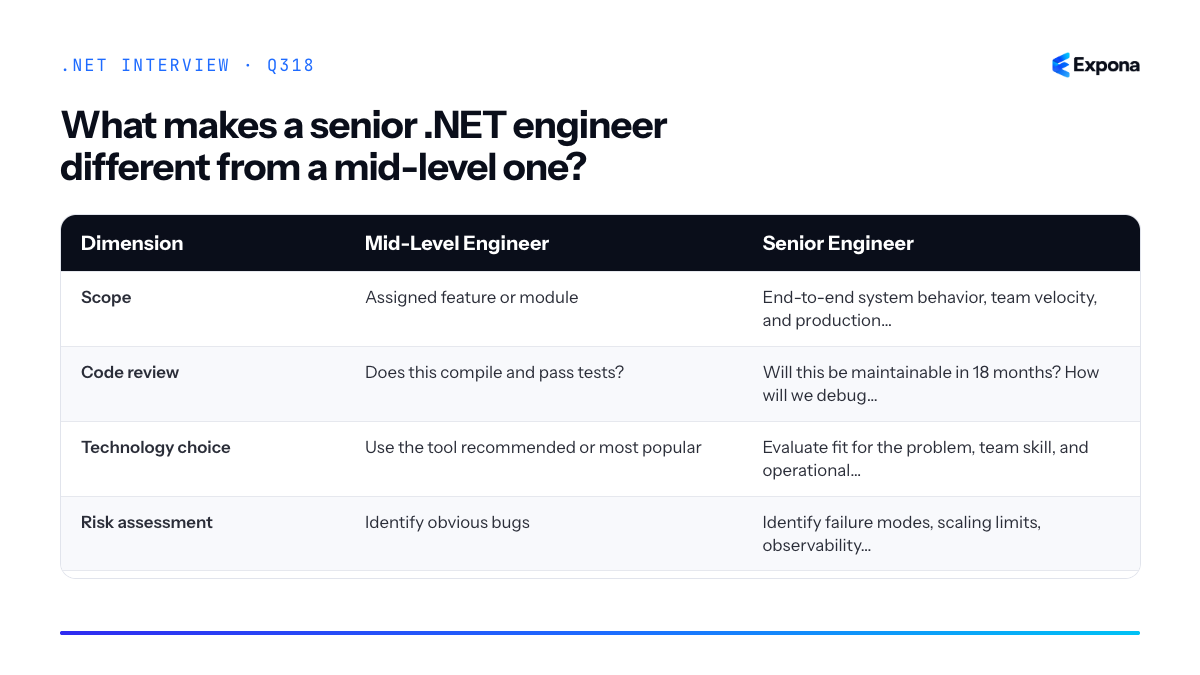
Common follow-up questions
- How do you balance shipping speed with code quality and maintainability? (Seniors often slow down deliberately to avoid compound technical debt.)
- How do you lead architectural decisions on a .NET team? (This tests whether you think systemically and involve others.)
- Tell me about a time you said "no" to a feature request or technology proposal. What was your reasoning? (Demonstrates conviction and judgment under pressure.)
Related interview questions
- How do you lead architectural decisions on a .NET team?
- How do you organize a large Minimal API project?
- What is CQRS?
Further reading
.NETCsharp319How do you design a rate limiter for a distributed system?
ExpertA distributed rate limiter uses a shared store (Redis) with atomic algorithms like token bucket or sliding window counters, partitions limits by tenant or user ID, and implements graceful degradation when the store is unreachable. This ensures consistent enforcement across all instances while maintaining high throughput and low latency.
How it works
In a distributed system, multiple instances cannot rely on in-memory state because each would maintain its own counter, allowing users to bypass limits by distributing requests across servers. Instead, you centralize state in Redis and use Lua scripts to ensure atomic operations—critical because incrementing and comparing a counter must happen as one indivisible action.
Token Bucket: A bucket holds tokens (e.g., 100 tokens for 1,000 requests/minute). Each request consumes 1 token; if tokens exist, the request proceeds. Tokens refill at a fixed rate. Redis scripts check tokens atomically, decrement if available, and calculate refill time.
Sliding Window: Track request timestamps in a sorted set, removing old entries outside the window. Count remaining requests; if below the limit, add the new request timestamp. This is precise but more memory-intensive.
Partition by tenant or user ID to isolate limits. Store keys like
rate_limit:{tenant_id}:{endpoint}to support different tiers. When Redis is unavailable, fail open (allow requests) or use local fallback buckets with eventual consistency.Example
csharppublic class RedisRateLimiter { private readonly IDatabase _redis; private const string TokenBucketScript = @" local key = KEYS[1] local limit = tonumber(ARGV[1]) local refill_rate = tonumber(ARGV[2]) local now = tonumber(ARGV[3]) local bucket = redis.call('HMGET', key, 'tokens', 'last_refill') local tokens = tonumber(bucket[1]) or limit local last_refill = tonumber(bucket[2]) or now local elapsed = math.max(0, now - last_refill) tokens = math.min(limit, tokens + elapsed * refill_rate) if tokens >= 1 then tokens = tokens - 1 redis.call('HMSET', key, 'tokens', tokens, 'last_refill', now) redis.call('EXPIRE', key, 3600) return 1 end return 0 "; public async Task TryAllowAsync(string userId, string endpoint, int limit, double refillRate) { try { var key = $"rate_limit:{userId}:{endpoint}"; var now = DateTimeOffset.UtcNow.ToUnixTimeMilliseconds(); var result = await _redis.ScriptEvaluateAsync( TokenBucketScript, new[] { (RedisKey)key }, new RedisValue[] { limit, refillRate, now } ); return (long)result == 1; } catch (RedisConnectionException) { // Graceful degradation: allow request, log for monitoring return true; } } }This Lua script atomically checks tokens, refills based on elapsed time, deducts 1 token if available, and returns 1 (allowed) or 0 (denied). The try-catch allows requests when Redis is down, preventing cascading failures.
Key points to mention
- Lua atomicity: Ensures the check-and-decrement happens as one operation; without it, race conditions allow overcounting in high-concurrency scenarios.
- Partitioning strategy: Use composite keys (user ID + endpoint + tenant ID) to enforce per-resource, per-user, and per-tier limits simultaneously.
- Graceful degradation: Distinguish between Redis timeouts (fail open) and rejections (fail closed); monitor library exhaustion to detect cascading failures early.
- TTL and cleanup: Set expiration on Redis keys to prevent memory bloat; use consistent TTLs so stale buckets don't skew calculations.
- Observability: Log rejected requests, track Redis latency, and alert on high rejection rates to detect abuse or misconfiguration.
Common follow-up questions
- How do you handle burst traffic or allow customers to purchase higher limits? (Implement tier-based limits; adjust bucket size or refill rate per customer tier; use Redis sorted sets to track tier expiry.)
- What's the difference between client-side and server-side rate limiting, and when use both? (Client-side saves bandwidth and backend load; server-side enforces hard limits. Use both—client-side is a courtesy, server-side is the guarantee. See rate limiting in .NET 8.)
- How do you handle clock skew across servers? (Use Redis server time (via
TIMEcommand) instead of local clocks; or use NTP to keep servers synchronized and assume acceptable drift.)
Related interview questions
- How do you implement rate limiting in .NET 8?
- How would you build a multi-tenant SaaS on ASP.NET Core?
- How do you design for horizontal scaling in ASP.NET Core?
Further reading
.NETCsharpSecurity320How do you reduce GC pauses in latency-sensitive services?
ExpertTo reduce GC pauses in latency-sensitive services, minimize heap allocations, avoid allocating large objects, use object pooling for frequently-created buffers, and strategically configure GCSettings.LatencyMode to SustainedLowLatency during critical windows. Measure pause times using tools like EventPipe or PerfView before and after optimizations to validate improvements.
How it works
Garbage collection pauses occur when the GC stops application threads to reclaim unused memory. In latency-sensitive services (trading systems, real-time processing, online games), even millisecond-scale pauses can violate SLA requirements. The .NET GC provides several strategies to minimize pause duration:
Allocation reduction directly decreases the amount of garbage that must be collected. Fewer objects mean shorter collection cycles and fewer full collections. Large object heap (LOH) awareness helps because allocations ≥85 KB trigger separate, less-frequently-collected segments; fragmentation here causes long blocking pauses. Object pooling reuses instances instead of allocating fresh ones, keeping the live set stable and predictable.
LatencyMode tuning changes how the runtime schedules collections. SustainedLowLatency mode enables concurrent GC phases and defers full collections, trading peak throughput for consistent pause times. GCHeapAffinitizeMask pins GC threads to specific cores, reducing context switching overhead. Measurement is critical—pause times vary by workload; profiling with EventPipe ensures your changes actually help.
Example
csharpusing System; using System.Runtime; public class LatencySensitiveService { private readonly ArrayPool<byte> _pool = ArrayPool<byte>.Shared; private readonly Queue<ProcessingBuffer> _bufferCache = new(); public LatencySensitiveService() { // For critical latency windows GCSettings.LatencyMode = GCLatencyMode.SustainedLowLatency; GCSettings.IsCompactionEnabled = false; // Avoid compaction pauses } public void ProcessRequest(byte[] data) { // Rent buffer from pool instead of allocating byte[] workBuffer = _pool.Rent(data.Length); try { Array.Copy(data, workBuffer, data.Length); // Process without intermediate allocations AnalyzeBuffer(workBuffer, data.Length); } finally { _pool.Return(workBuffer); } } private void AnalyzeBuffer(byte[] buffer, int length) { // Reuse stack-based buffers; avoid Linq or other allocation-heavy APIs Span<int> histogram = stackalloc int[256]; for (int i = 0; i < length; i++) { histogram[buffer[i]]++; } // Process histogram... } }This example uses ArrayPool to eliminate repeated buffer allocations, SustainedLowLatency to reduce pause duration, and stackalloc to keep temporary data on the stack instead of the heap.
Key points to mention
- Allocation-free code paths are the highest-impact optimization—every object not created is garbage that never needs collection.
- Object pooling (ArrayPool, custom pools) stabilizes heap size and collection frequency, making pause times predictable.
- Avoid the Large Object Heap by splitting large buffers into smaller chunks or using streaming; LOH collections are often non-concurrent and cause noticeable pauses.
- GCLatencyMode.SustainedLowLatency enables concurrent marking and defers full collections, but uses more CPU; measure before enabling in production.
- Profile with EventPipe or PerfView to measure Gen2 collection frequency and pause duration; optimizations without data are guesses.
Common follow-up questions
- What is the difference between SustainedLowLatency and Interactive latency modes? (SustainedLowLatency prioritizes consistent pauses; Interactive triggers more aggressive full collections to reduce overall pause time in short windows.)
- How does the Large Object Heap affect pause times, and how do you avoid it? (LOH segments use a different collection strategy; objects ≥85 KB go there. Split large allocations or use streaming instead.)
- Can you completely eliminate GC pauses? (No—even concurrent GC has stop-the-world phases for marking roots and sweeping. You can only reduce frequency and duration; for ultra-low latency, consider value types and stack allocation.)
Related interview questions
Further reading
.NETCsharpPerformance